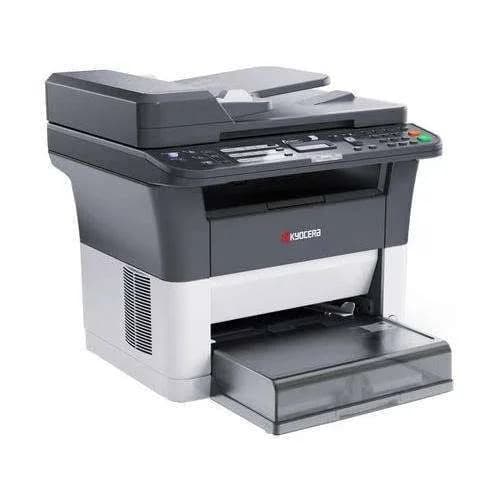
Kyocera ECOSYS FS-1025MFP Mono Laser All-in-One Printer in Kenya | City Gadgets Kenya
Same-day delivery in Nairobi by 10 Oct – 11 Oct
Description
Buy the genuine Kyocera ECOSYS FS-1025MFP A4 monochrome laser all-in-one printer with Ethernet and long-life components in Kenya from City Gadgets Kenya. Kyocera 1025 price in Kenya, low-cost office laser printer Nairobi, print copy scan.
Kyocera ECOSYS FS-1025MFP Mono Laser All-in-One Printer in Kenya
Genuine Kyocera | Brand New | A4 Monochrome Laser Print, Copy and Colour Scan | Ethernet and USB | Long-Life ECOSYS Design
Searching for the Kyocera FS-1025MFP price in Kenya, a durable office laser printer in Nairobi, or a black-and-white laser all-in-one with a low cost per page? The Kyocera ECOSYS FS-1025MFP is a brand-new, genuine A4 monochrome laser multifunction printer that prints, copies and scans in colour, prints at up to 25 pages per minute, and connects by Ethernet and USB. It's built on Kyocera's ECOSYS design, which is known for long-life components and a low total cost of ownership. It's available from City Gadgets Kenya with delivery across Kenya. Buyers also search for it as a Kyocera 1025, a Kyocera FS-1025MFP, a Kyocera ECOSYS MFP, a Kyocera laser printer scanner copier, a durable office laser printer, a long-life laser printer, or a laser printer for a school or clinic.
This guide explains the printer in plain language: what Kyocera's ECOSYS idea means, what the FS-1025MFP does and doesn't do, how it compares with the HP and Epson mono printers in our range, and who it suits. If you'd like to talk it through, message us on WhatsApp.
The short verdict
The Kyocera ECOSYS FS-1025MFP is a sturdy, no-frills mono laser all-in-one for offices that want to keep running costs low and reliability high. Kyocera designs its ECOSYS printers around long-life parts, such as a drum meant to outlast many toner cartridges, so you replace mostly toner and little else. The FS-1025MFP prints and copies at up to 25 pages per minute, scans in colour, handles a monthly duty cycle of up to 20,000 pages, and has a 250-sheet cassette with a 100-sheet multipurpose tray, plus Ethernet for sharing. It's an established design, with no Wi-Fi, a basic two-line display and, importantly, conflicting seller information about automatic duplex, which we confirm with you before you pay. For a small office, school or clinic that prints black-and-white documents all day, it's a dependable, economical choice.
What Kyocera's ECOSYS idea means
Kyocera built its ECOSYS name around two ideas: ecology and economy. In practice, that means a few things for you.
- Long-life components. The imaging drum and other parts are designed to last through many toner cartridges, so you don't throw away a drum with every refill.
- Toner as the main consumable. You mostly replace toner, which keeps the cost per page low.
- Less waste. Fewer parts to dispose of means less environmental impact.
- Durability. Kyocera has a reputation for printers that keep going in busy, harsh offices.
- Low total cost of ownership. Over several years, the combination of long-life parts and good toner yields often beats cheaper-looking printers.
For an office that prints every day, the logic is simple: pay a little more for a printer that costs less to keep running.
Who this printer is for
It suits you if:
- You print mostly black-and-white documents in a school, clinic, office or shop.
- You print several hundred to a few thousand pages a month, and want a durable machine.
- You want Ethernet to share the printer among several computers.
- You want a quiet-mode option for a small office.
- You care about total cost of ownership over several years.
Look elsewhere if:
- You need Wi-Fi or mobile printing. See the HP Laser MFP 137fnw or the Epson and Brother ink tank models.
- You need colour printing. See the Epson EcoTanks or HP Color LaserJet Pro models.
- You need fax. See the HP 137fnw or the Epson M3170.
- You need a document feeder as standard. Check with us, or see the Epson M3170 or HP LaserJet Tank 2602sdn.
What the listings say, and what to confirm
Kyocera's FS-1025MFP has been on the market for some time, and seller listings differ on a few points, so we want you to know what's reliable.
Consistent across listings
- Monochrome laser printing, copying and colour scanning.
- Up to 25 pages per minute.
- USB 2.0 and Ethernet (10/100) connections.
- A 250-sheet cassette and a 100-sheet multipurpose tray, with a 150-sheet output tray.
- A monthly duty cycle of up to about 20,000 pages.
- A two-line LCD display and a quiet mode.
- Toner yields of up to about 3,000 pages, per seller listings.
- A one-year warranty, per a Kenyan retailer listing.
Please confirm with us before you buy
- Whether the unit has automatic duplex. Some listings say yes, and Kyocera's sister model, the FS-1125MFP, is the version sold with a dedicated duplex and fax unit.
- Whether it includes an automatic document feeder.
- Whether it includes fax.
- The toner code and starter toner capacity.
- The warranty that applies.
We confirm these for the unit you order, in writing, so you know exactly what you're buying.
Specifications in plain English
| Feature | Detail | What it means for you |
|---|---|---|
| Model | Kyocera ECOSYS FS-1025MFP | Kyocera's compact mono laser MFP |
| Functions | Print, copy and colour scan | Three jobs in one machine |
| Colour | Black-and-white printing and copying, with colour scanning | Text and forms |
| Print speed | Up to 25 ppm (A4) | A steady office speed |
| Copy speed | Up to about 25 cpm | Matches print speed |
| Print resolution | Up to 1200 dpi class | Sharp text |
| Scan resolution | Up to about 600 dpi | Good for documents |
| Paper input | 250-sheet cassette and 100-sheet multipurpose tray | Generous for a compact printer |
| Output tray | About 150 sheets | Holds a good batch |
| Duty cycle | Up to about 20,000 pages a month | A high ceiling for the size |
| Connectivity | Hi-Speed USB 2.0 and Fast Ethernet (10/100) | Wired connections |
| Display | Two-line LCD | Simple controls |
| Extras | Quiet mode | Lower noise in small offices |
| Toner yield | Up to about 3,000 pages, per listings | Low cost per page |
These figures come from retailer listings of the FS-1025MFP. Ask us to confirm the exact configuration, toner code and warranty for the unit you order.
Toner and running costs
A laser printer's running cost depends on its toner.
- Standard toner. The FS-1025MFP uses a single black toner cartridge. Ask us for the code and the rated page yield.
- Cost per page. Divide the toner price by its rated pages. Kyocera's long-life design means you buy toner, not a new drum each time.
- Starter toner. Printers usually ship with a starter toner that prints fewer pages than a standard one, so keep a spare.
- Genuine toner. Use genuine Kyocera toner. Cheap refills can damage the machine and spoil prints.
- Storage. Keep spare toner sealed, flat and away from heat and sunlight.
If your volume climbs into the thousands of pages a month, the Epson M3170 and the HP LaserJet Tank 2602sdn in our range, with refillable tanks, can cost less per page. For moderate, steady use, the Kyocera's long-life parts keep the total cost of ownership low.
Setting up for an office
- Choose a location with good ventilation and a flat, sturdy surface.
- Unbox and remove all packing tape and shipping protection, including inside the toner area.
- Install the toner following the instructions.
- Load plain A4 paper in the cassette.
- Connect the Ethernet cable, and reserve an IP address for the printer on your router.
- Install the Kyocera driver on each computer.
- Print a test page, and run a copy and a scan.
- Set defaults that save money: economy mode for drafts, and quiet mode if noise matters.
- Assign someone to check toner and paper weekly.
Using quiet mode
The FS-1025MFP includes a quiet mode that reduces noise, which suits small offices, clinics and homes.
- What it does. It slows the printer a little to reduce mechanical noise.
- When to use it. In a shared room, a clinic reception or a home office, where noise bothers people.
- When not to. For large urgent batches, where speed matters.
- How to switch it. Through the printer's menu or settings. Ask us if you can't find it.
A worked example: total cost of ownership
Printer prices tell only part of the story, so here is a simple way to compare over three years, using figures you can replace with real prices.
- Start with the printer's purchase price.
- Estimate pages per month and multiply by 36.
- Work out toner cost. Divide the toner's price by its page yield, and multiply by your pages.
- Add paper. A ream per 500 pages.
- Add wear parts. Kyocera's long-life design aims to keep these low, and a cartridge laser's drum replacement can add cost.
- Add a margin for electricity and servicing.
- Compare with alternatives, such as the HP 137fnw, the HP LaserJet Tank 2602sdn and the Epson M3170.
For an office printing about 2,000 pages a month, a tank-based printer can win on cost per page. For one printing 500 to 1,500 pages a month and valuing durability, the Kyocera's low maintenance often wins on total cost.
Scanning and copying with the FS-1025MFP
The FS-1025MFP scans in colour and copies in black and white.
- Scan to a computer at up to about 600 dpi. For documents, 200 to 300 dpi is plenty.
- Scan to PDF for records, and to JPEG for images.
- Copy from the glass at up to about 25 copies per minute.
- Choose reduction or enlargement to fit different paper sizes.
- Use the glass for books, IDs and fragile originals.
- If a feeder is fitted, it speeds up stacks, and we'll confirm this for your unit.
- Back up scanned records to the cloud and an external drive from our range.
Paper handling: trays and weights
The FS-1025MFP's paper handling is generous for its size.
- The 250-sheet cassette holds A4 paper for everyday jobs.
- The 100-sheet multipurpose tray feeds envelopes, labels, card and other special media.
- The 150-sheet output tray collects finished pages.
- Use dry, good-quality paper, at 80 gsm for everyday jobs.
- Fan the stack before loading.
- Don't overfill the trays.
- Match the paper type in the print dialog, so the fuser uses the right heat.
- Check the manual for the weight limits of the multipurpose tray.
Common problems and simple fixes
Paper jams. Switch off, open the cover, and remove paper in the direction of travel. Use dry, good paper and don't overfill the tray.
Faint prints. The toner may be low. Remove the toner, shake it gently from side to side, and refit it, or replace it.
Black marks or smudges. The paper path may be dirty. Clean gently with a dry, lint-free cloth, and print a few blank pages.
Can't be found on the network. Check the Ethernet cable and router, restart the printer and confirm the IP address hasn't changed.
Scans have lines. Clean the scanner glass with a soft cloth.
Slow printing. Check whether quiet mode is on.
Error messages about toner. Check that the toner is genuine and seated properly.
If a problem continues, message us on WhatsApp.
Equipping a school, clinic or small office
A school office. Print exams, notes and circulars in black and white at a low cost per page, and copy documents for parents. A spare toner and a surge protector keep term-time printing reliable.
A clinic. Print forms and letters, scan referral letters to colour PDFs and copy IDs. Laser text resists smudging, which suits documents that get handled.
A small company. Share the printer over the office network, and print reports and contracts.
A print and copy shop. A steady 25 pages per minute and a high duty cycle suit regular black-and-white jobs.
In each case, a named person to check paper and toner weekly keeps the printer ready.
Questions to ask before you buy a laser printer
- How many pages will I print each month?
- Do I need Wi-Fi, fax or duplex? Confirm which this unit has.
- What does the toner cost, and what is the real cost per page?
- What's in the box, and does it include full-size toner?
- What warranty is included, and who honours it? Get it in writing.
- Can I see it before I pay? A trustworthy seller says yes.
We're glad to answer all of these on WhatsApp or in the shop before you pay.
Looking after the printer for years
- Keep it in a ventilated, dust-free spot.
- Use genuine Kyocera toner and good paper.
- Clean the glass and body with a soft, dry cloth.
- Protect the power with a surge protector.
- Don't block the vents, and leave space around the printer.
- Keep a spare toner so a busy week never stops you.
Warranty and after-sales: what to ask
A printer is a long-term purchase, so ask us what warranty covers the unit you order, how long it lasts and what it covers. A Kenyan retailer lists a one-year warranty for this model. Printers normally exclude consumables such as toner, and damage from non-genuine supplies or misuse. Keep your receipt, the serial number and the box. If a fault appears, message us on WhatsApp first, and we'll tell you the quickest way to get it sorted.
Why durability matters in Kenya
Kenya's offices put printers under real strain, and a durable design pays off.
- Dust. Many offices are dusty, and long-life components with good seals cope better than delicate ones.
- Power fluctuations. Surges and cuts stress printers, so a sturdy power supply and a surge protector help.
- Heat. Ventilation and a steady duty cycle matter in warm rooms.
- Heavy use. Schools and clinics print in bursts, and a high duty cycle gives headroom.
- Service access. Toner and parts that are easy to find reduce downtime. Ask us about supplies for this model.
A printer built to keep going, with parts that last, saves money and stress over the years.
A short guide to caring for a laser printer
Laser printers are low-maintenance, and a few habits keep them that way.
- Keep the paper dry, and store it flat and sealed.
- Don't touch the toner drum or the transfer parts.
- Handle toner gently, and keep it level.
- Let the printer cool before reaching inside after a long job.
- Clean the glass and paper path every few months with a dry, lint-free cloth.
- Don't use sticky labels or damaged paper, which can leave residue inside.
- Replace toner when prompted, not after faint prints for days.
Laser or ink tank for black-and-white work: a plain answer
Because we stock both, here is a plain summary.
- Choose a laser like the Kyocera if you print steadily, want sharp, dry, smudge-resistant text, and don't want to worry about print heads drying out after a break.
- Choose a tank printer like the Epson M3170 if you print the most pages, want the lowest cost per page, and need fax or Wi-Fi.
- Choose a tank laser like the HP LaserJet Tank 2602sdn if you want laser reliability with low cost per page and automatic duplex.
- Choose the HP Laser MFP 137fnw if you want a compact laser with Wi-Fi and fax for lighter use.
Tell us your monthly pages and your priorities, and we'll recommend honestly.
A note on speed
Kyocera rates the FS-1025MFP at up to 25 pages per minute. That's a steady office speed, and the first page takes a few seconds as the printer warms up. Large jobs print at close to the rated speed, and quiet mode slows things slightly. For typical office work, you won't wait long. For very large batches, print in sections and keep the paper tray topped up.
Using a printer in Kenya
Power protection. Laser printers draw a lot of power when they warm up. Use a surge protector, and don't plug a laser printer into a UPS meant for computers.
Heat, dust and humidity. Keep the printer in a ventilated, clean spot. Humid paper curls and jams.
Toner storage. Keep toner sealed, flat and away from heat and sunlight.
Network safety. Change the printer's default admin password, and keep it off public networks.
Warranty. A Kenyan retailer lists a one-year warranty for this model. Ask us for the warranty that applies to the unit you order, and keep the receipt and box.
How it compares with other options in our range
| Kyocera FS-1025MFP | HP Laser MFP 137fnw | HP LaserJet Tank 2602sdn | Epson M3170 | |
|---|---|---|---|---|
| Technology | Laser, toner cartridge | Laser, toner cartridge | Laser, refillable toner tank | Ink tank |
| Colour | No | No | No | No |
| Wi-Fi | No | Yes | No (sdn) | Yes |
| Ethernet | Yes | Yes | Yes | Yes |
| Fax | Confirm | Yes | No | Yes |
| Duplex | Confirm | Manual | Automatic | Confirm |
| Cost per page | Low | Medium | Low | Very low |
| Best for | Durable steady mono use | Light use with fax and Wi-Fi | Moderate to heavy mono use | Heavy mono use with fax |
Against the HP Laser MFP 137fnw: the HP has Wi-Fi and fax. The Kyocera has a sturdier, long-life design and a higher duty cycle.
Against the HP LaserJet Tank 2602sdn: the HP has automatic duplex and a refillable toner tank, and costs less per page at high volume.
Against the Epson M3170: the Epson costs less per page and has Wi-Fi, a feeder and fax. The Kyocera is a laser, with no drying out.
Honest pros and cons
Pros
- Kyocera's long-life ECOSYS design and low total cost of ownership.
- A durable build, with a duty cycle of up to about 20,000 pages.
- 25 pages per minute.
- A 250-sheet cassette plus a 100-sheet multipurpose tray.
- Ethernet and USB.
- A quiet mode.
- Laser text that doesn't dry out or smudge.
Cons
- Black and white printing only.
- No Wi-Fi, and a basic two-line display.
- An established design, with seller details that differ on duplex, feeder and fax.
- A higher purchase price than a cartridge inkjet.
- A higher cost per page than tank-based printers at high volume.
What to check when it arrives
- The box model matches Kyocera ECOSYS FS-1025MFP.
- The printer, power cable, toner and paperwork are in the box.
- All packing tape and shipping protection are removed.
- A test page prints, and a copy and a scan work.
- The Ethernet connection works.
- Duplex, if it's included, works.
- You get a receipt with the serial number and warranty details in writing.
Frequently asked questions
What is the Kyocera FS-1025MFP price in Kenya? We confirm the current price when you message us on WhatsApp, because supplier prices change. We tell you the price and what's in the box before you pay.
Where can I buy the Kyocera FS-1025MFP in Nairobi? At City Gadgets Kenya, New Alnoor Exhibition, Second Floor, Shop C7, Accra Road, Nairobi CBD, or by delivery.
Does it print in colour? No. It prints and copies in black and white, and it scans in colour.
Does it print double-sided automatically? Listings differ. We confirm this for the unit you order.
Does it have Wi-Fi? No. It has Ethernet and USB.
Does it fax? Listings differ. We confirm this for the unit you order.
How many pages can it print a month? Listings give a duty cycle of up to about 20,000 pages.
What warranty does it have? A Kenyan retailer lists one year. Ask us for the warranty that applies to the unit you order.
Can you deliver it? Yes, same day in Nairobi and next day outside Nairobi.
Can I pay via M-Pesa? Yes.
Why buy from City Gadgets Kenya
Genuine, brand-new Kyocera printer. We're at New Alnoor Exhibition, Second Floor, Shop C7, Accra Road, Nairobi CBD, and you're welcome to look at the printer before you buy. Message us on WhatsApp with how much your office prints, and we'll tell you honestly whether the FS-1025MFP is right or another model would suit you better. We confirm what's in the box before you pay.
Order your Kyocera ECOSYS FS-1025MFP today
Available now at City Gadgets Kenya. Message us on WhatsApp.
Specifications
- Brand
- Kyocera
- Condition
- New
Frequently Asked Questions
How much does the Kyocera ECOSYS FS-1025MFP Mono Laser All-in-One Printer in Kenya | City Gadgets Kenya cost in Kenya?
The Kyocera ECOSYS FS-1025MFP Mono Laser All-in-One Printer in Kenya | City Gadgets Kenya is priced at Ksh 52,000 at City Gadgets. You can pay via M-Pesa, card or cash on delivery.
Is the Kyocera ECOSYS FS-1025MFP Mono Laser All-in-One Printer in Kenya | City Gadgets Kenya available in Kenya?
Yes — the Kyocera ECOSYS FS-1025MFP Mono Laser All-in-One Printer in Kenya | City Gadgets Kenya is in stock at City Gadgets, ready for same-day delivery in Nairobi and countrywide shipping across Kenya.
Is the Kyocera ECOSYS FS-1025MFP Mono Laser All-in-One Printer in Kenya | City Gadgets Kenya genuine and does it have a warranty?
Every Kyocera ECOSYS FS-1025MFP Mono Laser All-in-One Printer in Kenya | City Gadgets Kenya we sell is 100% genuine brand-new stock and comes with a 12-month official brand warranty.
Do you deliver the Kyocera ECOSYS FS-1025MFP Mono Laser All-in-One Printer in Kenya | City Gadgets Kenya in Nairobi?
Yes. We offer fast same-day delivery within Nairobi and fast, affordable delivery to the rest of Kenya — order online or on WhatsApp.
Customer Reviews
No reviews yet
Be the first to review this product.
Rate us on Google
Your review helps other shoppers find us
Reviews from verified buyers will appear here.