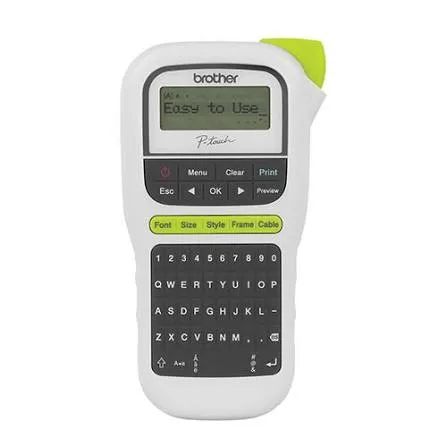
Brother P-touch PT-H110 Handheld Label Printer in Kenya | City Gadgets Kenya
Same-day delivery in Nairobi by 10 Oct – 11 Oct
Description
Buy the genuine Brother P-touch PT-H110 handheld label printer with QWERTY keyboard, TZe laminated tape up to 12mm, 15 label memory and battery or adapter power in Kenya from City Gadgets Kenya. Brother PT-H110 price in Kenya, label maker Nairobi, labels for offices, shops and stores.
Brother P-touch PT-H110 Handheld Label Printer in Kenya
Genuine Brother | Brand New | Handheld Label Maker | QWERTY Keyboard and LCD | TZe Laminated Tape 3.5, 6, 9 and 12 mm | 15 Label Memory | Battery or Mains Powered
Looking for the Brother PT-H110 price in Kenya, a label maker in Nairobi, or a simple way to make neat, durable labels for your office, shop, store or workshop? The Brother P-touch PT-H110 is a brand-new, genuine handheld label printer. It prints on Brother's TZe laminated tape in widths of 3.5, 6, 9 and 12 millimetres, with a QWERTY keyboard, a display so you can see your text, and a memory for 15 labels. It's light, compact and runs on batteries or with an external power adapter, so you can label anything, anywhere. It's available from City Gadgets Kenya with delivery across Kenya. Buyers also search for it as a Brother PT-H110, a Brother P-touch H110, a handheld label maker, a Brother label printer, a label maker for shops and stores, a cable labelling printer, a label printer for offices, or a TZe tape label maker.
This guide explains the label printer in plain language: how a thermal label maker works, what TZe tape gives you, what the PT-H110 does well, and where it's limited, so you can tell whether it's right for you. If you'd like to talk it through, message us on WhatsApp.
The short verdict
The Brother PT-H110 is the simple, low-cost way to make durable labels without a computer. Type your text on the QWERTY keyboard, check it on the display, and press print. Brother's tape is laminated, so the print is sealed between layers and resists water, rubbing and fading, which makes labels last on cables, shelves, boxes, tools, files and equipment. Listings describe a print speed of up to 20 millimetres a second, a resolution of 180 dpi, a maximum print height of 9 millimetres, a maximum label length of about 30 centimetres, up to two lines of text, three fonts, ten styles and a memory for 15 labels. It's black-and-white only, it has no connection to a phone or computer, and it prints on one tape width at a time, so it won't replace a desktop label printer for big jobs. For everyday labelling in an office, a shop, a store room or a workshop, it's a very handy tool.
Who this label printer is for
It suits you if:
- You label files, shelves, boxes, drawers, tools and equipment in an office, shop or store.
- You want to label network and power cables, patch panels and sockets.
- You want durable labels that survive water, rubbing and fading.
- You want a printer that works away from a desk, with batteries.
- You want a simple tool that anyone can use in minutes.
- You want small, neat labels for school items, kitchen jars and home organisation.
Look elsewhere if:
- You need to print many labels from a computer, or labels with barcodes and logos. See Brother's connected P-touch models, and ask us.
- You need wide labels, such as shipping labels. A larger label printer suits better.
- You need colour labels.
- You need Wi-Fi or phone connectivity. This model has none.
Specifications in plain English
| Feature | Detail | What it means for you |
|---|---|---|
| Model | Brother P-touch PT-H110 | Brother's introductory handheld label maker |
| Print method | Thermal transfer | Sharp, durable print with no ink |
| Resolution | 180 x 180 dpi | Clear text at label sizes |
| Print speed | Up to 20 mm per second | Quick for short labels |
| Tape | Brother TZe laminated tape | Water and wear resistant labels |
| Tape widths | 3.5, 6, 9 and 12 mm | Small to medium labels |
| Print height | Up to 9 mm | Text fits the 12 mm tape |
| Label length | Up to about 30 cm, minimum about 3 cm | Short to medium labels |
| Lines of text | Up to 2 | Short, clear labels |
| Characters | Up to 80 per line | Plenty for a name or a code |
| Fonts and styles | 3 fonts and 10 styles, with symbols, frames and underline | Some variety |
| Display | LCD with print preview | See before you print |
| Keyboard | QWERTY, with one-touch keys | Easy typing |
| Memory | 15 labels | Store frequent labels |
| Cutting | Manual | Tear or cut the tape |
| Power | Batteries (listed as six AAA) or an optional external adapter | Use it anywhere |
| Weight | About 400 g | Light and handheld |
| Connectivity | None. No Wi-Fi, no USB and no phone link | Standalone use |
| In the box | The printer and a starter tape cassette in some regions | Ready to start |
These figures come from Brother and retailer listings of the PT-H110. Listings differ on whether the keyboard is QWERTY or QWERTZ in some regions, and on the box contents. Ask us to confirm the keyboard, the starter tape, the adapter and the warranty for the unit you order.
How a thermal transfer label maker works
Understanding the method explains why the labels last.
- No ink and no toner. A thermal print head heats a ribbon inside the tape cassette, and transfers the print onto the label tape.
- The print is then sealed under a clear laminate layer, which is why TZe labels resist water, rubbing, heat and chemicals better than printed paper labels.
- Each cassette holds both the label tape and the ribbon, so there's nothing to refill. When the cassette runs out, you swap it.
- The tape has a split back, so you peel the backing off easily and stick the label down.
- The label is sticky and durable, on smooth, clean surfaces, though it doesn't stick well to dusty, oily or rough ones.
For most labelling jobs in an office or a store, that makes TZe labels a reliable choice.
TZe tape: widths, colours and uses
The tape is the running cost of a label maker, so it's worth understanding.
- Widths. The PT-H110 accepts 3.5, 6, 9 and 12 mm tape. 12 mm is the most common and the most readable.
- Colours. TZe tape comes in many colours, such as black on white, black on clear, white on black and coloured options. Black on white is the standard.
- Special tapes. Brother makes strong-adhesive tape for rough surfaces, flexible tape for cables, and iron-on fabric tape in some ranges. Check what fits your model, and ask us.
- Tape length. A typical cassette holds about 8 metres of tape, which makes a lot of short labels.
- Genuine tape. Brother's genuine TZe cassettes give the best results. We stock them, and can tell you what suits your jobs.
- Storage. Keep spare cassettes in a cool, dry place, away from sun.
What you can label
A handheld label maker has endless uses.
In an office
- File folders, lever arch files and drawers.
- Shelves, cabinets and stationery boxes.
- Network and power cables, patch panels and sockets.
- Keyboards, chargers and equipment with asset numbers.
- Key hooks and name tags for desks.
In a shop or store
- Shelf edges, bins and stock boxes.
- Price and size markers.
- Storage rooms and cleaning supplies.
- Tools and equipment.
In a workshop or school
- Tool boards and drawers.
- Lab equipment and chemicals (using suitable tape).
- Books, bags and uniform items.
- Music and sports equipment.
At home
- Kitchen jars and spice racks.
- Wires behind the TV and the router.
- Kids' belongings, and storage boxes.
- Gifts and craft projects.
Labelling cables: a mini-guide
Cable labelling is one of the best uses of a label maker.
- Decide your scheme. For example, "Router power", "TV HDMI 1" or "Server rack A, port 12".
- Use short, clear text, at both ends of each cable.
- Print the label at the length you need, and wrap it around the cable so the text reads without twisting.
- Use flexible tape if the cable is thin or round and the label tends to peel. Ask us.
- Label power adapters with the device name, so you never swap the wrong one.
- Keep a list of what each label means.
- Update labels when you change equipment.
A few minutes of labelling saves hours of confusion later.
Setting up the label printer
- Open the battery compartment, and insert the batteries, or connect the optional adapter.
- Open the tape compartment, and insert a TZe cassette, with the tape end through the slot.
- Close the cover, and press power.
- Choose your language, if prompted.
- Type your text on the keyboard, and check it on the display.
- Choose a font, style and frame with the function keys.
- Press print, and cut the label with the cutter.
- Peel the backing, and stick it on a clean, dry surface.
- Save frequent labels in the memory.
A worked example: labelling a small shop's store room
A concrete example shows how much a label maker can tidy up.
- The problem: a store room with shelves of mixed stock, and staff who waste time hunting for items.
- The plan: divide the room into zones, such as A for beverages, B for cleaning supplies and C for packaging, and number the shelves.
- The labels: a 12 mm black-on-white label on each shelf edge, such as "B2 - Cleaning", and smaller 9 mm labels on boxes, such as "Bleach 5L".
- The cables: label the router, the CCTV recorder and the UPS power leads, so a technician knows what's what.
- The tools: label the stepladder, the trolley and the box cutter board, so equipment doesn't walk away.
- The cost: two or three tape cassettes cover the whole room, and the work takes an afternoon.
- The result: faster stock-taking, fewer mistakes and a store room that looks professional.
Designing a labelling system
A little planning makes labels more useful.
- Be consistent. Use the same format everywhere, such as location first, then item.
- Keep text short. Two lines and 12 characters are easier to read from a distance than a long sentence.
- Use capital letters for shelf labels and lower case for small ones, whichever is clearest.
- Choose one or two colours of tape, so colour carries meaning, such as red for fragile and black on white for general.
- Place labels at eye level and in the same position each time.
- Put the label on a clean, dry, smooth surface.
- Use a number or a code for items that change, and keep a master list.
- Review labels yearly, and replace faded or peeling ones.
Tips for labels that stick and last
- Clean the surface with a dry cloth, or a little alcohol if it's oily, and let it dry.
- Press the label firmly for a few seconds, especially at the edges.
- Round the corners with scissors on small labels, which makes them less likely to peel.
- Avoid sticking to rough, dusty or damp surfaces.
- Use flexible or strong-adhesive tape where the standard tape doesn't hold. Ask us.
- Wrap cable labels fully around the cable, with the ends overlapping, so they don't lift.
- Keep labels away from strong heat and solvents.
- Don't peel and reposition more than once, because the adhesive weakens.
Looking after the batteries
The PT-H110 runs on batteries, and a few habits help.
- Use fresh alkaline batteries of the same brand and age.
- Replace all batteries together.
- Remove them if the printer won't be used for weeks.
- Weak batteries cause faint prints, a slow feed or random shutdowns. Replace them first when you see these.
- Use the adapter at a desk, to save batteries.
- Dispose of old batteries responsibly.
Common problems and simple fixes
Prints are faint or incomplete. The batteries may be weak. Replace them, or use the adapter. Check the tape cassette is seated properly.
The tape doesn't feed or jams. Open the cover, remove the cassette, check for creases, and tighten the tape by turning the spool. Refit it.
Nothing prints, or the display is blank. Check the batteries and their direction. Try the adapter.
The label won't stick. The surface is dirty, oily or rough. Clean it, or use a stronger adhesive tape.
The text is too big or too small. Change the font size or the style. The printer scales text to the tape width.
The cutter doesn't cut cleanly. Press firmly and fully, and don't force tape that's stuck.
The label has a blank space at the start. Normal. The printer feeds a short margin. Choose a smaller margin, if the menu offers it.
If a problem continues, message us on WhatsApp.
Questions to ask before you buy a label maker
- What will I label, and how many labels will I make?
- What tape width do I need? 12 mm suits most jobs.
- Do I need a computer or phone connection? If yes, ask about connected models.
- Do I need barcodes or logos?
- Will I use it at a desk or on the move?
- What does a replacement tape cassette cost?
- What warranty is included, and who honours it? Get it in writing.
- Can I see it before I pay?
We're glad to answer all of these on WhatsApp or in the shop before you pay.
Looking after the label printer for years
- Keep the printer clean and dry.
- Use genuine Brother TZe tape.
- Remove the batteries if it won't be used for a while.
- Clean the print head gently with a cotton swab and a little alcohol if prints look streaky, with the printer off.
- Don't leave it in a hot car or direct sun.
- Keep the box, manual and receipt.
Warranty and after-sales: what to ask
A label printer is a small, durable tool, so ask us what warranty covers the unit you order, how long it lasts and what it covers. Warranties normally exclude tape, batteries and damage from drops or liquid. Keep your receipt, the serial number and the box. If a fault appears, message us on WhatsApp first, and we'll tell you the quickest way to get it sorted.
Label maker uses by business type
Different businesses get different value from a handheld label maker.
- Offices. File labels, asset tags, cable labels and shelf signs.
- Shops and supermarkets. Shelf-edge labels, stock bins and storeroom zones.
- Pharmacies and clinics. Shelf and drawer labels, using clear text. For medicines and patient items, follow your regulator's rules, and don't rely on a basic label for dosing information.
- Schools. Lab equipment, library books, lockers and sports kit.
- Workshops and garages. Tool outlines, bins and parts drawers.
- IT companies and cyber cafes. Cables, patch panels, power adapters and computers.
- Hotels and restaurants. Storeroom shelves, linen cupboards and kitchen containers.
- Homes. Pantry jars, boxes, chargers and the family's belongings.
Understanding the specifications: a quick glossary
- Thermal transfer. Printing by heating a ribbon to transfer the print, with no ink.
- dpi (dots per inch). Print resolution. 180 dpi is typical for a basic label maker.
- TZe tape. Brother's laminated label tape.
- Laminated. The print is sealed under a clear layer, which protects it.
- Print height. The maximum height of the text on the tape.
- QWERTY. The standard keyboard layout.
- Label memory. Saved labels you can print again.
- mm per second. Print speed, the length of label printed each second.
Use these terms to compare label makers, and ask us if any is unclear.
When to choose a connected label printer instead
The PT-H110 is deliberately simple, and some jobs need more.
- You print dozens of labels at a time, such as asset tags or addresses.
- You need barcodes, QR codes or logos.
- You want to design labels on a computer or phone and reuse them.
- You need wider tape for bigger text or shipping.
- Several people share the label printer.
- You print labels every day.
For those jobs, Brother's connected P-touch printers suit better, and we'll tell you honestly what's available.
Using a label maker in Kenya
Batteries. Use good-quality alkaline batteries, and replace all of them together. Remove them if you won't use the printer for months, since they can leak. For heavy use, an adapter is cheaper than batteries.
Heat. Don't leave the printer or the tape in a hot car or in direct sun, which can spoil the tape and the adhesive.
Dust and humidity. Stick labels on clean, dry surfaces. Dust and damp stop the adhesive from holding.
Storage. Keep the printer and spare tape in a dry place.
Warranty. Ask us for the warranty that applies to the unit you order, and keep the receipt and box.
How it compares with other options
| Brother PT-H110 | Connected P-touch label printers | Office printers with label sheets | |
|---|---|---|---|
| Connection | None, standalone | USB, Bluetooth or Wi-Fi | Printer |
| Best for | Quick, simple labels | Barcodes, logos and large batches | Large sheet labels |
| Tape | TZe, 3.5 to 12 mm | TZe, up to wider widths | Sticker sheets |
| Labels per minute | Few, one at a time | Many | Many |
| Durability | Laminated, high | Laminated, high | Varies |
Against a printer with label sheets: a sheet-label printer, such as the Epson and HP printers in our range, prints many labels at once, though they aren't laminated. The PT-H110 prints one durable label at a time.
Honest pros and cons
Pros
- Durable, laminated TZe labels that resist water and fading.
- A QWERTY keyboard and a display with preview.
- Light and portable, with battery or adapter power.
- A memory for 15 labels.
- 3.5 to 12 mm tape widths.
- Simple to use, and low cost.
- A trusted brand.
Cons
- No computer or phone connection.
- Up to two lines of text, with a 9 mm print height.
- Black and white only.
- Manual cutting.
- Not for large batches or barcodes.
- Tape cassettes are the ongoing cost.
What to check when it arrives
- The box model matches Brother PT-H110.
- The printer and paperwork are in the box, plus a starter tape if included.
- The batteries or adapter work.
- A test label prints cleanly, and the cutter works.
- The keyboard types the right characters.
- You get a receipt with the serial number and warranty details in writing.
Frequently asked questions
What is the Brother PT-H110 price in Kenya? We confirm the current price when you message us on WhatsApp, because supplier prices change. We tell you the price and what's in the box before you pay.
Where can I buy the Brother PT-H110 in Nairobi? At City Gadgets Kenya, New Alnoor Exhibition, Second Floor, Shop C7, Accra Road, Nairobi CBD, or by delivery.
What tape does it use? Brother TZe laminated tape, in 3.5, 6, 9 and 12 mm widths.
Does it come with tape? Some regions include a starter cassette. We confirm for the unit you order.
Can I connect it to my phone or computer? No. It's a standalone label maker.
Does it run on batteries? Yes. It can also use an external adapter.
Can it print barcodes? No. See Brother's connected P-touch models.
Are the labels waterproof? TZe laminated labels resist water and wear well, though sticking depends on a clean surface.
What warranty does it have? Ask us for the warranty that applies to the unit you order.
Can you deliver it? Yes, same day in Nairobi and next day outside Nairobi.
Can I pay via M-Pesa? Yes.
Why buy from City Gadgets Kenya
Genuine, brand-new Brother label printer. We're at New Alnoor Exhibition, Second Floor, Shop C7, Accra Road, Nairobi CBD, and you're welcome to see the label maker before you buy. Message us on WhatsApp with what you want to label, and we'll tell you honestly whether the PT-H110 is right or a connected label printer would suit you better. We confirm what's in the box before you pay.
Order your Brother PT-H110 today
Available now at City Gadgets Kenya. Message us on WhatsApp.
Specifications
- Brand
- Brother
- Condition
- New
Frequently Asked Questions
How much does the Brother P-touch PT-H110 Handheld Label Printer in Kenya | City Gadgets Kenya cost in Kenya?
The Brother P-touch PT-H110 Handheld Label Printer in Kenya | City Gadgets Kenya is priced at Ksh 13,200 at City Gadgets. You can pay via M-Pesa, card or cash on delivery.
Is the Brother P-touch PT-H110 Handheld Label Printer in Kenya | City Gadgets Kenya available in Kenya?
Yes — the Brother P-touch PT-H110 Handheld Label Printer in Kenya | City Gadgets Kenya is in stock at City Gadgets, ready for same-day delivery in Nairobi and countrywide shipping across Kenya.
Is the Brother P-touch PT-H110 Handheld Label Printer in Kenya | City Gadgets Kenya genuine and does it have a warranty?
Every Brother P-touch PT-H110 Handheld Label Printer in Kenya | City Gadgets Kenya we sell is 100% genuine brand-new stock and comes with a 12-month official brand warranty.
Do you deliver the Brother P-touch PT-H110 Handheld Label Printer in Kenya | City Gadgets Kenya in Nairobi?
Yes. We offer fast same-day delivery within Nairobi and fast, affordable delivery to the rest of Kenya — order online or on WhatsApp.
Customer Reviews
No reviews yet
Be the first to review this product.
Rate us on Google
Your review helps other shoppers find us
Reviews from verified buyers will appear here.