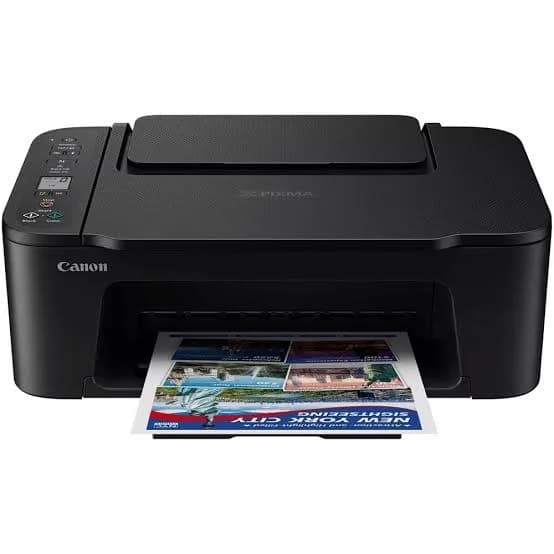
Canon PIXMA TS3640 Wi-Fi All-in-One Inkjet Printer in Kenya | City Gadgets Kenya
Same-day delivery in Nairobi by 10 Oct – 11 Oct
Description
Buy the genuine Canon PIXMA TS3640 colour all-in-one inkjet printer with Wi-Fi in Kenya from City Gadgets Kenya. Canon TS3640 price in Kenya, cheap Wi-Fi printer Nairobi, compact home printer scanner copier. An honest buyer's guide with running costs.
Canon PIXMA TS3640 Wi-Fi All-in-One Inkjet Printer in Kenya
Genuine Canon | Brand New | A4 Colour Print, Copy and Scan | Wi-Fi | Compact Starter Printer
Looking for the Canon TS3640 price in Kenya, a cheap Wi-Fi printer in Nairobi, or a compact Canon printer, scanner and copier for light home use? The Canon PIXMA TS3640 is a brand-new, genuine A4 colour all-in-one inkjet that prints, copies and scans, and connects by Wi-Fi. It's one of the lowest-priced ways to own a printer, scanner and copier, and it uses small FINE cartridges. It's available from City Gadgets Kenya with delivery across Kenya. Buyers also search for it as a Canon PIXMA TS3640, a Canon TS3640 printer, a cheap Canon Wi-Fi printer, a small home printer scanner copier, a starter printer for students, a Canon cartridge printer, or the cheapest Canon all-in-one.
This guide is written to help you decide honestly. We explain what the TS3640 does well, what its cartridges really cost to run, and when a MegaTank printer such as the Canon G3410 in our range is the smarter buy. If you'd like to talk it through, message us on WhatsApp.
The short verdict
The Canon PIXMA TS3640 is a simple, inexpensive printer for very light use. It prints, copies and scans in colour, joins your Wi-Fi, and fits on a small shelf. Its weakness is the cartridges: Canon rates the standard colour cartridge at only about 180 pages, and the XL at about 300 pages, so the cost per page is high. If you print a few pages a month, the low purchase price is a real saving. If you print regularly, the ink bills will quickly exceed the savings, and a refillable ink tank printer, such as the Canon G3410 or an Epson EcoTank in our range, will cost much less to run. We'd rather tell you that now than have you find it out after your third set of cartridges.
Who this printer is for
It suits you if:
- You print only occasionally: a few pages a month.
- You want the lowest purchase price for a Canon printer, scanner and copier.
- You have limited space and want a compact machine.
- You want simple setup from your phone.
- You need a basic second printer for a spare room.
Look elsewhere if:
- You print regularly. See the Canon G3410 or the Epson EcoTank printers.
- You need automatic double-sided printing or a document feeder.
- You need Ethernet or fax.
- You print photos often, where cartridge printing is costly.
Specifications in plain English
| Feature | Detail | What it means for you |
|---|---|---|
| Model | Canon PIXMA TS3640 | Canon's compact entry inkjet all-in-one |
| Functions | Print, copy and scan | Three jobs in one machine |
| Print technology | Two FINE cartridges: black and colour | Simple cartridge printing |
| Print speed (ISO) | About 7.7 ipm black and 4.0 ipm colour | Slow but steady |
| Copy speed | About 3.0 ipm | Slow for stacks |
| Cartridges | Colour CL-446 and CL-446XL, with a matching black cartridge | Small cartridges |
| Colour cartridge yield | About 180 pages (standard) and 300 pages (XL) | Cartridges run out quickly |
| Connectivity | Wi-Fi (802.11 b/g/n), with WPA, WPA2 and WPA3 security | Wireless printing |
| Cloud | Canon PRINT app and cloud services | Print and scan from phones |
These figures come from Canon's specification pages for the TS3640. Yields are measured to Canon's ISO test, and your own pages may differ. Ask us to confirm the black cartridge code and what's in the box for the unit you order.
The honest truth about running costs
This is the most important section on the page.
The colour cartridge yield is small. Canon rates the standard colour cartridge at about 180 pages and the XL at about 300. A single page of photos or graphics can use a lot of ink, and colour cartridges are replaced often.
Cost per page is high. Compared with a MegaTank printer, where a set of bottles prints thousands of pages, the TS3640's cartridges cost many times more per page.
The cartridges in the box may be smaller. Starter cartridges typically print fewer pages than standard ones, so keep a spare.
A fair example. Ask us for the price of a CL-446XL cartridge, and divide it by about 300. Do the same for a G3410 colour bottle, divided by about 7,000. The difference is stark. At 100 colour pages a month, the TS3640 can cost more to run in a year than the G3410 costs to buy.
Our advice. If you print under about 30 pages a month, the TS3640 is economical because of its low purchase price. If you print more, choose an ink tank printer.
What the TS3640 does well
- A low purchase price.
- A compact, light body that fits a shelf.
- Wi-Fi with modern security, including WPA3.
- Easy mobile printing through the Canon PRINT app.
- Colour printing for homework and simple projects.
- Low power use.
What it leaves out
- No automatic duplex.
- No document feeder, so you scan and copy one page at a time.
- No Ethernet or fax.
- Slow printing and copying, at about 7.7 ipm in black and 3.0 ipm for copies.
- Small cartridges, with a high cost per page.
- No borderless photo performance worth buying it for.
Setting up the printer
- Unbox and remove all packing tape inside and outside the printer.
- Plug in and switch on, then install the cartridges following the on-screen prompts.
- Load plain A4 paper in the tray.
- Download the Canon PRINT app and follow the steps to join your Wi-Fi.
- Print an alignment page if prompted.
- Print a test page and make a test copy.
Tips to save ink and money
- Print in draft or greyscale for everyday documents.
- Print only what you need. Use print preview.
- Use black-and-white unless colour matters.
- Print something every week or two, so cartridges don't dry out.
- Keep spare cartridges sealed, in a cool, dry place.
- Use genuine Canon cartridges. Cheap refills can clog the head.
- Don't print photos on this printer. Use a photo shop, or a six-colour ink tank printer such as the Canon G540 or Epson L8050 in our range.
A worked example: three households, three answers
Numbers show where a cartridge printer makes sense. Ask us for current cartridge and bottle prices, and swap in the real figures.
The occasional user: about 10 pages a month. A household that prints a form or an assignment now and then. Cartridge cost per page barely matters at this volume, and the TS3640's low price is the saving. The TS3640 is the right choice.
The regular user: about 100 pages a month, with some colour. The standard colour cartridge, at about 180 pages, runs out in under two months, and the XL, at about 300, in about three. Cartridge costs add up quickly, and a MegaTank printer such as the Canon G3410 would start to repay its higher price within a year.
The heavy user: 300 pages a month or more. A home business or a busy student household. Cartridges become the main expense, and the TS3640 is a false economy. The G3410 or an Epson EcoTank would save a large amount.
Count the pages you printed last month, and be honest. If you're unsure, message us, and we'll help you decide.
Why cartridge yields are small
It helps to know why a cartridge printer's cartridges run out so fast.
- Cartridges are small. They're designed to fit a compact printer, with a small amount of ink.
- Yields are measured on a standard test, and the figure assumes a certain amount of ink per page. Heavy graphics and photos use far more.
- The XL cartridge holds more, and costs less per page than the standard one, but it's still small compared with a tank.
- Setup cartridges in the box often hold even less.
- Ink also dries and evaporates, so rarely used cartridges lose some ink to cleaning cycles and time.
That's why we recommend a tank printer for anyone who prints regularly.
A student's guide to a small inkjet
The TS3640 is popular with students, and a few habits keep costs down.
- Print drafts in greyscale and only the final copy in colour.
- Use print preview to avoid wasted pages.
- Print double-sided manually for long documents, to save paper.
- Use a campus print shop for big jobs such as a thesis, where cartridge cost per page is high.
- Keep a spare cartridge so a deadline doesn't catch you with an empty one.
- Scan notes to your phone with the Canon PRINT app, instead of printing them.
- Back up assignments to the cloud and a SanDisk flash drive.
Using the Canon PRINT app
The app turns your phone into the printer's control panel.
- Setup. It finds the printer and joins it to your Wi-Fi.
- Print photos, documents and web pages from your phone.
- Scan a page from the glass straight to your phone as a PDF or image.
- Copy with a few taps.
- Check ink levels and run maintenance.
- Use cloud services to print from, and scan to, cloud accounts.
Apple and Android phones can also print through their built-in printing features when the printer is on the same Wi-Fi network.
Scanning and copying basics
The TS3640 scans and copies from a flatbed glass.
- Clean the glass with a soft, lint-free cloth.
- Place the page face down against the corner marker.
- Choose 300 dpi for documents.
- For multi-page documents, scan page by page and combine them in the app.
- Copying is slow, at about 3.0 images per minute.
- There's no feeder, so scanning stacks is slow. See the Epson L5290 or L6370 in our range if you scan often.
Common problems and simple fixes
Prints are faint or streaky. Run the print-head cleaning tool from the app or printer software, and check cartridge levels. Replace empty cartridges.
Colours look wrong. Clean the print head, replace the colour cartridge if empty and check the paper type setting.
Paper jams. Switch off, pull the paper out gently, and use good, dry paper.
Cartridge not recognised. Remove it, check the contacts and refit it. Use genuine Canon cartridges.
Won't connect to Wi-Fi. Restart the printer and router, move the printer closer and set it up again from the Canon PRINT app.
The app can't find the printer. Make sure your phone and the printer are on the same Wi-Fi network.
Slow printing. The TS3640 is slow by design. Draft mode is faster.
If a problem continues, message us on WhatsApp.
Signs you've outgrown it
You may be ready to move up to a MegaTank printer if:
- You replace cartridges every month or two.
- You print more than about 30 to 50 colour pages a month.
- You print photos regularly.
- You need automatic duplex, a feeder or Ethernet.
- You run a small business from home.
The Canon G3410 and the Epson EcoTank printers in our range cost more upfront and far less to run, and we'll help you make the move.
Questions to ask before you buy any entry printer
- How many pages will I print each month? Be honest.
- What does a replacement cartridge cost, and how many pages does it print?
- Do I need double-sided printing, a feeder or Ethernet?
- What's in the box, and are the cartridges full size?
- What warranty is included, and who honours it? Get it in writing.
- Can I see it before I pay? A trustworthy seller says yes.
We're glad to answer all of these on WhatsApp or in the shop before you pay.
Looking after the printer for years
- Print something every week or two, so the cartridges don't dry out.
- Use the printer's power button, not the wall switch.
- Keep it covered, level and out of direct sun.
- Use genuine Canon cartridges.
- Wipe the glass and body with a soft cloth.
- Keep the app and firmware updated.
Warranty and after-sales: what to ask
A printer is a purchase worth protecting, so ask us what warranty covers the unit you order, how long it lasts and what it covers. Printers normally exclude consumables such as cartridges, and damage from non-genuine supplies or misuse. Keep your receipt, the serial number and the box. If a fault appears, message us on WhatsApp first, and we'll tell you the quickest way to get it sorted.
Wi-Fi security on the TS3640: why WPA3 matters
Canon lists WPA, WPA2 and WPA3 security for the TS3640, and it's worth knowing what that means.
- WPA2 is the long-standing standard for home Wi-Fi, and it's secure when you use a strong password.
- WPA3 is the newer standard, with stronger protection against password guessing.
- Your router decides. The printer supports WPA3, but your router must offer it too, and many routers still use WPA2.
- A strong Wi-Fi password matters more than the standard. Use a long, unique password, and don't share it widely.
- Keep the router's firmware updated, and change the router's default admin password.
- A printer on your network is a device like any other, so keep the printer's firmware updated.
These simple steps keep your printer, and your home network, safer.
Paper and print settings that help a small inkjet
Small inkjets respond well to good habits.
- Use plain 80 gsm paper for everyday work.
- Choose the right paper type in the print dialog.
- Use draft or economy mode for drafts.
- Turn off "high quality" for text, because it uses more ink.
- Avoid heavy solid colour such as full-page posters, which drain colour cartridges.
- Print black-and-white when colour isn't needed. Choose "greyscale" in the print dialog.
- Align the print head when prompted, so lines and text look sharp.
Choosing between cartridge sizes
Because the TS3640 has standard and XL colour cartridges, here is a simple guide.
- Standard (about 180 pages): a lower price now, with a higher cost per page. Fine if you print very little.
- XL (about 300 pages): costs more now, and less per page. Better if you print regularly.
- Check what's in the box. Setup cartridges may be smaller than standard.
- Buy genuine cartridges, and store spares sealed.
- Consider a MegaTank if you find yourself buying XL cartridges often. The cost per page will be far lower.
Placing and protecting a small printer
A few simple choices make a small inkjet last.
- Put it on a flat, stable surface at a comfortable height for loading paper.
- Keep it within good range of your router, and away from microwaves and thick walls.
- Keep it out of direct sun and damp, because heat and humidity harm cartridges and paper.
- Use a surge protector, since power spikes in Kenya can damage the adapter and the board.
- Cover it when idle, to keep dust out of the paper path and the print head.
- Leave space around it so the lid and the paper tray open freely.
- Keep drinks and food away.
Should you buy a spare cartridge set on day one?
Yes, for two reasons. The cartridges that come in the box are usually smaller than standard ones, so they can run out within weeks. And on the day a cartridge runs out, you'll want to finish the job in front of you. A spare black cartridge and a spare colour cartridge, stored sealed in a cool, dry place, cost little compared with the stress of being unable to print before a deadline. We stock Canon cartridges for the TS3640, and we'll tell you the exact codes when you order.
What "FINE cartridge" means
Canon's small printers use what it calls FINE cartridges, and the term is worth understanding.
- A FINE cartridge includes the print head. The nozzles that spray the ink are part of the cartridge, so each new cartridge brings a fresh print head.
- That has a benefit. Print-head clogging is less of a long-term problem than in tank printers, because you replace the head with each cartridge.
- It has a cost. Because the head is part of the cartridge, the cartridge costs more to make and to replace.
- Two cartridges. The TS3640 uses a black cartridge and a colour cartridge, with the three colours sharing one cartridge. When one colour runs out, you replace the whole colour cartridge.
- Genuine matters. Cheap refills can leak, clog and spoil prints, so we recommend genuine Canon cartridges.
A quick comparison of how three printer types cost over time
A simple way to think about long-term cost is to compare three types.
- Cartridge inkjet (the TS3640): the lowest purchase price and the highest running cost.
- Ink tank (the Canon G3410 and the Epson EcoTanks): a higher purchase price and a very low running cost.
- Laser (HP and Brother): a medium purchase price, a medium running cost for black text, and no drying out.
The right type depends on how much you print and what you print. We stock all three, and we're happy to match you honestly to the one that costs you least over the next three years, not only the least today.
Using a printer in Kenya
Power protection. Printers can be damaged by surges. Use a surge protector, and don't plug a printer into a UPS meant for computers.
Dust and heat. Keep the printer covered when idle, in a clean, shaded spot.
Paper storage. Keep paper flat and dry, because humidity makes paper curl and jam.
Warranty. Ask us for the warranty that applies to the unit you order, and keep the receipt and box.
How it compares with other options in our range
| Canon TS3640 | Canon G3410 | HP DeskJet 2875 | Epson L3250 | |
|---|---|---|---|---|
| Type | Cartridge inkjet | Ink tank | Cartridge inkjet | Ink tank |
| Wi-Fi | Yes | Yes | 2.4 GHz | Yes, plus Wi-Fi Direct |
| Cost per page | High | Very low | High | Very low |
| Best for | Very light use | Regular printing | Very light use | Regular printing |
Honest pros and cons
Pros
- A very low purchase price.
- Print, copy and scan in one compact machine.
- Wi-Fi with WPA3 security.
- Canon PRINT app for phones.
- Colour printing.
Cons
- A high cost per page, with tiny cartridges.
- A colour cartridge rated at about 180 pages.
- Slow printing and copying.
- No duplex, feeder or Ethernet.
- Not suited to regular or photo printing.
What to check when it arrives
- The box model matches Canon PIXMA TS3640.
- The printer, power cable, cartridges and paperwork are in the box.
- All packing tape is removed.
- The cartridges install, and a test page prints.
- Wi-Fi connects through the Canon PRINT app.
- The scanner and copier work.
- You get a receipt with the serial number and warranty details in writing.
Frequently asked questions
What is the Canon TS3640 price in Kenya? We confirm the current price when you message us on WhatsApp, because supplier prices change. We tell you the price and what's in the box before you pay.
Where can I buy the Canon TS3640 in Nairobi? At City Gadgets Kenya, New Alnoor Exhibition, Second Floor, Shop C7, Accra Road, Nairobi CBD, or by delivery.
Does it have Wi-Fi? Yes, 802.11 b/g/n, with WPA3 security.
How many pages does a colour cartridge print? About 180 pages for the standard cartridge and about 300 for the XL.
Does it print double-sided? Not automatically.
Is it good for students? For light use, yes. For regular printing, an ink tank printer is cheaper to run.
What warranty does it have? Ask us for the warranty that applies to the unit you order.
Can you deliver it? Yes, same day in Nairobi and next day outside Nairobi.
Can I pay via M-Pesa? Yes.
Why buy from City Gadgets Kenya
Genuine, brand-new Canon printer. We're at New Alnoor Exhibition, Second Floor, Shop C7, Accra Road, Nairobi CBD, and you're welcome to look at the printer before you buy. Message us on WhatsApp with how much you print, and we'll tell you honestly whether the TS3640 is right or a MegaTank would save you money. We confirm what's in the box before you pay.
Order your Canon PIXMA TS3640 today
Available now at City Gadgets Kenya. Message us on WhatsApp.
Specifications
- Brand
- Canon
- Condition
- New
Frequently Asked Questions
How much does the Canon PIXMA TS3640 Wi-Fi All-in-One Inkjet Printer in Kenya | City Gadgets Kenya cost in Kenya?
The Canon PIXMA TS3640 Wi-Fi All-in-One Inkjet Printer in Kenya | City Gadgets Kenya is priced at Ksh 10,500 at City Gadgets. You can pay via M-Pesa, card or cash on delivery.
Is the Canon PIXMA TS3640 Wi-Fi All-in-One Inkjet Printer in Kenya | City Gadgets Kenya available in Kenya?
Yes — the Canon PIXMA TS3640 Wi-Fi All-in-One Inkjet Printer in Kenya | City Gadgets Kenya is in stock at City Gadgets, ready for same-day delivery in Nairobi and countrywide shipping across Kenya.
Is the Canon PIXMA TS3640 Wi-Fi All-in-One Inkjet Printer in Kenya | City Gadgets Kenya genuine and does it have a warranty?
Every Canon PIXMA TS3640 Wi-Fi All-in-One Inkjet Printer in Kenya | City Gadgets Kenya we sell is 100% genuine brand-new stock and comes with a 12-month official brand warranty.
Do you deliver the Canon PIXMA TS3640 Wi-Fi All-in-One Inkjet Printer in Kenya | City Gadgets Kenya in Nairobi?
Yes. We offer fast same-day delivery within Nairobi and fast, affordable delivery to the rest of Kenya — order online or on WhatsApp.
Customer Reviews
No reviews yet
Be the first to review this product.
Rate us on Google
Your review helps other shoppers find us
Reviews from verified buyers will appear here.