Brother DCP-T720DW Wireless Ink Tank All-in-One Printer with ADF and Auto Duplex in Kenya | City Gadgets Kenya
Same-day delivery in Nairobi by 10 Oct – 11 Oct
Description
Buy the genuine Brother DCP-T720DW A4 colour ink tank all-in-one printer with 20-sheet ADF, automatic duplex and Wi-Fi in Kenya from City Gadgets Kenya. Brother T720DW price in Kenya, refill ink tank printer Nairobi, low cost per page for small offices.
Brother DCP-T720DW Wireless Ink Tank All-in-One Printer with ADF and Auto Duplex in Kenya
Genuine Brother | Brand New | A4 Colour Print, Copy and Scan | 20-Sheet Document Feeder | Automatic Duplex | Wi-Fi and USB | Refillable Ink Tanks
Searching for the Brother DCP-T720DW price in Kenya, an ink tank printer with a document feeder in Nairobi, or a low-cost-per-page printer with automatic double-sided printing? The Brother DCP-T720DW is a brand-new, genuine A4 colour ink tank all-in-one that prints, copies and scans, with a 20-sheet automatic document feeder (ADF), automatic duplex printing and built-in Wi-Fi. It uses Brother's refillable ink tank system with high-yield bottles, rated by Brother at up to 7,500 black and 5,000 colour pages. It's available from City Gadgets Kenya with delivery across Kenya. Buyers also search for it as a Brother DCP-T720DW, a Brother T720DW, a Brother ink tank printer, a Brother refill printer with ADF, a Brother InkBenefit printer, a duplex ink tank printer, or a small office printer scanner copier.
This guide explains the printer in plain language: what Brother's ink tank system gives you, what the feeder and duplex add, how it compares with the Epson and Canon ink tank printers in our range, and where it's limited. If you'd like to talk it through, message us on WhatsApp.
The short verdict
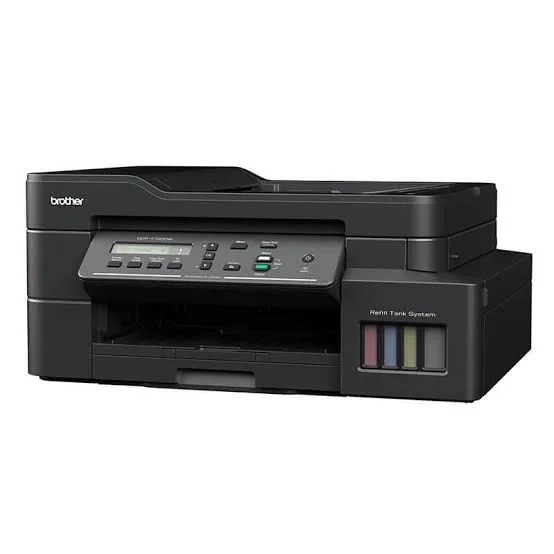
The Brother DCP-T720DW is the "everything useful, nothing fancy" ink tank printer. Three of the most useful office features in one machine: a 20-sheet document feeder for copying and scanning stacks, automatic double-sided printing, and Wi-Fi with AirPrint and Mopria. Its ink system is built for low running costs, with Brother quoting up to 7,500 black and 5,000 colour pages per bottle set, and it prints at up to 17 images per minute in black and 16.5 in colour, which is quick for an inkjet. Retail listings show a long carry-in warranty, a 5-year or 30,000-page warranty, on this model in South Africa, though Kenyan terms may differ. It has no fax and no Ethernet port, and its small display is basic. For a home business, a small office or a busy family that wants low costs and useful features, the T720DW is a strong choice.
How Brother's ink tank system works
A cartridge printer uses small cartridges that run out quickly. Brother's ink tank printers have large built-in tanks that you fill from bottles.
- Four bottles for four colours: black, cyan, magenta and yellow (Brother's BTD100 and similar bottles).
- Spill-free refilling. Brother designs the bottles and tank ports to fit together, so refilling is clean and precise.
- Front-access tanks. A transparent cover lets you see the ink levels at a glance.
- High yields. Brother quotes up to 7,500 pages for the black bottle and 5,000 for the colour bottles on its standard test.
- A low cost per page, a small fraction of what cartridges cost.
- A "plug and play" start. Brother says its ink tank printers need no complicated setup, and the first fill takes only a few minutes.
If you print regularly, an ink tank printer repays its higher purchase price within months.
Who this printer is for
It suits you if:
- You print regularly, a few hundred pages a month or more.
- You want automatic double-sided printing to save paper.
- You copy and scan multi-page documents and want a feeder.
- You want Wi-Fi and printing from phones.
- You want a low cost per page, in black and colour.
Look elsewhere if:
- You need fax or Ethernet. See the Brother MFC-T930DW in our range.
- You print very little. A cheap cartridge printer may cost less overall, though it will cost more per page.
- You need A3. See the Epson L15150.
- You print very high volumes of black text. See the Epson M3170 or the HP LaserJet Tank in our range.
Specifications in plain English
| Feature | Detail | What it means for you |
|---|---|---|
| Model | Brother DCP-T720DW | Brother's wireless ink tank 3-in-1 with ADF and duplex |
| Functions | Print, copy and scan | Three jobs in one machine |
| Print technology | Four-colour refillable ink tank | Low cost per page |
| Print speed (ISO) | Up to 17 ipm black and 16.5 ipm colour | Quick for an inkjet |
| Duplex | Automatic 2-sided printing | Saves paper and time |
| Document feeder | 20 sheets | Scan and copy stacks |
| Paper input | A 150-sheet tray, plus a manual feed slot for special paper | Flexible handling |
| Connectivity | Wi-Fi and USB 2.0 | Wireless and wired |
| Mobile printing | Brother iPrint&Scan, Apple AirPrint and Mopria | Print from phones |
| Ink yield | Up to about 7,500 black and 5,000 colour pages per set, per Brother | A very low cost per page |
| Warranty (a South African listing) | 5 years or 30,000 pages, carry-in | Ask us what applies in Kenya |
These figures come from Brother and retailer listings of the T720DW. Speeds and yields are Brother's test figures, and your results depend on your pages. Ask us to confirm what's in the box and the warranty for the unit you order.
What the T720DW does well
- A useful feature set for the price: feeder, duplex and Wi-Fi.
- A fast print speed for an inkjet, at up to 17 images per minute in black.
- A very low cost per page, with high-yield bottles.
- Clean refilling, with spill-free bottles.
- Front-visible ink tanks.
- A generous paper setup, with a main tray and a manual feed slot.
- A compact design for a printer with a feeder.
What it leaves out
- No fax.
- No Ethernet port, so it connects by Wi-Fi and USB only.
- A basic display, with limited on-screen controls.
- No duplex scanning from the feeder. It scans one side per pass.
- Not designed for very high volumes, where a laser or an A3 office EcoTank is better.
Setting up the printer
- Unbox and remove all packing tape and protective material, including in the feeder.
- Fill the ink tanks with the matching Brother bottles, following the guide, slowly and carefully.
- Let the printer initialise, which takes a few minutes.
- Load plain A4 paper in the tray.
- Connect to Wi-Fi using the Brother iPrint&Scan app or the printer's menu.
- Install the driver on your laptop if needed, and print a test page.
- Test duplex printing and the feeder.
- Run a nozzle check after the first week.
Printing double-sided
Automatic duplex halves your paper use on multi-page documents.
- Choose two-sided printing in the print dialog.
- Use good, dry paper. Thin or damp paper can jam or show through.
- Select the right binding edge: long edge for portrait pages bound like a book, and short edge for landscape pages.
- Print a test page before a long job.
- Set double-sided as the default if you print long documents often.
Scanning and copying with the feeder
The 20-sheet feeder speeds up everyday paperwork.
- Load pages face up, and square the stack.
- Remove staples and clips before loading.
- Scan to your computer or phone at 200 to 300 dpi for documents.
- Copy stacks by choosing the number of copies.
- Use the glass for single pages, books, IDs and fragile originals.
- Remember it scans one side per pass. For double-sided originals, scan each side, or use the glass.
A worked example: what the T720DW saves
A short calculation shows the value of a high-yield ink tank, using figures you can replace with real prices.
- Find the price of a bottle set. Ask us for the current prices of the Brother bottles.
- Use Brother's yields. Up to about 7,500 pages for black and 5,000 for colour, on Brother's standard test.
- Divide price by pages to get the cost per page, which for black text is a small fraction of a shilling.
- Compare with a cartridge printer, such as the Canon TS3640 or an HP DeskJet in our range, using the cartridge's price and its much smaller page yield.
- Multiply the difference by your monthly pages. At 300 pages a month, the saving is large within a year.
- Add the purchase prices. The T720DW costs more upfront and catches up quickly.
For a home business or an office printing several hundred pages a month, the ink tank design saves far more than the printer costs.
Running a home business or small office with the T720DW
The T720DW's feature set suits small commercial use.
- Print invoices, quotes and forms double-sided to save paper.
- Scan stacks of receipts and contracts through the feeder, and send them to the cloud.
- Copy IDs and documents quickly.
- Print flyers and price lists in colour at a low cost per page.
- Print from phones with AirPrint and Mopria, so staff don't need a computer.
- Keep a spare bottle set so a busy week never stops you.
- Protect it with a surge protector, a dust cover and a clean, shaded spot.
If your printing grows, the Brother MFC-T930DW adds fax and Ethernet, and the Epson L6370 and L6390 are higher-volume office models.
Using the Brother app and mobile printing
Brother's apps make the printer easy to use from a phone.
- Brother iPrint&Scan lets you print, scan and copy from your phone, check ink levels and set up the printer.
- Apple AirPrint lets iPhones and iPads print without an app, when on the same Wi-Fi.
- Mopria lets Android phones print through the built-in print service.
- Scan to phone. Scan a page from the printer to your phone as a PDF.
- Same network. Your phone and the printer must be on the same Wi-Fi.
If printing fails, restart the printer and your router, and check the Wi-Fi connection.
Paper, ink and keeping costs down
- Use good-quality A4 paper, especially for the feeder and duplex.
- Use genuine Brother ink bottles. Cheap third-party ink can clog print heads.
- Print in standard or economy mode for everyday documents.
- Set double-sided as the default.
- Print something weekly, so the print head stays healthy.
- Keep the printer level and in a cool, shaded spot.
- Store bottles upright, away from heat and sunlight.
Common problems and simple fixes
Streaks or faded lines. Run a nozzle check, then a print-head cleaning from the printer menu or app.
Paper jams. Switch off, pull the paper out gently, and use good, dry paper. Don't overfill the tray.
Feeder jams. Remove staples and clips, use good paper and don't overload the feeder.
Duplex pages jam. Use dry, good-quality paper, and make sure it's straight in the tray.
Won't connect to Wi-Fi. Restart the printer and router, move the printer closer and set it up again from the Brother app.
Blank pages. Check that tanks aren't empty, clean the head and make sure packing tape is gone.
Error message about the ink absorber. The part that collects waste ink is nearly full. Ask us, since it needs an authorised service.
If a problem continues, message us on WhatsApp.
Questions to ask before you buy any ink tank printer
- How many pages will I print each month?
- Do I need a feeder, duplex, Ethernet or fax?
- What does a replacement bottle set cost, and what is the real cost per page?
- What's in the box, and does it include ink?
- What warranty is included, and who honours it? Get it in writing.
- Can I see it before I pay? A trustworthy seller says yes.
We're glad to answer all of these on WhatsApp or in the shop before you pay.
Looking after the printer for years
- Print something every week, so the print head stays healthy.
- Use the printer's power button, not the wall switch.
- Keep the tanks above the minimum mark.
- Use genuine ink.
- Wipe the glass, feeder strip and body with a soft cloth.
- Keep it level, covered and out of direct sun.
- Service it when you see a maintenance message.
Warranty and after-sales: what to ask
A printer is a long-term purchase, so ask us what warranty covers the unit you order, how long it lasts and what it covers. A South African listing shows a 5-year or 30,000-page carry-in warranty for this model, and Kenyan terms may differ. Printers normally exclude consumables such as ink, and damage from non-genuine ink or misuse. Keep your receipt, the serial number and the box. If a fault appears, message us on WhatsApp first, and we'll tell you the quickest way to get it sorted.
Brother, Epson or Canon: a brand-neutral way to choose
All three brands make excellent ink tank printers, and a few practical questions settle the choice.
- Which features do you need? The T720DW offers a feeder and duplex together, which Canon's entry MegaTank models and Epson's L3250 don't.
- Which warranty and support can you get? Ask us what applies to the unit you order. Brother's long carry-in warranty on some markets is a selling point.
- Which bottles are easy to buy? We stock all three brands, so replacement ink is easy to find.
- Which app do you prefer? Brother iPrint&Scan, Canon PRINT and Epson Smart Panel all work well.
- Do you need fax, Ethernet or A3? See the Brother MFC-T930DW, the Epson L6390 or the Epson L15150.
If you're torn, message us. We'll recommend the best value today, and we won't push the dearest.
Printing marketing material with a small ink tank printer
Many of our customers use a printer like the T720DW to make business materials.
- Flyers and price lists. Print in colour at a very low cost per page, on 80 to 100 gsm paper.
- Menus and brochures. Use double-sided printing and folded A4.
- Labels and stickers. Use compatible sticker paper, within the printer's media limits.
- Certificates and cards. Use heavier card stock through the manual feed slot.
- Receipts and forms. Print in black-and-white to save ink.
- Proofs. Print drafts in economy mode before a final print run.
For large print runs, a print shop may be faster. For short runs and quick changes, your own printer saves time and money.
Understanding "ipm" and why it matters
Brother quotes speeds in images per minute, and a short explanation helps.
- ipm (images per minute) counts each printed side as one image, so a double-sided sheet counts as two images. It's a more realistic measure than a simple pages-per-minute figure, because it includes the time to feed and process.
- 17 ipm black and 16.5 ipm colour are the T720DW's headline figures. They're high for an inkjet, and they show that colour printing isn't much slower than black.
- Real-world speed depends on page content, print quality and the computer you print from. A page with a full-colour photo takes longer than a text page.
- Use the numbers to compare models, and ask us what to expect for your own documents.
Making the most of the manual feed slot
The T720DW's manual feed slot lets you print on paper that doesn't suit the main tray.
- Card stock for greeting cards and certificates, within the printer's weight limit.
- Envelopes, if the printer supports them. Check the manual for sizes.
- Photo paper for single prints.
- Labels and sticker sheets, following the paper maker's instructions.
- Load one sheet at a time, with the guides set to the paper's width.
- Choose the matching paper type in the print dialog, so the printer uses the right amount of ink.
Using a printer in Kenya
Power protection. Printers can be damaged by surges. Use a surge protector, and don't plug a printer into a UPS meant for computers.
Dust and heat. Keep the printer covered when idle, in a clean, shaded spot.
Paper storage. Keep paper flat and dry, because humidity makes paper curl and jam.
Refilling. Use clean hands and a flat surface, and keep ink away from children and pets.
Warranty. Ask us for the warranty that applies to the unit you order, and keep the receipt and box.
Accessories worth buying with it
| Accessory | Why it helps |
|---|---|
| Spare Brother ink bottle set | Keeps you printing when tanks run low |
| Surge protector | Protects against power spikes |
| USB cable (type A to B) | For a wired connection if needed |
| Quality A4 paper (80 gsm or more) | Fewer jams, better duplex results |
| Dust cover | Protects the printer when idle |
How it compares with other options in our range
| Brother DCP-T720DW | Brother MFC-T930DW | Brother DCP-T530DW | Epson L4360 | |
|---|---|---|---|---|
| Functions | Print, copy, scan | Print, copy, scan, fax | Print, copy, scan | Print, copy, scan |
| Document feeder | 20 sheets | 20 sheets | None | None |
| Automatic duplex | Yes | Yes | Yes | Yes |
| Ethernet | No | Yes | No | No |
| Ink yield (black/colour) | Up to about 7,500/5,000 pages | Up to about 7,500/5,000 pages | Confirm | Thousands of pages |
| Best for | Home business, small office | Office needing fax and Ethernet | Duplex at home | Duplex at home |
Against the Brother MFC-T930DW: it adds fax, Ethernet and a larger display. The T720DW costs less.
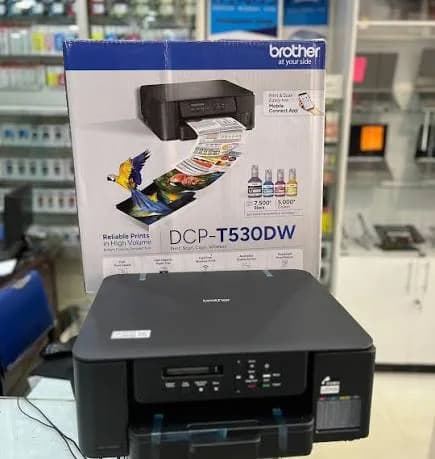
Against the Brother DCP-T530DW: that model has duplex but no feeder, and costs less.
Against the Epson L4360 and L5290: the Epson L4360 has duplex without a feeder, and the L5290 has a feeder and fax with manual duplex. The T720DW combines a feeder and automatic duplex.
Honest pros and cons
Pros
- A 20-sheet document feeder.
- Automatic duplex printing.
- Up to 17 images per minute in black and 16.5 in colour.
- A very low cost per page, with high-yield bottles.
- Wi-Fi, AirPrint and Mopria.
- Spill-free refilling and front-visible tanks.
Cons
- No fax and no Ethernet.
- A basic display.
- The feeder scans one side per pass.
- Not suited to very high volumes.
- A little messy to refill the first time.
What to check when it arrives
- The box model matches Brother DCP-T720DW.
- The printer, power cable and ink bottles are in the box.
- All packing tape and protective material are removed.
- The ink tanks fill properly, and a test page prints.
- Duplex printing and the document feeder work.
- Wi-Fi connects through the Brother app.
- You get a receipt with the serial number and warranty details in writing.
Frequently asked questions
What is the Brother DCP-T720DW price in Kenya? We confirm the current price when you message us on WhatsApp, because supplier prices change. We tell you the price and what's in the box before you pay.
Where can I buy the Brother T720DW in Nairobi? At City Gadgets Kenya, New Alnoor Exhibition, Second Floor, Shop C7, Accra Road, Nairobi CBD, or by delivery.
Does it print double-sided automatically? Yes.
Does it have a document feeder? Yes, 20 sheets.
Does it have Wi-Fi? Yes, Wi-Fi and USB, with AirPrint and Mopria.
Does it fax? No. See the Brother MFC-T930DW.
How many pages do the ink bottles print? Brother quotes up to about 7,500 black and 5,000 colour pages per set.
Does it come with ink? Brother ink tank printers normally ship with a starter set of ink bottles. Ask us to confirm.
What warranty does it have? Ask us for the warranty that applies to the unit you order.
Can you deliver it? Yes, same day in Nairobi and next day outside Nairobi.
Can I pay via M-Pesa? Yes.
Why buy from City Gadgets Kenya
Genuine, brand-new Brother printer. We're at New Alnoor Exhibition, Second Floor, Shop C7, Accra Road, Nairobi CBD, and you're welcome to look at the printer before you buy. Message us on WhatsApp with how much you print, and we'll tell you honestly whether the T720DW is right or another model would suit you better. We confirm what's in the box before you pay.
Order your Brother DCP-T720DW today
Available now at City Gadgets Kenya. Message us on WhatsApp.
Specifications
- Brand
- Brother
- Condition
- New
Frequently Asked Questions
How much does the Brother DCP-T720DW Wireless Ink Tank All-in-One Printer with ADF and Auto Duplex in Kenya | City Gadgets Kenya cost in Kenya?
The Brother DCP-T720DW Wireless Ink Tank All-in-One Printer with ADF and Auto Duplex in Kenya | City Gadgets Kenya is priced at Ksh 46,500 at City Gadgets. You can pay via M-Pesa, card or cash on delivery.
Is the Brother DCP-T720DW Wireless Ink Tank All-in-One Printer with ADF and Auto Duplex in Kenya | City Gadgets Kenya available in Kenya?
Yes — the Brother DCP-T720DW Wireless Ink Tank All-in-One Printer with ADF and Auto Duplex in Kenya | City Gadgets Kenya is in stock at City Gadgets, ready for same-day delivery in Nairobi and countrywide shipping across Kenya.
Is the Brother DCP-T720DW Wireless Ink Tank All-in-One Printer with ADF and Auto Duplex in Kenya | City Gadgets Kenya genuine and does it have a warranty?
Every Brother DCP-T720DW Wireless Ink Tank All-in-One Printer with ADF and Auto Duplex in Kenya | City Gadgets Kenya we sell is 100% genuine brand-new stock and comes with a 12-month official brand warranty.
Do you deliver the Brother DCP-T720DW Wireless Ink Tank All-in-One Printer with ADF and Auto Duplex in Kenya | City Gadgets Kenya in Nairobi?
Yes. We offer fast same-day delivery within Nairobi and fast, affordable delivery to the rest of Kenya — order online or on WhatsApp.
Customer Reviews
No reviews yet
Be the first to review this product.
Rate us on Google
Your review helps other shoppers find us
Reviews from verified buyers will appear here.