Logitech MX Keys S in Kenya | City Gadgets Kenya
Same-day delivery in Nairobi by 6 Oct – 7 Oct
Comes with
Description
Buy the genuine Logitech MX Keys S premium wireless keyboard in Kenya from City Gadgets Kenya. Authentic backlit keyboard for professionals, multi-device switching.
Logitech MX Keys S in Kenya
Genuine Logitech | Premium Wireless Keyboard | Built for Professionals
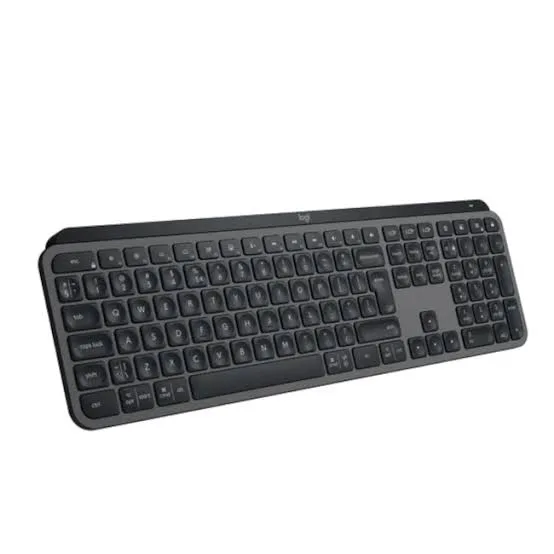
The Logitech MX Keys S sits at the top of Logitech's keyboard range for everyday productivity, built for people who type for a living and want the typing feel, build quality, and multi-device convenience to match. Available in Kenya from City Gadgets Kenya as an authentic Logitech product, this guide covers what genuinely justifies the MX Keys S sitting well above Logitech's budget keyboards, for buyers searching "Logitech MX Keys S Kenya," "best wireless keyboard for professionals Nairobi," "premium keyboard Kenya," or "MX Keys S price."
Why This Keyboard Costs More Than a Basic Wireless Keyboard
It's worth being direct about this, since the price difference between the MX Keys S and a basic Logitech combo keyboard is considerable, and that difference should translate into something genuinely felt in daily use, not just a name. The MX Keys S is built around refined key spacing and a key profile specifically engineered for typing comfort and accuracy over long sessions, rather than the more generic flat-key designs found on entry-level keyboards. For anyone who writes, codes, or types extensively for work, that difference is felt directly in reduced finger fatigue and fewer mistyped keys across a full working day.
Smart, Adaptive Backlighting
The MX Keys S includes backlit keys that automatically adjust based on ambient light and detect your hands approaching, lighting up as you reach for the keyboard and dimming when you step away, which both looks polished and genuinely saves battery compared with a backlight left on constantly. This is a specific, deliberate engineering feature aimed at people who work in varied lighting conditions, from a bright office to a dim evening desk at home.
Multi-Device Switching
A genuinely practical feature for modern work: the MX Keys S can pair with and switch between multiple devices, letting you type on a laptop, then switch to a desktop or tablet, without re-pairing each time. For anyone who works across more than one computer, such as a personal laptop and a work desktop, or a Mac and a Windows PC, this removes a genuine daily friction point that cheaper keyboards don't address at all.
Build Quality and Materials
Logitech positions the MX Keys S using more refined materials and a more solid overall construction than its budget keyboards, intended to look and feel appropriate on a professional desk, in a meeting room, or in a home office used daily for serious work, rather than looking like a disposable accessory.
Battery Life and Charging
It uses a rechargeable battery rather than replaceable ones, charged over USB-C, with battery life designed to last a genuinely long time between charges under typical daily use, backlighting included. This is a reasonable trade-off for a premium keyboard: slightly more charging discipline required than a basic battery-powered keyboard, in exchange for not generating ongoing battery waste.
Mac, Windows, and Multi-OS Compatibility
The MX Keys S is designed to work smoothly across both Windows and Mac, with Logitech's companion software, Logi Options+, allowing further customisation of function keys and behaviour depending on which operating system you're using at the time, a genuinely useful detail for anyone who switches between platforms regularly.
Who the MX Keys S Is Genuinely Right For
Professionals who type extensively for work — writers, developers, consultants, and anyone whose daily output depends directly on comfortable, accurate typing.
Buyers who regularly switch between multiple computers and want seamless device switching rather than repeated re-pairing.
Anyone building a considered, professional-looking desk setup, whether in a home office or a client-facing workspace.
Buyers upgrading from a basic keyboard who've decided typing comfort is worth a genuine investment, having spent enough hours noticing a cheaper keyboard's limitations.
MX Keys S vs Logitech's Budget Keyboards
Logitech's K250, MK270, MK220, and similar combos, also available from us, cover basic everyday typing capably at a fraction of the price. The MX Keys S is worth the premium specifically for buyers who type enough, and care enough about the experience, that the refined key feel, adaptive backlighting, and multi-device switching described throughout this page genuinely improve their daily work, rather than being features they'd rarely notice or use.
MX Keys S vs Wave Keys and Lift Combo
City Gadgets Kenya also stocks the Wave Keys and Lift combo, which pairs an ergonomic, curved keyboard with the Lift vertical mouse discussed in our mouse range. If ergonomic, strain-reducing design is your top priority, that combo is worth comparing directly. If flat-profile typing feel, multi-device switching, and adaptive backlighting are what you value most, the MX Keys S is the more direct fit.
Why Buy From City Gadgets Kenya
Genuine, authentic Logitech product. Browse our computer accessories category or message us on WhatsApp with any questions before you order.
Frequently Asked Questions
Does the MX Keys S work with both Windows and Mac? Yes, it's designed for both, with Logitech's Logi Options+ software adjusting function key behaviour depending on the operating system in use.
How many devices can it switch between? It supports pairing with multiple devices and switching between them, though ask our team for the exact number supported on this model.
Does the backlighting genuinely save battery, or is that just marketing? The hand-detection and ambient light adjustment genuinely reduce how long the backlight stays active compared with a keyboard that simply leaves backlighting on constantly, which does meaningfully extend battery life between charges.
Is this worth it over a basic wireless keyboard for everyday home use? If your use is genuinely light and occasional, a basic keyboard like the K250 may suit you fine. The MX Keys S earns its price specifically through extensive daily typing, multi-device use, or valuing a considered, professional desk setup.
Can I pay via M-Pesa? Yes, M-Pesa and card payments are both accepted.
Order Your Logitech MX Keys S Today
Available now at City Gadgets Kenya, guaranteed genuine. Message us on WhatsApp or browse our computer accessories category.
Specifications
- Brand
- LOGITECH
- Condition
- New
Frequently Asked Questions
How much does the Logitech MX Keys S in Kenya | City Gadgets Kenya cost in Kenya?
The Logitech MX Keys S in Kenya | City Gadgets Kenya is priced at Ksh 17,500 at City Gadgets. You can pay via M-Pesa, card or cash on delivery.
Is the Logitech MX Keys S in Kenya | City Gadgets Kenya available in Kenya?
Yes — the Logitech MX Keys S in Kenya | City Gadgets Kenya is in stock at City Gadgets, ready for same-day delivery in Nairobi and countrywide shipping across Kenya.
Is the Logitech MX Keys S in Kenya | City Gadgets Kenya genuine and does it have a warranty?
Every Logitech MX Keys S in Kenya | City Gadgets Kenya we sell is 100% genuine brand-new stock and comes with a 12-month official brand warranty.
Do you deliver the Logitech MX Keys S in Kenya | City Gadgets Kenya in Nairobi?
Yes. We offer fast same-day delivery within Nairobi and fast, affordable delivery to the rest of Kenya — order online or on WhatsApp.
Customer Reviews
No reviews yet
Be the first to review this product.
Rate us on Google
Your review helps other shoppers find us
Reviews from verified buyers will appear here.
Buying guides
Straight advice for shoppers picking between the models above.