Mi Wi-Fi Extender AC1200 vs N300 vs Pro: Which One Should You Buy in Kenya?
You have decided that a Wi-Fi extender is the right fix for your weak signal. Good. Now you face a smaller but still real question: which one? We stock three Xiaomi Mi Wi-Fi range extenders, the AC1200, the N300 and the Pro, and at first glance they look similar. Same brand, same compact plug-in design, similar names. But they are not the same, and choosing the wrong one can mean disappointment, such as an extender that cannot use your 5 GHz network, or one that lacks the Ethernet port you wanted.
This guide, from the team at City Gadgets Kenya in Nairobi, compares the three models plainly, using the manufacturer's published specifications. We explain what each difference means in practice, which homes each model suits, and how to decide. We sell all three, so we have an interest, and we say so. But we would rather you buy the right model than the largest one, so you will find honest advice here, including when the simpler model is the better choice. We leave figures out of this guide. Call Sales on 0745 575 931 for current availability.
If you are still deciding whether an extender is right for you at all, start with our guide to fixing weak Wi-Fi at home.
The three extenders side by side
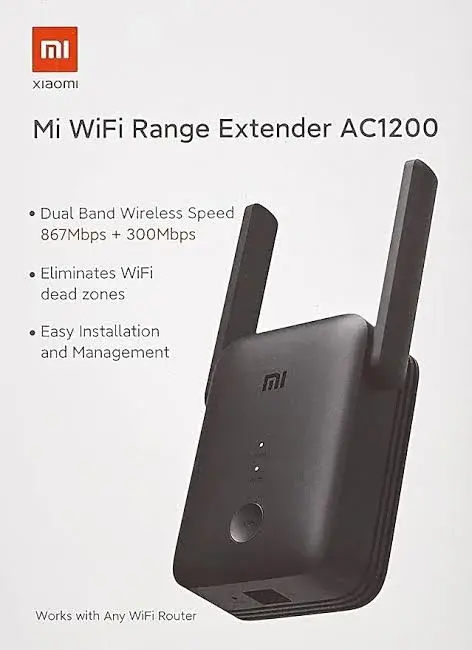
| Feature | Mi AC1200 | Mi N300 | Mi Pro |
|---|---|---|---|
| Model number | RA75 | RD10 | R03 |
| Wi-Fi bands | Dual-band: 2.4 GHz and 5 GHz | 2.4 GHz only | 2.4 GHz only |
| Standards | 802.11ac/n/a on 5 GHz, 802.11n/b/g on 2.4 GHz | 802.11b/g/n | 802.11b/g/n |
| Maximum published speed | Up to 867 Mbps on 5 GHz and up to 300 Mbps on 2.4 GHz | Up to 300 Mbps | Up to 300 Mbps |
| Antennas | Not stated in the specification we read | Two external antennas | Two external antennas |
| Ethernet port | One 10/100 Mbps port | Not listed | Not listed |
| Buttons | WPS and Reset | Not listed | Not listed |
| Modes | Range extender and access point | Not listed | Not listed |
| Processor and memory | 64 MB RAM (processor not stated) | Not stated | MediaTek MT7628K at 580 MHz, 8 MB RAM, 2 MB ROM |
| Security | WPA-PSK and WPA2-PSK | WPA-PSK and WPA2-PSK | WPA-PSK and WPA2-PSK |
| Size | About 84 x 100 x 82 mm (varies by region because of the plug) | 80 x 54 x 70 mm | 80 x 54 x 70 mm |
| Power | 100 to 240 V, 50/60 Hz, 0.3 A input | 100 to 240 V, 0.35 A input, 3.57 W | 100 to 240 V, 0.35 A input, 3.57 W |
| In the box | Extender, user manual, warranty card | Extender, warranty notice, user manual | Extender, user manual |
Two things stand out. The AC1200 is in a different class from the other two, with a second band, an Ethernet port, a WPS button and an access point mode. And the N300 and the Pro are close to each other on paper.
First, understand the two Wi-Fi bands
Everything in this comparison turns on one idea: Wi-Fi uses two main radio bands, and they behave differently.
| Band | Strengths | Weaknesses |
|---|---|---|
| 2.4 GHz | Reaches further, passes through walls better | Crowded, slower, more interference |
| 5 GHz | Faster, usually less crowded | Shorter range, weaker through walls |
Most modern routers offer both bands, often under one name or two. Many older routers offer only 2.4 GHz. Many smart home gadgets, such as plugs, bulbs and some cameras, use only 2.4 GHz. Newer phones, laptops and TVs can use both.
An extender can only repeat the bands it supports. A 2.4 GHz-only extender repeats the 2.4 GHz network. It cannot repeat your 5 GHz network. A dual-band extender can repeat both. So the first question is: what does your router offer, and what do your devices use?
The AC1200: the capable all-rounder
What it offers
The AC1200 supports both bands, with up to 867 Mbps on 5 GHz and up to 300 Mbps on 2.4 GHz. "AC1200" is a marketing label that adds the two maximum speeds together, and no single device will see the combined figure. It has one 10/100 Mbps Ethernet port, a WPS button for quick pairing with routers that support it, and two modes: range extender and access point.
Why choose it
- You have a dual-band router and want to extend both networks.
- You want to use 5 GHz for faster speeds at short range.
- You want an Ethernet port, for example to connect a smart TV, a games console, a desktop computer or a set-top box with a cable, from a spot with weak Wi-Fi.
- You can run a cable to it and want to use access point mode, which usually gives better results than wireless repeating.
- You want the most flexible model, which can serve you if your needs grow.
- Your home has many devices, because two bands let you spread the load.
What to keep in mind
- It is the largest of the three, at about 84 x 100 x 82 mm, so it takes more room at the socket.
- The Ethernet port runs at up to 100 Mbps, which is plenty for most streaming but lower than the wireless 5 GHz maximum.
- Real speeds are well below the published maximums, as with any extender.
- It needs a router that supports the bands you want to extend.
The N300: the simple, compact fix
What it offers
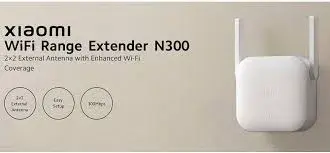
The N300 is a compact 2.4 GHz extender with two external antennas, a published maximum speed of 300 Mbps, and a size of 80 x 54 x 70 mm. It supports WPA-PSK and WPA2-PSK encryption and uses about 3.57 W. The specification we read does not list an Ethernet port, a WPS button or an access point mode, so we do not claim them.
Why choose it
- Your router is 2.4 GHz only, or you mainly use 2.4 GHz.
- Your devices are phones, laptops, TVs and smart home gadgets that work well on 2.4 GHz.
- You want the smallest, simplest option to fix one or two weak rooms.
- You want a plug-in fix with no extras.
- You want the signal to pass through walls, since 2.4 GHz travels further than 5 GHz.
What to keep in mind
- It cannot repeat a 5 GHz network. Devices that connect only to 5 GHz will not see it.
- The 2.4 GHz band is busy in apartment blocks, so speeds may be lower there.
- It lacks the Ethernet port of the AC1200, as far as the specification we read shows.
- It is slower than the AC1200's 5 GHz band at short range.
The Pro: the N300's close relative
What it offers
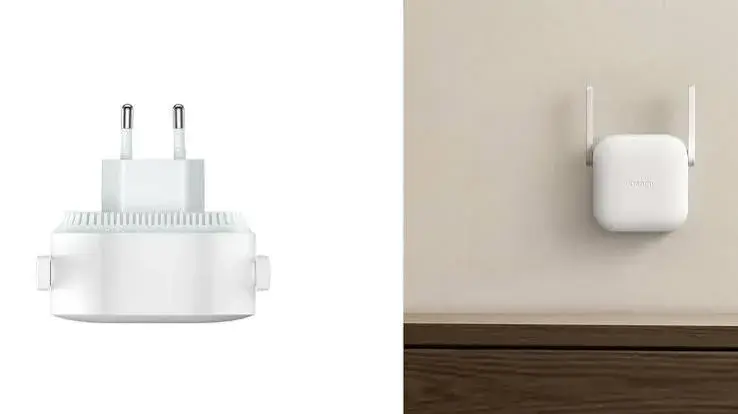
The Mi Wi-Fi Range Extender Pro is a compact 2.4 GHz extender with two external antennas and a published maximum speed of 300 Mbps. It has the same published size as the N300, 80 x 54 x 70 mm, and the same power figures. Its published hardware includes a MediaTek MT7628K processor at 580 MHz, 8 MB of RAM and 2 MB of ROM. The box is listed as the extender and a user manual.
How it differs from the N300
On paper, the difference is the published processor and memory. The specification we read for the N300 does not list a processor, so we cannot say whether the two differ in practice. We do not invent differences. If we have both in stock, we will tell you honestly what we can confirm on the units in the shop.
Why choose it
- Everything we said for the N300 applies.
- You prefer the model with the published processor details.
- Our team recommends it for your router, after checking.
What to keep in mind
- The same limits apply: 2.4 GHz only, and no Ethernet port or modes listed in the specification we read.
So which one should you buy?
Answer these questions in order.
Question 1: Does your router offer 5 GHz, and do you want to use it?
- Yes, and I want to use it: choose the AC1200.
- No, or I do not mind 2.4 GHz: the N300 or the Pro is enough.
Question 2: Do you need a wired port for a TV, console or computer?
- Yes: choose the AC1200.
- No: either works.
Question 3: Can you run a cable from your router to the extender's position?
- Yes: the AC1200's access point mode is worth having, because a wired link usually performs better than wireless repeating.
- No: a wireless extender works, and any of the three can do it.
Question 4: Do you have many devices, or are you a heavy user?
- Yes: the AC1200's two bands give you more room.
- No, a small household: the N300 or the Pro may be plenty.
Question 5: Do you need the smallest possible unit?
- Yes: the N300 or the Pro.
Question 6: Are your devices mainly smart home gadgets and cameras?
- Yes: many of these use only 2.4 GHz, so the N300 or the Pro fits them well, and the AC1200 also supports 2.4 GHz.
Choosing by home type
| Your home | Suggested model | Why |
|---|---|---|
| Bedsitter or one-bedroom flat with one weak corner | N300 or Pro | A small, simple fix |
| Two or three-bedroom flat, dual-band router | AC1200 | Extends both bands, with a wired port |
| Maisonette with a weak upstairs | AC1200 or N300 | Depends on your router and devices |
| Home office in a back room | AC1200 | Better for video calls on 5 GHz at short range |
| Smart TV far from the router | AC1200 | The Ethernet port gives a wired link |
| Small shop with a back room | N300 or Pro | Simple and compact |
| Home full of smart plugs and cameras | N300 or Pro | They mostly use 2.4 GHz |
| Heavy streaming household | AC1200 | Two bands and more capacity |
What all three have in common
- WPA-PSK and WPA2-PSK security.
- A plug-in design that goes straight into a wall socket.
- Power input from 100 to 240 V.
- Compatibility with most standard routers.
- Setup that takes minutes, which we confirm per unit.
- The limits of any extender: they cannot make your plan faster, they need a decent signal to repeat, they have no battery and they do not match a cable.
Placement: the same rule for all three
Whichever you choose, place the extender halfway between your router and the weak area, where the signal is still good. Do not put it in the dead spot. Our guide to fixing weak Wi-Fi explains how to find the right position.
When none of the three is right
An extender is not always the best answer. If your internet is slow everywhere, even beside the router, the plan or the router is the problem. If you need seamless coverage across a large home, a mesh system may suit you better. If you can run a cable, a wired access point is the strongest option. Our comparison of extenders, mesh, new routers and powerline helps you decide.
Buying from us
When you buy from City Gadgets Kenya, we:
- Check the model and the plug with you before you pay.
- Show you the unit and let you see it power on.
- Confirm the warranty in writing for the exact unit.
- Help you set it up, at the shop or by phone and video.
- Accept M-Pesa, with free shop collection and delivery options: same day in Nairobi for orders before 3pm, and courier delivery in one to three business days elsewhere.
Our shop is at New Alnoor Exhibition, Shop 7, Second Floor, Taveta Road, at the Taveta and Accra Road junction in Nairobi CBD. We are open Monday to Friday 9am to 7pm and Sunday 11am to 4pm, and closed on Saturday.
How the Mi extenders compare on real, everyday jobs
Specifications are useful, but most people want to know how an extender behaves in daily life. Here is how we think about each job, based on what the published specifications tell us and on how extenders work in general. We do not claim measured speeds for your home, because those depend on your router, walls and plan, and we confirm anything specific to the unit in stock.
Streaming video on a smart TV
Streaming needs a steady connection more than a huge one. A 2.4 GHz extender such as the N300 or the Pro can serve a TV in a room that previously buffered, as long as the extender sits where its own signal is strong. The AC1200 adds two advantages: it can use 5 GHz, and its Ethernet port lets you connect the TV by cable, which removes the wireless hop to the TV altogether.
Video calls and remote work
Calls need low delay and steady upload. A wired link beats a wireless one. If the AC1200 sits near your desk with a cable to your laptop, you get the most stable setup of the three. If you work wirelessly, the dual-band AC1200 lets you use 5 GHz at short range, where it tends to be less crowded.
Smart home gadgets
Many smart plugs, bulbs, sensors and cameras connect only on 2.4 GHz. All three Mi extenders support 2.4 GHz, so all can help. For a home full of such gadgets, the N300 or the Pro is a neat, compact choice.
Gaming
Online games care about delay, and wireless repeating adds some. For casual play, an extender may be fine. For serious play, the AC1200 with a cable to your console or computer is the better choice, or a cable straight from the router if you can manage one.
Browsing and social media
Any of the three is plenty. This is the easiest job, and the simplest model in the range, the N300, is often enough, so we say so openly.
Guests and visitors
An extender in the passage gives visitors a usable connection in the spare room, and they do not need to ask for the password to be shouted across the house.
Understanding the numbers on the box
Buyers are often puzzled by the figures. Here is what they mean.
300 Mbps (N300 and Pro). This is the maximum link speed of the 2.4 GHz radio under ideal conditions. Real-world speeds are lower.
867 Mbps on 5 GHz and 300 Mbps on 2.4 GHz (AC1200). The maximum link speeds of each radio. The "1200" in the name is just a rounded total of the two. A single device uses one band at a time, so it never sees the sum.
10/100 Mbps Ethernet (AC1200). The wired port runs at up to 100 Mbps. That is more than enough for most streaming and browsing, though it is below the 5 GHz wireless maximum.
WPA-PSK and WPA2-PSK. Encryption methods. WPA2 is the stronger of the two, and we suggest using it.
Two external antennas (N300 and Pro). Antennas help the extender receive and send signal. The AC1200's antenna arrangement is not stated in the specification we read.
100 to 240 V. The extenders accept a wide range of mains voltages, which includes Kenya's supply. The plug shape differs by region, so we check the unit fits Kenyan sockets, and we supply or advise on an adapter where needed.
Access point mode (AC1200). Lets the unit create a new Wi-Fi network from a cable connection. It is the best way to use an extender if you can run a cable.
Wired or wireless: the best upgrade you can make to an extender
An extender repeating wirelessly has to receive from the router and send to your devices, using the same radio. That takes some speed. If you can run an Ethernet cable from the router to the extender's position, the AC1200 can work as an access point and spread a strong, clean signal from there. This is one reason we call the AC1200 the most flexible of the three.
If you cannot run a cable, do not worry. Many homes work well with a wireless extender placed sensibly.
Kenyan home realities that affect your choice
Thick walls. Concrete and stone absorb Wi-Fi. The 2.4 GHz band passes through better, which is why the N300 and the Pro can do well in solid buildings. The AC1200 also covers 2.4 GHz, so it does too.
Crowded buildings. In flats, the 2.4 GHz band is busy. If your router offers 5 GHz, and the extender is close enough to the router, the AC1200's 5 GHz band can give a cleaner link.
Power cuts. Extenders stop when the power goes. A small UPS for the router and the extender keeps the network up for short outages.
Surges. Use surge-protected extensions.
Sockets. Kenya uses British three-pin sockets. We confirm the unit's plug, and we help with adapters if needed.
Rented homes. Plug-in extenders suit renters because nothing is drilled or fixed.
Mixed devices. A household has old and new devices. The AC1200 handles both generations better, while the N300 and the Pro serve older and simpler devices well.
Questions to ask any seller, including us
A good seller answers these clearly.
- Is this the exact model, with the model number on the box?
- Is it new and sealed?
- What warranty does it carry, and is it in writing?
- Does the plug fit Kenyan sockets?
- Which bands does it support?
- Can you help me set it up?
- Where can I come if something goes wrong?
We answer all of these in person at New Alnoor Exhibition, Shop 7, Second Floor, Taveta Road, and by phone on 0745 575 931. For help after purchase, Customer Relations is on 0794 488 806.
Our straight answers to the most common comparisons
"Should I get the AC1200 just in case?" If you have a dual-band router, a TV or computer that could use the cable port, or a larger home, yes, it gives you room to grow. If your need is one weak bedroom and a basic phone, the N300 or the Pro is enough, and we will tell you so.
"Is the Pro better than the N300?" The published details are very close. The Pro lists a MediaTek MT7628K processor at 580 MHz with 8 MB of RAM and 2 MB of ROM. We do not claim differences we cannot confirm, so we check what we have in stock before advising.
"Will the AC1200 work with my old router?" Yes, on 2.4 GHz. If your router has no 5 GHz band, the AC1200's second band will sit unused, and you may prefer a simpler model.
"Can I mix models in one home?" You can, but we suggest starting with one and adding another only if needed, since each extra hop can affect speed.
"Can I move it later?" Yes. It plugs into any socket, so you can move it if your needs change.
Setting up each model: what to expect
The details depend on the software version, so we confirm the steps for your unit, and we walk you through them at the shop. In outline, you plug the extender in near your router, connect it following the manual or the manufacturer's app, choose your network and enter the password, and then move it to its final position. The AC1200 also offers a WPS button for quick pairing with routers that support it, and an Ethernet port for wired use. The N300 and the Pro rely on the setup method described in their manuals.
After setup, test in the weak room and adjust the position if needed. A few steps either way can make a real difference, and it is worth ten minutes to get it right.
A buyer's checklist
- I know my router's model and whether it has 5 GHz.
- I know which rooms are weak.
- I know where the sockets are.
- I know whether I want a wired port.
- I have decided whether I can run a cable.
- I have checked the warranty and the plug.
- I know where to go for help.
If you can tick these, you are ready to choose. If not, call us or visit the shop, and we will help you fill the gaps.
Scenarios: the right model for the right household
Here are six households we meet at the shop, and the model we would suggest, with the reasoning. We always confirm after hearing the details.
Scenario 1: The young professional in a one-bedroom flat
The router sits in the living room, and the bedroom is behind a wall. The devices are a phone, a laptop and a smart TV. Only the bedroom is weak. Suggestion: the N300 or the Pro. A single weak room and simple devices do not need more. If the router has 5 GHz and the person likes to work from the bedroom, the AC1200 gives extra headroom.
Scenario 2: The family of five in a three-bedroom home
Five phones, two laptops, a TV and a games console. The router is near the front door, and the back bedrooms are weak. Suggestion: the AC1200. Two bands help share the load, and the Ethernet port can serve the console or the TV by cable.
Scenario 3: The home with many smart devices
Smart plugs, bulbs and a Xiaomi camera, mostly 2.4 GHz devices, spread across a maisonette. Suggestion: the N300 or the Pro for 2.4 GHz coverage. If you also have fast devices on 5 GHz, the AC1200 covers both.
Scenario 4: The small business owner
A shop with a till at the front and a stockroom at the back, with a card machine and a stock app. Suggestion: the N300 or the Pro for a simple fix. If a wired connection suits the till, the AC1200's port helps.
Scenario 5: The remote worker
A home office at the back of the house, with long video calls and large file uploads. Suggestion: the AC1200, ideally with a cable from the router and access point mode. If you cannot run a cable, use it wirelessly near the office.
Scenario 6: The student in a rented room
A room at the end of a corridor, one phone, one laptop, a tight arrangement and no way to drill. Suggestion: the N300 or the Pro. Small, simple and easy to unplug when you move.
What we do not know, and how we handle it
The specifications we read do not list everything. For the N300 and the Pro, an Ethernet port, a WPS button and extra modes are not listed. For the AC1200, the antenna arrangement and processor are not stated. We never fill gaps with guesses. When you ask about something not published, we say "not listed in the specification we read", and we check the unit in stock where we can. This honesty matters to us, because a buyer who is told the truth is a buyer who comes back.
The warranty and what to check on the box
Always check the following when you buy any extender.
- The model number on the box: RA75 for the AC1200, RD10 for the N300 and R03 for the Pro, as published.
- That the box is sealed and the contents match the list: for the AC1200, the extender, user manual and warranty card; for the N300, the extender, warranty notice and user manual; for the Pro, the extender and user manual.
- The warranty terms, in writing, for the exact unit.
- The plug type for Kenyan sockets.
We confirm each of these at the counter, and we give the warranty in writing.
A few words on safety and good practice
- Do not place any plug-in device where it can get wet.
- Do not cover it with cloth or paper.
- Do not overload a socket with several large appliances.
- Use a surge-protected extension if you can.
- Unplug it during storms if you can do so safely.
- Keep it away from children's reach where possible.
How to ask us for a recommendation
When you call or visit, tell us:
- Your router's brand and model, if you know it.
- Whether the router has a 5 GHz network.
- Which rooms are weak, and how many walls separate them from the router.
- What you use in those rooms.
- Whether you can run a cable.
- Whether you need a wired port.
With these six answers, our recommendation is usually clear in a few minutes. Call Sales on 0745 575 931, write to sales@citygadgetskenya.co.ke or visit the shop.
Frequently asked questions
Which is the best Mi extender?
The AC1200 is the most capable. The best one for you depends on your router, your devices and your home.
Is the AC1200 worth it over the N300?
If you have a dual-band router and want 5 GHz, an Ethernet port or access point mode, yes. If you only need a simple fix on 2.4 GHz, the N300 or the Pro may be enough.
Can the N300 extend my 5 GHz network?
No. It works on 2.4 GHz only.
What is the difference between the N300 and the Pro?
The published specifications are very close. The Pro lists a MediaTek MT7628K processor at 580 MHz with 8 MB of RAM and 2 MB of ROM. We confirm any other difference on the units in stock.
Does the AC1200 have an Ethernet port?
Yes, one 10/100 Mbps port.
Can I use two extenders?
Yes, but each adds delay, and too many can hurt performance. For large homes, ask us about other options.
Do they work during a power cut?
No. They have no battery. A small UPS keeps the network up through short outages.
Will they work with my router?
They work with most standard routers. Tell us your router's model, and we will confirm.
Can I pay by M-Pesa?
Yes. We accept M-Pesa, and shop collection is free.
Our recommendation, in one paragraph
If you have a dual-band router, many devices, or a TV or computer that would benefit from a cable, choose the AC1200. If you have a simple need, a 2.4 GHz network and a small space to cover, choose the N300 or the Pro, and let us confirm which we have in stock. If you are still not sure, tell us about your home. Call Sales on 0745 575 931, write to sales@citygadgetskenya.co.ke or visit the shop. For help after purchase, Customer Relations is on 0794 488 806.