How to Fix Weak Wi-Fi at Home in Kenya: Why a Mi Wi-Fi Extender Is the Simplest Fix
You pay for internet every month, and yet the bedroom has one bar, the balcony has none and the TV in the back room buffers every few minutes. You stand next to the router and everything is fast. Walk to the other end of the house and the video call freezes. It is one of the most common complaints we hear at our shop on Taveta Road, and the good news is that for most homes the fix is small, quick and simple to attempt: a Wi-Fi extender.
This article, from the team at City Gadgets Kenya in Nairobi, explains why Wi-Fi goes weak in Kenyan homes, how a Mi Wi-Fi extender solves the problem, why we recommend the Xiaomi Mi range, and how to get the best result from one. We are a shop that sells these extenders, so we have a clear interest, and we say so. But we also want you to be happy with what you buy, so we are honest about what an extender can and cannot do. If an extender is not the right answer for your home, we will tell you at the counter.
We leave figures out of this article, since they change with the model and the day you ask. Call Sales on 0745 575 931 for current availability.
Why Wi-Fi gets weak: it is physics, not your provider
Before you blame your internet provider, understand what is actually happening. Your router sends Wi-Fi out as radio waves. Those waves get weaker with distance, and they are absorbed and reflected by things in their way.
Walls are the biggest enemy
Many Kenyan homes and apartment blocks are built with thick stone, concrete or reinforced walls. These block Wi-Fi far more than the thin partitions common in other countries. One concrete wall can cut a signal sharply, and two or three can leave you with almost nothing. Metal doors, metal shelving, mirrors, fish tanks and even large water tanks in the wrong place add to the damage.
Distance adds up
Wi-Fi strength falls quickly with distance. A router that gives excellent speed in the living room may give a poor signal at the far end of a long house, in a maisonette's upper floor or in outside rooms.
Router placement is often wrong
Routers are often placed where the internet cable enters the home, for example near the front door, in a corner, in a cupboard or on the floor. That is rarely the best place for coverage.
Interference is a growing problem
In flats and estates, dozens of Wi-Fi networks sit close together. Your neighbours' routers compete with yours on the same radio channels, particularly on the busy 2.4 GHz band. Microwaves, cordless phones and Bluetooth devices add more noise.
Your devices have limits too
A basic phone or an old laptop has a weaker Wi-Fi antenna than a modern one, so it struggles to hear a faint signal and to be heard in return.
None of this is your provider's fault, and none of it will be fixed by calling them and asking for a faster plan. A faster plan makes the fast room faster. It does nothing for the room your signal cannot reach.
What a Wi-Fi extender actually does
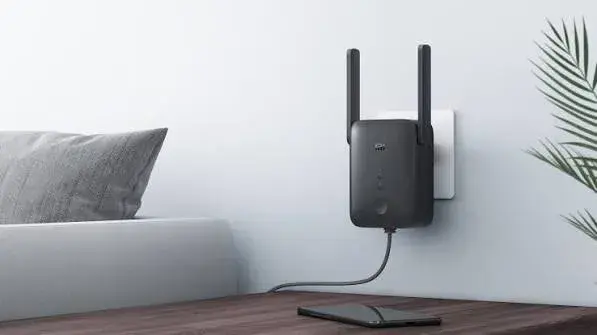
A Wi-Fi extender, also called a repeater or booster, is a small device that plugs into a wall socket. It listens to your router's signal, and sends it out again from where it sits. If you place it about halfway between your router and the weak room, devices in that room connect to the extender, which has a strong signal from the router, instead of straining to reach the distant router.
Think of it as a relay runner. The router can only shout so far, and the extender stands in the middle and passes the message on.
What it does well
- Fills dead spots in bedrooms, back rooms, upstairs floors and corners.
- Keeps devices connected without constant dropouts.
- Works with your existing router, with no need to replace anything.
- Plugs in and starts working in minutes.
- Needs no cables through walls.
- Is a far smaller step than replacing your whole network.
What it cannot do
- It cannot make your internet plan faster. An extender spreads the connection you already have. It does not increase the speed you pay for.
- It cannot create signal from nothing. It needs a decent signal from the router to repeat.
- It will not match a cable. A wired connection will always be steadier.
We say this plainly because buyers deserve the truth, and because understanding the limits is the key to being happy with the result. Used where it fits, an extender is one of the best value upgrades you can make to a home network.
Why a Mi Wi-Fi extender?
There are many extenders on the market, from well-known brands to unbranded units of doubtful quality. We stock three Xiaomi Mi Wi-Fi range extenders, and here is why we recommend them.
1. A brand with a track record
Xiaomi is a major electronics maker with products in many countries, and its Mi Wi-Fi range extenders are sold under its own name with a published specification. A branded, specified product is easier to trust than an unbranded box with a vague label.
2. Compact and neat
The N300 and the Pro measure about 80 x 54 x 70 mm, and the AC1200 about 84 x 100 x 82 mm, as published (size varies by region because of the plug shape). They plug directly into a wall socket, and do not take up shelf space.
3. Real security
All three support WPA-PSK and WPA2-PSK encryption, so your wireless traffic is encrypted and joining needs your password.
4. A clear choice for different needs
You can pick the model that fits your home:
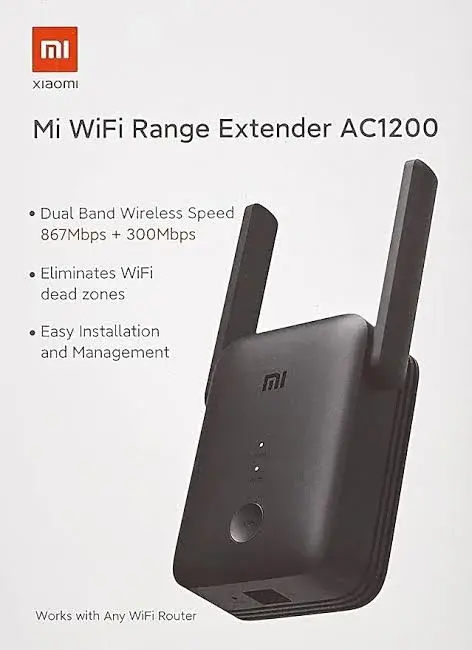
- Mi Wi-Fi Range Extender AC1200: dual-band, with up to 867 Mbps on 5 GHz and up to 300 Mbps on 2.4 GHz, one 10/100 Mbps Ethernet port, a WPS button and both range extender and access point modes.
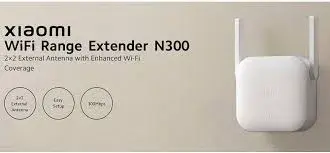
- Mi Wi-Fi Range Extender N300: a compact 2.4 GHz extender with up to 300 Mbps and two external antennas.
- Mi Wi-Fi Range Extender Pro: a compact 2.4 GHz extender with up to 300 Mbps, two external antennas and a MediaTek MT7628K processor.
Our comparison guide helps you choose between them.
5. Local support
When you buy from City Gadgets Kenya, you can visit the shop, ask questions, have the plug checked for Kenyan sockets and get help setting it up. We confirm the warranty in writing for the exact unit. You can pay by M-Pesa, collect free from the shop, or have it delivered: same day in Nairobi for orders before 3pm, and by courier within one to three business days elsewhere.
Is an extender right for your home?
Use this simple test.
An extender is a great fit if:
- Your router gives good speed in one part of the home and weak speed in another.
- The weak area still gets some signal, for example one or two bars.
- You rent, or cannot run cables through walls.
- You want a quick, low-effort fix.
- Your problem is coverage, not the plan's speed.
An extender is probably not the best fit if:
- Your internet is slow everywhere, even next to the router. The plan, the provider or the router is the problem.
- The weak area gets no signal at all. The extender needs something to repeat.
- You need the fastest possible, most stable connection for competitive gaming or heavy work in one room. A cable is better.
- You need to cover several buildings or a large compound. You may need cabled access points.
If you are unsure, bring a quick description to the shop, or call us. We will tell you honestly.
Where to put the extender: the one rule that matters
The most common reason people are disappointed with an extender is putting it in the wrong place. The rule is simple: put it halfway between the router and the weak area, where the signal is still good.
Do not put it in the dead spot. If the signal there is already weak, the extender will receive a weak signal and repeat a weak signal. Instead, walk from the router towards the weak room with your phone and watch the Wi-Fi bars. Stop where you still have a good signal, ideally three or four bars. That is where the extender should go.
More placement tips:
- Keep it in the open, not behind furniture, in cupboards or beside large metal objects.
- Keep it away from microwaves and cordless phones.
- Mind the socket height. A mid-height socket is usually better than one near the floor.
- Keep it dry. Avoid bathrooms and steamy kitchens.
- Test the speed in the weak room after you set it up, and move the extender if needed.
How easy is setup?
Setup takes a few minutes. In outline:
- Plug the extender into a socket close to the router.
- Wait for it to start.
- Connect to it following the instructions in the user manual or the manufacturer's app.
- Choose your router's Wi-Fi network and enter its password.
- Move the extender to its final position halfway to the weak area.
- Test the signal in the weak room.
The details vary by model and software version, so we confirm the method for your unit. If you buy from us, we set it up with you at the shop, or by phone and video if you order for delivery.
What speed should you expect?
The published figures, 300 Mbps for the N300 and the Pro, and 867 Mbps on 5 GHz plus 300 Mbps on 2.4 GHz for the AC1200, are the maximum link speeds of the radios under ideal conditions. They are not what you will see in your home. Real speeds are lower, because of distance, walls, interference and the fact that an extender must receive and send data. And the extended connection can never be faster than the internet plan you already have.
What matters is what you gain. If a room goes from "unusable" to "good enough for video calls, streaming and browsing", the extender has done its job. That is the realistic promise, and for most families it is exactly what they need.
Real situations where an extender helps
The bedroom at the end of the corridor
The router sits in the living room, and the master bedroom is behind two walls. The phone shows one bar, and videos buffer. An extender in the corridor gives the bedroom a strong signal.
The upstairs floor of a maisonette
The router is downstairs, and the upstairs rooms have patchy coverage. An extender on the landing, in a spot where the signal is still good, covers the upstairs.
The home office at the back
Someone working from home takes calls in a back room, and the connection drops during meetings. An extender between the router and the office stabilises the call.
The smart TV in the far lounge
The TV buffers in the evening. An extender near the TV, or halfway to it, fixes it, or an Ethernet cable from the AC1200's port gives the TV a wired connection.
The small shop with a back room
A shop owner wants Wi-Fi at the till and in the stockroom. An extender between them covers both.
The student in a rented room
A student in a hostel or rented room cannot run cables and shares the router with others. An extender helps, subject to the building's rules.
Smart home devices and cameras
Many smart plugs, bulbs and home cameras connect only on 2.4 GHz and need a stable signal. A 2.4 GHz extender, such as the N300 or the Pro, gives them one. If you have a Xiaomi Mi 360° camera, read our camera setup guide for tips on Wi-Fi and placement.
Power cuts and surges
Extenders have no battery and switch off when the power goes, along with your router, unless you have a backup. If your internet matters to you, a small UPS for the router and the extender keeps the network up through short outages. Plug your equipment into a surge-protected extension, since power surges are a risk when electricity returns.
Security: keep your network private
An extender extends your network, including its security.
- Use a strong Wi-Fi password on your router.
- Use WPA2 security.
- Change default passwords.
- Update your devices' software.
- Do not share your password widely. Anyone connected to the extender is connected to your network.
Why buy from City Gadgets Kenya
- We are in Nairobi CBD, at New Alnoor Exhibition, Shop 7, Second Floor, Taveta Road, at the Taveta and Accra Road junction.
- We open Monday to Friday 9am to 7pm and Sunday 11am to 4pm, and close on Saturday.
- You can see the unit before you pay, and we check the plug fits Kenyan sockets.
- We confirm the warranty in writing for the exact unit.
- We help you set it up.
- M-Pesa is accepted, shop collection is free, and delivery is available.
- We tell you the truth, including when an extender is not the right fix.
A ten-minute home survey before you buy anything
The best way to avoid disappointment is to survey your own home first. You need only a phone and a pen. Walk through the house with a speed-test app open and write down what you see in each room.
Step 1: Mark the router
Draw a rough sketch of your home. Mark where the router sits, which walls are thick stone or concrete, and where the weak rooms are. Even a sketch on the back of an envelope helps, and it is exactly what we ask to see at the shop when someone wants advice.
Step 2: Test beside the router
Stand next to the router and run a speed test. Write the download and upload figures down. This is your best case. Nothing you add later can beat it.
Step 3: Test in each room
Walk to each room, stand where you normally use your phone or laptop, and test again. Note the bars and the speed. You will often find the pattern is clear: fast in two rooms, acceptable in one, poor in the rest.
Step 4: Find the halfway point
For each weak room, walk back toward the router until the signal is clearly good again, three or four bars and a decent speed. That is the candidate spot for the extender. It must be near a wall socket, so look for one in the corridor, on the landing or in the room next to the weak one.
Step 5: Decide whether one unit is enough
If the weak rooms are all on the same side of the house, one extender usually covers them. If they are on opposite sides, you may need two, or a different approach. Our comparison of extenders, mesh, routers and powerline explains how to decide.
The two Wi-Fi bands, explained for ordinary people
Most trouble with extenders comes from confusion about bands, so a short explanation pays off.
Your router talks to your devices on radio channels grouped into two bands. The 2.4 GHz band reaches further and passes through walls more easily, but it is crowded and slower. The 5 GHz band is faster and cleaner, but it does not travel as far and is weaker through walls.
Think of 2.4 GHz as a deep, carrying voice that you can hear from the next room but that is often drowned out by other conversations. Think of 5 GHz as a clear, quiet voice that works well across a table but fades quickly down a corridor.
For an extender this matters in two ways. First, an extender can only repeat the bands it supports. The Mi N300 and the Mi Pro work on 2.4 GHz. The Mi AC1200 works on both. Second, the band you use between the router and the extender should be one that carries well. In a home with thick walls, the 2.4 GHz band is often the one that reaches the extender reliably.
If you are unsure what your router offers, look at the Wi-Fi names on your phone. Many routers show two names, often with "5G" in one of them. Some show only one. If you see only one name, ask us about your router model, and we will tell you what it supports.
The most common mistakes, and how to avoid them
We have helped many customers with extenders, and the same mistakes come up again and again.
Mistake 1: Placing it in the dead spot. An extender in a room with no signal has nothing to repeat. Place it where the signal is still good.
Mistake 2: Placing it too close to the router. If the extender sits right next to the router, it adds almost no coverage. It must be far enough to reach new areas, but close enough to receive a strong signal.
Mistake 3: Expecting a faster plan. An extender cannot exceed the speed of your internet plan. If your plan gives a modest speed, the extender will not change that.
Mistake 4: Hiding it behind furniture or metal. Open, mid-height positions work best.
Mistake 5: Using a 2.4 GHz-only model when you wanted 5 GHz. Check the bands before you buy.
Mistake 6: Connecting devices to the wrong network. After setup, some phones stay connected to the weak router signal instead of the stronger extender. Turn Wi-Fi off and on in the weak room to reconnect.
Mistake 7: Forgetting power protection. A surge can damage both the router and the extender. A surge-protected extension is a sensible safeguard.
Mistake 8: Stacking many extenders. Each hop adds delay. One well-placed unit is better than three badly placed ones.
Mistake 9: Buying from a seller you cannot reach. A unit without a clear warranty or a shop to visit leaves you stranded if something goes wrong.
If it does not work right away: a simple troubleshooting list
Most problems are fixable in minutes.
- The extender will not connect to the router. Move it closer to the router, check you entered the Wi-Fi password correctly, and try again.
- The signal is still weak in the room. Move the extender a little closer to that room, but keep it where its own signal from the router stays good.
- Speeds are slow. Run the test beside the extender, and then in the room. If it is good beside the extender but poor in the room, the room is too far.
- Devices will not switch networks. Toggle Wi-Fi on the device.
- The extender keeps dropping. Check for interference from a microwave or cordless phone, and try a different socket.
- You forgot the password. The extender can usually be reset with its reset method as described in the manual, and set up again.
- Nothing works. Bring it to the shop, and we will test it with you.
Who benefits most: family situations we see
The work-from-home parent. A video call from the bedroom keeps freezing. An extender in the corridor makes the call stable, and the family can stream in the lounge at the same time.
The students sharing a house. Four students, one router, one weak back room. An extender covers the back room, and rules about heavy downloads at peak times help the rest.
The landlord who offers Wi-Fi to tenants. A single router cannot reach every unit. Extenders can help in a small building, and cabled access points are the next step for a larger one.
The family with a new smart TV. The TV is in the one room the router cannot reach. The AC1200's Ethernet port gives the TV a cable connection.
The shopkeeper with a stockroom. The stockroom has a card terminal or a stock app that needs a connection. An extender covers it.
The home with guests who need a signal in the spare room. A simple extender gives a visitor a usable connection.
Myths about extenders
"An extender doubles my speed." It does not. It extends coverage.
"Any extender works the same." They differ in bands, ports, modes and build.
"I need an extender because my provider is bad." Often the provider is fine, and the signal is simply not reaching the room.
"A bigger number on the box means faster Wi-Fi." Numbers like AC1200 are marketing totals that add maximum speeds together. No single device gets the total.
"Extenders are only for large homes." They help small homes with thick walls just as well.
"Extenders make my network insecure." A WPA2-protected extender keeps your traffic encrypted. Use a strong password.
What to do after the extender is working
- Name the network clearly if the extender lets you, so you know which one you are on.
- Test again after a week, at different times of day.
- Keep a note of the spot you found, in case you move the furniture.
- Share the password carefully.
- Revisit your setup if you add devices or move house.
A short checklist before you visit or call us
- Which router do you have, and which provider?
- Does it offer 5 GHz?
- Which rooms are weak?
- How many walls are between the router and those rooms?
- What do you use in the weak room: phones, a TV, a laptop, a camera?
- Can you run a cable if needed?
- Do you need a wired port for a TV or console?
With these answers, we can usually recommend the right Mi extender within minutes. You can call Sales on 0745 575 931 or write to sales@citygadgetskenya.co.ke.
Extender, access point or repeater: what the words mean
Shops and websites use several words for similar things, and the confusion wastes buyers time.
Range extender or repeater. A device that picks up your router's wireless signal and sends it out again. This is what the Mi extenders do by default.
Access point. A device that connects to your router by cable and creates a new Wi-Fi network at its location. The Mi AC1200 can work in this mode. It is usually the stronger way to extend coverage, because the link back to the router is a cable and not a radio.
Booster. A casual word for either of the above.
Mesh node. A unit in a mesh system, designed to work with the others as one network.
Knowing these words helps you read product pages and ask sensible questions. If a seller cannot tell you whether a device is a repeater or an access point, be careful.
A week-by-week plan for a happier network
You do not have to fix everything in a day. Here is an easy plan.
Day 1: Survey. Do the ten-minute home survey above, and write down your results.
Day 2: Free fixes. Move the router to a better place if you can, and restart it. Test again.
Day 3: Decide. If the weak rooms are still weak, decide which extender fits your router and your devices. Call or visit us if you want a second opinion.
Day 4: Install. Plug in the extender, connect it and place it halfway to the weak room.
Day 5: Test. Run the same tests as on Day 1 and compare.
Day 6: Fine-tune. Move the unit a little if needed, and reconnect devices.
Day 7: Protect. Add a surge-protected extension, think about a small UPS and check your Wi-Fi password.
By the end of the week, you will know whether the problem is solved, and you will have notes to prove it.
Why a local shop matters when you buy networking gear
Networking products look simple, but small details cause big headaches: the wrong plug, the wrong band, a missing warranty card, a unit that was never meant for your region. Buying from a shop you can visit removes most of that risk.
At City Gadgets Kenya you can hold the box, check the model number, ask the question that occurred to you in the shop, and come back if something is not right. We are at New Alnoor Exhibition, Shop 7, Second Floor, Taveta Road, at the Taveta and Accra Road junction in Nairobi CBD. We open Monday to Friday 9am to 7pm and Sunday 11am to 4pm, and we are closed on Saturday. If you cannot come, we deliver: same day in Nairobi for orders before 3pm, and by courier within one to three business days elsewhere. M-Pesa is accepted, and collecting from the shop is free.
Small habits that keep Wi-Fi healthy
- Restart your router occasionally, perhaps once a month.
- Keep devices updated. Old software can be slow and insecure.
- Remove devices you no longer use from your network.
- Do not leave heavy downloads running during important calls.
- Keep the router and the extender dust-free and ventilated.
- Label your cables and sockets, so that you do not unplug the wrong thing during a power cut.
- Change your Wi-Fi password if you have shared it widely.
Frequently overlooked questions
Will the extender work with my provider's router?
In most cases, yes. It only needs the router's Wi-Fi name and password. If your router has unusual security settings, tell us, and we will check.
Will it slow down the rest of my network?
An extender shares the router's capacity. If many devices use it at once, the speed is shared between them. For ordinary homes this is rarely a problem.
Can I plug it into an extension cord?
You can, but a direct wall socket is better. If you use an extension, make it a good surge-protected one.
Is it safe to leave it on all the time?
Extenders are designed to stay plugged in, and they use little power. The N300 and the Pro list about 3.57 W. Keep them ventilated and dry.
What if I move house?
Unplug it and take it with you. It works with a new router once you reconnect it.
Can I get help setting it up by phone?
Yes. Call Sales on 0745 575 931, or Customer Relations on 0794 488 806, and we will walk you through it.
Frequently asked questions
Will an extender make my internet faster?
No. It extends coverage. It cannot make your plan faster, but it can make the speed you pay for reach the rooms that were not getting it.
Will it work with my router?
It works with most standard Wi-Fi routers. Tell us your router's model and we will confirm.
Do I need the AC1200, or will the N300 do?
It depends on your router and devices. The AC1200 is dual-band and has an Ethernet port. The N300 and the Pro are 2.4 GHz only. See our comparison guide.
Does it work during a power cut?
No. It has no battery. Use a small UPS if you want the network to stay up.
Can I use more than one extender?
Yes, but each extender adds delay, and too many can hurt performance. For large homes, a different solution may be better. Ask us.
Can I buy and test it?
Yes. Visit the shop on Taveta Road, and we will show you.
The bottom line
Weak Wi-Fi is annoying, but it is rarely a mystery, and it is often fixable without drastic changes. A Mi Wi-Fi extender, placed sensibly, is the simplest and one of the simplest ways to give a weak room a usable connection. It will not turn a slow plan into a fast one, and we will never pretend that it does. What it will do is bring the signal you already pay for to the rooms where you actually live and work.
Come to the shop, call Sales on 0745 575 931, or write to sales@citygadgetskenya.co.ke, and tell us about your home. We will help you choose the right extender, set it up and make sure you are happy before you leave. For help after purchase, Customer Relations is on 0794 488 806.