HP LaserJet Tank MFP 2602sdn Mono Laser All-in-One Printer with Refillable Toner in Kenya | City Gadgets Kenya
Same-day delivery in Nairobi by 8 Oct – 9 Oct
Description
Buy the genuine HP LaserJet Tank MFP 2602sdn A4 monochrome laser all-in-one with refillable toner tank, automatic duplex, ADF and Ethernet in Kenya from City Gadgets Kenya. HP 2602sdn price in Kenya, low-cost laser printer Nairobi, refillable toner printer. A complete buyer's guide.
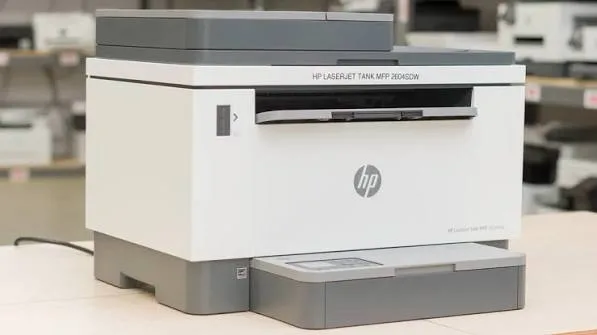
HP LaserJet Tank MFP 2602sdn Mono Laser All-in-One Printer with Refillable Toner in Kenya
Genuine HP | Brand New | A4 Monochrome Laser Print, Copy and Scan | Refillable Toner Tank | Automatic Duplex | Automatic Document Feeder | Ethernet and USB
Searching for the HP LaserJet Tank 2602sdn price in Kenya, a laser printer with refillable toner in Nairobi, or a low-cost-per-page black-and-white office printer? The HP LaserJet Tank MFP 2602sdn is a brand-new, genuine A4 monochrome laser all-in-one that prints, copies and scans, and uses a refillable toner tank instead of a disposable cartridge. It prints at up to 22 pages per minute, prints automatically on both sides, has an automatic document feeder, and connects by Ethernet and USB. It's available from City Gadgets Kenya with delivery across Kenya. Buyers also search for it as an HP LaserJet Tank 2602sdn, an HP 2602sdn, a refillable laser printer, a cheap laser printer with low running costs, a mono laser printer with duplex and ADF, a toner tank printer, or a laser alternative to an ink tank printer.
This guide explains the printer in plain language: how a toner tank laser works, why it's cheaper to run than an ordinary laser, how it compares with the Epson ink tank printers in our range, and where it's limited. If you'd like to talk it through, message us on WhatsApp.
The short verdict
The HP LaserJet Tank MFP 2602sdn tries to give you the best of two worlds: a laser's sharp, dry, always-ready output, with an ink tank printer's low cost per page. Its toner is refillable, so instead of buying an expensive new cartridge each time, you pour in a reload kit in seconds. The printer arrives pre-filled with enough toner for roughly 5,000 pages, prints at 22 pages per minute, and includes automatic duplex and a document feeder, which many small laser printers lack. It's black-and-white only, it connects by Ethernet and USB without Wi-Fi in this version, and it has no fax. If you print a moderate to high volume of black-and-white documents and want a laser's reliability with low running costs, it's an excellent choice. If you need Wi-Fi or fax, see the 2602sdw variant, the HP 137fnw or the Epson M3170.
How a toner tank laser works
An ordinary laser printer uses a cartridge that holds toner and a drum, and when the toner runs out, you replace the whole cartridge. A toner tank printer is built differently.
- A large built-in toner tank holds a lot of toner, and an imaging drum sits in the printer.
- Reload kits. When the toner runs low, you pour in a reload kit, such as the HP 153A (about 2,500 pages) or 153X (about 5,000 pages), and HP says it takes about 15 seconds.
- A pre-filled start. The printer comes with toner for roughly 5,000 pages, so you won't need to reload for a long time.
- Lower cost per page. Reload kits cost much less per page than complete cartridges.
- Less waste. You keep the drum and replace only the toner.
The idea is simple: keep the laser's speed, sharpness and no-dry-out reliability, and cut the running cost.
Who this printer is for
It suits you if:
- You print mostly black-and-white documents, a few hundred to a couple of thousand pages a month.
- You want a laser's sharp, smudge-resistant text and no risk of ink drying out.
- You want a lower cost per page than a standard laser.
- You want automatic double-sided printing and a document feeder.
- You use a wired network, or a single computer by USB.
Look elsewhere if:
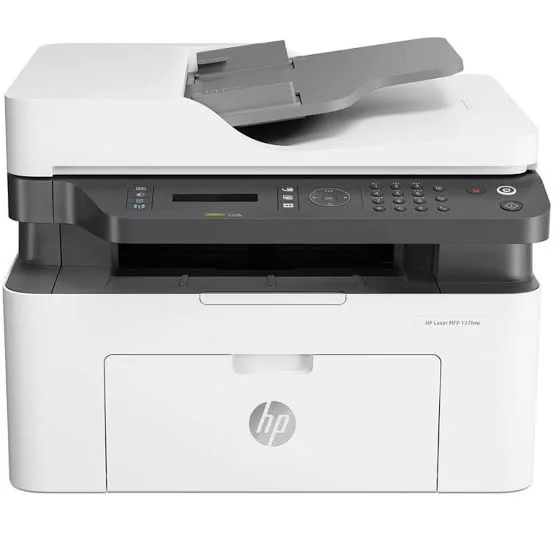
- You need Wi-Fi. See the HP LaserJet Tank 2602sdw, the HP 137fnw or the Epson models.
- You need fax. See the HP 137fnw or the Epson Monochrome M3170.
- You need colour. See the Epson EcoTanks or HP Color LaserJet Pro models.
- You print photos.
What the letters mean
HP's model names carry meaning.
- 2602 is the model family.
- s means it includes a document feeder and a more complete feature set.
- d means automatic duplex printing.
- n means built-in network (Ethernet) connectivity.
- w (in the 2602sdw) means wireless. The sdn here has no Wi-Fi.
Specifications in plain English
| Feature | Detail | What it means for you |
|---|---|---|
| Model | HP LaserJet Tank MFP 2602sdn (2R7F6A) | HP's refillable toner mono laser MFP |
| Functions | Print, copy and scan | Three jobs in one machine |
| Colour | Black-and-white printing and copying. The scanner can scan in colour | Text and forms |
| Print speed | Up to 22 ppm (A4). Duplex up to about 14 ipm | A steady office speed |
| Duplex | Automatic | Saves paper and time |
| Document feeder | Yes, about 40 sheets (no duplex ADF scanning) | Scan and copy stacks |
| Print quality | Up to 600 x 600 dpi | Sharp text |
| Toner | Pre-filled for roughly 5,000 pages. Reload kits 153A (about 2,500 pages) and 153X (about 5,000 pages) | A low cost per page |
| Monthly duty cycle | Up to 25,000 pages | The maximum capacity |
| Recommended monthly volume | 250 to 2,500 pages | The comfortable range |
| Scan speed | Up to 19 ppm black-and-white and 10 ppm colour | Fast enough for stacks |
| Connectivity | Hi-Speed USB 2.0 and Ethernet. No Wi-Fi on the sdn | Wired connections |
| Mobile printing | HP Smart app, Apple AirPrint and Mopria, over the network | Print from phones on the network |
| Power saving | HP Auto-On and Auto-Off | Lower energy use |
These figures come from HP's data sheet and retailer listings of the 2602 series. Ask us to confirm the exact configuration and what's in the box for the unit you order.
Toner tank versus ink tank: which is cheaper?
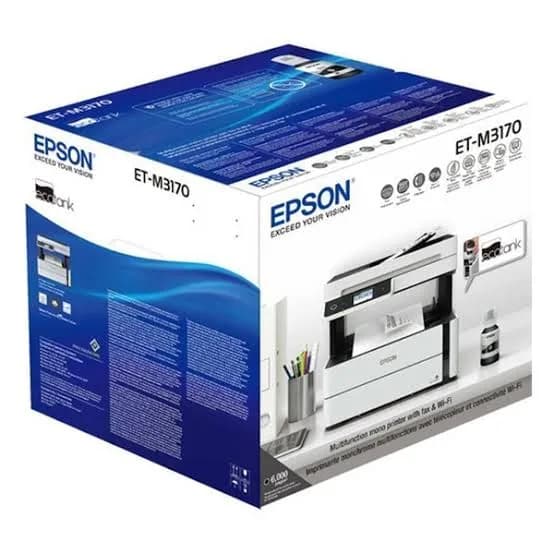
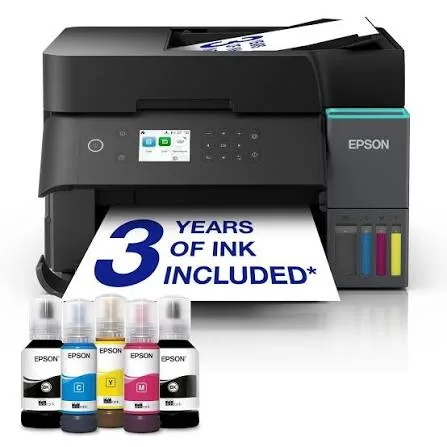
Both printers are designed to cut cost per page, so here is an honest comparison with the Epson Monochrome M3170 in our range.
HP LaserJet Tank 2602sdn
- Laser output, with fine toner powder, and no head to clog.
- Reload kits of about 2,500 or 5,000 pages.
- Automatic duplex and a 40-sheet feeder.
- No fax and no Wi-Fi on this version.
- 22 ppm.
Epson Monochrome M3170
- Pigment ink, with very high-yield bottles.
- A feeder, fax, Ethernet and Wi-Fi.
- Up to 39 ppm in draft mode.
- Ink needs regular use to keep the head healthy.
Both cost far less per page than a standard cartridge laser. The HP suits people who prefer laser reliability and a tidy, powdery refill. The Epson suits people who need fax or Wi-Fi, or the lowest per-page cost. Tell us your volume and needs, and we'll recommend honestly.
Refilling the toner: how it works
Refilling is quick and clean when you follow the steps.
- Wait until the printer prompts you, or until prints turn faint.
- Switch off the printer and open the toner access cover.
- Open the refill port on the tank.
- Attach the reload kit's nozzle to the port, and let the toner flow.
- Remove the kit and close the port.
- Close the cover and switch on.
- Print a test page.
Tips: refill over a sheet of paper, keep the printer level, use genuine HP reload kits, and keep children away from toner powder. Wipe any spills with a dry cloth, not a wet one.
Paper handling and duplex
Automatic duplex saves half your paper on multi-page documents.
- Choose two-sided printing in the print dialog.
- Use good-quality 80 gsm paper, which feeds reliably in duplex.
- Keep paper dry and flat, because humidity causes jams.
- Don't overfill the tray.
- The document feeder holds about 40 sheets, but it scans single-sided pages only. For double-sided originals, scan each side or use the glass.
Setting up the printer
- Choose a location with good ventilation and a flat, sturdy surface.
- Unbox and remove all packing tape and shipping protection.
- Check the toner tank and drum are fitted, following the setup guide.
- Load plain A4 paper.
- Connect the network cable or USB cable.
- Install the HP driver or use the HP Smart app.
- Print a test page, and test duplex, copying and the feeder.
A worked example: what a toner tank saves
Numbers show why a tank laser is attractive, using figures you can replace with real prices.
- Find the price of a reload kit and its rated pages: about 2,500 for the 153A and about 5,000 for the 153X. Ask us for current prices.
- Divide the price by the pages to get the cost per page.
- Do the same for a standard cartridge laser, such as the HP 137fnw, using its cartridge price and yield.
- Multiply the difference by your monthly pages. At 2,000 pages a month, the saving over a year can be large.
- Add the purchase prices and see how many months it takes to catch up.
The more you print, the more the tank design saves. If you print only a few hundred pages a month, the saving is smaller, and a basic laser may do.
The 2602 family: sdn, sdw and dn
HP sells the 2602 in several versions, and it helps to know the differences.
- 2602dn: print, scan and copy, with duplex and Ethernet, without a document feeder or Wi-Fi.
- 2602sdn (this model): adds the document feeder, with Ethernet and USB.
- 2602sdw: adds Wi-Fi and Bluetooth Low Energy to the sdn, for wireless setup and printing.
If you want to print from phones without a network cable, the sdw is the version to choose. If you work on a wired office network, the sdn is the economical one. Ask us what we have in stock, and whether we can supply the sdw.
Copying and scanning with the feeder
The 40-sheet feeder speeds up everyday paperwork.
- Copy stacks. Place pages in the feeder, choose the number of copies and press start. Copies are black-and-white.
- Scan stacks. Scan to your computer or a network folder, at up to about 19 pages per minute in black and white.
- Single-sided only. The feeder scans one side per pass. For double-sided originals, scan each side, or use the glass.
- Use the glass for fragile documents, books and IDs.
- Scan settings. 200 to 300 dpi in greyscale or black and white is plenty for documents.
- Keep scans organised, with consistent file names and a backup to the cloud and an external drive from our range.
Printing for a school, clinic or small company
A school. Print exams, notes and circulars with duplex, and copy documents for parents. Refilling toner takes seconds, so a busy term isn't interrupted.
A clinic. Print forms and letters, scan referral letters, and copy IDs. Laser text resists smudging, which suits documents that get handled.
A small company. Share the printer over the office network, print reports double-sided and scan contracts through the feeder.
A print and copy shop. A low cost per page and a 25,000-page duty cycle suit regular black-and-white jobs.
In each case, keep a spare reload kit and a surge protector, and a named person to check paper and toner weekly.
Common problems and simple fixes
Paper jams. Switch off, open the cover, and pull the paper out in the direction of travel. Use dry, good paper and don't overfill the tray.
Faint prints. Toner may be low. Refill with a genuine reload kit.
Streaks or marks. Clean the glass and the paper path gently, and check the drum area for dirt.
Duplex pages jam. Use good-quality paper and make sure it's straight.
Can't be found on the network. Check the Ethernet cable and router, restart the printer and confirm the IP address hasn't changed.
Scans have lines. Clean the scanner glass and the feeder strip.
Error messages about supplies. Use genuine HP reload kits, and reseat the toner tank and drum.
If a problem continues, message us on WhatsApp.
Questions to ask before you buy a tank laser
- How many pages will I print each month?
- Do I need Wi-Fi? If yes, ask for the sdw.
- Do I need fax or colour? If yes, choose a different model.
- What does a reload kit cost, and what is the real cost per page?
- What's in the box, and does it include a pre-filled toner tank?
- What warranty is included, and who honours it? Get it in writing.
- Can I see it before I pay? A trustworthy seller says yes.
We're glad to answer all of these on WhatsApp or in the shop before you pay.
Looking after the printer for years
- Keep it in a ventilated, dust-free spot.
- Use genuine HP reload kits and good paper.
- Clean the glass and body with a soft, dry cloth.
- Keep firmware updated.
- Protect the power with a surge protector.
- Don't block the vents, and leave space around the printer.
- Keep a spare reload kit.
Warranty and after-sales: what to ask
A printer is a long-term purchase, so ask us what warranty covers the unit you order, how long it lasts and what it covers. Printers normally exclude consumables such as toner, and damage from non-genuine supplies or misuse. Keep your receipt, the serial number and the box. If a fault appears, message us on WhatsApp first, and we'll tell you the quickest way to get it sorted.
Getting good print quality from a mono laser
Laser output is sharp by nature, and a few habits keep it that way.
- Use good-quality paper. Smooth, dry 80 gsm paper gives the crispest text.
- Match the paper type in the print dialog, so the fuser uses the right heat.
- Use standard quality for everyday work, and keep economy mode for drafts.
- Keep the printer level and away from heat.
- Don't touch the drum area, and keep dust out when you refill.
- Print a test page after refilling, and again if you see streaks.
- Replace the imaging drum when the printer or its software says it's near the end of life, using genuine parts.
Why wired networking is worth it
This version connects by Ethernet and USB, and for an office, wired networking has real advantages.
- Stability. A cable doesn't drop out because of signal strength or interference.
- Speed. Large jobs travel faster over a cable.
- Security. A wired connection is harder to snoop on than wireless.
- Simplicity. Plug in, reserve an IP address and forget about it.
- Printing from phones. On the same network, AirPrint and Mopria still work, so phones can print without Wi-Fi on the printer itself, as long as they share the network through your router.
If your office has no network cable at the printer's location, ask us about the sdw version with Wi-Fi.
Saving energy and paper
A printer that runs all day should be kind to your electricity and paper bills.
- HP Auto-On and Auto-Off. The printer wakes when a job arrives and powers down after a period of inactivity, which cuts standby power use.
- Duplex by default. Set two-sided printing as the default, and halve paper use on multi-page documents.
- Print preview. A quick look prevents blank or repeated pages.
- Economy mode for internal drafts.
- Fewer reprints. Good paper and correct settings reduce wasted pages.
- Switch off at the end of the week, with the power button, if the printer won't be used.
Over a year, these small habits can save a lot, especially in an office with several machines.
Understanding the numbers: ppm, ipm and duty cycle
Printer specifications use several terms, and a short guide helps.
- ppm means pages per minute, a speed measured on simple pages in normal mode. This printer is rated up to 22 ppm.
- ipm means images per minute, which often counts duplex sides. The printer's duplex rate of about 14 ipm reflects the extra time to flip and print the second side.
- Duty cycle is the maximum number of pages the printer can handle in a month. This one is up to 25,000.
- Recommended monthly volume is the comfortable range, 250 to 2,500 pages here.
- Yield is the number of pages a toner reload prints on a standard test, about 2,500 or 5,000 here.
Use these numbers to compare models, then confirm with us what they'll mean for your own work.
Using a printer in Kenya
Power protection. Laser printers draw a lot of power when they warm up. Use a surge protector, and don't plug a laser printer into a UPS meant for computers.
Heat, dust and humidity. Keep the printer in a ventilated, clean spot. Humid paper curls and jams.
Toner storage. Keep reload kits sealed, upright and away from heat and sunlight.
Network safety. Change the printer's default admin password, and keep it off public networks.
Warranty. Ask us for the warranty that applies to the unit you order, and keep the receipt and box.
How it compares with other options in our range
| HP LaserJet Tank 2602sdn | HP Laser MFP 137fnw | Epson M3170 | HP Color LaserJet Pro M182n | |
|---|---|---|---|---|
| Technology | Laser, refillable toner tank | Laser, toner cartridge | Ink tank | Colour laser, cartridge |
| Colour | No | No | No | Yes |
| Automatic duplex | Yes | No | Confirm | No |
| Document feeder | Yes | Confirm | Yes | No |
| Fax | No | Yes | Yes | No |
| Wi-Fi | No (sdn) | Yes | Yes | No |
| Cost per page | Low | Medium | Very low | Medium to high |
| Best for | Moderate to heavy mono use | Light to moderate mono use with fax | Heavy mono use with fax | Light colour use |
Honest pros and cons
Pros
- A refillable toner tank, with a low cost per page.
- Pre-filled for roughly 5,000 pages.
- Laser sharpness, with no ink to dry out.
- Automatic duplex and a 40-sheet document feeder.
- A high duty cycle of up to 25,000 pages.
- Fast, tidy refills.
Cons
- Black and white only.
- No Wi-Fi on this version, and no fax.
- 22 ppm is moderate.
- The feeder scans single-sided pages only.
- A higher purchase price than a basic laser.
What to check when it arrives
- The box model matches HP LaserJet Tank MFP 2602sdn.
- The printer, power cable and setup paperwork are in the box.
- All packing tape and shipping protection are removed.
- A test page, duplex printing, copying and scanning work.
- The network or USB connection works.
- You get a receipt with the serial number and warranty details in writing.
Frequently asked questions
What is the HP LaserJet Tank 2602sdn price in Kenya? We confirm the current price when you message us on WhatsApp, because supplier prices change. We tell you the price and what's in the box before you pay.
Where can I buy the HP 2602sdn in Nairobi? At City Gadgets Kenya, New Alnoor Exhibition, Second Floor, Shop C7, Accra Road, Nairobi CBD, or by delivery.
Does it have Wi-Fi? The sdn version has Ethernet and USB. The sdw version adds Wi-Fi.
Does it print double-sided automatically? Yes.
Does it have a document feeder? Yes, about 40 sheets, for single-sided scanning and copying.
How many pages does the toner print? It's pre-filled for roughly 5,000 pages. Reload kits print about 2,500 or 5,000 pages.
Does it fax? No.
What warranty does it have? Ask us for the warranty that applies to the unit you order.
Can you deliver it? Yes, same day in Nairobi and next day outside Nairobi.
Can I pay via M-Pesa? Yes.
Why buy from City Gadgets Kenya
Genuine, brand-new HP printer. We're at New Alnoor Exhibition, Second Floor, Shop C7, Accra Road, Nairobi CBD, and you're welcome to look at the printer before you buy. Message us on WhatsApp with how much you print and whether you need Wi-Fi or fax, and we'll tell you honestly whether the 2602sdn is right or another model would suit you better. We confirm what's in the box before you pay.
Order your HP LaserJet Tank MFP 2602sdn today
Available now at City Gadgets Kenya. Message us on WhatsApp.
Specifications
- Brand
- HP
- Condition
- New
Frequently Asked Questions
How much does the HP LaserJet Tank MFP 2602sdn Mono Laser All-in-One Printer with Refillable Toner in Kenya | City Gadgets Kenya cost in Kenya?
The HP LaserJet Tank MFP 2602sdn Mono Laser All-in-One Printer with Refillable Toner in Kenya | City Gadgets Kenya is priced at Ksh 60,500 at City Gadgets. You can pay via M-Pesa, card or cash on delivery.
Is the HP LaserJet Tank MFP 2602sdn Mono Laser All-in-One Printer with Refillable Toner in Kenya | City Gadgets Kenya available in Kenya?
Yes — the HP LaserJet Tank MFP 2602sdn Mono Laser All-in-One Printer with Refillable Toner in Kenya | City Gadgets Kenya is in stock at City Gadgets, ready for same-day delivery in Nairobi and countrywide shipping across Kenya.
Is the HP LaserJet Tank MFP 2602sdn Mono Laser All-in-One Printer with Refillable Toner in Kenya | City Gadgets Kenya genuine and does it have a warranty?
Every HP LaserJet Tank MFP 2602sdn Mono Laser All-in-One Printer with Refillable Toner in Kenya | City Gadgets Kenya we sell is 100% genuine brand-new stock and comes with a 12-month official brand warranty.
Do you deliver the HP LaserJet Tank MFP 2602sdn Mono Laser All-in-One Printer with Refillable Toner in Kenya | City Gadgets Kenya in Nairobi?
Yes. We offer fast same-day delivery within Nairobi and fast, affordable delivery to the rest of Kenya — order online or on WhatsApp.
Customer Reviews
No reviews yet
Be the first to review this product.
Rate us on Google
Your review helps other shoppers find us
Reviews from verified buyers will appear here.