HP Victus 15 Gaming Laptop (Ryzen 7 7445HS, RTX 4050, 16GB, 512GB) in Kenya | City Gadgets Kenya
Same-day delivery in Nairobi by 8 Oct – 9 Oct
Comes with
Description
Buy the HP Victus 15-fb3093dx with AMD Ryzen 7 7445HS, RTX 4050 6GB, 16GB DDR5 and 512GB SSD in Kenya from City Gadgets Kenya. A complete buyer's guide for first-time gaming laptop buyers and students: performance, screen, upgrades, battery and care.
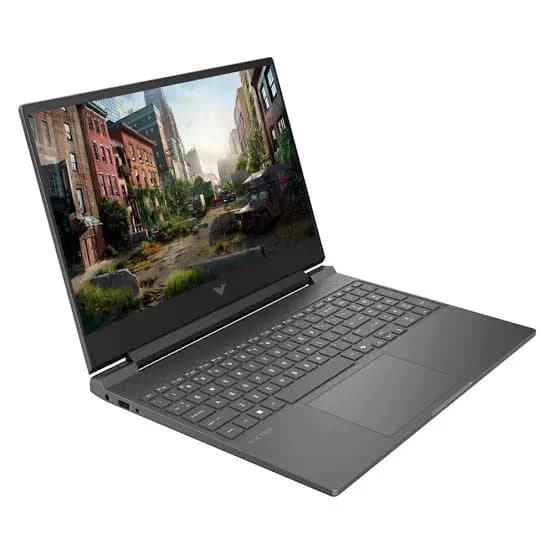
HP Victus 15 Gaming Laptop (Ryzen 7 7445HS, RTX 4050, 16GB, 512GB) in Kenya
Genuine HP | Brand New | Model 15-fb3093dx (BM4X8UA) | 15.6-Inch 144 Hz Gaming Laptop
The HP Victus 15 with an AMD Ryzen 7 7445HS processor and an NVIDIA GeForce RTX 4050 graphics card is HP's friendly entry into PC gaming. It plays today's popular games smoothly at Full HD on a fast 144 Hz screen, handles study and office work without effort, and weighs about 2.3 kg, so it can come with you to class, work or a friend's house. Available from City Gadgets Kenya as a brand-new, genuine HP laptop, it's aimed at people buying their first serious gaming laptop, and at students who want one machine for lectures and games.
This guide is long because a gaming laptop is a big purchase and the questions are real. Will it run the games I play? Is 6 GB of graphics memory enough? Can I upgrade it later? Is the screen good? How will it cope with Nairobi's heat and power cuts? You'll find straight answers below, including the places where this laptop is limited. If you want to talk it through, message us on WhatsApp.
The short verdict
The Victus 15 with the RTX 4050 is a sensible, well-balanced starter gaming laptop. The Ryzen 7 7445HS is a capable, efficient processor. The RTX 4050 runs most popular games well at 1920 x 1080, especially with NVIDIA's DLSS upscaling turned on. 16 GB of DDR5 memory and a fast NVMe SSD keep everything responsive. The weak points are honest ones: the screen's colours are modest, the 6 GB of graphics memory limits the newest games at top settings, and the battery is built for plugging in. If those trade-offs suit you, it's good value. If you want the latest graphics or a higher-quality screen, the HP Victus 15.6 with the RTX 5060 and the OMEN MAX 16, also in our range, sit above it.
Who this laptop is for
It suits you if:
- This is your first gaming laptop and you want a proper start without paying flagship money.
- You're a student who games after lectures and needs a laptop for coursework too.
- You play popular titles such as football games, shooters, battle royales, racing games and open-world games, and you're happy with high settings at Full HD.
- You want a 144 Hz screen so fast games look smooth.
- You want something you can carry. At about 2.3 kg, it's much lighter than flagship gaming laptops.
Look elsewhere if:
- You want to play the very newest games at maximum settings, or at a higher resolution. Choose the Victus 15.6 with the RTX 5060, or the OMEN MAX 16.
- You do colour-critical photo or video work. The screen's colour coverage is limited, and a creator laptop or an external monitor is a better choice.
- You mostly work, browse and study. A business laptop such as an HP ProBook, Lenovo ThinkPad or Dell Latitude from our range will be lighter and last longer on battery.
- You need to run a laptop on battery for many hours.
Specifications in plain English
| Feature | Detail | What it means for you |
|---|---|---|
| Model | 15-fb3093dx (part number BM4X8UA) | HP's Victus 15 gaming laptop |
| Processor | AMD Ryzen 7 7445HS | 6 cores, 12 threads, up to about 4.5 GHz |
| Graphics | NVIDIA GeForce RTX 4050 Laptop GPU, 6 GB GDDR6 | Good Full HD gaming, with DLSS support |
| Memory | 16 GB DDR5-5600 (two 8 GB modules) | Fast, and in dual channel |
| Storage | 512 GB PCIe 4.0 NVMe SSD | Quick boots and loading |
| Display | 15.6-inch Full HD (1920 x 1080), 144 Hz, IPS, anti-glare, about 300 nits, 62.5% sRGB | Smooth, but modest colour |
| Battery | 70 Wh | Built to be plugged in for gaming |
| Charger | 120 W | Compact and light |
| Ports | HDMI 2.1, RJ-45 Ethernet, USB-C, USB-A ports, 3.5 mm audio | Everything you need |
| Weight | About 2.29 kg | Portable for a gaming laptop |
| Operating system | Windows 11 Home | Ready to use |
These figures come from HP and retailer listings of the Victus 15-fb3093dx (BM4X8UA). Details such as colour and exact port layout can vary slightly, so ask us to confirm the unit you order.
The processor: AMD Ryzen 7 7445HS explained
The Ryzen 7 7445HS is a 6-core, 12-thread processor from AMD's Ryzen 7000 series, built on the Zen 4 design and a 4-nanometre process. Here's what that means in plain terms.
Cores and threads. A core is a separate processing unit, and threads let each core handle two jobs at once. Six cores and twelve threads is enough for gaming, streaming, and running a browser and Discord at the same time. Most games use between four and eight cores well, so this processor suits them.
Speed. It runs at about 3.2 GHz as a base and boosts to roughly 4.5 GHz when a game needs it. Higher boost speeds help games where one or two heavy tasks set the pace.
Efficiency. Zen 4 chips are known for doing a lot of work for the power they use. That means less heat and longer battery life in light use than older designs.
Built-in graphics. The processor includes an AMD Radeon 740M for everyday tasks. The laptop uses it for browsing, documents and video, and switches to the RTX 4050 for games, which saves power.
Why this matters for the games you play. In most popular games, a Ryzen 7 of this class won't hold back an RTX 4050. In fast competitive games, it keeps the frame rate high and steady. For study, the same processor runs coding tools, spreadsheets, design software and virtual machines comfortably.
The graphics card: GeForce RTX 4050 with 6 GB explained
The RTX 4050 Laptop GPU is based on NVIDIA's Ada Lovelace design, the generation before the newest RTX 50 series. It remains a very capable entry-level gaming card.
6 GB of GDDR6 video memory. Video memory holds textures and game data. 6 GB is enough for most popular games at 1920 x 1080 on high settings. The newest, most demanding games at their highest texture settings can use more, so you may need to lower textures or use upscaling in those. This is the main limit of the card.
DLSS. NVIDIA's DLSS uses AI to draw games at a lower internal resolution and sharpen them to your screen's resolution, raising frame rates with little loss in quality. The RTX 4050 supports DLSS, and its generation also supports DLSS frame generation in games that offer it. Not every game does, so check the games you play.
Ray tracing. The RTX 4050 can run ray-traced lighting, but it's demanding, and on a card this size it usually means turning on upscaling or lowering other settings. Treat ray tracing as a bonus in some games, not a feature to expect everywhere.
Video encoding. The card includes hardware that encodes video, so you can record or stream gameplay without slowing the game as much.
Power. Laptop graphics cards run at different power limits depending on how the maker sets them up. HP tunes the Victus to balance performance, heat and noise.
What gaming looks like on this laptop
We don't quote frame-rate numbers, because they change with game updates, settings and room temperature, and a figure in a guide can mislead. Here's what you can reasonably expect.
Popular competitive games (battle royales, tactical shooters, MOBAs): these run at high frame rates at Full HD, and the 144 Hz screen shows the benefit. Lowering a few graphics settings can raise frame rates further if you want the smoothest play.
Football and sports games: these run well at high settings and are a good match for a 144 Hz screen.
Big story and open-world games: most run at medium to high settings at Full HD, often with DLSS enabled. A few of the newest titles may need you to lower textures to stay inside 6 GB of video memory.
Racing games: these run smoothly. If you use a wheel, see the Logitech racing wheels in our range and check compatibility with the games you play.
Older and indie games: these will run at maximum settings with very high frame rates.
A good method for a new game is to start at the high preset, turn on DLSS or the game's upscaler, check the frame rate, and lower one setting at a time if it isn't smooth.
The display: smooth, with a catch
The screen is a 15.6-inch Full HD IPS panel with a 144 Hz refresh rate. It's anti-glare, so reflections are reduced.
What's good.
- 144 Hz makes motion look much smoother than a standard 60 Hz laptop screen, and it helps in fast games.
- Full HD (1920 x 1080) at 15.6 inches is sharp enough for gaming and everyday use, and it's easy on the graphics card.
- IPS gives wide viewing angles, so the picture stays consistent if you share the screen.
What to know. HP lists the panel at about 300 nits of brightness and 62.5% sRGB colour coverage. That means colours look good for games and video, but they're less vivid and less accurate than on a creator-class laptop. It's fine in a normal room. In bright sunlight or a bright office, 300 nits can feel dim. If you do colour-sensitive photo or video work, plan to use an external monitor for final colour decisions. We stock Dell, Lenovo and HP monitors that suit that.
Cooling and noise
Gaming creates heat, and the Victus 15 uses fans and heat pipes to carry it out of the body. Under load, the fans are audible. A headset or speakers cover the noise.
- Use the laptop on a hard, flat surface so the vents can breathe.
- A cooling stand improves airflow and helps in Nairobi's warm weather.
- If the laptop gets hot or loud while you're only browsing, check that nothing is running in the background and that the vents are clean.
- Keep the vents and fans clean. Dust builds up over months, and cleaning them makes a noticeable difference.
Battery, charger and portability
The laptop has a 70 Wh battery and comes with a 120 W charger. HP lists fast charge to about 50% in 30 minutes for the Victus 15 family.
An honest note: a gaming laptop is designed to be plugged in. On battery, performance drops and the battery drains quickly when you game. For light tasks, expect a few hours, which is enough to get through a lecture or a short work session.
The upside is portability. The Victus 15 weighs about 2.3 kg and the charger is compact, so it's an easier carry than flagship gaming laptops. A padded laptop backpack, and keeping the charger with the laptop, makes day-to-day use practical.
Ports and connections
- HDMI 2.1: connect a TV or an external monitor.
- USB-C: for data and accessories.
- USB-A ports: for a mouse, keyboard, headset dongle or flash drive.
- RJ-45 Ethernet: a wired connection is more stable than Wi-Fi for online gaming, which matters when you play competitive games.
- 3.5 mm headphone and microphone jack: for a headset.
- Wi-Fi and Bluetooth: for wireless internet and accessories.
Useful accessories from our range include a gaming mouse such as the Logitech G102 or G305, a Logitech or similar keyboard, a gaming headset, a SanDisk portable SSD for extra storage, and an Anker hub if you need more ports.
Memory and storage, and how to upgrade
16 GB of DDR5-5600 memory is a good amount for gaming and study. The laptop uses two 8 GB modules, which gives dual-channel memory and better performance than a single module. HP lists the Victus 15 as upgradeable, with retailer listings mentioning support for 32 GB or more, so you can add capacity later if you need it. Ask us before you buy if upgrades matter, and always match the memory type (DDR5 SO-DIMM).
512 GB of NVMe storage is a decent start, but modern games are large, and a few installed titles will fill it. You have two good options: replace the internal SSD with a larger one, or add a fast external SSD. Many Victus 15 laptops also have a spare M.2 slot for a second drive. Ask us to confirm this for the unit you order.
Study and everyday work
Don't forget that a gaming laptop is also a strong study laptop. The Ryzen 7 processor runs coding tools, spreadsheets, design apps and virtual machines comfortably. The graphics card speeds up some software for engineering, design and video editing, which is useful for students in those fields. The main costs are weight and battery life compared with a thin-and-light laptop.
A simple settings guide for getting the most out of it
You don't need to be an expert to get smooth games on this laptop. A few habits do most of the work.
- Set the game to 1920 x 1080 and the screen to 144 Hz. This is the laptop's native resolution, so it looks sharp and the graphics card isn't wasted on scaling.
- Start from the High preset, not Ultra. Ultra settings often cost a lot of performance for small visual gains. High looks almost the same and runs much smoother.
- Turn on DLSS or the game's upscaler. In supported games, choose the Quality or Balanced mode. It raises the frame rate with little visible loss.
- Lower textures if the game complains about video memory. With 6 GB, a few new games warn you when textures are too high. Dropping texture quality one step usually fixes stutter.
- Cap the frame rate slightly below the screen's limit if the laptop gets noisy. A steady 100 frames a second often feels better than a jumpy 140.
- Plug in and use the performance mode when you game. On battery, performance is lower.
- Close background apps such as extra browser windows and launchers.
If a game still stutters, check the temperature, clean the vents, and make sure the graphics driver is up to date.
A realistic week as a student with this laptop
It helps to picture how the laptop fits real life. On a normal university day, you carry it to lectures in a padded backpack with the charger. In class, you use it for notes, slides and research, with the screen brightness lowered, and it lasts a few hours between charges. In the library or your room, you plug it in and use it for assignments, coding, design or video work. In the evening, you plug in, switch to the performance mode, connect a mouse and headset, and play for a couple of hours.
Over a week, the laptop will mostly sit on a desk, plugged in. That's where it performs best, and where heat and battery wear are easiest to manage. Two small habits protect it: don't leave it charging on a bed, and don't carry it in a bag while it's still hot from gaming. If you're sharing a room or hostel, a cable lock and a lockable drawer are worth the small cost. Back up your coursework to cloud storage or a SanDisk external drive every week, because the laptop is a valuable item that can be lost or stolen.
Using a gaming laptop in Kenya
Power cuts and surges. Power problems can damage a charger and motherboard. A surge protector or voltage guard blocks spikes, and a small UPS gives you time to save your work. We stock APC and Mecer UPS units, and we can help you pick one for a 120 W laptop.
Heat and dust. Use the laptop on a hard surface, keep the vents clear, and consider a cooling stand.
Security. A laptop is a target in public. Don't leave it visible in a car, use a padded bag, and enable Windows' Find My Device feature.
Warranty and genuine product. Ask us for the warranty that applies to the unit you order, and keep the receipt and box.
Region. Some laptops are made for other markets. Ask us to confirm the keyboard layout and Windows language.
First-day setup checklist
- Check the box contents: the laptop, the charger and the paperwork.
- Inspect the body, screen and ports.
- Complete Windows 11 setup with your own account.
- Run Windows Update until it's finished, then update the graphics driver from NVIDIA and the BIOS through HP Support Assistant.
- Open HP's OMEN Gaming Hub or the Victus performance settings and choose a performance mode.
- Install your games and enable DLSS or upscaling where supported.
- Set the screen to 144 Hz in Windows display settings, if it isn't already.
- Turn on Find My Device and set a PIN or fingerprint.
- Back up important files from day one.
Looking after it
- Keep the vents clear and clean them with a soft brush or compressed air now and then, with the laptop off and unplugged.
- Don't block the vents on a bed or sofa.
- Keep drivers and Windows updated, and restart now and then.
- Use the original charger or an official replacement.
- Don't let the battery sit at 0%, and avoid leaving the laptop in a hot car.
- Keep drinks away from the keyboard.
How it compares with other options in our range
| Victus 15 (RTX 4050) | Victus 15.6 (RTX 5060) | Lenovo LOQ (RTX 3050) | OMEN MAX 16 (RTX 5070 Ti) | |
|---|---|---|---|---|
| Class | Entry gaming | Mid-range gaming | Entry gaming | Flagship |
| Graphics memory | 6 GB | 8 GB | 6 GB | 12 GB |
| Best for | First gaming laptop, students | Newer graphics at Full HD | Budget gaming | High settings, creative work |
| Weight | About 2.3 kg | About 2.3 kg | Light | About 2.68 kg |
Against the Victus 15.6 with the RTX 5060: that laptop has a newer, stronger graphics card with 8 GB of memory, but an older Intel processor. It's a better choice if your priority is graphics.
Against the Lenovo LOQ: a comparable entry-level laptop. The RTX 4050 here is a newer generation than an RTX 3050.
Against the OMEN MAX 16: a far more powerful laptop, with a far higher price. Choose it only if you need that power.
Honest pros and cons
Pros
- A capable Ryzen 7 processor.
- A good entry-level graphics card with DLSS support.
- 16 GB of fast DDR5 memory in dual channel, and a fast NVMe SSD.
- A smooth 144 Hz screen.
- Light enough to carry, at about 2.3 kg.
- A full set of ports, including Ethernet and HDMI 2.1.
- Good value for a gaming laptop.
Cons
- The screen has modest brightness and colour (about 300 nits, 62.5% sRGB).
- 6 GB of video memory limits the newest games at top settings.
- Short battery life when gaming.
- Fans are audible under load.
- 512 GB of storage fills quickly with big games.
What to check when it arrives
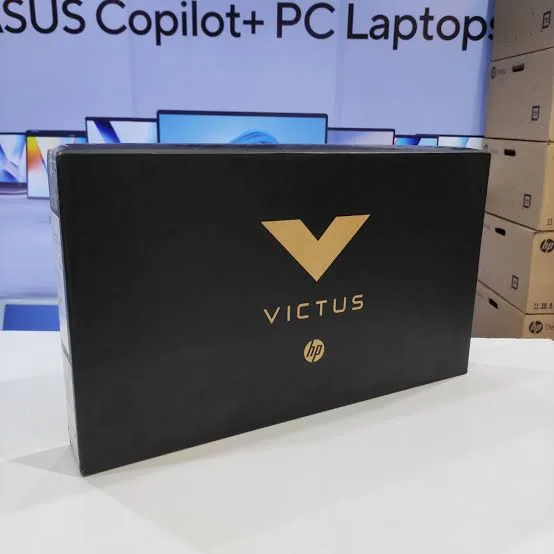
- The model on the box matches 15-fb3093dx or BM4X8UA.
- The graphics card is the RTX 4050 (check Task Manager, Performance, GPU).
- The processor is the Ryzen 7 7445HS, with 16 GB of RAM and 512 GB of storage.
- The screen has no dead pixels, scratches or backlight bleed.
- The keyboard, touchpad, webcam, speakers and ports all work.
- The charger is the correct unit.
- You get a receipt with the serial number and warranty details in writing.
Frequently asked questions
Is the RTX 4050 good enough for gaming? Yes, for popular games at Full HD with high settings, especially with DLSS. The newest games may need some settings lowered.
How much video memory does it have? 6 GB of GDDR6.
Can I upgrade the memory? HP lists the Victus 15 as upgradeable, and the two-module layout is easy to expand. Ask us before you buy.
Can I add more storage? You can replace the SSD with a larger one, add a second drive if the laptop has a free M.2 slot, or use an external SSD. Ask us to confirm for your unit.
Is the screen good for photo editing? It's fine for casual editing, but its colour coverage is limited. For serious colour work, use an external monitor.
How long does the battery last? A few hours for light use, and much less when gaming.
Is it good for students? Yes, if you also want to game. It's heavier than a thin laptop, and the battery is shorter.
Does it come with Windows? Yes, Windows 11 Home.
Will it run heavy design or engineering software? Yes, for most student-level work.
Can I connect it to a TV? Yes, through the HDMI 2.1 port.
Does it run hot? It warms up under load, as gaming laptops do. Use it on a hard surface and keep the vents clean.
What warranty does it have? Ask us for the warranty that applies to the unit you order.
Can you deliver it? Yes, same day in Nairobi and next day outside Nairobi.
Can I pay via M-Pesa? Yes.
Why buy from City Gadgets Kenya
Genuine, brand-new HP laptop. We're at New Alnoor Exhibition, Second Floor, Shop C7, Accra Road, Nairobi CBD, and you're welcome to look at the laptop before you buy. Message us on WhatsApp with your budget and the games you play, and we'll tell you honestly whether this is the right laptop or a cheaper or stronger one would suit you better. We confirm the exact configuration with you before you pay.
Order your HP Victus 15 today
Available now at City Gadgets Kenya. Message us on WhatsApp.
Specifications
- Brand
- HP
- Condition
- New
Frequently Asked Questions
How much does the HP Victus 15 Gaming Laptop (Ryzen 7 7445HS, RTX 4050, 16GB, 512GB) in Kenya | City Gadgets Kenya cost in Kenya?
The HP Victus 15 Gaming Laptop (Ryzen 7 7445HS, RTX 4050, 16GB, 512GB) in Kenya | City Gadgets Kenya is priced at Ksh 150,000 at City Gadgets. You can pay via M-Pesa, card or cash on delivery.
Is the HP Victus 15 Gaming Laptop (Ryzen 7 7445HS, RTX 4050, 16GB, 512GB) in Kenya | City Gadgets Kenya available in Kenya?
Yes — the HP Victus 15 Gaming Laptop (Ryzen 7 7445HS, RTX 4050, 16GB, 512GB) in Kenya | City Gadgets Kenya is in stock at City Gadgets, ready for same-day delivery in Nairobi and countrywide shipping across Kenya.
Is the HP Victus 15 Gaming Laptop (Ryzen 7 7445HS, RTX 4050, 16GB, 512GB) in Kenya | City Gadgets Kenya genuine and does it have a warranty?
Every HP Victus 15 Gaming Laptop (Ryzen 7 7445HS, RTX 4050, 16GB, 512GB) in Kenya | City Gadgets Kenya we sell is 100% genuine brand-new stock and comes with a 12-month official brand warranty.
Do you deliver the HP Victus 15 Gaming Laptop (Ryzen 7 7445HS, RTX 4050, 16GB, 512GB) in Kenya | City Gadgets Kenya in Nairobi?
Yes. We offer fast same-day delivery within Nairobi and fast, affordable delivery to the rest of Kenya — order online or on WhatsApp.
Customer Reviews
No reviews yet
Be the first to review this product.
Rate us on Google
Your review helps other shoppers find us
Reviews from verified buyers will appear here.
Buying guides
Straight advice for shoppers picking between the models above.

Best Laptops for Programmers and Developers in Kenya 2026 (Complete Guide) | City Gadgets Kenya
Best Laptops for Programmers and Developers in Kenya 2026: A Complete Guide
Read the guide
Best Lightweight and Ultraportable Laptops in Kenya 2026 (Complete Guide) | City Gadgets Kenya
Best Lightweight and Ultraportable Laptops in Kenya 2026: A Complete Guide
Read the guide
Best Laptops for University Freshers in Kenya 2026 (KUCCPS Season Guide) | City Gadgets Kenya
Best Laptops for University Freshers in Kenya 2026: The Complete KUCCPS Season Guide
Read the guide