Lenovo ThinkCentre neo 50t Gen 6 Desktop (Core Ultra 7, 8GB RAM, 512GB SSD, CPU Only) in Kenya | City Gadgets Kenya
Same-day delivery in Nairobi by 8 Oct – 9 Oct
Comes with
Description
Buy the Lenovo ThinkCentre neo 50t Gen 6 tower desktop with Intel Core Ultra 7, 8GB DDR5 RAM and 512GB SSD in Kenya from City Gadgets Kenya. Lenovo ThinkCentre neo 50t price in Kenya, office desktop Nairobi, Core Ultra 7 tower PC. A complete buyer's guide, including what you need to complete your setup.
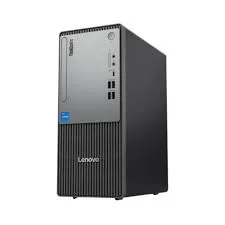
Lenovo ThinkCentre neo 50t Gen 6 Desktop (Core Ultra 7, 8GB RAM, 512GB SSD, CPU Only) in Kenya
Genuine Lenovo | Brand New | Tower Desktop, System Unit Only | Intel Core Ultra 7 | Windows 11 Pro
Searching for the Lenovo ThinkCentre neo 50t price in Kenya, a Core Ultra 7 desktop in Nairobi, or a reliable office tower PC for your business? The Lenovo ThinkCentre neo 50t Gen 6 is a brand-new, genuine business tower desktop with an Intel Core Ultra 7 processor, DDR5 memory, a fast 512 GB SSD and Windows 11 Pro, available from City Gadgets Kenya with delivery across Kenya. This listing is the system unit only ("CPU only"), so you add your own monitor, keyboard and mouse, or buy them from us. Buyers also search for it as a ThinkCentre neo 50t Gen 6, a Lenovo office desktop, a desktop PC for accounting and design, a Core Ultra 7 tower, a CPU-only desktop, or a business desktop for a small office.
This guide explains the desktop in plain language: what the Core Ultra 7 265 processor offers, why 8 GB of memory on a desktop is easy to upgrade, what "CPU only" means and how to complete a setup, and how to protect a desktop from Kenya's power problems. If you'd like to talk it through, message us on WhatsApp.
The short verdict
The ThinkCentre neo 50t Gen 6 is a powerful, no-nonsense business desktop. The Core Ultra 7 processor is among the strongest you'll find in an office tower, the Windows 11 Pro licence brings business security, and the tower chassis means you can upgrade memory, storage and sometimes graphics for years. The honest points are simple: as listed, the system comes with 8 GB of memory, which suits light use but is the first thing most buyers will want to increase, and "CPU only" means you must add a monitor, keyboard and mouse. Because it's a desktop, both are cheap to fix. For an office that wants a fast, upgradeable, long-lasting computer, this is a strong choice.
What "CPU only" means
In the desktop world, "CPU" is often used loosely to mean the whole system unit: the box that holds the processor, memory, storage and ports. "CPU only" means you receive just that box. It does not include:
- A monitor (screen).
- A keyboard and mouse.
- Speakers or a webcam.
- A UPS or surge protector.
You can reuse equipment you already own, or we can supply it. In our range, you'll find Dell, HP and Lenovo monitors, Logitech keyboards and mice, headsets and webcams, and APC, Mecer and Unomat UPS units. A complete setup is straightforward, and we're happy to put together a bundle. The box also includes a power cable, and the paperwork.
Who this desktop is for
It suits you if:
- You run an office, school, clinic, accounting practice or business that needs reliable desks of computers.
- You want a computer that can be upgraded over the years, not replaced.
- You want strong performance for office software, accounting systems, design or data work.
- You prefer a desktop's comfort: a full-size screen, keyboard and mouse, and a cooler, quieter machine under load.
- You want Windows 11 Pro for business security and management.
Look elsewhere if:
- You need to move around with your computer. See our laptops.
- You want an all-in-one design with the screen built in. See our all-in-one PCs.
- You need a high-end gaming or 3D workstation with a powerful graphics card. This model is aimed at business use.
- You want the smallest possible footprint. A mini PC or all-in-one uses less space.
Specifications in plain English
| Feature | Detail | What it means for you |
|---|---|---|
| Model | Lenovo ThinkCentre neo 50t Gen 6 (tower) | Lenovo's business tower desktop |
| Processor | Intel Core Ultra 7 265: 20 cores (8 performance and 12 efficiency), up to about 5.3 GHz | A very strong business processor |
| AI engine | Intel AI Boost (NPU), up to about 13 TOPS | Basic on-device AI features |
| Graphics | Intel integrated graphics. Other versions of the neo 50t offer an NVIDIA GeForce RTX 3050 | Smooth office use. Ask about graphics options |
| Memory | 8 GB DDR5, as listed | Good for light use and easy to upgrade |
| Storage | 512 GB SSD | Fast boots and loading |
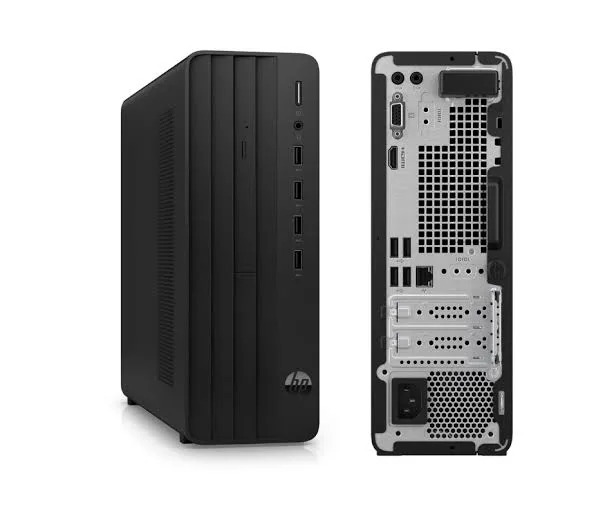
| Ports | USB-A (USB 2.0 and USB 3.2 Gen 1), HDMI and DisplayPort. Some versions also have VGA | Plenty of connections for office gear |
| Wireless | Wi-Fi | Convenient where cabling isn't practical |
| Operating system | Windows 11 Pro | Business-grade Windows |
| What's included | System unit only (no monitor, keyboard or mouse) | Add your own or buy from us |
These figures come from Lenovo and retailer listings of the ThinkCentre neo 50t Gen 6. Memory, storage, graphics and ports vary by version, so ask us to confirm the unit you order.
The processor: Intel Core Ultra 7 265 explained
The Core Ultra 7 265 is a desktop processor from Intel's newer Core Ultra family, and it's a big step up from the processors in most office desktops.
20 cores. It combines 8 performance cores for demanding tasks with 12 efficiency cores for everyday work and background jobs. That much parallel power means many programs can run at once without slowing each other down.
Up to about 5.3 GHz. The processor boosts to high speeds when a task needs it, so large files open quickly, exports finish fast and software feels responsive.
Built for sustained work. Desktop processors can run at full speed for long periods because the tower has room for proper cooling. That suits accounting, design, data analysis and heavy multitasking.
An AI engine. The processor includes an NPU (Intel AI Boost) of up to about 13 TOPS, which helps with some AI features efficiently. It's not enough for Microsoft's Copilot+ PC features, so don't buy it expecting those.
Integrated graphics. The built-in graphics are fine for office work, multiple monitors and video. For graphics-heavy design, 3D or gaming, ask us about versions with a dedicated graphics card.
Memory: why 8 GB on a desktop isn't a problem
Memory is the part of this configuration worth thinking about, and the news is good.
8 GB is enough to start. It handles browsing, Office apps, email, accounting packages and video calls.
It's easy and cheap to upgrade. Unlike many laptops, a desktop uses standard memory modules in slots you can reach. You can add a second 8 GB module for 16 GB, or replace both for 32 GB. This is one of the cheapest, easiest upgrades in computing.
Practical advice. For a busy office, 16 GB is the comfortable level. Ask us to confirm the number of free memory slots and the exact memory type (DDR5) of the unit you order. We can fit the extra memory for you at purchase, so you receive a ready-to-use machine.
Dual channel. Two matching modules run faster than one, so a pair is better than a single large stick.
Storage: 512 GB SSD
An SSD makes Windows start in seconds and opens files quickly, and 512 GB is plenty for Windows, Office, accounting data and documents. The tower has space to add a second drive, such as a larger SSD or a hard drive for archives, and a SanDisk portable SSD or portable hard drive from our range is a quick way to add backup storage. For an office, keep working files on the PC and back up daily to an external drive or cloud storage.
Ports and connections
Business desktops are loved for their ports, and the neo 50t has plenty: USB-A ports for keyboards, mice, printers and flash drives, HDMI and DisplayPort for monitors, and a network connection. Some versions have VGA for older monitors and projectors. The number of front and rear ports varies by version, so ask us to confirm. With HDMI and DisplayPort, you can connect modern monitors easily, and with a suitable adapter you can run more than one.
Security and Windows 11 Pro
For an office, Windows 11 Pro is a real advantage.
- BitLocker encrypts the drive, so stolen drives expose nothing.
- Domain join and management let an IT administrator manage the machine.
- Remote Desktop lets you connect to the PC from elsewhere, if set up securely.
- TPM security chip helps protect passwords and encryption keys.
- Windows Update for Business lets you control when updates install.
Add a trusted antivirus, such as one of our Kaspersky licences, and keep Windows updated.
Completing your setup: a simple shopping list
| Item | What to look for | Where from us |
|---|---|---|
| Monitor | 22 to 27 inches, Full HD, HDMI or DisplayPort | Dell, HP and Lenovo monitors |
| Keyboard and mouse | Wired or wireless | Logitech |
| UPS | Sized to the PC and monitor | APC, Mecer and Unomat |
| Antivirus | One licence per PC | Kaspersky |
| Headset and webcam | For video calls | Logitech, Soundcore, JBL, Sony |
| Printer | Laser or ink tank | HP, Epson, Canon, Brother, Kyocera, Pantum |
| Backup drive | External SSD or hard drive | SanDisk, WD, Seagate, Toshiba |
Power protection: essential for a desktop in Kenya
Desktops are more exposed to power problems than laptops, because they have no battery. A sudden outage means lost work and, over time, can damage the power supply and storage.
- Use a UPS. An uninterruptible power supply keeps the PC running for minutes after a cut, so you can save and shut down safely. We stock APC, Mecer and Unomat units, and we can size one for your PC and monitor.
- Use surge protection. Even with a UPS, a surge protector adds a layer of safety.
- Don't plug the PC straight into the wall in areas with unstable voltage.
- Test the UPS now and then by unplugging it from the wall for a moment.
- Replace UPS batteries every few years, because they wear out.
Everyday performance: what to expect
Office work: documents, spreadsheets, presentations and email run instantly.
Accounting and business software: local and cloud systems run well, even with several open at once.
Browsing and video calls: many tabs and Teams, Zoom or Meet run comfortably.
Design and data work: strong, especially after upgrading to 16 GB or more.
Gaming and heavy 3D: need a dedicated graphics card.
Upgrading a desktop's memory: how it works
One of the best things about a desktop is how simple the main upgrade is, so it helps to understand it.
- Check what's installed. In Windows, open Task Manager, choose Performance, then Memory. It shows the type (DDR5), speed and how many slots are used.
- Match the type. Desktop memory is a different size from laptop memory (DIMM, not SO-DIMM), and DDR5 can't go into a DDR4 slot. We'll make sure you buy the right modules.
- Pick the amount. For most offices, 16 GB is the sweet spot, and 32 GB suits heavy design, data work and virtual machines.
- Use matching pairs. Two identical modules run in dual-channel mode, which is faster than one.
- Fit it safely. Fitting memory takes minutes with the PC off and unplugged, but static electricity and force can damage parts. We can fit it for you at purchase.
- Check it worked. Look in Task Manager again to confirm the new total.
Because memory is cheap compared with replacing a computer, buying an 8 GB desktop and upgrading it is often better value than paying for a fixed larger configuration.
Choosing a monitor for office work
The monitor is where you'll spend all day, so choose it with care.
- Size. 22 to 24 inches suits most desks. 27 inches gives more room for spreadsheets and side-by-side windows.
- Resolution. Full HD (1920 x 1080) is fine at 24 inches. 27-inch screens look sharper at a higher resolution.
- Panel type. IPS panels have wide viewing angles and better colour. VA panels offer deeper contrast. For office work, IPS is a safe choice.
- Connections. Choose a monitor with HDMI or DisplayPort, to match the PC.
- Comfort features. Look for flicker-free technology, a low blue light mode and, ideally, height or tilt adjustment.
- Two monitors. Many people work faster with a second screen, and the neo 50t's DisplayPort and HDMI outputs make that possible.
We stock Dell, HP and Lenovo monitors, and we can recommend the right one for your desk and budget.
Sizing a UPS for a desktop
A UPS that's too small is worse than none, so size it properly.
- Add up the load. A desktop PC and a monitor typically draw a few hundred watts together. Ask us about the power supply of the unit you order.
- Allow headroom. Choose a UPS with a rating comfortably above the load, since overloading shortens its life.
- Think about runtime. A small UPS gives a few minutes, enough to save and shut down. A bigger one gives longer, for offices that want to keep working through short cuts.
- Plug in only what needs it. Printers draw a lot of power and can overload a small UPS, so put them on a surge protector instead.
- Plan for batteries. UPS batteries wear out every few years.
Tell us how many PCs and monitors you want to protect, and we'll recommend a UPS from our APC, Mecer or Unomat range.
Equipping a small office with desktops
If you're buying several, a plan avoids waste.
- Standardise the model, so parts, drivers and support are the same.
- Decide on memory once. 16 GB per PC suits most roles, and you can upgrade individual machines later.
- Use Windows 11 Pro everywhere, for BitLocker and management.
- Buy a UPS for each desk, or a larger one for a small server and network gear.
- Standardise antivirus. Our Kaspersky licences come in several user sizes.
- Add a network printer. We stock HP, Epson, Canon, Brother, Kyocera and Pantum models.
- Plan backups. A shared drive or cloud storage, plus an external drive for periodic copies.
- Keep a register of serial numbers, warranty dates and who has which PC.
Message us on WhatsApp if you're buying several, and we'll advise on configuration, delivery and set-up.
Questions to ask before you buy any business desktop
- What exactly is included? System unit only, or with a monitor, keyboard and mouse.
- What are the processor, memory and storage? You can check all three in Windows in under a minute.
- How many memory slots are free, and what type? This decides your upgrade path.
- Is there a dedicated graphics card, or integrated graphics?
- Which Windows edition is installed?
- What warranty is included, and who honours it? Get it in writing.
- Can I inspect it before I pay? A trustworthy seller says yes.
- Can you fit upgrades for me? We can.
We're glad to answer all of these on WhatsApp or in the shop before you pay.
Using a desktop in Kenya
Placement. Put the tower on a stable surface with space for air around it, away from direct sunlight, dust and moisture.
Dust. Clean the vents and fans occasionally, because dust shortens a desktop's life.
Security. For offices, consider a cable lock, a lockable room and BitLocker.
Warranty. Ask us for the warranty that applies to the unit you order, and keep the receipt and box.
Region. Ask us to confirm the Windows language and what's in the box.
First-day setup checklist
- Check the box: system unit, power cable and paperwork.
- Connect the monitor, keyboard and mouse, and plug the PC into a UPS.
- Complete Windows 11 setup.
- Run Windows Update until it's finished.
- Update the BIOS and drivers using Lenovo Vantage or Lenovo's support site.
- Turn on BitLocker and set a sign-in PIN.
- Install your software and antivirus.
- Set up backups.
- Check the memory in Task Manager so you know your upgrade options.
Looking after it
- Keep the tower off the floor if the floor is dusty or damp.
- Clean the vents and fans gently, with the PC off and unplugged.
- Keep Windows, drivers and the BIOS updated.
- Don't block the vents.
- Restart weekly.
- Replace UPS batteries on schedule.
How it compares with other options in our range
| ThinkCentre neo 50t Gen 6 | HP Pro 290 G9 Tower | Dell Pro Tower QCT1250 | Lenovo IdeaCentre AIO | |
|---|---|---|---|---|
| Type | Business tower | Business tower | Business tower | All-in-one |
| Processor | Core Ultra 7 265 | Core i5 (13th or 14th gen) | Core Ultra 5 | Core i7 (13th gen) |
| Memory as listed | 8 GB | 8 GB | 8 GB | Varies |
| Screen included | No | No | No | Yes |
| Best for | The strongest office tower | Value office work | Modern business use | Space-saving desks |
Against the HP Pro 290 G9 and Dell Pro Tower: the neo 50t has the strongest processor of the three desktops in our range, at a higher price. For basic office work, the HP is a cheaper choice.
Against all-in-one PCs: an all-in-one saves space and cabling. A tower gives you more power and upgradeability.
Honest pros and cons
Pros
- A powerful 20-core Core Ultra 7 processor.
- DDR5 memory that is easy to upgrade.
- A fast 512 GB SSD, with room to add more storage.
- Windows 11 Pro with business security.
- A good range of ports.
- A desktop's cooling, comfort and upgradeability.
Cons
- System unit only: you need a monitor, keyboard and mouse.
- 8 GB of memory as listed, which most buyers will want to upgrade.
- No Copilot+ AI features.
- Integrated graphics unless you choose a graphics version.
- Needs a UPS in Kenya.
What to check when it arrives
- The box model matches ThinkCentre neo 50t Gen 6.
- The processor is the Core Ultra 7, with the memory and storage you agreed (Settings, System, About).
- The PC powers on and displays correctly on your monitor.
- The ports on the front and back work.
- The power cable is included.
- You get a receipt with the serial number and warranty details in writing.
Frequently asked questions
What is the Lenovo ThinkCentre neo 50t price in Kenya? We confirm the current price when you message us on WhatsApp, because supplier prices change. We tell you the price and the exact configuration before you pay.
Where can I buy the ThinkCentre neo 50t in Nairobi? At City Gadgets Kenya, New Alnoor Exhibition, Second Floor, Shop C7, Accra Road, Nairobi CBD, or by delivery.
Does it come with a monitor, keyboard and mouse? No. This is the system unit only. We can supply them.
Can I upgrade the memory? Yes, a desktop's memory is easy to upgrade. We can fit it for you.
Is 8GB enough? For light use, yes. For a busy office, 16 GB is better, and upgrading is cheap.
Does it have a dedicated graphics card? This version uses integrated graphics. Other versions have an RTX 3050.
Does it come with Windows 11 Pro? Listings show Windows 11 Pro. Ask us to confirm.
What warranty does it have? Ask us for the warranty that applies to the unit you order.
Can you deliver it? Yes, same day in Nairobi and next day outside Nairobi.
Can I pay via M-Pesa? Yes.
Why buy from City Gadgets Kenya
Genuine, brand-new Lenovo desktop. We're at New Alnoor Exhibition, Second Floor, Shop C7, Accra Road, Nairobi CBD, and you're welcome to look at the desktop before you buy. Message us on WhatsApp with what your office does, and we'll tell you honestly what to buy, including the right monitor, UPS and memory. We confirm the exact configuration with you before you pay.
Order your Lenovo ThinkCentre neo 50t Gen 6 today
Available now at City Gadgets Kenya. Message us on WhatsApp.
Specifications
- Brand
- HP
- Condition
- New
Frequently Asked Questions
How much does the Lenovo ThinkCentre neo 50t Gen 6 Desktop (Core Ultra 7, 8GB RAM, 512GB SSD, CPU Only) in Kenya | City Gadgets Kenya cost in Kenya?
The Lenovo ThinkCentre neo 50t Gen 6 Desktop (Core Ultra 7, 8GB RAM, 512GB SSD, CPU Only) in Kenya | City Gadgets Kenya is priced at Ksh 123,000 at City Gadgets. You can pay via M-Pesa, card or cash on delivery.
Is the Lenovo ThinkCentre neo 50t Gen 6 Desktop (Core Ultra 7, 8GB RAM, 512GB SSD, CPU Only) in Kenya | City Gadgets Kenya available in Kenya?
Yes — the Lenovo ThinkCentre neo 50t Gen 6 Desktop (Core Ultra 7, 8GB RAM, 512GB SSD, CPU Only) in Kenya | City Gadgets Kenya is in stock at City Gadgets, ready for same-day delivery in Nairobi and countrywide shipping across Kenya.
Is the Lenovo ThinkCentre neo 50t Gen 6 Desktop (Core Ultra 7, 8GB RAM, 512GB SSD, CPU Only) in Kenya | City Gadgets Kenya genuine and does it have a warranty?
Every Lenovo ThinkCentre neo 50t Gen 6 Desktop (Core Ultra 7, 8GB RAM, 512GB SSD, CPU Only) in Kenya | City Gadgets Kenya we sell is 100% genuine brand-new stock and comes with a 12-month official brand warranty.
Do you deliver the Lenovo ThinkCentre neo 50t Gen 6 Desktop (Core Ultra 7, 8GB RAM, 512GB SSD, CPU Only) in Kenya | City Gadgets Kenya in Nairobi?
Yes. We offer fast same-day delivery within Nairobi and fast, affordable delivery to the rest of Kenya — order online or on WhatsApp.
Customer Reviews
No reviews yet
Be the first to review this product.
Rate us on Google
Your review helps other shoppers find us
Reviews from verified buyers will appear here.
Buying guides
Straight advice for shoppers picking between the models above.

Best Laptops for Programmers and Developers in Kenya 2026 (Complete Guide) | City Gadgets Kenya
Best Laptops for Programmers and Developers in Kenya 2026: A Complete Guide
Read the guide
Best Lightweight and Ultraportable Laptops in Kenya 2026 (Complete Guide) | City Gadgets Kenya
Best Lightweight and Ultraportable Laptops in Kenya 2026: A Complete Guide
Read the guide
Best Laptops for University Freshers in Kenya 2026 (KUCCPS Season Guide) | City Gadgets Kenya
Best Laptops for University Freshers in Kenya 2026: The Complete KUCCPS Season Guide
Read the guide