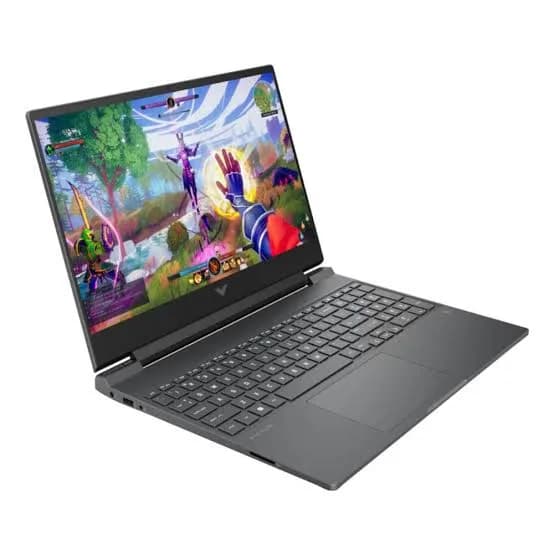
HP Victus 15.6 Gaming Laptop (Core i7-13620H, RTX 5060 8GB, 16GB, 512GB) in Kenya | City Gadgets Kenya
Same-day delivery in Nairobi by 8 Oct – 9 Oct
Comes with
Description
Buy the HP Victus 15 (FA2787) with Intel Core i7-13620H, NVIDIA RTX 5060 8GB GDDR7, 16GB RAM and 512GB SSD in Kenya from City Gadgets Kenya. A complete buyer's guide: DLSS 4, memory upgrades, screen, battery, ports and care.
HP Victus 15.6 Gaming Laptop (Core i7-13620H, RTX 5060 8GB, 16GB, 512GB) in Kenya
Genuine HP | Brand New | Model FA2787 (Victus 15-fa2787) | 15.6-Inch 144 Hz Gaming Laptop with RTX 5060
The HP Victus 15 with an Intel Core i7-13620H processor and an NVIDIA GeForce RTX 5060 graphics card is HP's mid-range gaming laptop with a current-generation graphics card. It gives you NVIDIA's newest Blackwell graphics architecture and 8 GB of fast GDDR7 video memory in a 15.6-inch laptop that weighs about 2.3 kg. Available from City Gadgets Kenya as a brand-new, genuine HP laptop, it's for gamers and students who want modern graphics without paying flagship prices.
This guide goes deeper than a spec sheet. It explains what the RTX 5060 and DLSS 4 actually do for you, where this laptop is strong, and where it shows its age, because the processor is an older design than the graphics card. You'll also find upgrade advice, a settings guide, and tips for running a gaming laptop in Kenya. If you'd like to talk it through, message us on WhatsApp.
The short verdict
The graphics card is the headline here. The RTX 5060 brings NVIDIA's latest features, including DLSS 4 and Multi Frame Generation, plus 8 GB of GDDR7 memory, to a mid-priced laptop. The Core i7-13620H processor is from an earlier generation, but its 10 cores are still plenty for gaming and study. The 15.6-inch screen runs at 144 Hz, and the body is light for a gaming laptop. The trade-offs are modest colour on the screen, a battery designed for plugging in, and memory that is worth upgrading. If you want the best graphics you can get without moving to a flagship, this is the Victus to choose.
Who this laptop is for
It suits you if:
- You want a newer graphics card than the RTX 4050 and 3050 laptops in our range, for better performance and newer features.
- You play modern games at Full HD and want high settings with smooth frame rates.
- You're a student or creator who also uses graphics-accelerated software.
- You want 144 Hz on a laptop you can still carry.
- You're upgrading from an older gaming laptop.
Look elsewhere if:
- You want the very best screen. The panel is bright enough for gaming, but colour coverage is modest.
- You want a flagship machine for 3D, AI or 4K work. See the OMEN MAX 16 in our range.
- You mostly do office work. A business laptop is lighter and lasts longer on battery.
- Budget is tight. The Victus 15 with the RTX 4050, also in our range, costs less and still plays most popular games.
Specifications in plain English
| Feature | Detail | What it means for you |
|---|---|---|
| Model | FA2787, HP Victus 15-fa2787 | A 2025 Victus 15 gaming laptop |
| Processor | Intel Core i7-13620H | 10 cores (6 performance and 4 efficiency), 16 threads, up to about 4.9 GHz |
| Graphics | NVIDIA GeForce RTX 5060 Laptop GPU, 8 GB GDDR7 | Current-generation graphics with DLSS 4 |
| Memory | 16 GB, expandable | Good for gaming, with room to grow |
| Storage | 512 GB NVMe SSD | Fast, but fills quickly with big games |
| Display | 15.6-inch Full HD (1920 x 1080), 144 Hz, IPS, anti-glare, about 300 nits, 62.5% sRGB | Smooth, with modest colour |
| Battery | 70 Wh, with fast charge to about 50% in 30 minutes | Built to be plugged in |
| Charger | 120 W | Compact |
| Ports | USB-C (5 Gbps, DisplayPort 1.4a), 2 USB-A (5 Gbps), HDMI 2.1, RJ-45, 3.5 mm audio | A full set |
| Wireless | Wi-Fi 6 and Bluetooth 5.4 | Solid connections |
| Weight | About 2.29 kg | Portable for a gaming laptop |
| Keyboard | Backlit, full-size, with a number pad | Good for gaming and study |
| Operating system | Windows 11 Home | Ready to use |
These figures come from HP and retailer listings of the Victus 15-fa2787. Memory type and colour can vary by region, so ask us to confirm the unit you order.
The graphics card: GeForce RTX 5060 with 8 GB of GDDR7 explained
The RTX 5060 Laptop GPU is part of NVIDIA's RTX 50 series, built on the Blackwell architecture. It's the entry point to that generation, and it comes with 8 GB of GDDR7 memory on a 128-bit bus.
GDDR7 memory. This is the newest and fastest type of graphics memory. It moves data to the graphics chip more quickly than the GDDR6 used in earlier cards, which helps keep frame rates high. The 8 GB capacity is enough for most games at Full HD on high settings.
DLSS 4 and Multi Frame Generation. DLSS is NVIDIA's AI technology for raising frame rates. Older versions render a game at a lower resolution and sharpen it to your screen's. RTX 50 series cards can also use Multi Frame Generation, which creates extra frames between the real ones, so a game that runs at a modest frame rate can look much smoother. These features work in supported games, so check the titles you play. They aren't magic: frame generation adds a little delay, which matters more in fast competitive games, where most players leave it off.
Better ray tracing hardware. Ray tracing makes lighting, shadows and reflections realistic, and it's demanding. The RTX 5060 can use it in many games at Full HD, usually with DLSS turned on.
Hardware video encoding. The card has dedicated encoders for recording and streaming, so capturing gameplay doesn't slow the game much.
What it isn't. The RTX 5060 is a mid-range card. It won't match the RTX 5070 Ti or 5090 in the OMEN MAX 16, and 8 GB of video memory means the very newest games at top texture settings may need a small reduction.
The processor: Intel Core i7-13620H explained
The Core i7-13620H is a 13th-generation Intel processor from the Raptor Lake family. It has ten cores: six performance cores for heavy tasks, and four efficiency cores for background work. Together they handle 16 threads, and the processor boosts up to about 4.9 GHz.
What this means in practice:
- Gaming: most games are limited more by the graphics card than by this processor at 1920 x 1080, so the i7-13620H works well with an RTX 5060.
- Multitasking: ten cores handle a game, a browser and Discord at once.
- Study and creative work: coding, design software, spreadsheets and video editing at student level run smoothly.
An honest note: this processor is an older generation than the graphics card, which is common in mid-range gaming laptops. Newer processors are faster and more efficient. For Full HD gaming, you're unlikely to notice. For heavy multi-core work such as long video exports and big renders, a newer processor, like the one in the OMEN MAX 16, would finish sooner.
Memory: the upgrade that matters most
The laptop has 16 GB of RAM, which is enough for gaming. Memory is also the easiest upgrade, and it can make a real difference, so it's worth understanding.
- Memory type. Different regional versions of the Victus 15 use different memory types, such as DDR4-3200 or DDR5. Ask us to confirm the type in the unit you order before buying any upgrade.
- Single or dual channel. Some configurations use one 16 GB module. In that case, the memory runs in single-channel mode. Adding a second matching module (making it dual-channel) can improve memory speed, which helps both games and the processor's built-in graphics. Check how many modules your laptop has.
- How much to add. Retailer listings mention support for up to 64 GB. For gaming, 16 to 32 GB is plenty. 32 GB is worth it if you also edit video or run virtual machines.
- Compatibility. Match the memory type and speed. Ask us to help, so you don't buy the wrong modules.
Storage
The 512 GB SSD is fast, because NVMe drives load games and Windows far quicker than hard drives. But modern games are large, often 50 to 150 GB each, so 512 GB fills quickly once Windows and a few games are installed. Options:
- Replace the SSD with a larger one, such as 1 TB or 2 TB, and move the data over.
- Add a second drive if the laptop has a free M.2 slot. Ask us to confirm for your unit.
- Use a fast external SSD over USB. The SanDisk Extreme and Extreme PRO portable SSDs in our range suit this.
- Use the USB-C port for archives, and keep only the games you're playing on the internal drive.
The display: smooth, with modest colour
The screen is a 15.6-inch Full HD IPS panel with a 144 Hz refresh rate.
Good points.
- 144 Hz makes motion smoother than a standard 60 Hz screen, which helps in fast games.
- Full HD at this size is sharp for gaming and everyday use.
- The anti-glare finish reduces reflections.
- IPS gives wide viewing angles.
To know. The panel is listed at about 300 nits and 62.5% sRGB. Colours look fine for games and video but not rich or accurate enough for professional photo or video work. In very bright rooms or sunlight, the screen can look dim. If colour matters, use an external monitor, such as one of the Dell, Lenovo or HP monitors we stock, for final work.
Cooling, performance and noise
A gaming laptop with an RTX 5060 and a 10-core processor makes heat, and the Victus 15 uses fans and heat pipes to move it out. Under gaming loads, the fans are audible. A headset or speakers cover the noise.
- Use the laptop on a hard, flat surface.
- A cooling stand can lower temperatures in warm weather.
- Keep the vents clean, because dust builds up.
- Use HP's performance settings to choose between a quiet mode and a performance mode.
- If the laptop is hot while idle, check for background tasks and update the BIOS and drivers.
Battery and charger
The 70 Wh battery comes with a 120 W charger, and HP lists fast charge to about 50% in 30 minutes. As with all gaming laptops, performance is lower on battery and the battery drains quickly when you game, so plan to game plugged in. For light work such as notes, browsing and video, expect a few hours. The charger is compact, which makes the laptop easy to carry compared with flagship machines.
Ports and connectivity
- USB-C (5 Gbps, with DisplayPort 1.4a): connect a monitor or accessories. It also supports Sleep and Charge.
- Two USB-A ports (5 Gbps): for a mouse, keyboard or flash drive. One supports Sleep and Charge, so you can charge a phone while the laptop sleeps.
- HDMI 2.1: connect a TV or monitor.
- RJ-45 Ethernet: the most stable connection for online games.
- 3.5 mm headphone and microphone jack.
- Wi-Fi 6 (2x2) and Bluetooth 5.4.
Good accessories from our range include a Logitech mouse and keyboard, an Anker hub or charger, a SanDisk portable SSD, and a Sony, JBL or Soundcore headset or speaker.
What gaming looks like on this laptop
We avoid quoting frame-rate numbers, which vary by game, settings and updates. Here is what to expect.
Competitive games: very high frame rates at Full HD, and the 144 Hz screen shows them. Many players turn off frame generation here, to keep delay low.
Big modern games: high or maximum settings at Full HD, often with DLSS on. Ray tracing is realistic in many titles.
Open-world and story games: smooth at high settings, with DLSS where supported.
Older and indie games: maximum settings and high frame rates, with headroom for extras such as higher render scale.
Streaming and recording: the hardware encoder lets you record gameplay with a small performance cost.
A simple settings guide
- Set the game to 1920 x 1080 and the screen to 144 Hz.
- Start from the High preset, then adjust.
- Turn on DLSS (Quality or Balanced) in supported games.
- Try Multi Frame Generation in single-player games where smoothness matters, and leave it off in fast competitive games.
- Lower textures one step if a game warns about video memory.
- Plug in and use the performance mode.
- Keep the graphics driver updated.
Using a gaming laptop in Kenya
Power. Surges and outages can damage a charger and motherboard. Use a surge protector or voltage guard, and a small UPS for safe shutdown. We stock APC and Mecer UPS units and can help you choose one.
Heat and dust. Keep the vents clear, use a hard surface, and clean the fans from time to time.
Security. Use a padded bag, don't leave the laptop in sight in a car, and turn on Windows' Find My Device.
Warranty and genuine product. Ask us for the warranty that applies to the unit you order, and keep the receipt and box.
Region. Ask us to confirm the keyboard layout and Windows language.
First-day setup checklist
- Check the box: laptop, charger and paperwork.
- Inspect the body, screen and ports.
- Complete Windows 11 setup.
- Run Windows Update, then update the NVIDIA graphics driver and the BIOS.
- Choose a performance mode in HP's software.
- Install your games and enable DLSS.
- Set the display to 144 Hz.
- Enable Find My Device and a sign-in PIN.
- Back up important files.
Looking after it
- Clean the vents with compressed air or a soft brush, with the laptop off.
- Don't block the vents on soft surfaces.
- Keep drivers and Windows updated.
- Use the original charger.
- Don't leave the laptop in a hot car.
- Keep liquids away from the keyboard.
Is an older processor with a newer graphics card a problem?
Buyers often ask this about mid-range gaming laptops, so it's worth answering directly. The graphics card does most of the work in games, and the processor mainly feeds it instructions. At Full HD, where this laptop runs, the graphics card is almost always the limit, so a 10-core processor from the previous generation doesn't hold an RTX 5060 back in most games.
Where the processor does matter:
- Fast competitive games that run at very high frame rates depend more on the processor.
- Strategy and simulation games with many units or large maps lean on it.
- Long video exports and renders finish faster on a newer, more efficient processor.
- Battery life and heat: newer processors are more efficient.
For a student or gamer on a sensible budget, pairing a strong, current graphics card with a proven processor is a reasonable way to spend. If your work leans on the processor, the OMEN MAX 16, also in our range, uses a far more powerful one.
Questions to ask any seller about a gaming laptop
Whether you buy from us or elsewhere, these questions protect you.
- Which exact model and part number is it? Compare it with the box and the label on the laptop.
- Is the graphics card really the one advertised? You can check it in Windows in under a minute.
- How much memory does it have, how many modules, and what type? This tells you how to upgrade.
- Is it brand new and sealed, and what warranty comes with it? Get the answer in writing.
- Which region is it made for? This affects the keyboard layout and Windows language.
- What's in the box? The charger should be the correct wattage.
- Can I inspect it before I pay? A seller with nothing to hide will say yes.
- Will I get a receipt with the serial number? You'll need it for the warranty.
- How does delivery work, and can I check the laptop on arrival?
- Who do I contact if something goes wrong? A seller with a real shop and an answered phone line is easier to reach.
We're happy to answer all of these before you pay. Message us on WhatsApp or visit the shop.
How it compares with other options in our range
| Victus 15.6 (RTX 5060) | Victus 15 (RTX 4050) | Lenovo LOQ (RTX 3050) | OMEN MAX 16 (RTX 5070 Ti) | |
|---|---|---|---|---|
| Graphics generation | RTX 50 (newest) | RTX 40 | RTX 30 | RTX 50 (newest) |
| Graphics memory | 8 GB GDDR7 | 6 GB GDDR6 | 6 GB | 12 GB GDDR7 |
| Processor | Core i7-13620H | Ryzen 7 7445HS | Core i7 (13th gen) | Core Ultra 9 275HX |
| Best for | Newer graphics at Full HD | First gaming laptop | Budget gaming | Flagship gaming and creative work |
Against the Victus 15 with the RTX 4050: this one has a newer, stronger graphics card with more video memory and DLSS 4. The RTX 4050 laptop costs less and has a newer-generation processor. Choose by whether graphics or price matters most.
Against the Lenovo LOQ: the RTX 5060 is two generations newer than an RTX 3050 and clearly stronger.
Against the OMEN MAX 16: a much more powerful laptop at a much higher price, with a larger screen and top-tier processor. Choose it only if you need that power.
Honest pros and cons
Pros
- A current-generation RTX 5060 with 8 GB of GDDR7.
- DLSS 4 and Multi Frame Generation support.
- A capable 10-core processor.
- A smooth 144 Hz Full HD screen.
- Light for a gaming laptop, at about 2.3 kg.
- A full set of ports, including Ethernet and HDMI 2.1.
- Upgradeable memory and storage.
Cons
- The processor is an older generation.
- The screen's colour and brightness are modest.
- Short battery life when gaming.
- Audible fans under load.
- 512 GB of storage fills quickly.
- 16 GB of memory, possibly in a single module, benefits from an upgrade.
What to check when it arrives
- The box model matches FA2787 or Victus 15-fa2787.
- The graphics card is the RTX 5060 (Task Manager, Performance, GPU).
- The processor is the Core i7-13620H, with 16 GB of RAM and 512 GB of storage.
- The screen has no dead pixels or scratches.
- The keyboard, touchpad, webcam, speakers and ports work.
- The charger is the correct unit.
- You get a receipt with the serial number and warranty details in writing.
Frequently asked questions
Is the RTX 5060 better than the RTX 4050? Yes, it's a newer generation with more video memory and support for DLSS 4 and Multi Frame Generation.
How much video memory does it have? 8 GB of GDDR7.
Can I upgrade the RAM? Yes. Ask us to confirm the memory type and number of modules before you buy upgrades.
Is it single-channel or dual-channel memory? It depends on the configuration. If it has a single module, adding a second matching module can improve performance.
Can I add storage? Yes, by replacing the SSD, adding a second drive if there's a free slot, or using an external SSD.
Is the processor too old? For Full HD gaming and study, it's fine. It's an older generation than the graphics card.
Does Multi Frame Generation add delay? A little. It suits single-player games, and most competitive players leave it off.
Is the screen good for photo editing? It's fine for casual editing, but its colour coverage is limited. For serious work, use an external monitor.
How long does the battery last? A few hours for light use, and much less when gaming.
Is it good for students? Yes, if you also game. It's heavier than a thin laptop.
Can I connect it to a TV? Yes, through HDMI 2.1.
Does it run hot? It warms up under load, as gaming laptops do. Use a hard surface and keep the vents clean.
What warranty does it have? Ask us for the warranty that applies to the unit you order.
Can you deliver it? Yes, same day in Nairobi and next day outside Nairobi.
Can I pay via M-Pesa? Yes.
Why buy from City Gadgets Kenya
Genuine, brand-new HP laptop. We're at New Alnoor Exhibition, Second Floor, Shop C7, Accra Road, Nairobi CBD, and you're welcome to look at the laptop before you buy. Message us on WhatsApp with your budget and the games you play, and we'll tell you honestly whether this is the right laptop or the cheaper RTX 4050 model or the stronger OMEN MAX 16 would suit you better. We confirm the exact configuration with you before you pay.
Order your HP Victus 15.6 today
Available now at City Gadgets Kenya. Message us on WhatsApp.
Specifications
- Brand
- HP
- Condition
- New
Frequently Asked Questions
How much does the HP Victus 15.6 Gaming Laptop (Core i7-13620H, RTX 5060 8GB, 16GB, 512GB) in Kenya | City Gadgets Kenya cost in Kenya?
The HP Victus 15.6 Gaming Laptop (Core i7-13620H, RTX 5060 8GB, 16GB, 512GB) in Kenya | City Gadgets Kenya is priced at Ksh 178,000 at City Gadgets. You can pay via M-Pesa, card or cash on delivery.
Is the HP Victus 15.6 Gaming Laptop (Core i7-13620H, RTX 5060 8GB, 16GB, 512GB) in Kenya | City Gadgets Kenya available in Kenya?
Yes — the HP Victus 15.6 Gaming Laptop (Core i7-13620H, RTX 5060 8GB, 16GB, 512GB) in Kenya | City Gadgets Kenya is in stock at City Gadgets, ready for same-day delivery in Nairobi and countrywide shipping across Kenya.
Is the HP Victus 15.6 Gaming Laptop (Core i7-13620H, RTX 5060 8GB, 16GB, 512GB) in Kenya | City Gadgets Kenya genuine and does it have a warranty?
Every HP Victus 15.6 Gaming Laptop (Core i7-13620H, RTX 5060 8GB, 16GB, 512GB) in Kenya | City Gadgets Kenya we sell is 100% genuine brand-new stock and comes with a 12-month official brand warranty.
Do you deliver the HP Victus 15.6 Gaming Laptop (Core i7-13620H, RTX 5060 8GB, 16GB, 512GB) in Kenya | City Gadgets Kenya in Nairobi?
Yes. We offer fast same-day delivery within Nairobi and fast, affordable delivery to the rest of Kenya — order online or on WhatsApp.
Customer Reviews
No reviews yet
Be the first to review this product.
Rate us on Google
Your review helps other shoppers find us
Reviews from verified buyers will appear here.
Buying guides
Straight advice for shoppers picking between the models above.

Best Laptops for Programmers and Developers in Kenya 2026 (Complete Guide) | City Gadgets Kenya
Best Laptops for Programmers and Developers in Kenya 2026: A Complete Guide
Read the guide
Best Lightweight and Ultraportable Laptops in Kenya 2026 (Complete Guide) | City Gadgets Kenya
Best Lightweight and Ultraportable Laptops in Kenya 2026: A Complete Guide
Read the guide
Best Laptops for University Freshers in Kenya 2026 (KUCCPS Season Guide) | City Gadgets Kenya
Best Laptops for University Freshers in Kenya 2026: The Complete KUCCPS Season Guide
Read the guide