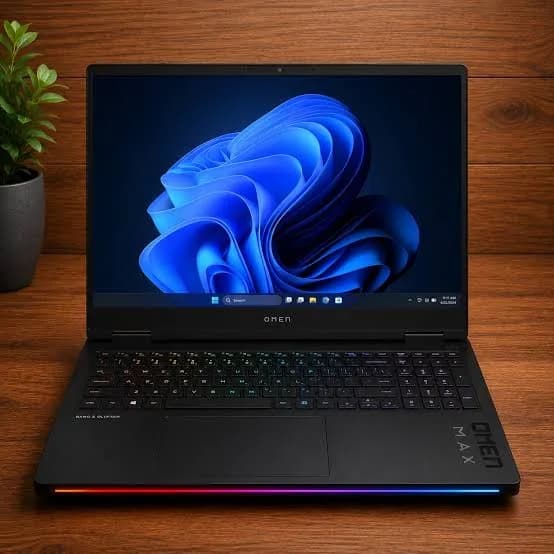
HP OMEN MAX 16 Gaming Laptop (Core Ultra 9 275HX, 32GB, 2TB, RTX 5090 24GB) in Kenya | City Gadgets Kenya
Same-day delivery in Nairobi by 8 Oct – 9 Oct
Comes with
Description
Buy the HP OMEN MAX 16 with Intel Core Ultra 9 275HX, 32GB RAM, 2TB SSD and RTX 5090 24GB in Kenya from City Gadgets Kenya. HP's most powerful laptop: a complete guide to who needs 24GB of graphics memory, AI and 3D workloads, 4K gaming, thermals and care.
HP OMEN MAX 16 Gaming Laptop (Core Ultra 9 275HX, 32GB, 2TB, RTX 5090 24GB) in Kenya
Genuine HP | Brand New | Model D13NWEA | The Most Powerful Laptop in HP's Range
The HP OMEN MAX 16 with the NVIDIA GeForce RTX 5090 Laptop GPU is the top of HP's gaming range and one of the most powerful laptops sold anywhere. It pairs an Intel Core Ultra 9 275HX processor with 24 GB of dedicated graphics memory, 32 GB of system memory and a 2 TB SSD. Available from City Gadgets Kenya as a brand-new, genuine HP laptop, it's meant for buyers whose work or play genuinely pushes a computer to its limits.
This guide is written for a buyer making a large purchase. It explains what the RTX 5090 adds over cheaper graphics cards, who truly needs that, how it behaves in real use, and what to prepare before it arrives in your home or office. We also say plainly when a cheaper machine would serve you just as well. For questions, message us on WhatsApp.
The short verdict
If you need 24 GB of graphics memory, or you want the fastest mobile graphics money can buy, this is the laptop. It's a real alternative to a desktop workstation for 3D artists, video professionals, AI developers and enthusiasts who run demanding games at the highest settings on external 4K screens. If your needs are "play the latest games at high settings", the cheaper RTX 5070 Ti version of the same laptop, also in our range, will give most of the experience for far less.
What the RTX 5090 Laptop GPU actually adds
It helps to know where the extra performance comes from, so you can judge whether you'd use it.
24 GB of GDDR7 video memory. This is the headline. Video memory holds textures, 3D scenes, video frames and AI models. When a task needs more memory than the card has, performance drops sharply or the task fails. Cards with 12 GB can struggle with the very largest scenes, huge texture packs and bigger AI models. 24 GB gives roughly double the room.
A larger graphics chip. The laptop RTX 5090 uses NVIDIA's GB203 chip with 10,496 CUDA cores, according to Notebookcheck. That's far more processing units than the 5070 Ti, so it renders frames and calculations faster.
More power headroom. Notebookcheck lists a graphics power limit of up to 175 W for this card in the OMEN MAX 16. More power means higher sustained clocks, which means better performance over a long session. HP's published figures also give about 250 W for the combined processor and graphics under load.
The same modern features as the other RTX 50 laptops. These include DLSS upscaling and frame generation, ray tracing hardware, and video encoders for streaming and recording. Those features are not exclusive to the 5090, but the 5090 has the most power to use them with.
In short: what you pay for is capacity and speed at the extreme end. The difference you notice depends on your workload, which we explain below.
Who truly needs this laptop
3D artists and animators. Large scenes in Blender, Maya, Cinema 4D or Unreal Engine can run out of video memory on smaller cards. With 24 GB, bigger scenes render and preview without crashing, and renders finish faster.
Video editors and colourists. 4K, 6K and higher-resolution footage with heavy effects, noise reduction and colour grading benefit from fast graphics and plenty of memory. The processor and 32 GB of RAM carry the rest.
AI and machine learning developers. Many AI tools run on NVIDIA's CUDA. 24 GB of video memory lets you run larger models locally, train smaller ones, and generate images or video without sending data to the cloud. This is one of the strongest arguments for the 5090 over the 5070 Ti.
Architecture and engineering professionals. Large CAD, BIM and visualisation models, with real-time rendering, suit the extra graphics memory.
High-end gamers. If you plan to play the newest games at maximum settings with ray tracing, or connect to a 4K or high-refresh external monitor, the extra power matters.
Streamers and creators who do everything at once. Gaming, recording, streaming and editing simultaneously use every part of the machine.
Who doesn't need it
It's worth being honest. If you mostly play e-sports and popular games, browse, study and edit light video, you won't use the RTX 5090's capacity. A rough guide:
- Esports and everyday gaming: the RTX 5070 Ti version is already more than enough.
- Mid-range gaming and study: the HP Victus models and the Lenovo LOQ in our range cost much less.
- Office, business and study work: a ThinkPad or EliteBook is lighter, cheaper and runs longer on battery.
Spending on the 5090 makes sense when your income, your studies or your hobby actually depend on the performance.
Specifications in plain English
| Feature | Detail |
|---|---|
| Model | D13NWEA |
| Processor | Intel Core Ultra 9 275HX: 8 performance cores up to 5.4 GHz, plus 16 efficiency cores |
| Graphics | NVIDIA GeForce RTX 5090 Laptop GPU, 24 GB GDDR7 |
| Memory | 32 GB DDR5-5600 |
| Storage | 2 TB NVMe SSD |
| Display | 16-inch WQXGA (2560 x 1600), 16:10, up to 240 Hz |
| Battery | 83 Wh, with a 330 W charger and fast charging to about 50% in 30 minutes, per HP |
| Ports | 2 Thunderbolt 4, 2 USB-A (10 Gbps), HDMI 2.1, RJ-45 Ethernet, 3.5 mm audio |
| Wireless | Wi-Fi 7 and Bluetooth 5.4 |
| Webcam | Full HD (1080p) |
| Weight | About 2.68 kg |
| Operating system | Windows 11 |
Figures come from HP's specifications and published reviews. HP sells the OMEN MAX 16 with IPS and OLED display options, so ask us to confirm the display of the unit you order.
The processor: 24 cores for everything else
The Core Ultra 9 275HX is the same chip as in the cheaper OMEN MAX 16 configurations. Its eight performance cores handle the heaviest threads, and its sixteen efficiency cores soak up background tasks. In a creator's workflow, that means a render, an export and a browser full of reference material can all run together. For AI work, the processor also contains a small neural engine (Intel AI Boost) for lightweight AI features, while the heavy lifting goes to the RTX card.
One point matters here: a processor and graphics card this strong generate a lot of heat. The laptop's cooling system, its 330 W charger and its performance modes all exist to manage that, and they're why the chassis is bigger and heavier than a thin-and-light laptop.
Gaming at the high end
You can play almost anything at maximum settings on this laptop, but it's most interesting in three situations.
1. Ray-traced games with all effects on. Ray tracing makes lighting, shadows and reflections realistic, and it's the most demanding feature in modern games. With the RTX 5090, you can enable it at high quality and use DLSS to keep frame rates smooth.
2. External 4K monitors and TVs. The laptop's screen is 2560 x 1600, which the 5070 Ti handles well. Connect to a 4K monitor or TV through HDMI 2.1 or Thunderbolt 4, and the extra graphics power lets you run at 4K with high settings far more comfortably.
3. High-refresh external screens. The laptop's own display goes up to 240 Hz. An external monitor with a high refresh rate can be driven at high frame rates in esports titles.
For ordinary gaming at the laptop's own resolution, you'll find the cheaper 5070 Ti version feels very similar, and that's worth knowing before you decide.
The display: sharp and fast
The 16-inch screen is 2560 x 1600 in a 16:10 shape. That gives more vertical space than a widescreen 16:9 laptop, which helps in timelines, spreadsheets and web pages. HP's IPS version is listed at about 500 nits and 100% sRGB, which is bright and accurate enough for web and video work, and reviews call the display accurate and free from PWM flicker. HP also offers OLED versions with deeper blacks and richer colour. If you do colour-critical work in wider colour spaces, ask us about the exact panel, and plan to use an external reference monitor for final grading.
Cooling, power modes and noise
Cooling is the most important part of a laptop like this. A large system of fans and heat pipes moves heat out of the body, and HP's OMEN Gaming Hub lets you pick performance profiles. Reviewers describe stable performance over long sessions, which is exactly what you need for a long render or a long game.
- Maximum performance mode: best for gaming, rendering and AI jobs. Fans are loud. Use a headset or speakers.
- Balanced mode: a good everyday setting with lower fan noise.
- Quiet use: for light tasks, the fans stay slow or off.
Some practical points:
- Use the laptop on a hard, flat surface.
- A cooling stand improves airflow and can lower temperatures in Nairobi's heat.
- For very long renders, keep the room cool, and don't cover the vents.
- Clean the vents with compressed air now and then.
Battery and portability
The 83 Wh battery is small relative to the power this laptop uses. Reviews describe battery life as poor under load, and performance on battery is lower than on a charger. HP lists fast charging to about 50% in 30 minutes, which helps in a pinch.
Think of the OMEN MAX 16 as a transportable workstation: you carry it between desk, studio, site and home, and you plug it in when you work. The laptop is about 2.68 kg, and the 330 W charger adds more. If you need to work for hours away from a socket, a smaller laptop is the better tool.
Ports and connecting a desk setup
The laptop's ports let it act as the centre of a desk:
- Two Thunderbolt 4 ports carry data, power and video. Use one for an external 4K monitor, and one for a fast external SSD, a capture device or a dock.
- HDMI 2.1 connects to a 4K TV or high-refresh monitor.
- Two USB-A ports (10 Gbps) handle a mouse, keyboard and flash drives.
- RJ-45 Ethernet gives a stable wired connection for online play, large file transfers and cloud sync.
- Wi-Fi 7 is the newest wireless standard, if your router supports it.
For a professional setup, a Thunderbolt dock with a monitor, keyboard, mouse and Ethernet lets you plug in one cable when you arrive at your desk. We stock accessories that work well with it, including SanDisk Extreme PRO portable SSDs for scratch storage, Logitech keyboards and mice, and Anker hubs and chargers.
Memory and storage
32 GB of DDR5-5600 RAM is generous for gaming and general creative work. For heavy video, 3D and AI work, some professionals use 64 GB, and published reviews list standard SO-DIMM modules in this laptop, so memory can be changed later. Ask us about upgrade options before you buy if this matters to you.
2 TB of NVMe storage is plenty for a game library or a project drive, but video and 3D projects grow quickly. Published specifications list a single M.2 slot for the main SSD, so extra storage is usually added with a fast external SSD over Thunderbolt, or by replacing the internal drive. For safe working, keep project files backed up on a second drive.
Working with AI on this laptop
AI is one of the best reasons to choose the RTX 5090 over the 5070 Ti, so it deserves its own section.
- CUDA and AI tools. Many AI frameworks and applications run best on NVIDIA GPUs, because they use CUDA. On this laptop, tools for image generation, upscaling, video enhancement, transcription and local language models can use the RTX card.
- Why 24 GB matters. AI models must fit in video memory to run quickly. Larger models and higher-resolution generation need more of it. A 12 GB card limits the size of the model you can use. 24 GB gives much more room, so you can run bigger models locally and experiment without paying for cloud computing.
- Privacy and cost. Running models locally keeps your data on your own machine and avoids per-use charges, which is useful for businesses with confidential material.
- Realistic expectations. A laptop doesn't match a data centre. The very largest AI models still need cloud hardware. For learning, prototyping, creative work and many production tasks, this laptop is a capable local machine.
Powering and protecting a laptop of this value in Kenya
A laptop at this level deserves proper protection.
Power. Power cuts and surges can damage chargers and motherboards. Use a UPS so you can save your work and shut down safely, and a surge protector to block spikes. We stock APC and Mecer UPS units. Because this laptop uses a 330 W charger, check the UPS's capacity before you buy, and ask us to size one for you.
Heat and dust. Keep the vents clear, use a cooling stand, and avoid using the laptop on soft surfaces.
Security. Treat the laptop as a high-value item. A padded bag, a cable lock for shared spaces, and Windows' Find My Device feature help. Don't leave it visible in a vehicle. Keep your receipt, the serial number and photos of the box.
Insurance. Some business and household insurers cover laptops. Ask your provider if you carry this laptop between locations.
Warranty and genuine product. Ask us for the warranty that applies to the unit you order, and keep the paperwork. Buying from a seller that can show you the unit before you pay protects you.
Setting it up on day one
- Check the box: laptop, 330 W charger, paperwork.
- Inspect the body, screen and ports.
- Complete Windows 11 setup with your own account.
- Run Windows Update, then update the graphics driver and BIOS.
- Open OMEN Gaming Hub and choose a performance mode.
- Install NVIDIA's app or drivers for creative or studio features if you do creative work.
- Set your display refresh rate, and calibrate colours if you do colour work.
- Install your software, and use a second drive or cloud storage for backups.
- Enable Find My Device and sign-in security.
Looking after it
- Clean the vents and fans from time to time with the laptop off.
- Don't block the vents, and avoid heavy loads on the closed lid.
- Keep drivers and Windows up to date, and back up before major updates.
- Use the original or an official 330 W charger.
- Store the laptop in a cool, dry place, and avoid leaving it in a hot car.
- Keep liquids away from the keyboard.
How it compares with other options in our range
| RTX 5090 version (this page) | RTX 5070 Ti version | HP Victus 15.6 (RTX 5060) | Lenovo LOQ (RTX 3050) | |
|---|---|---|---|---|
| Graphics memory | 24 GB | 12 GB | 8 GB | 6 GB |
| Best for | Heaviest 3D, AI, 4K work | High-settings gaming, creative work | Good Full HD gaming | Budget gaming |
| Same processor and RAM as this page? | Yes | Yes | No | No |
Against the RTX 5070 Ti version: the same laptop, with a faster card and double the video memory. Choose this one for 3D, AI or 4K work, or to future-proof for years of demanding use.
Against the Victus and LOQ: much lower prices, smaller screens and weaker processors. They suit Full HD gaming and study, not professional workloads.
How long will it stay current?
A flagship laptop is a multi-year purchase, so it's fair to ask how long it will stay useful. Three things decide that.
Graphics memory is the main limit. Games, 3D scenes and AI models keep growing, and video memory is usually the first thing a graphics card runs out of. With 24 GB, this laptop has far more room than cards with 8 or 12 GB, so it's less likely to hit that wall in the next few years.
The processor and memory are already top-tier. A 24-core processor and 32 GB of RAM will stay capable for a long time, and the standard memory modules mean you can add capacity later if your work demands it.
Software support. Windows, NVIDIA and HP keep supporting a laptop for several years with driver and firmware updates. Keeping the system updated, and cleaning the cooling system now and then, protects performance.
A realistic expectation is that the laptop will stay a strong machine for gaming and creative work for years. It won't stay at the top of the range forever, because new generations arrive, and the battery will wear with age. Buying at this level is about paying once for capacity you'll use for a long time, and about not paying twice.
Drivers for creative and professional work
NVIDIA offers two driver types for RTX cards, and choosing the right one helps stability.
- Game Ready drivers are tuned for new game releases and arrive often. Choose these if you mainly game.
- Studio drivers are tested against creative software such as Premiere Pro, DaVinci Resolve, Blender and Adobe apps, and update less often. Choose these if your income depends on a stable creative setup.
Whichever you choose, update deliberately: install updates when you're not in the middle of a deadline project, and keep the previous driver available in case an update causes problems. If you use the laptop for client work, keep a record of the driver version that works well for your projects.
Honest pros and cons
Pros
- The fastest mobile graphics available, with 24 GB of memory.
- A flagship 24-core processor.
- 32 GB RAM and 2 TB storage.
- A sharp, fast 16:10 screen.
- Thunderbolt 4, HDMI 2.1, Ethernet and Wi-Fi 7.
- Stable performance in long sessions, per reviewers.
Cons
- High price.
- Heavy, with a heavy charger.
- Short battery life under load.
- Loud fans at full performance.
- A single M.2 slot limits internal storage expansion.
- Most buyers won't use the full power of the card.
What to check when it arrives
- The box model matches D13NWEA.
- The graphics card is the RTX 5090 with 24 GB (check Task Manager or the NVIDIA Control Panel).
- The processor is the Core Ultra 9 275HX, with 32 GB of RAM and 2 TB of storage.
- The screen has no dead pixels or backlight bleed.
- The ports, keyboard, touchpad, webcam and speakers all work.
- The charger is the 330 W unit.
- You have a receipt with the serial number and warranty details in writing.
Frequently asked questions
How much video memory does it have? 24 GB of GDDR7.
Is the RTX 5090 worth it over the 5070 Ti? Only if you need 24 GB of video memory or the fastest graphics, for heavy 3D, AI, 4K gaming or professional work. For most gaming, the 5070 Ti is enough.
Can it replace a desktop? For many users, yes, when plugged in. It has desktop-class performance, though a desktop with a full-size graphics card is still faster and easier to upgrade.
Can it run local AI models? Yes. With 24 GB of video memory, it handles many local AI tools and mid-size models. The largest models still need cloud hardware.
Does it run hot? It warms up under heavy load, as all high-end laptops do. A cooling stand and a hard surface help.
Can I use it on battery? Yes, for light work, but battery life is short under load and performance is lower than when plugged in.
Can I connect a 4K monitor? Yes, through HDMI 2.1 or Thunderbolt 4.
Can I add memory or storage? Published reviews list standard SO-DIMM memory and a single M.2 SSD slot. Ask us for upgrade advice before you buy.
Is the display OLED? HP sells IPS and OLED versions. Ask us to confirm the unit you order.
Is it good for students? Only for demanding courses such as 3D design, engineering or computer science with AI. A cheaper laptop suits most students.
What power protection do I need? A UPS and a surge protector. Ask us to size one for a 330 W charger.
Does it come with Windows 11? Yes.
What warranty does it have? Ask us for the warranty that applies to the unit you order.
Can you deliver it? Yes, same day in Nairobi and next day outside Nairobi.
Can I pay via M-Pesa? Yes.
Why buy from City Gadgets Kenya
Genuine, brand-new HP laptop. We're at New Alnoor Exhibition, Second Floor, Shop C7, Accra Road, Nairobi CBD, and you're welcome to see the laptop before you pay. Message us on WhatsApp with what you'll use it for, and we'll tell you honestly whether the RTX 5090 is worth it for you or the RTX 5070 Ti version would do. We confirm the exact configuration with you before you pay.
Order your HP OMEN MAX 16 (RTX 5090) today
Available now at City Gadgets Kenya. Message us on WhatsApp.
Specifications
- Brand
- HP
- Condition
- New
Frequently Asked Questions
How much does the HP OMEN MAX 16 Gaming Laptop (Core Ultra 9 275HX, 32GB, 2TB, RTX 5090 24GB) in Kenya | City Gadgets Kenya cost in Kenya?
The HP OMEN MAX 16 Gaming Laptop (Core Ultra 9 275HX, 32GB, 2TB, RTX 5090 24GB) in Kenya | City Gadgets Kenya is priced at Ksh 720,000 at City Gadgets. You can pay via M-Pesa, card or cash on delivery.
Is the HP OMEN MAX 16 Gaming Laptop (Core Ultra 9 275HX, 32GB, 2TB, RTX 5090 24GB) in Kenya | City Gadgets Kenya available in Kenya?
Yes — the HP OMEN MAX 16 Gaming Laptop (Core Ultra 9 275HX, 32GB, 2TB, RTX 5090 24GB) in Kenya | City Gadgets Kenya is in stock at City Gadgets, ready for same-day delivery in Nairobi and countrywide shipping across Kenya.
Is the HP OMEN MAX 16 Gaming Laptop (Core Ultra 9 275HX, 32GB, 2TB, RTX 5090 24GB) in Kenya | City Gadgets Kenya genuine and does it have a warranty?
Every HP OMEN MAX 16 Gaming Laptop (Core Ultra 9 275HX, 32GB, 2TB, RTX 5090 24GB) in Kenya | City Gadgets Kenya we sell is 100% genuine brand-new stock and comes with a 12-month official brand warranty.
Do you deliver the HP OMEN MAX 16 Gaming Laptop (Core Ultra 9 275HX, 32GB, 2TB, RTX 5090 24GB) in Kenya | City Gadgets Kenya in Nairobi?
Yes. We offer fast same-day delivery within Nairobi and fast, affordable delivery to the rest of Kenya — order online or on WhatsApp.
Customer Reviews
No reviews yet
Be the first to review this product.
Rate us on Google
Your review helps other shoppers find us
Reviews from verified buyers will appear here.
Buying guides
Straight advice for shoppers picking between the models above.

Best Laptops for Programmers and Developers in Kenya 2026 (Complete Guide) | City Gadgets Kenya
Best Laptops for Programmers and Developers in Kenya 2026: A Complete Guide
Read the guide
Best Lightweight and Ultraportable Laptops in Kenya 2026 (Complete Guide) | City Gadgets Kenya
Best Lightweight and Ultraportable Laptops in Kenya 2026: A Complete Guide
Read the guide
Best Laptops for University Freshers in Kenya 2026 (KUCCPS Season Guide) | City Gadgets Kenya
Best Laptops for University Freshers in Kenya 2026: The Complete KUCCPS Season Guide
Read the guide