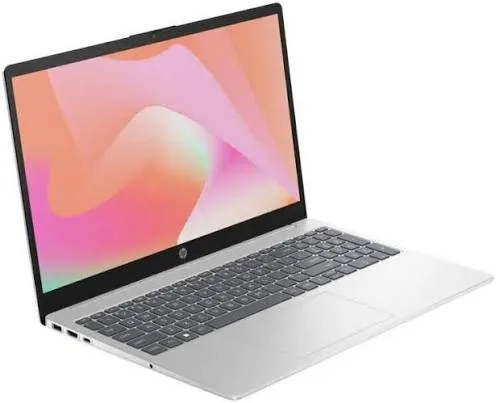
HP 15 Touchscreen Laptop FD2050WM (Core Ultra 5, 8GB RAM, 512GB SSD, 15.6" Full HD) in Kenya | City Gadgets Kenya
Same-day delivery in Nairobi by 8 Oct – 9 Oct
Comes with
Description
Buy the HP 15-fd2050wm with Intel Core Ultra 5, 8GB DDR5 RAM, 512GB SSD and a 15.6-inch Full HD touchscreen in Kenya from City Gadgets Kenya. HP 15-fd2050wm price in Kenya, Core Ultra 5 laptop Nairobi, touchscreen laptop for everyday use. A complete buyer's guide.
HP 15 Touchscreen Laptop FD2050WM (Core Ultra 5, 8GB RAM, 512GB SSD, 15.6" Full HD) in Kenya
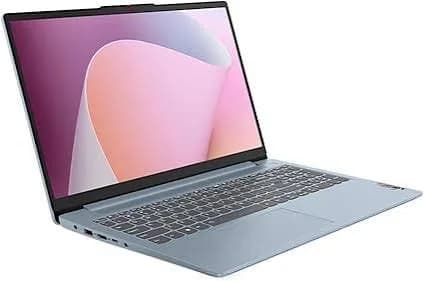
Genuine HP | Brand New | Model FD2050WM (HP 15-fd2050wm) | 15.6-Inch Full HD Touchscreen Laptop with Intel Core Ultra 5
Looking for the HP 15-fd2050wm price in Kenya, a Core Ultra 5 laptop in Nairobi, or an affordable HP touchscreen laptop with a 512GB SSD? The HP 15-fd2050wm is a brand-new, genuine HP laptop with an Intel Core Ultra 5 225U processor, 8 GB of DDR5 memory, a fast 512 GB NVMe SSD and a 15.6-inch Full HD IPS touchscreen, available from City Gadgets Kenya with delivery across Kenya. It's a modern, efficient everyday laptop for students, office workers, families and home users. Buyers also search for it as an HP Core Ultra laptop, an AI-ready laptop in Kenya, an HP 15 touchscreen laptop, a laptop for online classes, or an affordable HP laptop with a 15.6-inch screen.
This guide explains the laptop in plain language: what the Core Ultra 5 225U processor gives you, what its 8 GB of memory can and can't do, how the touchscreen, battery and ports perform, and how to decide whether it's the right laptop or a model with more memory would serve you better. If you'd like to talk it through, message us on WhatsApp.
The short verdict
The HP 15-fd2050wm is a modern, efficient everyday laptop with one clear compromise. Its newer Intel Core Ultra 5 processor, fast NVMe SSD, Full HD touchscreen and Wi-Fi 6 make it a pleasant, responsive laptop for study, office work and family use. The compromise is memory: 8 GB is enough for light and moderate use, but it's the first thing you'll feel if you keep many tabs open or run heavier software. If your use is light to moderate, this is a good-value laptop. If you multitask heavily, the HP 15 FD0127DX with 16 GB, also in our range, is the better choice, and 8 GB can often be upgraded later.
Who this laptop is for
It suits you if:
- You mainly browse, stream, write documents, make presentations and join video calls.
- You're a student who wants a modern laptop for coursework and online classes.
- You want a touchscreen for natural scrolling and tapping.
- You want a newer processor generation at a sensible price.
- You're fine with 8 GB for now and plan to upgrade the memory later if needed.
Look elsewhere if:
- You keep dozens of tabs open, edit video, or run heavy software. Choose 16 GB, such as the HP 15 FD0127DX or the HP 255R G10 in our range.
- You play demanding games. See the HP Victus or OMEN MAX models.
- You need business security features and Windows 11 Pro. See the HP ProBook range.
- You do colour-critical design or photography.
Specifications in plain English
| Feature | Detail | What it means for you |
|---|---|---|
| Model | FD2050WM, HP 15-fd2050wm | HP's 15.6-inch touchscreen laptop |
| Processor | Intel Core Ultra 5 225U (Series 2), 12 cores, built-in AI engine | Modern, efficient everyday performance |
| Graphics | Intel Graphics (built in) | Smooth video and everyday visuals |
| Memory | 8 GB DDR5. Some listings show DDR4 | Fine for light to moderate use |
| Storage | 512 GB NVMe SSD | Fast boots and loading |
| Display | 15.6-inch Full HD (1920 x 1080) IPS touchscreen, anti-glare, micro-edge | Sharp, with touch input |
| Wireless | Wi-Fi 6 and Bluetooth | Fast, modern connections |
| Ports | USB-C, USB-A, HDMI | The essentials |
| Webcam | HP TrueVision 720p HD | Good for calls |
| Colour | Natural silver | A clean look |
| Operating system | Windows 11 Home | Ready to use |
| Warranty | A Kenyan retailer lists 1 year for this model. Ask us what applies | Confirm in writing |
These figures come from HP and retailer listings of the 15-fd2050wm. Memory type and battery size vary between listings, so ask us to confirm the unit you order.
The processor: Intel Core Ultra 5 225U explained
The Core Ultra 5 225U is one of Intel's newer processors, part of the Core Ultra Series 2 family. "U" means it's built for thin and efficient laptops where battery life and low heat matter.
12 cores. The processor combines performance cores for demanding tasks, efficiency cores for everyday work and low-power cores for very light tasks. Windows and the chip decide which core handles which job, which keeps the laptop fast when you need speed and efficient when you don't.
Speed. Retail listings give maximum speeds of around 4.8 GHz for this class of chip, though listings differ, so treat the exact figure as approximate.
Efficiency. Core Ultra "U" processors are designed to deliver good performance with low power draw. That means less heat, a quiet fan and better use of the battery.
Built-in AI engine (NPU). Core Ultra processors include a neural processing unit for AI features such as background blur and noise reduction on video calls. An honest note: Microsoft's Copilot+ PC features need a more powerful NPU than the one in this class of chip, so "AI-ready" here means it supports basic on-device AI features, not the full Copilot+ set.
Built-in graphics. The integrated Intel graphics handle high-resolution video, multiple displays and light photo editing. They're not made for modern games.
For study, office work, browsing, streaming and video calls, this processor is more than enough. It's also faster and more efficient than older laptop processors at similar prices.
Memory: what 8 GB gives you, and what it doesn't
This is the part of the specification that deserves the most thought.
What 8 GB handles well.
- Browsing with a moderate number of tabs.
- Word, Excel and PowerPoint.
- Video streaming and music.
- Zoom, Teams or Google Meet calls with a document open.
- Light photo editing.
Where 8 GB starts to feel tight.
- Dozens of browser tabs along with other apps.
- Large spreadsheets and databases.
- Video editing and heavier creative software.
- Running several programs while on a video call.
- Years from now, as software becomes hungrier.
The good news: it's often upgradeable. Retail listings for this model mention that the memory is often expandable through SODIMM slots. If your unit has a free slot or replaceable memory, you can upgrade to 16 GB later at a modest cost, which makes 8 GB a lower-risk choice than on a laptop with soldered memory. Ask us to confirm the memory layout of the unit you order and what upgrades are possible.
A simple rule. If you're unsure, and your budget allows, choose 16 GB. If you're confident your use is light, or you plan to upgrade, 8 GB is fine.
Storage: 512 GB NVMe SSD
The 512 GB NVMe SSD is a strong point at this price. NVMe is far faster than a hard drive or an older SATA SSD, so Windows starts in seconds and apps open quickly. 512 GB is plenty for Windows, your documents, photos and a good library of music and video. If you store a lot of large files, use a SanDisk portable SSD or a portable hard drive from our range.
The touchscreen
The screen is a 15.6-inch Full HD (1920 x 1080) IPS panel with touch, an anti-glare finish and narrow bezels. Retail listings put typical brightness in the 250 to 300 nit range.
Where touch helps. Scrolling, tapping, pinch-to-zoom, annotating documents and using Windows 11 gestures all feel natural, especially if you also use a phone or tablet.
Where it doesn't matter. If you mostly type with a mouse, you may rarely touch it. Fingerprints show on touch panels, so keep a microfibre cloth handy.
Screen quality. Full HD at 15.6 inches is sharp, and IPS gives wide viewing angles. The screen is a standard everyday panel, good for study, office and streaming, but not for colour-accurate design or photo work. In bright sunlight, 250 to 300 nits can look dim.
Battery and charging
Retail listings suggest up to about 9 to 10 hours of video playback for this laptop, but real life is usually lower, because brightness, touchscreen use, Wi-Fi and the apps you run all use power. For the best battery life:
- Use Windows' battery saver mode when unplugged.
- Lower the screen brightness.
- Close background apps and extra tabs.
- Carry the charger on longer days, or an Anker power bank with USB-C output from our range.
Ask us for the exact battery size and charger of the unit you order.
Ports and connectivity
- USB-C: for data and accessories.
- USB-A: for a mouse, flash drive or printer.
- HDMI: for a projector, TV or external monitor.
- Wi-Fi 6 and Bluetooth: fast, modern wireless connections.
It doesn't have an Ethernet port or an SD card slot. An Anker USB-C hub from our range adds them if you need them.
Windows 11 Home: what you get
The laptop comes with Windows 11 Home, which includes a modern interface, snap layouts for arranging windows, built-in security with Windows Defender, Microsoft Teams chat and good touchscreen support. It doesn't include Windows 11 Pro's business features such as BitLocker drive encryption. If you need those, see the HP ProBook models.
AI features: what "AI-ready" means for you
Marketing for newer laptops mentions AI a lot, so it helps to know what's real.
- On-device AI engine. The NPU can run some AI tasks efficiently, such as blurring your background or reducing noise on a video call, without using much power.
- Copilot in Windows. Microsoft's Copilot assistant works on most Windows 11 laptops, including this one, and mostly uses the cloud.
- Copilot+ PC features such as Recall and the newest local AI tools need a stronger NPU, so this laptop isn't a Copilot+ PC.
- Practical advice. Don't pay a premium for "AI" alone. Choose a laptop for its memory, storage, screen and battery, and treat AI features as a bonus.
A student's guide to this laptop
- Lectures and notes. Type notes in Word or OneNote, or use touch to annotate slides.
- Online classes. The webcam and Wi-Fi 6 handle video classes comfortably.
- Research. With 8 GB, keep your open tabs and apps in check. If you notice slowdowns, upgrade to 16 GB.
- Group work. Collaborate on Google Docs or Microsoft 365.
- Presentations. Connect to a projector by HDMI.
- Backups. Save coursework to cloud storage and a SanDisk flash drive or portable SSD.
- Protection. Use a padded sleeve, a surge protector and a strong sign-in PIN.
Everyday performance: what to expect
Browsing and streaming: a moderate number of tabs and Full HD video play smoothly.
Office and study: documents, spreadsheets and presentations run well.
Video calls: Zoom, Teams and Meet run comfortably.
Photo editing and light creative work: simple edits run well on the integrated graphics.
Heavier tasks: large spreadsheets, video editing and many tabs open together will feel tight on 8 GB.
Gaming: light games at low settings only.
How to upgrade the memory later
If you buy this laptop with 8 GB and later need more, the upgrade is usually simple, and it's worth knowing the steps so you don't buy the wrong parts.
- Find out what's inside. In Windows, open Task Manager, choose Performance, then Memory. It shows the memory type (DDR4 or DDR5), speed and how many slots are used. Ask us to confirm this for your unit.
- Match the type and speed. Memory is not interchangeable. A DDR5 laptop needs DDR5 SO-DIMM modules, and a DDR4 laptop needs DDR4.
- Check the maximum. Retail listings differ on the maximum a model supports, so confirm before buying. For most uses, a total of 16 GB is plenty.
- Prefer a matching pair when possible. Two identical modules run in dual-channel mode, which is faster than a single module. If the laptop has one 8 GB module, adding a second 8 GB module gives 16 GB in dual channel.
- Back up first. Always save your data before opening a laptop.
- Have it fitted carefully. Opening a laptop can affect the warranty and risks damaging parts. Ask us how we handle upgrades and what happens to the warranty.
A memory upgrade is one of the cheapest ways to make a laptop feel faster and last longer, which is why an 8 GB laptop with an upgrade path is a reasonable purchase.
Choosing between a touchscreen and a standard screen
Touchscreens cost a little more and are common on everyday laptops. If you're unsure whether you want one, think about how you'll use it.
Choose a touchscreen if:
- You use a phone or tablet a lot and like tapping and scrolling.
- You read, annotate or sign documents.
- You share the screen with family or colleagues.
- You may use a stylus later for notes or sketches.
Choose a standard screen if:
- You mostly type and use a mouse.
- You want the longest possible battery life, because touch panels use a little more power.
- You prefer a matte, less reflective surface.
For most people, touch is a nice extra and not a deciding factor. Choose on memory, storage and your budget first.
Making an 8 GB laptop run smoothly
If you choose 8 GB, a few habits keep it quick.
- Limit startup programs. In Task Manager, open the Startup tab and disable apps you don't need at boot.
- Use fewer, lighter tabs. Close tabs you've finished with, and use a browser's tab-sleeping option if it has one.
- Keep at least 15% of the SSD free. A nearly full drive slows Windows.
- Restart now and then. A weekly restart clears memory and finishes updates.
- Uninstall software you don't use.
- Run one heavy program at a time. Close a big spreadsheet before you start a video edit.
These habits can make an 8 GB laptop feel as quick as one with twice the memory, for light and moderate work.
Using a laptop in Kenya
Power protection. Surges and outages can damage a charger and motherboard. A surge protector or voltage guard blocks spikes, and a UPS gives you time to save work and shut down safely. We stock APC, Mecer and Unomat UPS units.
Security. Don't leave a laptop visible in a car or on a table in public. Use a padded bag, set a sign-in PIN, and turn on Find My Device.
Heat and dust. Keep the vents clear and use the laptop on a hard surface.
Warranty. A Kenyan retailer lists a one-year warranty for this model. Ask us for the warranty that applies to the unit you order, and keep the receipt and box.
Keyboard and region. Some units ship with a US English keyboard. Ask us to confirm the layout.
First-day setup checklist
- Check the box contents: laptop, charger and paperwork.
- Inspect the body, screen and ports.
- Complete Windows 11 setup with your own account.
- Run Windows Update until it's finished.
- Install your software and an antivirus.
- Set a sign-in PIN, and turn on Find My Device.
- Set up cloud or external backups.
- Adjust brightness and battery settings.
- Check the memory layout in Task Manager (Performance, Memory) to see whether you can upgrade later.
Looking after it
- Carry it in a padded sleeve or bag.
- Clean the touchscreen with a soft microfibre cloth, slightly damp if needed, never with harsh chemicals.
- Keep the vents clear and clean them now and then.
- Keep Windows and drivers updated.
- Keep liquids away from the keyboard.
- Use the original charger or an official replacement.
- Don't leave it in a hot car.
Accessories worth buying with it
| Accessory | Why it helps |
|---|---|
| Padded laptop sleeve or bag | Protects against knocks and spills |
| Surge protector or UPS | Protects against power surges and outages |
| Logitech wireless mouse | More comfortable than the touchpad |
| Anker USB-C hub | Adds Ethernet, card readers and extra ports |
| SanDisk portable SSD or flash drive | Fast backups and extra storage |
| Soundcore, JBL or Sony headset | Clearer calls and music |
| Kaspersky antivirus | Extra protection for files and browsing |
Message us on WhatsApp and we'll put together a bundle that fits your budget.
How it compares with other options in our range
| HP 15 FD2050WM (Core Ultra 5, 8GB) | HP 15 FD0127DX (Core 7, 16GB) | HP 255R G10 (Ryzen 7, 16GB) | HP ProBook 440 G11 | |
|---|---|---|---|---|
| Class | Everyday touchscreen | Everyday touchscreen | Value business laptop | Business laptop |
| Processor | Core Ultra 5 225U | Core 7 150U | Ryzen 7 7735U | Core Ultra 7 155U |
| Memory | 8 GB | 16 GB | 16 GB DDR5 | 16 GB DDR5 |
| Touch | Yes | Yes | No | Check unit |
| Best for | Light to moderate use | Heavier multitasking | Office work | Professionals |
Against the HP 15 FD0127DX: that model has twice the memory, which matters more for multitasking. This one has a newer processor generation.
Against the HP 255R G10: the 255R has 16 GB, a Ryzen 7 and a number pad, but no touchscreen.
Against the HP ProBook 440 G11: a business laptop with Windows 11 Pro and stronger security, at a higher price.
Honest pros and cons
Pros
- A modern, efficient Core Ultra 5 processor.
- A fast 512 GB NVMe SSD.
- A 15.6-inch Full HD IPS touchscreen.
- Wi-Fi 6 and a good set of ports.
- A built-in AI engine for basic AI features.
- Memory that is often upgradeable.
- A good price for a modern laptop.
Cons
- Only 8 GB of memory, which will limit heavier users.
- Windows 11 Home only.
- Not a Copilot+ PC.
- A standard screen with modest brightness and colour.
- No Ethernet port or SD card slot.
- Not for gaming or heavy creative work.
What to check when it arrives
- The box model matches 15-fd2050wm.
- The processor is the Core Ultra 5, with 8 GB of RAM and 512 GB of storage (Settings, System, About).
- The touchscreen responds across the whole screen, with no dead pixels or scratches.
- The webcam, keyboard, touchpad, speakers and ports work.
- The charger is correct.
- You get a receipt with the serial number and warranty details in writing.
Frequently asked questions
What is the HP 15-fd2050wm price in Kenya? We confirm the current price when you message us on WhatsApp, because supplier prices change. We tell you the price and the exact configuration before you pay.
Where can I buy the HP 15-fd2050wm in Nairobi? At City Gadgets Kenya, New Alnoor Exhibition, Second Floor, Shop C7, Accra Road, Nairobi CBD, or by delivery.
Is it a touchscreen laptop? Yes, a 15.6-inch Full HD IPS touchscreen.
Is 8GB of RAM enough? For light to moderate use, yes. For heavy multitasking, choose 16 GB or plan to upgrade.
Can I upgrade the RAM? Listings suggest the memory is often expandable. Ask us to confirm for the unit you order.
Is the Core Ultra 5 225U a good processor? Yes, it's a modern, efficient 12-core processor suited to everyday work.
Is it a Copilot+ PC? No. Copilot+ features need a stronger AI engine.
Is it good for students? Yes, for coursework, research and online classes. Heavy multitaskers should consider 16 GB.
Can it play games? Only light games at low settings. See the HP Victus or OMEN MAX.
Does it come with Windows? Yes, Windows 11 Home.
What warranty does it have? A Kenyan retailer lists one year for this model. Ask us for the warranty that applies to the unit you order.
Can you deliver it? Yes, same day in Nairobi and next day outside Nairobi.
Can I pay via M-Pesa? Yes.
Why buy from City Gadgets Kenya
Genuine, brand-new HP laptop. We're at New Alnoor Exhibition, Second Floor, Shop C7, Accra Road, Nairobi CBD, and you're welcome to look at the laptop before you buy. Message us on WhatsApp with what you'll use it for, and we'll tell you honestly whether 8 GB is enough for you or a 16 GB model would suit you better. We confirm the exact configuration with you before you pay.
Order your HP 15 touchscreen laptop today
Available now at City Gadgets Kenya. Message us on WhatsApp.
Specifications
- Brand
- HP
- Condition
- New
Frequently Asked Questions
How much does the HP 15 Touchscreen Laptop FD2050WM (Core Ultra 5, 8GB RAM, 512GB SSD, 15.6" Full HD) in Kenya | City Gadgets Kenya cost in Kenya?
The HP 15 Touchscreen Laptop FD2050WM (Core Ultra 5, 8GB RAM, 512GB SSD, 15.6" Full HD) in Kenya | City Gadgets Kenya is priced at Ksh 90,000 at City Gadgets. You can pay via M-Pesa, card or cash on delivery.
Is the HP 15 Touchscreen Laptop FD2050WM (Core Ultra 5, 8GB RAM, 512GB SSD, 15.6" Full HD) in Kenya | City Gadgets Kenya available in Kenya?
Yes — the HP 15 Touchscreen Laptop FD2050WM (Core Ultra 5, 8GB RAM, 512GB SSD, 15.6" Full HD) in Kenya | City Gadgets Kenya is in stock at City Gadgets, ready for same-day delivery in Nairobi and countrywide shipping across Kenya.
Is the HP 15 Touchscreen Laptop FD2050WM (Core Ultra 5, 8GB RAM, 512GB SSD, 15.6" Full HD) in Kenya | City Gadgets Kenya genuine and does it have a warranty?
Every HP 15 Touchscreen Laptop FD2050WM (Core Ultra 5, 8GB RAM, 512GB SSD, 15.6" Full HD) in Kenya | City Gadgets Kenya we sell is 100% genuine brand-new stock and comes with a 12-month official brand warranty.
Do you deliver the HP 15 Touchscreen Laptop FD2050WM (Core Ultra 5, 8GB RAM, 512GB SSD, 15.6" Full HD) in Kenya | City Gadgets Kenya in Nairobi?
Yes. We offer fast same-day delivery within Nairobi and fast, affordable delivery to the rest of Kenya — order online or on WhatsApp.
Customer Reviews
No reviews yet
Be the first to review this product.
Rate us on Google
Your review helps other shoppers find us
Reviews from verified buyers will appear here.
Buying guides
Straight advice for shoppers picking between the models above.

Best Laptops for Programmers and Developers in Kenya 2026 (Complete Guide) | City Gadgets Kenya
Best Laptops for Programmers and Developers in Kenya 2026: A Complete Guide
Read the guide
Best Lightweight and Ultraportable Laptops in Kenya 2026 (Complete Guide) | City Gadgets Kenya
Best Lightweight and Ultraportable Laptops in Kenya 2026: A Complete Guide
Read the guide
Best Laptops for University Freshers in Kenya 2026 (KUCCPS Season Guide) | City Gadgets Kenya
Best Laptops for University Freshers in Kenya 2026: The Complete KUCCPS Season Guide
Read the guide