HP 15 Touchscreen Laptop FD0127DX (Core 7, 16GB RAM, 512GB SSD, 15.6" Full HD) in Kenya | City Gadgets Kenya
Same-day delivery in Nairobi by 8 Oct – 9 Oct
Comes with
Description
Buy the HP 15-fd0127dx with Intel Core 7, 16GB RAM, 512GB SSD and a 15.6-inch Full HD touchscreen in Kenya from City Gadgets Kenya. HP 15-fd0127dx price in Kenya, touchscreen laptop Nairobi, laptop for students and families. A complete buyer's guide.
HP 15 Touchscreen Laptop FD0127DX (Core 7, 16GB RAM, 512GB SSD, 15.6" Full HD) in Kenya
Genuine HP | Brand New | Model FD0127DX (HP 15-fd0127dx, B4HN8UA) | 15.6-Inch Full HD Touchscreen Laptop
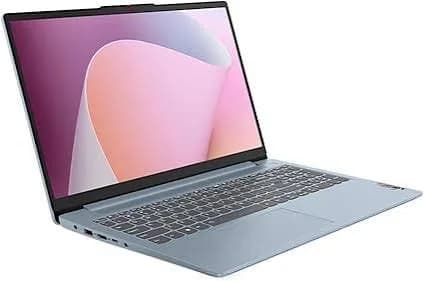
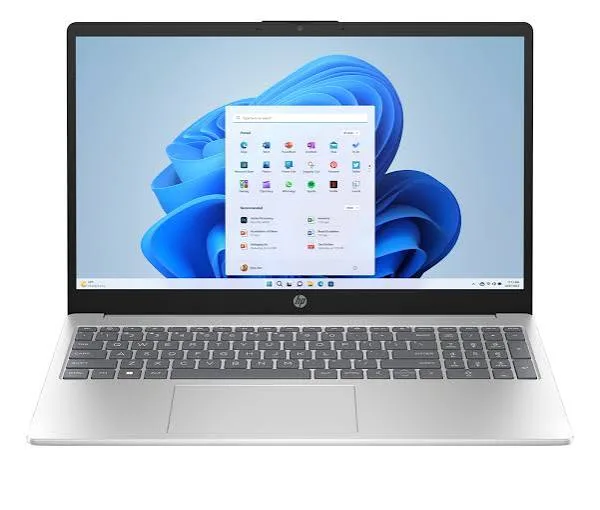
Searching for the HP 15-fd0127dx price in Kenya, a touchscreen laptop in Nairobi, or an HP 15 laptop with Core i7, 16GB RAM and a 512GB SSD? The HP 15-fd0127dx is a brand-new, genuine HP laptop with an Intel Core 7 processor, 16 GB of memory, a fast 512 GB NVMe SSD and a 15.6-inch Full HD IPS touchscreen, available from City Gadgets Kenya with delivery across Kenya. It's one of the most popular everyday laptops for students, families, teachers and home-office workers. Buyers also search for it as an HP touchscreen laptop, an HP 15 laptop with 16GB RAM, a laptop for university students in Kenya, a laptop for online classes, or an affordable Core i7 laptop.
This guide explains the laptop in plain language: what the processor and 16 GB of memory give you, why a touchscreen can be useful, how the screen, battery and ports perform, and where the laptop is limited. If you'd like to talk it through, message us on WhatsApp.
The short verdict
The HP 15-fd0127dx is a well-rounded everyday laptop with a generous 16 GB of memory, which is the feature that sets it apart from many laptops at this level that ship with 8 GB. You get a fast Intel processor, a 512 GB NVMe SSD, a sharp 15.6-inch Full HD touchscreen, Wi-Fi 6, a webcam with a privacy shutter, and a slim silver body. It's not a gaming laptop, a premium business machine or a creator laptop, and the screen and battery are basic. For studying, working from home, family use and everyday computing, it's a sensible choice that should stay comfortable for years.
Who this laptop is for
It suits you if:
- You're a university or college student who needs a laptop for lectures, research, assignments and online classes.
- You want a family laptop that everyone in the household can share for homework, streaming, browsing and video calls.
- You work from home and need a laptop for documents, spreadsheets, email and Zoom, Teams or Google Meet.
- You want a touchscreen for scrolling, tapping, sketching notes or using Windows more naturally.
- You want 16 GB of memory without paying for a premium laptop.
Look elsewhere if:
- You play demanding games. See the HP Victus and OMEN MAX in our range.
- You need business security and Windows 11 Pro features. See the HP ProBook and 255R models.
- You do colour-critical design or video work. The screen is a standard one.
- You need a very light laptop for daily travel. At 15.6 inches, it's more of a home and desk laptop.
Specifications in plain English
| Feature | Detail | What it means for you |
|---|---|---|
| Model | FD0127DX, HP 15-fd0127dx (B4HN8UA) | HP's 15.6-inch touchscreen laptop |
| Processor | Intel Core 7 150U (10 cores, up to 5.4 GHz), as listed. Some units list a Core i7-1355U (10 cores, up to 5.0 GHz) | Fast, efficient everyday performance |
| Graphics | Intel Iris Xe (built in) | Smooth video, light photo editing and everyday visuals |
| Memory | 16 GB. Some units list DDR5, others DDR4 | Plenty for many tabs and apps |
| Storage | 512 GB PCIe NVMe M.2 SSD | Fast boots and loading |
| Display | 15.6-inch Full HD (1920 x 1080) IPS touchscreen | Sharp, with touch input |
| Wireless | Wi-Fi 6 and Bluetooth | Fast, modern connections |
| Webcam | HP TrueVision HD with privacy shutter and noise reduction | Good for calls, with a physical privacy cover |
| Charger | 45 W, with HP Fast Charge | Compact and light |
| Security | TPM support | Helps protect passwords and encryption |
| Colour | Natural silver | A clean, professional look |
| Operating system | Windows 11 Home | Ready to use |
These figures come from HP and retailer listings of the 15-fd0127dx. Retailers list two processor and memory variants (a Core 7 150U with DDR5, and a Core i7-1355U with DDR4), so ask us to confirm exactly which the unit you order has.
The processor, explained
The 15-fd0127dx is sold with one of two Intel processors, both aimed at efficient everyday work.
Intel Core 7 150U. This is a 10-core processor with 2 performance cores and 8 efficiency cores, boosting up to about 5.4 GHz. "U" means it's designed for thin laptops that care about battery life and low heat.
Intel Core i7-1355U. This is a 13th-generation processor with 10 cores and 12 threads, boosting up to about 5.0 GHz, also in the efficient U family.
Both give very similar real-world performance for the jobs this laptop is made for. In practice, that means:
- Multitasking. You can keep a browser with many tabs, a document, a video call and music running together.
- Everyday speed. Windows starts quickly, programs open promptly, and the laptop stays responsive.
- Study and office work. Word, Excel, PowerPoint, research tools, online classes and coding basics all run smoothly.
- Quiet operation. Efficient processors run cooler, so the fan stays quiet.
Neither processor is built for gaming or heavy video editing.
16 GB of memory: why it matters
Memory is where this laptop stands out. 16 GB is double what many laptops in this price class offer, and it makes a real difference.
- Many browser tabs. Modern websites and web apps use a lot of memory. 16 GB lets you keep a large number open without slowdowns.
- Video calls plus work. A call in Zoom or Teams with a document and a browser open is comfortable.
- Fewer slowdowns over time. As software gets hungrier, extra memory keeps the laptop usable for longer.
- Light creative work. Photo editing, simple video edits and design tools such as Canva run better with 16 GB.
If you see 8 GB laptops at a lower price, remember that memory is the hardest thing to fix later on a laptop, and 16 GB is a good long-term investment.
Storage: 512 GB NVMe SSD
An NVMe SSD is much faster than a hard drive. Windows starts in seconds, apps open quickly, and large files copy fast. 512 GB is plenty for Windows, your documents, photos and a good collection of music and videos. If you store a lot of video, add an external drive from our range, such as the SanDisk Extreme portable SSD or a WD, Seagate or Toshiba portable hard drive for backups.
The touchscreen: is it worth having?
The 15.6-inch screen is a Full HD (1920 x 1080) IPS touchscreen. Touch isn't essential on a laptop, but it's handy in specific ways.
Where touch helps.
- Scrolling and tapping on web pages and apps feels natural, especially if you're used to a phone or tablet.
- Reading and annotating PDFs and documents by touch is quick.
- Presenting and sharing. Pointing at the screen is easy when you're showing something to someone next to you.
- Education. Touch is useful for younger children using educational apps, and for sketching with a compatible stylus.
- Windows 11 gestures such as pinch-to-zoom and swiping between windows.
Where it doesn't matter. If you mostly type and use a mouse, you may rarely touch the screen. A touch panel can also be slightly more reflective than a matte one, and fingerprints show. Keep a microfibre cloth handy.
Screen quality. IPS gives wide viewing angles, and Full HD is sharp at 15.6 inches. Expect a standard everyday brightness and colour. It's fine for work, study and streaming, but it isn't made for colour-accurate design or photo work.
Webcam, audio and privacy
The laptop has an HP TrueVision HD webcam with temporal noise reduction, which cleans up the picture in dim rooms, and a privacy shutter you can slide over the lens. For online classes and meetings, that's a useful, reassuring feature. Built-in speakers are fine for video calls and casual listening. For music, movies and long calls, a headset or speaker from our range, such as a Soundcore, JBL or Sony model, sounds much better.
Battery, charging and portability
The laptop comes with a compact 45 W charger and supports HP Fast Charge, which tops up the battery quickly. Real battery life depends on screen brightness, what you run and how many tabs you have open. For longer days:
- Use Windows' battery saver mode when unplugged.
- Lower the screen brightness, since a touchscreen at full brightness uses more power.
- Close background apps and extra tabs.
- Carry the compact charger, or an Anker power bank with USB-C output from our range.
At 15.6 inches, it's portable but not ultra-light, so it suits a bag for campus or the office rather than all-day carrying. Ask us for the exact weight and battery size of the unit you order.
Ports and connectivity
- USB-C: for data and accessories.
- USB-A ports: for a mouse, flash drive or printer.
- HDMI: for a projector, TV or external monitor.
- Headphone and microphone jack.
- Wi-Fi 6 and Bluetooth: fast, modern wireless connections.
It doesn't have an Ethernet port or an SD card slot. If you need them, an Anker USB-C hub from our range adds them.
Windows 11 Home: what you get
The laptop comes with Windows 11 Home, which includes everything most people need: a modern interface, snap layouts for arranging windows, built-in security with Windows Defender, Microsoft Teams chat, widgets and good touchscreen support. It doesn't include the extra business features of Windows 11 Pro, such as BitLocker drive encryption or domain joining. If you handle sensitive client data, ask us about a Pro model such as the HP ProBook.
A student's guide to this laptop
University and college life puts real demands on a laptop, and this one suits it.
- Lectures and notes. Type notes in Word or OneNote. With the touchscreen, you can also sketch diagrams or annotate slides.
- Research. With 16 GB of memory, you can keep many articles, a reference manager and a document open together.
- Online classes. The webcam, microphones and Wi-Fi 6 handle video classes, and the privacy shutter covers the lens when you're done.
- Group work. Share your screen, and collaborate on Google Docs or Microsoft 365.
- Presentations. Connect to a projector by HDMI.
- Backups. Save coursework to cloud storage, and keep a copy on a SanDisk flash drive or portable SSD. Losing an assignment the night before a deadline is a problem you can avoid.
- Protection. A padded sleeve, a surge protector in your room, and a strong sign-in PIN protect both the laptop and your work.
A family laptop
If the laptop is shared among family members, a few settings make it smoother.
- Create separate Windows accounts for each person, so files and settings stay separate.
- Use Microsoft Family Safety to set screen-time limits and content filters for children.
- Keep an administrator account for an adult only, to prevent accidental installs.
- Back up photos and documents to the cloud or an external drive.
- Turn on Find My Device so a lost laptop can be located.
Everyday performance: what to expect
Browsing and streaming: many tabs and Full HD video play smoothly.
Office and study: documents, spreadsheets, presentations and research run well.
Video calls: Zoom, Teams and Meet run comfortably.
Photo editing and light creative work: simple edits and design tools run well on the Iris Xe graphics.
Casual and older games: light games run at low settings. It isn't a gaming laptop.
8 GB or 16 GB: how much memory do you really need?
Memory is the most common question we get, so here is a simple guide.
- 8 GB is enough for light use: a few browser tabs, documents and video streaming. It starts to struggle when you add video calls, many tabs and other apps at once, and it ages quickly.
- 16 GB is the comfortable level for most people today. It handles heavy browsing, office apps, calls and light creative work together, and it keeps the laptop usable for longer.
- 32 GB is for professionals who edit video, run virtual machines or work with very large datasets. Most students and home users don't need it.
Because memory is hard or impossible to add on some laptops, choosing 16 GB at the start is a safer purchase. That's the main reason this model is worth considering over cheaper 8 GB alternatives.
Setting up a work-from-home desk
A laptop works best as part of a small, comfortable setup, especially if you work from home for hours.
- Raise the screen. A laptop stand or a stack of books lifts the screen to eye level.
- Add a keyboard and mouse. A Logitech wireless keyboard and mouse from our range makes long sessions far more comfortable.
- Use a headset for calls. A Soundcore, JBL or Sony headset gives clearer audio and blocks household noise.
- Consider a second screen. A 24-inch monitor from our Dell, HP or Lenovo range gives you much more space.
- Protect the power. A surge protector or UPS, because outages and surges are a fact of life.
- Sit well. A good chair and a desk at the right height matter more than any gadget.
- Backups. Cloud storage for documents and a portable drive for a periodic full copy.
Common mistakes laptop buyers make
A little knowledge saves a lot of money and frustration.
- Buying on processor name alone. Memory, storage type and screen quality matter just as much.
- Choosing a hard drive over an SSD to save a little money. An SSD makes a laptop feel dramatically faster.
- Ignoring the charger and warranty. Ask what's in the box and what warranty applies, in writing.
- Skipping surge protection. Power surges are among the most common causes of dead chargers and motherboards.
- Forgetting backups. Laptops get lost, stolen and damaged, and a backup turns a disaster into an inconvenience.
- Buying a gaming laptop for study. They're heavier and have shorter battery life. A laptop like this one suits study better.
- Not checking the keyboard layout. Confirm it before you pay, especially if the laptop was made for another market.
- Paying before seeing the laptop. A trustworthy seller lets you inspect it first.
Using a laptop in Kenya
Power protection. Surges and outages can damage a charger and motherboard. A surge protector or voltage guard blocks spikes, and a UPS gives you time to save work and shut down safely. We stock APC, Mecer and Unomat UPS units.
Security. Don't leave a laptop visible in a car or on a table in public. Use a padded bag, set a sign-in PIN, and turn on Find My Device.
Heat and dust. Keep the vents clear and use the laptop on a hard surface.
Warranty. Ask us for the warranty that applies to the unit you order, and keep the receipt and box.
Keyboard and region. Some units ship with a US English keyboard. Ask us to confirm the layout.
First-day setup checklist
- Check the box contents: laptop, 45 W charger and paperwork.
- Inspect the body, screen and ports.
- Complete Windows 11 setup with your own account.
- Run Windows Update until it's finished.
- Install your software and an antivirus.
- Set a sign-in PIN, and turn on Find My Device.
- Set up cloud or external backups.
- Adjust brightness and battery settings.
- If children will use it, set up Microsoft Family Safety.
Looking after it
- Carry it in a padded sleeve or bag.
- Clean the touchscreen with a soft microfibre cloth, slightly damp if needed, never with harsh chemicals.
- Keep the vents clear and clean them now and then.
- Keep Windows and drivers updated.
- Keep liquids away from the keyboard.
- Use the original charger or an official replacement.
- Don't leave it in a hot car.
How it compares with other options in our range
| HP 15 FD0127DX (touch, 16GB) | HP 15 FD2050WM (Ultra 5, touch, 8GB) | HP 255R G10 (Ryzen 7, 16GB) | HP ProBook 440 G11 (14") | |
|---|---|---|---|---|
| Class | Everyday touchscreen laptop | Everyday Core Ultra laptop | Value business laptop | Business laptop |
| Memory | 16 GB | 8 GB | 16 GB DDR5 | 16 GB DDR5 |
| Touch | Yes | Yes | No | Check unit |
| Best for | Students, families | Everyday use with newer processor | Office work | Professionals |
Against the HP 15 FD2050WM: that laptop has a newer Core Ultra 5 processor but only 8 GB of memory. The FD0127DX has twice the memory, which matters more for multitasking.
Against the HP 255R G10: the 255R is a business-style laptop with a number pad and no touchscreen. The FD0127DX has touch and a sleeker consumer look.
Against the ProBook 440 G11: the ProBook has stronger security and Windows 11 Pro for business, at a higher price.
Honest pros and cons
Pros
- 16 GB of memory, which is generous at this level.
- A fast Intel processor and a 512 GB NVMe SSD.
- A 15.6-inch Full HD IPS touchscreen.
- A webcam with a privacy shutter and noise reduction.
- Wi-Fi 6, a compact charger and HP Fast Charge.
- A good balance of price and features.
Cons
- Windows 11 Home only, with no business features.
- The screen is a standard one, with modest brightness and colour.
- No Ethernet port or SD card slot.
- Not for gaming or heavy creative work.
- The processor and memory type vary between listings, so confirm the unit.
What to check when it arrives
- The box model matches 15-fd0127dx or B4HN8UA.
- The processor, 16 GB of RAM and 512 GB of storage match what you agreed (Settings, System, About).
- The touchscreen responds across the whole screen, with no dead pixels or scratches.
- The webcam, shutter, keyboard, touchpad, speakers and ports work.
- The charger is the correct 45 W unit.
- You get a receipt with the serial number and warranty details in writing.
Frequently asked questions
What is the HP 15-fd0127dx price in Kenya? We confirm the current price when you message us on WhatsApp, because supplier prices change. We tell you the price and the exact configuration before you pay.
Where can I buy the HP 15-fd0127dx in Nairobi? At City Gadgets Kenya, New Alnoor Exhibition, Second Floor, Shop C7, Accra Road, Nairobi CBD, or by delivery.
Is it a touchscreen laptop? Yes, a 15.6-inch Full HD IPS touchscreen.
Does it have 16GB of RAM? Yes, 16 GB. Ask us to confirm whether the unit has DDR4 or DDR5.
Is it a Core i7 laptop? It's listed with an Intel Core 7 150U, and some units list a Core i7-1355U. Both are 10-core Intel processors. Ask us which the unit has.
Is it good for students? Yes. It suits lectures, research, assignments and online classes.
Can it play games? Only light games at low settings. See the HP Victus or OMEN MAX for gaming.
Can I upgrade it? Ask us about memory and storage upgrade options before you buy.
Does it have a webcam privacy cover? Yes, a privacy shutter.
Does it come with Windows? Yes, Windows 11 Home.
How long does the battery last? It depends on use. Ask us for the battery size of the unit you order.
What warranty does it have? Ask us for the warranty that applies to the unit you order.
Can you deliver it? Yes, same day in Nairobi and next day outside Nairobi.
Can I pay via M-Pesa? Yes.
Why buy from City Gadgets Kenya
Genuine, brand-new HP laptop. We're at New Alnoor Exhibition, Second Floor, Shop C7, Accra Road, Nairobi CBD, and you're welcome to look at the laptop before you buy. Message us on WhatsApp with what you'll use it for, and we'll tell you honestly whether this laptop is right for you or another model would suit you better. We confirm the exact configuration with you before you pay.
Order your HP 15 touchscreen laptop today
Available now at City Gadgets Kenya. Message us on WhatsApp.
Specifications
- Brand
- HP
- Condition
- New
Frequently Asked Questions
How much does the HP 15 Touchscreen Laptop FD0127DX (Core 7, 16GB RAM, 512GB SSD, 15.6" Full HD) in Kenya | City Gadgets Kenya cost in Kenya?
The HP 15 Touchscreen Laptop FD0127DX (Core 7, 16GB RAM, 512GB SSD, 15.6" Full HD) in Kenya | City Gadgets Kenya is priced at Ksh 110,000 at City Gadgets. You can pay via M-Pesa, card or cash on delivery.
Is the HP 15 Touchscreen Laptop FD0127DX (Core 7, 16GB RAM, 512GB SSD, 15.6" Full HD) in Kenya | City Gadgets Kenya available in Kenya?
Yes — the HP 15 Touchscreen Laptop FD0127DX (Core 7, 16GB RAM, 512GB SSD, 15.6" Full HD) in Kenya | City Gadgets Kenya is in stock at City Gadgets, ready for same-day delivery in Nairobi and countrywide shipping across Kenya.
Is the HP 15 Touchscreen Laptop FD0127DX (Core 7, 16GB RAM, 512GB SSD, 15.6" Full HD) in Kenya | City Gadgets Kenya genuine and does it have a warranty?
Every HP 15 Touchscreen Laptop FD0127DX (Core 7, 16GB RAM, 512GB SSD, 15.6" Full HD) in Kenya | City Gadgets Kenya we sell is 100% genuine brand-new stock and comes with a 12-month official brand warranty.
Do you deliver the HP 15 Touchscreen Laptop FD0127DX (Core 7, 16GB RAM, 512GB SSD, 15.6" Full HD) in Kenya | City Gadgets Kenya in Nairobi?
Yes. We offer fast same-day delivery within Nairobi and fast, affordable delivery to the rest of Kenya — order online or on WhatsApp.
Customer Reviews
No reviews yet
Be the first to review this product.
Rate us on Google
Your review helps other shoppers find us
Reviews from verified buyers will appear here.
Buying guides
Straight advice for shoppers picking between the models above.

Best Laptops for Programmers and Developers in Kenya 2026 (Complete Guide) | City Gadgets Kenya
Best Laptops for Programmers and Developers in Kenya 2026: A Complete Guide
Read the guide
Best Lightweight and Ultraportable Laptops in Kenya 2026 (Complete Guide) | City Gadgets Kenya
Best Lightweight and Ultraportable Laptops in Kenya 2026: A Complete Guide
Read the guide
Best Laptops for University Freshers in Kenya 2026 (KUCCPS Season Guide) | City Gadgets Kenya
Best Laptops for University Freshers in Kenya 2026: The Complete KUCCPS Season Guide
Read the guide