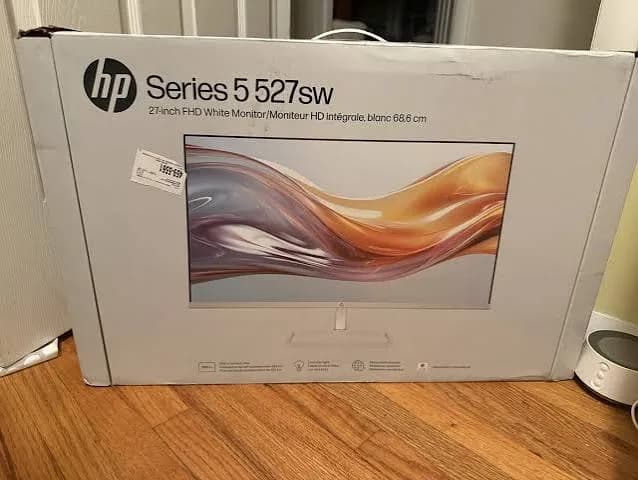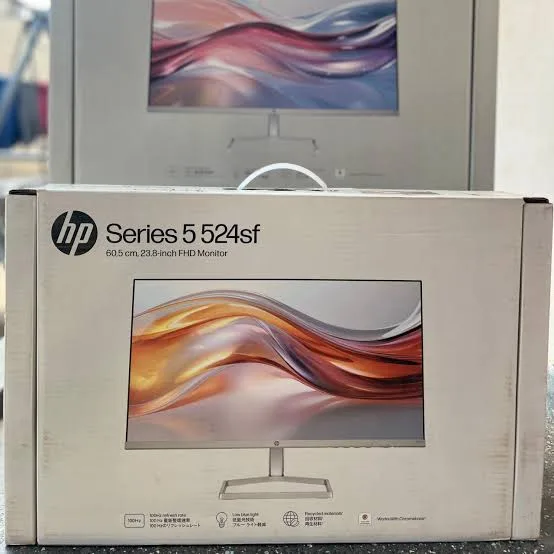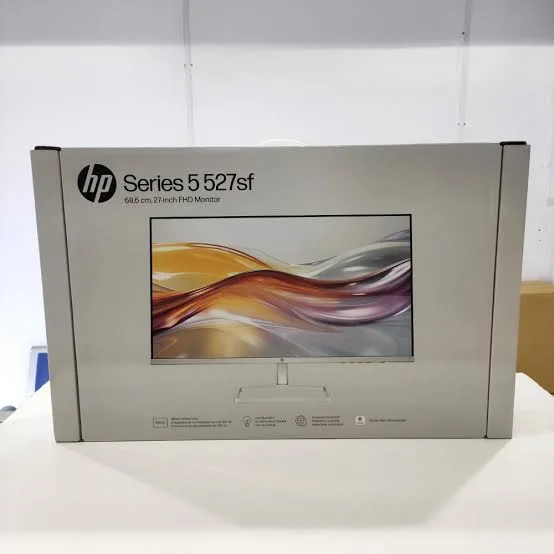
HP Series 5 524sw 23.8-Inch Full HD IPS 100Hz White Monitor in Kenya | City Gadgets Kenya
Same-day delivery in Nairobi by 9 Oct – 10 Oct
Comes with
Description
Buy the genuine HP Series 5 524sw 23.8-inch Full HD IPS 100Hz white monitor with HDMI, VGA, 99% sRGB and HP Eye Ease in Kenya from City Gadgets Kenya. HP 524sw price in Kenya, white 24 inch monitor Nairobi, compact monitor for small desks and bedrooms.
HP Series 5 524sw 23.8-Inch Full HD IPS 100Hz White Monitor in Kenya
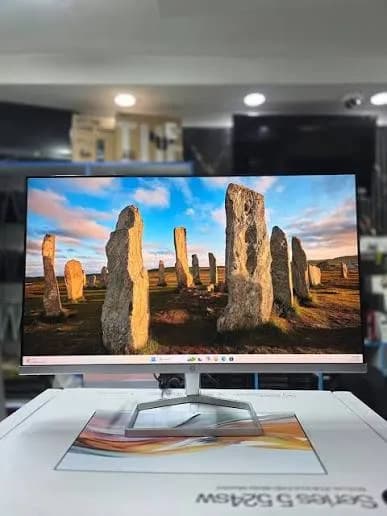
Genuine HP | Brand New | 23.8-Inch Full HD (1920 x 1080) IPS | 100 Hz | 300 Nits | 99% sRGB | HDMI 1.4 and VGA | White Finish | Slim Micro-Edge Design
Searching for the HP 524sw price in Kenya, a white 24-inch monitor in Nairobi, or a compact, stylish monitor for a small desk, a bedroom or a dorm? The HP Series 5 524sw is a brand-new, genuine 23.8-inch Full HD monitor in a clean white finish. It has an IPS panel, a 100 Hz refresh rate, 300 nits of brightness, about 99% sRGB colour, one HDMI 1.4 port, a VGA port and a slim, three-sided micro-edge design. It's available from City Gadgets Kenya with delivery across Kenya. Buyers also search for it as an HP 524sw, an HP white 24 inch monitor, a white 23.8 inch monitor, an HP Series 5 white monitor, a small white monitor for a desk, a 100Hz white monitor, or a monitor for a student's room.
This guide explains the monitor in plain language, and it's honest from the start: the 524sw is the white version of the HP 524sf, which is also in our range. The screen and performance are the same, and the difference is the colour. If you love the white look, this is the monitor. If colour doesn't matter, the black 524sf may cost less. If you'd like to talk it through, message us on WhatsApp.
The short verdict
The HP Series 5 524sw is a compact, bright, good-value monitor for people who want a clean, light look. Listings describe a 23.8-inch Full HD IPS panel at 100 Hz, 300 nits, a 1500:1 contrast ratio, a 5 ms response time and about 99% sRGB colour, with HP Eye Ease low blue light, an anti-glare coating and a 2024 release. It has one HDMI 1.4 port and one VGA port, so it suits one main computer plus a legacy device. The white finish and the thin bezels suit small rooms, student desks and light-coloured interiors. As with its black twin, the stand only tilts, and there's no DisplayPort, USB hub or speaker. For a neat second screen, a student's monitor or a bright, minimal desk, it's an excellent choice.
Who this monitor is for
It suits you if:
- You have a small desk, a bedroom or a dorm room, and want a monitor that doesn't dominate it.
- You want a white or light look to match a white laptop, keyboard or desk.
- You want a second screen for a laptop, with slim bezels.
- You want a bright, vivid IPS panel with 100 Hz, at a low price.
- You work at a reception, a salon desk or a shop counter with a light interior.
Look elsewhere if:
- Colour doesn't matter and you want the lowest price. The black HP 524sf in our range is the same monitor.
- You want a bigger screen. See the HP 527sw (27-inch).
- You want two HDMI ports. The 524sw has one HDMI and one VGA.
- You want a height-adjustable stand and a USB hub. See the Dell P2425H.
Specifications in plain English
| Feature | Detail | What it means for you |
|---|---|---|
| Model | HP Series 5 524sw (94C21AA) | HP's 23.8-inch Full HD white monitor |
| Screen size | 23.8 inches (60.5 cm) | The standard 24-inch size |
| Resolution | Full HD (1920 x 1080), 16:9 | Sharp for documents and video at this size |
| Pixel size | About 0.28 mm, about 93 pixels per inch | Crisp, comfortable text |
| Panel type | IPS, anti-glare | Wide 178-degree viewing angles and consistent colour |
| Refresh rate | 100 Hz | Smoother scrolling and motion than 60 Hz |
| Brightness | 300 nits | Bright enough for normal and bright rooms |
| Contrast | 1500:1 static (10,000,000:1 dynamic) | Good for an IPS panel |
| Response time | 5 ms grey to grey | Quick for office use and casual gaming |
| Colour | About 99% sRGB, 6 bit plus FRC (16.7 million colours) | Vivid, accurate everyday colour |
| Eye comfort | HP Eye Ease, flicker-free | Easier on the eyes in long sessions |
| Inputs | 1 x HDMI 1.4 and 1 x VGA | A modern and a legacy input |
| Stand | Tilt | Fixed height |
| Design | White finish, three-sided micro-edge bezel | A light, modern look |
These figures come from HP and retailer listings of the 524sw, and from HP's data for the 524sf, which shares the panel. Ask us to confirm what's in the box, the stand and the warranty for the unit you order.
White or black: how to choose
The 524sw and 524sf are identical apart from colour, so a plain guide helps.
Choose the white 524sw if:
- Your desk, walls or accessories are white, light grey or light wood.
- You want a bright, airy look in a small room.
- You're matching a white laptop, keyboard, mouse or lamp.
- You like a monitor that blends in.
Choose the black 524sf if:
- You prefer a classic dark desk.
- You use the monitor for film in a dim room, where a black bezel disappears.
- You want the lowest price, since black models sometimes cost a little less.
Performance is the same, so choose by look and price. We'll tell you what's in stock and which costs less today.
A small-space monitor: bedrooms, dorms and compact desks
A 24-inch monitor is the right size for small spaces, and a few ideas help.
- Measure your desk. A 23.8-inch monitor is about 54 cm wide with its stand, so it fits a desk as narrow as 80 cm with room for a keyboard.
- Sit an arm's length away, which suits 24 inches well.
- Raise the screen to eye level with a small riser, since the stand tilts only.
- Use the slim bezels to put two monitors side by side on a wider desk.
- Add a wall mount or a desk arm, if the monitor supports VESA mounting. Ask us to confirm, because we don't want you to buy an arm that doesn't fit.
- Keep cables tidy, with a cable sleeve.
- Use headphones or a small speaker, since the monitor has no speakers.
- Keep it out of direct sun, and away from damp.
A student's guide to the 524sw
A white 24-inch monitor suits a student's room, and a few habits help.
- Connect your laptop by HDMI, and extend the display in Windows.
- Keep notes or reading on the monitor, and writing on the laptop.
- Use the monitor for video lectures, while you take notes.
- Use HP Eye Ease and Night Light for evening study.
- Raise the screen to eye level.
- Keep the screen clean, and cover it in a dusty hostel room.
- Use a surge protector, and a small UPS if your power is unreliable.
- Back up your work to the cloud and a SanDisk flash drive.
What 100 Hz and IPS give you
100 Hz. The screen updates 100 times a second, so scrolling through long documents and web pages feels smoother than on a 60 Hz screen, and the pointer tracks more naturally. HP's listings show 100 Hz over HDMI. You may need to enable it in Windows Display settings.
IPS. The panel keeps colour and brightness consistent when you view it from the side or from above, with 178-degree viewing angles. That suits shared screens and desks where two people look at the same screen.
300 nits, 1500:1 and 99% sRGB. Good figures for an office monitor, and they keep the picture clear in a bright room.
HDMI and VGA: which to use
- HDMI 1.4 is the better choice. It's digital, sharp and carries the 100 Hz refresh rate. Use it with any modern laptop or desktop.
- VGA is analogue and older. It's useful for old computers, some projectors and legacy equipment, and the picture is softer and limited to a lower refresh rate.
- No DisplayPort and no USB-C. If your computer has only DisplayPort or USB-C, you need an adapter, or a different monitor.
- One HDMI port only. If you want two digital devices, see the HP 527sw, or use an HDMI switch.
If you're unsure which cable you need, message us the make and model of your computer, and we'll tell you.
Setting up the monitor
- Unbox with care, holding the panel by its edges, and attach the stand.
- Place it on a stable desk, about an arm's length from your eyes.
- Connect the power adapter, then the HDMI cable to your computer.
- Switch on, and select the right input if the monitor doesn't find it itself.
- Set the resolution to 1920 x 1080, and the refresh rate to 100 Hz in Windows Display settings.
- Tilt the screen so the top is at or just below eye level.
- Adjust brightness to suit the room.
- Check the screen for dead pixels with white, black and coloured pictures.
A worked example: a bright student room
A concrete example helps you plan.
- The desk: a small white or pale desk, about 100 by 50 cm.
- The monitor: the 524sw, with its tilt-only stand raised on a thin riser, so the top of the screen sits at eye level.
- The computer: a laptop beside the monitor, connected by HDMI, set to extend the display.
- The accessories: a white keyboard and mouse, a warm lamp and a small speaker or headphones.
- The power: a surge protector, and a small UPS for the laptop charger, monitor and router if your power is unreliable. See the Mecer 650VA and 850VA in our range.
- The habits: HP Eye Ease and Night Light in the evening, and a break every 20 minutes.
- The result: a bright, uncluttered study space, with a screen big enough for notes beside an essay.
Salons, clinics, shops and reception desks
A white 24-inch monitor suits front-of-house roles in light interiors.
- Salons and spas. A small white screen at the booking desk blends in with a clean interior.
- Clinics and pharmacies. A white finish looks clean and is easy to wipe. Turn the screen away from visitors when you show records.
- Boutiques and showrooms. A bright screen at the counter looks tidy.
- Reception desks. A screen for bookings and visitor logs.
- Cafes and small shops. A point-of-sale or music screen that doesn't dominate.
- Home offices. A white monitor keeps a small room feeling open.
In each case, pair the monitor with a surge protector, and keep the screen clean.
Cleaning a white monitor
White finishes show marks, so a little care keeps them fresh.
- Switch off and unplug the monitor, and let it cool.
- Wipe the body with a soft, dry microfibre cloth.
- For marks, dampen the cloth slightly with water, and wipe gently. Don't spray liquid on the monitor.
- Wipe the screen with a clean microfibre cloth, in gentle strokes.
- Avoid alcohol, bleach, ammonia and abrasive cleaners, which can damage coatings.
- Keep the stand and vents free of dust.
- Keep it out of direct sun, which over time can yellow some plastics.
- Keep oily hands and cosmetics away from the white plastic.
Setting up two monitors side by side
Two monitors raise productivity, and the 524sw's slim bezels suit a pair.
- Place the monitors side by side, with the bezels meeting in the middle.
- Connect each to your computer's video outputs. The 524sw has one HDMI input, so a computer with two outputs, or a hub, is needed.
- Set the arrangement in Windows Display settings, with the correct left and right order.
- Match the heights with risers.
- Use one as the main screen, and the other for reference, email and chat.
- Match the model and colour for a consistent look.
If your computer has only one video output, ask us about a USB-C hub or adapter.
Eye comfort habits
- Set the brightness to match the room.
- Follow the 20-20-20 rule. Every 20 minutes, look at something 20 feet away for 20 seconds.
- Keep the top of the screen at or just below eye level.
- Sit an arm's length away.
- Use HP Eye Ease or Night Light in the evening.
- Blink often, and take breaks.
- Keep the room lit, so the screen isn't the only bright thing in sight.
Common problems and simple fixes
No picture. Check the power, the cable and the input source. Use the monitor's menu to select HDMI or VGA, and try another cable or port.
The picture looks blurry. Check that the resolution is set to 1920 x 1080 and scaling is correct.
The refresh rate won't go to 100 Hz. Use HDMI, check the graphics settings and the driver, and try a better cable.
A laptop won't connect. Many laptops need a USB-C to HDMI cable or adapter. Tell us your model.
Flickering or lines. Try another cable and port, and check for loose connections.
Backlight bleed or dead pixels. Check the screen in a dark room on a black picture. If you find problems, tell us straight away, with a photo.
If a problem continues, message us on WhatsApp.
Questions to ask before you buy a monitor
- What size and resolution do I need?
- What panel type is it? IPS gives the best viewing angles.
- What refresh rate does it have, and over which port?
- Does the stand adjust for height? If not, plan a riser or an arm.
- Which ports does my computer need?
- Does it include the right cable?
- What colour suits my desk?
- What warranty is included, and who honours it? Get it in writing, and ask about dead pixels.
- Can I see it before I pay?
We're glad to answer all of these on WhatsApp or in the shop before you pay.
Looking after the monitor for years
- Clean the screen and body gently with a soft, dry microfibre cloth.
- Keep it out of direct sun and away from moisture.
- Use a surge protector.
- Lift it with two hands, and never press on the screen.
- Keep the box if you move or sell it.
- Update your graphics driver if you see odd behaviour.
Warranty and after-sales: what to ask
A monitor is a long-term purchase, so ask us what warranty covers the unit you order, how long it lasts and what it covers. HP monitor warranties vary by market, and Kenyan terms may differ. Check the policy on dead pixels, because brands differ. Keep your receipt, the serial number and the box. If a fault appears, message us on WhatsApp first, and we'll tell you the quickest way to get it sorted.
Understanding the specifications: a quick glossary
Specification sheets use terms that aren't always clear, so a short glossary helps.
- IPS. A panel type with wide viewing angles and consistent colour.
- Resolution. The number of pixels. 1920 x 1080 is Full HD.
- Pixels per inch (ppi). How dense the pixels are. The 524sw has about 93 ppi.
- Refresh rate (Hz). How many times the picture updates each second.
- Response time (ms). How quickly a pixel changes. Lower is better for motion.
- Brightness (nits). How bright the screen can get.
- Contrast ratio. The difference between the lightest and darkest the screen can show.
- sRGB. The standard colour space for web and documents. 99% means nearly full coverage.
- 6 bit plus FRC. The panel uses a trick to simulate 8-bit colour, which is normal at this price.
- Anti-glare. A matte finish that reduces reflections.
Use these terms to compare monitors, and ask us if any is unclear.
A short guide to dead pixels and backlight bleed
Every buyer should know what to check, so here is a simple test.
- Switch the monitor on and let it warm up for a few minutes.
- Show a solid white screen, and look for dark dots, which are dead pixels.
- Show a solid black screen in a dim room, and look for bright dots or glowing at the edges, which is backlight bleed.
- Show solid red, green and blue screens, and look for stuck pixels.
- Move your head to check for uneven brightness.
- Check the stand and the buttons for stiffness or damage.
- Tell us straight away if you find a problem, with a photo.
Small amounts of edge glow are normal on many monitors, and we'll explain what applies to the unit you order.
Why choose HP for a monitor
- Consistent quality control, with fewer dead pixels and uneven backlights than unknown brands.
- Clear published specifications.
- Real eye-comfort features such as HP Eye Ease.
- A recognised warranty, which we'll confirm for the unit.
- Easy pairing with HP laptops and desktops in our range.
- A slim design that suits modern desks.
A low-priced HP often costs little more than an unknown brand, and it's the safer buy.
Using a monitor in Kenya
Power protection. Monitors can be damaged by surges. Use a surge protector, and connect the monitor to the same UPS as your computer.
Dust. White monitors show dust, so wipe the body gently with a soft, dry microfibre cloth. Wipe the screen with the same cloth, and a little water if needed, never with harsh chemicals.
Placement. Keep the monitor away from direct sunlight.
Transport. Keep the original box if you may move the monitor, and carry it with two hands.
Warranty. Ask us for the warranty that applies to the unit you order, and keep the receipt and box.
How it compares with other options in our range
| HP 524sw (white) | HP 524sf (black) | HP 527sw (white, 27-inch) | Dell SE2425HM | |
|---|---|---|---|---|
| Size | 23.8-inch | 23.8-inch | 27-inch | 23.8-inch |
| Colour | White | Black | White | Black |
| Panel | IPS | IPS | IPS | IPS per most listings |
| Refresh rate | 100 Hz | 100 Hz | 100 Hz | 100 Hz |
| Inputs | HDMI, VGA | HDMI, VGA | 2 x HDMI, VGA | HDMI, VGA |
| Brightness | 300 nits | 300 nits | 300 nits | About 250 nits |
| Best for | Small white desks | The same, in black | Big screen, white desks | Budget everyday use |
Against the HP 524sf: the same monitor in black.
Against the HP 527sw: the same family in a bigger size, with two HDMI ports.
Against the Dell SE2425HM: a close rival, with a lower brightness listing and a different design.
Honest pros and cons
Pros
- A compact 23.8-inch IPS screen at a low price.
- A clean white finish that suits light setups.
- 100 Hz refresh rate.
- 300 nits, 1500:1 contrast and about 99% sRGB.
- HDMI and VGA inputs.
- HP Eye Ease and an anti-glare coating.
- A slim, three-sided micro-edge design.
Cons
- A tilt-only stand.
- Only one HDMI port.
- No DisplayPort, USB hub or built-in speakers.
- White shows dust and fingerprints.
- 6 bit plus FRC colour is normal at this price, but not for professional colour work.
What to check when it arrives
- The box model matches HP Series 5 524sw.
- The monitor, stand, power adapter and HDMI cable are in the box.
- The white finish is even, with no marks or scratches.
- The screen has no dead pixels, scratches or backlight bleed.
- HDMI works, and the refresh rate can be set to 100 Hz.
- You get a receipt with the serial number and warranty details in writing.
Frequently asked questions
What is the HP 524sw price in Kenya? We confirm the current price when you message us on WhatsApp, because supplier prices change. We tell you the price and what's in the box before you pay.
Where can I buy the HP 524sw in Nairobi? At City Gadgets Kenya, New Alnoor Exhibition, Second Floor, Shop C7, Accra Road, Nairobi CBD, or by delivery.
Is it the same as the 524sf? Yes, apart from the white colour.
Is it IPS? Yes, with 178-degree viewing angles.
Does it have 100 Hz? Yes, over HDMI.
How many HDMI ports does it have? One, plus a VGA port.
Is it height adjustable? No, it tilts only.
Does it have speakers? No.
What warranty does it have? Ask us for the warranty that applies to the unit you order.
Can you deliver it? Yes, same day in Nairobi and next day outside Nairobi.
Can I pay via M-Pesa? Yes.
Why buy from City Gadgets Kenya
Genuine, brand-new HP monitor. We're at New Alnoor Exhibition, Second Floor, Shop C7, Accra Road, Nairobi CBD, and you're welcome to see the monitor before you buy. Message us on WhatsApp with your desk and how you'll use it, and we'll tell you honestly whether the white 524sw, the black 524sf or a different monitor suits you better. We confirm what's in the box before you pay.
Order your HP Series 5 524sw today
Available now at City Gadgets Kenya. Message us on WhatsApp.
Specifications
- Brand
- HP
- Condition
- New
Frequently Asked Questions
How much does the HP Series 5 524sw 23.8-Inch Full HD IPS 100Hz White Monitor in Kenya | City Gadgets Kenya cost in Kenya?
The HP Series 5 524sw 23.8-Inch Full HD IPS 100Hz White Monitor in Kenya | City Gadgets Kenya is priced at Ksh 24,000 at City Gadgets. You can pay via M-Pesa, card or cash on delivery.
Is the HP Series 5 524sw 23.8-Inch Full HD IPS 100Hz White Monitor in Kenya | City Gadgets Kenya available in Kenya?
Yes — the HP Series 5 524sw 23.8-Inch Full HD IPS 100Hz White Monitor in Kenya | City Gadgets Kenya is in stock at City Gadgets, ready for same-day delivery in Nairobi and countrywide shipping across Kenya.
Is the HP Series 5 524sw 23.8-Inch Full HD IPS 100Hz White Monitor in Kenya | City Gadgets Kenya genuine and does it have a warranty?
Every HP Series 5 524sw 23.8-Inch Full HD IPS 100Hz White Monitor in Kenya | City Gadgets Kenya we sell is 100% genuine brand-new stock and comes with a 12-month official brand warranty.
Do you deliver the HP Series 5 524sw 23.8-Inch Full HD IPS 100Hz White Monitor in Kenya | City Gadgets Kenya in Nairobi?
Yes. We offer fast same-day delivery within Nairobi and fast, affordable delivery to the rest of Kenya — order online or on WhatsApp.
Customer Reviews
No reviews yet
Be the first to review this product.
Rate us on Google
Your review helps other shoppers find us
Reviews from verified buyers will appear here.
Buying guides
Straight advice for shoppers picking between the models above.

Best Laptops for Programmers and Developers in Kenya 2026 (Complete Guide) | City Gadgets Kenya
Best Laptops for Programmers and Developers in Kenya 2026: A Complete Guide
Read the guide
Best Lightweight and Ultraportable Laptops in Kenya 2026 (Complete Guide) | City Gadgets Kenya
Best Lightweight and Ultraportable Laptops in Kenya 2026: A Complete Guide
Read the guide
Best Laptops for University Freshers in Kenya 2026 (KUCCPS Season Guide) | City Gadgets Kenya
Best Laptops for University Freshers in Kenya 2026: The Complete KUCCPS Season Guide
Read the guide