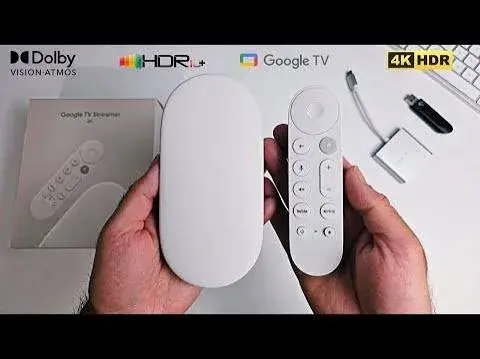
Google TV Streamer (4K) in Kenya | Buy at City Gadgets Kenya, Nairobi
Same-day delivery in Nairobi by 22 Nov – 23 Nov
Comes with
Description
Buy the Google TV Streamer (4K) in Kenya from City Gadgets Kenya, Nairobi. 4K HDR with Dolby Vision and Atmos, 4 GB RAM, 32 GB storage, Ethernet, Matter and Thread, and a voice remote. M-Pesa accepted. Call 0745 575 931.
Google TV Streamer (4K) in Kenya
Turn almost any HDMI television into a fast, smart 4K TV with Google TV, Dolby Vision, Dolby Atmos, a voice remote and a built-in smart home hub.
The Google TV Streamer (4K) is Google's set-top streaming box. It plugs into the HDMI port of your TV, connects to your home internet by Wi-Fi or Ethernet, and gives you a single home screen for your streaming apps, your live channels, your Google account and your smart home. Available in Kenya from City Gadgets Kenya, this page is for shoppers searching for "Google TV Streamer Kenya", "Google TV Streamer 4K Nairobi", "Chromecast replacement Kenya", "buy Google TV box Kenya", "4K streaming device Kenya", "Android TV box Kenya", "smart TV box Nairobi" or "how to make my TV smart in Kenya".
Below you will find what is in the box, what the device does, how to set it up on Kenyan internet, what to check about apps and services in Kenya, how it compares with a smart TV's built-in system, who should buy it, and what to check before you pay. We write only what the published specifications support, and where something must be confirmed for the exact unit in front of you, we say so.
Key specs at a glance
| Feature | Detail |
|---|---|
| Model | Google TV Streamer (4K) |
| Software | Google TV |
| Video | Up to 4K HDR at 60 frames per second |
| HDR formats | Dolby Vision, HDR10, HDR10+ and HLG |
| Audio | Dolby Digital, Dolby Digital Plus and Dolby Atmos |
| Memory | 4 GB RAM |
| Storage | 32 GB |
| Processor | Not listed on the maker's specification page |
| Wi-Fi | Dual-band 802.11ac (2.4 GHz and 5 GHz) |
| Bluetooth | 5.1 |
| Ethernet | 10/100/1000 Mbps (gigabit) |
| Smart home | Matter support and a Thread border router |
| Ports | HDMI 2.1 (Type A), Ethernet, USB-C for power and data |
| Remote | Voice remote, supplied with 2 AAA batteries |
| Size | About 6.4 in long, 3.0 in wide and 1.0 in high (about 163 x 76 x 25 mm) |
| Weight | About 5.7 oz (about 160 g) |
| Colours | Hazel and Porcelain (availability varies) |
| Materials | Made with at least 65% recycled plastic |
| Condition | Brand new |
| Market version, plug type and warranty | Confirmed per unit |
| Available from | City Gadgets Kenya, Nairobi CBD |
These figures come from the maker's published specification page. A certified HDMI 2.1 cable is required for the best picture, and it is sold separately, so tell us if you need one. Please ask our team to confirm the exact colour, market version, power plug and warranty for the unit you want.
What's in the box
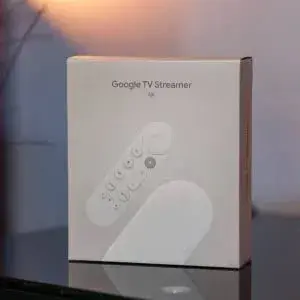
The published box contents are:
- The Google TV Streamer device
- The voice remote, with 2 AAA batteries
- A power adapter
- A 1.8 m power cable
- A quick start guide
- A safety and warranty document
The HDMI cable is not in the list, so if your TV does not have a spare cable nearby, we can supply one. The plug on the power adapter depends on the market the unit was made for, and some plugs do not match Kenyan sockets, which use the British three-pin style. We check this with you before you pay and can supply a plug adapter if you need one. We never describe anything as included unless we have seen it in the box.
What the Google TV Streamer is
A smart TV has its software built in. A streaming box is a small separate device that brings better, faster software to the TV you already own. That matters in Kenya, where many households have a good-looking TV whose built-in system has become slow, short of apps or no longer updated. A streaming box lets you keep the screen and upgrade the brain.
The Google TV Streamer replaces the older Chromecast with Google TV. It is bigger than a Chromecast, with more memory, more storage, a proper Ethernet port, a better remote, and a built-in smart home hub. It sits on a shelf or behind the TV rather than hanging off the HDMI port, which keeps it cooler and lets the Wi-Fi reach better.
People searching for "Google TV Streamer Kenya" are usually one of four types. Some want to make an older TV smart. Some want a faster, cleaner system than the one in their current smart TV. Some want a 4K HDR Dolby Vision player for a modern TV. And some want a smart home controller that also streams. The Streamer does all four, within the limits we explain below.
Picture quality: 4K, HDR and Dolby Vision
Resolution and frame rate
The Streamer outputs up to 4K at 60 frames per second. That is the sharp, smooth picture that modern 4K TVs are built for, provided the app you are watching offers 4K content. Many streaming apps offer 4K only on certain plans, so check the plan of the service you use.
HDR formats
HDR, or high dynamic range, gives brighter highlights, deeper shadows and richer colours. The Streamer supports Dolby Vision, HDR10, HDR10+ and HLG. Dolby Vision and HDR10+ adjust the picture scene by scene on TVs that support them. HLG is used by some broadcasters. Your TV needs to support a format for you to see it, so match the Streamer to your TV's specification. If your TV is not 4K or HDR, the Streamer will still work, and will output a picture your TV can show.
HDMI 2.1 and the cable
The Streamer has an HDMI 2.1 port, and the maker states that a certified HDMI 2.1 cable is required and sold separately. A poor or old cable is a common reason for a flickering or dropped 4K picture. We can supply a suitable cable and set the box up with you at the shop.
Getting the best picture
- Use a 4K TV that supports HDR, and switch on the HDMI "enhanced" or "deep colour" mode in the TV's settings if it has one.
- Use a certified HDMI cable.
- Check the plan of each streaming service, since 4K and HDR are often limited to higher plans.
- Use a fast, stable connection. We cover this next.
Sound: Dolby Atmos and surround
The Streamer supports Dolby Digital, Dolby Digital Plus and Dolby Atmos. Atmos adds a sense of height and space to the sound, provided the app offers an Atmos soundtrack, and your TV, soundbar or receiver supports Atmos and is connected correctly. Many soundbars connect through the TV's HDMI eARC port. If you want to hear Atmos, connect the Streamer to the TV, and the soundbar to the TV's eARC port, and check the settings. If you only use the TV's built-in speakers, you will still hear the improved clarity of the audio, but not the full effect of Atmos.
Speed, memory and storage
The Streamer has 4 GB of RAM and 32 GB of storage. In plain words, that means it opens apps quickly, switches between them without reloading, and has room for a large number of apps. Most streaming apps are small, so 32 GB is generous. The maker does not list the processor on its specification page, so we do not quote one. In everyday use, the combination of memory and storage is what makes the home screen feel quick compared with older or simpler sticks.
Connectivity
Wi-Fi
The Streamer has dual-band 802.11ac Wi-Fi, which covers both 2.4 GHz and 5 GHz networks. The 5 GHz band is faster and better for 4K, but it has a shorter range through walls. The 2.4 GHz band reaches further but is slower. In a Kenyan flat or house, the best approach is to place your router in a central spot, connect the Streamer to the 5 GHz network if the signal is strong, and fall back to 2.4 GHz if it is not.
Ethernet
The Streamer has a gigabit Ethernet port. If your router is near the TV, or you have a network cable or a power-line adapter, a wired connection is the most stable choice and removes Wi-Fi interference. It is especially valuable for 4K streaming in apartment blocks, where many Wi-Fi networks compete for the same channels.
Bluetooth
Bluetooth 5.1 lets you connect Bluetooth headphones, speakers and game controllers. Wireless headphones are useful for late-night viewing without disturbing the household.
Internet speed in Kenya
As a rough guide, a standard HD stream needs a few megabits per second, and 4K needs considerably more. Fibre and good home internet in Nairobi and other major towns will handle 4K comfortably, while a weak or shared mobile connection may force the picture down to lower quality. Data bundles on mobile internet can be used up quickly by 4K video, so check your plan before you watch for hours. If your connection is slow, set the streaming apps to a lower quality to avoid buffering.
The remote
The Streamer comes with a voice remote and 2 AAA batteries. The remote has a microphone for voice search and commands, so you can say what you want to watch instead of typing it with the on-screen keyboard. The remote also controls the basic functions of your TV, such as volume and power, so one remote can replace several. Features such as a button to locate a lost remote and programmable buttons are described in the maker's materials, and we confirm the exact features on the unit you buy.
Voice features depend on the language and region settings of your Google account, so ask us to demonstrate in the shop what works in English on a Kenyan connection.
Google TV: the software
Google TV is the software on the Streamer. Its home screen collects what you watch from many apps in one place, with recommendations, a watchlist you can add to from your phone, and rows for movies, shows, live TV and apps. You sign in with a Google account, which lets you sync your watchlist and use your Google services.
Apps
You install apps from the Google Play Store on the device. Many popular streaming, music, news and sports apps are available. App availability varies by country, and some services are not offered in Kenya or have different catalogues here. Before you buy, tell us which services you plan to use, and we will tell you what we can confirm. We do not promise that any particular service is available or that any particular content will be offered in Kenya.
Casting
You can cast videos, photos and music from your phone or laptop to the TV through the Streamer, from apps that support casting.
Google account and services
You sign in with a Google account. Some features, such as the Google Home integration and the voice assistant, depend on your account, your language and your region. Set up the account before you start, so that setup is quick.
Smart home: Matter and Thread
The Streamer is more than a streaming box. It supports Matter and acts as a Thread border router. Matter is a standard that lets smart home devices from different brands work together. Thread is a low-power wireless network used by many smart home devices, such as sensors, locks and lights. A Thread border router connects those devices to your home network and to the internet.
In practice, if you own or plan to buy Matter or Thread smart home devices, the Streamer can serve as the hub that connects them. If you do not, you can ignore this feature and use the Streamer purely for viewing. The smart home features depend on the devices you own and the apps you use, and we cannot promise compatibility with any specific device. Tell us what you have, and we will advise honestly.
Many smart home products on sale in Kenya are not Matter or Thread devices. The Streamer's smart home features are an added extra for those who need them, and not a reason to buy for everyone.
Gaming and other uses
The Streamer is a streaming device first. It supports Bluetooth controllers, and you can install games from the Play Store, but it is not a games console, and heavy games will not match a console or a gaming PC. Cloud gaming services, where the game runs on a remote server, depend on their own availability in Kenya and on a fast, low-delay connection, so check the service before you rely on it.
It is also useful for video calls on the big screen if you attach a compatible camera, for music through a soundbar, for photo slideshows from your account, and for watching your own videos from your phone by casting.
Setting up your Google TV Streamer
- Connect the Streamer to a free HDMI port on your TV with a certified cable.
- Plug in the power adapter and the cable. Use a surge-protected extension, because power surges are common when electricity returns after an outage.
- Insert the batteries in the remote.
- Select the right input on your TV.
- Pair the remote by following the on-screen prompts.
- Connect to Wi-Fi, or plug in an Ethernet cable.
- Sign in to your Google account.
- Install your streaming apps and sign in to each service.
- Set up the remote's TV controls for power and volume.
- Check the picture and sound settings for your TV and soundbar.
If you buy from us, we can help you set up at the shop or by phone and video if you order for delivery.
Using the Streamer in Kenya
- Power cuts. The Streamer has no battery, so it switches off when the power goes. It will start up again when power returns, but a surge-protected extension and, ideally, a small UPS on the TV, router and Streamer will protect your equipment.
- Router placement. Keep the router in an open, central place and away from thick walls and metal.
- Mobile hotspot. You can use a phone hotspot in an emergency, but 4K streaming will use a lot of data.
- Older TVs. If your TV only has an old HDMI port, or no HDMI port at all, tell us before you buy.
- Shared accounts. Each streaming service has its own rules about devices and households. Check the terms of the service you use.
- Screen burn and standby. Switch off the TV when you are not watching, and use the standby setting that suits you.
How it compares with a smart TV's built-in system
| Question | Smart TV built-in system | Google TV Streamer |
|---|---|---|
| Speed over time | Often slows as the TV ages | A separate device you can replace |
| App choice | Depends on the TV maker | Google Play Store |
| Updates | Depend on the TV maker | Provided by Google, subject to the model's support period |
| Picture formats | Limited by the TV | Dolby Vision, HDR10, HDR10+ and HLG output |
| Smart home hub | Rarely | Matter and Thread border router |
| Remote | The TV's remote | Voice remote with TV controls |
| Upgrading later | Replace the TV | Replace the box |
The Streamer will not make a poor TV panel better. It improves the software, the speed and the smart features, not the screen itself.
How it compares with other options
- A basic streaming stick is smaller, but has less memory, no Ethernet port in many models, and no smart home hub.
- A Chromecast with Google TV is the older model, which the Streamer replaces, with less memory and no Ethernet port.
- An Android TV box from another maker can have more ports and storage, but quality, software updates and the Google Play Store certification vary widely. Check that any such box is certified.
- A games console can stream, but does far more than most people need.
Our team can show you the options available at the shop so that you can choose the one that fits your TV and your needs.
Who should buy the Google TV Streamer
- Owners of older or slow smart TVs who want a faster, cleaner system.
- Owners of non-smart TVs with an HDMI port who want streaming.
- Owners of 4K HDR TVs who want Dolby Vision, HDR10+ and Atmos.
- Google and Android users who like to sync watchlists, photos and services.
- Smart home users who want a Matter and Thread hub.
- Households with weak Wi-Fi who want an Ethernet option.
- Gift buyers who want a practical, modern present.
Who should look elsewhere
- People with a modern TV they are happy with. If your TV is fast and has the apps you use, you may not need a box.
- People who need a particular service that is not available in Kenya. Check before you buy.
- People whose TV has no HDMI port.
- People who want a console-level gaming experience.
- Buyers who need a small stick to travel with. The Streamer is a shelf device.
Accessories worth buying
- A certified HDMI 2.1 cable.
- A plug adapter, if your unit's plug does not match your sockets.
- A surge-protected extension or a small UPS.
- An Ethernet cable or a power-line network adapter for a wired connection.
- A soundbar that supports Dolby Atmos, connected to your TV's eARC port.
- Rechargeable AAA batteries for the remote.
- A Wi-Fi extender or mesh router if your signal is weak.
- A Bluetooth headset for private listening.
Ask our team for options that suit your TV and your home.
Buying a Google TV Streamer safely in Kenya
Popular devices can be sold in doubtful condition, with the wrong plug, an opened box, or no warranty. Before you pay, we recommend the following checks, which we do with you at the counter, or on video for delivery.
- Check the box and seals. A new unit should arrive in clean, original packaging.
- Check the contents against the published list: the device, the remote with batteries, the power adapter and cable, and the paperwork.
- Check the model name on the box and the device.
- Check the plug. It should suit your sockets, or we supply an adapter.
- Power it on and confirm that the remote pairs, and that the device reaches the setup screen.
- Check that the device has not been set up or signed in to another person's account.
- Test the HDMI output and the Ethernet port if you plan to use them.
- Get a receipt and a written warranty. Warranty terms depend on the market version, so we confirm them in writing.
Be careful with offers that look too good to be true, with sellers who will not let you check the device, and with listings that use stock photos only. If a seller will not let you check, walk away.
Warranty and stock
Warranty terms depend on the market version and on who stocks the unit, so we confirm the exact terms in writing for the specific Streamer before you pay. A warranty covers manufacturing faults. Damage from drops, liquids, power surges and misuse is generally not covered. Customer Relations on 0794 488 806 helps with warranty questions after purchase, so keep your receipt and the box. Call Sales on 0745 575 931 to confirm availability and colour before you visit.
Strengths and limits
What we like:
- Sharp 4K HDR output with Dolby Vision, HDR10, HDR10+ and HLG.
- Dolby Atmos support for compatible soundbars and TVs.
- 4 GB of RAM and 32 GB of storage for a quick, roomy system.
- Gigabit Ethernet and dual-band Wi-Fi.
- A voice remote that controls the TV.
- Matter support and a Thread border router for smart homes.
- Made with recycled plastic.
What to keep in mind:
- A certified HDMI 2.1 cable is sold separately.
- App and service availability varies by country, so confirm the services you need.
- Voice and smart home features depend on your account, language and region.
- It does not improve the TV panel itself.
- It has no battery and needs stable power.
- The plug may need an adapter.
- The processor is not listed in the published specification.
Frequently asked questions
What is the Google TV Streamer (4K)? A streaming box from Google that adds Google TV, 4K HDR video and a smart home hub to an HDMI television.
Does it work with my TV? It works with TVs that have an HDMI port. 4K and HDR need a TV that supports them.
Does it support Dolby Vision and Dolby Atmos? Yes. It supports Dolby Vision, HDR10, HDR10+ and HLG video, and Dolby Atmos audio.
How much storage does it have? 32 GB, with 4 GB of RAM.
Does it have an Ethernet port? Yes, a gigabit Ethernet port.
Does it have Wi-Fi? Yes, dual-band 802.11ac.
What does Matter and Thread mean? Matter is a smart home standard, and Thread is a low-power smart home network. The Streamer supports Matter and works as a Thread border router.
Does it come with a remote? Yes, a voice remote with 2 AAA batteries.
Is an HDMI cable included? It is not in the published box contents, and a certified HDMI 2.1 cable is sold separately.
Do I need a Google account? Yes, to get the full Google TV experience and to install apps.
Will my favourite streaming service work? Many services have apps for Google TV, but availability varies by country. Tell us which you use.
What colours are available? Hazel and Porcelain. Availability varies.
Will it work during a power cut? No. It has no battery. Use a UPS if you want it to run through short outages.
Can I pay by M-Pesa? Yes. We accept M-Pesa, and shop collection is free.
Do you deliver outside Nairobi? Yes, by courier within one to three business days. In Nairobi, orders placed before 3pm are delivered the same day.
Can I see it before buying? Yes. Visit our shop on Taveta Road, and we will show you the device.
How to order
Call Sales on 0745 575 931 or write to sales@citygadgetskenya.co.ke to confirm availability, the colour, the market version and the warranty for the exact unit. Visit us at New Alnoor Exhibition, Shop 7, Second Floor, Taveta Road (at the Taveta and Accra Road junction), Nairobi CBD, open Monday to Friday 9am to 7pm and Sunday 11am to 4pm, closed Saturday. We accept M-Pesa. Shop collection is free, delivery in Nairobi is same day for orders placed before 3pm, and courier delivery elsewhere in Kenya takes one to three business days. For help after purchase, Customer Relations is on 0794 488 806.
Related pages
- Amazon Fire tablets at City Gadgets Kenya: https://www.citygadgetskenya.co.ke
- Amazon Echo Dot 5th Gen smart speaker: https://www.citygadgetskenya.co.ke
- Shop TV and streaming accessories at City Gadgets Kenya: https://www.citygadgetskenya.co.ke
Final word
The Google TV Streamer (4K) is a simple way to give a TV a faster, smarter life. It brings sharp HDR pictures, Atmos sound, a tidy home screen, a useful remote and a smart home hub to almost any HDMI television. It needs a good cable, a stable connection and a quick check that your favourite services are available in Kenya. If those fit your home, it is a device you will use every day. Call us on 0745 575 931 or visit the shop on Taveta Road, and we will set it up with you before you leave.
Specifications
- Brand
- Condition
- New
Frequently Asked Questions
How much does the Google TV Streamer (4K) in Kenya | Buy at City Gadgets Kenya, Nairobi cost in Kenya?
The Google TV Streamer (4K) in Kenya | Buy at City Gadgets Kenya, Nairobi is priced at Ksh 16,000 at City Gadgets. You can pay via M-Pesa, card or cash on delivery.
Is the Google TV Streamer (4K) in Kenya | Buy at City Gadgets Kenya, Nairobi available in Kenya?
Yes — the Google TV Streamer (4K) in Kenya | Buy at City Gadgets Kenya, Nairobi is in stock at City Gadgets, ready for same-day delivery in Nairobi and countrywide shipping across Kenya.
Is the Google TV Streamer (4K) in Kenya | Buy at City Gadgets Kenya, Nairobi genuine and does it have a warranty?
Every Google TV Streamer (4K) in Kenya | Buy at City Gadgets Kenya, Nairobi we sell is 100% genuine brand-new stock and comes with a 12-month official brand warranty.
Do you deliver the Google TV Streamer (4K) in Kenya | Buy at City Gadgets Kenya, Nairobi in Nairobi?
Yes. We offer fast same-day delivery within Nairobi and fast, affordable delivery to the rest of Kenya — order online or on WhatsApp.
Customer Reviews
No reviews yet
Be the first to review this product.
Rate us on Google
Your review helps other shoppers find us
Reviews from verified buyers will appear here.
Buying guides
Straight advice for shoppers picking between the models above.
Fire TV Stick 4K vs Fire TV Stick 4K Max in Nairobi: Which One Should You Buy?
Fire TV Stick 4K vs Fire TV Stick 4K Max in Nairobi: Which One Should You Buy?
Read the guide
Mi Box S 4K vs Mi TV Stick 4K: Which One Is Actually Better?
Mi Box S 4K vs Mi TV Stick 4K: Which One Is Actually Better?
Read the guide
Why a Fire TV Stick 4K Is Actually Better Than a Smart TV
Why a Fire TV Stick 4K Is Actually Better Than a Smart TV
Read the guide