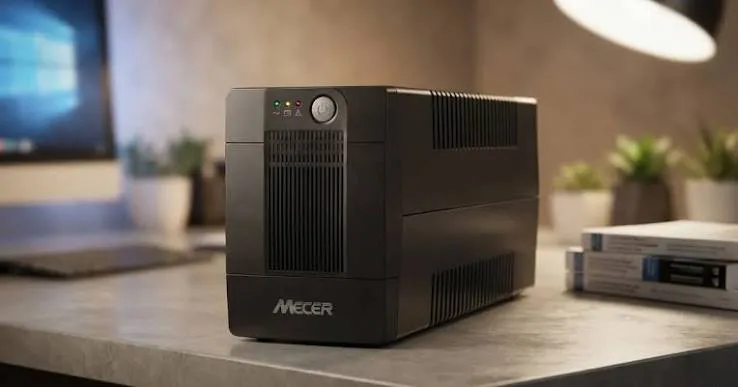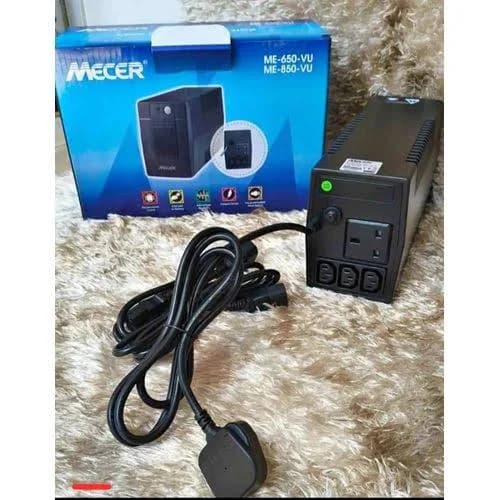
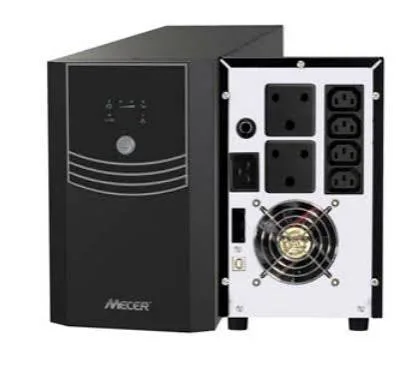
Mecer ME-3000-VU 3KVA 3000VA 1800W Line Interactive UPS in Kenya | City Gadgets Kenya
Same-day delivery in Nairobi by 10 Oct – 11 Oct
Description
Buy the genuine Mecer ME-3000-VU 3000VA 1800W line interactive UPS with AVR and four 12V 9Ah batteries in Kenya from City Gadgets Kenya. Mecer 3KVA UPS price in Kenya, UPS for IT closets, offices and workstations Nairobi.---
Mecer ME-3000-VU 3KVA 3000VA 1800W Line Interactive UPS in Kenya
Genuine Mecer | Brand New | 3000VA / 1800W Line Interactive UPS | Automatic Voltage Regulation | Four 12V 9Ah Internal Batteries | Surge and Line Protection | USB or RS-232 Monitoring
Looking for the Mecer 3KVA UPS price in Kenya, a UPS for an IT closet or a busy office in Nairobi, or a powerful, low-cost UPS for many workstations? The Mecer ME-3000-VU is a brand-new, genuine 3000VA line interactive UPS, listed by Kenyan retailers at 1800 watts, with automatic voltage regulation (AVR), four internal 12V 9Ah sealed lead-acid batteries, surge protection and monitoring software support. It's available from City Gadgets Kenya with delivery across Kenya. Buyers also search for it as a Mecer 3000VA UPS, a Mecer 3KVA UPS, a 3KVA line interactive UPS, a UPS for an office with many computers, a UPS for an IT closet, a 3000VA UPS for servers, or a 1800W UPS in Nairobi.
This guide is written to help you understand what a 3KVA UPS really delivers. We explain the difference between VA and watts, which matters a lot at this size, how long the four internal batteries will run your equipment, and what the power circuit needs. If you'd like to talk it through, message us on WhatsApp.
The short verdict
The Mecer ME-3000-VU is a high-capacity, low-price UPS for offices, labs and IT closets. Kenyan retailers list 3000VA and 1800 watts, line interactive topology with AVR, four internal 12V 9Ah batteries, and a 12-month warranty. The key point is that the 3000VA rating is not 3000 watts: this model supplies 1800 watts, which is a ratio of 0.6. That's about the same real power as many 2000VA units from other brands, so compare watts, not VA. It has no connector for external battery cabinets, so runtime is limited to the internal batteries, and it uses a simulated sine wave on battery. For an office that wants to protect several computers and a switch for a short time at a modest price, it's a sensible choice. For servers or sensitive equipment, an online or pure sine wave UPS suits better.
VA versus watts: the most important thing to understand
Buyers often compare UPS units by their VA rating, and that can mislead.
- VA (volt-amps) is the "apparent power" rating. It's a bigger number and appears on the box.
- Watts are the real power the UPS can deliver to your equipment.
- The ratio is called the power factor. For this UPS, 1800 watts divided by 3000VA is 0.6. The APC Smart-UPS C 3000VA in our range supplies 2100 watts, a ratio of 0.7, and online UPS units often supply 0.9.
- Your equipment's draw is in watts. Add up the watts of your devices, and compare with the UPS's watts, not VA.
- Two UPS units with the same VA can have very different real capacity.
- A rule of thumb: a 3000VA line interactive UPS supplies roughly 1800 to 2100 watts.
When you compare prices, compare the price per watt, and the battery capacity, not just the VA.
Who this UPS is for
It suits you if:
- You protect several computers, a switch and a router in an office or lab.
- You want an IT closet UPS at a low price.
- You want to save work and shut down safely during cuts.
- You're happy with a simulated sine wave.
- You have a suitable circuit for a 3KVA unit.
Look elsewhere if:
- You need pure sine wave. See the APC Smart-UPS C range.
- You need an online double-conversion UPS for servers. See the Mecer ME-3000-WPRU rack online UPS in our range.
- You need long backup times. Ask us about inverter systems and solar.
- You want to protect printers, fridges or heaters.
Specifications in plain English
| Feature | Detail | What it means for you |
|---|---|---|
| Model | Mecer ME-3000-VU | Mecer's 3000VA line interactive UPS |
| Capacity | 3000VA / 1800 W | The most real power it can supply |
| Topology | Line interactive | Corrects voltage without using the battery |
| AVR | Boost and buck | Handles low and high mains voltage |
| Battery | 4 x 12V / 9Ah sealed lead-acid, internal | About 432 watt-hours at nominal ratings |
| External batteries | No connector for external battery cabinets, per a Kenyan retailer | Runtime is limited to the internal batteries |
| Output on battery | Simulated sine wave | Fine for computers, but not every device |
| Protection | Surge, overload, discharge, overcharge | Protects equipment |
| Monitoring | USB or RS-232, with software | Automatic shutdown |
| Warranty | 12 months on Kenyan listings | Ask us about the batteries |
These figures come from Kenyan retailer listings of the Mecer ME-3000-VU. Ask us to confirm the real power, the outlet types and what's in the box for the unit you order.
How long will it run? A battery calculation
The battery is the key. Here is a simple way to estimate runtime.
- Work out the battery energy. Four 12V 9Ah batteries give 4 x 12 x 9 = 432 watt-hours at their nominal rating.
- Take off a margin. Batteries are never fully used, and the inverter loses some energy. A fair usable figure is about 60 to 65 percent, which is about 260 to 280 watt-hours.
- Divide by your load. At 900 watts (half load), 270 watt-hours lasts about 18 minutes in theory. In practice, high currents reduce battery capacity, so expect roughly 8 to 15 minutes.
- At 300 watts, the same energy lasts about 54 minutes in theory, and roughly 30 to 45 minutes in practice.
- At full load (1800 watts), expect only a few minutes.
These are estimates, not promises, and a pull-the-plug test with your real equipment gives the true figure. For hours of backup, you need a much bigger battery system, and we'll help you plan one.
Sizing: how to work out what you need
- List every device you'll connect.
- Find each device's power in watts, on its label or specifications.
- Add the watts together.
- Keep the total below about 60 percent of 1800 watts, which is about 1080 watts.
- Remember that VA is not watts.
- Add a margin for growth.
- Check outlet counts and types, so every device has a socket.
As a guide, a desktop and monitor draw about 100 to 200 watts, a small server 150 to 300 watts, a switch 20 to 80 watts and a router 10 to 25 watts. Eight desktops with monitors would draw about 1,000 to 1,500 watts.
The power circuit
A 3KVA UPS draws real current, and the wiring matters.
- At 1800 watts and 230 volts, the UPS draws about 8 to 9 amps at full load, plus charging current, and more if the mains voltage is low.
- Use a good-quality, properly rated circuit and cord.
- Don't plug it into a multi-way extension with other loads.
- Use an earthed socket, installed by a qualified electrician if needed.
- Check the plug type the UPS uses. Some 3KVA units are hard-wired or use a larger connector, and we confirm this for the unit you order.
- Plan for the whole chain, from the distribution board to the UPS.
A UPS is only as safe as the wiring behind it.
What you can and can't plug in
Good to plug in
- Desktop computers and monitors.
- A small server, a NAS and network switches.
- A router, modem and Wi-Fi access points.
- A CCTV recorder and cameras.
- A POS terminal.
Don't plug in
- Laser printers, which draw a big surge when they warm up.
- Heaters, kettles, irons, microwaves and hair dryers.
- Fridges, freezers and air conditioners.
- Power tools and pumps.
Line interactive, AVR and simulated sine wave
- Line interactive means the UPS passes mains power through a transformer that corrects the voltage, and switches to the battery only when the mains fails or goes far out of range.
- AVR boosts low voltage and trims high voltage, so your equipment sees a steady supply without draining the battery.
- A simulated sine wave on battery suits most computers and network equipment. Some computers with active PFC power supplies, and some sensitive equipment, do better on pure sine wave or an online UPS.
Setting up the UPS
- Choose a spot with good ventilation, off the floor and away from damp, direct sun and heat. The UPS is very heavy.
- Charge the batteries for at least 8 hours before first use.
- Plug the UPS into a suitable, earthed circuit.
- Plug your equipment into the UPS outlets.
- Connect the monitoring cable, and install the software.
- Test it: with equipment on, unplug the UPS from the wall for a few seconds, and check that equipment keeps running and the alarm beeps.
- Label the outlets.
Looking after the batteries
- Expect a life of about 2 to 4 years, depending on heat and use.
- Keep the UPS cool.
- Test it every few months.
- Replace the four batteries together, as a matched set.
- Use matching batteries. Ask us about replacements.
A worked example: a small office with eight workstations
A concrete example helps you plan.
- List the equipment: eight desktop computers (about 100 watts each, or 800 watts), eight monitors (about 25 watts each, or 200 watts), a switch (40 watts) and a router (20 watts). The total is about 1,060 watts.
- Check the rating. 1,060 watts is about 59 percent of 1800 watts, which is right at the recommended limit.
- Estimate the runtime. At about 60 percent load, with four 9Ah batteries, expect roughly 6 to 10 minutes on a new set. That's time to save and shut down, not to keep working.
- Consider splitting the load. A 3KVA UPS for the network gear and server, and smaller UPS units for desk groups, gives longer runtime for the critical items.
- Plan the outlets. Eight computers and monitors need a distribution strip, and the total must stay within the UPS's rating.
- Plan shutdown. Use the monitoring software for the server, and train staff to save and shut down when the alarm sounds.
- Test monthly.
For an office with many desks, several smaller UPS units are often more practical than one large one, and we'll help you plan.
Why heat matters for a 3KVA UPS
A large UPS makes heat, and heat is the enemy of its batteries.
- Every 10 degrees above room temperature roughly halves the life of a lead-acid battery.
- A 3KVA UPS at 60 percent load generates real heat from its transformer and electronics.
- Don't put it in a closed cupboard, or against a wall that blocks vents.
- Leave space around it for airflow.
- Keep the room cool, ideally with air conditioning.
- Clean dust from vents with a dry cloth, with the UPS unplugged.
A cool room can add years to the batteries' life.
What to expect from battery replacement
The four internal batteries are the main running cost, so plan for them.
- A set lasts about 2 to 4 years, depending on heat and use.
- Replace all four together, as a matched set. Mixing old and new shortens the life of both.
- Use batteries of the same type and size (12V 9Ah).
- Handle with care. The batteries are heavy, and the UPS must be switched off and unplugged.
- Ask us about replacement sets, and whether we can fit them.
- Recycle old batteries responsibly.
- Keep a record of the install date.
UPS, inverter, generator and solar
For longer outages, a UPS is one part of the answer.
- A UPS bridges short cuts and shuts down safely.
- A generator provides long-term power, and the UPS covers the start-up gap.
- An inverter and battery system runs equipment for hours.
- Solar reduces running costs and can charge batteries.
- A combined system often suits sites with regular long outages.
Tell us how long your outages usually last, and we'll tell you honestly what you need.
Common problems and simple fixes
The UPS beeps constantly on mains power. It may be overloaded, or the batteries are weak. Unplug some devices, and test again.
It switches to battery often. Mains voltage may be swinging beyond its range. Ask us about a different UPS.
It doesn't power on. Check the wall socket, the cord, the breaker and the switch. The batteries may need charging for many hours.
Backup time is very short. The batteries have aged, or the load is too high.
The computers don't shut down automatically. Install the monitoring software and connect the cable.
The UPS is hot or smells. Switch it off and unplug it. Ask us, and don't use it until it's checked.
If a problem continues, message us on WhatsApp.
Questions to ask before you buy a 3KVA UPS
- What equipment will it protect, and how many watts does it draw?
- How many real watts does the UPS supply, not just VA?
- How long do I need it to run?
- Is my power circuit suitable? Ask an electrician.
- Does my equipment need pure sine wave or online?
- What batteries does it use, and how much do replacements cost?
- What warranty is included, on the UPS and the batteries? Get it in writing.
- Can I see it before I pay?
We're glad to answer all of these on WhatsApp or in the shop before you pay.
Looking after the UPS for years
- Keep the room cool, dry and ventilated.
- Test the UPS every few months.
- Don't overload it.
- Replace the batteries as a matched set.
- Use a proper circuit and earth.
- Keep the manual, box and receipt.
- Keep the software updated.
Warranty and after-sales: what to ask
A UPS has two parts that matter: the unit and the batteries. Ask us what warranty covers the unit you order, how long it lasts, and whether the batteries have a separate, shorter warranty. Kenyan listings show 12 months, and terms may differ. Keep your receipt, the serial number and the box. If a fault appears, message us on WhatsApp first, and we'll tell you the quickest way to get it sorted.
Comparing UPS units fairly: a short checklist
When you compare UPS units, VA alone won't tell you the truth, so use this checklist.
- Compare real watts, not VA.
- Compare battery capacity, in the number and size of batteries, since it decides runtime.
- Compare output waveform: simulated sine wave, pure sine wave or online.
- Compare the input range, since a wide range means less battery wear.
- Compare the display: LED, LCD or none.
- Compare warranty, on the unit and the battery.
- Compare battery replacement cost, since it's the main running cost.
- Compare price per watt, and the total cost over five years, including batteries.
On that checklist, the Mecer 3KVA wins on price per watt, and loses on waveform, display and battery access. The APC wins on features, and loses on price. Tell us what matters to you, and we'll help you choose.
Planning the room for a large UPS
A 3KVA UPS needs a sensible home.
- Choose a cool, ventilated room, away from direct sun and damp.
- Place it on a firm, level floor, with space around it for airflow.
- Keep it close to the equipment it protects, with short cords.
- Keep it close to a suitable circuit, with an earthed socket.
- Leave room for batteries to be replaced.
- Keep a clear path to the unit for maintenance and for the pull-the-plug test.
- Keep children and pets away.
- Lock the room.
A note on noise
Large UPS units make some noise, and it's worth planning for.
- Cooling fans run at higher speed under load, and make a steady hum.
- The alarm beeps loudly during a cut, which is the point.
- Don't put it beside a quiet desk or a bedroom if noise matters.
- A separate room or a cabinet with ventilation solves the problem.
- Fan noise rising can mean dust, a hot room or a heavy load. Check the vents and the load.
Using a UPS in Kenya
Power quality. Voltage swings are common, and AVR is valuable.
Heat. A 3KVA UPS makes heat. Keep it in a cool, ventilated room.
Earthing. Use a properly earthed socket.
Weight. The ME-3000-VU is very heavy, so plan the placement and lift with several people.
Security. Lock the room.
Warranty. Ask us for the warranty that applies to the unit you order, including the batteries. Keep the receipt and box.
How it compares with other options in our range
| Mecer 3000VA line interactive | APC SMC3000I | Mecer 2000VA | Mecer ME-3000-WPRU (online rack) | |
|---|---|---|---|---|
| Capacity | 3000VA / 1800 W | 3000VA / 2100 W | 2000VA / about 1200 W | 3000VA / 2700 W |
| Type | Line interactive | Line interactive | Line interactive | Online double conversion |
| Output on battery | Simulated sine wave | Pure sine wave | Simulated sine wave | Pure sine wave |
| Form | Tower | Tower | Tower | Rack |
| Best for | Many workstations, low price | Server rooms | Several computers | Servers and critical IT |
Against the APC SMC3000I: the APC has more real power, pure sine wave, an LCD and a hot-swap battery, at a much higher price. The Mecer is the budget choice.
Against the Mecer online rack UPS: the online model gives the cleanest power for servers, at a higher price.
Honest pros and cons
Pros
- 1800 watts of real power for a low price.
- AVR, surge protection and line protection.
- Four internal 9Ah batteries.
- USB or RS-232 monitoring.
- A 12-month warranty on Kenyan listings.
Cons
- 3000VA is only 1800 watts.
- A simulated sine wave on battery.
- No external battery connector.
- Short runtime at high loads.
- Very heavy, and needs a proper circuit.
- Not for printers or heavy appliances.
What to check when it arrives
- The box model matches Mecer ME-3000-VU.
- The UPS, power cords, cables and paperwork are in the box.
- The UPS powers on, and the batteries charge.
- A pull-the-plug test works, and the alarm beeps.
- The outlets and monitoring work.
- You get a receipt with the serial number and warranty details in writing.
Frequently asked questions
What is the Mecer 3KVA UPS price in Kenya? We confirm the current price when you message us on WhatsApp, because supplier prices change. We tell you the price and what's in the box before you pay.
Where can I buy the Mecer 3KVA UPS in Nairobi? At City Gadgets Kenya, New Alnoor Exhibition, Second Floor, Shop C7, Accra Road, Nairobi CBD, or by delivery.
How many watts can it supply? 1800 watts.
What batteries does it have? Four internal 12V 9Ah sealed lead-acid batteries.
Can I add external batteries? Not on this model, per a Kenyan retailer.
How long will it run my computers? From a few minutes at high loads to tens of minutes at lower loads.
What kind of wave does it produce on battery? A simulated sine wave.
What warranty does it have? Kenyan listings show 12 months. Ask us about the batteries.
Can you deliver it? Yes, same day in Nairobi and next day outside Nairobi.
Can I pay via M-Pesa? Yes.
Why buy from City Gadgets Kenya
Genuine, brand-new Mecer UPS. We're at New Alnoor Exhibition, Second Floor, Shop C7, Accra Road, Nairobi CBD, and you're welcome to talk to us about your equipment before you buy. Message us on WhatsApp with the devices you want to protect, and we'll tell you honestly whether the 3KVA is right or a different UPS would suit you better. We confirm what's in the box before you pay.
Order your Mecer ME-3000-VU today
Available now at City Gadgets Kenya. Message us on WhatsApp.
Specifications
- Brand
- Mecer
- Condition
- New
Frequently Asked Questions
How much does the Mecer ME-3000-VU 3KVA 3000VA 1800W Line Interactive UPS in Kenya | City Gadgets Kenya cost in Kenya?
The Mecer ME-3000-VU 3KVA 3000VA 1800W Line Interactive UPS in Kenya | City Gadgets Kenya is priced at Ksh 36,000 at City Gadgets. You can pay via M-Pesa, card or cash on delivery.
Is the Mecer ME-3000-VU 3KVA 3000VA 1800W Line Interactive UPS in Kenya | City Gadgets Kenya available in Kenya?
Yes — the Mecer ME-3000-VU 3KVA 3000VA 1800W Line Interactive UPS in Kenya | City Gadgets Kenya is in stock at City Gadgets, ready for same-day delivery in Nairobi and countrywide shipping across Kenya.
Is the Mecer ME-3000-VU 3KVA 3000VA 1800W Line Interactive UPS in Kenya | City Gadgets Kenya genuine and does it have a warranty?
Every Mecer ME-3000-VU 3KVA 3000VA 1800W Line Interactive UPS in Kenya | City Gadgets Kenya we sell is 100% genuine brand-new stock and comes with a 12-month official brand warranty.
Do you deliver the Mecer ME-3000-VU 3KVA 3000VA 1800W Line Interactive UPS in Kenya | City Gadgets Kenya in Nairobi?
Yes. We offer fast same-day delivery within Nairobi and fast, affordable delivery to the rest of Kenya — order online or on WhatsApp.
Customer Reviews
No reviews yet
Be the first to review this product.
Rate us on Google
Your review helps other shoppers find us
Reviews from verified buyers will appear here.