Sony PS5 DualSense Charging Station in Kenya | City Gadgets Kenya
Same-day delivery in Nairobi by 29 Oct – 30 Oct
Comes with
Description
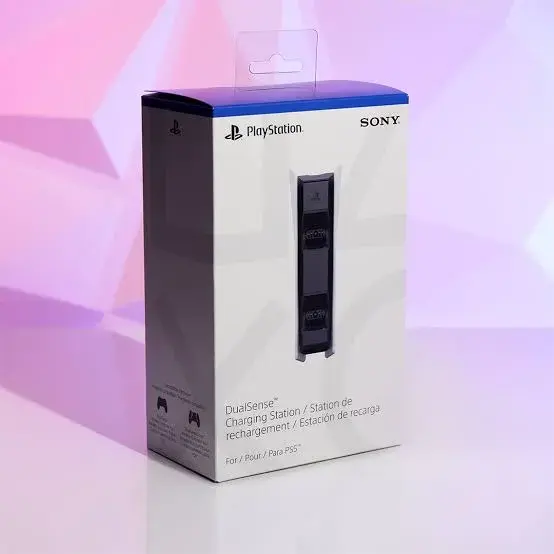
Buy the Sony PS5 DualSense Charging Station in Kenya from City Gadgets Kenya. Sony DualSense charging station that charges up to two PS5 controllers at once with a click-in dock, without needing the console to be on. Same-day Nairobi delivery, M-Pesa accepted. Call 0745 575 931.
Sony PS5 DualSense Charging Station in Kenya
Genuine Sony | DualSense Charging Station | Charges Two Controllers | Click-In Dock | Works Without The Console | Controllers Not Included
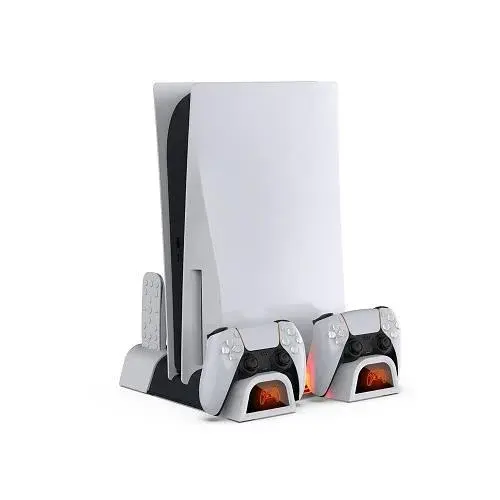
The Sony DualSense Charging Station is a dock that charges up to two DualSense wireless controllers at the same time. The controllers click into the dock, and they charge without being connected to the PS5 console. Controllers are not included. Our supplier's list calls it the Sony dual charging dock, and we confirm the model on the box before you pay. Available in Kenya from City Gadgets Kenya, this page is for shoppers searching "PS5 charging dock Kenya", "DualSense charging station Kenya", "buy PS5 controller charger Nairobi", "PS5 dual charging dock price Kenya", "Sony DualSense charger", "PS5 controller charging stand" or "two controller charger PS5".
A flat controller in the middle of a match is annoying, and charging by cable means a cable across your sofa. A charging station gives your controllers a home: you put them on the dock when you finish, and they are ready when you return. This page explains what the Sony dock offers, how it works, what it does not do, and how to check it when it is delivered.
Key specs at a glance
| Feature | Detail |
|---|---|
| Type | Charging dock for DualSense wireless controllers |
| Controllers | Up to two DualSense wireless controllers at once |
| Charging method | Click-in dock; the controllers charge without being connected to the PS5 |
| Controllers included | No |
| Dimensions | About 190 x 121 x 71 mm (7.5 x 4.78 x 2.78 in) |
| Weight | About 460 g (1.01 lb) |
| Compatible controllers | DualSense wireless controllers; the DualSense Edge is not mentioned in the listing, so we confirm |
| Charge time | Not stated in the listing we read; we confirm in the shop |
| Power supply and cable | Not stated in the listing we read; we confirm what is in the box |
| Colour | Not stated in the listing we read; we confirm in stock |
| Condition | Brand new |
| Available from | City Gadgets Kenya, Nairobi CBD |
Specifications come from published manufacturer and retail specification sheets. Gaming accessories are sold in several versions with different colours, model codes and platform labels, so please ask our team to confirm the exact model, colour and version in stock before you pay.
What's in the box
The listing says the controllers are not included. The rest of the box contents are not listed in the page we read, so we confirm exactly what is in the box, including any power cable or adapter, before you pay.
Overview: who the charging station is for
The DualSense Charging Station is for PS5 owners who have two controllers, or who play with a friend, a brother or a sister. It stops you from running out of battery, and it keeps controllers neat in one place instead of scattered between cushions.
It is a convenience, not a necessity. You can charge a DualSense by plugging it into the console or a USB charger with a cable. But a dock is quicker to use. You do not have to find a cable, plug it in and avoid pulling the controller off the table.
If your household has more than one PS5 player, the dock soon becomes one of the most-used accessories.
How the dock works
The dock has two slots. You place the controller on the dock so that it clicks into position, and its charging contacts meet the contacts on the dock. The listing says the controllers charge without being connected to the PS5 console, so the console can be off.
Each controller sits in its own slot, and the dock charges up to two at once. When a controller is fully charged, the dock should stop charging it. The listing does not describe the lights, so we show you the indicator behaviour in the shop.
The listing says the dock is for DualSense wireless controllers. It does not mention the DualSense Edge, which has a different shape, so if you own an Edge controller, tell us and we will confirm whether it fits.
Power and where to put it
Place the dock on a flat, stable surface near your console, such as a TV unit or a shelf, where it is easy to reach but out of the way of children and pets. Plug it into a surge-protected extension, because voltage spikes when power returns after an outage can damage chargers.
Keep the dock away from liquids and direct sun. Dust can collect on the contacts, so wipe them gently with a dry cloth now and then. Do not use metal objects to clean the contacts.
The dimensions are about 190 mm long, 121 mm wide and 71 mm high, and the weight is about 460 g, so the dock is stable and does not take much room.
Battery care for DualSense controllers
A DualSense uses a rechargeable lithium-ion battery. Like all such batteries, it wears with age. To make it last, avoid leaving the controller in hot places, avoid letting it stay at zero for days and avoid letting it sit fully charged on the dock for months without use.
Most players find that a dock is a convenient way to keep controllers at a good charge level. The controller light bar and the console show the battery level, and you can check it from the PS5 menu.
If a controller no longer holds a charge for long, the battery may be worn. Tell us, and we will advise on options.
Is the dock worth buying?
If you have two controllers, yes, especially if you play every day. If you have only one controller and you are happy to plug it in, you may not need it. If you have an Edge controller, check the compatibility first.
Compared with cheaper third-party docks, a genuine Sony dock is designed for the DualSense and its contacts. We recommend a genuine unit for controllers that cost thousands of shillings each. We confirm what we have in stock when you ask.
A dock is also a nice gift for a family that games together.
Common questions before buying the charging station
Does it need a power adapter? The listing we read does not describe the power supply, so we confirm what is in the box and how the dock is powered before you pay.
How long does it take to charge? The listing does not state a charge time. A controller usually takes a few hours from empty, and we can confirm the time on the unit if you want to test it.
Can I leave the controllers on the dock all the time? Most players do. Modern controllers stop charging when full. If you will not use a controller for weeks, store it at a partial charge instead.
Will it fit a controller with a case or grips on it? Cases and thick grips can stop a controller from sitting properly on the dock contacts. Remove accessories before docking, or tell us what you use and we will check.
Questions we hear often about PlayStation gear in Kenya
Is it safe to buy gaming accessories from a shop in town? It is safe if you buy from a seller who shows you the item, gives you a receipt and explains the warranty. We let you inspect the box and test the item before you pay, and we confirm every detail that is not published.
Can I return an item that does not fit my console? Fit problems are best solved before you buy, which is why we ask for your console model and check the item with you. If something is wrong when it arrives, contact Customer Relations on 0794 488 806 straight away and we will advise on the next steps.
Do you deliver in Nairobi and outside? Yes. Orders confirmed before 3pm are delivered the same day in Nairobi, and outside Nairobi we deliver by courier, typically 1 to 3 business days after dispatch. The delivery charge is confirmed before you pay, and M-Pesa is accepted.
How do I know the item is new? Every item we list is brand new, and we show you the sealed pack. If a pack looks opened or damaged, tell us before you pay.
Can you recommend what else I need? Tell us your console, your games and your budget. We would rather recommend one good item than sell you several that you do not need.
Final buying notes
Before you order the Sony PS5 DualSense Charging Station, take a minute to think about how many controllers you own and whether any is a DualSense Edge. If you are unsure, call or WhatsApp our sales team on 0745 575 931 with the model of your console and what you play, and we will tell you honestly whether this item is right for you.
We would rather lose a sale than sell you something that does not suit your setup. Every item is brand new, we let you inspect the pack and we confirm any detail that is not published before you pay.
You can visit the shop at New Alnoor Exhibition, Shop 7, Second Floor, Taveta Road, Nairobi CBD, to see the item, or we can arrange same-day delivery in Nairobi for orders confirmed before 3pm.
A dock also encourages good habits: when controllers always have a home, they are less likely to be dropped, sat on or lost between sofa cushions.
If you play with friends often, a dock means a charged controller is always ready for a guest.
Ask us to show you how the controller sits on the dock before you decide.
Using PlayStation accessories in a Kenyan home
Most PlayStation accessories are used in a sitting room or bedroom, around a TV, a console and a power socket. A few habits protect both the accessory and the console. Plug the console and its accessories into a surge-protected extension, because Kenya's power can spike when it returns after an outage, and spikes are a common cause of damaged electronics. If a thunderstorm is coming, switch the console off and unplug it. Keep the console in a place with good airflow, away from curtains, blankets and the back of a cabinet, because the PS5 is a large console that needs room to breathe. Dust is a fact of life in Nairobi, so wipe accessories with a dry cloth and keep ports free of dust.
Think about where cables will run. A cable across a walkway is a trip hazard and a pulled cable can drag a console or camera off a shelf. Use cable ties or clips to keep leads tidy. If small children or pets are in the house, keep small accessories and loose parts out of reach.
Setting up your PS5 for the whole family
The PS5 has family and parental controls that are worth setting up if children use the console. You can create a child account, set daily play-time limits, restrict games by age rating and control spending in the PlayStation Store. These settings protect children and avoid surprise bills, which matters in a home where a parent's M-Pesa or card might be linked to the account. Set a strong passcode on the parent account, and do not share it.
Storage is the other everyday issue. The console has a fixed amount of internal storage, and modern games are large. Delete games you have finished and keep only those you play. If you run out of space often, tell us, and we can advise on storage upgrades that are compatible with the console. Keep the console software updated, since updates add features and fix problems.
Internet, TV and sound: getting the basics right
Online play, downloads and streaming depend on your internet connection. A wired connection from the router to the console is more stable than Wi-Fi, which can suffer from walls and distance. If you must use Wi-Fi, place the router in the same room or use a mesh extender. Check that your plan has enough data, because game downloads can use many gigabytes.
The TV matters too. A TV with a game mode reduces input lag, and an HDMI 2.1 port is needed for the highest frame-rate and resolution modes on the PS5. If your TV is older, you can still enjoy the console, but some features will not work. For sound, a headset is the simplest choice for late-night play, and a soundbar adds to the family experience in the sitting room.
Caring for your console and accessories
Dust and heat are the enemies of electronics in Nairobi. Place the console where air can flow around it, never inside a closed cabinet, and do not stack other devices on top. Wipe the outside with a dry cloth and do not use liquids. Clean the console's air vents with a soft brush or a gentle blower now and then, but do not open the console.
Charge controllers and other accessories with a good cable and a surge-protected socket. Do not leave them charging for days at a time, and do not leave them in hot places, such as on a windowsill in direct sun. A little care keeps your gear working for years.
Buying PlayStation gear: a quick guide
Think about what you need, in this order: first, a controller for each player; second, a headset for comfortable, private sound; third, a charging dock or a spare controller so that play is never interrupted; fourth, storage and protection, such as a carrying bag or a stand; and last, extras such as a camera or a remote. You do not need everything at once, and it is better to buy a few good items than many cheap ones.
Checking compatibility before you buy
PlayStation accessories are made for specific consoles and controllers, and a mismatch is the most common reason for a return. The PS5 came in a standard edition with a disc drive, a Digital Edition without a disc drive, a slimmer redesigned version and a PS5 Pro, and some accessories fit only some of these. The DualSense controller and the DualSense Edge controller are different products, and parts for one do not fit the other. PlayStation 4 accessories and PlayStation 5 accessories are often different too.
Before you buy, write down the exact console and accessory you own. Tell us, and we will confirm that the item works with your setup before you pay. If you are not sure which version you have, bring the console or send a photo of the model sticker.
Genuine and imitation accessories
PlayStation accessories are widely copied. Imitations are often cheaper, and some work fine, but some use poor materials, have unreliable electronics or may not be recognised by the console. For items that connect to the console, or that protect an expensive device, we recommend genuine products and we say clearly what the item is. Check the printing on the box, the model code and the finish of the product, and be wary of a price far below the market.
How to check your item when it is delivered
- Inspect the box for damage before you sign, and check that the box is sealed.
- Open it and check that the contents match what we confirmed with you.
- Check the build: the finish should be clean, the fittings should be complete and nothing should rattle or feel loose.
- Test the item with your console if you can, or let us test it in the shop.
- Keep the receipt and the box.
- Contact our Customer Relations team on 0794 488 806 straight away if anything is wrong.
How to avoid a fake or counterfeit item
- Check the printing and the logo. Blurry text, spelling mistakes, a wrong logo or a missing model code are warnings.
- Check the box. A genuine box has sharp printing, a model number and a sealed finish.
- Compare the build. Rough edges, loose parts and a flimsy feel are warnings.
- Watch the price. A price far below the market is a reason to ask why.
- Buy from a seller with an address. Choose a seller who gives a receipt and explains the warranty, and avoid paying a stranger before you have seen the product.
Warranty and stock
Warranty depends on the market version of the product and on who stocks it. We confirm the model, the version and the exact warranty terms in writing for the specific unit before you pay, and Customer Relations on 0794 488 806 handles warranty questions after purchase. Keep your receipt and the box.
Strengths and limits
What we like:
- A genuine Sony dock for DualSense controllers.
- Charges two controllers at once.
- Click-in dock with no cables to plug in.
- Charges without the console being on.
- Keeps controllers tidy.
- A stable size of about 190 x 121 x 71 mm.
What to keep in mind:
- Controllers are not included.
- Charge time and lighting are not stated in the listing we read.
- The DualSense Edge is not mentioned in the listing.
- Needs a power socket.
- A convenience, not a necessity.
Who should buy the PS5 DualSense Charging Station
- Households with two PS5 controllers.
- Players who play every day.
- Parents who want controllers always ready.
- Families who share a console.
- Buyers who want a genuine Sony dock.
Who should look elsewhere
- Owners of only one controller who prefer a cable.
- Owners of a DualSense Edge who have not confirmed the fit.
- Buyers with no space near the console.
- Buyers who want to charge more than two controllers.
Compare before you buy
Charging station against a USB cable. A cable is cheaper and works anywhere. The dock is quicker to use and holds two controllers.
Genuine Sony dock against third-party docks. Third-party docks can be cheaper. A genuine dock is designed for the DualSense.
Charging station against a spare controller. A spare controller lets you swap instantly. A dock keeps all controllers charged.
Why buy from City Gadgets Kenya
Genuine, brand-new stock from a Nairobi shop you can visit. City Gadgets Kenya is at New Alnoor Exhibition, Shop 7, Second Floor, Taveta Road (at the Taveta Road and Accra Road junction), Nairobi CBD. We are open Monday to Friday 9:00am to 7:00pm, and Sunday 11:00am to 4:00pm (Saturday closed).
- Sales (pricing, stock and orders): call or WhatsApp 0745 575 931 on WhatsApp.
- Customer Relations (warranty, returns and support): call or WhatsApp 0794 488 806 on WhatsApp.
- Email: sales@citygadgetskenya.co.ke, handy for invoices, bulk orders and warranty paperwork.
- Delivery: same-day delivery in Nairobi for orders confirmed before 3:00pm on a working day. Outside Nairobi we deliver by courier to your nearest agent or your door, typically 1 to 3 business days after dispatch. The delivery charge depends on your location and the size of the item and is confirmed before you pay. Collection from the shop is free. Delivery times are estimates, not guarantees.
- Payment: M-Pesa accepted.
- Follow us: Instagram, TikTok and Facebook.
Frequently asked questions
How many controllers can it charge? Up to two DualSense wireless controllers.
Do I need the console on? No. The listing says the controllers charge without being connected to the PS5.
Does it work with the DualSense Edge? The listing does not mention the Edge. We confirm.
Are controllers included? No.
Can I pay via M-Pesa? Yes, M-Pesa is accepted.
Can I pay via M-Pesa? Yes, M-Pesa is accepted.
Do you deliver outside Nairobi? Yes. Outside Nairobi we deliver by courier, typically 1 to 3 business days after dispatch. The delivery charge depends on your location and the size of the item and is confirmed before you pay.
What if it is faulty on delivery? Contact Customer Relations on 0794 488 806 straight away, and we will advise on the next steps.
Order the Sony PS5 DualSense Charging Station today
Available now at City Gadgets Kenya. Call or WhatsApp our sales team on 0745 575 931 (WhatsApp) to confirm stock, the version, delivery and what is included, or email sales@citygadgetskenya.co.ke. Visit us at New Alnoor Exhibition, Shop 7, Second Floor, Taveta Road (at the Taveta Road and Accra Road junction), Nairobi CBD.
Specifications
- Brand
- SONY
- Condition
- New
Frequently Asked Questions
How much does the Sony PS5 DualSense Charging Station in Kenya | City Gadgets Kenya cost in Kenya?
The Sony PS5 DualSense Charging Station in Kenya | City Gadgets Kenya is priced at Ksh 6,000 at City Gadgets. You can pay via M-Pesa, card or cash on delivery.
Is the Sony PS5 DualSense Charging Station in Kenya | City Gadgets Kenya available in Kenya?
Yes — the Sony PS5 DualSense Charging Station in Kenya | City Gadgets Kenya is in stock at City Gadgets, ready for same-day delivery in Nairobi and countrywide shipping across Kenya.
Is the Sony PS5 DualSense Charging Station in Kenya | City Gadgets Kenya genuine and does it have a warranty?
Every Sony PS5 DualSense Charging Station in Kenya | City Gadgets Kenya we sell is 100% genuine brand-new stock and comes with a 12-month official brand warranty.
Do you deliver the Sony PS5 DualSense Charging Station in Kenya | City Gadgets Kenya in Nairobi?
Yes. We offer fast same-day delivery within Nairobi and fast, affordable delivery to the rest of Kenya — order online or on WhatsApp.
Customer Reviews
No reviews yet
Be the first to review this product.
Rate us on Google
Your review helps other shoppers find us
Reviews from verified buyers will appear here.
Buying guides
Straight advice for shoppers picking between the models above.
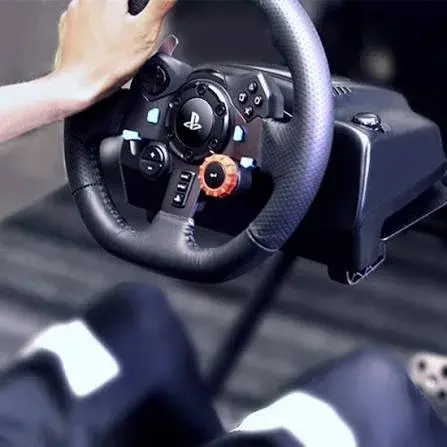
Logitech G29, G920 & G923 Racing Wheels in Kenya: The Complete Buying Guide
Logitech G29, G920 & G923 Racing Wheels in Kenya: The Complete Buying Guide
Read the guide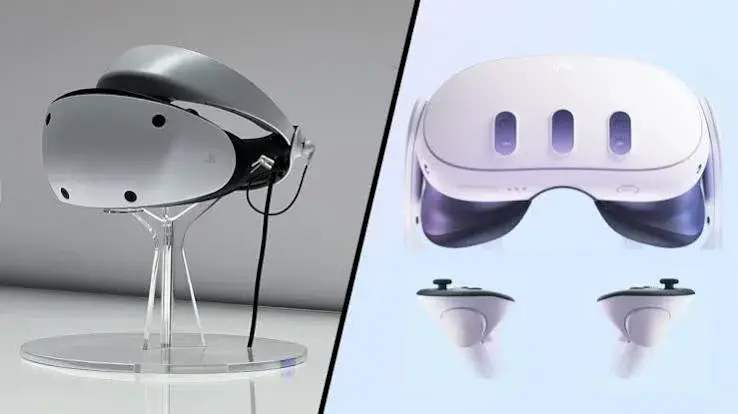
Meta Quest 3 vs Quest 3S vs PSVR2: Best VR Headset in Kenya? (2026 Guide)
Meta Quest 3 vs Quest 3S vs PSVR2: The Complete VR Headset Guide for Kenya
Read the guide