Skullcandy SLYR Pro Wireless in Kenya | City Gadgets Kenya
Same-day delivery in Nairobi by 4 Nov – 5 Nov
Comes with
Description
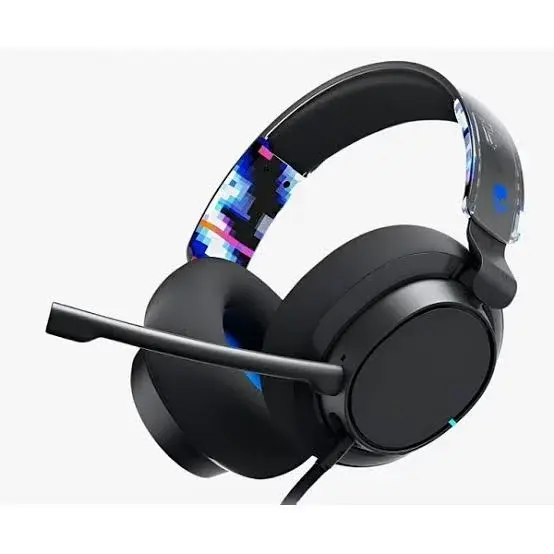
Buy the Skullcandy SLYR Pro Wireless in Kenya from City Gadgets Kenya. Skullcandy SLYR Pro Wireless gaming headset with 50mm drivers, 2.4GHz and Bluetooth 5.3, 24 hour battery, rapid charge and a removable boom microphone. Same-day Nairobi delivery, M-Pesa accepted. Call 0745 575 931.
Skullcandy SLYR Pro Wireless in Kenya
Genuine Skullcandy | SLYR Pro Wireless | 50mm Drivers | 2.4GHz And Bluetooth 5.3 | 24 Hour Battery | Rapid Charge | Removable Boom Mic | Companion App | PlayStation, Xbox, PC And Switch
The Skullcandy SLYR Pro Wireless is a wireless gaming headset with 50mm drivers, a 2.4GHz USB-A transmitter, Bluetooth 5.3, a wired 3.5mm option, a rated battery life of 24 hours with a rapid charge of 4 hours from 10 minutes, a removable boom microphone with a mute LED and a companion app for ChatMix, equaliser and sidetone. Our supplier's list calls it the multi-platform version, so we confirm which version is in the box before you pay. Available in Kenya from City Gadgets Kenya, this page is for shoppers searching "Skullcandy SLYR Pro Wireless Kenya", "Skullcandy SLYR Pro price Kenya", "buy Skullcandy SLYR Pro Nairobi", "Skullcandy gaming headset Kenya", "wireless gaming headset PS5 Kenya", "SLYR Pro Bluetooth headset" or "Skullcandy multi-platform headset".
Skullcandy is better known for lifestyle headphones, but its SLYR range is built for gaming. The SLYR Pro Wireless offers two wireless connections, a 24-hour battery and a removable boom microphone, which is a lot of features for a headset at this price level. This page explains what the SLYR Pro Wireless offers, how its connections work, where it is limited, and how to check it when it is delivered.
Key specs at a glance
| Feature | Detail |
|---|---|
| Type | Wireless and wired over-ear gaming headset |
| Speaker drivers | 50mm |
| Frequency response | 20 Hz to 20 kHz |
| Impedance | 32 ohms |
| Distortion | Below 2% at 1 kHz |
| Sound pressure level | 95 dB, plus or minus 3 dB |
| Wireless | 2.4GHz through an included USB-A transmitter, described as ultra-low latency |
| Bluetooth | Version 5.3 |
| Wired | 3.5mm cable included (5-pole to 4-pole, about 5 ft) |
| Battery | Rated at 24 hours; rapid charge gives about 4 hours from 10 minutes |
| Charging cable | USB-C to USB-A, about 6 ft |
| Microphone | Bi-directional removable boom microphone with an LED mute indicator |
| Weight | About 274 g |
| Software | Skullcandy app on desktop or mobile for ChatMix, equaliser modes and sidetone |
| Compatibility | PlayStation or Xbox, PC and Nintendo Switch, plus mobile; the version sold may be a PlayStation or Xbox version, so we confirm |
| Colours | Not stated in the page we read; we confirm in stock |
| Condition | Brand new |
| Available from | City Gadgets Kenya, Nairobi CBD |
Specifications come from published manufacturer and retail specification sheets. Gaming accessories are sold in several versions with different colours, model codes and platform labels, so please ask our team to confirm the exact model, colour and version in stock before you pay.
What's in the box
The manufacturer's page lists the headset, the removable boom microphone, a 3.5mm cable, a USB-C to USB-A charging cable and a quick-start and warranty guide. The USB-A transmitter is described as included. We confirm exactly what is in the box for your unit before you pay.
Overview: who the SLYR Pro Wireless is for
The SLYR Pro Wireless is for players who want one headset that does everything: a low-latency 2.4GHz connection for gaming, Bluetooth for music and calls, and a wired cable if the battery runs flat. That makes it useful to a student who uses a console in the evening and a phone on the bus.
It suits players on PlayStation, Xbox, PC and Nintendo Switch, as the page lists, though the exact console version matters. Skullcandy sells PlayStation and Xbox versions of the headset, so the transmitter or the settings may be matched to one console family. Tell us your console and we will confirm that the unit in stock will work.
If you only want a basic wired headset, you do not need this one. It is for buyers who want wireless freedom and some extra features.
Sound: 50mm drivers and an app with ChatMix
The headset has 50mm drivers with a listed frequency response of 20 Hz to 20 kHz and an impedance of 32 ohms. Low impedance means it is easy to drive from a phone or a controller. The distortion is listed at below 2% at 1 kHz.
The Skullcandy app is available for desktop and mobile, and the page lists ChatMix, equaliser modes and sidetone. ChatMix lets you balance the game sound against the voice chat, so you can turn teammates up without turning the game down. The equaliser lets you choose a sound profile, such as more bass or clearer voices. Sidetone lets you hear a little of your own voice in the ear cups, which helps you speak at the right volume.
Features that need an app depend on the app being available for your device. If you mainly play on a console, check which features work without the app, and we can tell you what we know.
Connections: 2.4GHz, Bluetooth 5.3 and 3.5mm
The headset has three ways to connect. The 2.4GHz connection uses the included USB-A transmitter, which plugs into a console or PC and is described as ultra-low latency. The Bluetooth 5.3 connection works with phones, tablets and laptops. The 3.5mm cable lets you use the headset wired when the battery is flat or when the other connections are not suitable.
A headset with several connections can be confusing at first. Use the 2.4GHz connection for games, Bluetooth for your phone and the cable as a backup. The quick-start guide explains how to switch between them. Note that the transmitter is USB-A, so a device with only USB-C ports will need an adapter.
Keep the transmitter safe, since it is small and a headset without it loses its low-latency connection.
Battery and charging
The page lists a battery life of up to 24 hours. A 24-hour battery covers several evenings of normal use. Rapid charge gives about 4 hours of play from 10 minutes of charging. That is a useful feature in Kenya, where power can be unreliable, because a short charge during a power window can save a gaming session.
The USB-C to USB-A cable is included and is about 6 ft long. Charge the headset using a surge-protected socket, and use a good-quality charger if you use a wall adapter. We do not quote a full charge time because the page does not list one.
If the battery is flat, you can use the wired 3.5mm connection, so you are never left without sound.
The microphone, comfort and build
The microphone is a removable boom microphone with a bi-directional pickup pattern and an LED that shows when it is muted. The page names the microphone as Clear Voice. Removable means you can take it off when you only want to listen to music. The LED mute light is a handy feature, because you can see at a glance whether you are muted.
The headset weighs about 274 g, which is light for a gaming headset with a battery. The page does not state the cushion material or whether the headset has noise cancellation, so we check these on your unit and do not claim them.
Try the headset on in the shop. Check that the cups sit over your ears and that the headband is comfortable.
Common questions before buying the SLYR Pro Wireless
Which version do I need, PlayStation or Xbox? The manufacturer sells the headset in console versions, priced the same, and also describes it as working with PlayStation or Xbox, PC and Switch. Tell us your console. We confirm which unit is in stock and whether it will work for you before you pay.
Can I use it on a phone? Yes. The headset has Bluetooth 5.3, which pairs with a phone, a tablet or a laptop. You can use it for calls and music, and use the 2.4GHz transmitter for games.
Does it have noise cancelling? The manufacturer's page we read does not state this, so we do not claim it. The closed ear cups reduce some outside noise, as most over-ear headsets do.
What if I lose the USB transmitter? The transmitter is the key to the low-latency connection. Keep it in a safe place. If it is lost, you can still use Bluetooth or the 3.5mm cable, and we can advise on a replacement.
What can I do with the app? The page lists ChatMix, equaliser modes and sidetone. Install the app on a phone or PC, connect the headset and try each mode. Not every feature is needed by every player, and the headset works without the app.
Getting the best from your SLYR Pro Wireless
When you first receive the headset, charge it fully, then connect it to your device. Use the 2.4GHz transmitter for games on a console or PC, because it has the lowest delay. Switch to Bluetooth when you want to take a call or listen to music from your phone, and use the cable if the battery is flat.
Set the equaliser to a profile that suits your game. A profile with extra mid-range can make voices and footsteps clearer in shooters, and a profile with more bass suits action games and music. Use ChatMix to balance voice chat and game sound, and use sidetone if you find yourself speaking too loudly.
Wipe the cushions and the boom microphone after use, and store the headset where it will not be crushed. Keep the cables and the transmitter in a small pouch so that nothing is lost.
If you travel with the headset, switch it off completely before you pack it, so that the battery does not drain in the bag, and keep the earcups from being pressed.
Final buying notes
Before you order the Skullcandy SLYR Pro Wireless, take a minute to think about which console version you need and whether you will use the app. If you are unsure, call or WhatsApp our sales team on 0745 575 931 with the model of your console and what you play, and we will tell you honestly whether this item is right for you.
We would rather lose a sale than sell you something that does not suit your setup. Every item is brand new, we let you inspect the pack and we confirm any detail that is not published before you pay.
You can visit the shop at New Alnoor Exhibition, Shop 7, Second Floor, Taveta Road, Nairobi CBD, to see the item, or we can arrange same-day delivery in Nairobi for orders confirmed before 3pm.
How to choose a wireless gaming headset
A wireless headset gives you freedom: no cable across your lap, no pulled controller, and the ability to walk to the kitchen between matches. Most gaming headsets connect in one of two ways. A 2.4GHz wireless connection uses a small USB transmitter, often called a dongle, plugged into the console or PC. It is designed for gaming, has very little delay between the screen and your ears, and needs no pairing once the transmitter and headset are matched. Bluetooth connects to phones, tablets and laptops without a dongle, and is convenient for music and calls, but it normally has more delay, so it is less suited to fast games.
Think about four things before you buy. First, battery life: a headset that lasts a full evening is comfortable, and one that dies mid-match is not. Second, the microphone: a boom microphone is clearer than a small microphone in the ear cup. Third, compatibility: a USB transmitter that works with one console may not work with another, so the version you buy matters. Fourth, comfort: you will wear it for hours, so check the weight, the cushions and the headband.
Connecting a wireless headset
For the 2.4GHz connection, plug the transmitter into a USB port on the console or PC and switch the headset on. The two usually pair automatically. If they do not, hold the power button for a few seconds to start pairing, and follow the quick-start guide. On a PlayStation or Xbox, open the sound settings and choose the USB headset as the output and the input. Some consoles route chat sound differently from game sound, so check the volume of both.
For Bluetooth, switch on pairing mode, open the Bluetooth settings on your phone or laptop and choose the headset. If a headset supports both connections, check how it switches between them, because some models can use both at the same time, and some need a button press. A headset with a 3.5mm socket can also be used wired, which is a good fallback if the battery runs flat.
Battery care and charging in Kenya
Wireless headsets use a rechargeable battery. The advertised hours are measured at moderate volume, and real life is usually a little less when the volume is high. To make the battery last for years, charge it before it is completely flat when you can, do not leave it in a hot car or in direct sun, and unplug it once it is full if you charge it often.
Power cuts are a fact of life in Kenya, so charge your headset when power is available, and keep a power bank for emergencies. Use the cable that came with the headset, or a good quality cable, and a surge-protected socket, because voltage spikes when power returns can damage chargers and batteries. A headset with a quick-charge feature is useful when the power is unreliable, since a short charge gives several hours of play.
Range, interference and latency
A 2.4GHz headset works well in the same room and usually through one or two walls, and the range listed by the manufacturer is measured in open space. In a busy Nairobi apartment block with many Wi-Fi networks, microphones and wireless devices, interference is possible. If the sound crackles or drops, move the transmitter closer, use a USB extension cable to bring it out from behind the console, or move other wireless devices away.
Latency means the delay between what happens on screen and what you hear. A good 2.4GHz connection has a very small delay that most people never notice. Bluetooth has a larger delay, which is fine for music and films but may be noticeable in fast shooters and rhythm games. If you play competitive games, use the 2.4GHz connection.
Looking after your headset
Wipe the ear cushions with a slightly damp cloth now and then and let them dry before use. Sweat and body oils break down faux leather over time, so do not leave the headset in a hot car or in direct sun. Do not pull the cable out by the cord, and do not wrap it tightly around the headband. Keep the USB transmitter in a safe place when you travel, because it is small and easy to lose, and a headset without its transmitter may not work on a console.
If the sound crackles in one ear, test the headset on another device first. If the fault follows the headset, contact us before you try to repair it yourself, because opening it can end any warranty.
How to check your headset when it is delivered
- Inspect the box for damage before you sign, and check that the box is sealed.
- Open it and check that the contents match what we confirmed with you, including the USB transmitter and the charging cable.
- Check the build: the headband should flex without creaking, the ear cups should swivel smoothly and the cushions should be intact.
- Charge the headset, connect it to a console, a PC or a phone and play a music track. Check that both sides play and that the sound is clean.
- Test the microphone in a party chat, and check the mute function.
- Contact our Customer Relations team on 0794 488 806 straight away if anything is wrong.
How to avoid a fake or counterfeit headset
Popular headset brands are copied, and a fake can look very similar in the box. The copy often has thinner plastic, a weak battery and poor sound.
- Check the printing and the logo. Blurry text, spelling mistakes, a wrong logo or a missing model code are warnings.
- Check the box and the quick-start guide. A genuine box has sharp printing and a model code that matches the headset.
- Compare the build. Rough moulding seams, a squeaky headband or a loose hinge are warnings.
- Watch the price. A price far below the market is a reason to ask why.
- Buy from a seller with an address. Choose a seller who gives a receipt and explains the warranty, and avoid paying a stranger before you have seen the product.
Warranty and stock
Warranty depends on the market version of the product and on who stocks it. We confirm the model, the version and the exact warranty terms in writing for the specific unit before you pay, and Customer Relations on 0794 488 806 handles warranty questions after purchase. Keep your receipt and the box.
Strengths and limits
What we like:
- 2.4GHz and Bluetooth 5.3 in one headset.
- A wired 3.5mm option as a backup.
- A rated battery life of 24 hours with rapid charge.
- A removable boom microphone with a mute LED.
- A companion app with ChatMix and an equaliser.
- A light headset of about 274 g.
What to keep in mind:
- The console version (PlayStation or Xbox) must be matched.
- The transmitter is USB-A.
- The cushion material and noise cancellation are not stated.
- Some features need the app.
- No full charge time is listed.
Who should buy the SLYR Pro Wireless
- Players who want one headset for console, PC and phone.
- Buyers who want a long battery and a wired backup.
- Players who like ChatMix and an equaliser.
- Students who use a headset in several places.
- Buyers who want a lightweight wireless headset.
Who should look elsewhere
- Buyers who want a wired-only headset.
- People who need active noise cancellation.
- Buyers who have not confirmed their console version.
- People who do not want to use an app.
Compare before you buy
Skullcandy SLYR Pro Wireless against the HyperX Cloud Core Wireless. The Cloud Core Wireless has DTS surround and HyperX comfort. The SLYR Pro has Bluetooth, a wired option, rapid charge and an app.
Skullcandy SLYR Pro Wireless against a wired headset. A wired headset has no battery. The SLYR Pro Wireless offers freedom and can also be used wired.
Skullcandy SLYR Pro Wireless against the HyperX Cloud III. The Cloud III is wired and has a steel frame and DTS. The SLYR Pro is wireless.
Why buy from City Gadgets Kenya
Genuine, brand-new stock from a Nairobi shop you can visit. City Gadgets Kenya is at New Alnoor Exhibition, Shop 7, Second Floor, Taveta Road (at the Taveta Road and Accra Road junction), Nairobi CBD. We are open Monday to Friday 9:00am to 7:00pm, and Sunday 11:00am to 4:00pm (Saturday closed).
- Sales (pricing, stock and orders): call or WhatsApp 0745 575 931 on WhatsApp.
- Customer Relations (warranty, returns and support): call or WhatsApp 0794 488 806 on WhatsApp.
- Email: sales@citygadgetskenya.co.ke, handy for invoices, bulk orders and warranty paperwork.
- Delivery: same-day delivery in Nairobi for orders confirmed before 3:00pm on a working day. Outside Nairobi we deliver by courier to your nearest agent or your door, typically 1 to 3 business days after dispatch. The delivery charge depends on your location and the size of the item and is confirmed before you pay. Collection from the shop is free. Delivery times are estimates, not guarantees.
- Payment: M-Pesa accepted.
- Follow us: Instagram, TikTok and Facebook.
Frequently asked questions
Does it work on PS5 and Xbox? The page lists PlayStation, Xbox, PC and Switch, but the headset is sold in console versions. We confirm which version is in the box.
How long does the battery last? The page lists up to 24 hours.
Does it have Bluetooth? Yes, version 5.3.
Can I use it wired? Yes, a 3.5mm cable is included.
Can I pay via M-Pesa? Yes, M-Pesa is accepted.
Can I pay via M-Pesa? Yes, M-Pesa is accepted.
Do you deliver outside Nairobi? Yes. Outside Nairobi we deliver by courier, typically 1 to 3 business days after dispatch. The delivery charge depends on your location and the size of the item and is confirmed before you pay.
What if it is faulty on delivery? Contact Customer Relations on 0794 488 806 straight away, and we will advise on the next steps.
Order the Skullcandy SLYR Pro Wireless today
Available now at City Gadgets Kenya. Call or WhatsApp our sales team on 0745 575 931 (WhatsApp) to confirm stock, the version, delivery and what is included, or email sales@citygadgetskenya.co.ke. Visit us at New Alnoor Exhibition, Shop 7, Second Floor, Taveta Road (at the Taveta Road and Accra Road junction), Nairobi CBD.
Specifications
- Brand
- SKULLCANDY
- Condition
- New
Frequently Asked Questions
How much does the Skullcandy SLYR Pro Wireless in Kenya | City Gadgets Kenya cost in Kenya?
The Skullcandy SLYR Pro Wireless in Kenya | City Gadgets Kenya is priced at Ksh 8,600 at City Gadgets. You can pay via M-Pesa, card or cash on delivery.
Is the Skullcandy SLYR Pro Wireless in Kenya | City Gadgets Kenya available in Kenya?
Yes — the Skullcandy SLYR Pro Wireless in Kenya | City Gadgets Kenya is in stock at City Gadgets, ready for same-day delivery in Nairobi and countrywide shipping across Kenya.
Is the Skullcandy SLYR Pro Wireless in Kenya | City Gadgets Kenya genuine and does it have a warranty?
Every Skullcandy SLYR Pro Wireless in Kenya | City Gadgets Kenya we sell is 100% genuine brand-new stock and comes with a 12-month official brand warranty.
Do you deliver the Skullcandy SLYR Pro Wireless in Kenya | City Gadgets Kenya in Nairobi?
Yes. We offer fast same-day delivery within Nairobi and fast, affordable delivery to the rest of Kenya — order online or on WhatsApp.
Customer Reviews
No reviews yet
Be the first to review this product.
Rate us on Google
Your review helps other shoppers find us
Reviews from verified buyers will appear here.
Buying guides
Straight advice for shoppers picking between the models above.
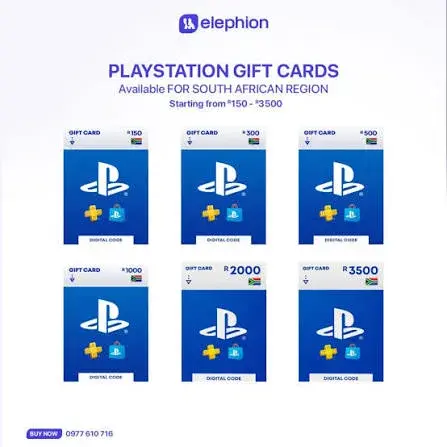
PlayStation Gift Card South Africa Region in Kenya: The Complete Buying and Redeeming Guide | City Gadgets Kenya
PlayStation Gift Card South Africa Region in Kenya: The Complete Buying and Redeeming Guide
Read the guide
PlayStation Gift Card USA Region in Kenya: The Complete Buying and Redeeming Guide | City Gadgets Kenya
PlayStation Gift Card USA Region in Kenya: The Complete Buying and Redeeming Guide
Read the guide
PlayStation Gift Card UK Region in Kenya: The Complete Buying and Redeeming Guide | City Gadgets Kenya
PlayStation Gift Card UK Region in Kenya: The Complete Buying and Redeeming Guide
Read the guide