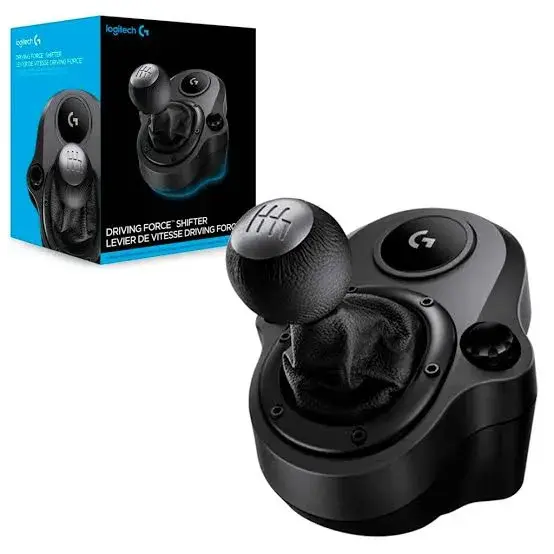
Logitech Driving Force Shifter in Kenya | City Gadgets Kenya
Same-day delivery in Nairobi by 29 Oct – 30 Oct
Comes with
Description
Buy the Logitech Driving Force Shifter in Kenya from City Gadgets Kenya. Logitech 6-speed H-pattern shifter with push-down reverse, steel shaft and leather knob for G923, G29 and G920 racing wheels. Same-day Nairobi delivery, M-Pesa accepted. Call 0745 575 931.
Logitech Driving Force Shifter in Kenya
Genuine Logitech G | 6-Speed H-Pattern | Push-Down Reverse | Steel Shaft | Leather Knob | For G923, G29 And G920 Racing Wheels | Built-In Clamps
The Logitech Driving Force Shifter is a six-speed, H-pattern gear shifter with a push-down reverse gear, designed for the Logitech G923, G29 and G920 racing wheels. It has a solid steel gear shaft, a hand-stitched leather knob and boot, and built-in clamps for attaching to a table or a racing rig. Our supplier's list gives only "Logitech Shifter", so we confirm that the unit is the Driving Force Shifter and that it suits your wheel before you pay. Available in Kenya from City Gadgets Kenya, this page is for shoppers searching "Logitech Driving Force Shifter Kenya", "Logitech shifter price Kenya", "buy Logitech shifter Nairobi", "G29 shifter Kenya", "G920 shifter Nairobi", "racing wheel shifter Kenya" or "sim racing shifter".
If you drive a manual car in your racing games, a shifter changes the experience. Instead of tapping a button, you move a real gear lever through an H pattern, and you feel the car change gear. This page explains what the Logitech shifter offers, which wheels it works with, where it is limited, and how to check it when it is delivered.
Key specs at a glance
| Feature | Detail |
|---|---|
| Type | Gear shifter for racing wheels |
| Gears | 6-speed short-throw H pattern with push-down reverse |
| Compatible wheels | Logitech G923, G29 and G920 |
| Connector | DE9 connector that plugs into the wheel base |
| Materials | Solid steel gear shaft; hand-stitched leather knob and boot |
| Colour | Black |
| Mounting | Built-in clamps for a table or racing rig |
| Platforms | Follows the wheel: PlayStation and PC with the G29, Xbox and PC with the G920; the G923 depends on its version |
| Dimensions and weight | Not listed in the page we read; we confirm in the shop |
| Condition | Brand new |
| Available from | City Gadgets Kenya, Nairobi CBD |
Specifications come from published manufacturer and retail specification sheets. Gaming accessories are sold in several versions with different colours, model codes and platform labels, so please ask our team to confirm the exact model, colour and version in stock before you pay.
What's in the box
The box contents are not listed in the page we read. We confirm exactly what is in the box for your unit, including the clamp and the cable, before you pay.
Overview: who the Logitech shifter is for
The Driving Force Shifter is for sim racing fans who want to drive manual cars as they would in real life. In many racing games, you can choose between automatic gears, paddle shifters on the steering wheel and a manual gearbox with a clutch. The shifter gives you the physical gear lever for the third option, and it is the part that many players say adds the most realism after the wheel and pedals.
It is made to work with the Logitech G923, G29 and G920 wheels. These are among the best-known entry-level and mid-range racing wheels, so there is a large community of owners. If you already own one of these wheels and enjoy cars, the shifter is a natural upgrade.
If you only drive automatic cars in games, or if you use paddle shifters and like them, you do not need a shifter. It is an optional extra, not a required part.
How the shifter works
The shifter has six forward gears in an H pattern and a reverse gear that you engage by pushing the lever down. The H pattern is the layout of a traditional manual gearbox: you move the lever sideways to select a lane, then forwards or backwards to select a gear. A short throw means the lever travels a short distance between gears, which gives quicker shifts than a long-throw lever.
The gear shaft is solid steel, and the knob and boot are leather with hand stitching, according to the listing. Steel gives the shifter weight and a solid feel, and a leather knob feels better in the hand than plastic. The shifter is designed to click into each gear and to resist wobbling when you shift quickly.
The shifter connects to the wheel base using a DE9 connector, which is a small multi-pin connector. It does not plug into the console or the PC directly. The wheel base handles the connection, which is why the shifter must be matched to the wheel.
Which wheels and platforms it works with
The listing says the shifter is designed for the G923, G29 and G920 racing wheels. The G29 is the PlayStation and PC version, and the G920 is the Xbox and PC version. The G923 comes in versions for PlayStation and PC, and for Xbox and PC, and the listing does not specify which. Tell us your wheel model and your console, and we will confirm that the shifter works with your setup.
Shifters work only with games that support manual gearbox control. Many racing games do, including Gran Turismo, Forza, Assetto Corsa, F1 and Euro Truck Simulator, but you may need to switch the game to manual transmission with a clutch, and you may need to change the game's control settings. The shifter does not make an automatic game manual on its own.
Older Logitech wheels, wheels from other brands and wheels of different types may not work. Do not assume a shifter fits every wheel.
Mounting: clamps, desks and rigs
The shifter has built-in clamps for a table or a racing rig. That means you can clamp it to the edge of your desk, usually to the right of the wheel, or bolt it to a rig. The clamp works best on a solid desk of reasonable thickness. A thin or glass desktop may not hold the clamp firmly, and a shifter that moves while you drive is a distraction.
Place the shifter where your hand falls naturally when you hold the wheel with your left hand and reach with your right. For most people, this is just below and to the right of the wheel. If you share a desk, you may prefer to attach the shifter only when you play.
If you plan to buy a rig or a playseat later, check that it has a mount for the shifter. Not every cockpit has one.
Is it worth the money?
A shifter is an enthusiast's upgrade. It adds realism, and it is satisfying to use, but it does not make you faster on its own. In many games, using paddles is quicker and easier. A shifter is for the player who enjoys the feel of driving a manual car.
If you drive a truck in Euro Truck Simulator or a classic car in a rally game, the shifter makes a big difference. If you mostly drive modern race cars with sequential gearboxes, paddle shifters on the wheel are the realistic choice, and a H-pattern shifter is less useful.
It is a good idea to think about what you drive in your games before you buy.
Common questions before buying a shifter
Do I need a clutch pedal? Many games that support an H-pattern shifter also support a clutch pedal. The Logitech G29 and G920 wheels come with three pedals, including a clutch, so you can use the shifter with a clutch. If you do not want a clutch, many games let you turn the clutch assist on so that the game handles it for you.
Will it work in every racing game? No. The game must support manual gears with an external shifter. Gran Turismo, Forza, Assetto Corsa, F1 and Euro Truck Simulator are examples of games that do, but the details change with game updates, so check the game you play. Tell us the game and the console and we will help you check.
Is it noisy? Mechanical shifters make a clicking sound as they move into gear. That is part of the feel, but if you play late at night in a shared flat, the sound carries, so think about the people nearby.
How do I look after it? Wipe the knob and the boot with a dry cloth, and avoid water and strong cleaners on the leather. Do not force the lever sideways or hit it hard, and keep dust out of the base by covering the shifter when you are not using it. Tighten the clamp from time to time, because vibration can loosen it.
What if I upgrade my wheel later? The shifter is designed for the Logitech G923, G29 and G920 wheels. If you move to a wheel from another brand, the shifter may not work with it, so think about your long-term plan before you buy. If you stay with the Logitech family, the shifter moves with you.
A short buying checklist
Before you pay, run through four questions. First, which exact wheel do you own, the G923, the G29 or the G920, and is it the PlayStation or the Xbox version? Second, do the games you play support manual gears with an external shifter? Third, where will the shifter be clamped, and is the surface solid enough? Fourth, do you want the extra realism enough to justify the cost?
If the answer to all four is yes, the shifter is a good addition. If you are unsure about any of them, talk to us first. We would rather give you honest advice than sell you a part that sits unused in a drawer.
Our team can answer these questions in a few minutes. Visit us at Taveta Road in Nairobi CBD, or call or WhatsApp us on 0745 575 931 with your wheel, console and game details, and we will tell you honestly whether this item suits your setup, what is in stock and when we can deliver it, in Nairobi or by courier to other towns.
Getting started with sim racing
Sim racing is a way of playing racing games with real controls: a steering wheel that turns, pedals that you press and a gear shifter you move with your hand. It feels very different from a standard controller, because your hands and feet do the work, and it is a favourite among people who love cars, motorsport and games like Gran Turismo, Forza, Assetto Corsa, F1 and Euro Truck Simulator.
A complete setup has four parts: a wheel and pedals, a way to mount them securely, a seat, and a console or PC to run the game. Many people start with a wheel and pedals clamped to a desk and add a shifter and a seat later. Each part makes the experience more realistic, and each can be bought separately.
Here is a sensible order. First, a wheel and pedals that your console or PC supports. Second, a stable mounting, because a wheel that moves on the desk spoils the experience. Third, a shifter, if you drive manual cars in games and enjoy the extra control. Fourth, a seat or a cockpit, which keeps your body in a steady position and makes long sessions comfortable.
Setting up your driving position
A good driving position matters more than expensive equipment. Sit so that your back is supported and your eyes are level with the middle of the screen. Hold the wheel with your arms slightly bent, so your elbows are not locked straight when your hands are at the top of the wheel. Set the pedals so that your knees stay slightly bent when you press them all the way down, and so that you can press the brake firmly without lifting your back off the seat. Keep the screen at a comfortable distance, and consider a monitor or a TV at eye level in front of you, not off to one side.
If you share the setup with other people, note the settings that suit each driver and adjust them when you swap. A few minutes at the start of a session saves backache later. Take a break every hour, stand up and stretch.
Making your racing games feel right
Most racing games let you change the wheel settings, including steering sensitivity, force feedback strength and dead zones. Spend an evening with these settings, because the defaults are often not ideal. Force feedback that is too strong makes the wheel hard to hold and can hide detail, and force feedback that is too weak makes the wheel feel dead. Start at a moderate level and change one setting at a time.
If you use a manual gearbox, practise changing gear without looking at the shifter. Start with a slow car on a simple circuit, and learn the sequence of the gears until your hand knows where they are. Games that support a clutch pedal give the most realistic feel, and you can start with the clutch assist on and turn it off as you improve.
Racing in a game is not a replacement for driving training on real roads. Treat it as entertainment and a hobby, and drive carefully in the real world.
Make sure it fits your wheel and your console
The most common mistake in sim racing is buying a part that does not work with the wheel or the console you own. Wheels from different brands use different connections and different software, and parts are usually made to work only with the brand they were designed for. Before you buy, write down the exact model of your wheel, the console or PC you use and the games you play. Then tell us, and we will check that the part works before you pay.
Also check the mounting. Wheels, pedals and shifters are clamped to a desk or bolted to a rig. A desk that is thin, glass-topped or rounded at the edge may not take a clamp well. A sturdy table or a rig is a better choice. If you are not sure, bring a photograph of your desk or tell us the thickness of the desktop.
Power cuts, surge protection and your setup in Kenya
Simulation gear is usually plugged into a console or a PC, and both are sensitive to power problems. Kenya's power can dip, cut and spike, and the spike when power returns is the most damaging. Plug your console or PC into a surge-protected extension, switch the console off properly before a planned outage and unplug expensive equipment during thunderstorms. A small uninterruptible power supply is a worthwhile investment for a PC, because it gives you time to save and shut down.
Cables also need attention. Route USB and power cables along the back of the desk or the frame, with a little slack, and use cable ties so that a pulled cable does not drag a device off the desk. Keep drinks and food away from controllers, wheels and joysticks.
How to check your item when it is delivered
- Inspect the box for damage before you sign, and check that the box is sealed.
- Open it and check that the contents match what we confirmed with you.
- Check the build: all parts should be present, the metal should be free of dents and rust and the fittings should be complete.
- Test the item with your wheel or console if you can, or let us test it in the shop.
- Keep the receipt and the box.
- Contact our Customer Relations team on 0794 488 806 straight away if anything is wrong.
How to avoid a fake or counterfeit item
Popular gaming brands are copied, and some sellers pass off older, used or copied parts as new. The copies often have thinner materials, poor finishing and unreliable electronics.
- Check the printing and the logo. Blurry text, spelling mistakes, a wrong logo or a missing model code are warnings.
- Check the box. A genuine box has sharp printing, a model number and a sealed finish.
- Compare the build. Rough edges, loose parts and a flimsy feel are warnings.
- Watch the price. A price far below the market is a reason to ask why.
- Buy from a seller with an address. Choose a seller who gives a receipt and explains the warranty, and avoid paying a stranger before you have seen the product.
Warranty and stock
Warranty depends on the market version of the product and on who stocks it. We confirm the model, the version and the exact warranty terms in writing for the specific unit before you pay, and Customer Relations on 0794 488 806 handles warranty questions after purchase. Keep your receipt and the box.
Strengths and limits
What we like:
- A genuine six-speed H-pattern gearbox feel.
- A push-down reverse gear.
- A steel shaft and a leather knob.
- Built-in clamps for a desk or a rig.
- Made for the popular G923, G29 and G920 wheels.
- An enthusiast upgrade that adds realism.
What to keep in mind:
- Works only with the supported Logitech wheels.
- Needs a game that supports manual gears.
- Needs a sturdy desk or a rig.
- Dimensions and weight are not listed.
- Not needed if you use paddle shifters.
Who should buy the Driving Force Shifter
- Owners of a Logitech G923, G29 or G920 wheel.
- Players who drive manual cars in their games.
- Euro Truck Simulator and rally fans.
- Sim racing hobbyists building a bigger setup.
- Gamers who want more realism.
Who should look elsewhere
- Buyers who do not own a supported Logitech wheel.
- Players who prefer automatic gears or paddles.
- People with a thin or glass desk and no rig.
- Buyers who want a shifter for a different brand of wheel.
Compare before you buy
Logitech shifter against paddle shifters. Paddles on the wheel are quick and easy. The shifter is more realistic for manual cars.
Logitech shifter against buying a new wheel. A new wheel changes the whole experience. A shifter adds one control to the wheel you already have.
Logitech shifter against a playseat. A playseat improves comfort and stability. A shifter improves realism. Many players buy both over time.
Why buy from City Gadgets Kenya
Genuine, brand-new stock from a Nairobi shop you can visit. City Gadgets Kenya is at New Alnoor Exhibition, Shop 7, Second Floor, Taveta Road (at the Taveta Road and Accra Road junction), Nairobi CBD. We are open Monday to Friday 9:00am to 7:00pm, and Sunday 11:00am to 4:00pm (Saturday closed).
- Sales (pricing, stock and orders): call or WhatsApp 0745 575 931 on WhatsApp.
- Customer Relations (warranty, returns and support): call or WhatsApp 0794 488 806 on WhatsApp.
- Email: sales@citygadgetskenya.co.ke, handy for invoices, bulk orders and warranty paperwork.
- Delivery: same-day delivery in Nairobi for orders confirmed before 3:00pm on a working day. Outside Nairobi we deliver by courier to your nearest agent or your door, typically 1 to 3 business days after dispatch. The delivery charge depends on your location and the size of the item and is confirmed before you pay. Collection from the shop is free. Delivery times are estimates, not guarantees.
- Payment: M-Pesa accepted.
- Follow us: Instagram, TikTok and Facebook.
Frequently asked questions
Which wheels does it fit? The listing says the Logitech G923, G29 and G920. Tell us your wheel model and we will confirm.
Does it work on PS5 and Xbox? It follows the wheel and the console. The G29 is for PlayStation and PC, and the G920 is for Xbox and PC. We confirm for your setup.
Does it have a clamp? Yes, built-in clamps for a table or rig.
Does it work with every game? No. The game must support manual gears with an H-pattern shifter.
Can I pay via M-Pesa? Yes, M-Pesa is accepted.
Do you deliver outside Nairobi? Yes. Outside Nairobi we deliver by courier, typically 1 to 3 business days after dispatch. The delivery charge depends on your location and the size of the item and is confirmed before you pay.
What if it is faulty on delivery? Contact Customer Relations on 0794 488 806 straight away, and we will advise on the next steps.
Order the Logitech Driving Force Shifter today
Available now at City Gadgets Kenya. Call or WhatsApp our sales team on 0745 575 931 (WhatsApp) to confirm stock, the version, delivery and what is included, or email sales@citygadgetskenya.co.ke. Visit us at New Alnoor Exhibition, Shop 7, Second Floor, Taveta Road (at the Taveta Road and Accra Road junction), Nairobi CBD.
Specifications
- Brand
- LOGITECH
- Condition
- New
Frequently Asked Questions
How much does the Logitech Driving Force Shifter in Kenya | City Gadgets Kenya cost in Kenya?
The Logitech Driving Force Shifter in Kenya | City Gadgets Kenya is priced at Ksh 8,000 at City Gadgets. You can pay via M-Pesa, card or cash on delivery.
Is the Logitech Driving Force Shifter in Kenya | City Gadgets Kenya available in Kenya?
Yes — the Logitech Driving Force Shifter in Kenya | City Gadgets Kenya is in stock at City Gadgets, ready for same-day delivery in Nairobi and countrywide shipping across Kenya.
Is the Logitech Driving Force Shifter in Kenya | City Gadgets Kenya genuine and does it have a warranty?
Every Logitech Driving Force Shifter in Kenya | City Gadgets Kenya we sell is 100% genuine brand-new stock and comes with a 12-month official brand warranty.
Do you deliver the Logitech Driving Force Shifter in Kenya | City Gadgets Kenya in Nairobi?
Yes. We offer fast same-day delivery within Nairobi and fast, affordable delivery to the rest of Kenya — order online or on WhatsApp.
Customer Reviews
No reviews yet
Be the first to review this product.
Rate us on Google
Your review helps other shoppers find us
Reviews from verified buyers will appear here.
Buying guides
Straight advice for shoppers picking between the models above.
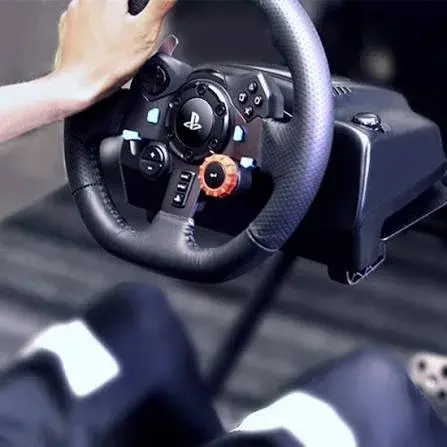
Logitech G29, G920 & G923 Racing Wheels in Kenya: The Complete Buying Guide
Logitech G29, G920 & G923 Racing Wheels in Kenya: The Complete Buying Guide
Read the guide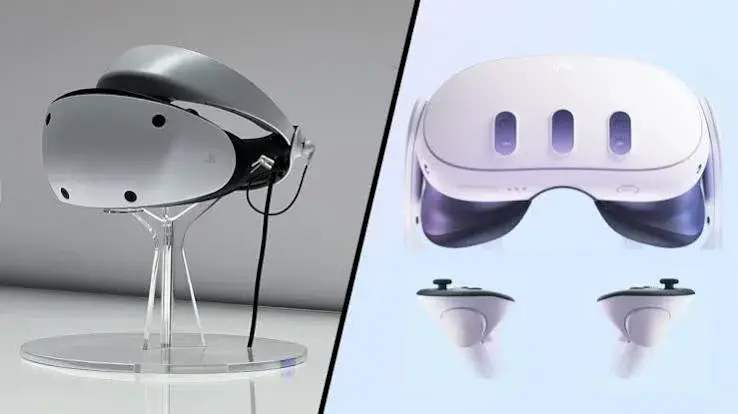
Meta Quest 3 vs Quest 3S vs PSVR2: Best VR Headset in Kenya? (2026 Guide)
Meta Quest 3 vs Quest 3S vs PSVR2: The Complete VR Headset Guide for Kenya
Read the guide