Epson EB-L260F 4600-Lumen Full HD Laser Projector in Kenya | City Gadgets Kenya
Same-day delivery in Nairobi by 10 Oct – 11 Oct
Description
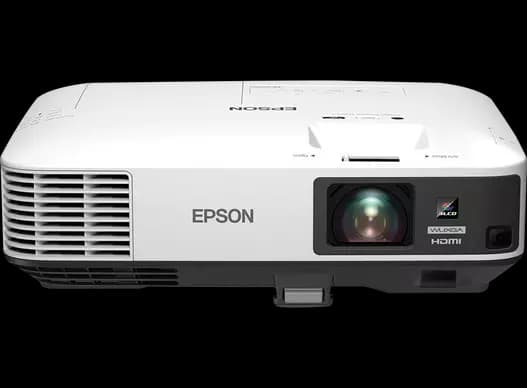
Buy the genuine Epson EB-L260F 4600-lumen Full HD 3LCD laser projector with Wi-Fi, Ethernet and 16W speaker in Kenya from City Gadgets Kenya. Epson L260F price in Kenya, laser projector Nairobi, lamp-free projector for offices, churches and schools.
Epson EB-L260F 4600-Lumen Full HD Laser Projector in Kenya
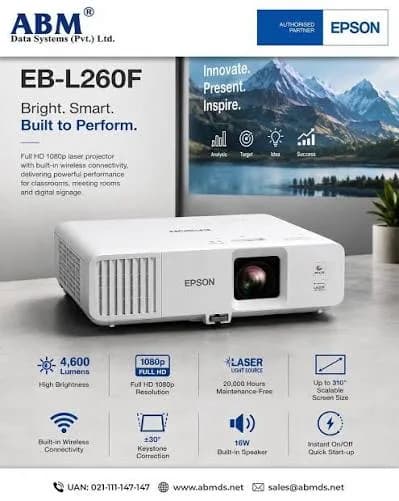
Genuine Epson | Brand New | Full HD (1920 x 1080) 3LCD Laser | 4,600 Lumens | Wi-Fi and Ethernet | 16W Speaker | Image Size 31 to 310 Inches
Searching for the Epson EB-L260F price in Kenya, a laser projector in Nairobi, or a bright lamp-free Full HD projector for an office, church or school? The Epson EB-L260F is a brand-new, genuine 3LCD laser projector with Full HD resolution, 4,600 lumens of brightness, built-in Wi-Fi and Ethernet, a 16-watt speaker and a scalable image of up to 310 inches. Epson describes it as an entry-level Full HD wireless laser projector, bringing laser reliability without a premium price. It's available from City Gadgets Kenya with delivery across Kenya. Buyers also search for it as an Epson L260F, an Epson EB-L260F, a laser projector with Wi-Fi, a lamp-free projector, a Full HD projector for bright rooms, a projector for a church or a classroom, a business projector, or an Epson laser projector price in Kenya.
This guide explains the projector in plain language: what laser and 3LCD give you, what 4,600 lumens means in a real room, how to choose a screen and a position, how it compares with the LG ProBeam and the Epson lamp projectors in our range, and where it's limited. If you'd like to talk it through, message us on WhatsApp.
The short verdict
The Epson EB-L260F is the sweet spot in our projector range for most venues. It delivers a sharp Full HD picture at 4,600 lumens, bright enough for lit meeting rooms, classrooms, churches and shops, from a laser light source that doesn't need lamp changes. Epson's 3LCD technology gives colour brightness equal to white brightness, so coloured slides and video stay vivid, not washed out. It has a built-in 16-watt speaker, Wi-Fi, Ethernet, HDMI and USB, a lens that lets you scale the image from 31 to 310 inches, and a five-year warranty on the UK market, though Kenyan terms may differ. It's not 4K, so very fine detail on huge screens isn't as sharp as on the LG ProBeam, and a single built-in speaker won't fill a large hall. For an organisation that wants a low-maintenance, bright, wireless projector at a sensible price, it's an excellent choice.
Who this projector is for
It suits you if:
- You equip a meeting room, classroom, church, training centre or shop.
- You want a bright picture with some ambient light.
- You want to avoid lamp replacements and the downtime they cause.
- You want to share your screen wirelessly from a laptop, tablet or phone.
- You want a projector with a built-in speaker for small to medium rooms.
Look elsewhere if:
- You need 4K detail on a very large screen. See the LG ProBeam in our range.
- You have a very small room or a tight budget. The Epson CO-W01 or CO-FH01 cost less.
- You want a portable projector for travel.
- You need an ultra-short-throw projector for a very short distance.
Specifications in plain English
| Feature | Detail | What it means for you |
|---|---|---|
| Model | Epson EB-L260F | Epson's entry Full HD wireless laser projector |
| Technology | 3LCD | Equal white and colour brightness |
| Light source | Laser | No lamp to replace |
| Resolution | Full HD (1920 x 1080), 16:9 | Sharp for slides, video and documents |
| Brightness | 4,600 lumens white and about 3,200 lumens colour, per retailer listings | Bright in lit rooms |
| Contrast | 2,500,000:1 | Deep, strong contrast |
| Colour depth | 10-bit | Smooth gradients |
| Image size | About 31 to 310 inches | From small rooms to large halls |
| Connectivity | HDMI, USB, Ethernet and built-in Wi-Fi | Wired and wireless |
| Audio | 16-watt built-in speaker | Sound for small and medium rooms |
| Weight | About 4.2 kg | Light for a fixed installation, and movable |
| Warranty (a UK retailer) | Five years | Ask us what applies in Kenya |
These figures come from Epson and retailer listings of the EB-L260F. Ask us to confirm the laser's rated life, the lens options and what's in the box for the unit you order.
What laser gives you over a lamp
Laser is the main reason to choose the EB-L260F.
- No lamp changes. A lamp typically lasts a few thousand hours and then needs replacing, at a cost and with downtime. A laser lasts many times longer.
- Consistent brightness. Lamps dim with age. A laser holds its brightness much better.
- Instant on and off. There's no warm-up or cool-down wait.
- Low maintenance, which suits a venue with no technician.
- A higher purchase price than a lamp projector, which you recover over years of use.
- Reliability. Fewer parts to fail during an important event.
For a place that uses its projector several hours a day, laser is the better value over time.
Why 3LCD matters
Epson's 3LCD technology is a quiet strength.
- Three separate chips handle red, green and blue light at the same time.
- Colour brightness equals white brightness, so a colourful chart or video is as bright as a white slide.
- Single-chip DLP projectors can look dimmer in colour than their lumen rating suggests, and a few viewers see a rainbow effect.
- The 3LCD image is smooth and steady, without that effect.
- That's why a listing may show two numbers: 4,600 for white and about 3,200 for colour on a different measure.
For presentations full of charts, photos and video, 3LCD gives reliably vivid colour.
What 4,600 lumens means in a real room
Brightness decides whether you can use a projector with the lights on.
- 3,000 to 4,000 lumens suit classrooms and meeting rooms with controlled light.
- 4,600 lumens suits larger rooms, halls and venues with some windows.
- Bigger screens need more light, because the same light spreads over a larger area.
- Ambient light matters. Close curtains and dim lights, and the picture improves.
- Screen choice matters. A good screen helps more than extra lumens.
At 4,600 lumens, the EB-L260F gives a bright picture on a screen of about 100 to 150 inches in a lit room, and larger with some light control.
Wireless and wired connections
The EB-L260F offers a good range of connections.
- Wi-Fi. Share your screen from a laptop, tablet or phone, using Epson's iProjection app.
- Ethernet. A wired network connection for control and management in an office or school.
- HDMI. The most common connection for laptops, media players and cameras.
- USB. For service, a USB display connection, or media.
- Built-in speaker. A 16-watt speaker for small and medium rooms.
- Check the exact ports for the unit you order. We'll confirm them.
For a meeting room, wireless sharing saves cable swapping and time.
Placement, zoom and screen size
Good placement makes a good picture.
- The image size ranges from about 31 to 310 inches. The lens zoom lets you adjust size without moving the projector.
- Use Epson's throw distance calculator, or ask us, to find the distance for your screen.
- Mount it on the ceiling for a permanent installation, with a rated bracket.
- Place it on a table for temporary use, with a stable, ventilated surface.
- Use keystone and lens controls to square the picture.
- Choose a screen to match the room: a white matte screen for most rooms, and an ALR screen in bright ones.
- Check the room's ambient light before deciding the screen size.
Tell us your room measurements, and we'll check the placement.
Choosing a screen for the EB-L260F
A projector is only as good as its screen, so a short guide helps.
- Size. A common rule is a screen height of about one-sixth of the distance to the furthest viewer. A 100-inch screen suits a medium room, and 120 to 150 inches suits a hall.
- Aspect ratio. Choose 16:9 to match the projector's Full HD picture.
- White matte screens suit most rooms, with wide viewing angles and natural colour.
- Ambient light rejecting (ALR) screens help where the room can't be darkened, at a higher price.
- Fixed-frame screens give the flattest, sharpest picture for permanent installations.
- Electric drop-down screens suit multi-use rooms, such as a church hall or a classroom.
- Manual pull-down screens are a budget choice.
- A painted wall works for tight budgets, though a screen looks far better.
We can recommend and supply a screen to suit your room.
Sharing your screen wirelessly
Wireless sharing is one of the EB-L260F's best features for meetings.
- Connect the projector to your network by Wi-Fi or Ethernet.
- Install Epson iProjection on your laptop, phone or tablet.
- Search for the projector and connect.
- Share your screen with a tap, or present from several devices in turn.
- Use a PIN or a password to keep the session private.
- Test before the meeting, so nobody wastes time.
- Keep an HDMI cable as a backup, because wireless depends on the network.
For a meeting room, wireless sharing saves the usual cable swapping, and keeps meetings moving.
Equipping a church, school or office with the EB-L260F
A church. Project hymns, scripture and sermon slides on a large screen. A laser projector avoids lamp failures on a Sunday morning, and 4,600 lumens copes with daylight. Add speakers for the congregation.
A school. Use it in classrooms and halls for lessons and assemblies, with wireless sharing for teachers. A lamp-free projector suits a school with no technician.
An office or training centre. Present slides, spreadsheets and video calls, with wireless sharing for guests.
A shop or showroom. Show product videos and promotions, with a long-life laser that runs for many hours a day.
A hotel or restaurant. Show events, sports or menus on a big screen.
In each case, a good screen, good cables, a surge protector and a simple user guide make the difference.
A room-planning checklist
Before you buy any projector, check these points.
- Measure the room, including the distance from the screen to the furthest viewer.
- Decide the screen size.
- Find the mounting spot, and check it matches the projector's throw range.
- Check the ambient light.
- Plan the cable route for power, video and network.
- Plan the audio.
- Check the power supply, and plan surge protection.
- Choose who operates it, and train them.
- Plan security against theft.
Tell us your measurements, and we'll check them against the projector's range.
Tips for the best picture
- Use a good HDMI cable and a Full HD source.
- Set your laptop to 1920 x 1080 for full sharpness.
- Use the right picture mode for presentations, video or text.
- Focus carefully, and check the image is square on the screen.
- Reduce ambient light where you can.
- Match the screen to the projector, with a clean, flat surface.
- Clean the filter on schedule.
Common problems and simple fixes
No picture. Check the cable, the input source and the power. Try another HDMI port or cable.
The picture is dim. Check the brightness mode, the ambient light and the screen.
The image isn't square. Adjust the position and lens controls first, then keystone.
Wireless sharing fails. Check that the devices are on the same network, and the projector's wireless settings.
The projector shuts down. Check the vents and filter for dust.
The picture flickers. Try another HDMI cable.
If a problem continues, message us on WhatsApp.
Questions to ask before you buy any projector
- How big is the room, and how far is the furthest viewer?
- How bright is the room?
- What resolution does my content need?
- Do I want a lamp or a laser?
- How will I mount it?
- What inputs do I need?
- What screen and sound do I need?
- What warranty is included, and who honours it? Get it in writing.
- Can I see it before I pay? A trustworthy seller says yes.
We're glad to answer all of these on WhatsApp or in the shop before you pay.
Looking after the projector for years
- Keep the filter and vents clean, and the room dust-free.
- Don't block the vents.
- Use a surge protector.
- Let the projector cool before moving it.
- Clean the lens gently with a lens cloth.
- Keep the firmware updated.
- Keep the remote, manual and box.
Warranty and after-sales: what to ask
A projector is a significant investment, so ask us what warranty covers the unit you order, how long it lasts and what it covers, including the laser light source. A UK retailer lists five years for this model, and Kenyan terms may differ. Keep your receipt, the serial number and the box. If a fault appears, message us on WhatsApp first, and we'll tell you the quickest way to get it sorted.
Laser versus lamp: the long-term cost
Because the EB-L260F costs more than a lamp projector, a simple comparison shows when it pays back.
- Find the lamp price and its rated hours for a comparable lamp projector. Ask us for current figures.
- Estimate your yearly hours. A church used 10 hours a week runs about 500 hours a year. A classroom used 6 hours a day runs far more.
- Work out how often a lamp would need replacing, and the cost, including a technician's visit.
- Add the cost of downtime, such as a failed lamp on the day of an event.
- Compare with the laser, which needs no lamp for many years.
- Add the purchase prices, and see how many years it takes to catch up.
For a heavily used projector, laser often pays back within a few years, and it removes the risk of a lamp failing at the wrong moment.
Sound: what the 16-watt speaker can and can't do
A built-in speaker is a convenience, and it has limits.
- It suits small and medium rooms, such as a meeting room or a classroom.
- It won't fill a large hall or a church. Add a PA system or powered speakers.
- It's fine for voices and video, and less impressive for music.
- Placement matters. The speaker is at the projector, which may be behind the audience.
- Use external speakers for events, and connect them to the laptop or a mixer.
- We stock JBL, Sony and Soundcore speakers, and can suggest one for your room.
A short guide to cables
Cables are the most common cause of a bad projector picture.
- HDMI. Use a good-quality cable, as short as practical, for a steady Full HD picture.
- Long runs. Beyond about 10 to 15 metres, use an HDMI extender or a wireless connection.
- Adapters. Many laptops need a USB-C to HDMI adapter.
- Power. Use a surge protector and a proper power cable.
- Labels. Label each cable, so staff can plug in correctly.
- Spares. Keep a spare HDMI cable and adapter in the room.
Is Full HD enough for a projector?
It's a fair question, so here is a plain answer.
- For slides, documents and video, Full HD is sharp and entirely adequate on screens up to about 150 inches, at normal viewing distances.
- For engineering drawings, maps and very fine detail on huge screens, 4K shows more. See the LG ProBeam.
- Most content is Full HD or lower, including most video, slides and web pages.
- Your sources matter. A 4K projector with Full HD content gains little.
- Brightness often matters more than resolution in a lit room.
For most offices, schools and churches, a bright Full HD laser projector like the EB-L260F is the better buy.
Ceiling mounting: a short guide
A fixed installation looks tidy and keeps the projector safe.
- Choose a mount rated for the weight, which for the EB-L260F is about 4.2 kg.
- Fix it to a solid ceiling, not to thin boards.
- Use the right height and distance for your screen.
- Run cables through the ceiling or a trunking, before closing it up.
- Add a lock or a security cable.
- Leave space around the projector for airflow.
- Have a competent installer fit it, and ask us about suppliers.
Using a projector in Kenya
Power protection. Projectors can be damaged by surges. Use a surge protector, and a UPS if you can.
Dust. Dust is a projector's main enemy. Keep filters clean, and the room tidy, and don't block vents.
Heat. Make sure the projector has airflow, especially in a ceiling mount.
Security. Projectors are valuable. Consider a lock and a cable.
Cables. Use good-quality HDMI cables, and plan their route.
Sound. The 16-watt speaker suits small and medium rooms. For halls and churches, add a PA system. We stock JBL, Sony and other speakers.
Warranty. Ask us for the warranty that applies to the unit you order, and keep the receipt and box.
How it compares with other options in our range
| Epson EB-L260F | LG BU60RG | Epson EB-2250U | Epson CO-FH01 | |
|---|---|---|---|---|
| Light source | Laser | Laser | Lamp | Confirm |
| Brightness | 4,600 lumens | 6,000 lumens | 5,000 lumens | 3,000 lumens |
| Resolution | Full HD | 4K UHD (pixel shifting) | WUXGA | Full HD |
| Technology | 3LCD | DLP | 3LCD | 3LCD |
| Wireless | Wi-Fi built in | Miracast and webOS | Optional Wi-Fi | Confirm |
| Built-in speaker | 16 W | Audio out only | Yes | Yes |
| Best for | Low-maintenance bright rooms | Large venues and 4K | Lit rooms at a lower price | Small rooms |
Against the LG ProBeam: the LG is brighter and 4K, at a much higher price. The Epson is the better value for most rooms.
Against the Epson EB-2250U: the EB-2250U is a lamp projector with 5,000 lumens and WUXGA resolution at a lower price. The L260F saves on lamps and maintenance.
Honest pros and cons
Pros
- A laser light source with no lamp changes.
- Full HD at 4,600 lumens.
- 3LCD technology with vivid colour.
- Built-in Wi-Fi and Ethernet.
- A 16-watt speaker.
- A wide image range of 31 to 310 inches.
- A strong warranty on some markets.
Cons
- Not 4K.
- A higher price than lamp projectors.
- The built-in speaker won't fill a large hall.
- Needs a good screen and cables.
- Not an ultra-short-throw model.
What to check when it arrives
- The box model matches Epson EB-L260F.
- The projector, power cord, remote and paperwork are in the box.
- The projector powers on, and the picture is sharp and bright.
- HDMI, USB and network connections work.
- Wi-Fi connects through Epson iProjection.
- You get a receipt with the serial number and warranty details in writing.
Frequently asked questions
What is the Epson EB-L260F price in Kenya? We confirm the current price when you message us on WhatsApp, because supplier prices change. We tell you the price and what's in the box before you pay.
Where can I buy the Epson EB-L260F in Nairobi? At City Gadgets Kenya, New Alnoor Exhibition, Second Floor, Shop C7, Accra Road, Nairobi CBD, or by delivery.
Is it a laser projector? Yes, with no lamp to replace.
What resolution is it? Full HD (1920 x 1080).
How bright is it? 4,600 lumens.
Does it have Wi-Fi? Yes, built in, with Ethernet as well.
Does it have a speaker? Yes, a 16-watt speaker.
Can I use it with the lights on? Yes, in most rooms, with a suitable screen.
What warranty does it have? A UK retailer lists five years. Ask us what applies in Kenya.
Can you deliver and install it? We deliver the same day in Nairobi and next day outside Nairobi. Ask us about installation and screens.
Can I pay via M-Pesa? Yes.
Why buy from City Gadgets Kenya
Genuine, brand-new Epson projector. We're at New Alnoor Exhibition, Second Floor, Shop C7, Accra Road, Nairobi CBD, and you're welcome to talk to us about your room before you buy. Message us on WhatsApp with your room size, screen distance and use, and we'll tell you honestly whether the EB-L260F is right or a different projector would suit you better. We confirm what's in the box before you pay.
Order your Epson EB-L260F today
Available now at City Gadgets Kenya. Message us on WhatsApp.
Specifications
- Brand
- Epson
- Condition
- New
Frequently Asked Questions
How much does the Epson EB-L260F 4600-Lumen Full HD Laser Projector in Kenya | City Gadgets Kenya cost in Kenya?
The Epson EB-L260F 4600-Lumen Full HD Laser Projector in Kenya | City Gadgets Kenya is priced at Ksh 222,000 at City Gadgets. You can pay via M-Pesa, card or cash on delivery.
Is the Epson EB-L260F 4600-Lumen Full HD Laser Projector in Kenya | City Gadgets Kenya available in Kenya?
Yes — the Epson EB-L260F 4600-Lumen Full HD Laser Projector in Kenya | City Gadgets Kenya is in stock at City Gadgets, ready for same-day delivery in Nairobi and countrywide shipping across Kenya.
Is the Epson EB-L260F 4600-Lumen Full HD Laser Projector in Kenya | City Gadgets Kenya genuine and does it have a warranty?
Every Epson EB-L260F 4600-Lumen Full HD Laser Projector in Kenya | City Gadgets Kenya we sell is 100% genuine brand-new stock and comes with a 12-month official brand warranty.
Do you deliver the Epson EB-L260F 4600-Lumen Full HD Laser Projector in Kenya | City Gadgets Kenya in Nairobi?
Yes. We offer fast same-day delivery within Nairobi and fast, affordable delivery to the rest of Kenya — order online or on WhatsApp.
Customer Reviews
No reviews yet
Be the first to review this product.
Rate us on Google
Your review helps other shoppers find us
Reviews from verified buyers will appear here.