"What size TV should I buy?" is one of the most common questions we hear, and it is usually answered with a shrug and "the biggest you can afford". That advice has a flaw: a screen that is too big for your room is uncomfortable, and a screen that is too small wastes the picture quality you paid for. The right answer depends on TV size and viewing distance, the resolution of what you watch and the room you have. This guide gives you real numbers, worked out for screens from 24 to 85 inches, so you can choose with confidence.
We are City Gadgets Kenya, at New Alnoor Exhibition, Second Floor, Shop C7, Accra Road, Nairobi CBD, with same-day delivery in Nairobi and next-day delivery outside Nairobi. We stock monitors, projectors and streaming devices, and we explain screens honestly. The tables in this guide are our own calculations from screen geometry and common viewing-angle guidelines, not maker specifications, and they are guides rather than rules.
The short version
- Screen size is the diagonal in inches, and the diagonal tells you less than you think. A 55 inch 16:9 screen is about 122 cm wide and 68 cm tall.
- A common guide is to sit far enough away that the screen fills roughly 30 to 40 degrees of your vision. For a 55 inch screen, that is roughly 1.7 to 2.3 metres.
- Resolution changes the nearest comfortable distance. A 4K screen lets you sit closer before you see pixels than a 1080p one.
- Measure your room, furniture and wall before you buy, including the width of the TV stand and the door you must carry it through.
- For monitors, an arm's length (about 60 to 80 cm) suits 24 to 27 inch screens.
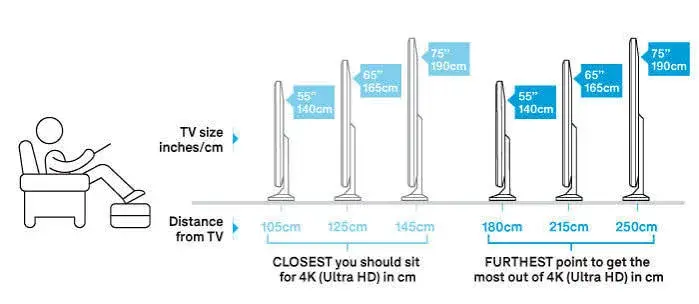
| Screen (16:9) | Width | Height | Distance at about 40° (immersive) | Distance at about 30° (comfortable) |
|---|---|---|---|---|
| 32 inch | 71 cm | 40 cm | 1.0 m | 1.3 m |
| 43 inch | 95 cm | 54 cm | 1.3 m | 1.8 m |
| 50 inch | 111 cm | 62 cm | 1.5 m | 2.1 m |
| 55 inch | 122 cm | 68 cm | 1.7 m | 2.3 m |
| 65 inch | 144 cm | 81 cm | 2.0 m | 2.7 m |
| 75 inch | 166 cm | 93 cm | 2.3 m | 3.1 m |
| 85 inch | 188 cm | 106 cm | 2.6 m | 3.5 m |
Distances are rounded from our calculations using the viewing-angle approach explained below.
What "inches" really means on a screen
TV and monitor sizes are quoted as the diagonal of the visible screen, from one corner to the opposite corner. Most screens today are 16:9, so you can work out width and height from the diagonal:
- Width is about 0.87 times the diagonal.
- Height is about 0.49 times the diagonal.
So a 55 inch TV is about 48 inches (122 cm) wide and 27 inches (68 cm) tall. Ultrawide monitors have a different shape, such as 21:9, so their width is greater for the same diagonal, and a 34 inch ultrawide is not the same height as a 34 inch 16:9 screen.
Two practical points:
- The physical TV is bigger than the picture because of the bezel and the stand. Check the full width and the depth in the specification sheet.
- The stand matters. Some TVs have feet at the far edges, which need a wide cabinet. Others have a central pedestal. Check the stand width against your furniture, or plan to wall-mount.
The viewing-angle approach
Screen makers, cinema groups and calibration bodies publish guidance on how much of your field of view a screen should fill. Two commonly quoted figures are about 30 degrees, a comfortable, general viewing standard, and about 40 degrees, more immersive and cinema-like.
The distance for a given angle comes from simple geometry:
distance = screen width ÷ (2 × tan(half the angle))
For 30 degrees, the distance is about 1.87 times the screen width. For 40 degrees, it is about 1.37 times the screen width. That is where the table above comes from. For a 55 inch TV, 122 cm wide, 40 degrees gives about 1.7 m and 30 degrees about 2.3 m.
These are guides. Some people love being close and surrounded by the picture. Others prefer to sit back. Fast sports may feel better a little farther back, while films can feel more involving closer.
The pixel approach: how close before you see pixels?
The second way to think about distance is about sharpness. The human eye can distinguish detail down to roughly one arcminute (one sixtieth of a degree) under good conditions. If a pixel looks smaller than that from where you sit, you cannot see it individually, and extra pixels add little visible benefit.
Using that rule of thumb, we calculated the distance at which individual pixels start to become visible on a 16:9 screen:
| Screen | Pixels visible closer than (1080p) | Pixels visible closer than (4K) |
|---|---|---|
| 32 inch | 1.3 m | 0.6 m |
| 43 inch | 1.7 m | 0.9 m |
| 50 inch | 2.0 m | 1.0 m |
| 55 inch | 2.2 m | 1.1 m |
| 65 inch | 2.6 m | 1.3 m |
| 75 inch | 3.0 m | 1.5 m |
| 85 inch | 3.4 m | 1.7 m |
These are our calculations, not a maker's specification, and real eyes, screens and content vary. They show an idea: at the 30-degree distance of 2.3 m for a 55 inch screen, a 1080p picture is already near the limit where you see pixels (about 2.2 m), while a 4K picture could be viewed from as close as about 1.1 m before the pixels show. That is why higher resolution lets you sit closer or buy a larger screen without losing sharpness.
If you want to see how content resolution interacts with the screen, read our 4K upscaling explained article.
Choosing a TV size by room
Here is a simple approach.
- Measure the distance from where you sit to where the TV will be, in metres.
- Find your distance in the table and choose the size whose 30-degree to 40-degree range includes it.
- Check the space for the screen and stand, and the door or lift you must carry it through.
- Consider your content. Mostly broadcast and 1080p streaming? A slightly smaller screen or a longer distance hides softness. Mostly 4K streaming and games? You can sit closer or go larger.
Rough guide by distance (from our table):
| Your seating distance | Sensible screen sizes |
|---|---|
| About 1.5 m | 43 to 50 inch |
| About 2 m | 50 to 65 inch |
| About 2.5 m | 55 to 75 inch |
| About 3 m | 65 to 75 inch |
| About 3.5 m and beyond | 75 to 85 inch, or a projector |
Many Kenyan living rooms have a sitting distance of 2 to 3 metres, which suits 50 to 65 inch screens for most households, while bedrooms often suit 32 to 43 inch screens. Larger sizes suit larger rooms and enthusiasts.
Size by room type
Bedroom. Distances are often 2 to 3 m. A 32 to 43 inch screen is often enough, and a wall mount can save space.
Living room. Typically 2 to 3.5 m. 50 to 65 inch is a sweet spot for many households, and larger for dedicated viewing rooms.
Small flat or hostel room. Space is tight, so a 32 inch TV or a monitor used as a TV works well at a short distance.
Home cinema. A dark room, a long wall and a seating distance of 3 m or more can justify 75 inch and above, or a projector. See our projectors category.
Office or meeting room. Screens should be big enough for the back row to read text. Think about the farthest seat, not the nearest.
Church or classroom. Distances can be large. A big display or a bright projector may be a better fit than a TV.
Monitors: how big and how far?
A desk monitor is a different situation because you sit close and read small text. The usual advice is to sit about an arm's length from the screen, roughly 60 to 80 cm. The top edge of the screen should be at or just below eye level.
| Monitor | Width | Height | Suitable for |
|---|---|---|---|
| 24 inch | 53 cm | 30 cm | Office and study at a normal desk |
| 27 inch | 60 cm | 34 cm | More workspace, slightly deeper desk |
| 32 inch | 71 cm | 40 cm | Large workspace; sit a little farther back |
Our range includes the Dell P2425H (23.8 inch), the Dell SE2425HM, the HP Series 5 monitors and the Lenovo ThinkVision E24-40 aimed at office work, per their makers, and we confirm the exact size per unit. See our monitors category.
Resolution and size on a monitor. A 24 inch full HD monitor gives a sharp image at normal desk distances. At 27 inches and above, higher resolution begins to help, since a full HD image is stretched across more space. If you use a 27 inch or larger monitor for reading and spreadsheets, consider whether a sharper panel suits you. For the panel types, read our IPS vs VA vs OLED explained article.
Using a TV as a monitor. A large TV on a desk is uncomfortably close, and text can look rough. If you do, sit farther back, use PC or game mode and scale the interface.
Mounting height and angle
A screen placed too high or too low causes neck and eye strain.
- TV: the centre of the screen should be at or slightly below eye level when seated. For a typical sofa, that is often about 90 to 110 cm from the floor to the screen's centre, though it depends on seating height.
- Avoid mounting a TV above a fireplace or very high on a wall unless you can tilt it down. Looking up for hours strains the neck.
- Wall-mount brackets come as fixed, tilting and full-motion. Tilting suits slightly high placement. Full-motion suits corners and shared spaces.
- Check the wall. Use the right fixings for brick, concrete or drywall, and ask a professional if you are unsure. A large TV is heavy and expensive to drop.
- Mind the cables. Plan for power, HDMI and any streaming stick before you mount. Behind-wall cable management and a nearby power point with surge protection are worth considering.
Measuring your room: a step-by-step method
- Sit where you normally sit and have someone measure the distance to the wall where the TV will go. Use a tape measure, not a guess.
- Measure the usable wall or cabinet width. The TV's width plus a little space on each side looks and works better than a screen squeezed in.
- Check the stand or cabinet depth. Some TVs have deep feet.
- Check for windows and lights. Glare from a window opposite the screen can wash it out. Think about curtains and where the sun falls at different times of day.
- Check the route in. Measure doors, corridors, stairs and the lift. A 75 inch TV box is large, and a taxi or boot may not take it.
- Plan power and cables. A power point, a place for a streaming stick and a surge-protected extension.
- Mark the screen on the wall with masking tape or newspaper at the real size, and sit on the sofa. This quick test reveals whether the size feels right.
Seating arrangements and viewing angle
Distance is not the only factor. Where people sit across the room matters too.
- Off-axis seats: On many LCD screens, colours and contrast fade when viewed from the side, especially with VA panels, while IPS panels and OLED hold up better. If your sofa is wide or people sit at angles, panel type matters. Read our IPS vs VA vs OLED explained article.
- Row depth: In a big family room, the front row sits much closer than the back row. Choose the size for the main seat, but test the worst seats.
- Height of seats: Low sofas put the eyes lower than the screen centre. Adjust the TV height or tilt.
- Lights: Dim lighting makes the picture look better, particularly for films and for screens with strong contrast. See our QLED vs OLED vs mini-LED explained article.
Does a bigger TV always look better?
Bigger is more immersive, but not always better.
Benefits of a bigger screen:
- More cinematic films and games.
- Easier viewing from farther away.
- Better for groups.
Downsides:
- Reveals weaknesses. Low-quality content looks softer, and noise and compression artefacts are easier to see. This is where 1080p and broadcast content can disappoint on a large screen.
- Takes space, and can overwhelm a small room.
- Costs more, and a premium panel at a smaller size may beat a basic panel at a larger size.
- Needs a stronger stand or mount.
- Can strain your neck if you sit too close and have to scan the screen.
A sensible compromise is to choose the largest size that fits your seating distance comfortably, and then put the rest of the budget into panel quality rather than extra inches.
Resolution, HDR and refresh rate by size
A bigger screen needs more pixels to keep the picture sharp, and it benefits from good brightness for HDR.
- 32 inch: 1080p or 720p can be fine at a normal bedroom distance.
- 43 to 55 inch: 4K is the common choice today and usually worthwhile.
- 65 inch and above: 4K is the realistic minimum, and picture quality features such as brightness and local dimming matter more.
For HDR, read our HDR, HDR10 and Dolby Vision explained article. For motion and games, read our refresh rate explained article. For ports on bigger TVs, read our HDMI 2.1 explained article.
Smart features and streaming
Size and platform are separate decisions. A big screen with a slow smart system can be fixed with a streaming device such as the Apple TV 4K, Amazon Fire TV Stick 4K Plus or Xiaomi TV Stick 4K, which we stock. Read our smart TV platforms explained article.
Projectors: when a TV is not big enough
If you want a screen larger than 85 inches, or a big picture in a classroom, church or meeting room, a projector can be more practical and cost-effective. A projector throws a picture onto a wall or screen, and the size depends on the distance from the projector to the wall and the lens, per the maker. Room lighting matters a great deal, since a projector's picture fades in bright rooms. Our range includes models such as the LG ProBeam 4K laser projector and Epson models aimed at offices, classrooms and presentations. We confirm the throw ratio, brightness and resolution per unit. See our projectors category and, when it goes live, our projector guides.
Ultrawide and curved monitors
Some desk monitors are wider than 16:9. A 21:9 ultrawide fits two documents side by side or a long timeline, and a 32:9 super-ultrawide replaces two monitors. The quoted diagonal is bigger than the height suggests, so compare width and height, not just inches. A 34 inch 21:9 monitor is about as tall as a 27 inch 16:9 screen but much wider, by our estimate. Curved screens wrap the edges toward your eyes, which can feel natural on wide monitors at desk distance. They are less useful on a wall-mounted TV watched from an angle by several people. If you consider an ultrawide, check that your graphics output supports its resolution and your desk is deep enough.
VESA mounts, stands and weight
Most TVs and monitors have a standard pattern of four screw holes on the back, called a VESA mount, measured in millimetres. A wall bracket or monitor arm must match this pattern and carry the screen's weight. Ask for the VESA size and the weight with and without the stand before you buy a bracket. Some slim TVs need spacers or a specific bracket because of recessed holes. Some office monitors, including models in our range, have VESA mounting, per their makers, and we confirm per unit. A monitor arm frees desk space and lets you set height and distance exactly, which helps with posture.
Aspect ratio and black bars
Most TVs and monitors are 16:9. Films are often wider, so you see black bars at the top and bottom. Older content is 4:3 with bars at the sides. These bars are normal and do not mean your screen is wrong. If you stretch the picture to fill the screen, faces look distorted, so choose the setting that keeps the original ratio. Our 4K upscaling explained article covers this in more detail.
Power use and running costs
A bigger, brighter screen generally uses more electricity than a smaller one, and features such as HDR can raise consumption. Power use varies by technology, brightness setting and content. Check the maker's rating and use the eco or auto-brightness settings if you want to save. Because outages and surges are common, plug a large TV into a surge-protected extension, and consider a UPS for sensitive equipment such as a router or computer. Our UPS guides, such as power surges and AVR in Kenya, explain what protection suits you.
Delivery, installation and safety
Large screens are fragile and awkward. For delivery and installation:
- Check the screen on delivery before you sign. Look for cracks, scratches and dead pixels with the TV on.
- Keep the box for the warranty period, since it helps with transport if the TV needs service.
- Never carry a TV by the screen. Hold the frame, ideally with two people for larger sizes.
- Transport it upright, not flat, unless the maker says otherwise.
- Anchor tall stands and brackets properly, especially in homes with children. TVs that tip can cause serious injury.
- Use the supplied stand screws and follow the instructions.
- Let the TV reach room temperature after transport in hot or cold conditions before powering on.
- Keep vents clear so the TV does not overheat.
We offer same-day delivery in Nairobi and next-day delivery outside Nairobi, and we can advise on mounting. Message us on WhatsApp.
A quick way to test size in the shop
When you visit us at Shop C7, bring your measurements and photos of your room. We can show screens side by side and help you picture the size at home. A few tips for judging:
- Stand at your real distance, not at the front of the display.
- Use a natural picture mode and the same content on each screen.
- Ask for dark and bright scenes to compare contrast and glare.
- Look from the side to see how the colours hold up.
- Compare a smaller premium panel with a larger basic one.
- Take a photo of the model label so you can check the size and specification later.
We would rather you choose the right size once than return a screen that does not fit.
When the smaller screen is the smarter buy
Buying one size down can make sense. If the saved money buys a better panel, a streaming stick, a sound bar or a proper wall mount, the overall experience can be better than a bigger, basic screen on a tight budget. If your room is small, a smaller screen avoids neck strain and leaves space. And if you mostly watch broadcast TV and 1080p streams, a very large screen will expose their softness. Ask yourself what you will watch most, and let that guide the size, not only the inches on the box.
Example scenarios
These are illustrative scenarios, not customer records.
A living room with the sofa 2.5 m from the wall. Using our table, a 55 to 65 inch 4K TV fits the 30-to-40-degree range. A 55 inch suits a smaller wall, and a 65 inch suits a big wall and film lovers.
A bedroom with the bed 2 m from the wall. A 43 to 50 inch screen is comfortable, and a 32 inch is fine if space is tight. A wall mount saves floor space.
A student's hostel room, 1.5 m from the bed. A 32 to 43 inch screen or a monitor with a streaming stick is plenty.
A shop or reception with a TV above the counter. A mid-size screen mounted high needs a tilt bracket and good viewing angles. Static content calls for care about burn-in on OLED, covered in our QLED vs OLED vs mini-LED explained article.
A desk with a 24 inch monitor 70 cm away. This is a comfortable office setup. Upgrading to 27 inches would give more room, and you might sit a little farther back.
Common mistakes when choosing a size
- Buying the biggest TV without measuring the room.
- Ignoring the stand width, then finding it does not fit the cabinet.
- Forgetting the route in through doors and stairs.
- Buying a large 1080p TV and expecting 4K sharpness.
- Mounting the TV too high.
- Facing the screen towards a bright window.
- Using a TV as a desk monitor and sitting too close.
- Ignoring off-axis seats and panel type.
- Trusting the shop's lighting to judge brightness and contrast.
- Not checking the warranty and who services large TVs.
Questions to ask any seller before you pay
- What are the exact width, height, depth and weight, with and without the stand?
- Is the size quoted the true diagonal of the visible screen?
- What is the panel type, and how are the viewing angles?
- What is the native resolution and refresh rate?
- How wide is the stand, and can it be wall-mounted? What is the VESA pattern?
- Which HDMI ports support 4K and HDR?
- How will it be delivered, and can you help with mounting?
- What warranty applies, and who services it?
- Is the box sealed, and will I get a receipt?
How to spot a misdescribed or fake screen size
Screen sizes and specifications can be misreported. Sellers sometimes round up, quote the overall diagonal including the bezel, or sell a lower-spec panel under a higher-spec name. Use these ten checks together.
- Verify the model number and serial. They should match on the box, the back label and the on-screen menu, and be verifiable on the maker's website.
- Measure the screen yourself. Use a tape measure along the diagonal of the visible picture, not the frame. A 55 inch screen should measure about 139.7 cm on the diagonal, since an inch is 2.54 cm.
- Check the width and height against the maker's dimensions.
- Check the resolution on screen. The settings menu or input information should show the native resolution. A display sold as 4K should accept and display 3840 × 2160.
- Check the panel type and features against the maker's page.
- Check the ports. Count and type should match the specification.
- Look for dead pixels and uniformity problems with solid-colour screens.
- Check the packaging and seals. Re-taped or damaged boxes can mean a used or swapped unit.
- Check the warranty and receipt. A genuine seller gives clear terms and a shop address.
- Check the price. A price far below normal for the size and brand is a red flag.
If you are unsure, bring the screen to New Alnoor Exhibition, Second Floor, Shop C7, Accra Road, and we will help you check it.
Why buy your screen from City Gadgets Kenya
- Genuine products, checked before they reach you.
- A real shop at New Alnoor Exhibition, Second Floor, Shop C7, Accra Road, Nairobi CBD, opening from 9:00 AM.
- Same-day delivery in Nairobi and next-day delivery outside Nairobi.
- M-Pesa payment and clear receipts.
- Honest advice, including telling you when a smaller screen suits you better.
- Monitors, projectors and streaming devices in our monitors category and accessories category.
- Support and repairs through our repair service.
- Trade-ins through our sell page.
- WhatsApp help on +254745575931.
Your screen-size checklist
- I measured my seating distance and the wall or cabinet width.
- I chose a size that fits the 30-to-40-degree range for my main seat.
- I matched resolution to size and content.
- I checked the stand, mount and route into the room.
- I considered glare, seating angles and panel type.
- I measured the diagonal and checked the model on any screen I inspected.
- I have a receipt and know the warranty terms.
Frequently asked questions
What size TV should I buy? Measure your seating distance. For 2 to 3 metres, 50 to 65 inch screens suit most households.
How far should I sit from a 55 inch TV? About 1.7 to 2.3 metres by our calculation.
Is a 65 inch TV too big for my room? If you sit about 2 m or more from the screen, a 65 inch is comfortable.
Is 4K worth it on a small TV? On 32 inch and below, usually not. On 43 inch and above, it is increasingly standard.
What size monitor is best? 24 to 27 inch for most office work, at an arm's length.
How tall should I mount the TV? With the centre of the screen at or slightly below seated eye level.
Is a projector better than a big TV? For screens above 85 inches, or in classrooms and churches, often yes, with room light as a limit.
How do I measure a TV? Diagonally, corner to corner on the visible screen.
Can I pay by M-Pesa? Yes.
How do I know it is genuine? Use the ten checks above.
Where can I buy a monitor or projector in Nairobi? At City Gadgets Kenya, Shop C7, Second Floor, New Alnoor Exhibition, Accra Road.
Need help choosing?
Message us on WhatsApp with your room size, seating distance and use, and we will help you choose the right screen size.
Related reading: 4K upscaling explained · IPS vs VA vs OLED explained · Smart TV platforms explained · HDMI 2.1 explained