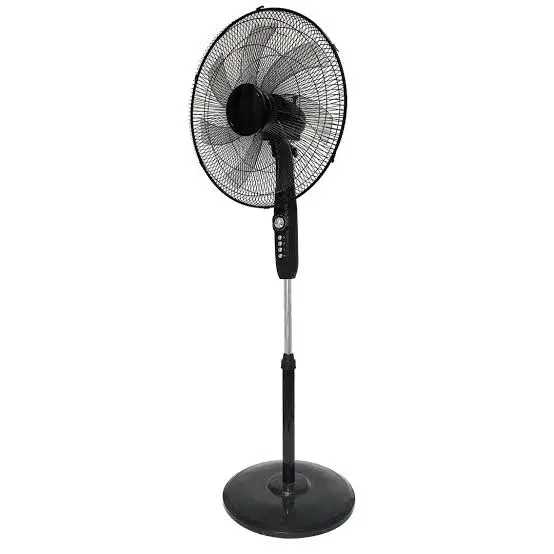
Vision Plus VPSF18T 18 Inch 7 Blade Standing Fan in Kenya | City Gadgets Kenya
Same-day delivery in Nairobi by 4 Nov – 5 Nov
Description
Buy the genuine Vision Plus VPSF18T 18 Inch 7 Blade Standing Fan in Kenya from City Gadgets Kenya. 18-inch head, seven blades, oscillation, telescopic stand and a 24-month warranty per Vision Plus. Same-day Nairobi delivery, M-Pesa accepted. Call 0745 575 931.
Vision Plus VPSF18T 18 Inch 7 Blade Standing Fan in Kenya
Genuine Vision Plus | 18-Inch Head | 7 Blades | Oscillating | Adjustable Height | 24-Month Warranty
The Vision Plus 18 inch 7 blade standing fan is a floor-standing, oscillating fan with an 18-inch fan head, seven blades, a choice of speeds, a telescopic stand that sets the fan at your preferred height and a wide, sturdy base, with a 24-month warranty, per Vision Plus's own pages. It is built to cool a large room quietly and efficiently, in the maker's words. Available in Kenya from City Gadgets Kenya as a genuine, brand-new product, this page is for shoppers searching "Vision Plus VPSF18T 18 Inch 7 Blade Standing Fan Kenya," "Vision Plus 18 inch standing fan," "18 inch stand fan price Kenya," "oscillating fan Nairobi," or "standing fan for living room Kenya."
A fan is the cheapest way to feel cooler, and a good stand fan makes a bedroom, living room, shop or classroom more comfortable on hot days without the running cost of an air conditioner. This page explains what the VPSF18T offers, what Vision Plus's pages leave out, how to size, place, use and clean a standing fan in a Kenyan home or business, how it compares with other fans, and how to check your unit on delivery.
Key specs at a glance
| Feature | Detail |
|---|---|
| Model | VPSF18T. Vision Plus's pages name the product as the 18 Inch 7 Blade Standing Fan and do not show a model code, so we confirm the code on your unit's label |
| Type | Floor-standing oscillating fan |
| Fan head | 18 inches, per Vision Plus's pages |
| Blades | Seven, per Vision Plus's pages |
| Speeds | Multiple speed settings, per Vision Plus's pages. The number of speeds is not stated, so we confirm it per unit |
| Oscillation | Yes, side to side, per Vision Plus's pages |
| Height | Telescopic stand, adjustable, per Vision Plus's pages. The height range is not stated, so we confirm it per unit |
| Base | Wide, sturdy base, per Vision Plus's pages |
| Power | Not stated on Vision Plus's pages. We confirm the wattage per unit |
| Motor | Not stated on Vision Plus's pages. We confirm it per unit |
| Tilt, remote, timer | Not stated on Vision Plus's pages. We confirm each per unit |
| Safety guard | Not stated on Vision Plus's pages. We confirm the guard design per unit |
| Noise | Described as quiet. No decibel figure is given, so we do not quote one |
| Warranty | 24 months, per Vision Plus's pages. A site banner mentions two years on every product. We confirm the warranty that applies to the unit we sell |
| Condition | Brand new, genuine Vision Plus |
| Available from | City Gadgets Kenya, Nairobi CBD |
Figures come from Vision Plus's own product page and blog review of the 18 Inch 7 Blade Standing Fan. Fans sold under the same name can differ between batches, so please ask our team to confirm the exact features and warranty of the unit you order before you pay.
What's in the box
A new standing fan normally ships with the fan head, the stand sections, the base, the guard and blades, screws and the user manual. Some fans need assembly. We confirm exactly what is in the box for your unit when you order, and we check it with you at delivery.
Why choose the Vision Plus VPSF18T 18 Inch 7 Blade Standing Fan
An 18-inch fan head is a large head, designed to move a lot of air. Vision Plus describes the head as giving maximum airflow coverage, and the seven blades as precision-engineered, which in plain terms means a fan intended to push a wide stream of air without excessive noise. Oscillation sweeps that air from side to side, so everyone in the room feels it instead of one person. The telescopic stand lets you raise the fan above furniture, or lower it to sit near a bed or desk, and the wide base is there to keep it steady.
What the pages do not tell us is the power rating, the motor type, the number of speeds, whether the head tilts, whether there is a remote or timer, and the exact height range. We do not guess these. We confirm them with you before you pay.
How a standing fan cools you
A fan does not lower the temperature of the room. It moves air across your skin, which helps sweat evaporate and makes you feel cooler. That is why a fan is pointless in an empty room: switch it off when nobody is there. A bigger fan head can move more air at a lower speed, which is why larger fans often feel gentler and quieter than small ones at the same airflow. An 18-inch head sits in the middle of the range for home fans, bigger than a desk fan and smaller than industrial models.
Is an 18-inch fan the right size?
As a rule of thumb from our experience, an 18-inch stand fan suits a bedroom, a living room, an office, a small shop or a classroom corner. In a very large space, such as a hall or a big open-plan floor, one fan may not be enough, and two fans placed on opposite sides may work better. For a tiny room, a smaller fan may suit. These are guides, not promises, and we are happy to talk through your space.
Seven blades: does the count matter?
Vision Plus's pages promote seven blades. Blade shape, pitch, speed and motor matter at least as much as the count, so a higher number does not automatically mean better airflow. More blades can help spread the air more smoothly and may reduce the pulsing feel of a fan with few blades, though the design decides. The pages give no airflow figure in cubic metres per hour, so we do not quote one. We suggest you feel the fan on each speed in the shop.
Speeds, oscillation and height
Speeds. Vision Plus's pages say you can choose from different speed options. Use the lowest speed that keeps you comfortable at night, and a higher speed for the heat of the afternoon. Higher speeds use more power and make more noise.
Oscillation. The pages say the fan rotates from side to side to spread cool air evenly across the room. Switch oscillation off if you want a steady stream on yourself, or if you want the air directed at a single point, such as a desk.
Height. The telescopic stand lets you set the fan head at a preferred height. Raise it so the air passes over the heads of people sitting, or lower it so it blows across a bed. Lock the stand firmly after each adjustment. The pages do not give the height range, so we confirm it.
Where to put it
- Stand it on a flat, solid floor. A wobbly floor makes a fan rattle.
- Leave space around it. Keep the guard clear of curtains, cables and furniture.
- Aim it for cross-ventilation. Place the fan near a window or door so that it helps move hot air out or fresh air in.
- Keep it out of reach of small children. Even with a guard, a fan is not a toy.
- Keep the cable out of the walkway. Tuck it along the wall so nobody trips.
- Use a proper 240 V socket with a surge protector, not an overloaded extension. Kenya uses Type G plugs.
Using it well: tips for staying cool
Open a window on the shady side of the house and a door or window on the other side, and the fan will help pull fresh air through. During the day, close curtains on the sunny side to keep heat out. At night, point the fan across the room instead of straight at your face, and use a low speed. Drink water, and wear light clothes. In humid coastal areas, a fan helps sweat evaporate less than in dry air, so it feels less dramatic than in dry highland weather.
Safety first
Never put your fingers, a stick or toys through the guard. Switch the fan off and unplug it before you clean or adjust it. Keep it away from water and wet floors, and never use it in a bathroom. Check the cable and plug for damage, and stop using the fan if it sparks, smells burnt or overheats. Do not cover a running fan. If the fan falls over, switch it off and check for damage before using it again. These are general safety practices; always follow the manual.
Running cost and power
Vision Plus's pages do not state the wattage, so we do not quote a running cost. For an example, not a Vision Plus rating: suppose a fan uses 60 W. Used for 8 hours a day, that is about 0.48 kWh a day, or roughly 14 kWh a month, from our calculation. Multiply by your own tariff to estimate the cost. The label on your unit gives the real rated figure, and we can confirm it for you. A fan generally costs far less to run than an air conditioner.
Power cuts and voltage
Voltage in many neighbourhoods fluctuates, and a fan motor can run hot or struggle on very low voltage. A surge protector helps, and a voltage stabiliser helps more. If power cuts are frequent, a rechargeable fan may suit you, though it is a different product with a smaller head. If the fan runs slowly or hums at low voltage, switch it off rather than leave it straining.
Assembly
Most standing fans are assembled in a few minutes. Fit the base, the stand sections and the head, tighten the screws and the locking collar, and fit the guard and blades following the manual, with the unit unplugged. Make sure the blade locking nut is tight, because a loose blade is noisy and unsafe. Spin the blades by hand before you plug in, to make sure they turn freely. If anything looks wrong, stop and call us.
Cleaning and care
Switch the fan off and unplug it. Wipe the guard and blades with a damp cloth, since dust on the blades makes the fan noisier and reduces airflow. Do not use harsh chemicals or soak the motor. If you can open the guard safely following the manual, clean the blades more thoroughly every few months. Wipe the stand, and store the fan in a dry place when it is not needed, with its cable wound loosely. Do not oil the motor unless the manual says so.
Troubleshooting
The fan does not start. Check the socket, the plug and the speed switch. Try another socket.
It makes a rattling or buzzing noise. Check that the blades and guard are tight, the stand is locked and the floor is level. Clean dust from the blades.
It wobbles. Check that the base is fixed, the stand is locked at the right height and the floor is level.
The oscillation does not work. Check that the oscillation knob is engaged, and avoid forcing the head by hand.
It runs slowly. Low voltage, dust or a worn motor can be the cause. Clean it and try another socket, and tell us if it continues.
There is a burning smell. Switch off and unplug at once, and call Customer Relations.
Fan placement by room
Bedroom. Place the fan a couple of metres from the bed, pointing across the room rather than at your face, on the lowest comfortable speed. Lower the stand so the air passes over the bed.
Living room. Place the fan in a corner, oscillating across the seating area. Raise the head so the air passes over the people on the sofa.
Shop or salon. Put the fan where staff and customers both feel it, and keep the cable away from the walking path.
Classroom or meeting room. Use two fans on opposite sides if the room is wide, and keep them away from where children run.
Kitchen. Use the fan to clear heat and cooking smells, but keep it away from open flames, which a strong airflow can disturb.
Fans and mosquitoes
Moving air can make it harder for mosquitoes to settle on you, so a fan can help in the evening when mosquitoes are active. A fan does not replace a net or other protection where malaria or dengue is a risk, so keep your usual protection in place. Do not rely on a fan alone.
Saving power with a fan
Switch the fan off when you leave the room. Use the lowest speed that keeps you comfortable. Clean the blades, because dust makes the motor work harder. Combine the fan with closed curtains on the sunny side and open windows on the shady side, so you need less fan time. In the evening, when outside air cools, open windows wide and let the fan pull in fresh air.
Moving and storing the fan
Lower the stand to its shortest length, lock it, and move the fan by holding the stand, not the guard. Do not drag it across a floor. If you store it for months, wipe it clean, cover it with a cloth or the original box to keep dust off, and keep it in a dry place. Do not wind the cable tightly around the stand, which can damage it.
Common mistakes to avoid
Leaving the fan on in an empty room. It wastes power and does not cool the room. Placing it against a wall. It cannot draw air properly. Putting it on a rug or uneven floor. It wobbles and rattles. Tilting it up to reach a high ceiling. Check whether the head can tilt, as the pages do not say. Using an overloaded extension. It can overheat. Ignoring odd noises. A rattle usually means a loose screw, which is easy to fix.
Compare before you buy
Vision Plus 18 inch vs the Vision Plus 16 inch 5 blade stand fan. Vision Plus also sells a 16 inch 5 blade stand fan. The 18 inch moves more air with a larger head. The 16 inch is smaller and lighter.
Standing fan vs a table fan. A table fan is cheaper and smaller, but sits low and cools one person. A stand fan raises the air and covers a room.
Standing fan vs a ceiling fan. A ceiling fan needs installing and cools a whole room from above. A stand fan moves where you want it.
Standing fan vs a wall fan. A wall fan saves floor space but needs fixing to the wall. A stand fan needs no tools.
Standing fan vs an air conditioner. An air conditioner lowers the room temperature but costs far more to buy and run. A fan makes you feel cooler for little power.
Who should buy it
Families with a bedroom or living room that gets hot.
Shops, salons and offices needing air movement for staff and customers.
Classrooms, churches and waiting areas with limited budget.
Tenants wanting a cooling option that needs no installation.
Anyone looking to cut costs compared with an air conditioner.
Usage scenarios
A bedroom in Kayole. The fan at the foot of the bed on a low speed, with a window open on the shady side.
A living room in Ruiru. An oscillating fan covering the sofa area during hot afternoons.
A hair salon in Eastleigh. A tall fan raised above the chairs to keep clients comfortable.
A small shop in Nakuru. A fan at the counter to cool the shopkeeper and customers.
A short buying checklist
- What size is my room, and do I need one fan or two?
- Do I want a remote or timer? The pages do not list them, so I should ask.
- Do I have a safe place for the fan, away from children and water?
- Is my socket suitable, and do I have surge protection?
- How noisy is too noisy for the bedroom?
- What warranty does the unit carry, and who do I contact?
Choosing the VPSF18T with confidence
Vision Plus's pages list the main features of this fan but leave out the power rating, the motor, the number of speeds, the height range and the remote and timer. Before you pay, ask us to confirm the model code, the speeds, the height range, the guard design and the warranty. We answer these before payment, so there are no surprises on delivery. If you can, visit us at Taveta Road and see the fan, because the stand, the guard and the head are things you can judge by looking. Switch it on at each speed, listen for noise and check how it feels. Message us on WhatsApp and tell us the size of your room, and we will suggest the right fan.
How to check the fan when it is delivered
- Inspect the box for damage before you sign, and open it with the delivery person present if you can.
- Check the model code on the label and the box, and make sure the serial number matches your receipt. The serial number is what your warranty is registered against.
- Check that the head, stand sections, base, guard, blades, screws and manual are included.
- Assemble it and switch it on at each speed, check oscillation and the height lock, and listen for rattles.
- Check the cable and plug for damage.
- Contact our Customer Relations team on 0794 488 806 straight away if anything is wrong.
How to tell a genuine Vision Plus from a copy
- Model code: the label should match the box and your receipt.
- Packaging: sealed, with clean printing and consistent barcodes.
- Price: a price far below the market is a warning.
- Seller: buy from a seller who gives a receipt and explains the warranty.
Why buy from City Gadgets Kenya
Genuine, brand-new stock from a Nairobi shop you can visit. City Gadgets Kenya is at New Alnoor Exhibition, Shop 7, Second Floor, Taveta Road (at the Taveta Road and Accra Road junction), Nairobi CBD. We are open Monday to Friday 9:00am to 7:00pm, and Sunday 11:00am to 4:00pm (Saturday closed).
- Sales (pricing, stock and orders): call or WhatsApp 0745 575 931 on WhatsApp.
- Customer Relations (warranty, returns and support): call or WhatsApp 0794 488 806 on WhatsApp.
- Email: sales@citygadgetskenya.co.ke, handy for invoices, bulk orders and warranty paperwork.
- Delivery: same-day delivery in Nairobi for orders confirmed before 3:00pm on a working day. Outside Nairobi we deliver by courier to your nearest agent or your door, typically 1 to 3 business days after dispatch. The delivery charge depends on your location and the size of the item and is confirmed before you pay. Collection from the shop is free. Delivery times are estimates, not guarantees.
- Payment: M-Pesa accepted.
- Follow us: Instagram, TikTok and Facebook.
Frequently asked questions
How big is the fan? Vision Plus's pages list an 18-inch fan head with seven blades.
Does it oscillate? Yes, side to side, per Vision Plus's pages.
Can I adjust the height? Yes, with a telescopic stand, per Vision Plus's pages. The pages do not give the height range, so we confirm it.
Does it have a remote or timer? The pages do not say, so we confirm it per unit.
How many watts is it? The pages do not state the wattage, so we confirm it per unit.
What warranty does it have? Vision Plus's pages list 24 months. We confirm the warranty that applies to the unit we sell.
Can I pay via M-Pesa? Yes, M-Pesa is accepted.
Do you deliver outside Nairobi? Yes. Outside Nairobi we deliver by courier, typically 1 to 3 business days after dispatch. The delivery charge depends on your location and the size of the item and is confirmed before you pay.
Order your Vision Plus VPSF18T 18 Inch 7 Blade Standing Fan today
Available now at City Gadgets Kenya. Call or WhatsApp our sales team on 0745 575 931 (WhatsApp) to confirm stock, delivery and what is included, or email sales@citygadgetskenya.co.ke. Visit us at New Alnoor Exhibition, Shop 7, Second Floor, Taveta Road (at the Taveta Road and Accra Road junction), Nairobi CBD.
Specifications
- Brand
- Vision
- Condition
- New
Frequently Asked Questions
How much does the Vision Plus VPSF18T 18 Inch 7 Blade Standing Fan in Kenya | City Gadgets Kenya cost in Kenya?
The Vision Plus VPSF18T 18 Inch 7 Blade Standing Fan in Kenya | City Gadgets Kenya is priced at Ksh 5,250 at City Gadgets. You can pay via M-Pesa, card or cash on delivery.
Is the Vision Plus VPSF18T 18 Inch 7 Blade Standing Fan in Kenya | City Gadgets Kenya available in Kenya?
Yes — the Vision Plus VPSF18T 18 Inch 7 Blade Standing Fan in Kenya | City Gadgets Kenya is in stock at City Gadgets, ready for same-day delivery in Nairobi and countrywide shipping across Kenya.
Is the Vision Plus VPSF18T 18 Inch 7 Blade Standing Fan in Kenya | City Gadgets Kenya genuine and does it have a warranty?
Every Vision Plus VPSF18T 18 Inch 7 Blade Standing Fan in Kenya | City Gadgets Kenya we sell is 100% genuine brand-new stock and comes with a 12-month official brand warranty.
Do you deliver the Vision Plus VPSF18T 18 Inch 7 Blade Standing Fan in Kenya | City Gadgets Kenya in Nairobi?
Yes. We offer fast same-day delivery within Nairobi and fast, affordable delivery to the rest of Kenya — order online or on WhatsApp.
Customer Reviews
No reviews yet
Be the first to review this product.
Rate us on Google
Your review helps other shoppers find us
Reviews from verified buyers will appear here.