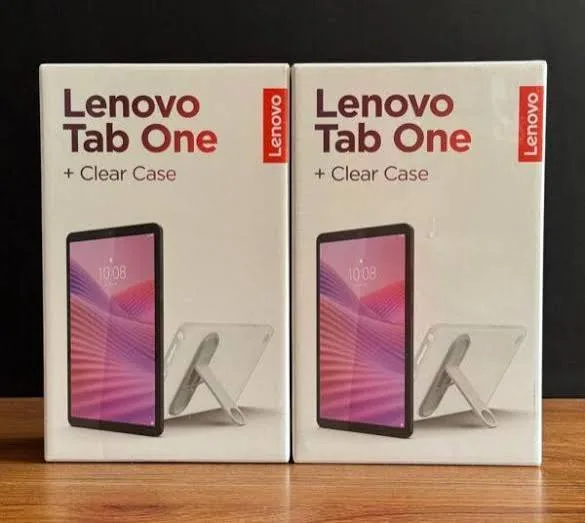
Lenovo Tab One 8.7-Inch 4GB 128GB Android 14 Tablet in Kenya | City Gadgets Kenya
Same-day delivery in Nairobi by 10 Oct – 11 Oct
Comes with
Description
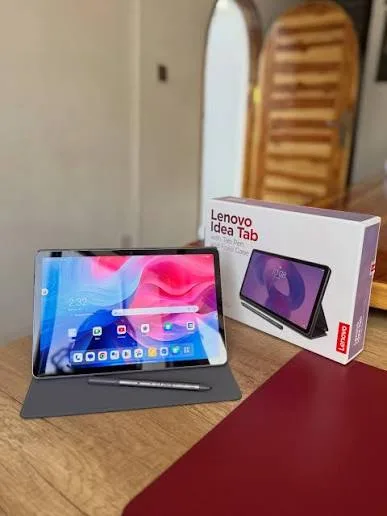
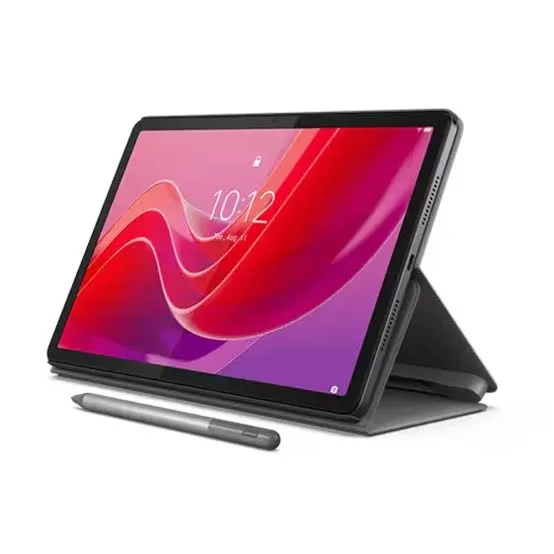
Buy the genuine Lenovo Tab One 8.7-inch tablet with MediaTek Helio G85, 4GB RAM, 128GB storage, Android 14 and Dolby Atmos speakers in Kenya from City Gadgets Kenya. Lenovo Tab One price in Kenya, compact tablet for reading, travel and work Nairobi.
Lenovo Tab One 8.7-Inch 4GB 128GB Android 14 Tablet in Kenya
Genuine Lenovo | Brand New | 8.7-Inch HD IPS Display | MediaTek Helio G85 | 4GB RAM | 128GB Storage | MicroSD up to 1TB | Android 14 | Dual Dolby Atmos Speakers | 320 g
Searching for the Lenovo Tab One price in Kenya, a compact tablet for reading and travel in Nairobi, or an affordable Android 14 tablet that fits in a bag? The Lenovo Tab One is a brand-new, genuine 8.7-inch Android tablet released in March 2025. It has an 8.7-inch HD IPS display, a MediaTek Helio G85 processor, 4GB of RAM, 128GB of storage that you can expand with a microSD card, dual side-firing speakers with Dolby Atmos and a 5,100 mAh battery, all in a body that weighs only 320 grams. It's available from City Gadgets Kenya with delivery across Kenya. Buyers also search for it as a Lenovo Tab One, a Lenovo 8.7 inch tablet, a Lenovo TB305 tablet, a small Android tablet, a compact tablet for reading, a tablet for travel and commuting, a tablet with 128GB storage, or a cheap Android 14 tablet.
This guide explains the tablet in plain language: what a small tablet is good for, what the HD display and the Helio G85 chip mean in daily use, the difference between the Wi-Fi and LTE models, and where it's limited. If you'd like to talk it through, message us on WhatsApp.
The short verdict
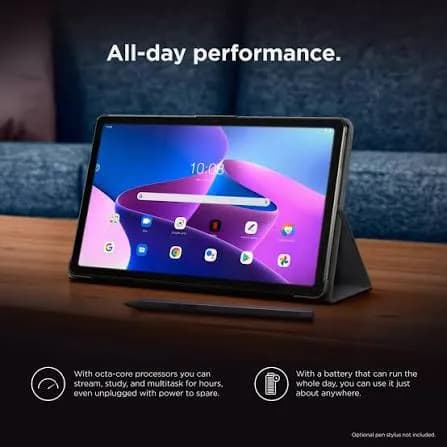
The Lenovo Tab One is a small, light, low-priced tablet for reading, video, browsing and everyday apps. Listings describe an 8.7-inch IPS display at 1340 by 800 pixels with about 480 nits of brightness, a MediaTek Helio G85 octa-core processor, 4GB of RAM, 128GB of storage with a dedicated microSD slot for up to 1TB more, dual stereo speakers with Dolby Atmos, 8 MP and 2 MP cameras, Wi-Fi 5 and Bluetooth 5.3, and Android 14. At just 320 grams, it's easy to hold in one hand and slip into a handbag or a work bag. It's a modest tablet: the HD screen is less sharp than the 2K screen on larger tablets, the processor suits everyday tasks and light games, and the 5,100 mAh battery gives a day of normal use, not several days. For reading, travel, children's apps, video calls and basic work apps, it's a very good-value choice.
Who this tablet is for
It suits you if:
- You want a tablet small enough to hold in one hand and carry every day.
- You read books, news and PDFs, and watch videos on the go.
- You want 128GB of storage at a low price, with room for a card.
- You want a recent Android version, Android 14, out of the box.
- You want a second screen for apps, a notebook or a point-of-sale or delivery app.
- You want a tablet for a child, in a compact size.
Look elsewhere if:
- You want a big, sharp screen for films and study. See the Lenovo Tab M10 Plus in our range.
- You want a powerful tablet for heavy gaming or multitasking.
- You want a tablet as a laptop replacement.
- You want a stylus or a keyboard experience.
An honest note on the Wi-Fi and LTE versions
Lenovo sells the Tab One in two forms, and it's worth being clear.
- A Wi-Fi-only model connects to the internet through Wi-Fi, and doesn't take a SIM card.
- An LTE (4G) model has a nano-SIM slot, so you can use mobile data without Wi-Fi.
- Storage options include 64GB and 128GB, with 4GB of RAM. The listing for this product is the 128GB version.
- Listings differ on charging, with some sources showing 15 W and others 20 W, and the speed depends on the charger in the box.
We confirm whether the unit you order is Wi-Fi only or LTE, and what charger comes with it, in writing, before you pay.
Specifications in plain English
| Feature | Detail | What it means for you |
|---|---|---|
| Model | Lenovo Tab One (TB305 series) | Lenovo's compact 8.7-inch tablet |
| Display | 8.7-inch IPS, 1340 x 800 (HD), about 480 nits, 60 Hz | Bright, but not as sharp as 2K |
| Processor | MediaTek Helio G85 (8 cores, 12 nm) | Fine for everyday apps and light games |
| Memory | 4GB LPDDR4x | Enough for browsing and streaming |
| Storage | 128GB (eMMC 5.1) in this version, with a microSDXC slot up to 1TB | Plenty of space, and room to grow |
| Battery | 5,100 mAh | A day of normal use |
| Charging | 15 to 20 W, depending on the source and charger | Confirm with us |
| Audio | Dual side-firing stereo speakers, Dolby Atmos | Good sound for a small tablet |
| Cameras | 8 MP rear (autofocus) and 2 MP front | Fine for documents and basic calls |
| Wireless | Wi-Fi 5 and Bluetooth 5.3, with optional 4G on the LTE model | Standard connectivity |
| Software | Android 14 | A recent Android version |
| Size and weight | About 211 x 125 x 8.5 mm, 320 g | Slim, light and portable |
| Build | Glass front, plastic frame and back | Light and affordable |
These figures come from Lenovo and retailer listings. Ask us to confirm the version, the colour and what's in the box for the unit you order.
The HD display: what to expect
It helps to be realistic about the screen.
- 1340 by 800 pixels on 8.7 inches is about 179 pixels per inch. Text is readable, though less crisp than on a 2K tablet or a good phone.
- About 480 nits is bright, so the screen stays clear in a bright room.
- IPS gives steady colour and wide viewing angles.
- A 5:3 shape suits portrait reading, and landscape video with small bars.
- A glass front helps resist scratches.
- For reading books and articles, it's fine. For fine detail, photos and 1080p video, a sharper tablet looks better.
If sharpness matters to you, the Lenovo Tab M10 Plus (2K) in our range is the better screen.
What the Helio G85 and 4GB mean in daily use
The Helio G85 is a well-known mid-range chip.
- Browsing, streaming, social media, reading and video calls run smoothly.
- Common apps such as WhatsApp, YouTube, Netflix, Google Docs and banking apps work well.
- Light games such as puzzle and casual titles run fine.
- Demanding 3D games will run at low settings, if at all.
- Many apps open at once may slow it down, with 4GB of RAM.
- Android 14 brings recent features and a modern interface.
- Updates: Lenovo's update promise isn't clear from the listings we found, so don't assume many future Android versions.
For everyday use, it's perfectly capable.
Good uses for a compact tablet
An 8.7-inch tablet fits real needs.
- Reading. Books, newspapers, PDFs and comics fit comfortably, and one hand holds it.
- Travel and commuting. Watch videos on the bus, or read offline, with downloaded content.
- Children's learning. A small, light tablet suits small hands, in a rugged case.
- Work apps. Show a price list, a catalogue or a form to a customer.
- Delivery and field work. Run a delivery, inventory or survey app, with an LTE model if you need data on the move.
- Kitchen and workshop. A recipe or manual stand.
- Smart home and CCTV viewing, with the right apps.
- A second screen for notes and chat.
Setting up the tablet
- Unbox with care, and charge it fully before first use.
- Switch on, choose your language and connect to Wi-Fi.
- Sign in with a Google account, or create one.
- Update the system and apps.
- Insert a microSD card if you have one, with the tablet off.
- Set a screen lock, and turn on Find My Device.
- Install your apps.
- Add a case and a screen protector.
A worked example: a commuter's tablet
A concrete example shows how a small tablet earns its place.
- The user: a commuter in Nairobi with a long morning and evening journey.
- The setup: the tablet with downloaded books, a few offline videos and podcasts, and a note app.
- The storage: 128GB internal, with a 128GB microSD card for films and music. That's more than most commuters will fill.
- The battery: a day of reading and a couple of hours of video fits comfortably, and a power bank in the bag covers longer days.
- The case: a slim folio case with a stand, which doubles as a cover against scratches.
- The data: downloads happen on home or office Wi-Fi, so no mobile data is spent on the road. With an LTE model, a small data bundle covers maps and messages.
- The comfort: at 320 g, the tablet is light enough to hold one-handed for an hour of reading.
- The result: a pocketable media and reading tablet at a modest price.
Reading on a small tablet: tips
- Use the reading mode and the dark theme for night reading.
- Choose a font size that suits your eyes, and use landscape for wide pages.
- Download books and articles for offline use, and keep them on the card.
- Use apps such as Kindle, Google Play Books and your library's app.
- Keep the brightness low in dim rooms.
- Take breaks every 20 minutes, to rest your eyes.
- A stand or case props the tablet while you eat or sit.
- PDFs with small print are harder at HD, so zoom in, or use a bigger tablet.
Tablet for children: a compact choice
A small tablet suits small hands, with sensible rules.
- Use a child-friendly case with a handle, and a screen protector.
- Create a restricted profile, or use Google Family Link for parental controls.
- Limit screen time, and avoid bedtime use.
- Install educational apps and books.
- Turn off in-app purchases, or require a password.
- Keep the tablet in a shared place, not a bedroom, if you can.
- Review installed apps regularly.
- Teach children not to share personal details online.
Tablet for small business and field work
A compact tablet is a handy business tool.
- Show catalogues and price lists to customers.
- Take orders and deliveries with a business app.
- Run a point-of-sale app with a Bluetooth printer or card reader, if the app supports it.
- Take photos of documents, though the 8 MP camera is basic.
- Use an LTE model for data on the road.
- Protect it with a rugged case, a screen protector and a strong lock.
- Charge it daily, and keep a power bank.
- Back up your data to the cloud, and use Find My Device.
Storage planning
128GB is generous, and a plan keeps it tidy.
- The system and apps take about 15 to 20GB, leaving roughly 100GB.
- A 1-hour HD film takes about 1 to 3GB, so a few dozen films fit.
- A novel is tiny, and a thousand books take little space.
- Photos and videos from the camera fill space slowly.
- A microSD card adds more, and holds music and films.
- Clear app caches now and then.
- Back up photos to the cloud or a SanDisk drive.
Common problems and simple fixes
The tablet won't charge. Try another cable and charger, clean the port gently, and leave it for 15 minutes.
It runs slowly. Close unused apps, clear storage, restart and check for updates.
Storage is full. Move photos and videos to a microSD card, and delete unused apps.
Wi-Fi won't connect. Restart the router and the tablet, forget the network and reconnect.
The screen freezes. Hold the power button for about 10 seconds to restart.
The battery drains fast. Check which apps use power, and lower the brightness.
The SIM isn't recognised (LTE model). Check the SIM is inserted correctly, and that mobile data is enabled.
If a problem continues, message us on WhatsApp.
Questions to ask before you buy a tablet
- Who will use it, and for what?
- Do I want a small or a large screen? 8 inches is portable, and 10 inches is roomy.
- Wi-Fi only or with a SIM?
- How much storage do I need?
- What processor and Android version does it have?
- What accessories do I need?
- What warranty is included, and who honours it? Get it in writing.
- Can I see it before I pay?
We're glad to answer all of these on WhatsApp or in the shop before you pay.
Looking after the tablet for years
- Use a case and a screen protector.
- Keep it cool, dry and out of direct sun.
- Charge it sensibly, and avoid cheap chargers.
- Keep the software updated.
- Back up photos and files to the cloud or a SanDisk drive.
- Clean the screen with a soft, dry microfibre cloth.
- Keep the box, charger and receipt.
Warranty and after-sales: what to ask
A tablet is a long-term purchase, so ask us what warranty covers the unit you order, how long it lasts and what it covers. Lenovo warranties vary by market. Warranties normally exclude drops and liquid damage. Keep your receipt, the serial number and the box. If a fault appears, message us on WhatsApp first, and we'll tell you the quickest way to get it sorted.
Tablet or phone? A plain answer
Many buyers ask why they'd buy an 8-inch tablet when large phones exist.
A tablet like the Tab One is better for:
- Reading and video, where a bigger screen is far more comfortable.
- Children, who shouldn't use your phone.
- Showing things to customers or a group.
- Keeping your phone free for calls and messages.
- Apps that work better on a larger screen.
A phone is better for:
- Calls and everyday messaging.
- Carrying in a pocket at all times.
- Cameras and photography.
- Mobile money and quick tasks.
For many people, a tablet complements a phone, and doesn't replace it.
Accessories worth buying
| Accessory | Why it helps |
|---|---|
| Folio case with a stand | Protects the tablet, and props it for reading or video |
| Child-proof case | Survives drops |
| Screen protector | Prevents scratches |
| microSD card (128GB or more) | Adds storage for films and music |
| Bluetooth headphones | Private listening |
| Power bank | Charging on the move |
| USB-C cable and charger | A spare for the office or home |
| Surge protector | Protects the charger |
Understanding the specifications: a quick glossary
- IPS. A display type with wide viewing angles and steady colour.
- HD (1340 x 800). A modest resolution, less sharp than Full HD or 2K.
- Nits. A measure of brightness. 480 nits is bright.
- RAM. Short-term memory. 4GB handles everyday apps.
- eMMC. A type of flash storage, slower than the UFS storage in premium tablets.
- microSDXC. A memory card that adds storage.
- mAh. Battery capacity.
- Dolby Atmos. Sound tuning that adds depth.
- Helio G85. A mid-range processor from MediaTek.
Use these terms to compare tablets, and ask us if any is unclear.
Staying safe online
- Set a screen lock with a PIN.
- Install apps only from Google Play.
- Keep the system and apps updated.
- Use strong passwords and two-step sign-in.
- Use Find My Device if the tablet is lost.
- Be careful with public Wi-Fi, and avoid banking on it.
- Consider security software. We stock Kaspersky in our range.
- Back up to the cloud.
Eye comfort habits for tablet use
- Use the reading mode and dark theme for long sessions.
- Lower the brightness in dim rooms.
- Hold the tablet at a comfortable distance, about 40 cm.
- Take breaks. Look up every 20 minutes.
- Keep the room lit.
- Limit screen time before bed, especially for children.
Using a tablet in Kenya
Charging and power. Use the supplied charger, and a surge protector, since power spikes in Kenya can damage chargers.
Heat and dust. Don't leave the tablet in a hot car or in direct sun.
Data. Download updates and big apps on Wi-Fi, to save mobile data. If you buy the LTE model, choose a data bundle that suits you.
Protection. Add a case and a screen protector. Small tablets get dropped.
Security. Set a screen lock, and use Find My Device.
Warranty. Ask us for the warranty that applies to the unit you order, and keep the receipt and box.
How it compares with other options in our range
| Lenovo Tab One | Lenovo Tab M10 Plus | Samsung tablets | Apple iPad | |
|---|---|---|---|---|
| Screen | 8.7-inch, HD IPS | 10.6-inch, 2K IPS | Varies | Varies |
| Weight | About 320 g | About 465 g | Varies | Varies |
| Storage here | 128GB, plus microSD | 64GB, plus microSD | Varies | Varies |
| Speakers | Two, Dolby Atmos | Four, Dolby Atmos | Varies | Varies |
| Android version | 14 | 12 at launch | Varies | Not applicable |
| Best for | Reading, travel and compact use | Streaming, study, family | Premium Android | Premium and apps |
Against the Lenovo Tab M10 Plus: the Tab One is smaller, lighter, has more storage in these versions and a newer Android. The M10 Plus has a bigger, sharper screen and better sound.
Honest pros and cons
Pros
- Small, light and easy to carry, at 320 g.
- 128GB of storage, with a microSD slot up to 1TB.
- Android 14 out of the box.
- A bright 480-nit IPS display.
- Dual Dolby Atmos speakers.
- Wi-Fi 5 and Bluetooth 5.3.
- A low price.
Cons
- An HD display, softer than 2K screens.
- A modest processor and 4GB of RAM.
- A 5,100 mAh battery, which is smaller than larger tablets.
- A plastic body.
- A 2 MP front camera.
- Regional variants differ, so check the unit.
What to check when it arrives
- The box model matches Lenovo Tab One.
- The tablet, charger, cable and paperwork are in the box.
- The screen has no dead pixels or scratches.
- It powers on and charges.
- Wi-Fi, the speakers and cameras work.
- If it's an LTE model, the SIM slot works.
- You get a receipt with the serial number and warranty details in writing.
Frequently asked questions
What is the Lenovo Tab One price in Kenya? We confirm the current price when you message us on WhatsApp, because supplier prices change. We tell you the price and what's in the box before you pay.
Where can I buy the Lenovo Tab One in Nairobi? At City Gadgets Kenya, New Alnoor Exhibition, Second Floor, Shop C7, Accra Road, Nairobi CBD, or by delivery.
How big is the screen? 8.7 inches, with an HD IPS display.
How much storage does it have? 128GB in this version, expandable with a microSD card up to 1TB.
Does it take a SIM card? Only the LTE model does. We confirm which you're getting.
Which Android version does it have? Android 14.
Is it good for reading? Yes. It's small, light and easy to hold.
Is it good for games? For casual and light games, yes. Heavy 3D games will struggle.
What warranty does it have? Ask us for the warranty that applies to the unit you order.
Can you deliver it? Yes, same day in Nairobi and next day outside Nairobi.
Can I pay via M-Pesa? Yes.
Why buy from City Gadgets Kenya
Genuine, brand-new Lenovo tablet. We're at New Alnoor Exhibition, Second Floor, Shop C7, Accra Road, Nairobi CBD, and you're welcome to see the tablet before you buy. Message us on WhatsApp with who will use it and what for, and we'll tell you honestly whether the Tab One is right or a bigger tablet would suit you better. We confirm what's in the box before you pay.
Order your Lenovo Tab One today
Available now at City Gadgets Kenya. Message us on WhatsApp.
Specifications
- Brand
- LENOVO
- Condition
- New
Frequently Asked Questions
How much does the Lenovo Tab One 8.7-Inch 4GB 128GB Android 14 Tablet in Kenya | City Gadgets Kenya cost in Kenya?
The Lenovo Tab One 8.7-Inch 4GB 128GB Android 14 Tablet in Kenya | City Gadgets Kenya is priced at Ksh 23,000 at City Gadgets. You can pay via M-Pesa, card or cash on delivery.
Is the Lenovo Tab One 8.7-Inch 4GB 128GB Android 14 Tablet in Kenya | City Gadgets Kenya available in Kenya?
Yes — the Lenovo Tab One 8.7-Inch 4GB 128GB Android 14 Tablet in Kenya | City Gadgets Kenya is in stock at City Gadgets, ready for same-day delivery in Nairobi and countrywide shipping across Kenya.
Is the Lenovo Tab One 8.7-Inch 4GB 128GB Android 14 Tablet in Kenya | City Gadgets Kenya genuine and does it have a warranty?
Every Lenovo Tab One 8.7-Inch 4GB 128GB Android 14 Tablet in Kenya | City Gadgets Kenya we sell is 100% genuine brand-new stock and comes with a 12-month official brand warranty.
Do you deliver the Lenovo Tab One 8.7-Inch 4GB 128GB Android 14 Tablet in Kenya | City Gadgets Kenya in Nairobi?
Yes. We offer fast same-day delivery within Nairobi and fast, affordable delivery to the rest of Kenya — order online or on WhatsApp.
Customer Reviews
No reviews yet
Be the first to review this product.
Rate us on Google
Your review helps other shoppers find us
Reviews from verified buyers will appear here.
Buying guides
Straight advice for shoppers picking between the models above.