
Our dedicated NVMe vs SATA piece assumed you'd already chosen SSD over a traditional hard drive and explained the nuance between SSD types. This piece steps back to make the more foundational case — why SSD over HDD matters so fundamentally that it deserves to be treated as close to non-negotiable, especially for refurbished buyers navigating City Gadgets Kenya's catalog, where both storage types can still occasionally appear in older, more accessible configurations.
The Mechanical Reality of a Traditional Hard Drive
It's worth understanding precisely what happens inside a traditional hard drive, since this mechanical reality is the entire basis for the reliability argument this piece makes. A hard disk drive stores data on a spinning magnetic platter — genuinely spinning, at speeds commonly around 5,400 or 7,200 rotations per minute — while a mechanical read/write head hovers microscopically close to the platter's surface, physically moving back and forth to access different data locations. This is a genuine, precision mechanical system with moving parts, conceptually similar to a record player, operating continuously whenever your laptop is in use.
Why this mechanical design creates inherent reliability risk: any system with moving mechanical parts carries genuine wear and failure risk that a system without moving parts simply doesn't share. The spinning platter motor can fail. The read/write head, hovering at a microscopic distance from the platter, can physically contact and damage the platter surface if the laptop experiences a sufficiently sharp shock or drop — a phenomenon technicians call a "head crash," and a genuine, well-documented failure mode specific to mechanical hard drives that solid-state storage architecturally cannot experience.
SSD: No Moving Parts, Fundamentally Different Failure Profile
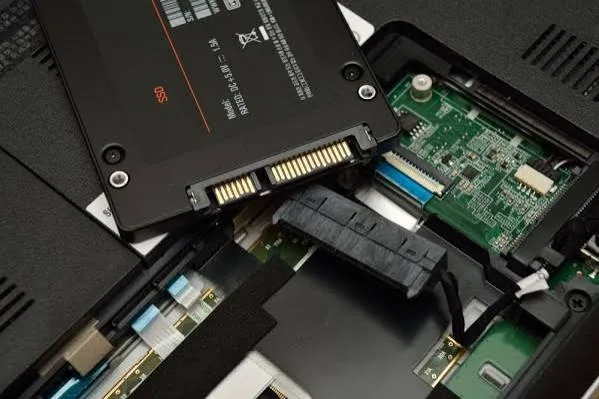
A Solid-State Drive stores data on flash memory chips with no moving mechanical components whatsoever — data is stored and retrieved through electrical signals alone, the same fundamental principle used in USB flash drives and SD cards, just implemented at larger scale and higher performance for laptop storage use.
Why this eliminates an entire category of failure risk: without spinning platters or moving read/write heads, SSDs simply cannot experience the mechanical failure modes discussed above — no head crashes, no motor failures, no risk from the physical shock of a drop causing mechanical components to collide. This doesn't mean SSDs never fail (flash memory has its own, different wear characteristics over very heavy, sustained use), but it does mean an entire, historically significant category of hard drive failure is architecturally impossible with solid-state storage.
Real Reliability Data: What Large-Scale Studies Have Actually Found
It's worth grounding this argument in genuine, published reliability data rather than only architectural reasoning. Backblaze, a data storage company that has published detailed, large-scale drive reliability statistics for years across many thousands of drives in active service, has consistently found SSDs showing meaningfully lower failure rates than traditional hard drives across comparable service periods in their own infrastructure. While laptop usage patterns differ somewhat from Backblaze's server environment, this kind of large-scale, real-world reliability data lends genuine, independent support to the architectural reasoning explained above — this isn't simply manufacturer marketing claims, but consistently observed real-world failure rate differences.
Why This Matters Even More for Refurbished Laptop Buyers Specifically
It's worth explaining why this distinction carries particular weight for refurbished buyers, connecting to our broader ex-UK laptop and buying checklist pieces. A refurbished laptop's storage drive has already experienced years of use during its original corporate service life — meaning any accumulated mechanical wear on a traditional HDD is already further along its lifespan than a brand-new drive would be. An SSD's lack of moving parts means this particular concern simply doesn't apply in the same way, making SSD storage specifically more reassuring for a refurbished purchase than it might be for someone buying entirely new hardware where a fresh HDD's full mechanical lifespan still lies ahead.
The Physical Shock Resistance Difference: Directly Relevant to Kenyan Daily Use
This connects directly to the durability discussions throughout our ThinkPad and business laptop pieces. A traditional hard drive's vulnerability to physical shock — the head crash risk discussed above — is genuinely, directly relevant to daily Kenyan laptop use: carrying a laptop through commutes, occasional accidental bumps or drops, and transport across the varied road conditions discussed in our lightweight laptop buying guide. An SSD, lacking any moving parts to be damaged by sudden physical shock, is meaningfully more forgiving of exactly these kinds of everyday physical stresses than a mechanical hard drive would be — a genuine, practical safety margin for real-world Kenyan daily carrying and use.
Performance Beyond Just Reliability: The Speed Difference Deserves Restating
While this piece focuses primarily on the reliability case, it's worth briefly restating the performance dimension covered more fully in our NVMe vs SATA piece: even the slowest SATA SSD dramatically outperforms any traditional hard drive for virtually every everyday computing task — boot times, application loading, file access — making the case for SSD over HDD genuinely a combination of both superior reliability and superior everyday performance together, not a trade-off between the two.
What Genuine Data Loss From a Failed HDD Actually Costs You
It's worth making the reliability argument concrete by considering what a hard drive failure genuinely costs beyond the replacement drive itself. Unlike a failed keyboard or a drained battery — inconveniences requiring repair but not necessarily losing anything irreplaceable — a failed hard drive risks genuine, permanent loss of whatever data was stored on it: coursework, business records, years of accumulated documents and photos, precisely the kind of material discussed throughout our accountants, small business, and student buying guides where losing this data has genuine, sometimes severe practical consequences beyond the cost of hardware repair alone. This is precisely why the reliability case throughout this piece matters more than a simple inconvenience-avoidance argument — it's fundamentally about protecting against a category of loss that, unlike most hardware failures, can't always be fixed by simply replacing a part.
Frequently Asked Questions
Do SSDs ever fail, or are they genuinely immune to failure? SSDs can fail, though through different mechanisms than HDDs — flash memory cells have a finite number of write cycles before wearing out, though this threshold is genuinely high enough that typical everyday laptop use rarely approaches it within a laptop's realistic working lifespan.
Is it worth replacing an HDD with an SSD in an older refurbished laptop if I find a good deal on one with a traditional hard drive? Often yes, if the laptop is otherwise well-specified — this is a genuinely worthwhile, commonly performed upgrade that meaningfully transforms an otherwise capable laptop's daily usability, similar in spirit to the RAM upgrade guidance in our dedicated piece on that topic.
Does a traditional hard drive's larger storage capacity at a lower price ever justify choosing it over SSD? Rarely for a primary laptop drive today, given how dramatically SSD prices have fallen — the reliability and performance case throughout this piece generally outweighs any remaining capacity-per-shilling advantage HDDs might retain, particularly for a laptop's primary, daily-use drive.
Can I tell if a refurbished laptop has an SSD or HDD just by its weight or feel? Not reliably — always confirm this specification directly with your seller, as emphasised throughout our buying checklist guide, rather than guessing based on physical handling alone.
Is the head crash risk discussed in this piece a common, everyday occurrence, or a rare edge case? It's a genuine, documented failure mode rather than a purely theoretical risk, though its likelihood depends on specific circumstances (drop height, surface, drive activity at the moment of impact) — the broader point is that this risk category simply doesn't exist for SSD storage at all, regardless of how common or rare it might be for HDDs specifically.
Should I back up my data regardless of whether I have an SSD or HDD? Yes, absolutely — as emphasised throughout our small business and accountants buying guides, no storage technology is completely immune to failure, and regular backups remain essential practice regardless of which storage type your laptop uses.
Does City Gadgets Kenya confirm SSD versus HDD for every laptop in the catalog? Yes — storage type is confirmed and clearly stated for every unit, consistent with the transparent specification disclosure emphasised throughout our buying checklist guide.
Buy With Confirmed SSD Storage at City Gadgets Kenya
Every laptop at City Gadgets Kenya has its exact storage type confirmed and clearly stated, backed by a genuine 6-month warranty. Browse our laptops category or message us on WhatsApp to confirm SSD storage for any unit you're considering.








