
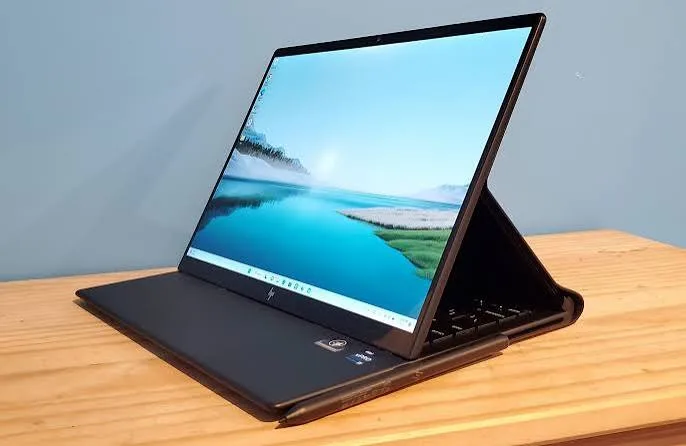
Our dedicated touchscreen laptop buying guide covered the practical basics of who benefits from touch input. This piece goes deeper into two specific Kenyan audiences where touchscreen functionality creates genuinely meaningful, not just convenient, value — students navigating increasingly digital coursework, and creative professionals building visual work — connecting to real touchscreen configurations available at City Gadgets Kenya.
The Genuine Shift in How Kenyan Students Study Digitally
It's worth situating this discussion within a broader, genuinely significant shift in Kenyan education over the past several years. As referenced throughout our law student and university freshers buying guides, coursework across Kenyan universities and colleges has moved substantially toward digital-first material — PDF textbooks and case law, digital lecture slides, and increasingly, digital submission and assessment platforms. This shift creates genuine, new daily interaction patterns that touch input serves meaningfully better than trackpad-only navigation.
Annotation-heavy reading is now a core daily student activity. As detailed in our law student buying guide specifically, highlighting, underlining, and margin-noting directly on digital documents has become a genuine daily study technique across many disciplines, not just law — medical students annotating diagrams, business students marking up case studies, humanities students highlighting key passages in digital readings. Touch input genuinely speeds and simplifies this specific interaction compared to trackpad-based selection and annotation tools.
Digital note-taking with a stylus increasingly substitutes for physical notebooks. Beyond simple touch, active pen support (discussed in our convertible laptop buying guide) allows students to write notes in their own handwriting directly into digital note-taking apps, combining the genuine cognitive benefits some research associates with handwritten note-taking against the practical convenience and searchability of digital storage — a genuine middle ground increasingly popular among Kenyan students who've grown up with both handwriting and digital tools as native parts of their education.
Why This Matters More for Kenyan Students Specifically Than a Generic Global Claim
It's worth being specific about the Kenyan context rather than treating this as a purely universal claim. Textbook costs and availability remain a genuine, practical constraint for many Kenyan students, making digital reading materials — whether official digital textbooks, shared PDF scans, or open educational resources — a genuinely more common primary study material than in some wealthier markets where physical textbook purchase remains more universally affordable. This makes the touch-based reading and annotation convenience discussed throughout this piece genuinely more central to daily Kenyan student life than it might be in a context where physical textbooks remain the dominant study material.
Creative Professionals: Touch as a Genuine Workflow Enabler, Not Just Convenience
Building on our graphic design and content creators buying guides, it's worth explaining specifically why touch input creates genuine workflow value for creative work, beyond the general convenience discussed in our dedicated touchscreen guide.
Direct manipulation feels genuinely more natural for visual, spatial creative tasks. Rotating, scaling, and positioning visual elements in design software — arranging elements in a social media graphic, adjusting a photo composition, sketching initial concept ideas — genuinely benefits from the direct, spatial interaction touch provides compared to the more abstracted cursor-based interaction a trackpad offers, since touch input maps your hand's actual physical movement directly onto the canvas rather than through an intermediary cursor.
Client presentation and feedback sessions benefit from touch-based annotation. As discussed in our content creators and graphic design buying guides, Kenyan creative professionals frequently present work directly to clients for feedback — touch input allows genuinely natural, immediate annotation and adjustment during these sessions, circling areas for revision or making quick adjustments live in front of a client, rather than needing to describe verbally what should change while the client waits for a subsequent revision.
Stylus-based sketching serves as a genuine entry point into digital illustration for creative professionals not yet ready to invest in a dedicated graphics tablet, as discussed in our graphic design buying guide — a touchscreen convertible with pen support offers a genuinely functional, more accessible starting point for exploring digital illustration work before committing to more specialised, expensive dedicated equipment.
The Genuine Cost-Benefit Calculation for These Two Audiences Specifically
Connecting back to the practical, honest cost discussion throughout our dedicated touchscreen buying guide: for students and creative professionals specifically, the modest price premium touchscreen functionality typically carries is more likely to be genuinely justified by real, felt daily workflow benefit than for buyers whose work is purely keyboard-and-mouse-oriented business tasks. This isn't a claim that every student or creative professional must have touch input — but it is a claim that these two audiences specifically are more likely to extract genuine, felt value from this feature than the average buyer, making the premium a more sensible investment for these specific use cases than a blanket recommendation would suggest.
A Practical Note on Choosing Between Touch-Only and Full Convertible for These Audiences
It's worth connecting this discussion back to the touch-versus-convertible distinction covered in our dedicated convertible laptop piece, specifically for these two audiences. Students primarily focused on reading, annotation, and note-taking often find a fixed-form touchscreen laptop, without the added cost of full 360-degree convertible functionality, genuinely sufficient for their needs — the core annotation and note-taking benefits discussed throughout this piece don't specifically require tablet or tent mode. Creative professionals doing more active sketching or wanting to hand a device to a client for direct interaction, however, more often benefit from the full convertible functionality discussed in our dedicated piece, since tablet mode specifically supports the more natural sketching angle and client hand-off scenarios common in creative work. This distinction is worth weighing honestly against your specific primary use pattern rather than defaulting to the more expensive full convertible option without a genuine, specific need for its additional folding functionality.
Frequently Asked Questions
Do all Kenyan students genuinely benefit from touchscreen laptops, or only specific disciplines? The general PDF-reading and annotation benefit discussed throughout this piece applies broadly across disciplines, though it's most pronounced for genuinely reading and case-study-heavy fields like law, medicine, and business, as detailed in our dedicated law student buying guide.
Is a full convertible laptop necessary for students wanting stylus note-taking, or does a touchscreen alone suffice? Active pen support specifically, as discussed in our convertible laptop buying guide, requires the right digitizer hardware regardless of whether the laptop folds into tablet mode — confirm pen support specifically rather than assuming any touchscreen includes it.
Should creative professionals prioritise touchscreen laptops over dedicated graphics tablets? Touchscreen laptops offer a more accessible, all-in-one entry point, as discussed above, though serious professional illustration work typically still benefits from a dedicated pressure-sensitive graphics tablet's finer control once a creative professional's needs grow more demanding.
Does touch input genuinely improve client presentation experiences, or is this overstated? Genuinely improves the immediacy and naturalness of live annotation during client feedback sessions, as discussed above, though the underlying creative work quality itself depends on the professional's skill rather than the input method alone.
Is it worth the touchscreen price premium for a student on a genuinely tight budget? Worth weighing against other specification priorities discussed throughout our student and budget-tier buying guides — if budget is genuinely constrained, prioritising RAM and processor generation over touchscreen functionality is generally the more impactful choice for overall coursework performance.
Can touchscreen functionality be added to a laptop after purchase if I decide I want it later? No — this is built into the specific display hardware at manufacturing, similar to other non-upgradeable hardware discussed throughout our catalog, meaning this decision needs to be made at the point of purchase.
Find the Right Touchscreen Laptop for Your Studies or Creative Work at City Gadgets Kenya
Every touchscreen laptop at City Gadgets Kenya has touch responsiveness tested and confirmed, backed by a genuine 6-month warranty. Browse our laptops category or message us on WhatsApp to find a configuration genuinely suited to your studies or creative work.








