Look at a new charger on a shop shelf and you will often see two letters in big print: GaN. Sellers promise it is smaller, cooler, faster and safer than "normal" chargers. Is that true, or is it a buzzword stuck on a box? This guide answers what is GaN charging in plain language: what gallium nitride is, why it lets chargers shrink, what it does and does not do for charging speed, how to pick a GaN charger for your phone or laptop, and how to avoid fake "GaN" chargers that are neither small nor safe.
If you want help choosing a charger, message City Gadgets Kenya on WhatsApp with your phone or laptop model.
The short version
- GaN stands for gallium nitride, a semiconductor material that can replace silicon in the switching parts of a charger.
- GaN switches faster and wastes less energy as heat, which lets designers use smaller components and make chargers noticeably more compact.
- GaN does not by itself make your device charge faster. Speed is set by the charger's wattage, the cable and what your device accepts. See USB Power Delivery explained.
- A GaN charger of a given wattage is usually smaller and cooler than an older silicon charger of the same wattage.
- Not all chargers labelled GaN are good. Design, protection and component quality still matter.
- Multi-port GaN chargers share their wattage across ports. Read the power-split table.
- Fakes exist. A "100W GaN" charger the size of a phone charger and priced like a toy is suspect.
| Feature | Traditional silicon charger | GaN charger |
|---|---|---|
| Size for 65W | Larger brick | Often 30 to 50 percent smaller |
| Heat | Warm to hot | Typically cooler for the same power |
| Efficiency | Good | Slightly higher |
| Price | Lower | Usually a bit higher, narrowing |
| Charging speed | Set by wattage | Set by wattage |
| Best for | Budget, low-wattage use | Travel, laptops, multi-device charging |
What is gallium nitride?
Chips inside electronic devices are made from semiconductors, materials that can be switched between conducting and not conducting. For decades the default material has been silicon. Gallium nitride (GaN) is a newer semiconductor with properties that suit power electronics better:
- A wider bandgap. Roughly speaking, GaN can withstand higher voltages and electric fields before it breaks down. Silicon has a bandgap of about 1.1 electron volts; GaN is about 3.4.
- Faster switching. Electrons move through GaN quickly, so it can switch on and off at much higher frequencies.
- Lower resistance for a given size, meaning less energy lost as heat when it conducts.
GaN is not new in technology: it has been used in LEDs for years (it is the reason blue LEDs exist) and in radio-frequency equipment. The charger industry adopted it for power conversion once manufacturing costs came down.
How a charger works, and where GaN fits
A wall charger converts mains AC (240V in Kenya) into the low-voltage DC your device needs. The conversion happens in stages:
- Rectification. The AC is converted to high-voltage DC.
- Switching. Transistors rapidly switch the high-voltage DC on and off, thousands or millions of times a second, creating a high-frequency signal.
- Transforming. A small transformer steps the voltage down to a safe level.
- Rectifying and smoothing. The output is converted back to smooth DC.
- Regulation and communication. Control chips adjust the output and talk to your device using protocols such as USB Power Delivery.
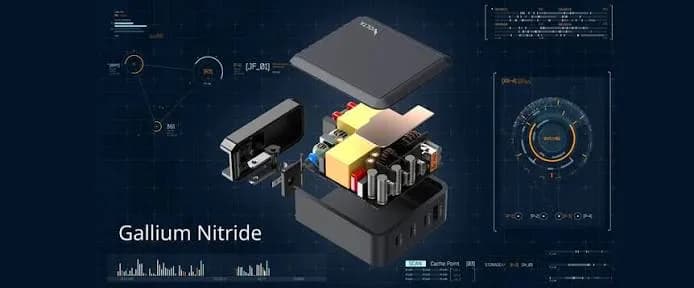
GaN replaces the silicon transistors in the switching stage. Because GaN switches faster with lower losses, the charger can run at a higher switching frequency. Higher frequency means the transformer and capacitors can be physically smaller for the same power, which is the main reason GaN chargers shrink. Lower losses mean less heat to dissipate, which is why they tend to run cooler and need less bulky heat-spreading.
What GaN does for you, and what it does not
Benefits
- Smaller and lighter. A 65W GaN charger can be about the size of an older 30W charger. This is a real benefit for travel and desks.
- Cooler operation. Less waste heat means a charger that is comfortable to touch in a hot Nairobi afternoon, though it will still get warm under load.
- Higher power in less space. A single compact charger can handle a laptop, which wasn't practical before.
- Better multi-port options. High-wattage chargers with several ports fit in a pocket-sized body.
- Efficiency. Slightly less energy wasted, though the saving on your electricity bill is tiny.
Limits
- It does not speed up charging by itself. A 20W GaN charger charges at 20W, the same as a 20W silicon charger.
- It does not guarantee quality. A badly designed GaN charger can still overheat. Protection circuits, insulation and component choice matter.
- It does not remove heat completely. A 100W charger under load gets warm.
- It does not make your battery last longer. Battery health depends on heat, charge levels and usage.
- It costs a little more, although prices have fallen as GaN became mainstream.
GaN generations: GaN, GaN II, GaN III and beyond
Manufacturers talk about GaN "generations" such as GaN II and GaNPrime. These reflect improvements in the control chips, switching designs and thermal layout rather than a fundamental change in the material. A newer-generation GaN design can be smaller, more efficient or able to deliver power more intelligently across ports. For buyers, the key is not the label's generation, but the actual measured size, wattage, protection features and brand reputation. If a seller makes grand claims about a "GaN 5" or "GaN 6" with no manufacturer data to back it, be sceptical.
GaN charging and USB Power Delivery
GaN is the hardware; USB PD is the language. A GaN charger usually supports USB PD, and often PPS for phones, so it can deliver the right voltage and current to each device.
- A 30W GaN charger suits a phone and tablet.
- A 45W GaN charger suits larger phones, tablets and ultrabooks. The Anker Nano Charger 45W in our range lists USB-C Power Delivery with PPS support, according to retailer listings; we confirm the details for the unit in stock.
- A 65W GaN charger suits most laptops plus a phone.
- A 100W GaN charger, such as the CMF Power 100W GaN Charger, can power a larger laptop or several devices at once.
- Power banks and desktop chargers can also use GaN to pack more watts into a smaller body.
When you buy, check the wattage, the port layout and the PD or PPS profiles, not just the "GaN" sticker. For Samsung phones, a PPS-capable charger matters; for iPhones, 20W to 30W PD is plenty.
Do you need a GaN charger?
You probably do if:
- You travel and want to carry a single compact charger for phone, tablet and laptop.
- You have a laptop that charges over USB-C.
- You want a multi-port desk charger.
- You dislike hot, bulky chargers.
You probably do not need one if:
- You only charge a phone at home and a basic charger works fine.
- Your budget is tight and a genuine standard charger of the right wattage meets your needs.
A genuine standard charger from a reputable brand is better than an unknown "GaN" charger. Quality and safety come before the material.
Multi-port GaN chargers: how power is shared
Multi-port chargers are where GaN shines, and where labels confuse. A charger marked "100W, 3 ports" does not supply 100W per port. It has a total power budget that is divided according to what is plugged in. Typical behaviour for a three-port charger:
| Ports in use | Possible output |
|---|---|
| One USB-C port | Up to 100W to one laptop |
| Two USB-C ports | For example 65W + 30W or 45W + 45W |
| Three ports | For example 45W + 30W + 18W, or lower on each |
The exact split depends on the model, and it should be printed on the charger or the manufacturer's page. Before you buy, add up what you want to charge at once and compare it with the split. A laptop that needs 65W plus a phone that wants 25W is 90W, so a 100W charger handles both, but a 65W charger would not.
Smart chargers recalculate every time you plug or unplug something. This is why you may notice a laptop slowing slightly when you plug in a phone. It is normal behaviour, not a fault.
Heat, safety and what "cool" really means
A GaN charger under heavy load is not cold. It may feel warm to hot, especially a high-wattage model charging a laptop in a warm room. The difference is that, for the same output, it should run cooler than an older silicon design of similar size, and it should shut down or reduce output if it gets too hot.
Signs of a healthy charger:
- Warm, but you can hold it comfortably.
- No burning smell, buzzing or crackling.
- No discolouration or softening of the plastic.
- Consistent charging speed, not sudden drops.
Signs of trouble: very hot casing, a smell of burning plastic, noisy whining, or intermittent charging. Unplug immediately and stop using it.
Safe habits:
- Give it air. Do not bury a charging charger under a pillow, clothing or papers.
- Use a genuine, undamaged cable. A frayed cable can overheat.
- Avoid cheap extension cords. They add resistance and heat. A quality surge-protected extension is better.
- Do not leave chargers plugged into a damp area.
- Unplug during storms or use surge protection.
- Replace chargers with cracked casings or bent pins.
GaN vs silicon: a fair comparison
Silicon chargers have not become obsolete. They are mature, cheap and perfectly adequate for low-power use. GaN wins as power rises and size matters. A sensible way to choose:
- Under 20W and budget-conscious: a genuine silicon charger is fine.
- 25W to 45W for a modern phone or tablet: GaN is nice to have, and many good chargers in this range use it.
- 65W and above for laptops: GaN is the sensible default because silicon bricks at these wattages are bulky.
- Multi-port desk chargers: GaN lets you fit the power in a reasonable body.
Remember that wattage, ports, protection and brand matter more than the material.
GaN in power banks, car chargers and hubs
GaN is not limited to wall chargers. It also appears in:
- Desktop chargers and power strips with several USB-C ports.
- Power banks, where it can pack higher output and faster recharging into a compact body.
- Car chargers, where small size and low heat help. Our Anker 67W car charger with cable charges a phone and even a small laptop from the 12V socket.
- Docks and hubs that pass power through to a laptop.
For power banks, capacity and airline limits matter as much as GaN; see power bank mAh vs Wh explained.
Which charger for which device?
| Device | Charger suggestion | Notes |
|---|---|---|
| Wireless earbuds | Any small 15W+ charger | GaN not necessary |
| Mid-range phone | 25W to 33W PD charger | GaN optional |
| Samsung Galaxy flagship | 25W or 45W PPS charger | Confirm PPS |
| iPhone | 20W to 30W PD charger | GaN gives a compact option |
| Tablet | 30W to 45W PD charger | GaN good for travel |
| Ultrabook | 45W to 65W GaN | Compact travel charger |
| Performance laptop | 100W GaN or higher | Check the laptop's requirement |
| Phone + laptop together | 100W multi-port GaN | Check power split |
Our accessories category includes Samsung, Anker and CMF chargers, and the laptops category lists laptops that charge over USB-C.
A short history: from silicon bricks to pocket chargers
For decades, chargers were silicon-based and followed a simple rule: more watts, bigger brick. Laptop chargers were famously bulky, with a heavy power block and a thick cable, and phone chargers were slow and small. Silicon switching technology reached its practical limits for size and heat. As manufacturers pushed for faster phone charging and USB-C laptop charging, they needed switching parts that wasted less energy. GaN, already proven in LEDs and radio equipment, became affordable enough for consumer chargers around the late 2010s. Within a few years, a 65W charger went from the size of a paperback to the size of a deck of cards. Silicon carbide (SiC), another wide-bandgap material, is used in higher-power applications such as electric vehicles and solar inverters; you will rarely see it in phone or laptop chargers.
Efficiency and your electricity bill
Efficiency measures how much of the mains power reaches your device and how much is lost as heat. A good silicon charger may reach roughly 85 to 90 percent efficiency at full load. A good GaN design can reach the low to mid 90s. On a 65W charger running flat out, the difference in wasted power is only a few watts. Over a year of normal use, the saving on a household electricity bill is small, perhaps a few shillings a month. Efficiency matters more for heat: wasted watts become heat inside a small plastic case, so a more efficient charger runs cooler and puts less stress on its components. Do not buy GaN to save on electricity; buy it for size, heat and convenience.
Another factor is standby power: even when nothing is connected, chargers draw a tiny amount. Quality chargers keep this very low. Unplugging chargers you do not use is still a good habit, particularly with unknown brands.
Packing for travel: what a GaN charger replaces
Imagine a typical working traveller. Without GaN she carries a laptop brick, a phone charger, a tablet charger and an earbuds cable, four items and a tangle of cables. With one 65W or 100W multi-port GaN charger and two or three cables she charges the laptop, phone and earbuds from a single wall socket. That also means she needs only one plug adapter abroad, and in a hotel with a single socket she can charge everything overnight. For Kenyan travellers who use hotels, conferences and co-working spaces, where sockets are scarce, this is the biggest practical benefit of GaN.
Packing tips:
- Carry one quality multi-port charger and two or three good cables (one 5A e-marked cable for the laptop).
- Check the charger's input range (100-240V) before travelling abroad, and carry the right plug adapter.
- Keep chargers in a small pouch to protect the pins and cables.
- Do not pack a power bank in checked luggage; see our power bank guide.
Wireless and magnetic charging: where GaN fits
Wireless chargers still take their power from a wall adapter. A GaN adapter can make the whole setup smaller, particularly stands and travel pads that need a decent wattage. Our range includes the Anker 3-in-1 cube with MagSafe, which charges several Apple devices at once. For wireless charging the main limits are the wireless standard and the efficiency of the coil, which loses more energy as heat than a cable. If speed matters, a cable remains faster and cooler.
How to test a charger with a USB power meter
A small USB power meter, a plug-in device that displays volts, amps and watts, is a cheap way to verify any charger and cable. Here is how to use it.
- Plug the meter between the charger and the cable, or between the cable and the device, depending on its design.
- Plug in a phone or laptop that can draw the charger's full power.
- Read the volts and amps. A 65W PD charger charging a hungry laptop should show around 20V and about 3.25A. A phone with PPS may show changing voltage as it charges.
- Check the wattage against the label. If the meter shows far less, suspect the cable, the device's limit or a fake charger.
- Test with a different cable to rule out a bad cable.
- Repeat when the battery is low, because devices draw less as they fill.
Meters are inexpensive and invaluable for checking a suspicious charger or cable. Note that a meter measures what is delivered, which depends on what your device requests, so test with a device that can use the full power.
What to look for in reviews and specifications
When you research a GaN charger, look beyond the headline wattage.
- Port layout and power split table. Does it do what you need with two or three devices connected?
- Supported protocols. USB PD, PPS and, if you need them, other fast-charging standards.
- Protection features. Over-voltage, over-current, over-temperature and short-circuit protection should be listed.
- Size and weight. Compare against similar wattage chargers.
- Foldable pins if you travel.
- Cable included or not. A quality cable in the box is a real saving.
- Warranty and brand support.
- Independent reviews that measure output, not just repeat the marketing.
Maintenance and lifespan
Chargers last for years if treated well. Avoid yanking the cable by the wire, which loosens connectors. Keep the charger dry. Wipe dust from the pins with a dry cloth. If the casing cracks, the pins loosen or you notice smells or noises, replace the charger. Treat cheap chargers as consumables and quality chargers as long-term tools.
Choosing by scenario
The phone-only household. You charge one or two phones and a pair of earbuds. A genuine 25W to 45W charger from a trusted brand does the job. GaN gives a smaller plug that will not block the neighbouring socket on a crowded extension, but it is a nicety, not a necessity.
The remote worker. You use a USB-C laptop, a phone and earbuds at a desk. A 65W or 100W multi-port GaN charger lets you charge all three from one socket, and a spare cable keeps the setup tidy. Pair it with a surge-protected extension and, if power cuts are frequent, a UPS or a PD power bank.
The student. Hostel sockets are scarce. A compact 45W or 65W GaN charger that powers a laptop and a phone, plus a short cable, is a good investment that survives years in a backpack.
The frequent traveller. Choose a charger with foldable pins, a wide input range and enough wattage for your laptop. Add a 5A cable and a small pouch.
The creator. Camera batteries, tablets, laptops and phones all need power. A 100W multi-port charger and a quality power bank keep the kit running on shoots.
The car commuter. A 67W car charger with a cable, like the one in our range, keeps phones topped up in traffic and can help a laptop on long trips.
Common myths about GaN charging
"GaN charges your phone faster." Not on its own. Wattage and supported protocols decide speed.
"GaN chargers never get hot." They get warm. They tend to be cooler than equivalent older chargers.
"GaN is a gimmick." It is real technology that enables smaller, more efficient chargers, even if marketing sometimes oversells it.
"All GaN chargers are good." Quality varies by brand and design.
"GaN will ruin my battery." No. Your battery is protected by your device's own charging circuit.
"I need GaN for a phone." No, but it can be a nice compact option.
"A tiny charger claiming 100W must be GaN." It might be a fake. Check the brand and listing.
Troubleshooting GaN and fast chargers
The charger is warm. Normal under load. Very hot, or hot with no load, is not. Unplug and replace.
It charges my phone but not my laptop. Check the charger's wattage against the laptop's requirement, and use a 5A e-marked cable for 100W. Confirm the laptop's USB-C port supports charging.
It charges slowly when two devices are connected. That is the power split at work. Charge the laptop alone, or use a higher-wattage charger.
It makes a faint whine. Some coil whine is normal at certain loads. A loud buzz or crackle is not.
My phone says "charging slowly". The cable, the charger or the port may be limiting. Swap the cable first, then check for lint in the port.
It clicks on and off. This can indicate a failing cable, a loose connector or a protective shutdown. Replace the cable, and if the problem continues, retire the charger.
It works in one socket but not another. Check the socket and extension. Poor contacts reduce power. Our repair desk can inspect devices if a charging port is damaged.
The honest bottom line
GaN is a genuine improvement, and for laptop and multi-device charging it is the sensible choice. It makes chargers smaller and cooler, which is why we recommend it for travel, desks and anyone tired of carrying bricks. It is not a magic speed upgrade, and the word GaN on a box proves nothing about quality. Buy from a trusted brand, check the wattage and ports, read the power split, use the right cable and buy from a seller who can support you after the sale. If you tell us what you charge, we will tell you the smallest, simplest and safest setup that does the job.
A note on cables and GaN
A compact GaN charger is only as good as the cable you plug into it. A short, well-made cable wastes less power as heat and carries the full current. Long, thin cables lose voltage and can slow charging. For 100W, always use a 5A e-marked cable; for 60W and below, a decent 3A cable is fine. We stock Anker cables up to 240W; ask us which length suits your desk or travel bag.
How to spot a fake GaN charger
GaN is a selling point, so counterfeiters and careless sellers print it on chargers that are not GaN at all, or copy the look of premium brands such as Anker. Fake chargers are a real safety risk. Use these checks.
1. Size and weight against wattage. A genuine 65W or 100W GaN charger is compact but not weightless; it contains real components. If a "100W GaN" charger is as small and light as a 5W phone charger, it is suspect. Equally, if it is as large and heavy as an old brick, it is probably not GaN.
2. Price. GaN chargers from reputable brands have a floor price. A price far below the market is a warning. A very cheap "GaN 100W" is almost certainly mislabelled or unsafe.
3. The label. The output profiles should be listed in detail (for example 5V 3A, 9V 3A, 15V 3A, 20V 5A). A label that shows only "5V 2A" next to a "100W GaN" marking contradicts itself. Look for model and serial numbers, regulatory marks and sharp printing.
4. Brand verification. Compare the model number and appearance with the manufacturer's website. Some brands offer ways to verify authenticity; use them when available.
5. Packaging. Genuine boxes have crisp printing, consistent model names and correct logos. Spelling mistakes, blurry images and missing information are warning signs.
6. Performance test. A USB power meter shows the volts, amps and watts the charger actually delivers. A charger that cannot hit its rated wattage, or that collapses when two ports are used, is not what it claims.
7. Heat and noise. Excess heat, buzzing or coil whine at normal loads indicates poor design.
8. Build quality. Tight seams, firm plug pins and clean finishing are signs of quality. Gaps, wobble and rough edges are not.
9. Seller and warranty. A genuine seller supplies a receipt and warranty and can answer technical questions.
10. Trust your instincts about extremes. If the claim sounds too good to be true, it usually is.
If you are unsure about a charger you own, bring it to the shop or send photos of the label and the plug on WhatsApp.
Why buy GaN chargers from City Gadgets Kenya
- Genuine Samsung, Anker and CMF chargers, power banks and cables, sealed and verified.
- Honest recommendations. If a standard 25W charger fits your phone, we say so. If you need 100W for a laptop, we say that too.
- We confirm what is inside. Whether a model uses GaN, supports PPS or has a particular power split is checked against the manufacturer's information.
- A real shop in Nairobi CBD at New Alnoor Exhibition, Second Floor, Shop C7, Accra Road, where you can compare size and weight in your hand.
- Same-day delivery in Nairobi and next-day outside Nairobi, with M-Pesa payment.
- After-sales support for compatibility and faults.
- Message us for today's price. Prices change, so we quote the current price on WhatsApp.
Browse the full accessories category.
Frequently asked questions
What is GaN charging? Charging using a charger built with gallium nitride transistors, which allow smaller, cooler and more efficient designs than traditional silicon.
Is GaN better than silicon? For higher-wattage, compact chargers, generally yes. For low-power chargers, silicon is perfectly fine.
Does GaN charge faster? Not by itself. Charging speed depends on wattage and the protocols your device uses.
Is GaN safe? Yes, when the charger is well-designed and genuine. Fakes are the risk.
Does GaN last longer? Quality components and design matter more than the material, but cooler operation can help longevity.
Can a GaN charger charge my phone? Yes. Most GaN chargers support USB PD, and the phone takes what it needs.
Can I charge a laptop with a GaN charger? Yes, if the wattage meets the laptop's needs and the laptop charges over USB-C.
Why is my GaN charger warm? All chargers produce some heat. Warm is normal; very hot is not.
Is a more expensive GaN charger worth it? Usually it means better protection circuits, tested components and warranty, which matter for safety.
How do I know if a charger is really GaN? Check the brand's specifications and compare size, weight and price. Be wary of unverified claims.
Can I use a GaN charger abroad? Most accept 100 to 240V, but check the label and use the correct plug adapter.
Do you sell genuine Anker, Samsung and CMF chargers? Yes. Message us for today's price and availability.
Ready to choose?
Tell us what you need to charge, and we will recommend the right wattage, confirm compatibility and deliver the same day in Nairobi.
WhatsApp: wa.me/254745575931 Visit: New Alnoor Exhibition, Second Floor, Shop C7, Accra Road, Nairobi CBD. Same-day delivery in Nairobi; next-day outside Nairobi.
Related reading: USB Power Delivery explained, power bank mAh vs Wh explained, best power bank in Kenya.