Walk into any electronics shop and the labels fly at you: "2.1 channel", "3.1", "5.1", "7.1.4", "Dolby Atmos", "1000 W". If you have ever wondered what does 5.1 and 2.1 mean, whether more channels always sound better, why a "5.1" bar can have only one box on the TV stand, and whether you really need rear speakers, this guide will settle it. We explain what a channel is, what the ".1" means, how soundbars create surround without speakers behind you, how to match a setup to your room and viewing habits, how to place the speakers, and how to see through spec-sheet tricks. We use real products from our range as examples: the Hisense HS1800, HS2100, HS3100, HS5100 and AX5100Q, the Sony HT-S400, HT-S20R, HT-S40R and HT-S60, the JBL 2.1 MK2 and JBL Bar 800 MK2, the Logitech Z906 5.1 system and the Nobel multimedia speaker systems. We finish with how to spot fake or exaggerated audio claims.
The short version
- A channel is a separate stream of audio sent to a speaker or group of speakers.
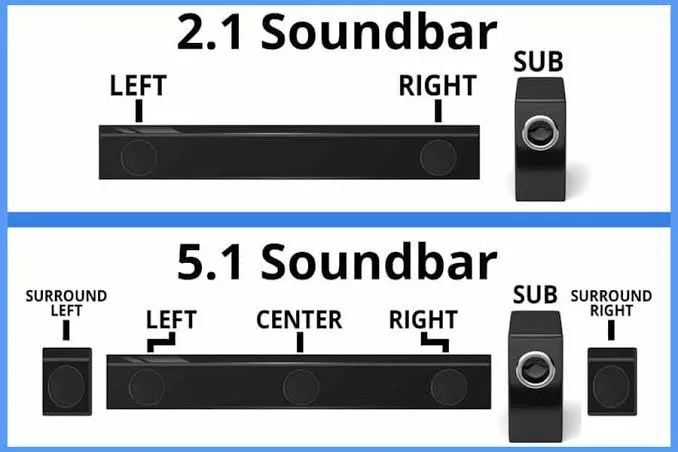
- The number before the dot counts the full-range channels (left, right, centre, surrounds). The number after the dot counts subwoofer channels for deep bass.
- 2.1 is a stereo pair plus a subwoofer. 3.1 adds a centre channel for dialogue. 5.1 adds two surround channels behind or beside you. 7.1 adds two more.
- More channels give a wider, more immersive sound only if the speakers are really there and placed sensibly. A cheap 5.1 system can sound worse than a well-made 2.1.
- Soundbars without rear speakers use virtual surround, which is a clever illusion, not true surround.
What is a "channel"?
In audio, a channel is a separate signal intended for a specific speaker position. Mono has one channel. Stereo has two: left and right. When a film is mixed for surround, the sound team creates more channels so that, for example, a character's voice comes from the centre, a car passes from left to right across the front speakers, and rain surrounds you from behind.
Think of it as the difference between hearing a band from one speaker, from two speakers, and from a speaker for each musician around the room. More channels allow more precise placement.
What does the ".1" mean?
The ".1" refers to the LFE (Low-Frequency Effects) channel, the dedicated channel for deep bass sent to the subwoofer. It is called ".1" because it covers only a narrow range of frequencies (roughly below 120 Hz), so it counts as a "tenth" of a channel by convention. A subwoofer handles explosions, engines, drum hits and bass notes, relieving the smaller speakers of the heaviest work. This is why even a modest soundbar with a subwoofer sounds much fuller than one without.
The common layouts, one by one
2.0 (stereo)
Left and right. The classic pair of speakers, or a basic soundbar with no subwoofer. Good for music and clear dialogue, with limited bass and no real surround.
2.1
Left and right speakers plus a subwoofer. This is the most common soundbar layout in Kenya. Examples: the Hisense HS1800 (2.1, 140 W maximum, wireless subwoofer, HDMI ARC, Bluetooth 5.3), the Hisense HS2100 (2.1, wireless subwoofer) and the Sony HT-S400 (2.1, 330 W, wireless subwoofer). The JBL 2.1 MK2 is a speaker system rather than a bar: two compact main speakers and a dedicated subwoofer.
Best for: small and medium rooms, bedrooms, bedsitters, offices, and anyone who wants better TV sound with minimal fuss.
3.1
Left, right and centre channels plus a subwoofer. The centre channel is dedicated to dialogue, which is what you hear most of the time in films and news. Hisense's HS3100 is listed as 3.1 with 480 W maximum, a wireless subwoofer, HDMI ARC and Bluetooth 5.3. The Nobel NB2070 is listed as a 3.1 tall-boy system, though note that its headline "55,000 W PMPO" figure is a marketing peak figure and one retailer lists about 200 to 220 W RMS.
Best for: people who watch a lot of TV and films and struggle to hear dialogue, in medium rooms.
5.1
Five full-range channels (left, centre, right, left surround, right surround) plus a subwoofer. This is the standard for home cinema and DVD/Blu-ray surround. Examples: Sony HT-S20R (5.1, 400 W, wired subwoofer and wired rear speakers), Sony HT-S40R (5.1, 600 W, wireless rear speakers that still need power), Sony HT-S60 (5.1, 1,000 W, wireless subwoofer and rear speakers, Dolby Atmos and DTS:X), Hisense HS5100 (5.1, 540 W, with rear speakers that listings describe as wired or wireless, so confirm), Hisense AX5100Q (5.1, 580 W, Dolby Atmos and DTS:X, semi-wireless rears) and the Logitech Z906 (a full 5.1 satellite system commonly quoted as 500 W RMS and 1,000 W peak; we confirm for the unit you order).
Best for: living rooms where you want a genuine sense of sound behind you, for films, series and games.
5.1.2, 7.1, 7.1.4 and beyond
Additional ear-level speakers (7.1) and height channels (the third number, as in 5.1.2 or 7.1.4) for Dolby Atmos and DTS:X. These need either more speakers, up-firing drivers or virtual height processing. We cover them in our blog on spatial audio and Dolby Atmos.
| Layout | Speakers (full-range) | Subwoofer | Typical form | Best for |
|---|---|---|---|---|
| 2.0 | 2 | None | Basic bar or pair | Music, small rooms |
| 2.1 | 2 | 1 | Bar + sub, or two speakers + sub | Small to medium rooms |
| 3.1 | 3 | 1 | Bar with centre + sub | Dialogue-heavy viewing |
| 5.1 | 5 | 1 | Bar + sub + two rear speakers | Living rooms, home cinema |
| 5.1.2 | 5 + 2 height | 1 | Atmos bar + rears | Premium TV and film |
| 7.1.4 | 7 + 4 height | 1 | Receiver + many speakers | Dedicated cinema rooms |
How can one soundbar claim 5.1 or 7.1 if it is just a bar?
This is the biggest source of confusion. There are three different meanings.
1. True channels with real speakers. A 5.1 system with a bar, a subwoofer and two real rear speakers has speakers in all five positions. This is genuine surround, as in the Sony HT-S20R, HT-S40R and HT-S60, and the Hisense HS5100 and AX5100Q.
2. Virtual surround. A bar with only front speakers uses digital processing to make sound appear to come from beyond the bar. Brands call this "virtual surround", "DTS Virtual:X" or similar. It can widen the soundstage and sometimes impressively so, but it cannot put sound behind your head the way real rear speakers can. The Hisense HS2100 and HS3100 list DTS Virtual:X.
3. Marketing channels. Some products claim "5.1" or "7.1" because they have multiple drivers inside one box, or because their processing accepts a 5.1 signal. A single box cannot recreate rear speakers. Be sceptical of claims on small, cheap bars.
The honest ranking for surround realism: real rear speakers beat virtual surround, and virtual surround beats plain stereo.
Do you actually want rear speakers?
Rear speakers add real surround, but also add cost, cables or power sockets, and placement demands.
Wired rear speakers (such as those on the Sony HT-S20R) need cables running from the subwoofer or bar to the back of the room. They are reliable but untidy; cable covers or a plan before installation help.
Wireless rear speakers (as on the HT-S40R, HT-S60 and Hisense AX5100Q) connect to the bar or subwoofer by radio, so there is no signal cable, but they still need mains power. You need a socket near each rear speaker, or an extension cable run neatly.
Battery rear speakers exist on some premium bars (the JBL Bar 800 MK2 uses detachable rear speakers that run on rechargeable batteries), avoiding both cables and sockets at the cost of recharging.
If you rarely watch films and mostly watch news, sport or music videos, rear speakers are unlikely to change your life. If you love films, series and games, they transform the experience.
Which layout for which room?
| Room | Suggested layout | Why |
|---|---|---|
| Bedsitter or studio, 2 to 3 metres from TV | 2.1 compact bar | Small space, neighbours, no room for rears |
| Bedroom | 2.1 | Simple, clear dialogue, night mode |
| Small living room | 2.1 or 3.1 | Dialogue and bass without clutter |
| Medium living room | 3.1 or 5.1 | Depends on how much you love films |
| Large living room or open plan | 5.1 or Atmos system | Needs power and spread |
| Office or reception | 2.1 or Bluetooth speaker | Music and background |
| Church or small hall | Dedicated PA system, not a home soundbar | Home systems are not built for large rooms |
| Gaming desk | 2.1 PC speakers or a headset | See our PC speaker guide |
Where to put the speakers
Soundbar. Centre it below or in front of the TV, close to ear height if possible. Do not place it inside a closed cabinet. If wall-mounting, keep the bar clear of the TV's infrared receiver and consider the height.
Subwoofer. Bass is the hardest part to place. Try the front corner first (corners boost bass), then move it a metre along the wall if it sounds boomy. On upstairs floors, use rubber feet to reduce vibration to the room below. Neighbours in flats appreciate a night mode.
Rear speakers. Place them beside or slightly behind the main seating position, at or just above ear height, facing inwards. Directly behind a sofa against a wall works well. Equal distances left and right matter more than perfection.
Seating. Sit within the "sweet spot," roughly central. Surround effects diminish for seats far to the side.
Room acoustics. Bare tiled floors and walls echo; rugs, curtains and sofas soak up reflections and improve clarity.
More channels is not automatically better
A tempting rule is "5.1 beats 2.1". Reality is more subtle. Sound quality depends on:
- The quality of the drivers (the actual speaker cones). A well-made pair of stereo speakers can outperform five tiny, cheap satellites.
- The amplifier. Underpowered or poorly designed amplification distorts at the volumes you want.
- The cabinet and construction. Rigid cabinets and sensible porting give cleaner sound; thin plastic rattles.
- The tuning. Good engineers shape the sound so that dialogue is clear and bass is controlled. Cheap systems often boost bass and treble to impress in a shop.
- Placement and room. A well-placed 2.1 beats a badly placed 5.1.
Rather than counting channels, ask three questions: Is the dialogue clear? Is the bass controlled? Does the system stay clean at the volume I actually use? If the answer is yes for a 2.1 bar, it may serve you better than a 5.1 system that sounds muddy.
That said, for films and games, real rear speakers make a difference that no stereo system can match. The choice depends on what you watch.
The centre channel: why it matters more than you think
In most films, series and news broadcasts, the majority of what you need to hear is speech, and in surround mixes, speech is routed mainly to the centre channel. A system with a dedicated centre speaker places dialogue firmly on the screen, separate from music and effects, so it stays clear even when the action is loud.
A 2.1 bar has no centre speaker. It creates a phantom centre from the left and right speakers. That works, but dialogue can feel less anchored and be masked by effects. This is why a 3.1 bar like the Hisense HS3100, or any 5.1 system, often sounds clearer for speech. Many bars also offer a dialogue or voice mode that boosts speech frequencies. Sony's HT-S60 lists Voice Zoom 3 for this.
If you often turn the volume up to hear speech and then down when the action starts, you are a good candidate for a centre-channel system.
The subwoofer: size, placement and wired vs wireless
The ".1" does a lot of work, and subwoofers vary widely.
Size. Larger drivers move more air and reach lower. Our Hisense AX5100Q lists a 6.5-inch wireless subwoofer; the Nobel NB1211 lists a 12-inch bass driver in a wooden cabinet. Bigger is not always better in a small room, where a huge subwoofer can boom and annoy neighbours.
Wired vs wireless. A wireless subwoofer (as on the Sony HT-S400, Hisense HS1800, HS2100 and HS3100) connects to the bar by radio and needs only a power socket, so you can put it where it sounds best. A wired subwoofer (as on the Sony HT-S20R) is connected by cable to the bar.
Level and crossover. Most bars let you adjust the subwoofer level. Start low and raise it until bass is full but does not mask speech. If your bar has a "night mode," use it late at night: it reduces bass and loud peaks.
Neighbours and walls. Bass travels through walls and floors. In flats and apartments, place the subwoofer on a rug or rubber feet, avoid placing it against a shared wall and keep the level reasonable.
Dolby Digital, DTS and the formats behind the numbers
Channel counts describe the layout. Formats describe how the audio is encoded. Common ones include:
- Dolby Digital (5.1): the standard for DVD, TV broadcasts and many streams.
- Dolby Digital Plus: an improved, more efficient version used by streaming services, including for Atmos.
- Dolby TrueHD and DTS-HD Master Audio: lossless formats on Blu-ray, needing eARC to pass to a bar.
- Dolby Atmos and DTS:X: object-based formats that add height; see our Atmos explainer.
- DTS Virtual:X and similar: virtual surround processing.
A 5.1 bar can play a stereo programme in two ways: as plain stereo, or upmixed to fill all speakers, which creates a surround impression from stereo material. Upmixing is pleasant for sport and music, but it is processing, not true surround. Your bar's remote typically has modes such as Movie, Music, Sports, News, Game and Night. Try each with content you know. See our blog on HDMI ARC and eARC for how to connect the bar so these formats reach it.
Soundbar vs speaker system vs home theatre receiver
| Option | Examples | Strengths | Weaknesses |
|---|---|---|---|
| Soundbar (2.1/3.1) | Hisense HS1800, HS2100, HS3100; Sony HT-S400 | Simple, tidy, big upgrade over TV speakers | Limited surround |
| Soundbar + rears (5.1) | Sony HT-S20R, HT-S40R, HT-S60; Hisense HS5100, AX5100Q | Real surround, easy setup | Rear speaker placement, sockets |
| Detachable-rear soundbar | JBL Bar 800 MK2 | Wireless rears without sockets (battery) | Rears need recharging |
| 2.1 desktop/living speakers | JBL 2.1 MK2 | Strong bass, simple | No true surround |
| Multimedia speaker systems | Nobel NB2040, NB2070, NB1211 | Loud, Bluetooth/USB/FM, parties | Inflated power claims, less refined |
| 5.1 PC/home system | Logitech Z906 | Powerful, multiple inputs, THX certified | Wires, bulk, no HDMI ARC convenience |
| AV receiver + speakers | Not in our range | Best quality and flexibility | Cost, complexity |
Multimedia speaker systems like the Nobel range are popular in Kenyan homes for their volume, bass and extras such as Bluetooth, USB, SD card playback, FM radio and a remote. They are not built for the clarity and dialogue focus of a TV soundbar, and their power figures are typically peak marketing numbers (the NB2070's headline 55,000 W PMPO versus a roughly 200 to 220 W RMS figure from one retailer). They suit music and general entertainment more than critical film watching. See our blog on watts, RMS and PMPO.
An upgrade path you can follow over time
You do not have to buy the biggest system on day one. Many of our customers build in stages, and it makes sense financially.
Stage 1: A 2.1 soundbar with a wireless subwoofer. The biggest jump from TV speakers. Connect by HDMI ARC, enable CEC, enjoy clearer dialogue and real bass. Examples in our range: Hisense HS1800 or HS2100, Sony HT-S400.
Stage 2: A 3.1 bar with a centre channel. If dialogue remains a problem, or the room is bigger, step up. Example: Hisense HS3100.
Stage 3: A 5.1 system with real rear speakers. When you start watching more films and series and want the sound around you. Examples: Sony HT-S20R (wired rears), HT-S40R (wireless rears), Hisense HS5100.
Stage 4: A premium Atmos system. When your TV, your content and your room justify it. Examples: Sony HT-S60 or Hisense AX5100Q, connected by eARC where possible.
A caution: unless a soundbar is part of an expandable system from the same maker, you generally cannot add rear speakers later; check whether the bar supports optional rears before assuming so. It is often more sensible to buy the layout you want from the start than to plan an upgrade that the product does not support.
A worked example: choosing for a real room
Consider a family in a three-bedroom house in Kilimani with a 55-inch TV on a wall in a living room of about four by five metres. They watch Citizen news and Netflix series in the evening, the children play console games on weekends, and the neighbours in the flat below are sensitive to noise.
Their needs: clear dialogue for news and series, enjoyable bass for films, a game mode, a night mode, and moderate volume.
The analysis: a 2.1 bar would improve things but might leave dialogue anchored weakly. A 5.1 system would give surround but needs sockets and cable planning in a room where the sofa is against the back wall. The neighbours' sensitivity argues against an enormous subwoofer.
The recommendation: either a 3.1 bar (centre channel for speech, wireless subwoofer with moderate level) or a modest 5.1 system with rear speakers placed on the side walls and the subwoofer set low with night mode enabled for late viewing. The 3.1 route is simpler; the 5.1 route is more immersive for films and games. We would ask whether they care more about simplicity or immersion, and let their answer decide.
This is typical of the conversations we have: no single answer is right, and the best choice depends on room, habits and neighbours. Message us with your own details and we will talk it through.
How many speakers is too many?
At some point, adding channels yields little. In a small room, a 7.1 system with large speakers is overkill, and the reflections from nearby walls blur the effect. In a mid-sized room, the practical sweet spot for most households is 3.1 to 5.1. More speakers need more cables, more power sockets, more space and more calibration. If you won't use the extra channels, you pay for complexity without enjoyment. Choose the simplest layout that does what you want.
Matching the layout to how you watch
News, sport and series with dialogue: a 3.1 bar or any system with a centre channel and a dialogue mode.
Films and streaming dramas: 5.1 with real rear speakers, ideally with Atmos for premium content.
Gaming: a bar with a game mode and low delay; real rear speakers help you place footsteps. For competitive gaming, a headset may help more. See our gaming headset guide.
Music: a good 2.1 system often beats a cheap 5.1 for music. Wireless streaming over Bluetooth helps, as does a separate music mode.
Church, school or event use: a PA system, not a home bar.
A child's room or a bedsitter: a compact 2.1 bar with night mode.
Mixed use: a 3.1 or 5.1 bar with sound modes for each activity.
Common myths
Myth: "Higher watts means better sound." Watts measure power, not quality. A clean 100 W can sound better than a distorted 1,000 W claim.
Myth: "5.1 means five speakers in one bar." Real 5.1 means separate speakers around the room, or a bar plus rear speakers. A single bar cannot reproduce rears.
Myth: "A subwoofer is optional." For TV and films, it makes the biggest single difference, since TV and bar speakers are small.
Myth: "I need Atmos for good surround." No. Good 5.1 gives most of the benefit for most people.
Myth: "Wireless means no cables." Wireless speakers still need power sockets (unless they are battery-powered).
Myth: "The box says 7.1, so it is 7.1." Check the actual number and placement of speakers.
Myth: "More speakers always means a bigger room can be filled." Power, driver size and placement matter as much.
A listening checklist for the shop or showroom
- Dialogue. Play speech at a moderate level. Is every word clear without straining?
- Bass. Play a bass-heavy scene. Does the subwoofer sound tight, or boomy and slow?
- Width. Play rain, crowds or music. Does sound extend beyond the edges of the TV?
- Rears. Play a scene with sounds behind you. Can you hear them?
- Volume headroom. Turn up to a loud level. Does the sound stay clean?
- Night mode. Does it keep speech clear while reducing loud peaks?
- Music mode. Does the sound remain natural?
- Connections. Does it connect to your TV the way you need? Check ARC, optical and Bluetooth.
Bring a clip or two from the content you actually watch. Showroom demo clips are designed to impress; your own content tells you the truth.
Troubleshooting channel and surround problems
Only the front speakers work. The content may be stereo, or the bar may be in stereo mode. Switch to a surround or movie mode and check the source's audio format.
Rear speakers silent. Check their power, pairing and level settings. Many wireless rears need to be re-paired after a power cut.
Dialogue is lost in the effects. Raise the centre or voice level, use a dialogue mode, or use night mode.
Bass is boomy or muddy. Move the subwoofer, lower its level, or remove it from the corner.
Bass is weak. Raise the subwoofer level, check wireless pairing and make sure it is not facing a wall too closely.
The bar is out of sync with the picture. Adjust lip-sync settings on the TV or bar.
Everything sounds tinny. The TV may still be playing its own speakers; set sound output to the soundbar.
How to spot fake or exaggerated audio claims
Some products are outright counterfeits, and many more are honest hardware with dishonest labels. Here is how to protect yourself.
- PMPO and peak watt claims. If a small system advertises tens of thousands of watts, that is PMPO, a meaningless peak figure. Look for RMS.
- Channel count claims. A single soundbar claiming "7.1" or "5.1" without separate rear speakers is using virtual processing at best.
- Check the connections. A bar claiming Atmos with no HDMI port is not delivering Atmos.
- Weight and build. Genuine multi-speaker systems have real weight. Light, hollow units are suspect.
- Check the manufacturer's site. Sony, Hisense, JBL and Logitech list model numbers and specifications. A non-existent model is a fake.
- Look at the box. Serial numbers, regulatory marks, accurate printing and correct brand fonts.
- Listen at volume. Fakes distort early, buzz or lack bass.
- Be wary of "too good" prices. A branded 5.1 system at a fraction of the usual price is a warning.
- Check the warranty and keep your receipt.
- Buy where you can listen and where the seller will explain the specifications honestly.
The bottom line
Channels describe where sound can come from; quality, placement and honesty of the specifications decide how good it actually is. A 2.1 bar is the sensible first step for most homes, a 3.1 bar helps if dialogue matters, and a 5.1 system with real rear speakers is worth it if you love films and games and have the room. Be sceptical of giant power numbers, ask what the "5.1" consists of, and check that the bar connects to your TV the way you need. If you want a second opinion on a specific model or room, message us on WhatsApp.
Why buy your soundbar or speaker system from City Gadgets Kenya
- Genuine Sony, Hisense, JBL, Logitech and Nobel products, with channel layout, connections and power ratings confirmed for the exact unit.
- Layout advice for your room. Tell us the room size and your TV and we will say whether 2.1, 3.1 or 5.1 makes sense, rather than selling the biggest box.
- Honest power figures. We tell you when a headline number is a peak or marketing figure.
- A real shop in Nairobi CBD at New Alnoor Exhibition, Second Floor, Shop C7, Accra Road, where you can hear products.
- Same-day delivery in Nairobi and next-day outside Nairobi, with M-Pesa payment.
- After-sales support for setup, pairing and troubleshooting.
Browse our accessories category.
Frequently asked questions
What does 2.1 mean on a soundbar? Two main speakers (left and right) plus a subwoofer for bass.
What does 5.1 mean? Five main channels (left, centre, right and two surrounds) plus a subwoofer.
Is 5.1 always better than 2.1? Not automatically. It gives real surround if the rear speakers are present and well placed, but a good 2.1 can beat a poor 5.1.
Do I need rear speakers? Only if you want true surround for films and games. For news, music and sport, you may not.
What is the difference between 3.1 and 2.1? 3.1 adds a centre speaker for clearer dialogue.
Can a single soundbar give true surround? It can give virtual surround, a convincing widening, but not sound from behind you.
Why do my rear speakers need power? Wireless rears receive their signal by radio but still need electricity to run their amplifiers.
What is PMPO? A peak marketing figure that is not comparable with RMS. Judge power by RMS.
What size room suits a 5.1 system? Medium to large living rooms. Compact rooms suit 2.1 or 3.1.
Can you recommend a system for my room? Yes. Tell us the room size, your TV and what you watch.
Ready to choose?
Send us your room size, TV model and what you watch, and we will recommend the right layout and product.
WhatsApp: wa.me/254745575931 Visit: New Alnoor Exhibition, Second Floor, Shop C7, Accra Road, Nairobi CBD. Same-day delivery in Nairobi; next-day outside Nairobi.
Related reading: best soundbars in Kenya, home theatre systems guide, watts, RMS and PMPO explained.