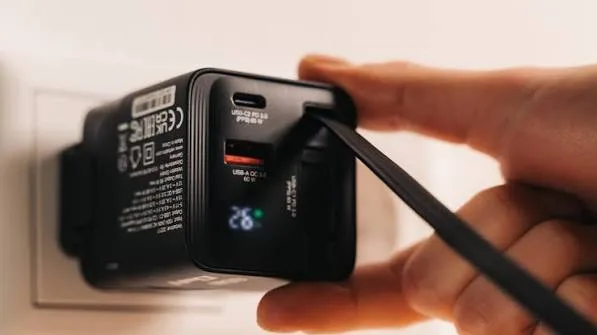
You buy a "65W" charger and your laptop still says "charging slowly". You plug a fast charger into your phone and it charges at half speed. You pick up a USB-C cable that looks identical to the one in the box and your laptop refuses to charge from it. These frustrations come from one confusing fact: USB-C is a connector, not a charging speed. The charging speed is decided by a negotiation called USB Power Delivery (USB PD). This guide gives you USB Power Delivery explained in plain language, from how a charger and a device agree on volts and amps to why cable ratings, PPS and 240W matter, and how to avoid fake chargers.
If you would like help choosing a charger, cable or power bank for your phone or laptop, message City Gadgets Kenya on WhatsApp.
The short version
- USB-C is the plug shape. USB Power Delivery is the protocol that lets chargers and devices negotiate how much power to send.
- Power in watts = volts × amps. Older USB gave 5V at up to 2.5W to 15W. USB PD can deliver 9V, 15V, 20V and, with newer versions, up to 48V.
- PD 3.0 added PPS (Programmable Power Supply), which lets the charger fine-tune voltage and current in tiny steps, important for the fastest, coolest phone charging.
- PD 3.1 added Extended Power Range (EPR) for up to 240W, using 28V, 36V and 48V.
- Cables matter. Anything above 60W needs a cable with an electronic marker chip (e-marked) rated for 5A.
- The device decides how much to take. A 100W charger will not damage a phone that only accepts 25W.
- Your charger, cable and device must all support the speed you want. The slowest link sets the speed.
- Fake and cheap chargers can be dangerous. Buy genuine, tested products.
| Power level | Voltage and current | Typical use |
|---|---|---|
| 5W to 15W | 5V at 1 to 3A | Earbuds, small accessories, old phones |
| 18W to 30W | 9V to 15V at 2 to 3A | Phones, tablets |
| 45W to 65W | 15V to 20V at 3A | Large phones, tablets, ultrabooks |
| 100W | 20V at 5A (e-marked cable) | Laptops, docking, power banks |
| 140W to 240W | 28V to 48V at up to 5A | High-performance laptops, workstations (EPR) |
USB-C is a connector, not a standard for speed
Many people think "USB-C" means "fast". It does not. USB-C simply describes the small reversible plug. Behind it can be any of several things: a plain USB 2.0 data connection that charges at 5V and a few watts, a USB 3 data link, a Thunderbolt connection, a video output and a Power Delivery charger. Two USB-C cables that look identical can differ hugely in what they can carry.
That is why you will hear advice such as "check the cable" and "check the charger". The plug is only the doorway; the negotiation behind it decides everything.
How USB Power Delivery works
USB PD is a conversation. When you plug a USB-C charger into a phone or laptop, the two devices talk over a communication line in the cable called the CC line. The charger announces what it can offer, a list of power profiles (for example 5V/3A, 9V/3A, 15V/3A and 20V/3.25A). The device picks the profile it wants, and the charger switches to that voltage. If anything goes wrong, the connection falls back to safe 5V.
This is why a modern charger can safely power both a pair of earbuds and a laptop. It does not push 65 watts into everything; it offers 65 watts and the device takes what it needs.
Some key points:
- The device is in charge of the request. A small phone that supports 25W will request around 25W even from a 100W charger.
- Voltage steps up for higher power. Pushing 100W at 5V would need 20 amps, which no ordinary cable could carry. Raising the voltage to 20V lets the same power flow at 5 amps. That is why high-power charging uses higher voltages.
- Safety is built in. The charger and device monitor temperature and current, and the protocol requires shutting down on faults.
- Both ends must speak PD. If either side does not support it, charging falls back to the basic USB speeds.
Volts, amps and watts, quickly
Electrical power is measured in watts. For USB:
Watts = volts × amps
- 5V × 3A = 15W
- 9V × 3A = 27W
- 15V × 3A = 45W
- 20V × 3A = 60W
- 20V × 5A = 100W
- 28V × 5A = 140W
- 48V × 5A = 240W
Higher watts means more energy delivered per second, so a battery fills faster, provided the battery can safely accept it. A phone with a small battery has a limit set by chemistry and heat. A laptop with a large battery and a power-hungry processor can use much more.
PD versions explained: 2.0, 3.0 and 3.1
USB PD 2.0 (2014) established the fixed voltage profiles: 5V, 9V, 15V and 20V, up to 100W.
USB PD 3.0 (2015) added refinements, including PPS (Programmable Power Supply), better communication features and improved compatibility. Most chargers sold today support PD 3.0.
USB PD 3.1 (2021) added Extended Power Range (EPR), raising the maximum to 240W by adding 28V, 36V and 48V profiles. It requires cables certified for EPR. This is aimed at powerful laptops, monitors, small workstations and even some tools.
Later revisions have continued to refine the specification, but the practical picture for buyers is: PD 3.0 with PPS covers phones and most laptops; PD 3.1 EPR is for 140W to 240W devices.
PPS: why your phone may charge faster with the right charger
PPS stands for Programmable Power Supply. Instead of a handful of fixed voltages, PPS lets the charger adjust voltage in small steps (as fine as 20 millivolts) and current in 50 milliamp steps, continuously, as the phone requests. The advantages:
- Less heat in the phone. The phone's internal charging circuit does less voltage conversion, so less energy is wasted as heat.
- More efficient charging. The phone can ask for exactly the voltage it needs at each moment of the charge curve.
- Faster sustained charging on phones that support it.
Several phone makers build their fast charging on PPS. For example, Samsung's "Super Fast Charging" for many Galaxy phones relies on PPS-capable chargers. If you use a Samsung phone, a PPS charger lets it charge at its fastest. A charger without PPS will still charge it, just more slowly. For Samsung's own range, see the Samsung 25W and 45W adapters in our accessories category, and ask us which one matches your phone.
Some third-party chargers list PPS support and the voltage ranges it covers. As an example, the Anker Nano Charger 45W is listed with PD voltage steps up to 20V and PPS support up to 45W, according to retailer listings; we confirm the exact version for the unit in stock.
Cables: the hidden limit
A charger can offer 100W and a laptop can ask for 100W, but if the cable cannot carry it, charging is limited.
- Standard USB-C cables are rated for up to 3 amps, which at 20V means 60W.
- 5A cables include a small chip, called an e-marker, that tells the charger and device the cable is safe for up to 5 amps. They support up to 100W at 20V, and with EPR up to 240W at 48V.
- Cheap, unmarked cables may not support high power at all, may overheat, or may be too thin to carry current without wasting energy.
- Data speed is separate. A cable can carry 100W of power and only USB 2.0 data speed, or vice versa. Charging cables and data cables are not always the same thing.
For high-power charging, use a quality cable rated for the wattage you need. An example in our range is the Anker USB-C to USB-C cable rated at 240W and 6 feet long, suitable for EPR devices. For everyday phone charging, a decent 60W cable is plenty.
Rule of thumb: for 60W or less, any decent USB-C PD cable; for 100W or more, an e-marked 5A cable.
Matching a charger to your device
Use this as a starting point; always check your device's manual or specification.
| Device | Typical maximum charge power | A sensible charger |
|---|---|---|
| Wireless earbuds and case | 5W to 10W | Any USB-C charger of 15W or more |
| Smartwatch and fitness band | 2W to 10W | Any small USB charger |
| Mid-range Android phone | 18W to 33W | 25W to 35W PD charger |
| Samsung Galaxy flagship | 25W to 45W | 25W or 45W PPS charger |
| iPhone | Roughly 20W to 30W class | 20W to 30W PD charger |
| Tablet | 18W to 45W | 30W to 45W PD charger |
| Thin-and-light laptop | 45W to 65W | 65W PD charger |
| Performance laptop or workstation | 100W to 240W | 100W+ PD charger, e-marked cable |
| Handheld console or portable gaming PC | 45W to 100W | 65W to 100W PD charger |
Two reminders. First, a bigger charger is fine: a 65W charger will charge a phone safely and may also charge a laptop later. Second, a smaller charger will charge slowly or not at all for a hungry device. A laptop that needs 65W on a 20W charger may charge very slowly, show "plugged in, not charging", or even drain while in use.
Phones: how fast is fast enough?
Phones charge fastest at the start and slow down as the battery fills, to protect it. A phone that supports 45W does not charge at 45W throughout; it ramps up, holds for a while and tapers off. That means:
- The difference between a 25W and a 45W charger shows up mainly in the first half of the charge.
- Heat is the enemy of battery health. A phone that stays cool charges more consistently.
- Overnight charging does not need a fast charger. A modest charger is kinder to the battery if you are not in a hurry.
For Samsung phones, the right PPS charger at the right wattage is the key. For iPhones, a 20W to 30W USB-C PD charger reaches the fastest speeds the phone allows; larger chargers will not make an iPhone charge faster. For other Android phones, check the brand's own fast-charging standard, since some use proprietary methods on top of or instead of USB PD. We confirm compatibility before you pay.
Laptops: where USB PD shines
Many modern laptops charge over USB-C. Typical power needs run from 45W for ultraportables to 65W for mainstream machines and 100W or more for performance models. One good USB-C PD charger can power your laptop, tablet and phone, which reduces the amount you carry. Our laptops category includes machines that charge this way, and we can advise on the right charger.
Tips:
- Check the laptop's wattage on its original charger or specification label, then buy a PD charger at or above that number.
- Charging while gaming or rendering may need more power than the battery gets, so a weaker charger can cause the battery to drain even while plugged in.
- Use a good 5A cable for 100W and above.
- If the laptop has proprietary barrel-plug charging and also a USB-C port, check whether the USB-C port supports charging at all. Some are data-only.
Multi-port chargers and power splitting
A charger labelled "100W" with several ports does not give 100W to every port. The total is shared. When you plug in a second device, the charger renegotiates and splits power. A typical dual-port 65W charger might give 45W to a laptop when used alone, but only 30W and 30W when charging a laptop and a phone together, depending on its design.
Practical advice:
- Read the multi-port table on the charger or manufacturer's page.
- Remember the lowest power case if you plan to charge several devices.
- For desks and travel, a good multi-port GaN charger saves space; see our explainer on what GaN charging is.
An example from our range is the CMF Power 100W GaN charger, and the same logic applies to power banks with multiple ports.
Power banks and USB PD
A PD power bank is a charger in a battery. The best models can both charge a laptop and recharge themselves quickly.
- The Anker Prime Power Bank 26K 300W provides up to 300W total across its ports, with up to 140W from a single USB-C port using a 5A cable, and can recharge at up to 250W using both USB-C ports together, according to the listed specifications.
- The Anker Power Bank 25K 165W has built-in retractable cables and up to 165W maximum output.
For a deeper look at capacities and how to read them, see power bank mAh vs Wh explained. Remember that the power bank, the cable and your device all have to support the same speed.
Car chargers
Cars add a wrinkle: the 12V socket supplies limited power and gets hot. A good car charger with USB PD, such as the Anker 67W with cable, can charge a phone and even a small laptop on the road. Look for overheat and short-circuit protection, and avoid the cheapest unbranded car chargers, which are among the commonest sources of fires and fried phones.
How to troubleshoot slow charging
If charging is slower than you expect, work through this list.
- Check the charger's rating. Is it capable of the wattage your device wants?
- Check the cable. Try a known-good PD cable. Cable damage and cheap cables are the most common culprits.
- Check the port. Dust and lint in the phone's USB-C port cause poor contact. Turn the phone off and gently clean it with a wooden toothpick or a soft brush; never use metal.
- Check the wall socket or extension. A loose or low-quality extension can limit current.
- Check the device is not hot. Phones throttle charging when hot. Remove cases and move out of direct sun.
- Check what the phone is doing. Gaming, video calls and navigation use power while charging, slowing the net gain.
- Check software. Some phones have "adaptive" or "optimised" charging that slows the final stage.
- Try another port. On multi-port chargers, the ports may differ in output.
- Check the manual for supported standards. Some phones use proprietary fast charging that needs a matching charger.
- Replace old batteries. A degraded battery charges unpredictably.
If you are unsure what is slowing your charge, message us a photo of your charger label, cable and device model and we will help.
Safety: why quality matters
Chargers handle mains electricity and convert it to low voltage. Cheap, uncertified chargers cut corners on insulation, protection circuits and components. Known problems include overheating, voltage spikes that damage phones, fire hazards and electric shock risk.
Good habits:
- Buy from trusted brands and sellers with warranty.
- Avoid charging on beds, sofas and under pillows. Heat needs to escape.
- Do not use damaged cables or chargers. Frayed insulation and bent plugs are warning signs.
- Use surge protection where your electricity supply is unstable. A good surge protector or a UPS protects sensitive equipment from spikes.
- Unplug when you do not use a charger for long periods.
- Never cover a charger while it works.
Common myths about USB PD
"A higher-wattage charger will damage my phone." No. The phone requests the power it can accept.
"All USB-C cables are the same." No. Power rating, data speed and quality vary widely.
"Fast charging ruins batteries." Heat ruins batteries. Well-designed fast charging manages heat. Charging at moderate speeds in cool conditions is gentler on any battery.
"I need the same brand of charger as my phone." Not for USB PD. Any good PD charger works. Some proprietary fast-charging methods need matching chargers.
"Wireless charging is as fast as wired." Usually slower and less efficient.
"240W will charge my phone in a minute." The phone accepts only what its battery and design allow.
"PD and Quick Charge are the same." They are different standards. Many modern chargers support both, and phones pick what they understand.
A worked example: why your 65W laptop charger is slow on a long cable
Wanjiru uses a thin-and-light laptop that wants 65W. She buys a good 65W USB-C PD charger but plugs it in with a thin, generic cable she found in a drawer. The laptop shows "charging slowly". The charger offers 20V at 3.25A. The generic cable, however, is not rated for 3A and has high resistance, so the charger and laptop negotiate a lower profile, perhaps 15W to 30W, to stay safe. Swapping in a proper 60W or 100W PD cable restores full speed. The fault was never the charger. The lesson: when charging underperforms, swap the cable first, because it is the cheapest and most common fault.
A second example: Brian owns a Samsung phone that supports 45W PPS charging. He uses a 20W iPhone charger from a friend and wonders why it charges "slowly". The charger works perfectly; it simply cannot deliver the PPS profile his phone wants for its top speed. A 45W PPS charger would roughly double the speed during the first part of the charge.
Reading a charger label like an expert
The small print on a charger tells you everything. A typical PD charger label might read:
- Input: 100-240V ~ 50/60Hz 1.5A. This is the mains side; it works worldwide and in Kenya's 240V supply.
- Output: 5V 3A, 9V 3A, 15V 3A, 20V 3.25A (65W Max). These are the PD profiles on offer.
- PPS: 3.3-21V 3A. This shows the programmable range if supported.
- Regulatory marks: safety and quality marks, which should be crisp and complete.
- Model and serial numbers: needed for warranty and authentication.
If the label lists only "5V 2A" you have a basic charger. If it lists several voltages and a "Max" wattage, it supports PD or another fast-charging standard. If you see impossible figures, such as "100W" with only 5V profiles, you are looking at either an error or a fake.
USB PD and the environment
One quiet benefit of USB PD is fewer chargers. A single PD charger can power a phone, earbuds, a tablet and a laptop, so you carry and buy fewer bricks, and drawers fill with fewer abandoned adapters. This is part of why governments and industry have pushed toward USB-C as a common standard. When you buy, a good PD charger is a long-term purchase: it will serve the phones and laptops you buy over the next several years.
Charging etiquette that protects batteries
Whatever charger you use, a few habits extend battery life. Avoid letting the battery sit at zero or at 100 percent for long periods. Keep devices cool while charging. Remove thick cases if the phone gets hot. If your phone offers a charge limit or an optimised charging mode, use it overnight. These habits make more difference to battery lifespan than the exact wattage of your charger.
USB PD with hubs, docks and monitors
USB-C hubs add ports to a laptop, such as HDMI, USB-A, card readers and Ethernet, and many accept a PD charger through a pass-through port so one cable can power the laptop and connect everything. Two cautions apply. First, a hub keeps a share of the power for itself, so a 100W charger might deliver 85W to the laptop. Second, the hub's pass-through rating must be at least what your laptop needs. Our range includes the Anker 5-in-1 and 7-in-1 USB-C hubs; ask us about their pass-through wattage before you buy for a power-hungry laptop. Some USB-C monitors can charge your laptop over the same cable that carries video, which is neat for a desk setup, but the monitor's charging wattage must match the laptop's needs.
Why USB PD matters for Kenya's power conditions
Many homes and offices in Kenya face voltage fluctuations and outages. Good PD chargers handle a wide mains input range, typically 100 to 240V, and include protection circuits, but they are not a replacement for surge protection. A surge protector or small UPS is sensible for laptops, routers and desktop gear. Charging from a power bank during outages is a practical use of PD power banks, as they can keep a phone and even a laptop alive for hours.
How to spot fake and counterfeit chargers and cables
Chargers and cables from Anker, Samsung, Apple and others are heavily counterfeited because they sell in volume and fakes are easy to make. A fake charger looks right and may even charge normally, until it overheats or damages your phone. Check these points.
1. Price. A genuine 65W or 100W GaN charger from a major brand has a floor price. If the price is a fraction of normal, the product is not genuine, or it is dangerously corner-cut.
2. Weight and size. Genuine chargers contain real components, transformers, capacitors and protection circuits, and feel solid for their size. Counterfeits are often noticeably lighter, sometimes with a weight inside to disguise this.
3. Markings. Look at the label. Genuine chargers list model number, input and output ratings, regulatory marks and a serial or batch code in sharp, even print. Missing or blurry markings, spelling errors and impossible claims (for example a tiny charger claiming 100W output at 5V) are red flags.
4. Plug and pins. Pins on genuine chargers are firmly fixed and well finished. Wobbly, thin or oddly bent pins are warnings.
5. Seams and finish. Quality casings have tight seams and clean finish. Fakes often have rough edges, visible glue and uneven gaps.
6. Performance. Genuine chargers deliver their stated wattage. A charger that gets very hot, buzzes loudly, or charges far slower than the label suggests is suspect. You can test with a USB power meter, which shows volts, amps and watts.
7. Cable details. Genuine high-power cables are thicker, carry the right ratings and are properly e-marked. Thin cables claiming 240W are not real.
8. App and verification. Some brands offer product verification on their sites or in their apps. Where they do, use it and compare the serial number.
9. Packaging. Genuine packaging has sharp printing, correct logos and consistent model numbers. Compare with images on the brand's official site.
10. Seller and warranty. A genuine seller issues a receipt and honours a warranty. If a seller refuses, walk away.
If you are not sure about a charger you own, bring it to our shop or send photos of the label and plug on WhatsApp.
Why buy chargers, cables and power banks from City Gadgets Kenya
- Genuine Samsung, Anker, CMF by Nothing and Apple accessories, sealed and verified.
- We match the charger to your device. Tell us your phone or laptop, and we confirm the wattage, PD or PPS support and cable you need.
- Honest advice. If a 25W charger is enough for your phone, we do not sell you a 100W one.
- A real shop in Nairobi CBD at New Alnoor Exhibition, Second Floor, Shop C7, Accra Road, where you can see the products and ask questions.
- Same-day delivery in Nairobi and next-day outside Nairobi, with M-Pesa payment.
- After-sales help with compatibility and faults.
- Message us for today's price. Prices change, so we quote the current price on WhatsApp.
Browse the accessories category for chargers, cables and power banks.
Glossary
- PD (Power Delivery): the USB-C power negotiation protocol.
- PPS: Programmable Power Supply, fine-grained voltage and current control.
- EPR: Extended Power Range, 28V to 48V profiles up to 240W.
- SPR: Standard Power Range, up to 100W.
- E-marker: chip in a cable that declares its current rating.
- CC line: the communication wire used for negotiation.
- GaN: gallium nitride, a semiconductor that makes chargers smaller.
- Source and sink: the source gives power (charger); the sink receives it (device).
Quick buying checklist
- Find your device's maximum charging wattage.
- Choose a PD charger at or above that wattage.
- For Samsung phones, choose a PPS charger.
- For 100W or more, use an e-marked 5A cable.
- For multi-port chargers, read the power split table.
- Buy genuine, from a seller with a receipt and warranty.
- Replace damaged cables immediately.
Frequently asked questions
What is USB Power Delivery? A charging protocol over USB-C that lets chargers and devices negotiate voltage and current, delivering up to 100W (and up to 240W with PD 3.1).
Is USB-C the same as USB PD? No. USB-C is the plug. PD is the power negotiation protocol that may run over it.
What is PPS? Programmable Power Supply, an extension of PD 3.0 that lets the charger fine-tune voltage and current for efficient fast charging, used by Samsung's fast charging.
What is the difference between PD 3.0 and PD 3.1? 3.1 adds Extended Power Range, up to 240W using 28V, 36V and 48V.
Do I need a special cable for 100W? Yes, an e-marked cable rated for 5A.
Can I use a laptop charger on my phone? Yes, if it supports USB PD. The phone takes only what it needs.
Will a 100W charger damage my phone? No. The phone requests only the power it can accept.
Why does my phone charge slowly with a fast charger? Check the cable, the phone's supported standard, heat and the port.
Can I charge my laptop with a power bank? Yes, if the power bank supports USB PD at the laptop's wattage and the cable can carry it.
What wattage charger do I need for an iPhone? A 20W to 30W USB-C PD charger reaches the fastest speeds typical for iPhones.
What is an e-marked cable? A cable with a chip that identifies its power rating, required for 5A and 240W charging.
How do I know if my charger is fake? Check price, weight, markings and performance, and buy from a trusted seller.
Ready to choose?
Tell us your phone or laptop model and where you charge it, and we will recommend the right charger, cable or power bank and confirm compatibility before you pay.
WhatsApp: wa.me/254745575931 Visit: New Alnoor Exhibition, Second Floor, Shop C7, Accra Road, Nairobi CBD. Same-day delivery in Nairobi; next-day outside Nairobi.
Related reading: what is GaN charging, power bank mAh vs Wh explained, best power bank in Kenya.