
Our video editing and gaming laptop buying guides both mentioned thermal throttling as a genuine, practical performance factor — this piece explains the underlying cooling engineering in full detail, why the thinnest available laptop isn't automatically the best performer, and how to evaluate cooling capability when shopping through City Gadgets Kenya's catalog.
Why Laptops Generate Heat in the First Place
It's worth a brief foundational explanation: every electronic component that processes information — the processor, graphics card, and to a lesser extent RAM and storage — generates heat as an unavoidable byproduct of electrical current flowing through transistors performing computational work. More demanding tasks require more transistor switching activity, generating proportionally more heat, which is precisely why your laptop feels warmer during a demanding video export (as discussed in our video editing buying guide) than during light document editing.
The Basic Cooling Mechanism: How Heat Actually Leaves a Laptop
Virtually all laptops use a broadly similar fundamental cooling approach, though implementation quality varies considerably between models.
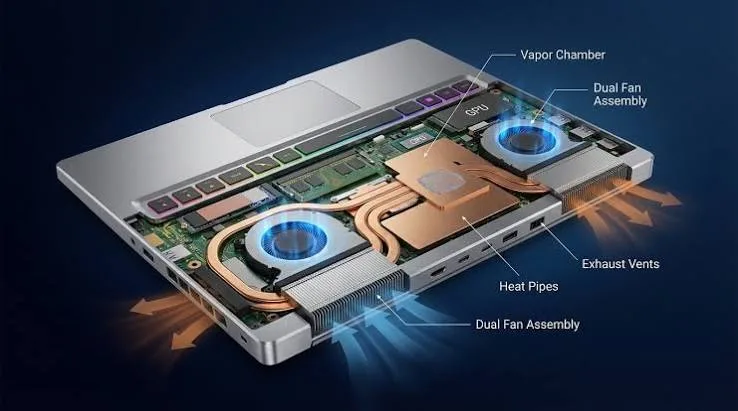
Heat pipes — thin, sealed copper tubes containing a small amount of liquid that evaporates when heated near the processor, travels along the pipe as vapour, and condenses back to liquid after releasing heat elsewhere, creating a continuous heat transfer cycle — carry heat away from the processor and graphics card toward a designated area, usually near the laptop's edge, where a fan can more effectively expel it.
Fans pull cooler outside air into the laptop and push the heated air, now carrying the thermal energy transported by the heat pipes, back out through exhaust vents — a straightforward but genuinely critical mechanical process for sustained performance.
Heat sinks — networks of thin metal fins with large total surface area — sit at the point where heat pipes meet the exhaust airflow, maximising the surface area available for heat to transfer into the moving air stream before it's expelled from the laptop.
Why Thinner Laptops Face a Genuine Engineering Challenge Here
This is worth explaining directly, since it's the core tension this piece addresses. Effective cooling fundamentally benefits from physical space — larger fans move more air more quietly, longer heat pipes can route heat further from sensitive components, and larger heat sinks offer more surface area for heat transfer. A thinner laptop chassis, by definition, has less physical space available for all of these components, creating a genuine engineering trade-off between chassis thinness and cooling capacity that no amount of clever engineering can fully eliminate — only manage more or less effectively.
Thermal Throttling: What Actually Happens When Cooling Falls Behind
As mentioned in our video editing buying guide, thermal throttling is the process by which a processor or graphics card automatically reduces its own performance (specifically, its clock speed) when internal temperature sensors detect the component is approaching a safety threshold — a genuine, deliberate protective mechanism built into virtually all modern processors to prevent permanent heat damage, rather than a malfunction.
Why this matters practically: a laptop's specification sheet describes its maximum theoretical performance, but thermal throttling means sustained real-world performance during demanding tasks can fall meaningfully below this theoretical maximum if the cooling system can't keep pace — precisely why two laptops with identical processor specifications can perform noticeably differently during a genuinely demanding, sustained task like video export or extended gaming, purely due to cooling system design differences.
Why Business Laptops Often Handle Sustained Load Better Than Ultra-Thin Consumer Laptops
Connecting this to our broader brand-focused pieces: business laptops, even relatively compact configurations, are frequently engineered with somewhat more conservative thinness targets than consumer ultrabooks specifically competing on visual thinness for retail shelf appeal, as discussed in our business-versus-consumer laptops piece. This modest additional physical space, combined with business laptops' general engineering philosophy prioritising consistent, predictable performance over years of daily use, often translates into genuinely better sustained thermal performance than an equivalently-specified but more aggressively thin consumer laptop — one of several reasons, alongside durability and repairability, that business-grade laptops perform well for the demanding, sustained workloads discussed throughout our video editing and developers buying guides.
Gaming and Workstation Laptops: Cooling as a Primary Design Priority
As detailed in our gaming laptop and mobile workstation buying guides, laptops specifically designed for sustained heavy workloads — MSI's Stealth gaming line, HP's ZBook and Dell's Precision workstation lines — deliberately accept somewhat thicker, heavier chassis designs specifically to accommodate more capable cooling systems, a genuine, direct design trade-off prioritising sustained performance over ultimate thinness. This is precisely why these categories, despite sometimes having similar on-paper processor specifications to slimmer ultrabooks, genuinely deliver stronger sustained real-world performance during the extended demanding tasks their target buyers actually perform.
Vapour Chamber Cooling: A More Advanced Approach in Premium Configurations
It's worth mentioning a more advanced cooling technology appearing in some premium and workstation-class laptops, offering genuine improvement over standard heat pipe designs. A vapour chamber operates on the same basic evaporation-condensation principle as heat pipes, but uses a flat, wider chamber rather than a narrow tube, allowing heat to spread across a larger surface area more evenly before being carried to the exhaust fans. This genuinely improves heat distribution efficiency compared to standard heat pipes routing heat along a narrower path, particularly beneficial in configurations with especially powerful, hot-running components like the dedicated graphics cards discussed throughout our gaming and mobile workstation buying guides — worth knowing about as a marker of genuinely more sophisticated cooling engineering when comparing premium configuration specifications.
How to Assess a Laptop's Cooling Capability Before Buying
Check for dedicated cooling design details in official specifications — mentions of specific heat pipe counts, dual-fan designs, or dedicated cooling zone engineering suggest a manufacturer has invested specifically in thermal performance rather than treating cooling as an afterthought to a primarily aesthetic-driven thin design.
Consider the laptop's general category and intended use, as discussed throughout this piece — a laptop specifically marketed and engineered for gaming or workstation use generally prioritises cooling more deliberately than a laptop marketed primarily on thinness and portability.
If possible, test under genuine sustained load rather than just brief use, as discussed in our video editing buying guide's testing section — running a demanding task for 15-20 minutes and checking for performance consistency, unusual heat, or excessive fan noise gives a more realistic picture than brief handling alone.
Frequently Asked Questions
Does thermal throttling mean my laptop is defective? No — it's a deliberate, normal protective mechanism, as explained throughout this piece, though frequent, severe throttling during moderate tasks can indicate a cooling system that's genuinely inadequate for the processor's demands.
Is it possible to improve a laptop's cooling after purchase? To some degree — external cooling pads can provide modest additional airflow, and ensuring vents remain unobstructed and clean (as discussed in our small business maintenance guidance) helps maintain a cooling system's designed performance, though these are incremental improvements rather than a fundamental redesign of the laptop's internal cooling engineering.
Why do gaming laptops often have louder fans than business laptops? Reflecting the more aggressive cooling demands of sustained gaming workloads discussed throughout this piece — louder, faster-spinning fans move more air, prioritising thermal performance over the quieter operation business laptops often optimise for during typical lighter everyday use.
Does a thinner laptop always perform worse under sustained load than a thicker one? Generally yes, all else being equal, though manufacturer engineering quality varies considerably — some manufacturers achieve genuinely better thermal performance within a thin chassis through superior heat pipe and fan design than others manage even in a bulkier chassis, making specific model evaluation more useful than assuming chassis thickness alone determines cooling capability.
Is cooling capability something I should prioritise for typical business or student use? Less critical for genuinely light, everyday tasks discussed throughout most of our buying guides, though it becomes genuinely important for the sustained demanding workloads covered in our video editing, gaming, and CAD/engineering buying guides specifically.
Can dust buildup inside a laptop genuinely affect cooling performance over time? Yes, genuinely — accumulated dust on heat sinks and fans reduces airflow efficiency over time, which is why the basic maintenance habits discussed in our small business buying guide (periodic compressed air cleaning of vents) help preserve a laptop's original cooling performance across its working life.
Find Laptops With Genuine Cooling Capability at City Gadgets Kenya
Every laptop at City Gadgets Kenya, including cooling system function, is fully tested and backed by a genuine 6-month warranty. Browse our laptops category or message us on WhatsApp to find a configuration with genuinely adequate cooling for your workload.








