
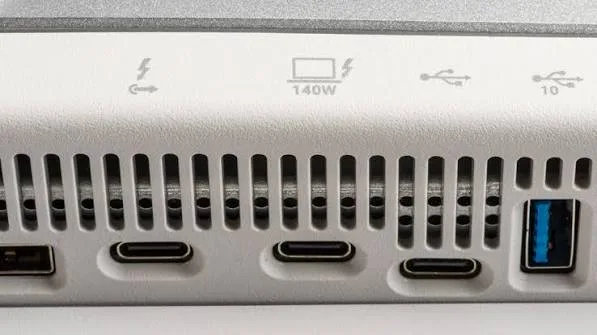
Few laptop port questions confuse buyers as consistently as this one, largely because Thunderbolt and USB-C ports frequently look physically identical — the same small, reversible oval connector — while offering genuinely different capabilities depending on which specific technology a given port actually supports. This piece clarifies this distinction clearly for Kenyan laptop buyers navigating our catalog at City Gadgets Kenya.
USB-C: A Physical Connector Shape, Not a Single Technology
This is the single most important clarification worth making upfront: USB-C describes a physical connector shape, not one specific technology or capability level. A USB-C port can carry several genuinely different underlying protocols and capability levels — basic USB data transfer, USB Power Delivery for charging, DisplayPort video output, and, in some cases, Thunderbolt — all through the exact same physical connector shape, which is precisely why two laptops both advertising "USB-C ports" can offer meaningfully different actual capabilities.
Thunderbolt: A Specific, More Capable Protocol That Uses the USB-C Shape
Thunderbolt, developed originally by Intel in partnership with Apple, is a specific, more advanced data transfer protocol that happens to use the same physical USB-C connector shape (since Thunderbolt 3 onward specifically) but offers genuinely superior capability in several respects.
Higher data transfer speeds. Thunderbolt (in its most common current versions, Thunderbolt 3 and 4) offers significantly higher maximum data transfer speeds than standard USB-C data transfer — relevant directly to the storage transfer speed discussions in our dedicated NVMe vs SATA piece, since a fast external NVMe drive genuinely benefits from Thunderbolt's higher bandwidth ceiling compared to standard USB-C transfer speeds.
Support for external graphics cards (eGPUs). Thunderbolt's higher bandwidth and specific protocol design allows connecting external graphics card enclosures — a capability standard USB-C data ports don't support, relevant to buyers wanting to add genuine dedicated graphics capability to an otherwise integrated-graphics laptop, connecting to the broader dedicated graphics discussion throughout our CAD and gaming buying guides.
Daisy-chaining multiple displays and devices. Thunderbolt supports connecting multiple high-resolution external displays and devices through a single port using daisy-chain connections, a capability beyond what standard USB-C video output typically supports.
Why This Distinction Genuinely Matters for Laptop Buyers
It's worth being concrete about the practical stakes here, since assuming any USB-C port offers Thunderbolt's full capability can lead to genuine disappointment or wasted accessory purchases.
Buying a Thunderbolt-specific accessory (like an external graphics card enclosure, or certain high-speed external storage drives specifically designed around Thunderbolt's bandwidth) and discovering your laptop's USB-C ports don't actually support Thunderbolt means that accessory simply won't function as intended, or may not function at all, despite physically connecting via the same connector shape.
External monitor setups, particularly those using a single cable for both video output and laptop charging simultaneously, sometimes specifically require Thunderbolt's combined capability rather than standard USB-C, worth confirming before purchasing this kind of setup.
How to Tell Whether Your Laptop's USB-C Ports Are Genuinely Thunderbolt-Enabled
Check for the Thunderbolt logo (a small lightning bolt icon) printed directly next to the port on the laptop's chassis — manufacturers include this specific marking to distinguish Thunderbolt-capable ports from standard USB-C ports on the same laptop, since many laptops include a mix of both port types.
Check official manufacturer specifications for your specific model and generation, since this detail is always documented officially even when the physical port marking isn't clearly visible or has worn away on an older refurbished unit.
Ask your seller directly, similar to the specification verification emphasised throughout our buying checklist guide — a knowledgeable seller should be able to confirm this detail for any specific unit in their inventory.
Thunderbolt Across Business Laptop Generations in Kenya's Refurbished Market
It's worth noting, connecting to our Intel generations piece, that Thunderbolt 3 support became increasingly common across premium business laptop configurations from roughly the 8th generation Intel era onward — meaning many of the ThinkPad X1 Carbon, Dell XPS 13, and premium Latitude configurations covered throughout our catalog from this generation forward genuinely include Thunderbolt capability, while more accessible, entry-tier configurations from the same era may include standard USB-C without Thunderbolt's additional capability, reflecting the same broader tier distinctions discussed throughout our Dell Latitude tiers and brand comparison pieces.
The Historical Reason Thunderbolt and USB-C Converged on One Connector Shape
It's worth briefly explaining why this confusing overlap exists in the first place, rather than the two technologies simply using visibly distinct connectors. Prior to Thunderbolt 3, Thunderbolt used an entirely different physical connector (resembling a Mini DisplayPort connector), genuinely distinct in appearance from USB ports of that era. When USB-C emerged as a new, universal, reversible connector standard, Intel made the deliberate decision to align Thunderbolt 3 onward with this same physical shape — a genuine effort toward port simplification and universality, reducing the number of different physical connector types a laptop needed to include. This was, in principle, a genuinely positive simplification for laptop design and manufacturing, though it came with the real practical trade-off discussed throughout this piece: visual identity alone can no longer tell users which specific capability a given port offers, making the confirmation methods discussed above genuinely necessary rather than optional.
Frequently Asked Questions
Can I tell Thunderbolt and standard USB-C ports apart just by looking at the connector shape? No — as explained throughout this piece, they use the identical physical connector shape; the distinguishing marker is typically a small lightning bolt icon printed beside Thunderbolt-specific ports, or official specification confirmation.
Will a standard USB-C cable work with a Thunderbolt port, or do I need a special cable? Standard USB-C cables generally work for basic functions, though achieving Thunderbolt's full speed and capability benefits typically requires a cable specifically rated for Thunderbolt, since not all USB-C cables support the same maximum bandwidth.
Does every premium laptop genuinely include Thunderbolt, or only specific models? Varies by specific model and generation, as discussed above — worth confirming directly for any specific configuration rather than assuming all premium-tier laptops automatically include this capability.
Is Thunderbolt worth prioritising for typical everyday business or student use? Generally not essential for typical use — Thunderbolt's genuine advantages (eGPU support, maximum transfer speeds, multi-display daisy-chaining) matter most for specific, more demanding use cases discussed throughout this piece, rather than everyday browsing and document work.
Can I add Thunderbolt capability to a laptop that only has standard USB-C ports? No — this is determined by the laptop's internal hardware and controller design, similar to the non-upgradeable dedicated graphics discussion in our mobile workstation piece, not something addable after purchase.
Why did Intel align Thunderbolt with the USB-C connector shape if it creates this confusion? As explained above, this reflected a genuine simplification goal — reducing the number of distinct physical connectors a laptop needed — even though it introduced the identification challenge this piece addresses.
Does City Gadgets Kenya specify which laptops include genuine Thunderbolt ports? Yes — we confirm this detail alongside other port and connectivity specifications for any unit in our catalog when it's relevant to your intended use.
Find the Right Connectivity for Your Needs at City Gadgets Kenya
Every laptop at City Gadgets Kenya has its exact port specifications, including Thunderbolt capability where present, confirmed and clearly stated, backed by a genuine 6-month warranty. Browse our laptops category or message us on WhatsApp to confirm connectivity for your specific accessory needs.








