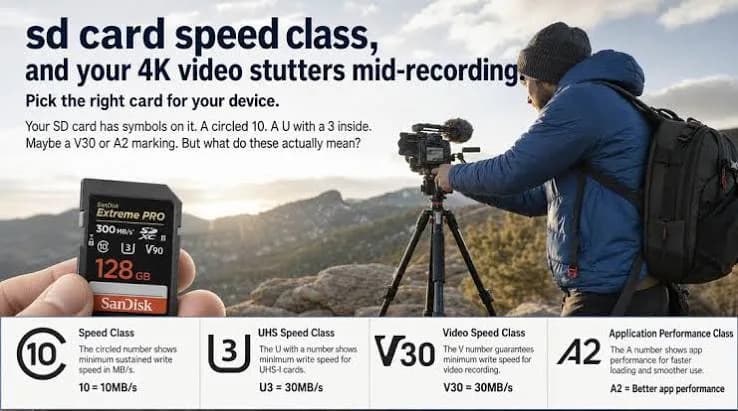
Most explanations of SD card labels stop at "V30 means 30 megabytes per second". That is true, but it does not help when you are standing in a shop, camera in hand, wondering whether the card on the shelf will survive a wedding, a football match or a long documentary interview in 4K. This post takes the practical route. We start from your camera's video settings, turn them into a number you can compare with a card's rating, and show you how to choose a SD card video speed class that will not drop frames, stop recording or leave you with a corrupted clip. We also work out how long a card will record, explain why cards run hot and what to do about it, and show you how to spot the fake cards that ruin shoots.
If you want the full label-by-label explanation of speed classes on microSD cards, with A1 and A2 ratings for phones and consoles, read our earlier post on microSD speed classes A1, A2 and V30 explained. This post is about full-size SD cards and video, and about the calculation that links a camera setting to a card.
We hedge where the answer depends on your exact camera and say "check your manual" or "we confirm per unit" rather than guess. We are City Gadgets Kenya, at New Alnoor Exhibition, Second Floor, Shop C7, Accra Road, Nairobi CBD, with same-day Nairobi delivery and next-day delivery outside Nairobi. Message us on WhatsApp with your camera model and we will help you choose.
The short version
- Video Speed Class (V6, V10, V30, V60, V90) is a guaranteed minimum sustained write speed in megabytes per second for video recording, so V30 means at least 30 MB/s.
- Your camera's bitrate is measured in megabits per second (Mbps). Divide by 8 to get megabytes per second.
- Pick a card whose guaranteed speed comfortably exceeds your highest bitrate, leaving a margin for overhead.
- Most 4K recording at common bitrates is comfortable on V30. Higher-bitrate modes such as 4K at high frame rates or all-intra recording may need V60 or V90. Check your manual.
- Bus type matters: UHS-I, UHS-II and SD Express are different connections. A V60 or V90 card is usually UHS-II.
- "Up to" speeds are reads, not video guarantees.
- Heat, fragmentation and fakes cause dropouts that have nothing to do with the label.
- Buy genuine cards and test them before an important shoot.
| Video Speed Class | Guaranteed minimum sustained write | Typical use (check your camera manual) |
|---|---|---|
| V6 | 6 MB/s | Basic HD recording |
| V10 | 10 MB/s | Full HD, some 4K at low bitrate |
| V30 | 30 MB/s | Most 4K video, many action cameras and drones |
| V60 | 60 MB/s | High-bitrate 4K, high frame rates, some 6K and all-intra modes |
| V90 | 90 MB/s | Professional high-bitrate 4K, 6K, 8K and RAW video |
First, the unit trap: megabits vs megabytes
Camera menus and spec sheets talk about bitrate in megabits per second (Mbps). Memory cards talk about speed in megabytes per second (MB/s). A byte is eight bits, so you divide megabits by eight to compare them.
Example: a camera mode recording at 100 Mbps writes 100 ÷ 8 = 12.5 MB/s to the card. A mode at 400 Mbps writes 50 MB/s.
Mixing up the two makes a card look eight times faster or slower than it really is. If you ever see someone claim that a V30 card cannot handle 100 Mbps video, they have confused bits and bytes: 12.5 MB/s sits comfortably below 30 MB/s.
The calculation in four steps
- Find the bitrate for your chosen video mode in the camera manual or menu, in Mbps. Cameras often list several modes with different bitrates for the same resolution.
- Divide by 8 to get MB/s.
- Add a safety margin. Real writing has overhead from audio, metadata and the file system. A margin of 50 percent or more is sensible, and more if you record in hot weather or for long periods.
- Choose a card whose guaranteed sustained write comes above that number. The V-rating is the guarantee to look for.
| Camera bitrate | Writes to card | Comfortable minimum class |
|---|---|---|
| 50 Mbps | 6.25 MB/s | V10 |
| 100 Mbps | 12.5 MB/s | V30 (comfortable) |
| 150 Mbps | 18.75 MB/s | V30 |
| 200 Mbps | 25 MB/s | V30 (tight in hot or long recordings, consider V60) |
| 400 Mbps | 50 MB/s | V60 |
| 800 Mbps | 100 MB/s | Above V90, check your camera and consider CFexpress or SSD |
These are illustrative bitrates to show the method. Your camera's actual bitrates differ by model and mode, so check the manual. Some cameras specify the exact class or card type required for each mode.
How long will a card record?
Recording time depends on capacity and bitrate. The arithmetic is simple: one minute at a given bitrate uses bitrate × 60 ÷ 8 megabytes. For example, 100 Mbps uses 750 MB a minute, or 0.75 GB.
| Bitrate | GB per minute | 64 GB card | 128 GB card | 256 GB card |
|---|---|---|---|---|
| 50 Mbps | 0.375 | about 170 min | about 340 min | about 680 min |
| 100 Mbps | 0.75 | about 85 min | about 170 min | about 340 min |
| 150 Mbps | 1.125 | about 57 min | about 114 min | about 228 min |
| 200 Mbps | 1.5 | about 43 min | about 85 min | about 170 min |
| 400 Mbps | 3 | about 21 min | about 43 min | about 85 min |
| 800 Mbps | 6 | about 11 min | about 21 min | about 43 min |
These figures ignore audio, proxies, formatting overhead and the fact that a card's usable capacity is a little less than the label. Treat them as estimates. For an event, plan with margin, and carry more cards than you think you need.
Understanding the label: V, U, C and the bus
An SD card can carry several markings. Here is what matters for video.
Video Speed Class (V). The one designed for video. It guarantees minimum sustained writing.
UHS Speed Class (U1, U3). An older rating. U3 guarantees 30 MB/s, the same as V30. Many cards carry both.
Speed Class (C). The oldest, C10 guarantees 10 MB/s.
UHS bus (I, II, III). The type of connection. UHS-I is the common standard. UHS-II adds a second row of pins on the back for faster transfer. UHS-III exists on paper and is rare. SD Express is a newer interface that uses a different technology for much higher speeds, and needs a device that supports it.
Capacity class (SDHC, SDXC, SDUC). SDHC covers up to 32 GB, SDXC covers above that up to 2 TB, and SDUC goes beyond. Your camera must support the type of card.
A card can have a high "read speed up to" figure and still only guarantee V30. Do not mistake read speed for video-recording guarantee.
UHS-I vs UHS-II for video
UHS-I cards top out at a bus limit that is high enough for most V30 recording, and they are widely supported. Their sustained video speed is limited by the interface.
UHS-II cards have the extra row of pins and can reach much higher speeds, making V60 and V90 possible. They work in UHS-I cameras too, but only at UHS-I speeds, so you will not get the benefit unless your camera's slot is UHS-II.
If your camera has a UHS-I slot, buying a V90 card gives no extra recording speed and costs more. If your camera has a UHS-II slot and records high-bitrate video, a V60 or V90 card makes sense. Check your manual.
Matching cards to cameras and uses
Smartphones with SD or microSD slots
Many phones use microSD, covered in our microSD post. For video, V30 is plenty for most phone video.
Action cameras
Action cameras record high-resolution video in a small body that heats up. They typically use microSD cards with V30 or higher ratings, and manufacturers publish recommended card lists. Heavy modes need faster cards, and heat can make the camera stop before the card fails.
Drones
Drones record high-bitrate video while flying, and a dropout mid-flight is costly. Use a card recommended by the drone maker, usually V30 microSD, and keep spare cards.
Mirrorless and DSLR cameras
Photo-centric cameras usually have SD slots. For 4K video at moderate bitrates, V30 is common. For high-bitrate or high-frame-rate modes, V60 or V90 UHS-II may be needed. For burst photography, the card's write speed and buffer matter too.
Cinema and professional cameras
Professional cameras often record very high bitrates and may use CFexpress, CFast or SSDs rather than SD. If your camera accepts V90 SD cards, check which modes need them.
Camcorders
Modern camcorders usually record at moderate bitrates to SD cards. Check the manual for the required class.
Dashcams and CCTV
These write continuously for months, so endurance matters more than peak speed. They use microSD cards designed for high endurance. See our memory card guide for CCTV and dashcams.
360 cameras
360 cameras record very high-resolution video and often need V30 or higher. Follow the maker's list.
Why a card with the right rating can still drop frames
Matching the number is necessary but not always sufficient. These are the usual reasons a card fails during recording even though the label looks right.
Fake or counterfeit cards. A frequent cause of the "my V30 card keeps stopping" story. A fake can report a large capacity and a fast speed class but deliver neither.
Heat. Cards and cameras get hot during long 4K recording. Hot flash memory can slow down, and some cameras stop recording to protect themselves. Shade, airflow and breaks help.
A nearly full card. As a card fills, it can have fewer free blocks to write to and may slow down.
Fragmentation and poor formatting. A card that has been used and deleted many times without being formatted in the camera may perform worse. Format in-camera.
A worn card. Flash memory wears out. Heavy users should replace cards periodically.
A slow card reader or cable. This affects offloading, not recording, but people often confuse the two.
Wrong file system. Cameras use FAT32 or exFAT depending on the card size. Formatting on a computer with the wrong type can cause errors. Format in-camera. Our post on exFAT, FAT32 and NTFS explains the differences.
Camera limits. Some cameras cannot use the full speed of a card. Others restrict certain modes to specific card types.
Interface mismatch. A UHS-II card in a UHS-I slot runs at UHS-I speed.
Faulty or dirty contacts. Dust and moisture on the gold pins cause errors. Clean gently with a dry cloth.
Sustained speed vs burst speed
Memory cards behave differently for short bursts and long recordings.
Burst speed is how fast the card accepts a short flurry of data, helped by internal caching. This matters for rapid-fire photo bursts.
Sustained speed is how fast the card writes continuously over a long time, once any cache is full. This matters for video. The Video Speed Class guarantees sustained writing, which is why it is the right label for video, while "up to" figures on the front of the card are often best-case reads.
A card that is brilliant at bursts may still be poor for long 4K clips. Always check the V rating for video work.
Overheating: the problem nobody puts on the box
Long video recordings heat the camera body and the card. In warm Kenyan conditions, such as an outdoor wedding at midday, a safari or a sports ground in direct sun, this is real. Practical tips:
- Keep the camera and spare cards in the shade.
- Use a lighter bitrate mode if you do not need maximum quality.
- Turn off the screen or reduce brightness when you can.
- Use an external recorder or power if your workflow allows.
- Rest the camera between long takes.
- Do not leave cards in a hot car.
- Use quality cards, which usually handle heat better than cheap ones.
If the camera shows a heat warning, do not ignore it. Corrupted clips often follow a thermal shutdown.
Dual card slots and safe workflows
Professionals rarely trust a single card. Many cameras have two slots, and you can use them in different ways.
Backup mode (mirror). Every clip is written to both cards. If one fails, you still have the other. Both cards must be fast enough, and the slower one limits you.
Overflow mode. When one card fills, recording continues on the second.
Split mode. Photos on one card and video on the other, or raw on one and JPEG on the other.
For important events such as weddings, funerals, graduations and corporate shoots, use backup mode if your camera supports it. If it has one slot, change cards often and copy the footage to two places before you format.
Offloading your footage safely
The shoot is only done when the footage is safe in two places.
- Use a good card reader rather than connecting the camera by cable, which is often slower. A UHS-II reader unlocks UHS-II speeds.
- Copy to your computer or an external SSD first. See our portable SSD guide.
- Verify the copy by opening files or using checksum tools.
- Make a second copy on another drive.
- Only then format the card, and do it in the camera.
- Never delete files from a card on a computer if you plan to keep shooting. Format in-camera.
- Label cards so you know which are used and which are fresh.
Follow the 3-2-1 backup rule for anything you cannot reshoot.
Choosing capacity for video work
Larger cards hold more, but a single failure then costs more. For important events, many professionals prefer several mid-sized cards over one huge one. For example, rather than one 512 GB card for a whole day, use several 128 GB or 256 GB cards, rotating as they fill. That limits the damage of one failure. Calculate with the table above, add margin, and carry spares.
Speed vs price: where to spend
Cards are priced by capacity, speed class and brand. A sensible approach:
- Spend on genuine cards from trusted sellers before spending on top-tier speed.
- Match the rating to your camera, not to the biggest number on the shelf.
- Buy a reader that suits your card type.
- Buy enough cards for backup rather than one very expensive card.
Message us on WhatsApp with your camera model and typical recording mode, and we will tell you honestly which card class you need. If a V30 is enough, we will say so.
SD Express and CFexpress: where the market is heading
Newer cameras use faster formats. SD Express keeps the SD shape but adds a PCI Express interface for much higher speeds, and needs a compatible device. CFexpress cards are a different, larger format used in higher-end cameras for very high bitrates, including raw video. If your camera uses them, you need those cards, and V-rated SD cards will not fit. Most cameras on the market in Kenya still use classic SD or microSD. Always follow your camera's manual.
Photos, bursts and raw files
Although this post focuses on video, photographers also benefit from faster cards. Shooting bursts of raw files fills the camera's buffer, and a faster card empties it sooner, so you can keep shooting. UHS-II cards help here when the camera supports them. For occasional casual photography, a good V30 UHS-I card is enough. See our guide to SD cards for cameras and microSD card guide.
Testing a card before an important shoot
Do not meet your card for the first time at the event.
- Format it in the camera.
- Record a test clip at your highest bitrate for as long as you will need, or at least several minutes, preferably in warm conditions.
- Play it back on the camera and a computer, checking for dropped frames or glitches.
- Run a capacity and speed test on a computer with a trusted tool, which also reveals fakes.
- Repeat with each card you plan to use.
- Note any card that fails and do not use it for important work.
This takes under an hour and prevents the worst surprises.
Common mistakes when buying SD cards for video
- Confusing Mbps and MB/s. Divide megabits by eight.
- Trusting "up to" read speeds. Look for the V rating.
- Buying V90 for a UHS-I camera. You will not get the benefit.
- Buying the cheapest unbranded card. Fakes are common.
- Ignoring the camera manual. Some modes require specific cards.
- Formatting on a computer. Format in-camera.
- Using one big card for a critical event. Spread the risk.
- Skipping the test. Test before the shoot.
- Leaving cards in the sun. Heat damages cards and recordings.
- Not backing up footage. Copy twice before you format.
Example scenarios
These are illustrative, not customer records.
Scenario 1: A wedding videographer. His camera records 4K at 150 Mbps, or about 18.75 MB/s. A V30 UHS-I card is comfortable. He uses dual-slot backup, rotates 128 GB cards and offloads to two drives each night.
Scenario 2: A school filming a sports day. The camcorder records Full HD at a modest bitrate. A V10 or V30 card does the job. They buy genuine cards from a shop with a receipt rather than the cheapest option at a roadside stall.
Scenario 3: A documentary shooter. The camera offers a 400 Mbps mode, which writes about 50 MB/s. She chooses V60 UHS-II cards, tests them in the heat, carries spares and records interviews in shorter takes to manage heat.
Scenario 4: A drone pilot. He uses the card recommended by the maker, a V30 microSD, keeps two spares in a case and formats in the drone before each flight session.
Scenario 5: A student filmmaker on a budget. She shoots 4K at a moderate bitrate. A genuine V30 card does the job, and the money saved goes on a second card for backup.
Frame rate, codec and resolution: why bitrate changes
Bitrate is not fixed by resolution alone. Several settings change how much data your camera writes.
Resolution. More pixels generally need more data, but not in direct proportion, because compression is clever.
Frame rate. Recording at 60 or 120 frames per second needs more data than 24 or 30, because there are more frames to store each second.
Codec. Modern codecs such as H.265 (HEVC) compress more efficiently than H.264, giving similar quality at a lower bitrate, though they demand more processing and can be slower to edit on older computers.
Frame structure. "Long GOP" recording stores some frames as changes from earlier ones and uses less data. "All-intra" stores every frame in full, using much more data but making editing easier. All-intra modes are the usual reason a camera demands a V60 or V90 card.
Bit depth and colour sampling. 10-bit video with richer colour sampling uses more data than 8-bit.
Log and raw formats. These preserve more image information for colour grading and use far more data.
When you change a menu setting, look at the bitrate your camera reports or the card requirement it shows. Many cameras list the minimum required class next to each mode, which is the best guide of all.
Slow motion and high frame rates
High-frame-rate recording for slow motion is a stress test for a card. A camera that records 4K at 120 frames per second may write a very high bitrate, or may restrict the mode to certain cards. If you plan to shoot slow motion at a sports event or a dance performance, confirm the card requirement in the manual and test before the day. A short clip of fast action at a high frame rate can fill a surprising amount of space.
What about audio and metadata?
Audio, timecode and metadata add a little to every clip. The amounts are small compared with the video, which is why we recommend a margin of at least 50 percent over the calculated figure. If you record multi-channel audio or additional streams such as proxy files at the same time, add their bitrates to your total.
Recording to card vs recording externally
Some cameras can send video to an external recorder or an SSD. This bypasses the card's limits for high-bitrate modes. It is a professional workflow that adds cost and cables. For most people in Kenya shooting weddings, events, school productions and online content, a good genuine card and sensible settings are all that is needed. If you find yourself pushing against a card's limits, consider whether a lower bitrate mode would serve your project equally well.
A quick rule of thumb if you do not want to do the maths
If you are not sure and your camera does not name a required class, use this as a starting point, then confirm in the manual. Full HD video and ordinary 4K at everyday settings usually sit comfortably on V30. High frame rate 4K, 6K, all-intra and log recording point towards V60 or V90, provided your camera has a UHS-II slot. When the manual and this post disagree, the manual wins, and when you are still unsure, message us your camera model and we will check with you before you pay.
Looking after your cards
- Store cards in a case, not loose in a bag.
- Keep them dry and away from heat, magnets and static.
- Do not bend or force them into a slot.
- Use the write-protect switch on full-size SD cards to protect finished footage, then slide it back to record.
- Eject properly from computers.
- Rotate cards so no single card does all the work.
- Retire old cards used heavily for years.
- Keep the gold contacts clean.
Questions to ask any seller before you pay
- Is the card brand new and sealed?
- What is the exact model, V rating and bus type?
- Will it work in my camera's slot?
- Can I test the real capacity?
- What is the exchange policy?
- Will I get a receipt?
- Where is your shop if something goes wrong?
How to spot a fake SD card
Counterfeit cards are a major cause of corrupted video. Typical fakes report a big capacity such as 256 GB but contain a much smaller real chip, or they carry a speed class they cannot deliver. They record fine until the real space is used up, then overwrite or corrupt. Use these ten checks together.
- Test the real capacity. Use a trusted tool that writes and verifies data across the full card. A fake fails.
- Check the packaging. Genuine boxes are clean and accurate. Spelling mistakes and poor print are warning signs.
- Check the label print. Logos, markings and the V-rating should be crisp and aligned. Blurry or smudged print is a red flag.
- Check the model and serial. They should match the box and be verifiable with the maker.
- Inspect the casing and pins. Rough edges, uneven seams and dull or messy contacts suggest a fake.
- Check the speed. Write a large file and watch the speed. A card that starts fast then collapses to a crawl is suspicious.
- Check the UHS-II pins. A genuine UHS-II card has a second row of pins on the back. If the label says UHS-II but there is only one row, it is wrong.
- Check the price. If it looks too good to be true, it probably is.
- Check the seller. No shop address, no receipt and no return policy are warnings.
- Check behaviour over time. Files that go missing or become corrupt after the card fills are a red flag.
If you are unsure, bring the card to New Alnoor Exhibition, Second Floor, Shop C7, Accra Road, and we will help you check it.
Why buy your SD cards from City Gadgets Kenya
- Genuine products, checked before they reach you.
- A real shop at New Alnoor Exhibition, Second Floor, Shop C7, Accra Road, Nairobi CBD.
- Same-day delivery in Nairobi and next-day delivery outside Nairobi.
- M-Pesa payment and clear receipts.
- Honest advice, including telling you when a V30 is enough and V90 is a waste.
- Cards, readers and drives in our accessories category.
- Support and repairs through our repair service.
- Trade-ins through our sell page.
- WhatsApp help on +254745575931.
Your pre-shoot checklist
- I know my camera's highest bitrate and converted it to MB/s.
- My card's V rating is comfortably above that.
- My card's bus matches my camera's slot.
- I formatted the card in the camera.
- I tested a long clip at my highest bitrate.
- I have spare cards and a plan to copy footage twice.
- I checked the card is genuine.
- I have a receipt and know where to get support.
Frequently asked questions
What does V30 mean on an SD card? A guaranteed minimum sustained write speed of 30 MB/s for video.
Is V30 enough for 4K? For many 4K modes, yes. High-bitrate or high-frame-rate modes may need V60 or V90. Check your camera manual.
What is the difference between Mbps and MB/s? Mbps is megabits per second, MB/s is megabytes per second. Divide Mbps by 8.
Do I need a UHS-II card? Only if your camera has a UHS-II slot and records modes that need that speed.
Why does my camera say the card is too slow? The card's guaranteed write speed may be below the mode's requirement, or the card is fake or worn.
How long can I record on a 128 GB card? It depends on bitrate. At 100 Mbps, roughly 170 minutes, ignoring overhead.
Should I format in the camera? Yes, always.
Can I use a microSD card with an adapter? Often yes, but quality varies. Use a good adapter and a genuine card.
How do I know my card is genuine? Use the ten checks above and test the real capacity.
Where can I buy an SD card in Nairobi? At City Gadgets Kenya, Shop C7, Second Floor, New Alnoor Exhibition, Accra Road.
Need help choosing?
Message us on WhatsApp with your camera model and the mode you record in, and we will recommend a genuine card.
Related reading: microSD speed classes A1, A2, V30 explained · Best SD card for cameras · How wear levelling works · Data recovery: what to do in Kenya