
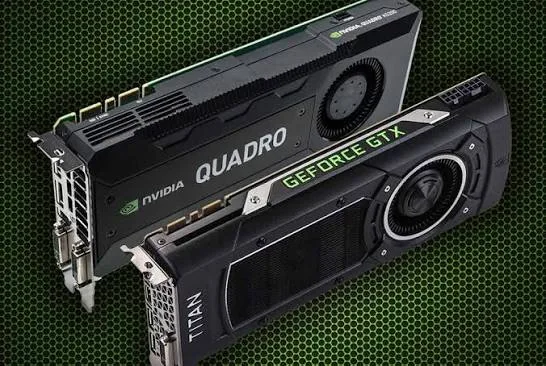
Our dedicated piece on mobile workstations touched on the Quadro-versus-GeForce distinction as part of explaining that broader product category. This piece goes deeper specifically into the graphics card technology itself — the genuine architectural and driver differences, real benchmark behaviour, and honest guidance on which category actually serves different Kenyan buyers, whether you're shopping through our CAD and engineering guide, our video editing guide, or our gaming laptop guide, all pointing to real configurations at City Gadgets Kenya.
Starting From Shared Hardware Foundations
It's worth clarifying something genuinely important and often misunderstood: Quadro and GeForce cards frequently share very similar, sometimes nearly identical, underlying silicon — the same core GPU chip design, manufactured on the same production lines. NVIDIA doesn't necessarily engineer completely separate hardware for each product line from scratch; in many cases, the same physical chip is binned, configured, and paired with different drivers and firmware to serve these two genuinely distinct market segments. This is a crucial point of understanding: the difference between these two product categories is substantially about driver engineering and certification, not always about fundamentally different silicon.
What Drivers Actually Do, and Why This Matters So Much Here
For readers less familiar with this concept: a graphics driver is the software layer translating an application's rendering requests into instructions the graphics hardware can actually execute. This driver layer is where an enormous amount of practical, day-to-day behaviour is determined — how efficiently a specific game or application's rendering calls get processed, how stable performance remains during unusual or edge-case rendering scenarios, and how the card behaves under the specific, sometimes idiosyncratic ways different software categories use graphics hardware.
GeForce drivers are engineered and continuously tuned primarily around gaming performance — NVIDIA invests heavily in "game-ready drivers," frequently updated specifically to optimise performance for newly released games, sometimes within days of a major title's launch. This driver engineering prioritises maximum frame rates and visual effects performance in the specific, relatively predictable ways game engines render scenes.
Quadro (and RTX A-series) drivers are engineered and certified around professional application stability and accuracy — as detailed in our mobile workstation piece's discussion of ISV certification, these drivers undergo extensive testing specifically with professional CAD, 3D modelling, and content creation software, prioritising precise, predictable, glitch-free rendering behaviour over the raw frame-rate maximisation gaming drivers prioritise.
Concrete Behavioural Differences: What Actually Happens in Practice
It's worth illustrating specific, genuine scenarios where this driver difference produces measurably different real-world behaviour, rather than remaining purely theoretical.
Wireframe and technical rendering modes, heavily used in CAD software for visualising the underlying structure of 3D models before final rendering, are specifically optimised in Quadro drivers for precise line rendering and stable display even with extremely complex models containing millions of individual line segments — a scenario where consumer GeForce drivers, not specifically tuned for this rendering mode, can show genuine instability or dramatically reduced performance.
Anti-aliasing and rendering precision settings in professional CAD and visualisation software often rely on specific rendering techniques that Quadro drivers are certified to handle correctly, while GeForce drivers, optimised for different, gaming-specific anti-aliasing techniques, may not handle these professional-specific rendering calls with the same accuracy or stability.
Multi-monitor and high-resolution professional display configurations, common in professional CAD and design workstations running multiple large external monitors simultaneously, are more extensively tested and certified on Quadro configurations, since this is a genuinely common professional workflow that consumer gaming setups, more commonly single-monitor focused, don't require the same certification rigor around.
Extended, unattended rendering sessions — overnight 3D renders or extended simulation runs common in professional engineering and design workflows — benefit from Quadro's driver stability testing specifically around long-duration, unattended operation, a genuinely different testing priority than gaming drivers, which are primarily tested around shorter, actively-supervised gaming sessions.
Where GeForce Genuinely Outperforms Quadro
It's worth being honest that Quadro isn't universally "better" — for its specifically intended use case, GeForce is often the genuinely superior choice, and understanding this distinction prevents buyers from assuming professional certification means broader superiority.
Gaming performance, unambiguously. As detailed in our dedicated gaming laptop buying guide, GeForce and consumer RTX cards are specifically engineered and continuously driver-tuned for maximum gaming performance — a similarly-priced or even considerably cheaper GeForce card will typically outperform a Quadro card in actual games, since Quadro's driver engineering simply isn't optimised for this specific workload.
Price-to-raw-performance ratio for non-certified workloads. Since Quadro's premium reflects certification and professional driver engineering rather than necessarily superior raw hardware, buyers whose workload doesn't specifically benefit from that certification (casual creative work, general computing, gaming) often get better raw performance per shilling spent from an equivalent-tier GeForce card.
The RTX A-Series Transition: What Changed in NVIDIA's Naming
As mentioned in our mobile workstation piece, NVIDIA has been transitioning its professional graphics naming from "Quadro" to "RTX A-series" (as seen in our Dell Precision 5570's RTX A1000/A2000 configurations) in recent product generations. This represents a naming and branding evolution rather than an abandonment of the underlying certification philosophy discussed throughout this piece — RTX A-series cards continue to receive the same ISV certification process and professional-focused driver engineering that defined Quadro, simply under updated branding that also signals these newer cards incorporate the ray-tracing and AI-acceleration hardware features NVIDIA's newer "RTX" architecture generally introduced across both its consumer and professional product lines.
A Historical Note: Why NVIDIA Chose to Segment Its Product Line This Way
It's worth understanding briefly why NVIDIA developed this dual product-line strategy in the first place, rather than simply selling one universal graphics card category. In the early days of 3D graphics acceleration during the 1990s, professional visualisation and CAD work represented a genuinely lucrative, specialised market willing to pay substantial premiums for certified, reliable hardware — engineering firms and design studios needed absolute confidence their expensive licensed software would run correctly, and were willing to pay for that certainty. Meanwhile, the emerging consumer gaming market represented a completely different commercial opportunity — high volume, price-sensitive, and driven by rapidly evolving game engine technology requiring frequent driver updates optimised for whatever specific games were popular that season. NVIDIA's decision to build genuinely separate driver development and certification pipelines for these two markets, while often sharing underlying chip designs to maximise manufacturing efficiency, reflects a deliberate, decades-old strategic response to these two markets' genuinely different commercial and technical demands — a strategy AMD has broadly mirrored with its own professional (Radeon Pro) versus consumer (Radeon) graphics card segmentation, though AMD's professional line appears less frequently in Kenya's refurbished laptop market than NVIDIA's Quadro/RTX A-series.
Benchmark Behaviour: Why Direct Comparisons Can Be Misleading
It's worth cautioning readers researching this topic further online against a common pitfall: directly comparing Quadro and GeForce cards using purely gaming-oriented benchmark tools produces genuinely misleading results, since these benchmarks measure precisely the workload category GeForce is optimised for and Quadro isn't. A fair comparison requires using professional application-specific benchmarks (such as SPECviewperf, an industry-standard benchmark suite specifically measuring professional CAD and visualisation application performance) to see Quadro's genuine advantages, just as a fair gaming comparison requires standard gaming benchmarks to see GeForce's genuine advantages. This asymmetry is precisely why online comparisons using only one type of benchmark can create a misleadingly one-sided picture of either card's genuine capabilities — always consider which specific software category a benchmark actually measures before drawing conclusions relevant to your own intended use.
How to Decide Which Category Genuinely Fits Your Needs
Bringing this back to practical decision-making for Kenyan buyers navigating our various buying guides:
Choose Quadro/RTX A-series (workstation configurations) if your primary software is professional CAD (AutoCAD, SolidWorks, Revit), professional 3D modelling or visualisation, or colour-critical professional video work specifically requiring certified stability, as detailed in our CAD/engineering and mobile workstation buying guides.
Choose GeForce/consumer RTX (gaming or creative-consumer configurations) if your primary use is gaming, general content creation without strict professional certification requirements, or moderate creative work where raw performance-per-shilling matters more than certified stability, as detailed in our gaming laptop and content creator buying guides.
Frequently Asked Questions
Do Quadro and GeForce cards use genuinely different physical hardware? Often substantially similar or even identical underlying silicon, with the meaningful difference concentrated in driver engineering and certification, as explained throughout this piece — not always a fundamentally different physical chip.
Can I install GeForce drivers on a laptop with Quadro hardware, or vice versa? Generally not straightforwardly or advisably — manufacturers lock driver compatibility to the specific certified configuration, and attempting to circumvent this can cause instability or void warranty coverage.
Is RTX A-series genuinely different from older Quadro cards, or just a rebrand? Both — it's a genuine rebrand reflecting NVIDIA's broader naming transition, but RTX A-series cards also incorporate newer underlying architecture (ray-tracing and AI acceleration hardware) alongside the same professional certification philosophy Quadro established.
Will a Quadro-equipped laptop perform worse in games than a GeForce laptop with similar specifications? Generally yes, often noticeably — as explained throughout this piece, Quadro's driver engineering prioritises professional stability over gaming-specific performance optimisation.
Is it worth paying the Quadro/RTX A-series premium if I only occasionally use CAD software? Depends on how much stability and certified compatibility matters for that occasional use — light, infrequent CAD use may be adequately served by consumer graphics, while regular professional work genuinely benefits from certification, as detailed in our CAD and engineering buying guide.
Does Quadro/RTX A-series certification apply to video editing software the same way it does to CAD software? Partially — some professional video and colour-grading software (particularly DaVinci Resolve) does have specific certification and optimisation for professional NVIDIA cards, though the video editing category, as detailed in our dedicated buying guide, also benefits substantially from strong consumer gaming-class graphics depending on the specific software and workflow.
Why do Quadro cards often show lower raw specifications (like clock speed) than GeForce cards at a similar price? This reflects the different engineering priorities discussed throughout this piece — Quadro's value proposition centres on certified stability and professional driver optimisation rather than maximising raw specifications for headline benchmark numbers the way consumer gaming cards are often marketed around.
Is AMD's Radeon Pro a genuine equivalent to NVIDIA Quadro/RTX A-series? Yes, conceptually — AMD applies a similar professional-versus-consumer segmentation strategy with its own certified professional line, though it appears less frequently in Kenya's refurbished laptop market than NVIDIA's professional offerings, as noted throughout this piece.
Can software developers or IT professionals benefit from Quadro/RTX A-series graphics, or is this strictly for CAD and creative work? Generally strictly relevant to the specific professional visualisation, CAD, and certified creative software discussed throughout this piece — standard software development work, as covered in our developers' buying guide, doesn't specifically benefit from this certification and is better served by prioritising RAM and processor specifications instead.
Explore Both Quadro and Consumer Graphics Laptops at City Gadgets Kenya
Every laptop at City Gadgets Kenya, whether Quadro/RTX A-series certified or consumer GeForce/RTX equipped, is fully tested and backed by a genuine 6-month warranty. Browse our laptops category or message us on WhatsApp to find the right graphics category for your genuine workload.








