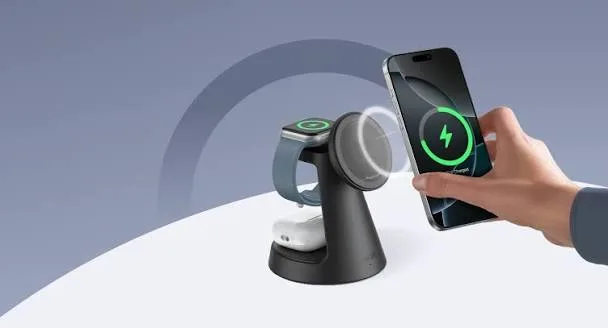
Wireless charging looks like magic: put the phone down and it charges. Then reality sets in. The phone slips off the pad in the night and wakes with 20 percent. It gets warm. It charges slower than the cable. A friend says their charger "does 15W" and yours does not. And now boxes mention Qi, Qi2, MagSafe, MagGo, "Qi2 Ready" and "magnetic". This guide gives you Qi2 and MagSafe wireless charging explained in plain language: how it works, how the standards differ, how fast and efficient it really is, what cases and phones work, and how to avoid fake wireless chargers.
If you want help matching a wireless charger or magnetic power bank to your phone, message City Gadgets Kenya on WhatsApp with your phone model.
The short version
- Qi (pronounced "chee") is the universal wireless charging standard. Most phones, earbuds and watches support it.
- MagSafe is Apple's magnetic wireless charging system for iPhones from the iPhone 12 onward. It aligns the phone and charger with magnets and can charge faster than basic Qi.
- Qi2 is the new version of Qi that adds a magnetic alignment system based on MagSafe, so any Qi2 phone and charger snap together and charge efficiently at up to 15W.
- Qi2.2 raises the maximum to 25W on supported phones and chargers.
- "Qi2 Ready" means a phone supports Qi2 charging but lacks built-in magnets and needs a magnetic case.
- Wireless charging is convenient but less efficient than a cable. Expect more heat and slower charging in most cases.
- Alignment and cases matter. Misalignment wastes energy and heat.
- Fake wireless chargers can overheat or damage batteries. Buy genuine.
| Standard | Magnets | Typical speed | Works with |
|---|---|---|---|
| Qi (basic) | No | 5W to 15W | Most phones, earbuds, watches |
| MagSafe (Apple) | Yes | up to 15W (higher on newer iPhones with newer chargers) | iPhone 12 and later |
| Qi2 | Yes | up to 15W | Qi2 phones, iPhones with MagSafe support |
| Qi2.2 | Yes | up to 25W | Newer phones and chargers |
| "Qi2 Ready" phone | Needs a magnetic case | up to 15W with case | Some Android phones |
How wireless charging works
Wireless charging uses electromagnetic induction. A charger contains a coil of wire. When alternating current flows through it, it creates a changing magnetic field. A second coil in the back of your phone sits within that field, and the changing field induces a current in the phone's coil. The phone converts that current into direct current to charge its battery.
Two details explain nearly everything about wireless charging's quirks.
The coils must be close and aligned. The magnetic field weakens rapidly with distance and drifts off when the coils are not centred. When alignment is poor, much of the energy never reaches the phone's coil and ends up as heat.
Energy is lost at every step. Mains power is converted to DC, then to a high-frequency AC for the coil, then back to DC in the phone. Every conversion wastes energy as heat. This is why wireless charging is less efficient than a cable.
Qi: the universal baseline
Qi was created by the Wireless Power Consortium and is supported by hundreds of devices. A Qi charger can charge any Qi phone, earbud case or watch that fits the pad, regardless of brand. Early Qi charged at about 5W, and later versions reached 10W and 15W for supported phones.
The weakness of basic Qi is alignment. You place the phone on the pad and hope the coils line up. Many pads have a sweet spot, and a phone placed a centimetre off charges slowly or not at all. Pads with several coils help but add cost and heat. Thick cases, metal objects and credit cards between phone and pad also cause problems.
MagSafe: Apple's magnetic upgrade
Apple introduced MagSafe wireless charging with the iPhone 12. It adds a ring of magnets around the charging coil in the phone and in the charger. When you bring them together, the magnets snap into perfect alignment. That solves the alignment problem and also lets Apple push more power, with up to 15W on the iPhone 12 to 15 series with a suitable charger, according to Anker's published information for its MagSafe products. Apple's MagSafe system also supports accessories like magnetic wallets, stands and power banks.
Key points for buyers:
- MagSafe is a certified system. Chargers with the "Made for MagSafe" certification use Apple's specification and can deliver the full speed. Cheaper "MagSafe-compatible" products may attach magnetically but charge only at basic Qi speeds.
- A MagSafe charger works as a Qi charger on non-MagSafe phones at lower speeds without magnets.
- Cases matter. A MagSafe-compatible case has magnets built in so the charger attaches properly. A thick non-magnetic case weakens the connection and reduces speed.
- Newer iPhones add higher speeds. The iPhone 16 and later support Qi2 charging at higher speeds with suitable chargers. We confirm what your specific iPhone supports.
Qi2: magnets for everyone
Qi2 is the new Wireless Power Consortium standard. It takes Apple's MagSafe idea and makes it an open standard. Phones and chargers that carry Qi2 certification include a Magnetic Power Profile, a ring of magnets arranged the same way as MagSafe. The result:
- Better alignment, less waste, less heat. Magnetic alignment keeps the coils centred.
- Up to 15W for Qi2 and up to 25W for Qi2.2 on supported devices.
- Cross-brand compatibility. A Qi2 charger from any brand charges any Qi2 phone, and a Qi2 phone works with any Qi2 charger.
- Accessories become universal. Magnetic stands, power banks and car mounts work across brands.
Many Qi2 products are backward compatible with ordinary Qi, so a Qi2 charger will still charge a non-magnetic Qi phone, just without magnetic snapping and at lower speeds.
What does "Qi2 Ready" mean?
Some Android phones support Qi2 charging electronics but lack built-in magnets. They are labelled "Qi2 Ready" and need a magnetic case to snap onto Qi2 chargers properly. With the right case they charge as Qi2 phones; without it, they charge as ordinary Qi phones.
Which phones support Qi2 or MagSafe?
- iPhone 12 and later: magnetic MagSafe charging in various forms, with newer models adding Qi2 support. Speeds differ by model.
- Recent Android flagships: several support Qi2 or Qi2 Ready. Support varies by model and region.
- Older phones: basic Qi without magnets.
Tell us your exact phone and we will confirm what charger type suits it.
Speed: how fast is wireless charging really?
Headline numbers are charger maximums, not phone averages. Real speed depends on the phone, the case, alignment, temperature and the charger's power supply. Rough expectations:
| Setup | Typical practical speed |
|---|---|
| Basic Qi pad, 5W | Slow; 5 to 6 hours for a full charge |
| Qi pad, 10W | Moderate |
| MagSafe or Qi2, 15W | Comparable to a basic 15W to 20W cable charger |
| Qi2.2, 25W | Faster, on supported phones |
| Cable, 25W to 45W PD | Usually fastest |
A wireless charger also needs a suitable power adapter. A 15W MagSafe or Qi2 charger connected to a 5W phone adapter will crawl. Use an adapter that meets the charger's requirement, often 20W or 30W USB PD. The Anker 3-in-1 Cube with MagSafe, for example, includes a 30W charger and a 5-foot USB-C cable, according to Anker's published information.
For more on adapters and cables, see USB Power Delivery explained and what is GaN charging.
Efficiency, heat and battery health: wireless versus cable
Wireless charging is convenient, but it is less efficient than a cable. Some energy is lost as heat between the two coils, so more power is drawn from the wall than reaches the battery. In everyday use that means a slightly higher electricity draw and a warmer phone during charging. For one phone on a bedside table, the electricity difference is small. What matters more is the heat.
Lithium-ion batteries age faster when they are hot. A phone that sits on a wireless pad under a thick case, in a warm room, in the afternoon sun, will run hotter than one on a cable. Modern phones manage this by slowing the charge when they get warm, which is why a wireless charge sometimes seems to stall at 80 percent. That is the phone protecting itself, not a faulty charger.
Practical habits that protect battery health with wireless charging:
- Remove thick, metal-backed or wallet-style cases that trap heat before charging.
- Keep the pad out of direct sun and away from hot car dashboards.
- Do not charge under a pillow or blanket.
- Use the phone's optimised or limited charging feature if it has one, so it holds at 80 percent overnight.
- Do not worry about brief warmth. Warm is normal, hot to the touch is not.
If you want deeper background on battery ageing, see our lithium-ion battery care guide and fast charging and battery health myths.
Cases, metal and alignment problems
Most wireless charging complaints come from three causes: the case, something between the coils, or poor alignment.
Cases. A thin plastic, silicone or TPU case is usually fine. Very thick cases, cases with metal plates or magnets in the wrong place, and cases with built-in wallets or card slots can block or weaken the charge. For MagSafe and Qi2, the magnet ring must align, so a case marked for MagSafe or Qi2 is the safer choice. A normal case on a magnetic charger may still charge but hold weakly, and the phone may slide off.
Metal and cards. A metal ring, a PopSocket-style grip, a metal sticker for a car mount, or a credit card or key fob tucked in the case can block the field and heat up. Magnetic strips on bank cards can also be affected by strong magnets. Keep cards out of the case when charging magnetically.
Alignment. A Qi pad needs the phone's coil to sit over the pad's coil. If the phone buzzes, restarts charging or shows an on-and-off charging symbol, shift it a centimetre or two. Magnetic chargers solve this by snapping into place, which is the main benefit of MagSafe and Qi2 over older flat pads.
Foreign objects. Most chargers detect metal and stop to avoid heating it. If your charger will not start, check for coins, keys or a loose ring under the phone.
Magnetic power banks and the Anker 3-in-1 Cube
Two Anker products show where wireless charging fits in daily life.
Anker MagGo 10K. A magnetic power bank is a thin battery that clips to the back of a compatible iPhone and charges it while you move around. It is useful in a queue, on a matatu, or on a long day when you do not want to hold a cable. Anker's published information states that the Slim 10K version is Qi2-certified up to 15W, according to a retail listing. Other MagGo versions may differ, so please ask which version is in stock and we will confirm per unit. Magnetic power banks charge slower than a cable power bank, and they can get warm, so we suggest a cable power bank for a heavy phone drain and a magnetic one for convenience.
Anker 3-in-1 Cube with MagSafe. This is a folding stand that charges a phone, a watch and earbuds from one wall adapter. Anker states that it supports iPhone 12 to 15 up to 15W through an MFi module, includes a 30W charger and a 5-foot USB-C cable, and carries an 18-month warranty. It suits a bedside table or desk where you want one tidy spot for all your devices. If you travel, check that your watch charging puck fits and that you carry the right adapter plug.
See more on power banks in our power bank mAh versus Wh guide and browse accessories at City Gadgets Kenya.
Car mounts and wireless charging while driving
A wireless car charger holds your phone and charges it at once. It is convenient, but the car is a hard place for wireless charging because of heat and vibration. A phone on a sunny windscreen mount, charging wirelessly, running navigation, can get hot enough to slow charging or dim the screen. Our advice:
- Choose a magnetic mount with a strong grip, and check it holds your phone on a bumpy road.
- Place the mount where air-conditioning can reach the phone, not in direct sun.
- Use a decent car adapter that meets the charger's power requirement. A weak adapter gives a slow or unstable charge.
- For long navigation, a cable may be steadier and cooler than wireless.
- Keep the phone legally and safely positioned and never handle it while driving.
If you only need to top up on a short trip, a cable is simple and reliable. For a deeper look at in-car charging safety, see our car charger safety explained article.
Wireless versus wired: which to use in which situation
| Situation | Better choice | Why |
|---|---|---|
| Bedside overnight charge | Wireless (magnetic) | Tidy, easy, no cable wear |
| Desk during work | Wireless stand | Phone stays visible, notifications readable |
| Need a fast top-up in 20 minutes | Cable with PD | Higher speed, less heat |
| Gaming or video while charging | Cable | Cooler, steadier |
| Travelling light | Cable power bank | Faster, less loss |
| Walking around, topping up | Magnetic power bank | No cable to hold |
| Charging earbuds and watch together | 3-in-1 stand | One adapter, one spot |
| Hot day, in a car | Cable | Lower heat |
There is no single winner. Many people use wireless at home and a cable when they are in a hurry. That is a sensible balance.
Troubleshooting: why is my wireless charger not working?
Work through these checks in order:
- Check the adapter. Use an adapter that meets the charger's requirement, usually 20W or 30W USB PD for 15W charging.
- Check the cable. A damaged or very thin cable from the adapter to the charger can limit power. See our USB-C cable types guide.
- Remove the case. If it charges without the case, the case is the issue.
- Remove cards, rings and grips.
- Realign the phone. Wait a few seconds for the charging symbol.
- Restart the phone. A software glitch can stop wireless charging.
- Update the phone. Some Qi2 and MagSafe features depend on software updates.
- Try another charger or another phone. This tells you whether the fault is the phone or the charger.
- Check for overheating. If the phone is hot, let it cool.
- Bring it to us. If a good charger fails on a good phone, we can test it. See our repair page.
Myths about wireless charging
Myth: Wireless charging destroys your battery. Wireless charging does not damage a battery on its own. Heat does. Manage the heat and the battery is fine.
Myth: Any wireless charger works the same. Chargers differ in power, alignment, safety, build and certification. Cheap uncertified chargers can be slow, hot or unsafe.
Myth: Wireless is always slower. At 15W with the right adapter it can match a basic cable. At higher cable speeds, cable wins.
Myth: Magnets will break my phone. The magnets in MagSafe and Qi2 chargers are designed for phones. Keep bank cards and hotel key cards away from them, but the phone is not harmed.
Myth: Qi2 and MagSafe are identical. They are closely related, and Qi2 is based on the same magnetic approach, but certification and supported power can differ. Ask us for your exact phone.
Myth: You can leave it charging for days. Leaving a phone on a charger is normal, but constant 100 percent plus heat is not ideal. Use optimised charging where possible.
How the charger and phone talk to each other
Wireless charging is not just a coil sending power. The charger and the phone exchange small messages during the charge. The phone tells the charger how much power it wants, the charger checks that a real compatible device is present, and both watch for temperature and foreign objects. This is why a good wireless charger will not start if you put a coin on it, and why a phone can ask the charger to reduce power when it gets warm.
Qi2 and MagSafe add a magnetic profile to this conversation, so the charger knows the phone is correctly aligned before it ramps up to full speed. That alignment is a big part of why magnetic charging is more efficient than an older pad where the phone is placed loosely. Less misalignment means less wasted energy, less heat and a steadier charge.
This also explains why very cheap chargers behave badly. Without proper communication and safety checks, a charger may keep sending power into metal or a poorly aligned phone, creating heat. A charger from a known brand, bought from a seller who stands behind it, avoids that risk.
Choosing between a pad, a stand and a 3-in-1 station
Flat pad. The simplest form. It suits a bedside table or a drawer. Phone notifications are harder to see because the screen faces up at an awkward angle on some surfaces. Cheap, flexible, and fine for earbud cases too.
Stand. The phone sits upright, so you can see the screen, use video calls, and read notifications at a desk. A stand is the best choice for a work desk or a kitchen counter. Check that the stand supports your phone in both portrait and landscape if you watch video.
Magnetic puck. A small disc that snaps to the back of the phone. It is great for travel because it is small, but cable length and the adapter matter.
3-in-1 station. One base for phone, watch and earbuds. It saves sockets and desk space. The trade-off is that the total power is shared, so charging all three at once can be slower than charging one. For a household that carries an iPhone, a watch and earbuds, the Anker 3-in-1 Cube with MagSafe is designed for exactly this.
Magnetic power bank. Not a base at all, but a portable battery. Think of it as a wireless charger you carry.
When in doubt, think about where the charger will live. If it lives at a desk, choose a stand. If it lives beside the bed, choose a pad or a 3-in-1. If it lives in your bag, choose a magnetic power bank or a cable power bank.
Wireless charging for earbuds, watches and other devices
Many wireless earbuds cases support wireless charging, though not all. Check your model: some cases charge wirelessly, some only by cable. Smartwatches usually use their own proprietary charging puck rather than standard Qi, so a normal pad may not charge a watch. A 3-in-1 station includes a dedicated watch charger for this reason. If you own a non-Apple watch, ask us before buying, because compatibility differs by brand.
Earbud cases are small and low-power, so even a basic Qi pad can charge them. This is a good use for an older, slower pad that you already own.
Phones from several brands support Qi, and some now support Qi2 or can be made magnetic with a case. Always ask us about your exact model rather than assuming, as support changes between generations.
Safety tips for everyday wireless charging
- Use a charger and adapter from a trusted brand.
- Do not cover the charger or the phone while charging.
- Do not charge on soft bedding where heat can build up.
- Keep liquids away from the charger.
- Stop using any charger that smells hot, swells or looks damaged.
- Keep pacemakers and similar medical devices away from strong magnets as a precaution, and follow your doctor's advice.
- Keep cards and key fobs away from the magnet.
- Unplug the charger from the wall during storms.
What to expect over time
A wireless charger is a simple device with few moving parts, so a good one should last for years. The surface may scratch and the cable may wear, which is usually the first thing to fail. If the charger becomes unreliable, test it with another cable and adapter before replacing it. If you use it daily, treat the cable gently and avoid sharp bends.
Wireless standards will keep improving. Qi2.2 pushes speed higher, and future phones will support it more widely. A Qi2 charger today should still work with newer Qi2 phones, but speeds depend on phone support. Buying a certified charger now is a safe approach.
Quick answers for Kenyan buyers
Many customers ask whether wireless charging is worth it where power can be unstable. The charger itself is not the issue; the wall supply is. In areas with frequent outages or surges, plug your adapter into a protected socket or surge-protected extension, because a spike can damage the adapter and charger. Keep a cable power bank handy for blackouts, since a wireless pad needs mains power to work.
If you share a charger with family, a stand or 3-in-1 station that fits several devices is practical. If you travel between Nairobi and upcountry, carry a cable and a compact adapter as a backup, because a pad is one more item that can fail or be left behind. And if you are unsure which standard your phone supports, bring it to our shop at Accra Road and we will check it with you in person, no pressure to buy.
How to spot a fake MagSafe or Qi2 charger
Fake and uncertified wireless chargers are common because the packaging is easy to copy. Fakes can charge slowly, run hot, fail to align and, in the worst case, be unsafe. Check these ten points:
- Certification claims. Genuine Qi2 chargers are Qi2 certified. Be careful with a box that says "Qi2" or "MagSafe" in large letters but has no certification detail. Ask the seller to show proof.
- Brand and packaging quality. Look for sharp printing, correct spelling, consistent logos and a proper batch or serial number. Blurry print and odd grammar are warning signs.
- Weight and build. A real magnetic charger feels solid and the magnet ring is firm. A fake feels light, flexes and the surface may peel.
- Magnet strength. A weak magnet that lets the phone slide off is a red flag.
- Heat. A charger that becomes very hot in a few minutes is not behaving properly.
- Speed. If a "15W" charger takes hours longer than expected with a suitable adapter, it is suspect.
- Included adapter and cable. Genuine kits include sensible accessories. Thin, short or loose cables point to a fake.
- Charging symbol behaviour. Constant start-stop or a phone message that the accessory is not supported is a bad sign.
- Price too good to be true. A well-known brand at a price far below normal is almost always a fake or a grey import.
- Seller and warranty. A seller who will not give a receipt or warranty is a risk.
When you buy a charger or magnetic power bank from City Gadgets Kenya, you get a real product from a physical shop and a seller you can find again. See our guide to spotting fake chargers and cables for general advice.
Why buy wireless chargers and accessories from City Gadgets Kenya
- A real shop you can visit. We are at New Alnoor Exhibition, Second Floor, Shop C7, Accra Road, Nairobi CBD. Come in, test the fit and ask questions.
- Honest advice. If a cable will suit you better than a wireless pad, we will say so.
- Compatibility help. Tell us your phone and case and we will confirm what works.
- Genuine brands. We stock brands such as Anker and Soundcore and confirm details per unit.
- Delivery. Same-day delivery within Nairobi and next-day delivery outside Nairobi.
- Payment options. M-Pesa is accepted, and Lipa Mdogo Mdogo is available on iPhones.
- After-sales help. Message us on WhatsApp if something does not work.
Browse accessories or phones, or message us for today's price.
Wireless charging buying checklist
- Do I know my phone model and whether it supports MagSafe, Qi2 or only Qi?
- Does my case work with magnetic charging?
- Do I have a suitable 20W or 30W USB PD adapter?
- Do I want a flat pad, a stand, a 3-in-1 station or a magnetic power bank?
- Is the charger certified and from a seller I can trust?
- Do I need it for the desk, the bedside, the car or travel?
- Do I need a warranty and a receipt?
Frequently asked questions
What is the difference between Qi and Qi2? Qi is the older wireless standard where the phone must sit on a flat coil. Qi2 adds a magnetic ring for alignment and usually supports up to 15W.
Is MagSafe the same as Qi2? They are closely related. MagSafe is Apple's magnetic system, and Qi2 brings a similar magnetic approach to the wider Qi standard. Ask us for your exact phone.
Do Android phones work with Qi2? Some do, and some use a magnetic case. Please tell us your model and we will confirm.
Does wireless charging damage the battery? No by itself. Heat is the real risk, so avoid thick cases and hot places.
Can I use any adapter with a wireless charger? No. Use an adapter that meets the charger's requirement, often 20W or 30W USB PD.
Is a magnetic power bank worth it? It is great for convenience, and a cable power bank is better for speed. Ask us which version of the Anker MagGo is in stock.
Can I charge earbuds and a watch wirelessly? Yes, with a 3-in-1 stand such as the Anker Cube, if your devices are compatible.
Why does my phone stop at 80 percent? It may be protecting the battery from heat or using an optimised charging feature.
Ready to choose?
Tell us your phone model and case and we will confirm which wireless charger or magnetic power bank suits you. Message us on WhatsApp: https://wa.me/254745575931 or visit us at New Alnoor Exhibition, Second Floor, Shop C7, Accra Road, Nairobi CBD. Message us for today's price. Same-day delivery in Nairobi, next-day outside Nairobi, M-Pesa accepted.
Related reading: USB Power Delivery explained, what is GaN charging, USB-C cable types, power bank mAh vs Wh.