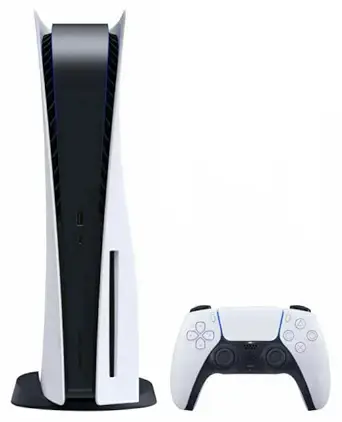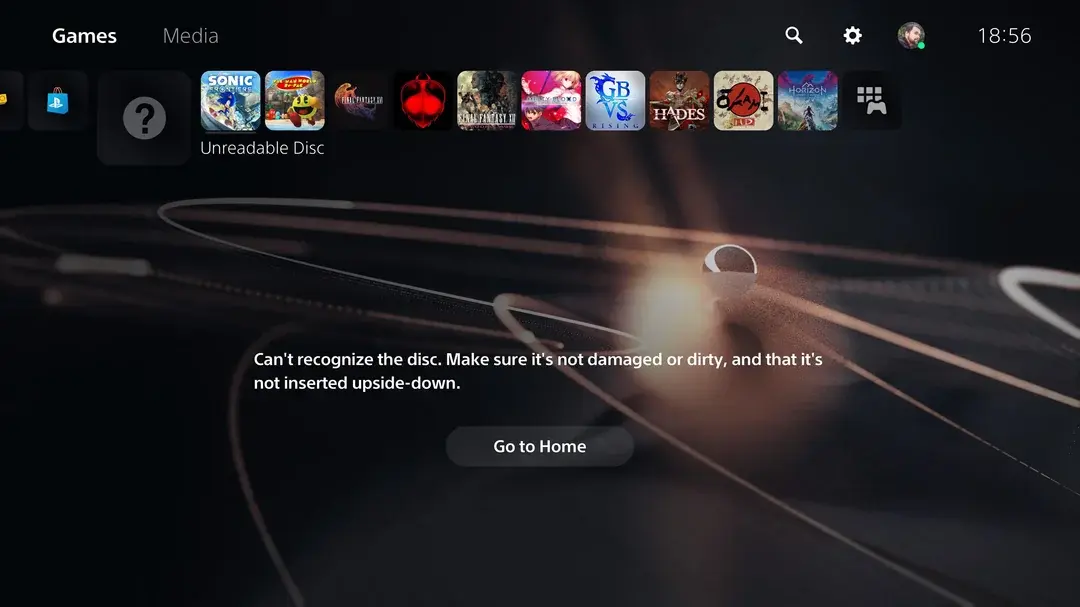
You slot a game disc into your PS5, wait for that familiar whir as the drive spins up — and instead of the game loading, you're met with a message telling you the disc can't be read. It's an oddly unsettling error, mostly because it doesn't tell you why, leaving you unsure whether the problem is the disc, the game, or the console itself. The good news is that this specific error has a fairly well-understood set of causes, most of which are simple to check yourself before assuming the worst. This guide walks through exactly what's behind an unreadable disc error on PS5, what you can safely test at home, and when it's genuinely time to get the console looked at professionally.
What This Error Actually Means
When your PS5 tells you a disc "cannot be read," it's reporting a specific failure in one of three places: the physical disc itself, the drive's laser and reading mechanism, or occasionally a software-level confusion in how the console is interpreting what it detects. You may see this paired with a specific error code — CE-10005-6 is a commonly reported one tied to disc reading failures — or simply as an on-screen message prompting you to check the disc.
The genuinely useful diagnostic distinction to make immediately is this: does it happen with every disc, or just one? That single question does more to narrow down the cause than almost anything else, so it's worth testing before doing anything more involved.
The Most Common Cause: The Disc Itself
This is, by a wide margin, the most frequent explanation — and the one most people check last rather than first. A PS5's Ultra HD Blu-ray disc drive is genuinely precise, and it needs a clean, undamaged disc surface to read correctly. A few disc-side issues account for the majority of unreadable disc errors:
Fingerprints, smudges, and surface dirt. Even light fingerprint oil or dust on the disc's reading surface can be enough to prevent a clean read, particularly on discs that have been handled by the edges and face rather than stored properly in their case.
Scratches. Visible scratches — even ones that don't feel deep to the touch — can scatter the drive's laser enough to prevent a proper read, especially scratches that run across the disc's circular tracks rather than along them.
A warped or physically damaged disc, often from improper storage — left out of its case, exposed to heat, or stacked under other objects for extended periods.
A genuinely defective disc from manufacturing, which, while less common, does happen — a brand-new disc that's never worked from the moment you opened it points toward a factory defect rather than anything you did.
Other Possible Causes
If the disc itself checks out clean and undamaged, a few other explanations are worth considering:
A temporary software glitch. Sometimes the PS5's system software simply misreads what the drive is detecting, producing an unreadable disc error even though both the disc and drive are functioning normally. This is genuinely common and often resolves with nothing more than removing the disc, restarting the console, and trying again.
A drive that's struggling to read discs consistently, even clean, undamaged ones. If multiple different discs — including ones that worked fine previously — all trigger the same error, this points toward the drive's laser or reading mechanism itself rather than anything disc-related.
Outdated system software. Sony periodically ships updates addressing disc-handling bugs; running an older system software version can occasionally contribute to reading inconsistencies that a routine update resolves.
A known installation-related bug affecting disc-based games. PS5 has, at various points, experienced a documented issue where inserting a disc for a game that has both PS4 and PS5 versions triggers unexpected or repeated installation behavior rather than a clean read — worth knowing about specifically if the "unreadable" behavior is actually more of a stuck installation loop than a flat refusal to recognize the disc at all.
What to Check Yourself, Step by Step
Work through these in order — most unreadable disc cases resolve within the first two or three steps, without needing anything more involved.
-
Remove the disc and inspect it closely under good light. Look specifically for fingerprints, dust, smudges, or visible scratches across the disc's underside (the shiny, non-label side).
-
Clean it properly if it looks dirty. Wipe gently from the center of the disc outward toward the edge — never in a circular motion — using a soft, lint-free cloth. If needed, a very light mix of water and rubbing alcohol on the cloth (never applied directly to the disc) can help lift stubborn marks. Avoid household glass cleaners or anything abrasive.
-
Try the disc again after cleaning. If it now reads correctly, the issue was simply a dirty surface — worth building a habit of proper disc storage going forward to avoid a repeat.
-
Test a completely different disc. This is the single most useful diagnostic step available to you. If a different, known-good disc reads perfectly fine, the problem is very likely isolated to that one specific disc rather than your console. If every disc you try produces the same error, the problem is far more likely to be the drive itself.
-
Restart the console properly. Power off fully, unplug from the wall (not just standby), wait a full 30 minutes, then reconnect and try again. This clears far more residual software confusion than a quick restart.
-
Check for a pending system software update, and install it if available — occasionally this alone resolves disc-reading inconsistencies tied to a known software bug.
-
If the disc is brand new and still won't read, contact the retailer or platform you bought it from about a replacement before assuming your console is at fault — a genuinely defective disc straight out of the packaging isn't unheard of, and doesn't reflect a problem with your PS5 at all.
When You Should Genuinely Be Worried
A few specific patterns indicate this has moved past a simple disc or software issue and needs proper attention:
Every disc you try fails, including ones that worked perfectly before. This is the clearest sign the problem sits with the drive itself rather than any individual disc — a healthy drive doesn't suddenly stop reading its entire existing library of games all at once without a hardware-level explanation.
A brand-new, undamaged disc from a different game still won't read. If you've ruled out a defective single disc by testing a completely different one and it still fails, this strongly points toward the drive's laser or internal reading mechanism rather than anything disc-related.
The problem persists after a full power cycle and a software update. Once you've ruled out the easy software-side explanations, a continuing unreadable disc error is a stronger signal of a genuine hardware issue with the drive.
You notice unusual noise from the drive during read attempts — grinding, excessive clicking, or a labored whirring sound that doesn't match how the drive normally sounds when reading a disc successfully.
The issue is paired with other disc drive symptoms, such as difficulty ejecting or the drive refusing to accept discs at all — if you're seeing unreadable-disc errors alongside those symptoms too, it's worth reading our companion guide on why PS4 and PS5 won't eject or accept discs, since these issues often share the same underlying mechanical cause.
Your console is still relatively new, and this is happening despite clean, well-maintained discs. A drive struggling to read discs this early points toward a manufacturing issue rather than expected wear, and is genuinely worth having diagnosed both to fix the problem and to check whether it's still covered under warranty.
Why a Struggling Laser Isn't a DIY Fix
If your testing points toward the drive itself rather than any individual disc, it's worth being direct about this: the laser assembly inside a PS5's disc drive is a precision optical component, not something that benefits from home troubleshooting beyond the basic checks above. There's no safe, reliable way to "clean" or adjust the internal laser yourself, and attempting to open the drive assembly risks misaligning components that were otherwise still functioning, or damaging a drive that might have been repairable with proper parts and technique. This is exactly the kind of issue where a proper diagnostic — distinguishing a failing laser from a simpler software or connection issue — genuinely changes what the correct (and correctly priced) fix actually is, rather than paying for an unnecessary full drive replacement when a smaller repair would have solved it.
Preventing Unreadable Disc Errors Going Forward
A handful of simple habits meaningfully reduce how often you'll run into this error at all:
Store discs in their cases, always. Leaving a disc sitting out on a shelf, table, or stacked loosely with other discs is the single biggest contributor to the dust, fingerprints, and scratches that cause read errors in the first place.
Handle discs by the edges and center hole only. Avoid touching the shiny underside directly — the natural oils from fingertips are enough to interfere with a clean laser read, even when the disc looks unaffected to the eye.
Keep the console itself clean and well-ventilated. A dusty environment around the console doesn't just contribute to overheating (covered in our companion guide on PS5 overheating issues) — dust can also work its way into the disc drive itself over time, gradually affecting how reliably it reads discs.
Avoid inserting non-standard or damaged media. Burned discs, poor-quality third-party Blu-rays, or discs already showing visible damage put unnecessary strain on the drive and increase the odds of a stuck or failed read attempt.
Keep your system software up to date. Since Sony periodically addresses disc-handling bugs through system updates, staying current reduces your exposure to any known software-side reading issues.
If you're buying secondhand or refurbished discs, give them a visual inspection and a gentle clean before the first use — a previously-owned disc is more likely to carry surface wear than a factory-sealed one, and a quick check upfront saves a frustrating error message later.
Get It Looked at Properly
If you've worked through the disc and software checks above and your PS5 is still struggling to read discs — particularly if it's failing on multiple different, undamaged discs — City Gadgets Kenya's Repairs category offers proper diagnosis before any repair work begins. A thorough diagnostic identifies whether you're genuinely dealing with a failing laser or drive component, or something simpler like a lingering software glitch or connection issue — meaning you're not paying for a full drive replacement when a smaller, correctly diagnosed fix would do the job.
The "One Disc vs. Every Disc" Test, Explained Further
Since this single test does more diagnostic work than anything else in this guide, it's worth walking through exactly how to interpret the results properly.
If only one specific disc fails, and it's a game you've owned and played before: the disc itself has likely developed a scratch, warping, or surface damage since you last used it — check storage habits going forward, and consider whether a replacement copy is worth it if the game is one you play often.
If only one specific disc fails, and it's brand new, never-played: this points toward either a factory defect on that specific copy, or damage that occurred during shipping or handling before it ever reached your console — a replacement from the retailer is the right next step, not a console repair.
If every disc fails, including ones you know worked fine recently: this is the pattern that genuinely warrants treating it as a console-side issue rather than a disc problem, and moving toward the software checks and, if needed, professional diagnosis covered above.
If discs work sometimes but not consistently, with no clear pattern: this intermittent behavior often points toward either a drive that's beginning to fail gradually, or a disc that's borderline-damaged and only readable when everything else (temperature, exact disc position, alignment) happens to line up — worth monitoring closely, since intermittent issues like this tend to become fully consistent failures over time rather than resolving on their own.
Frequently Asked Questions
Why does my PS5 say a disc can't be read even though it looks clean? Even light fingerprint residue or fine dust that isn't obviously visible can be enough to interfere with the drive's laser. Try a proper clean — wiping from center to edge with a soft, lint-free cloth — even if the disc appears fine at a glance.
Is it my disc or my console causing the problem? Test a completely different, known-good disc. If it reads fine, the issue is isolated to the original disc. If every disc you try fails, the problem is much more likely to be the drive itself.
What does PS5 error code CE-10005-6 mean? It's a commonly reported error code associated with disc reading failures on PS5, generally pointing toward either a disc-surface issue or a drive-level reading problem, distinguished by whether the error occurs with one disc or all of them.
Can a software update actually fix a disc reading problem? Yes, in some cases — Sony has periodically shipped system updates addressing disc-handling bugs, so keeping your PS5's software current is a genuinely worthwhile step before assuming a hardware fault.
Should I try cleaning the inside of the disc drive myself? No — external disc cleaning is safe and often effective, but the drive's internal laser and reading mechanism are precision components that shouldn't be opened or adjusted without proper training, since incorrect handling risks turning a fixable issue into a more serious one.
Where can I get my PS5 disc drive diagnosed and repaired in Kenya? City Gadgets Kenya's Repairs category provides professional diagnosis and repair for PS5 disc reading issues — reach out via WhatsApp to describe what you're experiencing and get guidance on the right next step.
Final Word
An unreadable disc error is genuinely one of the more encouraging PS5 problems to run into, precisely because it's so often traceable to something simple — a dirty disc, a single damaged copy, or a temporary software hiccup that a proper restart clears up entirely. The key diagnostic step is always the same: test whether it's one disc or every disc, work through the basic checks in order, and only treat it as a genuine hardware concern once you've ruled out the easy explanations. If it does turn out to be the drive itself, getting a proper diagnosis first ensures you're paying for the right fix rather than guessing.
If your PS5 is still showing unreadable disc errors after working through the checks above, get it looked at through City Gadgets Kenya's Repairs category, or reach out on WhatsApp to describe what's happening and find out the best next step for your console.