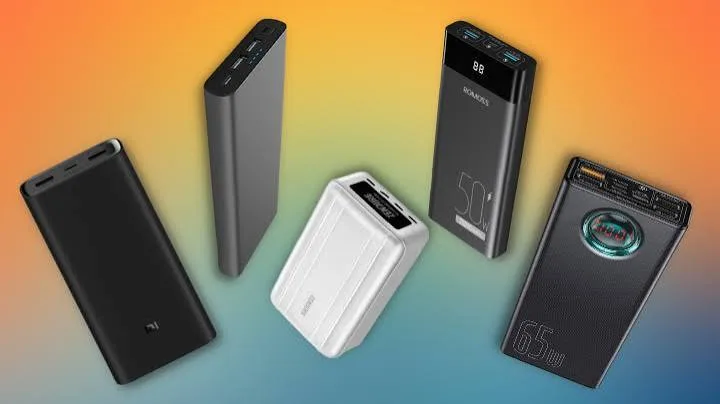
A 10,000mAh power bank should charge a 5,000mAh phone twice. In real life it charges it about one and a half times, and sometimes less. A 20,000mAh power bank that costs half the price of a famous brand turns out to hold a fraction of what it claims. A power bank is refused at the airport because "it is over the limit", though you had no idea there was a limit. All of these puzzles come down to one thing: mAh is a misleading number, and watt-hours (Wh) tell the true story. This guide explains power bank mAh vs Wh in plain language, with simple maths you can do on your phone's calculator, airline rules, laptop charging and how to spot fake capacity claims.
If you want help choosing a power bank for your phone, tablet or laptop, message City Gadgets Kenya on WhatsApp.
The short version
- mAh (milliamp-hours) measures charge, not energy. It only means something when you know the voltage.
- Wh (watt-hours) measures energy and is the fair way to compare power banks, phones and laptops.
- Conversion: Wh = mAh × voltage ÷ 1000. Power bank cells run at about 3.6 to 3.7V.
- You never get the full rated capacity. Voltage conversion, heat and cable losses mean you typically get roughly 60 to 70 percent of the rated mAh as usable charge at the phone.
- Airlines limit power banks by Wh: generally up to 100Wh in carry-on without special approval, and 100 to 160Wh only with airline approval. Power banks must go in cabin baggage, never checked.
- Output wattage matters as much as capacity. A big bank with slow output charges a laptop poorly.
- Fake power banks lie about capacity. Weight, price and a simple discharge test expose them.
| Rated capacity | Energy (at 3.7V) | Typical use |
|---|---|---|
| 5,000 mAh | 18.5 Wh | Emergency top-up for one phone |
| 10,000 mAh | 37 Wh | One to two phone charges, daily carry |
| 20,000 mAh | 74 Wh | Several phone charges, tablet, small laptop top-up |
| 25,000 mAh | 92.5 Wh | Multi-day phone use, partial laptop charge |
| 26,250 mAh | about 97 Wh | Near the 100Wh airline limit |
| 30,000 mAh | 111 Wh | Over 100Wh; needs airline approval |
What mAh and Wh really measure
Milliamp-hour (mAh) is how much electric charge a battery stores. One mAh means the battery can supply one milliamp for one hour. By itself it tells you little, because the same charge at a higher voltage carries more energy.
Think of water in a tank. Charge (mAh) is like the volume of water. Voltage is like the height of the tank: the higher it is, the more energy each litre carries when it falls. Energy (Wh) is volume multiplied by height. Two tanks with the same volume but different heights hold different amounts of energy.
Watt-hour (Wh) is energy: how much work the battery can do. One Wh means one watt for one hour. Wh accounts for both charge and voltage, so it lets you compare different batteries fairly.
The conversion is simple:
Wh = mAh × V ÷ 1000
Lithium-ion cells used in power banks and phones have a nominal voltage of about 3.6 to 3.7V (phones often quote 3.85V for newer chemistries). Using 3.7V:
- 10,000 mAh × 3.7 ÷ 1000 = 37 Wh
- 20,000 mAh × 3.7 ÷ 1000 = 74 Wh
- 26,250 mAh × 3.7 ÷ 1000 = 97.1 Wh
Why a 10,000mAh power bank does not charge a 5,000mAh phone twice
Here is the mystery most people notice. Your phone has a 5,000mAh battery. The power bank is 10,000mAh. Surely two full charges? In practice you get about one and a half. There are three reasons.
1. Voltage conversion losses. The power bank's cells run at about 3.7V, but USB output is 5V (or 9V, 12V, 15V, 20V for fast charging). The power bank must boost the voltage, and the conversion wastes energy as heat. Typical efficiency is 85 to 90 percent, sometimes lower at low loads.
2. The phone's own conversion. Your phone then steps the voltage back down to charge its 3.85V battery, losing a bit more.
3. Cable, heat and charging-curve losses. Cables have resistance. Phones slow the charge near full, and heat in either device wastes energy.
Put numbers on it. A 10,000mAh bank holds 37Wh. At about 85 percent conversion, around 31Wh reaches the phone. A phone with a 5,000mAh battery at 3.85V holds about 19.25Wh. Dividing, 31 ÷ 19.25 ≈ 1.6 charges. With cable and heat losses and the phone's own charging losses, 1.3 to 1.5 charges is typical. That is normal, not a fault. Many manufacturers quote a figure like "about two charges" for 10,000mAh, which assumes ideal conditions or smaller phones.
A simple rule: expect to get 60 to 70 percent of the power bank's rated mAh as usable charge for your phone. So 10,000mAh gives roughly 6,000 to 7,000mAh to your device; 20,000mAh gives roughly 12,000 to 14,000mAh.
A quick calculator for real-world charges
Use this formula to estimate how many charges you will get:
Charges ≈ (power bank Wh × 0.65) ÷ phone battery Wh
Find the phone battery's Wh from its specification, or calculate it from mAh and voltage (a 5,000mAh phone at 3.85V is about 19.25Wh).
Examples with a 19Wh phone:
| Power bank | Wh | Estimated phone charges |
|---|---|---|
| 10,000 mAh | 37 | about 1.3 |
| 20,000 mAh | 74 | about 2.5 |
| 25,000 mAh | 92.5 | about 3.1 |
| 26,250 mAh | 97 | about 3.3 |
For a small iPhone with a battery of around 13Wh, the same banks give more charges; for a big-battery Android phone, fewer. Use your own phone's figure.
Output wattage: the other half of the story
Capacity tells you how much energy; output tells you how fast it flows. A power bank that holds a lot of energy but delivers only 10W will charge a modern phone slowly and a laptop barely at all.
- 5W to 12W output: slow charging, fine for earbuds and old phones.
- 18W to 30W output: fast charging for most phones and tablets. Examples in our range: the Anker Zolo 20K with 22.5W output and the Anker Zolo 10K with 30W, as listed.
- 45W to 65W: charges ultrabooks and large tablets.
- 100W and above: charges powerful laptops. The Anker Power Bank 25K 165W has a maximum output of 165W, and the Anker Prime Power Bank 26K 300W offers 300W total across its ports with up to 140W from a single USB-C port using a 5A cable, according to the listed specifications.
Output depends on USB Power Delivery and the cable. Read USB Power Delivery explained to see why your cable and device must support the speed you want.
Charging a laptop from a power bank
Laptops hold much more energy than phones. A typical thin laptop battery is 40 to 60Wh; a performance laptop may be 70 to 99Wh.
A 25,000mAh power bank (about 92.5Wh) delivers perhaps 55 to 65Wh to a laptop after losses. That is roughly one full charge of a 50Wh laptop, or most of the way for a larger machine. A 10,000mAh bank (37Wh) will only top up a laptop partially.
What you need for laptop charging:
- Capacity large enough for the charge you want: at least 20,000mAh for a meaningful top-up.
- Output wattage at or above what your laptop draws, using USB PD: 45W, 65W or 100W, depending on the laptop.
- A proper cable, with e-marked 5A rating for 100W and above.
- A laptop that charges over USB-C. Some laptops use barrel-plug chargers and cannot charge from a PD power bank.
If your laptop is working hard on battery, a 45W bank may only slow its decline rather than charge it. That is a physics limit, not a defect.
Airline rules: the 100Wh limit
If you fly with a power bank, Wh matters. Under international air-safety rules followed by most airlines (set by ICAO and IATA), spare lithium batteries, which includes power banks:
- Must travel in carry-on baggage, never in checked luggage. A damaged battery in the cabin can be dealt with by the crew; in the hold, a fire could go unnoticed.
- Up to 100Wh: generally allowed in carry-on without special approval.
- Between 100Wh and 160Wh: allowed only with the airline's approval, usually limited to two per passenger.
- Above 160Wh: not allowed on passenger aircraft.
Rules can differ between airlines and countries, and in recent years some airlines have added restrictions on using power banks during flight or limiting the number you may carry. Always check your airline's current policy before travelling.
Because the limit is in Wh, the label on your power bank matters. A 20,000mAh bank at 3.7V is 74Wh, comfortably under 100Wh. A 26,250mAh bank is about 97Wh, just below the line, which is why high-capacity power banks are often engineered at around 26,000mAh and marketed as airline-safe. The Anker Prime Power Bank 26K 300W is listed as airline-safe at 26,250mAh. A 30,000mAh bank is about 111Wh and needs airline approval.
Tips for travel:
- Look for the Wh figure printed on the power bank. Many are required to show it. If it is missing, calculate it as above and carry the specification sheet.
- Keep it in your carry-on, accessible, with terminals protected from short circuits (the original case or a pouch).
- Do not travel with a damaged or swollen power bank.
- Check your airline's policy on in-flight use and number allowed.
Understanding other power-bank specs
Input (recharge) speed
A big power bank that takes 20 hours to recharge from a 10W adapter is a nuisance. Look for USB-C PD input, at 18W, 30W or higher. High-end models recharge at 100W or more. The Anker Prime 26K lists recharging at up to 250W using both USB-C ports together. Pair a fast power bank with a proper charger; see what is GaN charging.
Number and type of ports
USB-C PD ports are the most useful. USB-A ports are handy for older cables. Several ports let you charge multiple devices, but the output is shared, so read the multi-port power split.
Built-in cables
Some power banks, such as the Anker 25K 165W with retractable cables, include built-in cables. They are convenient but you cannot replace a damaged one easily. Consider carrying a spare cable.
Pass-through charging
Pass-through lets you charge the power bank and a device at the same time. It is convenient but can generate extra heat; check the manufacturer's notes.
Wireless and magnetic charging
Magnetic power banks, such as the Anker MagGo 10000mAh, snap onto compatible phones and charge wirelessly. They are convenient and slower than cables, and wireless charging is less efficient, so expect fewer charges from the same capacity. Alignment and phone cases affect performance.
Display and app
A display showing percentage or watts is useful. App support lets you update firmware and adjust settings on premium models.
Size and weight
Capacity costs weight. A 10,000mAh bank is pocketable; a 25,000mAh bank is a brick. Choose what you will actually carry.
Cell quality, cycles and safety
Good power banks use quality cells with protection circuits for over-charge, over-discharge, over-current, short circuit and temperature. Cycle life is typically several hundred full cycles before the capacity drops noticeably, which in daily use means a couple of years. Cheap power banks skimp on protection, which is where the safety risk lies.
Which power bank for which user?
| User | Suggested size | Output | Notes |
|---|---|---|---|
| Daily commuter | 10,000mAh | 20W to 30W | Slim and pocketable, e.g. Zolo 10K 30W |
| Heavy phone user or two phones | 20,000mAh | 22.5W to 30W | Covers two days |
| Traveller with phone and tablet | 20,000 to 25,000mAh | 30W to 65W | Dual USB-C |
| Remote worker / laptop top-up | 25,000mAh | 100W+ | e.g. Anker 25K 165W |
| Power-user, creator or engineer | 26,000mAh | 140W to 300W | e.g. Anker Prime 26K 300W |
| iPhone user wanting no cables | 10,000mAh magnetic | wireless | e.g. MagGo 10K |
| Outage backup for phones and router | 20,000mAh+ | PD + USB-A | Charge in advance |
Our accessories category lists the Anker range. We do not print prices because they change; message us for today's price.
Power banks during outages in Kenya
Power cuts are a fact of life in many areas, and a power bank is an inexpensive way to stay connected. A few tips:
- Charge the bank fully before you need it, and top it up monthly if you do not use it.
- Prioritise. Use it to keep your phone and Wi-Fi router alive rather than charging low-priority gadgets.
- Note that routers use different voltages. Many routers need 9V or 12V and a specific connector; a power bank with a matching cable or a "DC UPS" product is needed. Do not plug a router into a bank with the wrong voltage.
- Consider a UPS for desktop computers and routers. A power bank is not a substitute for a proper UPS.
- Keep a basic charger and cable in a drawer so you are never stranded.
How much energy do your devices need?
Knowing the Wh of your gadgets turns a power bank into a simple budget. These are typical figures; check your own device.
| Device | Typical battery | Energy |
|---|---|---|
| Wireless earbuds (case included) | 400 to 700 mAh | about 1.5 to 2.5 Wh |
| Smartwatch | 300 to 500 mAh | about 1 to 2 Wh |
| Compact phone | 3,000 to 4,000 mAh | about 12 to 15 Wh |
| Large phone | 4,500 to 5,500 mAh | about 17 to 21 Wh |
| Tablet | 7,000 to 10,000 mAh | about 27 to 40 Wh |
| Thin laptop | 40 to 60 Wh | 40 to 60 Wh |
| Performance laptop | 70 to 99 Wh | 70 to 99 Wh |
| Wi-Fi router (running) | uses about 10 to 20 W | 10 to 20 Wh per hour |
| Portable Bluetooth speaker | 2,000 to 10,000 mAh | about 7 to 37 Wh |
With this table, planning is straightforward. A 74Wh (20,000mAh) bank delivers around 48Wh after losses. That could be about two large phone charges plus a tablet top-up, or roughly three hours of running a router at 15W. A 37Wh (10,000mAh) bank delivers about 24Wh, around one and a quarter large-phone charges.
Worked example: a long day out
Achieng leaves home at 7am and returns at 9pm. Her phone uses about 25 percent of a 19Wh battery per four hours of mixed use, so around 15Wh for the day plus a top-up for earbuds of about 2Wh. She needs around 17Wh at the device, so about 26Wh from the power bank after losses. A 10,000mAh bank (37Wh nominal, about 24Wh deliverable) is borderline; a 20,000mAh bank is comfortable. She picks the 20,000mAh model because she often travels and wants a reserve for her tablet.
Another example: Kevin works on a 50Wh laptop at a client site with unreliable power. He wants one full charge of his laptop, about 50Wh. With 65 percent efficiency he needs a bank of roughly 77Wh, so a 25,000mAh (92.5Wh) bank is the minimum sensible choice, and he needs 65W or more of USB PD output to charge while he works.
How to run a simple capacity test at home
You can check a power bank's real capacity without special equipment if you are patient.
- Charge the power bank to 100 percent and note the time.
- Fully discharge a phone you know the battery size of, or use a USB power meter that logs energy delivered.
- Charge the phone from the power bank to 100 percent, then discharge it again and repeat until the power bank is empty. Count the total percentage charged and multiply by the phone's capacity.
- Compare with the estimate. If the delivered energy is well below 60 percent of the nominal Wh, the capacity claim is suspect.
- With a power meter, read the Wh or mAh delivered directly. Most meters show this. A genuine 20,000mAh bank should deliver about 12,000 to 14,000mAh at 5V, or around 48Wh.
Do this with a fresh bank, in a cool room, with a decent cable. If your result is dramatically lower, return the bank under warranty.
Why wireless and fast charging shrink the numbers
The real efficiency of a power bank depends on how you use it. Charging at 5V with a short cable is generally efficient. Fast charging at 9V, 12V or 20V reduces current for the same power and can be efficient too, but the bank's converter works harder and heat rises. Wireless charging adds an air gap between coils and wastes substantially more energy as heat, so a magnetic bank may deliver only 50 to 60 percent of its nominal energy. If you want to stretch your battery, use a cable.
Disposal and recycling
Lithium batteries should not go in household rubbish. Swollen, damaged or dead power banks can catch fire in bins and in waste trucks. Take unwanted power banks to an electronics recycling point or return them to a seller who accepts old batteries. If you are in doubt, ask us. Tape the terminals of damaged cells before disposal and keep them in a cool, dry place until you can drop them off.
How to care for a power bank
- Charge it before it hits zero, and store it at around half charge if unused for months.
- Keep it cool. Heat degrades and endangers lithium batteries. Never leave it in a hot car.
- Avoid water and drops. A cracked or dented power bank may be unsafe.
- Use quality cables and chargers.
- Stop using it if it swells, smells, overheats or leaks. Dispose of it properly.
- Do not sleep with it charging under a pillow.
- Recharge every few months if it sits unused.
- Replace it every few years; capacity fades with age.
Common myths about power banks
"Higher mAh always means more charges." Only if the voltage and efficiency are comparable, and only if the number is true.
"A power bank can be recharged forever." Cells wear out after hundreds of cycles.
"Fast charging damages the phone." Fast charging in cool conditions is fine; heat is the issue.
"I can take any power bank on a plane." There is a 100Wh limit without approval.
"The cheapest 30,000mAh bank is a bargain." Usually it is a fake capacity claim.
"A power bank works as a UPS." Not for most equipment.
"Using a power bank while charging it is fine." Pass-through works on some, but generates heat and may shorten life.
Power banks, phones and heat in Nairobi
Kenya's climate is moderate in Nairobi and hot on the coast, and both matter for batteries. Lithium cells dislike heat above about 35 degrees Celsius; a power bank left on a car dashboard or in direct sun can swell, lose capacity quickly or become dangerous. In hot weather, keep the bank in a bag, in the shade, and do not charge it in direct sunlight. In very cold conditions, capacity drops temporarily but recovers when warm. This is also why quality power banks specify an operating temperature range and include temperature protection.
A final word on honesty in capacity labelling
Real manufacturers rate capacity at the cell level, which is the maximum the cells can hold. Usable output is always lower, and good brands say so in their documentation. When a seller promises "10,000mAh gives you exactly two full phone charges", they are rounding in their favour. At our shop we give you the realistic numbers: the Wh, the output wattage and the likely number of charges for your phone, so you can decide with the facts. If a particular bank is not right for your use, we say so and point you to one that is.
How to spot a fake power bank or false capacity claim
Power banks are among the most misrepresented electronics. A fake can claim 30,000mAh and deliver 5,000mAh, or it can lack basic protection circuits, which is dangerous. Here is how to check.
1. Weigh it. Lithium cells are heavy. A genuine 20,000mAh bank needs roughly seven standard 18650-type cells (about 3,000mAh each) or an equivalent pouch pack, which weighs around 300 grams or more with casing and electronics. A "20,000mAh" bank that weighs 150 grams cannot hold that capacity. Compare the weight with the manufacturer's listing for the genuine model.
2. Check the price. Cells cost money. A 20,000mAh power bank sold for a fraction of the price of reputable brands almost certainly contains less than claimed.
3. Read the label. Genuine power banks print capacity in both mAh and Wh, input and output ratings, model number and regulatory marks. A label that shows only "30000mAh" with no Wh figure, spelling errors or impossible output claims is suspicious. Watch for unrealistic claims such as "50,000mAh" in a pocket-sized case.
4. Check the Wh arithmetic. If the label says 20,000mAh at 3.7V and 74Wh, the numbers should agree. Mismatches suggest relabelling.
5. Do a real-world test. Fully charge the bank, then charge a phone of known capacity and see how many percent you get. Compare to the estimate above. A 20,000mAh bank that charges your phone only once fully is suspect. A USB power meter that logs mAh or Wh delivered gives a more precise answer.
6. Look at the build. Genuine banks have tight seams, clean port finishes and firm buttons. Fakes often rattle, creak or show rough edges and misaligned logos.
7. Check the output. If a bank claims 65W PD but cannot charge a laptop or only outputs 5V, the claim is false. A power meter shows the voltage and current.
8. Check heat. A bank that gets very hot under moderate load is poorly designed or poorly protected.
9. Verify with the brand. Compare model number, appearance and listing with the manufacturer's official page. Some brands offer authenticity checks.
10. Buy from a trusted seller with a receipt and warranty. A genuine seller supports the product. If they will not, walk away.
If you are unsure, bring a power bank to our shop, or send photos of the label and the product on WhatsApp, and we will help you check the maths.
Why buy power banks from City Gadgets Kenya
- Genuine Anker power banks and other brands, sealed and verified, with listed specifications confirmed.
- We explain the real numbers. We give you Wh, output and realistic charge counts, not just a big mAh figure.
- Honest sizing. If a 10,000mAh bank is enough, we say so; if you need 25,000mAh for a laptop, we say that too.
- A real shop in Nairobi CBD at New Alnoor Exhibition, Second Floor, Shop C7, Accra Road, where you can handle the weight and size.
- Same-day delivery in Nairobi and next-day outside Nairobi, with M-Pesa payment.
- After-sales help with compatibility and faults.
- Message us for today's price. Prices change, so we quote the current price on WhatsApp.
See our accessories category, and our phones category if you want a phone and power bank together.
Glossary
- mAh: milliamp-hours, a measure of charge.
- Wh: watt-hours, a measure of energy.
- Nominal voltage: the average operating voltage of a cell, about 3.6 to 3.7V.
- PD: USB Power Delivery, a fast-charging protocol.
- Pass-through: charging the bank while it charges a device.
- Cycle life: the number of full charge and discharge cycles a battery tolerates before capacity drops noticeably.
- Conversion efficiency: the share of stored energy that reaches your device.
Quick buying checklist
- Choose capacity from your needs, using the Wh calculator.
- Check output wattage matches your phone, tablet or laptop.
- Check the Wh if you will fly.
- Check ports and cables.
- Check input speed so it recharges in a sensible time.
- Weigh it and check the label.
- Buy genuine with a receipt and warranty.
Frequently asked questions
What is the difference between mAh and Wh? mAh measures charge; Wh measures energy. Wh = mAh × voltage ÷ 1000. Wh is the fair way to compare.
How many times will a 10,000mAh power bank charge my phone? Roughly 1.3 to 1.5 times for a 5,000mAh phone, because of conversion losses.
How do I convert mAh to Wh? Multiply mAh by the voltage (about 3.7V) and divide by 1000.
Can I take a 20,000mAh power bank on a plane? Usually yes; it is about 74Wh, under the 100Wh limit. Carry it in your cabin bag and check your airline's rules.
Can I take a 30,000mAh power bank on a plane? It is about 111Wh and needs airline approval.
Can a power bank charge a laptop? Yes, if it supports USB PD at your laptop's wattage and your laptop charges over USB-C.
Why does my power bank charge slowly? Low output wattage, a weak cable or a heat-limited phone. Check output and swap the cable.
How long does a power bank last? Several hundred charge cycles, typically a couple of years of daily use.
Is it safe to leave a power bank charging overnight? Quality power banks have protection circuits, but avoid covering it or charging on a bed.
How do I know if a power bank is fake? Weight, price, label checks and a real discharge test. Buy from a trusted seller.
Do you sell Anker power banks? Yes, including 10K, 20K, 25K and 26K models. Message us for today's price.
Which power bank is best for a laptop? A 25,000mAh or larger bank with 65W to 100W+ PD output, such as the Anker 25K 165W or Prime 26K 300W.
Ready to choose?
Tell us your phone, tablet or laptop and how long you need to stay unplugged, and we will recommend the right size and output and confirm the numbers before you pay.
WhatsApp: wa.me/254745575931 Visit: New Alnoor Exhibition, Second Floor, Shop C7, Accra Road, Nairobi CBD. Same-day delivery in Nairobi; next-day outside Nairobi.
Related reading: USB Power Delivery explained, what is GaN charging, best power bank in Kenya.