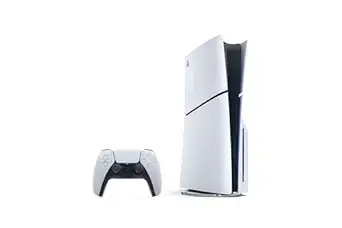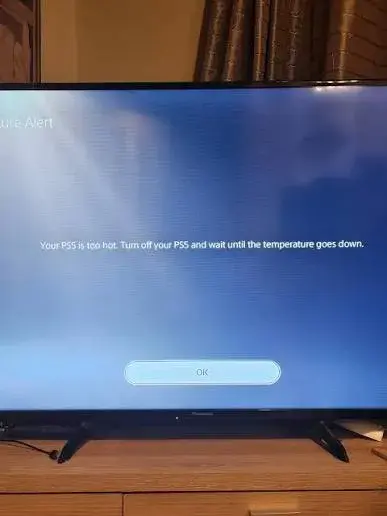
You're a few months into owning your PS5, deep into a session, and suddenly a message appears: your console is too hot and needs to shut down. Or maybe there's no warning at all — just a sudden black screen, a beep, and silence. It's genuinely alarming, especially on a console this new, and the natural first question is whether something is seriously wrong or whether this is just normal PS5 behavior you haven't encountered yet. This guide walks through exactly what causes PS5 overheating, what you can safely check yourself, and — most importantly — when this stops being a minor annoyance and becomes something you should get looked at professionally before it turns into a much bigger repair.
What "Overheating" Actually Looks Like on a PS5
Before troubleshooting, it helps to recognize the specific signs, since PS5 overheating tends to show up in a few consistent ways:
- A direct on-screen warning reading something like "Your PS5 is too hot. Turn off your PS5 and wait until the temperature goes down" — Sony's own built-in thermal protection message, often tied to the specific error code CE-109564-1.
- A sudden shutdown with no warning at all — the screen goes black, the fan briefly spins up loudly, and the console powers off entirely, sometimes restarting cleanly on its own afterward.
- The fan running at continuous high speed, sounding closer to a small jet engine than the console's normal operating noise, even during lighter, less demanding games.
- Shutdowns that happen faster during specific games — heavier, more graphically demanding titles (open-world games, anything pushing the console's processor and graphics chip hard) tend to trigger the issue sooner than lighter, less intensive titles or apps.
- The console feeling noticeably hot to the touch on its casing, particularly near the vents, well beyond what feels like normal warmth during use.
If you're seeing any combination of these, your PS5 genuinely is running hotter than it's designed to, and the console's built-in thermal protection is doing exactly what it's supposed to do — shutting down before internal temperatures reach a level that could cause permanent damage.
Why This Is Happening: The Real Causes
Overheating on a PS5 this new is rarely random bad luck — it almost always traces back to one of a handful of specific, identifiable causes.
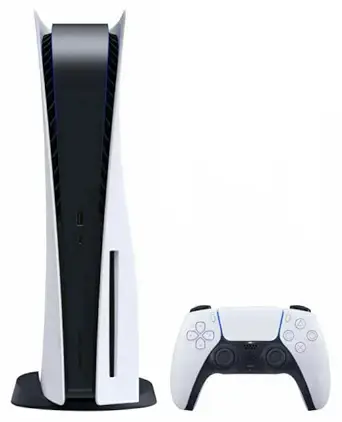
1. Poor ventilation and placement. This is by far the single most common cause, and the easiest to fix. A PS5 needs genuine airflow on all sides, particularly the back, where the main exhaust vent sits. Consoles tucked into an enclosed TV stand cubby, pushed flush against a wall, surrounded by other equipment, or laid flat with objects on top are all working against the console's own cooling system before it even starts a game.
2. Dust buildup in the vents and internal fan. Even in a clean home, dust accumulates inside any device with active airflow over months of use. As dust collects on the intake vents, the internal heatsink fins, and the fan blades themselves, the console has to work harder to move the same amount of air — and eventually can't move enough to keep up, regardless of how demanding the game is.
3. A struggling or failing internal fan. If the fan itself has accumulated heavy dust or grime, or if it's beginning to fail mechanically, it simply can't spin fast enough to move sufficient air even with clear vents — a related but distinct problem from dust blockage alone.
4. Thermal paste or heat sink issues. Inside every PS5 sits a compound called thermal paste, which transfers heat away from the console's main processor to the heatsink and fan system. On a console still within its first year, this is less common as a root cause than dust or placement — but it becomes an increasingly likely explanation the longer a console has been in service, or if the overheating pattern is severe and immediate rather than developing gradually.
5. A failing or inaccurate thermal sensor. Less common, but worth knowing about: if the console's internal temperature sensor itself is malfunctioning and reporting inaccurately low readings, the fan won't ramp up appropriately in response to genuinely rising heat — meaning the console can cross its actual safe temperature threshold before the cooling system ever reacts properly.
6. External storage or accessories adding load. In some cases, an external hard drive or other connected accessory can contribute additional heat or processing load. If your overheating pattern seems to line up with when an external drive is connected, that's worth testing in isolation.
What You Can Safely Check at Home First
A handful of steps are genuinely safe and worth trying before assuming the worst — these address the two most common causes (placement and surface dust) without requiring you to open the console yourself.
-
Give it real breathing room. Make sure your PS5 has at least a few inches of clearance on all sides, especially the back exhaust vent. If it's inside an enclosed cabinet or TV stand cubby, that alone could be the entire problem — move it to a more open position and see whether the issue improves.
-
Check for surrounding heat sources. Keep the console away from direct sunlight, radiators, or other heat-generating electronics stacked closely nearby, all of which raise the ambient temperature the PS5 has to work against.
-
Gently clean the external vents. A vacuum with a soft brush attachment, held gently against the visible vents (never pressed hard against the fan itself, which can damage the blades), can help pull out surface-level dust without opening the console. Compressed air can help too, used in short bursts with the can held upright to avoid moisture getting inside.
-
Disconnect external accessories temporarily. If you use an external hard drive, unplug it and test whether the overheating pattern changes during a normal play session.
-
Check for a pending system software update. Occasionally, software-level issues can affect how efficiently the console manages its own thermal performance — make sure your PS5 is running the latest system software.
-
Note the pattern. Is it every game, or only the most demanding titles? Does it happen within minutes, or only after extended sessions? Has it gotten worse over time, or did it start suddenly? This information is genuinely useful if you do end up needing a professional repair, since it helps narrow down the likely cause quickly.
When You Should Genuinely Be Worried — And Stop DIY Troubleshooting
This is the part worth taking seriously rather than continuing to push through. A few specific signs mean it's time to stop experimenting at home and get the console looked at properly:
The console is shutting down within just a few minutes of starting a demanding game, even after you've addressed ventilation and surface dust. This pattern typically points to something deeper than surface-level airflow — commonly a failed internal heat sink compound, a fan that's genuinely dying rather than just dusty, or heatsink fins clogged with dust that's built up beyond what external cleaning can reach.
The fan runs at continuous full speed all the time, even during light use. This suggests either a failing thermal sensor reporting inaccurate readings, or the processor genuinely running dangerously hot — neither of which resolves on its own, and both of which risk further internal damage the longer they continue.
You're seeing the specific "too hot" warning or error code CE-109564-1 repeatedly, even after cleaning vents and improving placement. A recurring, specific thermal shutdown code that persists despite basic troubleshooting is a strong signal of an internal hardware issue rather than something fixable through positioning or a quick clean.
The overheating pattern is worsening over time rather than staying consistent — this typically indicates a genuinely progressive issue (worsening dust accumulation deep inside, a fan bearing wearing down, thermal paste degrading) rather than a one-off environmental factor.
The console eventually stops turning on at all after repeated thermal shutdowns. This is the most serious sign of all — repeated thermal stress cycles can, over time, affect the solder joints on the console's main processor board. Left unaddressed, what started as an overheating warning can progress into the console failing to power on entirely.
Your PS5 is still relatively new — like yours, at just a few months old. This genuinely matters: a console this age overheating already, despite reasonable placement and normal use, points toward either a manufacturing or assembly issue (which may still be covered under warranty) rather than the kind of gradual dust buildup you'd expect after a year or more of use. This is exactly the scenario where professional diagnosis is worth pursuing promptly, both to fix the immediate problem and to potentially catch it under warranty before that coverage expires.
Bottom line: if basic ventilation and cleaning don't meaningfully improve things within a session or two of testing, stop troubleshooting on your own. Continuing to run a console that's repeatedly hitting thermal shutdown risks compounding a fixable problem into a much more serious and expensive one — particularly the kind of processor-level damage that isn't a simple repair.
Why This Isn't Something to Try Fixing Yourself Beyond Basic Cleaning
It's worth being direct about this: while external vent cleaning and repositioning are safe for any PS5 owner to do, opening the console itself — to access the internal fan, replace thermal paste, or inspect the heatsink — is genuinely not something to attempt without proper training and tools. A PS5 opened incorrectly can void any remaining manufacturer warranty entirely, and incorrect reassembly, static damage, or improper thermal paste application can turn a fixable overheating issue into a console that won't power on at all. This is exactly the kind of repair where professional diagnosis and service protects both your console and your wallet.
Preventing This Going Forward
Once your PS5 is running properly again, a few ongoing habits genuinely reduce the odds of overheating becoming a recurring problem:
Keep its permanent spot open and ventilated. Whatever position you settle on after fixing the current issue, resist the temptation to tuck it away in an enclosed cabinet later — consistent airflow matters every single session, not just while troubleshooting.
Build in a periodic light clean. A gentle external vent clean every few months, especially in dustier households or homes without air conditioning, prevents the gradual buildup that causes overheating in the first place — far easier than dealing with a fully clogged system later.
Use Rest Mode thoughtfully. Extended, uninterrupted play sessions place more sustained thermal load on the console than shorter sessions with natural breaks — not a reason to stop playing how you enjoy, but worth knowing if overheating tends to show up later in longer sessions specifically.
Don't ignore early warning signs. A fan that's slightly louder than usual, or a console that feels warmer than it used to during the same games, is worth addressing while it's still a simple fix — waiting until you're hitting full thermal shutdowns regularly makes the eventual repair more involved than it needed to be.
Get It Looked At Properly
If you've tried the basic checks above and the overheating is continuing — or if you'd simply rather have a professional properly diagnose the exact cause before it gets worse — City Gadgets Kenya's Repairs category is built exactly for this. Rather than guessing at internal fan replacements or thermal paste yourself, a proper diagnostic can identify whether you're dealing with simple dust accumulation, a failing fan, degraded thermal paste, or a sensor issue — and get it fixed correctly the first time, protecting the console from the kind of repeated thermal stress that leads to much more serious, costly problems down the line.
Given how recently you bought your console, it's also worth checking whether the issue may still fall under manufacturer warranty before pursuing a paid repair — something our team can help you confirm.
Frequently Asked Questions
Is it normal for a PS5 to get warm during use? Yes — some warmth during normal operation is completely expected, particularly during demanding games. The concern is specifically shutdowns, on-screen thermal warnings, continuous full-speed fan noise, or the console feeling dangerously hot to the touch, not general warmth alone.
What does PS5 error code CE-109564-1 mean? This is Sony's specific thermal shutdown error code, directly indicating the console has detected it's running too hot and has shut itself down as a protective measure.
Can I fix PS5 overheating myself? Basic external steps — improving ventilation, cleaning visible vents gently, disconnecting external accessories, and checking software updates — are safe to try yourself. Opening the console to address internal dust, fan issues, or thermal paste should be left to a professional, since incorrect DIY repair risks voiding warranty or causing further damage.
My PS5 is only a few months old — why would it already be overheating? This can happen due to a manufacturing or assembly issue rather than typical wear, particularly if basic placement and airflow aren't the cause. Given how recent your purchase is, it's genuinely worth getting it checked professionally soon, both to catch the root cause early and to confirm whether it's still covered under warranty.
How urgent is it to get a PS5 with overheating issues repaired? If basic troubleshooting doesn't resolve it, treat it as genuinely urgent rather than something to keep pushing through. Continuing to use a console that repeatedly hits thermal shutdown risks turning a fixable issue into permanent processor-level damage that's a far more serious and expensive repair.
Where can I get my PS5 repaired in Kenya? City Gadgets Kenya's Repairs category offers professional diagnosis and repair for PS5 overheating and other hardware issues — reach out via WhatsApp to describe your specific symptoms and get guidance on next steps.
Final Word
An overheating PS5 is genuinely worth taking seriously, not ignoring or just powering through. The good news is that most cases trace back to fixable, identifiable causes — poor ventilation, dust buildup, or a struggling fan — rather than anything catastrophic, especially when caught early. The key is knowing the difference between a quick placement fix and a sign that something inside genuinely needs professional attention, and given how new your console still is, getting it properly diagnosed now is a far better move than waiting to see if it gets worse on its own.
If your PS5 is still showing overheating warnings or shutting down after basic troubleshooting, get it looked at through City Gadgets Kenya's Repairs category, or reach out on WhatsApp to describe what you're experiencing and find out the best next step for your console.