You can buy a headset with great sound and still sound terrible on a call. Colleagues say "you are breaking up", friends complain about wind noise, and your voice reaches Zoom as a muffled, robotic version of itself. The reason is almost always the microphone, not the speakers. This guide covers headset microphone types in plain language: how each kind works, where it shines, where it fails, and how to choose one for calls, gaming, streaming or classes. We also cover how to spot a counterfeit headset, because fake products cut corners on the microphone first.
If you would rather skip the theory, message City Gadgets Kenya on WhatsApp with how you use your headset and we will point you to a model that suits it.
The short version
- Boom microphones sit close to your mouth on an arm and give the clearest, most consistent voice. Best for gaming, call centres and long meetings.
- Inline microphones sit on the cable. They are convenient but pick up cable rustle and sit far from your mouth.
- Built-in microphones in earbuds and headphones are tiny and rely on software to isolate your voice. Quality varies widely.
- Beamforming uses two or more microphones to focus on your voice and reject background sound.
- ENC (Environmental Noise Cancellation) is a call-noise feature that cleans up what the other person hears. It is different from ANC, which cleans up what you hear.
- USB and 3.5 mm headsets carry the microphone signal differently, and a mismatch is a common reason a mic "does not work".
- Bluetooth calls are limited by the Bluetooth voice profile, so even a good mic can sound narrow over wireless.
- Cheap or counterfeit headsets frequently use poor microphones even when the earcups look identical to the real thing.
| Type | Voice clarity | Background noise rejection | Best for |
|---|---|---|---|
| Boom mic (wired or wireless) | Excellent | Good to excellent | Gaming, meetings, call centres |
| Detachable boom mic | Excellent | Good | Headphones that double as a headset |
| Inline cable mic | Fair | Poor | Quick calls, budget wired earphones |
| Built-in earbud mics | Fair to good | Fair to good with beamforming/ENC | Calls on the move |
| USB desktop mic | Excellent | Depends on the pattern | Streaming, podcasts, voice-overs |
| Bone-conduction/voice-pickup sensor | Good | Very good in wind | Sports, noisy streets |
How a microphone works, quickly
A microphone converts sound pressure into an electrical signal. A thin diaphragm vibrates when sound hits it, and that movement is converted into voltage. Two designs dominate headsets:
Electret condenser microphones use a permanently charged diaphragm and a small built-in amplifier. They are cheap, small and sensitive, which is why they appear in most headsets, earbuds and phones.
MEMS microphones are tiny silicon microphones built like a computer chip. They are extremely small, consistent from unit to unit and easy to use in arrays, which is why earbuds and modern phones use them for beamforming.
Dynamic microphones use a coil and a magnet, like a speaker in reverse. They are rugged and ignore distant sounds well, so they are popular for stage and podcasting, but they are too bulky for most headsets.
For ordinary headsets, the important point is not the physics but the position and the processing. A mediocre microphone two centimetres from your mouth usually beats a good one twenty centimetres away, because voice level rises sharply as distance falls while room noise stays the same. That is the biggest advantage of a boom.
Boom microphones
A boom mic is a short arm that places a small microphone in front of your mouth, usually at the corner of the lips. It is the classic gaming and call-centre design.
Why it works. Distance is everything. Sound level falls quickly as you move away from the source. A boom microphone sits close to your voice, so your speech is far louder than the room around it. That gives a good signal-to-noise ratio even with a cheap capsule.
Strengths:
- Clearest voice for the price.
- Consistent level, because the distance does not change as you move.
- Can be flexible, adjustable and sometimes muted by lifting the arm.
- Many are detachable, so the headset works as normal headphones when you go out.
Weaknesses:
- Plosives (the pops from "p" and "b") if the mic is directly in front of the mouth.
- Breathing noise if the mic is too close.
- Visible and bulky for casual use.
- Cheap booms can pick up keyboard clicks and fan noise if the pattern is wide.
Placement tip. Position the capsule about two to three finger-widths from the corner of your mouth, slightly off to the side, not straight in front. This reduces plosives and breath noise. Point the front of the mic (usually marked) toward your mouth.
Good for: gaming, Zoom and Teams meetings, call centres, online classes, remote work.
Inline (cable) microphones
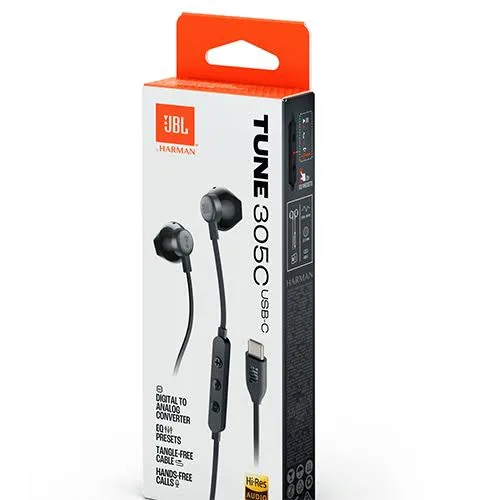
An inline microphone is a small capsule on the cable of wired earphones. The classic example is the remote with a button and microphone on a pair of 3.5 mm earphones.
Strengths:
- Cheap and simple.
- Works on almost any phone or laptop with a headset jack.
- No battery needed.
Weaknesses:
- It sits around the chest, so your voice is quiet relative to ambient noise.
- Clothing rubs the capsule and produces rustling.
- Wind noise is a problem outdoors.
- Cable movement is audible.
Good for: short calls, travel, emergencies. Not ideal for long meetings or noisy streets.
Tip. Clip the inline microphone near your collar and keep it away from beards and fabric that brush against it.
Built-in microphones in earbuds and headphones
True wireless earbuds and many wireless headphones hide microphones in the body. Some models use one microphone per earbud; others use two or three, including an inward-facing one used for noise cancelling.
The problem. The microphone sits far from your mouth, usually at ear level. Your voice has to travel across your cheek, and wind and background noise reach the capsule with similar strength.
The solution. Manufacturers use beamforming, voice pickup units and software noise suppression to compensate. The result varies between brands and models far more than the speaker quality does.
Strengths:
- No arm, no cable, very discreet.
- Good enough for everyday calls when processing is strong.
Weaknesses:
- More sensitive to wind and traffic.
- Quality depends heavily on software and the call app.
- Often worse than a boom microphone for long calls.
Beamforming and microphone arrays
Beamforming uses two or more microphones a known distance apart. Because sound reaches each microphone at slightly different times, the processor can work out which direction a sound came from. It then boosts sound from the direction of your mouth and reduces sound from elsewhere.
You can think of it as a virtual shotgun microphone aimed at your face.
Where it works well: steady background noise from the side or behind you, such as an office or a street.
Where it struggles: noise that comes from the same direction as your voice, wind blowing directly across the capsules, and very loud environments where the array simply cannot separate voices.
A headset with two microphones in each earcup or a boom plus an array usually produces the cleanest result, since the system has more information to work with.
ENC vs ANC: two different jobs
This is the most misunderstood pair of acronyms in audio.
- ANC (Active Noise Cancellation) removes noise from what you hear. It uses microphones to listen to the environment and plays an opposite sound through the speakers. We explain the physics in how active noise cancelling works.
- ENC (Environmental Noise Cancellation) removes noise from what the other person hears. It uses microphones and software to separate your voice from background sound before sending it over the call.
A headset can have ANC without ENC, ENC without ANC, or both. If you take many calls from noisy places, ENC (or similar branded technology such as AI noise reduction) matters more than ANC. If you mainly listen to music on a commute, ANC matters more.
How to tell if ENC is real. Call a friend from a noisy place and ask how it sounds. If the claim on the box says "ENC" but your friend hears every passing vehicle, the marketing is better than the product.
Polar patterns: where the microphone listens
A polar pattern describes which directions a microphone picks up sound from. You will see these terms on USB desktop and streaming microphones, and occasionally on headsets.
- Omnidirectional: picks up sound from all directions equally. Natural sounding but also picks up every noise in the room. Useful for room recording or conference tables.
- Cardioid: most sensitive at the front, less at the sides and least at the back. The default choice for voice, because it ignores room noise behind the microphone.
- Supercardioid and hypercardioid: narrower than cardioid, with a small pickup lobe behind the microphone. Useful for very noisy spaces.
- Bidirectional (figure-8): picks up front and back and rejects the sides. Good for two people facing each other.
For a headset boom, a noise-cancelling cardioid-type capsule is the standard design: it hears your mouth and ignores most of what is behind and beside you.
3.5 mm, USB and wireless: how the microphone connects
How your headset connects to your device decides whether the microphone works at all.
3.5 mm analogue headsets
A single 3.5 mm plug with four contacts (called TRRS) carries left audio, right audio, ground and microphone. Phones and many laptops use this layout. The two common wiring standards are CTIA and OMTP, which swap the ground and microphone contacts. Most modern devices use CTIA. If you use an old headset on a new phone, or the reverse, the microphone may not work even though the sound does.
Desktop PCs often have separate jacks for headphones (green) and microphone (pink). A single-plug headset in a desktop PC's headphone jack will give you sound but no microphone. A Y-splitter adapter solves this, or you can use a USB headset instead.
USB headsets
A USB headset contains its own small sound card (a DAC and an analog-to-digital converter). The microphone signal is digitised inside the headset, so it avoids the electrical noise of a PC's front-panel audio jack. USB is the easiest option for desktop PCs and laptops without a headset port.
Strengths: plug-and-play, consistent quality, often includes a mute button and volume controls. Weaknesses: may not work with phones unless it is USB-C and supported, and the built-in sound card determines the quality ceiling.
Bluetooth headsets
Bluetooth is convenient but has a long-standing limitation: voice calls use a different profile than music. When you start a call, the headset switches from high-quality music streaming to the Hands-Free Profile (HFP). Basic HFP uses narrowband audio, which sounds thin and telephone-like. Better headsets support wideband speech (mSBC), and newer ones with LE Audio and the LC3 codec can deliver clearer voice. We cover the music side in Bluetooth codecs explained.
This is why a Bluetooth headset can sound excellent for music and mediocre for calls. It is not necessarily faulty; it is the profile in use.
Gaming tip. Many wireless gaming headsets use a 2.4 GHz USB dongle instead of standard Bluetooth. This allows low latency and a better microphone channel.
Mic quality: the specs that actually matter
Spec sheets love numbers, but only a few help.
- Frequency response: voice sits mainly between about 100 Hz and 8 kHz. A headset mic that covers about 100 Hz to 10 kHz is more than enough. Huge claims such as "20 Hz to 20 kHz" for a boom mic are marketing.
- Sensitivity: how strong the signal is for a given sound. Too high picks up room noise; too low needs software boost.
- Signal-to-noise ratio (SNR): higher is better; it describes how much louder your voice is than the microphone's own hiss.
- Sample rate and bit depth: USB headsets often quote 16-bit/48 kHz. That is fine for voice.
- Noise-cancelling mic: usually a physical design that cancels distant sound, not software alone.
- Mute indicator: a light or tone showing when the mic is muted. It prevents embarrassing mistakes.
Choosing a headset microphone by use
For work calls and meetings
A boom microphone with a cardioid pattern and a mute indicator is the best everyday choice. If you work in a shared or noisy office, look for dual microphones or ENC. For calls on the move, earbuds with beamforming and wind protection are a good compromise. Our headphones and headset guide goes deeper.
For online classes and interviews
Clarity matters more than anything. A USB headset with a boom is simple, consistent and avoids Bluetooth voice limits. Plug it in before the call, test it in the app's audio settings, and keep the boom two to three finger-widths from the corner of your mouth.
For gaming
A detachable or flip-up boom, a mute button and a USB or 2.4 GHz connection make team chat clearer and more reliable. Console players should check which connection the console supports: some use 3.5 mm jacks on the controller, some use USB, and some wireless headsets need a particular dongle. Tell us your console and we will confirm compatibility. See our consoles category.
For streaming and content creation
A headset is a convenient start, but for serious voice work a separate USB or XLR microphone with a cardioid pattern will sound better. Use the headset only for monitoring, and a pop filter and stand for the microphone.
For sport, running and cycling
Wind is the enemy. Look for microphones with wind protection or a voice-pickup sensor, and a secure fit. A boom is rarely practical; beamforming earbuds or bone-conduction designs work better.
For call centres and shared desks
Choose a single-ear or dual-ear headset with a noise-cancelling boom, a quick-disconnect cable and a replaceable ear cushion. Hygiene and durability matter here more than hi-fi sound.
Why your microphone sounds bad: a troubleshooting list
Before you blame the headset, check these common causes.
- Wrong input device. Windows, macOS and call apps can choose a different microphone, such as the laptop's built-in one. Select the headset in the app's audio settings.
- Wrong jack. A single-plug headset in a desktop's headphone jack will not carry the microphone.
- Muted at the hardware or software level. Check the inline mute, the boom mute position and the operating system's microphone privacy permissions.
- Bluetooth profile switching. If music sounds great but calls sound thin, your headset is using the voice profile. Check for wideband support.
- Level too high. If your voice sounds harsh or crackles, reduce the input gain or move the microphone away from your mouth.
- Level too low. Move the boom closer, face it correctly and increase gain a little.
- Plosives and breath. Move the mic to the side of your mouth and use a foam cover if one is supplied.
- Background hiss. Turn off automatic gain boost in the OS, and move away from fans.
- App noise suppression. Zoom, Teams and Google Meet apply their own noise suppression. Sometimes it is overly aggressive and cuts words. Try different settings.
- Faulty cable or connector. Wiggle the cable while talking. Crackling means a damaged cable.
- Outdated drivers or firmware. Update the headset firmware and the computer's audio drivers.
- Counterfeit hardware. A fake headset with a poor capsule will never sound right. See the section below.
Care tips that keep a mic sounding good
- Do not blow into the microphone to test it; tap lightly instead.
- Keep foam covers on and replace them when they crumble.
- Do not wrap the boom cable tightly when storing it.
- Clean earcups and the microphone grille with a slightly damp, not wet, cloth.
- Avoid leaving headsets in hot cars.
- Store the USB dongle in a safe place; a lost dongle often means a dead headset.
- Update the firmware when the manufacturer releases fixes.
Common myths about headset microphones
"More microphones always mean better quality." Not necessarily. Position and processing matter more. Two poorly placed microphones can sound worse than one boom.
"ANC headphones have good microphones." ANC uses microphones for the listener's benefit. It does not guarantee a good call microphone.
"A expensive headset always has a good mic." Some premium headphones put all the money into sound and noise cancelling and skimp on voice pickup. Check reviews and test calls.
"Bluetooth is bad for calls." Modern Bluetooth with wideband speech is perfectly acceptable. Older or cheaper implementations are the problem.
"A USB microphone is always better than a headset mic." A good headset boom close to your mouth can beat a USB microphone placed far away on a desk.
"Noise cancelling mics remove all noise." They reduce steady and distant sounds. Sudden or voice-like sounds can still pass through.
Headset mic vs standalone mic vs laptop mic
| Option | Typical quality | Convenience | Best use |
|---|---|---|---|
| Laptop built-in mic | Fair | Excellent | Occasional calls in quiet rooms |
| Headset boom mic | Very good | Very good | Daily calls, gaming, classes |
| Earbud mic | Fair to good | Excellent | Calls on the move |
| USB desktop mic | Excellent | Good | Streaming, podcasts, voice-overs |
The laptop microphone is the weakest because it sits far from your mouth and shares space with the keyboard and fan. Any competent headset will improve on it, which is why a headset is one of the cheapest upgrades for anyone who works remotely.
Setting up your microphone properly: a five-minute routine
Even a good microphone sounds poor when it is set up carelessly. Spend five minutes on the following and most calls will improve immediately.
Step 1: choose the right input. Open your operating system's sound settings and select the headset as the input device, then do the same inside the call app, because Zoom, Teams and Meet keep their own settings.
Step 2: set the level while speaking normally. Speak at your usual volume and watch the input meter. It should move well into the middle of the bar, peaking near three-quarters on loud words, and never sit at the very top. A meter that barely moves means the level is too low; one that hits the end means distortion.
Step 3: position the boom. Place the capsule at the corner of your mouth, two to three finger-widths away, with the marked side facing you. Lifting it slightly above the line of your lips cuts breath noise.
Step 4: record a test. Use the built-in voice recorder or a meeting with yourself, then listen back with the headset off. Check for hiss, pops and room echo.
Step 5: reduce the room. Soft furnishings, curtains and carpets absorb echo. A bare room makes every microphone sound hollow. Turn off fans where you can, and close windows facing the road.
Step 6: decide on software noise suppression. Leave it on if you work in a noisy space, and turn it down if it clips the ends of your words.
Step 7: save the setup. Many USB headsets have an app that stores your equaliser and microphone settings. Write down what worked so you can restore it after an update.
Following this routine takes far less time than shopping for a more expensive headset, and it often solves the problem that made you consider upgrading.
How to spot a fake or counterfeit headset
Counterfeit headsets are common for well-known brands, and the microphone is usually the first thing to suffer. The sound may be acceptable for a while, but the call quality gives the game away. Here is how to check.
1. Examine the packaging. Genuine boxes have sharp printing, consistent fonts, correct logos and precise colours. Look for misspellings, blurry images, wrong model names or a different box to the brand's website.
2. Check the model number and serial number. Compare the model number on the box, the headset and the manual with the manufacturer's website. Many brands offer a serial number or registration check. Missing, duplicated or mismatched numbers are warning signs.
3. Compare the weight and build. A genuine headset has a certain heft and tight tolerances. Fakes are often lighter, with creaky plastic, gaps at the hinges and flimsy booms.
4. Test the boom and the mute function. On a genuine product the boom moves smoothly and holds position, and the mute function works reliably. A loose, floppy boom or a mute that does nothing is suspicious.
5. Look at the cable and connector. Genuine cables are neatly finished, with proper strain relief. Thin, rough or stiff cables and loose plugs are red flags. On USB headsets, the connector should fit firmly.
6. Check the companion software. Many genuine gaming and office headsets have an official app or driver. The app should recognise the exact model. If it does not, or you cannot find the model on the brand's page, be careful.
7. Make a test call. Record yourself in a quiet room and then in a noisy one. A genuine headset with ENC or a noise-cancelling mic should clearly reduce background sound. A fake often sounds muffled, tinny or full of hiss, or has an unusually low volume.
8. Check Bluetooth identification. The Bluetooth name should match the model. Pairing under a generic name or the wrong brand is a classic fake sign.
9. Be suspicious of the price. If a headset is far cheaper than any reputable seller, the difference is almost always in the components.
10. Check the seller and the warranty. A genuine seller gives you a receipt, honours a warranty and answers technical questions. If you cannot reach the seller after the sale, you have no protection.
If you are unsure, send us clear photos of the box, serial number and headset on WhatsApp and we will help you check.
Why buy your headset from City Gadgets Kenya
- Genuine headsets, earbuds and speakers from brands including Logitech, JBL, Sony and Anker Soundcore, with specifications confirmed against the manufacturer.
- Honest microphone advice. We tell you if a model is great for music but average for calls, and we recommend a different one when your use calls for it.
- Compatibility checked before you pay. PC, console, laptop or phone, 3.5 mm, USB or wireless: we confirm that the microphone will actually work with your device.
- A real shop in Nairobi CBD at New Alnoor Exhibition, Second Floor, Shop C7, Accra Road, where you can try before you decide.
- Same-day delivery in Nairobi and next-day outside Nairobi, with M-Pesa payment.
- After-sales help with setup, drivers and troubleshooting.
- Message us for today's price. Prices change, so we quote the current price on WhatsApp.
See our accessories category for headsets and audio, and our laptops category if you are upgrading your whole remote-work setup.
A note on comfort and the microphone
Comfort affects microphone quality more than people expect. A headset that pinches or slips makes you adjust it constantly, and the boom drifts away from your mouth. Choose a model with a headband that distributes weight evenly, soft ear cushions and a boom that stays where you put it. For long shifts, lighter is better than louder.
Quick buying checklist
- What will you use it for? Calls, gaming, classes, streaming or sport.
- Which device? Phone, laptop, desktop or console, and which ports it has.
- Which connection? 3.5 mm, USB, 2.4 GHz dongle or Bluetooth.
- Which microphone? Boom for clarity, built-in for convenience.
- Noise handling? Cardioid boom, dual mics or ENC if you work in noise.
- Comfort? Long calls need a light, well-padded headset.
- Controls? A physical mute and volume control saves time.
- Warranty and seller? Buy from someone who can support you afterwards.
Frequently asked questions
What are the main headset microphone types? Boom microphones, inline cable microphones, built-in microphones in earbuds and headphones, USB desktop microphones and specialised pickup sensors such as bone-conduction units.
Is a boom microphone better than a built-in microphone? For voice clarity, usually yes, because it is closer to your mouth. Built-in microphones are more convenient and can be good with beamforming.
What is the difference between ANC and ENC? ANC reduces noise you hear. ENC reduces noise the other person hears during a call.
Why does my Bluetooth headset sound bad on calls? Calls use a voice profile with lower audio quality than music. Headsets with wideband speech or LE Audio sound better.
Why does my headset microphone not work on my PC? Common causes are the wrong input selected, a single-plug headset in a desktop's headphone jack, a muted microphone or privacy settings blocking access.
What do CTIA and OMTP mean? They are two wiring standards for 3.5 mm headset plugs. They swap the ground and microphone contacts. A mismatch can stop the microphone working.
Is a USB headset better than 3.5 mm? USB avoids a computer's analogue noise and is plug-and-play on PCs. 3.5 mm is ideal for phones and consoles that have the jack.
What is beamforming? It uses multiple microphones to focus on your voice and reduce sound from other directions.
What does cardioid mean? A heart-shaped pickup pattern that is most sensitive in front and least sensitive behind. It is ideal for voice.
How far should the mic be from my mouth? About two to three finger-widths from the corner of your mouth.
Do I need a pop filter? A foam cover helps with plosives. For streaming on a desk microphone, a pop filter is recommended.
Can I use a gaming headset for work calls? Yes. Many gaming headsets have excellent boom microphones. Choose a sober design if appearance matters.
How do I know if a headset is fake? Compare the packaging, model and serial number with the manufacturer, check build quality, test the microphone and buy from a trusted seller.
Does a more expensive headset always have a better microphone? No. Some premium headphones focus on sound and noise cancelling, with only average call microphones.
Ready to choose?
Tell us your device, your typical environment and how much you talk, and we will recommend a headset whose microphone suits the job, then confirm compatibility before you pay.
WhatsApp: wa.me/254745575931 Visit: New Alnoor Exhibition, Second Floor, Shop C7, Accra Road, Nairobi CBD. Same-day delivery in Nairobi; next-day outside Nairobi.
Related reading: IPX ratings explained, Bluetooth codecs explained, ANC vs transparency vs passive isolation.