Walk through any phone market in Nairobi and you will hear the same warnings. "Do not use the fast charger, it will spoil your battery." "Never charge overnight." "Always drain to zero first." "Only use the original cable." Some of this advice was true ten years ago, some is half true, and some is simply wrong. The truth about fast charging and battery health is more useful, and less scary, than the myths.
This article explains what fast charging actually does inside a phone, what really shortens battery life, and which habits are worth keeping. We are City Gadgets Kenya, a phone and accessory shop at New Alnoor Exhibition, Second Floor, Shop C7, Accra Road, Nairobi CBD, and we see worn batteries, swollen batteries and fake chargers every week. What follows comes from that experience and from how lithium-ion batteries are known to behave.
The short version
- Fast charging is not automatically bad for your battery. Heat is the main enemy, not speed on its own.
- Modern phones control the charging speed themselves, so a stronger charger does not "force" more power than the phone accepts.
- The phone's built-in protection slows charging as the battery fills and as it warms up.
- A fake or cheap charger is a bigger risk than a genuine fast charger.
- Charging to 100 percent and keeping the phone hot is harder on the battery than charging to 80 percent in a cool place.
- You do not need to drain the battery to zero. Partial charges are fine.
| Claim | Verdict |
|---|---|
| Fast charging ruins the battery | Mostly myth; heat and bad chargers matter more |
| A higher-watt charger can damage my phone | Myth, if the charger is genuine and standard-compliant |
| Charging overnight is dangerous | Mostly myth with a good charger and modern phone |
| Drain to 0 before charging | Myth for lithium-ion |
| Use only the original charger | Partly true; use a good, certified one |
| Phone hot while charging is normal | Warm is normal; very hot is not |
| Wireless charging damages the battery | Myth, but it can run hotter |
| Cheap uncertified chargers are fine | Myth and a real risk |
What is inside your phone battery?
Almost every phone, earbud case, power bank and laptop uses a lithium-ion or lithium-polymer battery. In simple terms, lithium ions move from one side of the battery to the other when you charge and back again when you use the device. Each full cycle puts a little wear on the materials, and over hundreds of cycles the battery holds a little less charge. This gradual loss is called battery ageing or degradation, and it happens to every phone eventually.
What speeds up ageing? Three things matter most:
- Heat. High temperature accelerates unwanted chemical reactions inside the cell.
- High voltage. Staying at 100 percent for long periods keeps the battery at high stress.
- Deep cycles. Repeatedly running from 100 percent to nearly 0 percent wears the battery faster than shallow cycles.
Notice that "fast" is not on the list. Speed affects battery health mostly because faster charging can produce more heat. A phone that handles heat well and slows down when it warms is not harmed by a good fast charger.
For a deeper look at how batteries age and how to care for them, read our lithium-ion battery care guide.
How fast charging actually works
When you plug in a phone, the charger and the phone communicate. The phone tells the charger what voltage and current it can accept, and the charger supplies exactly that. This is why you can plug a 65W laptop charger into a phone that only accepts 25W and the phone will still charge at its own limit. The charger offers power; the phone decides how much to take.
Standards such as USB Power Delivery (USB PD) and PPS define these conversations so that chargers and phones from different brands can agree on safe settings. Many brands also have their own fast charging systems. You can read the details in our USB Power Delivery explained article.
A typical fast charge has stages:
- Fast stage (roughly 0 to 50 or 70 percent). The phone accepts high power while the battery is lower and has room to take energy.
- Slowing stage (70 to 90 percent). The phone reduces current to protect the battery.
- Trickle stage (90 to 100 percent). The final percentages take much longer, and the phone sends only a small current.
This is why a phone may reach 50 percent in 20 minutes and still need another hour to hit 100 percent. It is also why topping up from 20 to 70 percent during the day is gentle and efficient.
Myth 1: "Fast charging kills your battery"
This is the most common claim. The honest answer is that fast charging can contribute a small extra amount of wear when it makes the battery hotter, but modern phones are designed with that in mind. Phone makers test their own fast charging systems for long battery life and often guarantee a certain capacity after a number of charge cycles. They would not ship a charging speed that destroys batteries within a year.
What actually happens in poorly managed situations is different. A phone that is charging fast while you play a heavy game, on a hot day, under a thick case, will get very hot. That heat, not the wattage, is the problem. If you charge fast in a cool room and let the phone rest, the effect on battery life is small.
If you want to be extra careful, you can use a slower charger overnight and a faster one when you are in a hurry. Many phones also offer settings to limit charging speed or to cap charging at 80 percent. Those features exist because heat and time at 100 percent matter.
Myth 2: "A higher-watt charger will damage my phone"
A 100W charger does not push 100W into a phone that accepts 20W. Watts are a measure of the maximum a charger can deliver, not what it forces. The phone requests what it can handle. This is why a laptop charger can safely charge a phone, as long as it is a genuine, standards-compliant charger with proper safety circuits.
The danger arises with fake or uncertified chargers, which may not regulate voltage properly, may lack protection against overheating, and may use poor quality components. A fake 20W charger is far riskier than a genuine 100W charger. Read more in our guide on what is GaN charging, which also explains why compact modern chargers can be safe and efficient.
Myth 3: "Never charge overnight"
Charging overnight is fine for most modern phones with a decent charger. Once the battery reaches 100 percent, the phone stops charging and only tops up occasionally. Modern phones also include smart features such as optimised or adaptive charging, which learn your routine, hold the battery at around 80 percent for most of the night, and finish just before you wake up.
Overnight charging is not ideal if the phone is under a pillow, covered, on a hot surface, or connected to a fake charger. The risk then is heat. In a normal setup, on a hard surface with some airflow, using a genuine charger, it is fine.
If your phone has an optimised charging option, switch it on. If you often wake in the night and notice the phone feels warm, move it to a cooler place.
Myth 4: "Always drain the battery to 0 before charging"
This advice came from older nickel-based batteries, which had a "memory effect". Lithium-ion batteries do not suffer from that. In fact, deep discharges are stressful for lithium-ion batteries. Keeping your charge level between roughly 20 and 80 percent is gentle, but nobody needs to live by that rule. Charging whenever it is convenient is fine.
An occasional full discharge and recharge is harmless, and some devices need it to recalibrate the battery percentage display. But making it a habit shortens battery life.
Myth 5: "You must use the original charger only"
You do not need the original charger, but you do need a good charger. Third-party chargers from reputable brands that meet the right standards work well and often charge as fast as the original. The problem is the sea of fakes and unbranded chargers.
When you choose a charger, check:
- It supports the right standard (USB PD, PPS or the phone brand's own system) for your phone.
- It is from a reputable maker such as Anker.
- It comes with proper markings, a serial number and a seller who gives a warranty.
- It is paired with a good cable. See our USB-C cable types guide.
For example, the Anker Nano 45W supports PPS according to a retailer listing, which suits phones that use that fast-charging mode. Please ask us which charger fits your phone, and we will confirm per unit. Browse accessories at City Gadgets Kenya.
Myth 6: "A hot phone while charging means the charger is bad"
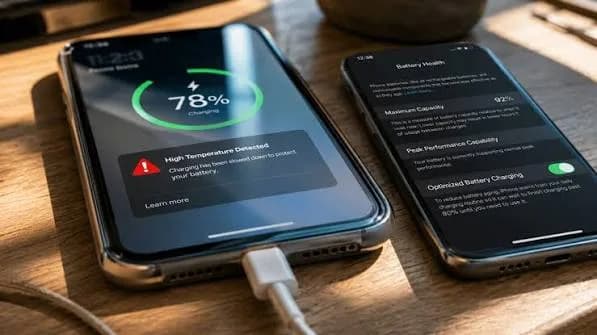
A phone gets warm when it charges, especially fast. Warm to the touch is normal. The conversion of electrical energy into stored chemical energy is never perfect, and some becomes heat. The problem is when the phone becomes uncomfortably hot, shows a temperature warning, or dims the screen and slows charging.
Common reasons for excess heat:
- A thick case or a cover that traps heat.
- Using the phone for gaming, video calls or navigation while charging.
- Charging in direct sunlight, in a car on a hot day, or under a pillow.
- A weak or damaged cable causing resistance.
- A fake charger with poor regulation.
- A phone battery that is already worn and generating more heat.
If your phone is regularly very hot on a known good charger, the battery may be worn or swollen, and it is worth a check. See our repair page.
Myth 7: "Wireless charging damages the battery"
Wireless charging does not damage a battery by itself. It is less efficient than a cable, so it creates more heat, and heat is the problem. A phone on a well-aligned wireless pad in a cool room is fine. A phone on a misaligned pad under a thick case on a warm day is not ideal. Our Qi2 and MagSafe wireless charging explained article goes deeper.
Myth 8: "Apps that show battery health are exact"
Battery health percentages shown by phones and apps are estimates. They compare today's maximum capacity with the original design capacity, and they can vary after a software update or a recalibration. A phone showing 88 percent is not necessarily worse than one showing 90 percent in daily use. Use the number as a rough guide and judge by how long the phone lasts between charges.
Myth 9: "Closing apps saves battery"
This is a battery habit myth rather than a charging myth, but it is so common that it deserves a mention. Force-closing apps usually does not save battery on modern phones. Reopening apps from scratch can use more power than leaving them in memory. Better savers are lowering screen brightness, using dark mode on OLED screens, switching off background refresh for apps you rarely use, and keeping a good signal.
Myth 10: "Power banks ruin phone batteries"
A good power bank charges a phone in the same way as a wall charger. The risk is in cheap, low-quality power banks with exaggerated capacity labels and poor regulation. Our power bank mAh versus Wh guide explains how to read capacity claims. For airline rules, see can a power bank fly.
What really shortens battery life
Putting the myths aside, the following habits do make a difference:
- Frequent exposure to heat. Car dashboards, direct sun and hot pockets.
- Staying at 100 percent for long periods while hot.
- Deep discharges to 0 percent.
- Very cheap, uncertified chargers and cables.
- Heavy gaming while charging.
- A swollen or damaged battery that is still in use.
- Time. Every battery ages whatever you do.
A realistic aim is not to preserve the battery forever. It is to reach two to three useful years before capacity drops enough to bother you, and then replace the battery rather than the phone.
Practical charging habits that work
| Habit | Why it helps |
|---|---|
| Charge in a cool place | Lower heat, slower ageing |
| Remove thick cases when charging fast | Lets heat escape |
| Use optimised or 80 percent limit if available | Less time at full stress |
| Top up during the day instead of draining | Shallow cycles are gentler |
| Use a certified charger and cable | Protects battery and phone |
| Avoid gaming while fast charging | Reduces heat |
| Do not leave the phone in a hot car | Heat is damaging |
| Replace swollen batteries immediately | Safety |
You do not need to be perfect. If you charge in a normal way, use a good charger and avoid heat, the battery will last a sensible time.
Fast charging standards you will see on boxes
Different brands name their systems differently, and the boxes can be confusing. A few common ones:
- USB Power Delivery (USB PD). The standard used by many phones, tablets and laptops.
- PPS (Programmable Power Supply). A USB PD feature that adjusts voltage in small steps, used by several Android phones.
- Quick Charge. A system from the Qualcomm era found on many Android phones.
- Brand systems. Many phone makers use their own fast charging, sometimes needing their own charger and cable to reach the top speed.
If your phone uses a brand system, a USB PD charger will still charge it, but possibly slower. If you want the top speed, use the recommended charger. Tell us your phone model and we will confirm what suits it.
Fast charging for different devices
Phones. Most modern phones support some form of fast charging. The advantage is real: 30 minutes can add a lot of charge.
Earbud cases. Small batteries, low speeds. Quick top-ups are possible but not huge.
Smartwatches. Use the watch's own charger.
Laptops. Laptops using USB-C PD can charge from a compact PD charger, although speed depends on the laptop's requirement. See our laptops.
Power banks. Output and input speeds matter. A large bank like the Anker Prime 26K 300W is described as 26,250 mAh with up to 300W total, 140W on each USB-C port, and recharge up to 250W, but only fast if your cable and devices support it.
A closer look at heat: the real driver of battery ageing
If you remember only one thing from this article, remember heat. A lithium-ion cell stores energy in a delicate arrangement of materials. At moderate temperatures the chemistry is stable. As the temperature climbs, side reactions grow faster. These reactions slowly consume lithium and build up layers inside the cell, so the battery can store less. This happens whether the heat comes from charging, from a hot car or from a long gaming session.
In a Kenyan setting, the environment matters. Nairobi is mild, but the coast and other hot regions, matatu dashboards, boda boda phone holders in direct sun and closed vehicles can push temperatures higher than a phone likes. A phone left on a dashboard can reach temperatures that harm the battery in a short time, even if it is not charging. Combine that with a fast charge and you have a worst case.
Easy ways to manage heat:
- Keep the phone out of direct sun and out of a parked car.
- Take the case off when charging in a warm place.
- Avoid using navigation, video and gaming together while charging.
- Do not wrap the phone in a cloth or keep it in a tight pocket while it charges.
- If the phone warns about temperature, stop charging and let it cool.
Fast charging versus slow charging: a fair comparison
| Factor | Fast charging | Slow charging |
|---|---|---|
| Time to charge | Short | Long |
| Heat generated | Higher during the fast stage | Lower |
| Battery wear | Slightly higher if hot | Slightly lower |
| Convenience | High | Low |
| Best use | Daytime top-ups, emergencies | Overnight, desk charging |
| Risk with fakes | High | Still present |
The best strategy for most people is not to choose one, but to use both. Use fast charging when you need it, and gentle charging when you have time. Many phones now do this automatically: they charge fast at first, slow down as the battery fills, and hold at a lower level overnight.
Charging cycles and what they mean
A "charge cycle" is one full use of the battery's capacity, not one plug-in. Charging from 50 to 100 percent twice counts as one cycle. Many phone batteries are designed to keep a large share of their capacity, such as around 80 percent, after several hundred cycles, though figures differ by phone and maker. We confirm per unit when asked about a specific device.
This means a phone that you top up often does not wear faster than a phone you charge once a day, as long as the total energy used is similar. The wear depends on the total energy passing through and the conditions, especially heat and voltage.
When people say "my battery lasted a year and then fell off", the actual cause is often heat, constant use at 100 percent, or a poor charger, not a particular number of plug-ins.
Signs that your battery is ageing
- The phone does not last as long as it used to.
- The percentage jumps or the phone shuts off at 20 or 30 percent.
- The phone gets hot with light use.
- Charging seems to take unusually long or unusually short.
- The phone slows down because the system limits performance to avoid shutdowns.
- The back of the phone bulges or the screen lifts. This is a safety issue.
Ageing is normal, but swelling is not. A swollen battery can damage the phone and can be dangerous. Stop charging, stop using the phone and bring it to a qualified technician straight away.
When to replace the battery
If the phone still works well otherwise, replacing the battery is often cheaper and greener than replacing the phone. A fresh battery can bring back all-day life and smooth performance. Choose a technician who uses proper parts and who tests the phone after the job. We offer repair services; see our repair page and message us for today's price.
If your phone is very old and no longer receives updates, you might choose to upgrade instead. Browse phones at City Gadgets Kenya or consider our sell your phone option when upgrading.
Charging other gadgets: earbuds, headphones and power banks
The same battery chemistry sits in your earbuds, headphones and power banks, so many of the same habits apply. Earbuds have tiny batteries, so heat and constant full charging matter. Keep the case out of hot cars. Headphones like the Soundcore Space Q45 are rated for long listening, so you rarely need to charge them, which helps battery life. Power banks are best stored at moderate charge in cool places if you will not use them for a while.
For earbuds specifically, our earbuds battery life explained article shows why the stated hours fall over time. Soundcore models, for example the Liberty 4 NC, quote up to 10 hours with noise cancelling off and 8 hours with it on, but real life varies with volume and settings.
Charging while using the phone: what is safe?
Using a phone while it charges is generally safe with a good charger. The phone is smart enough to share the power between running and charging. What you may notice:
- Charging is slower while the screen is on and busy.
- The phone gets warmer.
- The battery percentage may stay flat during heavy use if the charger is low-powered.
If you often play games while charging, a stronger charger helps, and a cooler environment helps more. Some gaming phones include special charging features. Others simply rely on a good charger.
Cables matter as much as chargers
A fast charger paired with a weak cable is slow. Worse, a poor cable can heat at the connector. When you buy a fast charger, buy a cable rated for the same power. Look for thick, well-made cables from trusted brands. Our USB-C cable types guide explains the labels.
Signs of a bad cable:
- It charges only when held at an angle.
- The connector gets hot.
- The phone says "charging slowly".
- The cable is frayed near the connector.
- It disconnects when moved.
Replace such a cable rather than keep using it.
Power cuts, surges and charging in Kenya
Voltage spikes and sudden power cuts can damage chargers and adapters. Good chargers include surge protection to a point, but they are not a substitute for a surge-protected socket. For a home office with laptops and monitors, consider a UPS to protect the equipment; our guides on UPS and power protection explain the options. For phone charging, a power bank is a handy backup during blackouts.
A simple weekly routine
You do not need a complicated system. A routine that works for most people looks like this. In the morning, unplug at a healthy level rather than waiting for a full 100 percent if you are in a hurry. During the day, top up whenever your phone sits near a socket or a power bank. In the evening, plug in with a decent charger on a hard surface with some airflow. Once a month, glance at the battery health reading and the temperature habits of the phone. If something looks wrong, such as a swollen back panel, shutdowns at high percentages or extreme heat, get it checked.
For families, it helps to label the good chargers and keep the cheap spares for emergencies only. For small businesses where staff share chargers, buying a few quality multi-port chargers is cheaper than replacing damaged phones. If you run a shop or an office, we can advise on bulk accessories; message us on WhatsApp.
Final word
Fast charging is a feature, not a threat. Treat heat with respect, buy genuine chargers and cables, avoid extremes, and let your phone's built-in protection do its job. The biggest battery killers are not wattage numbers but hot cars, bad chargers and neglect.
How to spot a fake fast charger or cable
Fake chargers are a real battery and safety risk, and they are common because a charger looks simple on the outside. Here are ten checks:
- Weight. Genuine chargers contain proper components and feel solid. A feather-light charger is suspicious.
- Markings. Look for clear input and output ratings, brand name and compliance marks. Blurry or missing text is a warning sign.
- Packaging. Misspellings, low-quality print and poor box fit suggest a fake.
- Plug fit. The pins should fit firmly and look neat. Loose or crooked pins are a bad sign.
- Price. A big brand charger at a very low price is almost always fake or a grey import.
- Heat. A charger that becomes very hot very quickly is suspect.
- Charging speed. If it claims fast charging but is slow, or the phone does not show fast charging, something is wrong.
- Buzzing or whining. Loud coil noise can indicate poor build quality.
- Cable build. Thin, stiff or flimsy cables, or connectors that wobble, are unreliable.
- Seller and warranty. If the seller will not give a receipt or warranty, think twice.
When you buy from City Gadgets Kenya, you buy from a physical shop. If something goes wrong, you know where to find us.
Why buy chargers and power accessories from City Gadgets Kenya
- We confirm compatibility. Tell us your phone and we will confirm which charger and cable suit it.
- Genuine brands. We stock brands such as Anker and Soundcore and confirm details per unit.
- Honest advice. If a cheaper charger suits you, we will say so.
- Visit us. New Alnoor Exhibition, Second Floor, Shop C7, Accra Road, Nairobi CBD.
- Delivery. Same-day delivery within Nairobi and next-day delivery outside Nairobi.
- Payment. M-Pesa accepted, and Lipa Mdogo Mdogo on iPhones.
- Support. WhatsApp us if something does not work.
See accessories and phones. Message us for today's price.
Battery health checklist
- I use a certified charger and a good cable.
- I avoid heat while charging.
- I use optimised or 80 percent charging if my phone has it.
- I do not routinely drain to 0 percent.
- I take off a thick case during fast charging.
- I replace a swollen battery immediately.
- I know where to get a battery replaced.
Frequently asked questions
Does fast charging reduce battery life? Only slightly, and mostly when it adds heat. Modern phones manage this.
Is it safe to use a charger with a higher wattage than my phone needs? Yes, if it is genuine and standards-compliant. The phone takes only what it needs.
Should I charge to 100 percent? You can. For best long-term health, avoid sitting at 100 percent in the heat.
Is it bad to use the phone while charging? Light use is fine. Heavy gaming while fast charging creates heat.
How long should a phone battery last? Typically two to three years of good use, depending on habits and heat.
When should I replace the battery? When the phone no longer lasts your day, shuts down unexpectedly, or the battery swells.
Are cheap chargers safe? Some are, but uncertified ones are a real risk. Buy from a trusted seller.
Do Android and iPhone batteries differ? Both use lithium-ion cells, and the advice here applies to both.
Ready to choose?
Tell us your phone model and we will confirm which charger and cable suit it. WhatsApp: https://wa.me/254745575931. Visit us at New Alnoor Exhibition, Second Floor, Shop C7, Accra Road, Nairobi CBD. Message us for today's price. Same-day Nairobi delivery, next-day outside Nairobi, M-Pesa accepted.
Related reading: Lithium-ion battery care guide, USB Power Delivery explained, what is GaN charging, Qi2 and MagSafe explained.