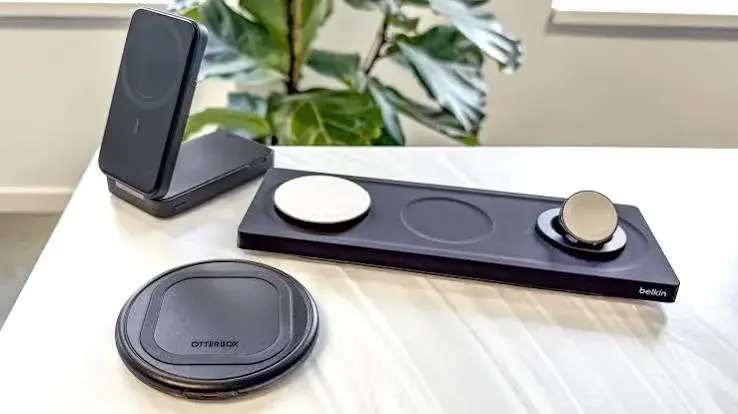
Wireless charging looks like magic: put the phone down, and it charges. But behind the convenience is a confusing alphabet of standards (Qi, Qi2, MagSafe), a lot of marketing wattage and a market full of cheap pads that run hot, charge slowly or do not line up with your phone at all. If you have ever put your phone on a wireless pad, woken up to find it hardly charged because it had slipped slightly out of position, you know why alignment matters.
This guide to the best wireless charger in Kenya explains how wireless charging works, what Qi, Qi2 and MagSafe really mean, how the Anker 3-in-1 Cube with MagSafe and the Anker MagGo magnetic power bank fit, how fast and how efficient wireless charging really is, and how to spot a fake pad before you pay.
We are City Gadgets Kenya, at New Alnoor Exhibition, Second Floor, Shop C7, Accra Road, Nairobi CBD, with same-day delivery in Nairobi and next-day delivery outside Nairobi. Specifications are per the makers or retailer listings, and we confirm details per unit. Calculations are our own, from stated assumptions. Prices change, so message us on WhatsApp for today's price.
The short version
- Wireless charging transfers power through a magnetic field between a coil in the charger and a coil in the phone. It is convenient but less efficient than a cable.
- Qi is the universal standard. Qi2 adds magnets that snap the phone into the right position, which improves speed and efficiency. MagSafe is Apple's magnetic system, and Qi2 is based on the same idea.
- Alignment is everything. A pad that lets the coils drift apart charges slowly and wastes energy as heat.
- The wall charger matters. A wireless charger needs a capable power adapter to reach its top speed.
- A cable is still faster and cooler for most phones.
- Buy genuine. Cheap pads can overheat and damage the battery.
| Product in our range | What it is | Best for |
|---|---|---|
| Anker 3-in-1 Cube with MagSafe | A foldable station that charges an iPhone, Apple Watch and AirPods together | iPhone owners with a Watch and AirPods |
| Anker MagGo 10,000 mAh magnetic power bank | A power bank that snaps to the back of a compatible phone and charges wirelessly | Charging on the go without a cable |
| Anker Nano Charger 45W | A compact wall charger | Powering wireless chargers and cables |
| Anker 322 USB-C cable 3 ft 60W | A USB-C cable | A spare for wired charging |
Figures are per the makers or retailer listings, and we confirm the exact model and what is in the box per unit.
How wireless charging works
A wireless charger contains a flat coil of wire. When power flows through it, it produces a changing magnetic field. A matching coil inside your phone picks up that field and turns it back into electric current, which charges the battery. This is called inductive charging, and it is the same principle as an electric toothbrush base.
Because the energy crosses a gap through the air, case and back glass of the phone, some of it is lost as heat. A cable moves power with very little loss, so a wireless charger always wastes more energy than a cable. From our rough assumptions, real-world wireless charging commonly runs at about 60 to 75 percent efficiency, depending on alignment, power level and case thickness. That is why wireless chargers warm the phone, and why alignment makes such a difference.
Qi, Qi2 and MagSafe: what is the difference?
Qi
Qi (pronounced "chee") is the industry standard for wireless charging, run by the Wireless Power Consortium. Most modern phones, from Samsung to Apple to many others, support Qi. A Qi charger works with any Qi phone, though speeds vary by phone and by charger. The weakness of basic Qi is alignment: the phone can sit slightly off-centre, which reduces efficiency.
MagSafe
MagSafe is Apple's magnetic wireless system, introduced with the iPhone 12. It adds a ring of magnets around the coil so the charger clicks onto the back of the phone and stays aligned. Apple states a wireless charging power of up to 15W for MagSafe on supported iPhones, and the Anker 3-in-1 Cube lists up to 15W for iPhone 12 to 15 series through an MFi-approved MagSafe module, per Anker.
Qi2
Qi2 is the newer version of Qi. It brings a magnetic ring to the standard, based on Apple's MagSafe technology, so that many phones and chargers can align themselves. Qi2 chargers are rated up to 15W, per the standard. Newer iPhones support Qi2, and some Android phones support it or work with a magnetic case. The Anker MagGo Slim 10K is listed as Qi2 certified for up to 15W, per a retail listing. Check your phone's specification for Qi2 support, since many Android phones need a magnetic case to use magnetic chargers. We explain the standards in more detail in our Qi2 and MagSafe wireless charging explained article.
| Feature | Qi | Qi2 | MagSafe |
|---|---|---|---|
| Magnets for alignment | No | Yes | Yes |
| Works with older phones | Yes | Yes, usually at Qi speeds | Yes, at Qi speeds |
| Typical top speed | 5W to 15W | Up to 15W | Up to 15W on many iPhones, higher with newer models per Apple |
| Where it is used | Most phones | Newer iPhones, some Android | iPhone 12 and later |
| Case matters | Yes | Yes | Yes |
Anker 3-in-1 Cube with MagSafe
The Anker 3-in-1 Cube with MagSafe is a folding charging station designed for Apple users. According to our product notes, it charges an iPhone, Apple Watch and AirPods together. Key points, per Anker's listing:
- iPhone charging: up to 15W through an MFi-approved Apple MagSafe module, for iPhone 12 to 15 series.
- Apple Watch: certified for fast charging.
- Included charger: a 30W charger with interchangeable plugs.
- Cable: a 5 ft (1.5 m) USB-C to USB-C cable.
- Stand: the phone charger adjusts, with viewing angles up to about 60 degrees, so you can use the phone as a bedside clock or watch videos while it charges.
- Warranty: 18 months on Anker's listing, and we confirm what applies.
Confirm the plug. Interchangeable plugs are useful for travel, but we check that the plug fits Kenya's Type G sockets before you pay. Kenya uses 240V mains.
Who it suits. iPhone owners who also have an Apple Watch and AirPods and want one tidy place to charge all three at night. If you use only a phone, a simpler single pad may be enough. If you have a newer iPhone, check which wireless charging speeds it supports, since we confirm compatibility per model.
Anker MagGo magnetic power bank 10,000 mAh
The Anker MagGo is a magnetic power bank. It snaps to the back of a compatible phone and charges it wirelessly, with no cable. According to our notes, it holds 10,000 mAh and offers magnetic wireless charging for compatible phones. A slimmer version, the MagGo Slim 10K, is listed as Qi2 certified for up to 15W, per a retail listing.
What to know:
- Capacity. From our calculation, 10,000 mAh at 3.7 volts is about 37 watt-hours, but because of conversion losses, and especially with wireless charging, you will get less than the full figure into your phone. See our power bank capacity guide for the maths.
- Convenience. It sits on the back of the phone, so you can use the phone while it charges, though the phone becomes thicker and warmer.
- Heat. Wireless charging from a power bank warms the phone. If the phone gets hot, remove the bank and let it cool.
- Compatibility. The magnetic feature works with phones that have a compatible magnetic system, or with a magnetic case. Confirm with us for your phone.
- Cable backup. Most power banks also have a USB-C port for faster wired charging. We confirm the ports for your model.
How fast is wireless charging, really?
Wireless charging is rated in watts, but the speed you actually see depends on the phone, the charger, the power adapter and alignment. A 15W wireless charger does not charge a phone at 15W the whole time, and the rate falls as the battery fills. From our rough calculation, a phone with a 4,500 mAh battery holds about 16.7 watt-hours. At an average of 10W delivered, that takes about 1.7 hours to fill, and longer if the phone is in use. A wired 25W charger can finish the same job in roughly an hour.
So wireless charging is best for top-ups at a desk, overnight charging on a bedside stand and charging the phone while you use it. For a quick fill before leaving home, a cable and a decent fast charger are quicker. See our best fast charger in Kenya guide.
Wireless charging and heat
Heat is the main cost of wireless charging. The energy that does not reach the battery turns into warmth in the charger and the phone. A phone that is slightly misaligned, in a thick case or sitting in a hot room will run warmer. Phones protect themselves by slowing the charge when they get hot, which is why a warm phone on a pad can take much longer than expected. Some tips:
- Align the phone carefully, or use a magnetic charger that does it for you.
- Remove thick or metal-backed cases, or choose a case made for wireless charging.
- Do not charge in direct sun, under a pillow or in a closed drawer.
- Do not charge while gaming or streaming if you can avoid it, since that adds heat.
- Stop if the phone gets very hot and let it cool.
Battery health depends on heat more than on charging speed, which we cover in our lithium-ion battery care guide.
Cases, metal plates and cards
- Cases. Thin cases usually work. Thick, rugged cases, cases with metal plates and cases with pop-up grips can block or weaken wireless charging. For magnetic chargers, use a case designed for magnetic charging, or no case.
- Metal and magnets. Never put a metal object, such as a key, coin or a metal phone-ring plate, between the phone and the charger, because it can heat up.
- Cards. Credit cards, hotel cards and some access cards can be affected by strong magnets or heat. Do not keep them between the phone and the charger, and be careful with wallet cases.
- Medical devices. Magnets and charging fields can affect some implanted medical devices. If you use one, follow your device maker's guidance on the distance to keep from magnets and chargers.
Stands, pads, cubes and power banks: which format?
| Format | Strengths | Limits |
|---|---|---|
| Flat pad | Simple, cheap, good for desks | Phone can slip, charges one device |
| Stand | Phone stays upright, can see notifications, suits video calls | Alignment depends on the design |
| Magnetic puck | Snaps into place, stays aligned | Needs a compatible phone or case |
| 3-in-1 station (like the Anker Cube) | Phone, watch and earbuds in one place | Larger, and ecosystem-specific |
| Magnetic power bank (like MagGo) | Wireless charging on the go | Warm, and slower than a cable |
| Car mount charger | Charges while the phone is on the mount | Heat in the car, needs a strong mount |
Which Apple devices work with the Anker 3-in-1 Cube?
The Cube is built around Apple's charging systems. The phone pad uses a MagSafe module, the watch pad charges Apple Watch, and the third pad charges AirPods with a wireless charging case. If you do not own all three devices, you can still use the pads you need. We confirm which iPhones, watches and cases are compatible with the exact unit you order, since Apple's wireless charging features vary by model and generation.
Android phones and wireless charging
Many Android phones, including many Samsung Galaxy models, support Qi wireless charging, with speeds that vary by model. Samsung phones also support wireless power sharing on some models, which lets the phone charge earbuds or a watch from its back. If your Android phone does not have built-in magnets, you can use a magnetic case to snap onto magnetic chargers, but the actual speed is limited by what your phone supports. Check your phone's specification, and message us on WhatsApp with the model.
Power adapters: the missing piece
A wireless charger needs a power adapter, and the adapter limits the speed. A 5W adapter gives you slow charging even on a 15W pad. Check the charger's requirements, and use a suitable adapter, ideally USB-C PD. The Anker 3-in-1 Cube comes with a 30W charger, per Anker. A compact charger such as the Anker Nano 45W can also power wireless chargers. See our best GaN charger in Kenya guide for compact chargers.
Is wireless charging bad for the battery?
Wireless charging is not harmful in itself. The concern is heat. A poorly aligned or poorly made charger produces more heat, and heat ages the battery faster. A good magnetic charger keeps alignment and lowers heat. Modern phones manage charging to protect the battery, for example by slowing near full, and many have a battery protection feature that limits the charge to a lower level for overnight use. We cover the myths in our fast charging and battery health myths article.
Wired vs wireless: an honest comparison
| Feature | Wired | Wireless |
|---|---|---|
| Speed | Fastest | Slower |
| Efficiency | High | Lower, more heat |
| Convenience | Plug in each time | Place and go |
| Wear on the port | Port wears over time | No port wear |
| Use while charging | Possible, with a cable | Easier on a stand |
| Cost | Low | Higher |
The best answer for many people is both: a cable for fast top-ups and a wireless stand for the desk and bedside.
Choosing the best wireless charger for you
- What phone do you have? Check whether it supports Qi, Qi2 or MagSafe. An iPhone 12 or later works with MagSafe. Many Android phones support Qi.
- Do you want a magnetic charger? Magnets keep alignment, but your phone or case must support them.
- What else do you charge? If you have an Apple Watch and AirPods, a 3-in-1 station is convenient.
- Do you want to charge on the go? A magnetic power bank like the MagGo is convenient, but warmer and slower than a cable.
- What adapter will you use? Make sure it can supply the power.
- Where will you use it? A desk, bedside table or car each suits a different format.
- Is it genuine? Safety matters more with wireless chargers, because they run warm.
Safety: why fake wireless chargers are dangerous
A wireless charger is a power electronics device, and many cheap ones have little protection. Problems with poor ones include:
- Overheating. Poor coils and no temperature sensing can cause dangerous heat.
- Foreign object detection missing. A genuine charger detects a metal object between the phone and the pad and shuts off. A fake may not.
- Voltage spikes. Poor circuits can stress the phone's battery.
- Weak magnets and poor alignment, causing slow, hot charging.
- Interference with other electronics.
We recommend buying chargers from a known brand through a seller who stands behind the product.
Troubleshooting wireless charging
| Problem | Likely cause | What to try |
|---|---|---|
| Phone does not charge | Not aligned, or case too thick | Re-position, remove the case, check the charger's light |
| Charging starts and stops | Slight movement, metal object or weak adapter | Keep the phone still, remove metal plates, use a stronger adapter |
| Charging is very slow | Weak adapter, heat or misalignment | Use a PD adapter, cool the phone, re-align |
| Phone gets hot | Thick case, poor alignment or hot room | Remove the case, move to a cooler place |
| Magnets do not hold | Case blocks the magnets or the phone is not compatible | Use a magnetic case or a compatible phone |
| Charger light flashes | Foreign object detected or fault | Remove metal objects, try another cable and adapter |
| Apple Watch does not charge | Watch not seated on its pad | Re-position the watch on the pad and check the cable |
Setting up a bedside charging spot
Many people use a wireless charger by the bed. A few suggestions help the phone, the charger and your sleep.
- Put the charger on a hard, flat, ventilated surface, not under a pillow or on a soft bed.
- Use a stand or a pad with a low-glare light, so the charger does not light the room at night.
- Turn on a battery protection or optimised charging setting if your phone has one, so it avoids sitting at 100 percent for hours.
- Use a suitable adapter that matches the charger's input.
- Keep the cable tidy, where it will not be pulled when you reach for the phone.
- Keep liquids away from the charger.
If you have an Apple Watch, a 3-in-1 station lets the watch sit upright as a bedside clock, in a charging mode that Apple provides on the watch. Check the watch's settings for the display options.
Power cuts and wireless chargers in Kenya
Power cuts are part of life, and wireless chargers react to them like any other electronics. When the power returns, a charger may restart with a surge, so a surge-protected socket or a UPS is sensible for expensive equipment. If your power is unreliable, a power bank can be a backup, and a magnetic power bank like the MagGo can charge a compatible phone without a cable. For larger needs, see our guides on backup power for home and the best UPS for a home office.
Charging an Apple Watch and AirPods wirelessly
The Apple Watch charges with its own magnetic puck, which is a different method from the phone's MagSafe. A 3-in-1 station like the Anker Cube includes a watch charger that is certified for fast charging, per Anker, which needs a suitable power source to reach the maximum speed. AirPods with a wireless charging case charge on a pad, and the AirPods case shows a light to indicate charging. Because Apple changes charging features between generations, we confirm compatibility for your watch and AirPods before you order.
Wireless charging for earbuds and smartwatches on Android
Many earbuds and some Android smartwatches charge wirelessly, but each has its own charging method. Earbuds with a wireless charging case work on a standard Qi pad. Smartwatches usually need the maker's own charger. A multi-device pad that claims to charge "everything" may not charge your specific watch, so check compatibility before you buy.
Wireless charging at work: desks, shops and reception
Offices, shops and reception desks sometimes provide wireless chargers for visitors and staff. If you set up chargers for others:
- Choose Qi chargers that work with the widest range of phones.
- Use a branded charger with temperature protection.
- Keep chargers where staff can see them, so they are not left covered.
- Plan power: use a proper power strip or a UPS if power is unreliable.
- Expect mixed results, because not every phone and case will work.
Wireless charging and the environment
Because wireless charging loses more energy as heat than a cable, it uses slightly more electricity for the same charge. For one phone the difference is tiny, but across a busy office it adds up. If you care about efficiency, use wireless charging where convenience matters, such as the desk and the bedside, and use a cable when you need a fast, efficient top-up. Unplug pads that you do not use, because some draw a small standby current.
Common mistakes buyers make
- Buying a pad without checking the adapter.
- Assuming wireless is as fast as wired.
- Using a thick case or metal plate and wondering why it does not charge.
- Buying a cheap, unbranded pad.
- Leaving a phone to charge in direct sun or under a pillow.
- Confusing Qi2 with MagSafe, and expecting an Android phone to snap on without a magnetic case.
- Forgetting the cable and charger, which may not be included with every pad.
Example scenarios
An iPhone user with an Apple Watch and AirPods. The Anker 3-in-1 Cube charges all three from one 30W adapter, so the bedside table has one cable. Check the compatibility for your models.
A commuter who wants a cable-free top-up. A magnetic power bank like the MagGo snaps to the phone on the matatu or train. Remember that it warms the phone and charges more slowly than a cable.
A student with a Samsung Galaxy phone. A Qi pad or stand and a 25W adapter keeps the phone topped up at the desk. A cable is quicker for emergencies.
An office worker who uses video calls. A stand charger keeps the phone upright and charging during calls, with notifications visible.
A traveller. A charger with interchangeable plugs and a power bank is easier to carry, but remember that wireless is slower than a cable on the road.
Questions to ask any seller before you pay
- Is it genuine Anker, with a model number I can verify?
- Which phones and cases does it support?
- What is the maximum wireless power, and with which adapter?
- Is the adapter and cable included?
- Does it include a plug that fits Kenya's Type G sockets?
- Does it have foreign object detection and temperature protection?
- What is the warranty, and who handles it?
- Is it MagSafe-certified or Qi2-certified, and how can I check?
- Can I see it working with my phone before I pay?
- Can I get a receipt, with the shop address?
How to spot a fake wireless charger
Wireless chargers are widely copied, particularly the MagSafe-style pads. Use these ten checks together.
- Check the packaging. Genuine Anker packaging has sharp printing, correct spelling and a clear model number. Blurry logos and spelling mistakes are warning signs.
- Verify the model number on the maker's website, and compare the rated output on the label with the listing.
- Check for certification. MFi or Qi2 claims should be verifiable. Be wary of "MagSafe" in large print with no maker's name.
- Check the weight and build. A very light unit may have a thin coil or missing parts. The shell should fit cleanly without gaps.
- Check the magnets. A MagSafe-style charger should snap on firmly and hold the phone when you lift it gently. Weak magnets suggest a poor copy.
- Check the label. The output, safety marks and model number should be crisp. Be wary of impossible claims, such as 30W wireless from a tiny pad.
- Check the charging. Place your phone and check that it shows wireless charging and that it does not get dangerously hot.
- Check the cable and adapter included. They should feel solid and match the listing.
- Check the seller. A genuine seller has a shop address, a receipt and clear warranty terms.
- Check the price. A price far below normal for the claimed output is a red flag.
If you are unsure, bring the charger to New Alnoor Exhibition, Second Floor, Shop C7, Accra Road, and we will help you check it.
Why buy your wireless charger from City Gadgets Kenya
- Genuine Anker products, checked before they reach you.
- A real shop at New Alnoor Exhibition, Second Floor, Shop C7, Accra Road, Nairobi CBD, opening from 9:00 AM.
- Same-day delivery in Nairobi and next-day delivery outside Nairobi.
- M-Pesa payment and clear receipts.
- Lipa Mdogo Mdogo on iPhones, so you can pair a new iPhone with the right charger.
- Honest advice, including telling you when a cable is the better answer.
- Chargers, cables and power banks in our accessories category.
- Support and repairs through our repair service.
- Trade-ins through our sell page.
- WhatsApp help on +254745575931.
Your wireless charger checklist
- I know which wireless standard my phone supports.
- I chose a charger to suit, and I know what the adapter must be.
- I checked my case for compatibility.
- I know how many devices I want to charge.
- I understand that wireless is slower than a cable.
- I will keep the phone cool while it charges.
- I bought genuine, with a receipt and a warranty.
Frequently asked questions
What is the best wireless charger in Kenya? The best one matches your phone. For iPhone users with a Watch and AirPods, the Anker 3-in-1 Cube with MagSafe is a strong option, and for charging on the go, the Anker MagGo magnetic power bank.
What is the difference between Qi and Qi2? Qi2 adds magnets for alignment, based on Apple's MagSafe.
Is MagSafe the same as Qi2? They are related, but not identical. Qi2 is based on the same magnetic idea.
Does wireless charging work with a case? With thin cases, yes. Thick or metal cases can block it.
Is wireless charging slower than a cable? Usually, yes.
Does wireless charging damage the battery? Not in itself, but heat does.
Can I use a MagSafe charger with an Android phone? Many Android phones support Qi charging, and magnets need a magnetic case. Speeds depend on the phone.
Does the Anker 3-in-1 Cube include the charger? Per Anker, it includes a 30W charger with interchangeable plugs. We confirm per unit.
Can I charge my phone while I use it? Yes, but it will warm up more.
Can I pay by M-Pesa? Yes.
Where can I buy a wireless charger in Nairobi? At City Gadgets Kenya, Shop C7, Second Floor, New Alnoor Exhibition, Accra Road.
Ready to choose?
Message us on WhatsApp with your phone model and what else you charge, and we will recommend the right wireless charger.
Related reading: Best fast charger in Kenya · Best GaN charger in Kenya · Best power bank in Kenya · Qi2 and MagSafe wireless charging explained