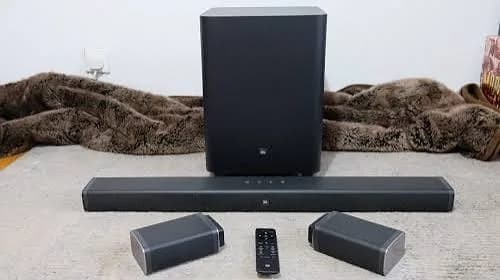
Modern TVs are thin, bright and sharp, and their sound is thin too. There is simply no room inside a slim TV for proper speakers, so dialogue gets lost behind music, football commentary sounds distant, and explosions in a film lack weight. A soundbar is the simplest fix. This guide to the best soundbar in Kenya explains the numbers on the box, helps you choose between 2.1, 3.1 and 5.1 systems, compares the Sony, Hisense and JBL soundbars we stock, and shows how to spot a fake.
We are City Gadgets Kenya, at New Alnoor Exhibition, Second Floor, Shop C7, Accra Road, Nairobi CBD. We sell soundbars, speakers, TVs, laptops, phones and accessories, and we set up many of these systems for customers. Soundbar specifications can differ slightly between listings and markets, so where a detail matters we say "we confirm per unit."
The short version
- A soundbar is the easiest way to improve TV sound. Even a basic 2.1 bar with a subwoofer is a big upgrade over TV speakers.
- Choose by room size and viewing habits: football and news (dialogue), films (surround and bass), music (balanced sound), gaming (low delay and HDMI).
- The watt number is a marketing figure. Compare channels, drivers and features, not just watts.
- 5.1 systems give real surround with rear speakers. 2.1 and 3.1 bars simulate surround.
- Dolby Atmos adds height effects but only with Atmos content and a capable system.
- Use HDMI ARC (or eARC) for the easiest setup and one-remote control.
- Wireless subwoofers still need power sockets. Plan where cables and sockets are.
- Buy genuine from a seller who gives a warranty, since fake or misrepresented soundbars exist.
| Your priority | Look at | Why |
|---|---|---|
| Better TV sound, simple setup, tight budget | Hisense HS1800 or HS2100, Sony HT-S400 | 2.1 with wireless subwoofer |
| Clearer dialogue | Hisense HS3100 | 3.1 with dedicated centre channel |
| Real surround, entry level | Sony HT-S20R, Hisense HS5100 | 5.1 with rear speakers |
| Surround with fewer cables | Sony HT-S40R, Hisense AX5100Q | Wireless-connected rear speakers |
| Dolby Atmos | JBL Bar 500 MK2, Hisense AX5100Q, JBL Bar 800 MK2 | Atmos support (we confirm per unit) |
| Big, powerful home theatre | Logitech Z906 | Full 5.1 speaker system |
| Small room, desk or bedroom | JBL 2.1 MK2, compact bars | Compact bass |
Why TV speakers sound bad
TV makers focus on screens, and the slimmer the screen, the less space for speakers. Small drivers cannot reproduce bass, and speakers that face down or backward bounce sound off walls and furniture. The result is weak low frequencies, muddy voices and little sense of space. A soundbar uses larger drivers and an enclosure designed for sound, usually sitting directly below the TV and aiming at you. A subwoofer then handles bass that a bar cannot.
Understanding channels: 2.1, 3.1, 5.1 and beyond
The numbers describe how many speakers and sound channels the system has.
2.1. Two front channels (left and right) plus a subwoofer ("0.1"). Simple and affordable. Good for clearer TV sound and more bass. Surround is simulated using processing.
3.1. Left, right and a dedicated centre channel, plus a subwoofer. The centre channel handles dialogue, which makes voices clearer. This is the most common complaint solved: "I cannot hear what they are saying." The Hisense HS3100 is a 3.1 bar.
5.1. Left, centre, right, two rear speakers and a subwoofer. Real rear speakers give genuine surround, with sound coming from behind you. Sony HT-S20R, HT-S40R and Hisense HS5100 are 5.1 systems.
5.1.2 and Dolby Atmos. Systems with height channels or virtual height can create sound above you. Atmos is a format, and real height effects usually need upward-firing or ceiling speakers. Many bars simulate height virtually. The Hisense AX5100Q supports Dolby Atmos and DTS:X but has no dedicated upward-firing height speakers, so its height effects are created virtually.
7.1 and beyond. More channels for larger rooms. Rare in entry-level bars.
For a deeper explanation, read our what does 5.1 and 2.1 mean on soundbars article.
The watt rating: what it really tells you
Soundbar boxes shout big watt numbers. It is tempting to think 600W is louder than 330W. Remember:
- Watts are a manufacturer's maximum or total figure. They help compare systems of the same type but do not tell you how good or loud a soundbar will sound in your room.
- The number of speakers, driver quality, cabinet design and amplifier quality matter more.
- Some brands quote peak power, others RMS. Our watts RMS vs peak explained article covers this.
- A bar that sounds clean at moderate volume beats one that is loud but distorted.
So use watts as a rough tier indicator, then compare channel layout, drivers and features.
Connections: how a soundbar plugs into your TV
HDMI ARC and eARC
HDMI ARC (Audio Return Channel) lets the TV send audio to the soundbar through a single HDMI cable, and lets you control volume with your TV remote. eARC is the newer version with higher bandwidth for advanced formats. Most soundbars use ARC. Plug the HDMI cable into the TV's port labelled ARC or eARC. Read HDMI ARC and eARC explained for details.
Optical (TOSLINK)
A digital audio cable that works on almost every TV. It carries stereo and compressed surround such as Dolby Digital, but not Atmos. Remote control may need setup.
AUX (3.5 mm)
A simple analogue connection. Works with almost anything but gives the least features.
Bluetooth
For streaming music from your phone. Newer versions such as Bluetooth 5.3 are more stable. The Hisense HS1800 and HS3100 list Bluetooth 5.3.
USB
Some bars can play music from a USB drive.
HDMI inputs
Some soundbars have HDMI inputs, letting you connect a console or streaming box to the bar and pass video through to the TV. This reduces cable swaps.
Before buying, check which ports your TV has. Most modern TVs have HDMI ARC; older ones may only have optical. We can confirm compatibility if you tell us your TV model.
Which soundbars we stock
All details below come from catalogue and retailer listings and we confirm per unit.
Hisense HS1800: compact entry level
A 2.1-channel soundbar with a wireless subwoofer, 140W maximum, two 2-inch full-range speakers in the bar and a 4.5-inch subwoofer. Connections include HDMI ARC (one port), optical, AUX and USB, plus Bluetooth 5.3. The soundbar is about 760 mm wide. It is a compact, affordable upgrade over TV speakers. It will not fill a large room or give real surround, but it makes voices clearer and adds bass.
Best for: bedrooms, small living rooms, tight budgets.
Hisense HS2100: 2.1 with DTS Virtual:X
A simple 2.1-channel bar with a wireless subwoofer. Listings show 240W, with some showing 120W, so we confirm. Supports Dolby Digital and DTS Virtual:X, which creates a wider, more spacious sound from two front speakers, plus Bluetooth for music.
Best for: small to medium rooms, everyday TV.
Hisense HS3100: 3.1 for clearer dialogue
A 3.1-channel bar with left, right and centre speakers and a 6.5-inch wireless subwoofer, 480W maximum, Dolby Digital Plus and DTS Virtual:X, with HDMI ARC, optical, AUX and Bluetooth 5.3. The dedicated centre channel improves dialogue. It has no rear speakers or Atmos, so surround is simulated.
Best for: news, football, soaps, anyone who struggles with dialogue.
Hisense HS5100: 5.1 entry-level surround
A 5.1-channel system with a wireless subwoofer and two rear speakers, 540W, Dolby Digital, Dolby Digital Plus and DTS Virtual:X. Hisense's announcement describes the rear speakers as wired, while some retailers list them as wireless, so we confirm which applies to the unit in stock. It does not support Dolby Atmos.
Best for: films and football with real surround on a budget.
Hisense AX5100Q: 5.1 with Dolby Atmos and DTS:X
The most capable Hisense soundbar in our range: a 5.1-channel system with Dolby Atmos and DTS:X support, an eight-speaker soundbar, a 6.5-inch wireless subwoofer, semi-wireless rear surround speakers and 580W maximum. The rear speakers connect to the bar wirelessly but still need power. Height effects are virtual, since there are no dedicated upward-firing speakers. Features such as Hi-Concerto need a compatible Hisense TV.
Best for: film lovers, mid to large rooms, buyers wanting Atmos support at a sensible level.
Sony HT-S400: simple 2.1 with 330W
A 2.1-channel bar with a wireless subwoofer and 330W total, made to give a TV fuller sound and deeper bass without complicated setup. We confirm connections, such as HDMI ARC, optical and Bluetooth, and box contents.
Best for: simple setups, buyers who want the Sony name, medium rooms.
Sony HT-S20R: real 5.1 at a modest level
A 5.1-channel home theatre soundbar with a 3-channel bar, two rear speakers and a subwoofer, 400W total, Dolby Digital, HDMI ARC, optical, analogue and USB inputs, Bluetooth 5.0 and HDMI CEC. Subwoofer and rear speakers are wired with colour-coded connections.
Best for: families who want real surround and do not mind running speaker cables.
Sony HT-S40R: 5.1 with wireless rear speakers
A 5.1-channel system with 600W, a subwoofer and wireless rear speakers, Dolby Audio, HDMI, optical, USB and Bluetooth. The rear speakers connect wirelessly but still need to be plugged into power. It supports Dolby Audio, not Atmos.
Best for: surround sound with fewer cables across the room.
JBL Bar 500 MK2: Atmos at an accessible tier
A conventional soundbar with a wireless subwoofer and Dolby Atmos support. It delivers strong front-facing sound without detachable rear speakers. We confirm the specification per unit.
Best for: buyers who want Atmos support and a premium brand, without a flagship level.
JBL Bar 800 MK2: flagship with detachable surrounds
JBL's flagship bar has detachable rear speakers that double as wireless surround channels. They are battery powered when detached, so you get surround without running cables. It supports Dolby Atmos and typically has several HDMI inputs. Ask us about charging and battery life per unit.
Best for: renters, anyone who cannot run cables, home theatre enthusiasts.
JBL 2.1 MK2 deep bass speaker system
Not a soundbar, but a compact 2.1 speaker system with a dedicated subwoofer for TV, gaming and music. A sensible middle ground between a TV and a full surround system.
Logitech Z906: the big home theatre
A full 5.1 speaker system rated at 1000 watts with THX-certified surround, for living rooms and media rooms. It needs more setup than a soundbar because five speakers must be positioned, but it delivers genuine home theatre sound. Read our home theatre system guide.
Browse accessories and message us for today's price on any model.
Soundbar comparison table
| Model | Layout | Power (listed) | Rear speakers | Atmos | Bluetooth | Notes |
|---|---|---|---|---|---|---|
| Hisense HS1800 | 2.1 | 140 W | No | No | 5.3 | Compact, HDMI ARC |
| Hisense HS2100 | 2.1 | 240 W or 120 W, we confirm | No | No | Yes | DTS Virtual:X |
| Hisense HS3100 | 3.1 | 480 W | No | No | 5.3 | Centre channel |
| Hisense HS5100 | 5.1 | 540 W | Yes (wired or wireless, we confirm) | No | Yes | Entry-level surround |
| Hisense AX5100Q | 5.1 | 580 W | Semi-wireless | Yes, plus DTS:X | Yes | Most capable Hisense |
| Sony HT-S400 | 2.1 | 330 W | No | No | We confirm | Simple Sony |
| Sony HT-S20R | 5.1 | 400 W | Yes, wired | No | 5.0 | Real surround |
| Sony HT-S40R | 5.1 | 600 W | Yes, wireless-connected | No | Yes | Dolby Audio |
| JBL Bar 500 MK2 | Soundbar with sub | We confirm | No | Yes | We confirm | Wireless sub |
| JBL Bar 800 MK2 | Flagship | We confirm | Detachable battery rears | Yes | We confirm | Multiple HDMI |
| Logitech Z906 | 5.1 speaker system | 1000 W | Yes, wired | No | No | Full home theatre |
For a head-to-head between the main brands, read our Sony vs Hisense soundbar guide.
Choosing by room size
Small room or bedroom (up to about 12 square metres). A compact 2.1 bar such as the Hisense HS1800 or HS2100 is enough. A bigger system will overpower the room and annoy neighbours.
Medium living room. A 3.1 or 2.1 bar with a good subwoofer, like the HS3100 or Sony HT-S400, fills the room well. Consider a 5.1 if you watch many films.
Large living room or open plan. Choose 5.1 systems such as the Sony HT-S40R, Hisense HS5100 or AX5100Q, or the Logitech Z906 for serious volume and surround.
Apartments. If you have thin walls, bass travels. Use the subwoofer level control and night mode. A smaller bar may be wiser.
Choosing by what you watch
Football and news
Dialogue and crowd atmosphere matter. A 3.1 bar with a dedicated centre channel, like the HS3100, gives clear commentary. Look for a "voice" or "news" mode.
Films and series
Surround and bass matter. A 5.1 system with rear speakers delivers the best immersion. Dolby Atmos support helps with Atmos content on streaming platforms and discs, though many films and shows still use standard Dolby Digital.
Music
A 2.1 or 3.1 bar with Bluetooth is fine for casual listening. Serious music fans may prefer a stereo speaker system or the JBL 2.1 MK2.
Gaming
Look for low latency, HDMI and a game mode. A console connected through the TV and a bar via ARC works for most players. For competitive gaming, a headset is better; see best gaming headset in Kenya.
Kids' shows and general TV
A simple 2.1 bar with a night mode (reduces loud peaks) is kind to families and neighbours.
Subwoofer placement and setup
- Place the subwoofer on the floor, usually near the front of the room. Try corners and the sides of the sofa, and listen.
- Leave space around it, since bass needs room to breathe. Don't hide it inside a cabinet.
- Power it from a nearby socket. Wireless subwoofers still need power cables.
- Adjust level and crossover. Reduce bass if it booms, raise it if thin.
- Avoid placing it right next to a wall unless you want extra boom.
Rear speaker placement
For a 5.1 system, place the rear speakers behind or beside your seating position, at or slightly above ear height. If they are wired, plan cable runs along the skirting boards or under rugs. If they are wireless-connected, they still need power sockets. If you cannot position them behind you, place them to the sides. Consider whether a bar with detachable rear speakers, like the JBL Bar 800 MK2, suits a room where cables are impractical.
Setting up a soundbar step by step
- Unbox and place the bar below the TV, centred. Make sure it does not block the TV's remote sensor.
- Connect HDMI ARC from the bar's HDMI OUT (ARC) to the TV's HDMI ARC port.
- Turn on HDMI CEC (the setting that lets one remote control both). It has different names by brand.
- Set the TV's audio output to external speaker or ARC, and disable the TV's own speakers.
- Pair the subwoofer if it does not link automatically.
- Set the sound mode (movie, music, voice, night).
- Check the audio format on the TV: set to auto or passthrough, so the bar receives surround where available.
- Test with familiar content. Use a film scene you know well.
- Adjust bass and treble.
If a soundbar has no sound, check cable, ARC port, TV output settings and the bar's input. WhatsApp us and we will help.
Dolby Atmos: is it worth it?
Atmos adds a sense of height and precision, but the benefit depends on three things: the content (Atmos films and shows), the source (a streaming device or disc player that outputs Atmos), and the system (a bar capable of decoding and rendering it). Many entry-level systems with Atmos support simulate height using virtual processing, so the effect is subtle compared to a system with real height speakers.
If you watch a lot of Atmos content, a system with Atmos support is a sensible choice. If you mostly watch football, news and local shows, a clear 3.1 or a simple 5.1 will serve you better. Our spatial audio and Dolby Atmos explained blog explains what to expect.
Soundbar versus home theatre versus speakers
| Option | Strength | Weakness |
|---|---|---|
| Soundbar | Simple, tidy, big upgrade over TV | Less true surround |
| Soundbar with rear speakers | Real surround, still tidy | More boxes and cables |
| Full home theatre (Z906) | Power and immersion | Setup, space, cables |
| Stereo speakers with subwoofer | Great for music | Less cinematic |
| TV speakers | No extra cost | Thin and weak |
Common mistakes when buying a soundbar
- Buying only on watts. Compare layout, drivers and features.
- Ignoring the TV's ports. Check HDMI ARC or optical.
- Choosing too big for the room.
- Forgetting power sockets for the subwoofer and rears.
- Expecting full surround from a 2.1 bar.
- Paying for Atmos you will not use.
- Placing the bar in a closed cabinet, which muffles sound.
- Not setting the TV's audio output.
- Buying a fake or grey-import unit with no warranty.
Sound modes and features explained
Soundbars come with sound modes, and using them well improves everyday listening.
Movie mode. Boosts bass and widens the soundstage for films. Good for action and cinematic content.
Music mode. Flatter and more balanced for songs. Use it for Bluetooth music.
Voice or dialogue mode. Lifts the centre channel and trims background music so speech is clearer. Great for news, football commentary and soaps.
Night mode. Reduces loud peaks and limits bass so you do not disturb a sleeping household. Very handy in apartments.
Sports or stadium mode. Widens crowd sound and keeps commentary clear on some models.
Game mode. Minimises processing and delay.
Bass and treble controls. Adjust to taste and room. If your room has hard floors and bare walls, reduce treble; if the room is heavily furnished, you may add some.
Virtual surround. DTS Virtual:X and similar systems widen the sound from two or three speakers. They help but are not the same as real rear speakers.
HDMI CEC. Lets the TV remote control the bar's volume and power. Turn it on in the TV's settings.
Wall mounting versus table placement
A soundbar sits on a table in front of the TV or on a wall bracket under it. On a table, keep it centred and make sure it does not block the TV's infrared sensor or the TV's stand. On a wall, many bars come with a template and brackets. Always check that the wall can take the weight, drill carefully and keep cables tidy. If you use a TV bracket, leave space between the TV and the bar so sound is not blocked. Do not place the bar inside a cabinet, because the cabinet walls muffle the sound.
Cables, power and tidy setup
A good soundbar setup has few visible cables. Use an HDMI cable of suitable length and quality; a basic certified HDMI cable is enough for ARC. Keep power cables separate from signal cables where possible to reduce hum. Use cable clips or trunking to hide wiring. Label cables if you have a full entertainment unit. Use a surge-protected extension for the TV, bar and subwoofer so a spike does not damage everything. In Nairobi, where voltage can fluctuate, an AVR or surge protector is a sensible investment; see earthing and wiring for UPS in Kenya for good wiring practice.
Troubleshooting common soundbar problems
No sound. Check the input source, mute, HDMI cable, the ARC port and the TV's audio output setting.
Sound is out of sync with the picture. Look for an audio delay or lip-sync setting on the TV or the bar.
Subwoofer not working. Check power, pairing button and distance. Re-pair if needed.
Rear speakers silent. Check power, pairing and that the sound mode supports surround.
Distorted bass. Lower the subwoofer level and move it away from walls.
Remote does not work. Replace batteries, check the sensor is not blocked, and re-enable HDMI CEC.
Bluetooth keeps dropping. Move closer, remove obstacles, and unpair other devices.
Volume too low on TV shows. Raise the bar's volume and check the TV is not sending a reduced output.
If it still fails, message us on WhatsApp and we will walk you through it or arrange a check at our shop.
A simple way to decide in five minutes
If the options still feel like too many, answer these five questions and you will have your shortlist.
- How big is the room? Small means a compact 2.1 bar. Medium means a 2.1 or 3.1 with a good subwoofer. Large means 5.1.
- What do you mostly watch? Football and news point to a centre channel. Films point to surround and bass.
- Can you run cables? If not, choose a bar with wireless-connected rear speakers, or skip the rears and use a 3.1 bar.
- Do you care about Atmos? If you stream a lot of Atmos films, consider a capable system. If not, skip it.
- What is your budget? Message us and we will recommend the best fit at your level, not the most expensive.
Most buyers end up with one of three choices: a compact 2.1 for bedrooms and small lounges, a 3.1 for clear dialogue in family living rooms, or a 5.1 for dedicated film nights. Start there, then fine-tune with our team.
How to spot a fake or misrepresented soundbar
Soundbars are often misrepresented rather than copied outright. The usual tricks are exaggerated watt numbers, relabelled cheap units, missing accessories and no warranty. Use these ten checks.
- Price against the market. A branded soundbar far below the usual price range is suspicious. Compare with the market and ask why.
- Watt claims. Be suspicious of enormous numbers on a small box, such as 5000W PMPO on a tiny bar. See watts RMS vs peak explained.
- Model number. Check the model on the box, on the unit and on the manual. They should match exactly.
- Packaging and print. Genuine boxes have crisp printing and consistent branding. Misspellings or blurry logos are warning signs.
- Weight. A real subwoofer is heavy because of the driver, magnet and cabinet. A feather-light subwoofer means a tiny driver.
- Contents. Check the bar, subwoofer, remote, cables, power adapters and manual. Missing parts indicate a repackaged unit.
- Ports. The ports should match the listing: HDMI ARC, optical, AUX, USB. Fake units sometimes lack ports that are advertised.
- Sound test. Play music with deep bass and clear vocals. A fake bar sounds thin or distorted, with bass that rattles.
- Remote and display. The remote should work smoothly, and displays and lights should be crisp.
- Seller and warranty. A seller without a shop, receipt or warranty is a risk. Ask what the warranty covers.
When you buy from City Gadgets Kenya, you buy from a real shop at New Alnoor Exhibition, Second Floor, Shop C7, Accra Road, Nairobi CBD. We confirm the model, connections and box contents per unit.
Why buy your soundbar from City Gadgets Kenya
- Genuine Sony, Hisense and JBL. Authentic products with warranty support.
- Room and TV matching. Tell us your TV model and room size and we will confirm the right soundbar and the right port.
- Honest advice. If a 2.1 bar suits you, we say so. If you need 5.1, we say that too.
- See and hear. Visit our shop and listen.
- Delivery. Same-day within Nairobi and next-day outside Nairobi.
- Payment. M-Pesa accepted.
- Support. WhatsApp us for setup help.
- Complete your setup. Pair your soundbar with a TV streaming box, a console or a laptop.
Message us for today's price.
Power protection for your TV and soundbar
Home entertainment equipment is vulnerable to surges and sudden power cuts. A surge protector or AVR helps protect TVs and amplifiers. Read power surges and AVR in Kenya. A UPS is not usually needed for a TV and soundbar, but a good surge protector is wise. Always plug the subwoofer and rear speakers into protected sockets.
Soundbar buying checklist
- I know my room size.
- I know my TV's ports: HDMI ARC, eARC or optical.
- I know what I watch most: news and football, films, music or gaming.
- I have decided between 2.1, 3.1 and 5.1.
- I have a plan for subwoofer and rear speaker power sockets.
- I do not need Atmos, or I know my content supports it.
- I have checked the model, box contents and warranty.
- I am buying from a trusted seller.
Frequently asked questions
What is the best soundbar in Kenya? It depends on your room, TV and budget. For simple upgrade, the Hisense HS1800 or HS2100 or Sony HT-S400. For clear dialogue, the Hisense HS3100. For surround, the Sony HT-S20R and HT-S40R or Hisense HS5100 and AX5100Q. For Atmos, the JBL Bar 500 MK2 or Hisense AX5100Q. We confirm per unit.
Is a soundbar better than TV speakers? Yes, usually by a wide margin, especially in dialogue clarity and bass.
Do I need a subwoofer? For films and music, yes, a subwoofer makes a big difference. Wireless subwoofers need only a power socket.
What is HDMI ARC? A feature that sends audio from the TV to the soundbar through one HDMI cable and lets one remote control both.
Will a soundbar work with my old TV? Usually yes through optical or AUX. Tell us your TV model.
Is Dolby Atmos necessary? No. It helps with Atmos content on a capable system. Most people will be happy with a good 3.1 or 5.1.
Are wireless rear speakers truly wireless? They connect without a signal cable but still need power sockets.
Can I use a soundbar for music? Yes, via Bluetooth, AUX or USB.
How do I spot a fake soundbar? Check price, watt claims, model, weight, contents, ports, sound and warranty.
Ready to choose?
Tell us your TV model, room size and what you watch, and we will recommend the right soundbar and confirm the connections. WhatsApp us: https://wa.me/254745575931. Or visit New Alnoor Exhibition, Second Floor, Shop C7, Accra Road, Nairobi CBD. Message us for today's price. Same-day Nairobi delivery, next-day outside Nairobi, M-Pesa accepted.
Related reading: Sony vs Hisense soundbars, HDMI ARC and eARC explained, what does 5.1 and 2.1 mean, home theatre system guide.