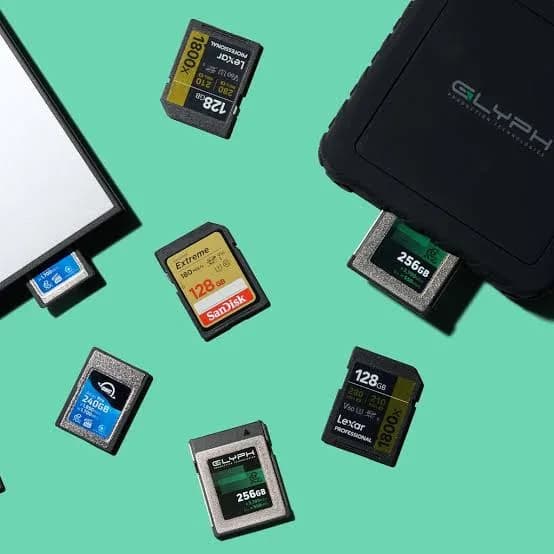
Choosing the best SD card for cameras in Kenya is a decision that quietly decides whether a shoot goes well. A slow card makes a camera stop mid-burst. A fake card loses the wedding. A card that is too small ends a safari early. A card that is fine for photos but too slow for 4K will give you a "card write speed too slow" warning in the middle of a ceremony you cannot repeat. This guide explains what the numbers and symbols on SD cards mean, which SanDisk SD cards we stock (Class 10, Ultra, Extreme, Extreme PRO and the Extreme PRO CF line), which one to buy for your specific camera and job, and how to spot a fake SD card before it costs you a day's work.
Prices change with the exchange rate, so we do not print them in guides. Message us on WhatsApp for today's price.
Quick answer: which SD card should you buy?
| Your camera and use | Recommended card | Why |
|---|---|---|
| Compact camera, family photos, Full HD video | SanDisk Class 10 or Ultra, 32-128 GB | Cheap, reliable, enough speed |
| Entry DSLR or mirrorless, photos mostly | SanDisk Extreme SD (U3, V30) 64-128 GB | Fast enough for bursts and 4K when needed |
| Mirrorless shooting 4K video | Extreme or Extreme PRO SD (V30), 128-256 GB | Sustained write speed for 4K |
| Wedding or event photographer, RAW bursts | Extreme PRO SD, 128-256 GB, several cards | Speed, safety and spares |
| Pro cameras with CFexpress slots | Extreme PRO CF line (confirm format) | For cameras that use that card type |
| Camcorders and basic video | Class 10 or Extreme (V30) | Matches the video bit rate |
If you are not sure what your camera takes, send us the model and we will confirm which cards it accepts before you buy.
First step: which kind of card does your camera take?
Before speed, check the physical type. Mixing these up is the commonest and most avoidable mistake.
- SD / SDHC / SDXC (full size): most cameras, camcorders and many laptops take these. SDHC covers up to 32 GB; SDXC covers 64 GB up to 2 TB. Older cameras that only support SDHC cannot read SDXC cards, so check the manual before buying anything over 32 GB.
- microSD: used in drones, action cameras and phones. Not for most traditional cameras without an adapter. Our guide to the best microSD cards covers these.
- CompactFlash (CF): an older, larger card type used in some DSLRs.
- CFexpress Type B: a newer, much faster professional card type used in higher-end mirrorless and cinema cameras. It looks similar in size to the old CF cards but is not interchangeable with them.
The Extreme PRO CF cards in our range are most likely CFexpress Type B, which is the format current retail listings of that product line describe, with read speeds up to about 1,700 MB/s and write speeds up to about 1,200 MB/s on the 128 GB card. We confirm the exact format of the card before you buy, because a CFexpress card will not work in a camera that has only an old CompactFlash slot, and vice versa. Many popular cameras use SD cards only; if yours does, you do not need CF at all.
Decoding SD card markings
SD cards are covered in symbols. These are the ones that matter for a photographer or videographer.
Capacity class: SDHC, SDXC
SDHC (up to 32 GB) uses the FAT32 file system; SDXC (64 GB and above) uses exFAT. If your older camera does not support exFAT, it will not read SDXC cards.
Speed Class (C): Class 10
The number in a circle with a C means the minimum sustained write speed in MB/s. Class 10 means at least 10 MB/s, which suits photos and Full HD video.
UHS Speed Class (U): U1 and U3
The number in a U shape also guarantees minimum sustained write speed. U1 is 10 MB/s and U3 is 30 MB/s. U3 is the minimum sensible choice for 4K video.
Video Speed Class (V): V30, V60, V90
V30 guarantees 30 MB/s, V60 guarantees 60 MB/s and V90 guarantees 90 MB/s. These are the numbers that matter for video bit rates. A camera that records 4K at 100 Mbps needs about 12.5 MB/s, so V30 is plenty. Higher-bitrate modes, 4K at 120 fps, 6K or RAW video, can demand V60 or V90.
UHS bus: UHS-I and UHS-II
UHS-I is the common standard, with a theoretical maximum of 104 MB/s. UHS-II adds a second row of pins and reaches much higher speeds, but only in cameras and readers that support it. A UHS-II card in a UHS-I camera works, but only at UHS-I speed. Our current SD range is UHS-I, so check your camera's specification if you have been told you need UHS-II.
The "up to" read speed
The large number on the front, such as 180 MB/s or 200 MB/s, is the maximum read speed, which affects how quickly you can copy files to a computer. Write speed is more important in the camera, and it is lower. For example, an Extreme PRO SD card can read at up to about 200 MB/s but writes at up to about 90 MB/s on most capacities, with some larger capacities rated up to 140 MB/s.
The SanDisk SD cards we stock, one by one
SanDisk Class 10 SD (32, 64, 128, 256 GB)
A dependable everyday card, rated Class 10, UHS-I, with SanDisk Ultra-family ratings of U1 and read speeds up to roughly 80 to 140 MB/s depending on version. It suits compact cameras, camcorders and Full HD video. It is a sensible, inexpensive card for family photos, school events and a casual hobbyist.
Not for: 4K video, long RAW bursts, or professional work.
SanDisk Ultra Go SD (32, 64 GB)
Sits at the same level as Class 10, with Class 10, UHS-I and U1 ratings. We list the exact version of the stock we hold, because retail names and specifications vary. It is a good fit for compact cameras, camcorders and Full HD video.
SanDisk Extreme SD (128 GB)
This is the first step into serious performance. Rated UHS-I, U3, V30 and Class 10, with read speeds up to about 180 MB/s and write speeds up to about 90 MB/s on the 128 GB card (per retailer listings), it is made for 4K video and fast burst photos. For the majority of enthusiasts and many working photographers, this is the sweet spot.
SanDisk Extreme PRO SD (64, 128, 256, 512 GB)
The top of our standard SD range: UHS-I, U3, V30, Class 10, up to 200 MB/s read, and up to 90 MB/s write on most capacities (some larger capacities list up to 140 MB/s). It is described as temperature-proof, waterproof, shock-proof and X-ray proof, and it is built for 4K UHD video, RAW photography and burst shooting. If you shoot for money, this is the card line we recommend, ideally in several modest-size cards rather than one huge one.
SanDisk Extreme PRO CF (128, 256 GB)
A professional card for cameras with the matching slot. As described above, we confirm the exact format (most likely CFexpress Type B) before you order. Speeds listed for the 128 GB card reach 1,700 MB/s read and 1,200 MB/s write. These cards suit cinema cameras and high-end mirrorless bodies that record RAW video or very fast bursts. They are overkill, and incompatible, for a camera that takes only SD.
Side-by-side comparison
| Card | Ratings | Top read speed | Write speed (typical) | Best for |
|---|---|---|---|---|
| Class 10 SD | Class 10, UHS-I, U1 | About 80-140 MB/s | Lower; suited to Full HD | Family photos, camcorders |
| Ultra Go SD | Class 10, UHS-I, U1 | About 100+ MB/s | Lower; suited to Full HD | Compact cameras |
| Extreme SD | UHS-I, U3, V30 | About 180 MB/s | About 90 MB/s | 4K video, bursts |
| Extreme PRO SD | UHS-I, U3, V30 | Up to 200 MB/s | Up to 90 MB/s (some up to 140) | Pro photo, 4K, RAW |
| Extreme PRO CF | Confirm format (CFexpress B likely) | Up to 1,700 MB/s | Up to 1,200 MB/s | High-end cameras with that slot |
Speeds are from SanDisk and retailer listings. Real-world speed depends on the camera and reader.
Match the card to the kind of photography you do
Weddings and events
A wedding is the highest-pressure shoot most photographers ever do, and it cannot be repeated. The goals are speed (so the camera never pauses), reliability, and not putting all your images on one card. Use Extreme PRO SD cards in moderate sizes (64-128 GB) rather than one giant card, and rotate through them through the day. If your camera has two card slots, set it to record to both simultaneously (the "backup" or "mirror" setting) so every frame is saved twice. Label full cards, put them in a case, and never reformat until the files are safely copied in two places.
Safari, wildlife and sports
Fast bursts of RAW images at high frame rates fill the camera's buffer, and the card has to empty it quickly. This is the situation where card write speed shows. Choose Extreme or Extreme PRO, and carry spares, because a safari in the Mara or a match at Kasarani is not the time to run out of space. Dust and heat are hazards: keep cards in a closed case and out of direct sun.
Portraits, studio and product photography
You often shoot tethered or in smaller bursts, so card speed matters less. An Extreme SD card of 64-128 GB is plenty. Prioritise reliability and a good reader for fast transfers after the session.
Travel and hobby photography
An Ultra or Extreme card of 64-128 GB handles everything from holidays to weekend trips. Buy two cards rather than one large card, so a failure costs you half a trip, not all of it.
Video: 4K, 1080p and RAW
Video is where cards fail most visibly. Use the table below as a rough guide, and always follow your camera manufacturer's recommended card specification when it gives one.
| Video mode (typical) | Approximate data rate | Minimum card rating we suggest |
|---|---|---|
| 1080p at 30 fps, standard quality | About 15-50 Mbps (2-6 MB/s) | Class 10 / U1 |
| 4K at 24-30 fps | About 100-150 Mbps (12-19 MB/s) | U3 / V30 |
| 4K at 60 fps or higher quality (10-bit) | About 200-400 Mbps (25-50 MB/s) | V30 for lower end, V60 for safety |
| High-bitrate 4K, 6K, RAW video | 400 Mbps or more | V60 or V90, or CFexpress if the camera uses it |
These are approximate; camera bit rates vary widely. The card's sustained write speed is what counts, and this is why the V and U ratings are more reliable than the large "up to" number.
How many photos and minutes of video fit on a card?
The numbers vary by camera, image quality and file type, so use these as rough estimates.
| Card size | 24 MP JPEG (about 8 MB each) | 24 MP RAW (about 25-30 MB each) | 4K video (about 100 Mbps) |
|---|---|---|---|
| 32 GB | About 3,800 photos | About 1,100 photos | About 40 minutes |
| 64 GB | About 7,500 photos | About 2,200 photos | About 80 minutes |
| 128 GB | About 15,000 photos | About 4,500 photos | About 2.6 hours |
| 256 GB | About 30,000 photos | About 9,000 photos | About 5 hours |
| 512 GB | About 60,000 photos | About 18,000 photos | About 10 hours |
Higher-resolution cameras (45 MP and above) produce files two to three times larger. Remember, capacity on the label is a little more than what you can use after formatting.
One big card or several small ones?
This is a real debate among photographers, and the sensible answer is several medium cards. A single 512 GB card is convenient, but if it fails, corrupts or is lost, everything on it is gone. Two 256 GB cards, or four 128 GB cards, spread the risk. For events, rotate cards, and treat a full card as finished work that goes straight into a protective case. For video, one larger card can be easier, but format it in the camera at the start of each project and offload promptly.
Card readers: the overlooked half of the system
A fast card in a slow reader is a slow card. The USB 2.0 reader built into a cheap laptop or the little reader that came free with a phone can throttle a 200 MB/s card to a crawl. A reader on a USB 3.0 or faster port gives you the speed you paid for. For regular professional use, buy a good dedicated reader, and pair it with a fast portable SSD so that offloading a 128 GB card takes minutes, not an hour.
Good habits that save careers
- Format in the camera. Always format the card in the camera you are going to use, not on a computer, before important work. It sets the right file structure and clears hidden errors.
- Do not delete individual photos in the camera. Frequent deletions fragment the file structure and increase the risk of errors. Offload everything, then format.
- Never remove a card while the camera is writing. Wait for the access light to go off and the camera to finish.
- Never run the battery to zero while shooting. A camera that shuts off mid-write can corrupt files. Charge batteries and carry spares.
- Copy twice before formatting. Two copies, on two devices, before the card is wiped. See our backup guide.
- Rotate and retire. Cards that have taken hard use for years should be retired for critical shoots.
- Keep them protected. A hard, closed card case keeps out dust, moisture and static.
- Label cards. A numbered sticker on each card avoids mixing full and empty ones.
- Test new cards before big jobs. Do not first use a new card on a wedding day. Test it at home and run a capacity check.
Why a "good enough" card is false economy for professionals
A good card costs a small fraction of the cost of your camera and a tiny fraction of the value of a wedding or event. Failing to deliver because of a card problem damages a reputation that took years to build. For professionals, a premium card is cheap insurance. For hobbyists, the same logic applies to family memories that cannot be reshot, such as a baby's first steps, graduation day, or a parent's last birthday. Buy a genuine card from a seller who will stand behind it.
A practical workflow: from shutter to safe backup
Good cards deserve a good routine. This is the workflow we recommend to wedding photographers, school photographers and anyone who shoots work that cannot be repeated.
- Before the job. Charge batteries, format fresh cards in the camera, and check the date and time. Test every card with a few shots and a short video.
- During the job. Rotate cards on a schedule (for example, change cards at each major part of the event). Never fill a card to the last frame. Put the full card in a labelled case, face-down or in a pouch, so it cannot be confused with an empty one.
- Straight after the job. Copy every card to a computer, then to a second drive. Verify the files open, with a quick scroll through thumbnails.
- Only then reformat. Do not format any card until both copies exist. Many photographers wait until the final gallery is delivered.
- Archive. Keep the originals on a large hard drive and a fast SSD for active editing. Our guides to portable SSDs and portable hard drives cover the choices.
What each type of camera needs
Compact and point-and-shoot cameras. Usually take SD, SDHC or SDXC cards, and record Full HD or 4K at modest bit rates. A Class 10 or Ultra card suits most. Check the maximum capacity in the manual.
Entry-level DSLRs and mirrorless cameras. These typically handle bursts of 24 MP images, and many record 4K. An Extreme SD (U3, V30) is the right choice. If your camera is a few years old, it may be limited to UHS-I speeds, so a UHS-II card brings no benefit.
Enthusiast and professional mirrorless cameras. Often have two card slots, one of which may be SD and the other CFexpress or a second SD. Use matching, fast cards, and enable the backup or overflow mode. Extreme PRO SD for the SD slot, and a CFexpress card for the other slot where it applies.
Camcorders. Often record long continuous clips, so reliability matters more than burst speed. A V30 card is a solid, safe choice.
Cinema cameras and high-bitrate video. Check your camera maker's approved card list. This is where V90 or CFexpress is justified.
Kenyan conditions: dust, heat and the road
Photographers in Kenya work in conditions that cameras and cards are not always designed for. Matatu rides, dusty safari tracks, humid coastal shoots and hot outdoor ceremonies all stress equipment. A few simple habits help:
- Change cards in a clean, sheltered spot, not in a dusty wind. Dust in the card slot is a leading cause of read errors.
- Keep spare cards in a closed case, not loose in a pocket where they pick up lint, damp and static.
- Avoid leaving your camera bag in a hot car. Heat damages batteries, lenses and cards.
- Carry a small blower or soft brush to clean the card slot and contacts.
- Protect against power cuts when you offload. If you are copying files to a desktop computer in a place with unreliable electricity, a UPS can stop a power cut from interrupting the transfer.
Troubleshooting the five most common SD card problems
"Card error" or "Card cannot be accessed." Turn the camera off, remove and reinsert the card, and clean the contacts with a dry cloth. If the error continues, test the card in a computer. If the card works on a computer but not in the camera, format it in the camera, after copying your files off. If it fails everywhere, the card may be failing or fake.
"Card write speed too slow" or recording stops. The camera is asking for more sustained write speed than the card provides. Move up to a U3/V30 or faster card, lower the video bit rate, or test the card for authenticity.
Card shows as RAW or asks to be formatted. Do not format yet. A RAW message often means the file system is damaged, not that the pictures are gone. Use a recovery tool first, or ask a professional. Formatting makes recovery harder.
Photos missing after a shoot. Common causes are removing the card mid-write, a battery dying during a write, or a fake-capacity card that overwrote old images. Stop using the card and attempt recovery before shooting more.
Card is slow to copy to the computer. Check the reader and USB port first; a USB 2.0 reader cripples a fast card. Try a USB 3.0 reader and a different port.
If any of these happen with a card you bought from us, message us on WhatsApp with a photo of the card and your receipt.
Choosing capacity: a simple decision rule
If you shoot JPEG only, 64 GB is generous for a day. If you shoot RAW, 128 GB handles a typical event. If you shoot 4K video, 128-256 GB gives a comfortable day. If you shoot all three on a serious job, carry several cards totalling at least twice what you expect to use. The shoot that runs long, or the client who asks for an unplanned extra session, is the one that fills your last card. The cost of an extra card is small, and the cost of running out is a missed shot.
Honest limits: what a better card will not fix
A faster card cannot make a slow camera faster. Your camera has its own limit on how quickly it can write data, set by its processor and its card slot. If your camera writes at 40 MB/s, a card rated for 140 MB/s will perform exactly like one rated for 60 MB/s, and you will have paid for speed you cannot use. Likewise, a card cannot fix a full buffer on a long burst: once the camera's internal memory fills, it must wait to empty, and that speed is set by the camera. The honest approach is to buy a card that comfortably exceeds what your camera needs, then stop. Tell us your camera model and we will tell you where the limit is.
How to spot a fake SD card
Fake SD cards are the same problem as fake microSD cards, and photographers are prime targets because they buy larger, more expensive cards. The two types are mislabelled cards (a slow, cheap card made to look like a fast brand) and fake-capacity cards (a small chip reporting a large size). The second type accepts photos until the real memory is full, then silently overwrites older images. You find out when you view your wedding photos and half are corrupt.
1. Price and seller
A 512 GB Extreme PRO at a fraction of the usual price is not a bargain; it is a warning. Buy from a seller with a shop, a receipt and a reputation.
2. Packaging
Genuine retail packaging is sealed, cleanly printed and accurate. Look for spelling mistakes, blurred logos, loose seals, and mismatched model numbers. Cards sold loose or in unmarked bags are a gamble.
3. Card printing
On a genuine card, the printing is crisp, uniform and correctly spaced, with the right class symbols (U3, V30) and capacity. Compare to a known genuine card if you can. Fake cards often have slightly different fonts, colours, edges or contacts.
4. The write-protect switch
A genuine SD card has a smooth, properly fitted lock switch. Fakes often have loose or badly shaped switches. This is a minor clue, not proof.
5. Capacity test
Use H2testw on Windows or F3 on Mac and Linux to write and verify data across the full card. A fake reports errors or less real capacity. Do this before using the card on a job.
6. Speed test
Use a tool such as CrystalDiskMark or the Blackmagic Disk Speed Test with a good USB 3.0 reader. An Extreme PRO that reads around 20 MB/s is not performing as claimed. Test in a second reader to rule out the reader itself.
7. Camera test
Record a few minutes of the highest-quality video your camera offers, and shoot a long burst of RAW photos. A card that triggers "card too slow" warnings or stops recording is not performing as advertised, or the card is not suitable for that mode.
8. Check the CF/CFexpress format
If you buy a professional CF-line card, confirm that the physical format matches your camera's slot and that the speed claims match your camera's capabilities. A mislabelled CompactFlash card sold as CFexpress is a known trick.
9. Keep the receipt
If anything is wrong, return it quickly. Take photos of the packaging on the day you buy, and run your tests within days, not months.
10. Be careful with used cards
A card that already contains pictures, or whose packaging is not sealed, may be a used card sold as new.
Why buy your SD card from City Gadgets Kenya
- Genuine SanDisk SD and professional cards, sealed, with the version confirmed for what you order.
- Camera-specific advice. Tell us your camera model and kind of work, and we will confirm compatibility and recommend the right card and size, not the most expensive.
- Honest about what you do not need. If an Extreme is enough, we will not sell you a PRO. If your camera takes only SD, we will not sell you CF.
- A real shop you can visit at New Alnoor Exhibition, Second Floor, Shop C7, Accra Road, Nairobi CBD, where you can ask questions and check the card.
- Same-day delivery in Nairobi and next-day outside Nairobi through reputable courier companies, plus M-Pesa payment.
- Support after the sale by WhatsApp if a card behaves oddly.
Explore the rest of our storage range in the accessories category.
Frequently asked questions
What is the best SD card for cameras in Kenya? For most photographers, the SanDisk Extreme PRO SD (U3, V30) in 64-256 GB. For casual use, an Extreme or even a Class 10 card is enough.
Do I need V90 for 4K video? Usually not. V30 handles typical 4K. V60 or V90 matter for very high bit rates, high frame rates, or RAW video. Follow your camera's recommended specification.
Is 64 GB enough? For photos, yes, if you rotate cards. For 4K video, 128 GB or larger is more comfortable.
Can I use a microSD card with an adapter in my camera? Often, but a proper full-size card is more robust and usually better matched to the camera's slot.
Will my old camera read a 256 GB card? Not necessarily. Older cameras may support only SDHC (up to 32 GB). Check the manual or ask us.
What does "card write speed too slow" mean? The camera needs a faster sustained write speed than the card can provide, or the card is slow or fake. Move up a speed class or test the card.
Is UHS-II worth it? Only if your camera and reader both support UHS-II. Otherwise it does not help.
How do I check a fake SD card? Buy from a trustworthy seller, inspect the packaging, and run H2testw or F3, then test speed.
Should I format a new card? Yes, in your camera, before your first real shoot.
Do you have CFexpress cards? We stock the Extreme PRO CF line. We confirm the exact format and your camera's compatibility before you order.
Ready to buy?
Send us your camera model, what you shoot, and how much storage you need, and we will recommend the right SD card.
WhatsApp: wa.me/254745575931 Visit: New Alnoor Exhibition, Second Floor, Shop C7, Accra Road, Nairobi CBD. Same-day delivery in Nairobi; next-day outside Nairobi.
Related reading: best microSD cards in Kenya, SD card speed classes explained, best external storage for photographers.