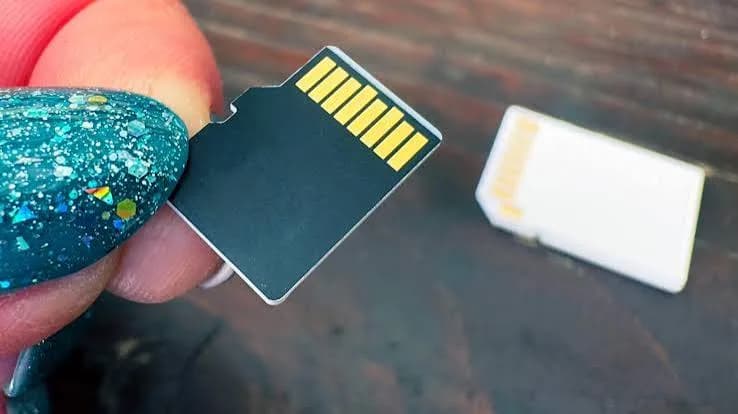
The best microSD card in Kenya is not a single product. It is the card that matches the device you are putting it in. A card that is perfect for a Tecno phone is wrong for a 4K drone, a card that records a dashcam for two years is wrong for a gaming handheld, and a card that is "fast" on the box can still be a fake. This guide walks you through every microSD card type we sell at City Gadgets Kenya, from SanDisk Class 10 and Ultra cards to Extreme, Extreme PRO, High Endurance, Max Endurance and microSD Express, explains what the letters and numbers (U1, U3, V30, A1, A2) actually mean, shows which card to buy for each device, and gives you a practical checklist for spotting fake microSD cards, which are among the most commonly counterfeited electronics products anywhere in the world.
We do not publish prices inside guides because they follow the exchange rate. Message us on WhatsApp for today's price on any card.
The short answer
| Your device | Best card type | Capacity to start with |
|---|---|---|
| Budget Android phone or tablet | SanDisk Class 10 or Ultra (A1) | 64-128 GB |
| Mid-range Android phone with lots of apps and video | Extreme (A2) | 128-256 GB |
| 4K action camera (DJI Osmo Action, GoPro and similar) | Extreme or Extreme PRO (V30, A2) | 128-256 GB |
| Drone shooting 4K | Extreme PRO | 128-256 GB |
| Dashcam, CCTV or baby monitor | High Endurance or Max Endurance | 64-128 GB |
| Nintendo Switch (original, OLED, Lite) | Class 10, Ultra or Extreme (UHS-I) | 128-256 GB |
| Nintendo Switch 2 | microSD Express | 256 GB or larger |
| Raspberry Pi, trail camera, simple gadgets | Class 10 or Ultra | 32-64 GB |
Keep reading to understand why, and how to avoid the mistakes that waste money.
First, check that your device even has a microSD slot
This sounds basic, but it saves disappointment. Many modern flagship phones, including iPhones and recent Samsung Galaxy S models, do not have a microSD slot at all. Many mid-range and budget Android phones from brands like Tecno, Infinix, Itel, Redmi and Samsung's A series still do. Some tablets, all Nintendo Switch consoles, many drones and action cameras, dashcams and CCTV cameras do. Check your phone's SIM tray: if it has a second small slot, or a SIM-or-card combination slot, you can use a card. If you are unsure, send us your exact model on WhatsApp and we will tell you before you buy.
Also check the maximum card size your device supports. Most modern devices accept microSDXC cards up to 512 GB or 1 TB, but older ones cap at 32 GB or 128 GB. Putting a 256 GB card into a device that supports only 128 GB may cause errors.
Decoding the labels: what the symbols mean
A microSD card is covered in logos. Four ideas matter.
Capacity class: SDHC, SDXC, SDUC
- microSDHC covers cards up to 32 GB and is usually formatted FAT32.
- microSDXC covers cards from 64 GB up to 2 TB and is usually formatted exFAT.
- A few very old devices only read SDHC. If your old camera is picky, use 32 GB.
Speed class (the number inside a "C"): Class 10
Class 10 guarantees a minimum sustained write speed of 10 MB/s. This is the baseline for a basic card and fine for Full HD video, photos and everyday storage.
UHS speed class (the number inside a "U"): U1 and U3
U1 guarantees at least 10 MB/s sustained write; U3 guarantees at least 30 MB/s. U3 is the minimum for reliable 4K video.
Video speed class ("V"): V30, V60, V90
V30 guarantees 30 MB/s minimum sustained write, V60 guarantees 60 and V90 guarantees 90. The V ratings matter to video shooters. A V30 card suits 4K video on most action cameras and drones, V60 and V90 are for higher-bitrate cinema and 6K-8K recording.
Application performance class: A1 and A2
This one is about apps and games, not video. A1 guarantees at least 1,500 random read operations per second and 500 random writes. A2 guarantees 4,000 reads and 2,000 writes. If you install apps or run games from the card on an Android phone, or use it as extra storage on a handheld, A2 gives a noticeably smoother experience. A1 is fine for storing photos and music.
Bus interface: UHS-I, UHS-II and Express
Most microSD cards use UHS-I, which tops out around 104 MB/s in theory, with the best cards reaching up to about 200 MB/s. microSD Express is a new, much faster standard (PCIe and NVMe based) with speeds in the hundreds of MB/s, used by the Nintendo Switch 2. Express cards work in older UHS-I devices at UHS-I speeds, but only Express-capable devices get the full speed.
Why "up to 200 MB/s" is the wrong number to focus on
The big number on the front of the card is maximum read speed, which only matters when you copy files from the card to a computer. For recording video, the number that matters is sustained write speed, which is lower, and is the number the V and U ratings guarantee. A card that reads at 200 MB/s but writes at 90 MB/s is still more than enough for 4K video; a card with a bigger front number but a poor write guarantee may stutter.
The SanDisk microSD cards we stock, explained
SanDisk Class 10 microSD (16 GB, 32 GB, 64 GB, 128 GB, 256 GB)
This is the standard everyday card: Class 10, UHS-I, typically U1 and A1 on SanDisk's Ultra-family ratings, with read speeds up to about 100-140 MB/s depending on version. It is a reliable, sensible choice for phones, tablets, Full HD cameras, music, photos and general storage. If you want a card to extend a phone's storage and you are not recording 4K video or running games from it, this is where most people should start.
Choose it for: budget phones, tablets, simple cameras, photo and music storage, and dashboards that need extra room for maps.
Avoid it for: 4K video, drones, or any high-bitrate recording.
SanDisk Ultra Go microSD (64 GB, 128 GB)
The Ultra family sits at the same level as the Class 10 cards, with Class 10, UHS-I, U1 and A1 ratings. We list the exact version for the unit you order, because retail names vary. It suits phones, tablets and Full HD cameras. Think of it as a dependable all-rounder, slightly better suited to app storage thanks to its A1 rating.
SanDisk Extreme (Go) microSD (64 GB, 128 GB, 256 GB)
This is the step up for people who shoot 4K video or install games. The Extreme microSD line is rated UHS-I, U3, V30 and A2, with read speeds listed up to about 170-190 MB/s depending on capacity. The A2 rating helps apps and games load faster, and U3/V30 means it records 4K video reliably. It is the card we most often recommend for action cameras, entry-level drones and phones that record a lot of video.
SanDisk Extreme PRO microSD (64 GB, 128 GB, 256 GB, 512 GB)
The Extreme PRO is the fastest standard UHS-I microSD in our range: UHS-I, U3, V30, A2 and Class 10, with read speeds up to 200 MB/s and write speeds up to 140 MB/s on larger capacities (some capacities are rated at 90 MB/s write). It is listed as shock, temperature, water and X-ray proof, and retail listings show a lifetime limited warranty. It is the card to buy for 4K drones, high-bitrate action cameras, serious photographers copying large files, and anyone who wants the fastest card their device can use.
SanDisk High Endurance and Max Endurance (32 GB, 64 GB, 128 GB)
These cards are different in kind. They are built not for speed, but for continuous recording, such as dashcams, home security cameras, baby monitors and body cameras. The cards are listed with UHS-I, U3 and V30 ratings, up to about 100 MB/s read and 40 MB/s write, and a temperature range of -40 to 85 degrees Celsius, and they are described as shock, temperature, water and X-ray proof. Their key rating is "hours of recording": a figure that rises with capacity and indicates how long the card can handle constant overwriting. Ask us for the figure for the exact card you want.
Choose them for: dashcams and CCTV. A normal card in a dashcam is overwritten again and again every day and can wear out within a year or two; an endurance card is built for that workload. Max Endurance is the higher-rated version.
SanDisk microSD Express (256 GB)
This card is for the Nintendo Switch 2 and other microSD Express devices. SanDisk lists read speeds of up to 880 MB/s and write speeds of up to roughly 650 MB/s on most listings, using a PCIe 3.1 NVMe interface with a standard UHS-I fallback so it also works (more slowly) in older devices. The Switch 2 needs Express cards for expansion storage; ordinary UHS-I microSD cards are not compatible with the Switch 2's card slot for game storage. See our Nintendo Switch 2 coverage.
Comparison table
| Card | Rating highlights | Typical top read speed | Best for | Skip if |
|---|---|---|---|---|
| Class 10 | Class 10, UHS-I, U1, A1 | About 100-140 MB/s | Phones, tablets, photos, music | You shoot 4K video |
| Ultra Go | Class 10, UHS-I, U1, A1 | About 100+ MB/s | Phones, Full HD cameras | You need high write speed |
| Extreme (Go) | UHS-I, U3, V30, A2 | About 170-190 MB/s | Action cams, drones, game storage | You only store photos |
| Extreme PRO | UHS-I, U3, V30, A2 | Up to 200 MB/s | 4K drones, pro photography | A cheaper Extreme would do |
| High / Max Endurance | U3, V30, endurance-rated | Up to about 100 MB/s | Dashcams, CCTV, 24/7 recording | You want fast file copying |
| microSD Express | PCIe NVMe, UHS-I fallback | Up to 880 MB/s | Nintendo Switch 2 | Your device is not Express-ready |
Which card for which device? Device-by-device advice
Android phones and tablets
For most phones, the best card is the one that matches how you use it. If you mainly want to keep photos, music, WhatsApp media and downloads off the internal memory, a Class 10 or Ultra card at 64-128 GB is plenty. If you shoot a lot of video, or you move apps and games to the card, step up to an Extreme (A2) card. Do not pay for an Extreme PRO in a phone that cannot record 4K or write fast enough to benefit.
Two phone-specific tips. First, many Android phones offer to format a card as internal ("adoptable") storage or as portable storage. Adoptable storage merges the card into the phone and encrypts it, which makes it unreadable in other devices and slows the phone if the card is slow, so use it only with a fast A2 card, and only if you accept that removing the card can break apps. Portable storage is the safer, more flexible option for most people. Second, if the phone says "card not supported" or "blank card", it may need reformatting to exFAT or FAT32, or the card may be fake. Try another device before concluding the card is bad.
Action cameras (DJI Osmo Action, GoPro, Insta360)
Action cameras write video continuously at high bit rates, and they punish slow cards with dropped frames or recording stops. Choose a U3/V30 card, which means Extreme or Extreme PRO in our range, and follow your camera's own recommended-card list where it gives one. For 4K at 60 frames per second or high-bitrate modes, the PRO is the safer choice. See our comparison of DJI Osmo Pocket vs Action cameras and DJI vs Insta360.
Drones
Drones record 4K video to a microSD card, and a card failure mid-flight means lost footage, not just a restart. We recommend Extreme or Extreme PRO from a trusted seller, and a formatting routine before each major shoot. Carry a spare card. Remember that a drone is a bad place to discover a fake card.
Dashcams, CCTV and security cameras
Use High Endurance or Max Endurance. A standard card in a dashcam is overwritten constantly, and heat inside a parked car in Nairobi's sun adds stress. Endurance cards are designed for continuous overwriting and a wider temperature range. Format the card in the camera every month or two to keep the file system healthy, and replace it every year or two if the footage is important. Cameras that report "SD card error" are often asking for a new card, not a repair.
Nintendo Switch, Switch Lite and Switch OLED
The original Switch family uses standard microSD (UHS-I) cards. A 128-256 GB Extreme or Ultra card is a sensible size for a mix of downloaded games. Digital games are large, and a handful of big titles can fill 128 GB quickly. Switch performance on microSD is limited by the console, so a PRO brings little advantage.
Nintendo Switch 2
The Switch 2 uses microSD Express for expansion. Do not buy a regular microSD for it. Our 256 GB microSD Express card is the right type. Ask us to confirm the console's current compatibility list and minimum standard before ordering, because console support is set by Nintendo.
Raspberry Pi, trail cameras and small gadgets
For a Raspberry Pi running an operating system from the card, the A1/A2 rating matters because the card is doing lots of small random reads and writes. A reliable Extreme or Ultra card is a good choice; cheap unbranded cards are a common source of mysterious Pi crashes. For simple trail cameras, a 32-64 GB Class 10 card is enough.
Laptops and cameras that take full-size SD
If your device uses a full-size SD card, a microSD card in an adapter often works, but a dedicated SD card is better suited to professional cameras. See our guide to the best SD cards for cameras.
How much capacity do you need?
| Use | Estimate | Suggested size |
|---|---|---|
| Photos and music on a phone | A few GB per month | 64-128 GB |
| WhatsApp media, downloads, videos | Grows quickly | 128 GB |
| Phone 4K video, regular filming | About 400 MB per minute at typical 4K settings | 256 GB |
| Action camera 4K | Roughly 20-30 GB per hour at common settings | 128-256 GB |
| Drone 4K | Similar to action cameras, higher at top bitrates | 256 GB, with a spare |
| Dashcam | Depends on loop settings | 64-128 GB endurance card |
| Nintendo Switch | A few GB per game up to 20 GB or more | 128-256 GB |
| Nintendo Switch 2 | Larger games | 256 GB or larger |
These figures are estimates; bitrates vary by device and mode. A good rule: bigger is almost always better, but a very large card from a doubtful seller is the most likely to be fake.
Caring for a microSD card in Kenyan conditions
- Keep it clean and dry. Dust and moisture are the enemy of the tiny contacts. Store spare cards in a small case.
- Do not leave cards in hot cars. Heat shortens life and corrupts files. Dashcams should use endurance cards for this reason.
- Eject properly. Pulling a card out mid-write is the commonest cause of corruption. On a phone, use the unmount option before removing the card.
- Format in the device. For cameras and drones, format the card in the device, not on a computer, so the file structure is correct.
- Back up regularly. A microSD card is small, easy to lose and easy to corrupt. Copy important photos and video to a computer or external drive. See our guides on portable SSDs and backup drives.
- Replace cards used for heavy recording. Even the best flash wears. A dashcam card is a consumable.
- Use a good card reader. A cheap reader can be the reason a good card seems slow.
How to spot a fake microSD card
Counterfeit memory cards are among the most widely faked consumer products in the world. They are cheap to make and profitable to sell, and they come in two nasty forms. The first is a real card with a fake label: a slow, low-quality card relabelled as a faster brand. The second, and worse, is a fake-capacity card: a tiny chip whose firmware lies about its size, reporting 256 GB while holding perhaps 8 GB. It accepts files until the real memory is full and then overwrites or discards data, so you only discover the problem when photos and video are corrupt or missing. Take these steps.
1. Be suspicious of the price and the seller
If a 256 GB or 512 GB Extreme PRO is far below what established sellers charge, assume the product is fake. Genuine memory cards from authorised distributors fall within a fairly narrow range. Buy from a seller with a real shop, a real receipt and a reputation to protect.
2. Check the printing and packaging
On genuine SanDisk cards, the printing is sharp, clean and consistent, and the capacity, class symbols (U3, V30, A2) and branding are crisp. Look for smudged or uneven logos, misspellings, colours that look slightly off, rough edges, or poorly aligned printing. Genuine retail packaging is neat, sealed and carries accurate model information. A card sold loose, with no packaging, in an unsealed bag, is a poor sign.
3. Compare the card with a known genuine one
If you can, hold the card next to one you trust. The font, finish and gold contacts of a genuine card look identical to the same model, while fakes often differ subtly: a slightly different shade, a rougher back, differently shaped contacts.
4. Look at the speed claims
A genuine card carries the speed symbols its specifications call for: the Extreme PRO should show U3, V30 and A2, for example. A card claiming 200 MB/s but showing only a basic Class 10 symbol is not what it claims.
5. Test the real capacity
This is the test that catches the worst fakes. Do not store important photos on a new card until it passes.
- Windows: use H2testw. Select the card, test all available space, and wait. A fake will report errors or far less real capacity than advertised.
- Mac and Linux: use F3 (Fight Flash Fraud), which does the same job.
- Android: some apps run similar tests, but a computer test is more reliable.
6. Test the real speed
Use a speed tool such as CrystalDiskMark, or the Blackmagic Disk Speed Test or the free SD Card Tester tools, with a good card reader. A card that reads at 15 MB/s when it should reach over 100 MB/s is either fake, defective or in a poor reader. Try another reader to make sure.
7. Check how the device sees it
Insert the card and look at the information your computer shows. Fakes sometimes show generic or strange manufacturer details, or capacity that does not match the label. Some can show the correct capacity but fail the test above.
8. Be wary of "perfect" fixes
Some sellers tell you a card showing less capacity than advertised is "just formatted wrongly". A genuine 128 GB card shows roughly 119-120 GB usable once formatted, which is normal, but a 128 GB card showing 16 GB or 32 GB is not "formatted wrongly". It is fake or damaged.
9. Keep the receipt and packaging
If a card fails, you need proof of purchase. Take photos of the packaging and card on the day you buy, and run the tests within the first few days.
10. Avoid used cards sold as new
Cards that have been used in cameras, drones or dashcams and are resold as new are a hidden risk. A card that arrives with files on it, or without sealed packaging, is not new.
Seven common microSD mistakes (and how to avoid them)
1. Buying the biggest number on the front. The "up to" read speed is for copying files. For recording video, the guaranteed write class (U3, V30) is what counts.
2. Buying a PRO when an Extreme would do. If your phone or camera writes at 40 MB/s, a card that can write at 140 MB/s gives you nothing extra. Match the card to the device's limit.
3. Buying a normal card for a dashcam. It will work for a while, then fail without warning. Endurance cards exist for this exact job.
4. Buying a card larger than the device supports. Some older devices cap at 32 GB, 128 GB or 256 GB. Check the manual or ask us.
5. Buying from a stranger because it is cheap. The cost of a fake is not the price of the card, it is the footage you lose when it fails.
6. Never formatting in the device. Formatting a card in the device it will be used in sets up the right file structure and reduces errors. If you have used the card elsewhere, format it before an important shoot.
7. Treating one card as a backup. A card is storage, not safety. Copy important footage off the card as soon as you can, and keep it in at least two places.
Fast reference: buy this if...
- You want one safe, cheap, general card: SanDisk Class 10 or Ultra, 64-128 GB.
- You shoot 4K video or play games from the card: SanDisk Extreme (A2), 128-256 GB.
- You fly a drone or shoot high bitrate: SanDisk Extreme PRO, 128-256 GB, plus a spare.
- You run a dashcam or CCTV: SanDisk High Endurance or Max Endurance, 64-128 GB.
- You own a Switch 2: SanDisk microSD Express, 256 GB or larger.
- You are unsure: message us the device and we will pick it with you.
What happens if a card fails?
Even genuine cards fail occasionally, and knowing what to do next protects your files.
Stop using the card immediately. Every extra write can overwrite recoverable data. Remove it from the device and, if you can, keep it aside.
Try a different reader and port. Many "dead" cards are really a dirty contact, a worn reader or a faulty adapter. Wipe the gold contacts gently with a dry, clean cloth, then test in another reader.
Do not format if the card shows as RAW. A RAW or "needs formatting" message does not always mean the data is gone. Formatting writes new structures and makes recovery harder. Use a recovery tool first, or ask a professional.
Copy what you can. If the card is readable but slow or erratic, copy files off one folder at a time, starting with the most important.
Contact us. If the card is under warranty, message us on WhatsApp with the receipt. If the problem is a fake card, run the capacity tests above and tell us what the results show.
Learn from it. Photographers and videographers often shoot to two cards when the camera allows it, and copy files to a laptop and an external drive at the end of every day. That habit costs very little and turns a disaster into an annoyance.
Why buy your microSD card from City Gadgets Kenya
- Genuine SanDisk stock, from Class 10 and Ultra to Extreme, Extreme PRO, endurance and Express cards, with the exact version confirmed for the card you order.
- We will match the card to your device. Tell us the phone, camera, drone, dashcam or console, and we will pick the right type and capacity rather than selling you the most expensive one.
- A real shop in Nairobi CBD: New Alnoor Exhibition, Second Floor, Shop C7, Accra Road. See the card, ask questions and test it.
- Same-day delivery in Nairobi and next-day outside Nairobi through reputable couriers.
- M-Pesa payment and WhatsApp support before and after the sale.
- Straight answers about limits. If your device does not support the card you want, we tell you before you pay.
Browse more in our accessories category.
Frequently asked questions
What is the best microSD card in Kenya for a phone? For most phones, a 64-128 GB SanDisk Class 10 or Ultra card is enough. For heavy video shooters or app-on-card users, a 128-256 GB Extreme (A2) card is better.
What is the difference between U1, U3 and V30? U1 guarantees at least 10 MB/s sustained write, U3 at least 30 MB/s, and V30 is a video rating of 30 MB/s. For 4K video, choose U3/V30 or better.
What does A2 mean? A2 is an app performance rating: at least 4,000 random read and 2,000 random write operations per second. It makes apps and games on the card run more smoothly than A1.
Can I use a microSD in a Samsung S-series or iPhone? Most current flagship Samsung S-series phones and all iPhones have no microSD slot. Check your model or ask us.
Which card should I use in a dashcam? A High Endurance or Max Endurance card, which is designed for constant overwriting.
Will any microSD card work in a Nintendo Switch 2? No. The Switch 2 needs a microSD Express card for expansion storage.
Why does my 128 GB card show less space? Part of the capacity is taken by formatting and by the way capacity is counted. About 119-120 GB usable is normal for a genuine 128 GB card.
How do I know my card is genuine? Buy from a trustworthy seller, check the printing and packaging, and run H2testw or F3 on a computer. A genuine card passes.
How long do microSD cards last? Many last years in light use, but cards in heavy-write devices such as dashcams wear faster. Replace important cards periodically and back up.
Can you confirm the exact version before I order? Yes. Message us the device and capacity, and we will confirm the card and its specifications.
Ready to buy?
Tell us the device, how you use it and how much you want to store, and we will recommend the right microSD card.
WhatsApp: wa.me/254745575931 Visit: New Alnoor Exhibition, Second Floor, Shop C7, Accra Road, Nairobi CBD. Same-day delivery in Nairobi; next-day outside Nairobi.
Related reading: best SD cards for cameras, microSD speed classes explained, best memory card for CCTV and dashcams.