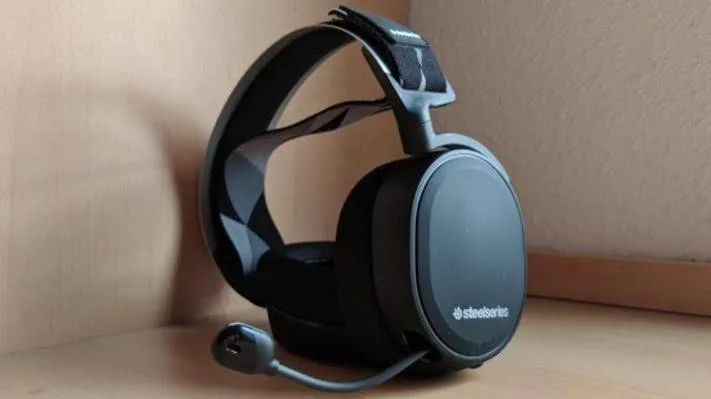
A good gaming headset changes how you play. You hear footsteps before the enemy turns the corner, your teammates actually understand your callouts, and a four-hour session stops feeling like a neck workout. A bad one gives you muffled sound, a mic that sounds like it is inside a tin, and ear cups that become uncomfortable after an hour. This guide to the best gaming headset in Kenya explains how to choose, compares the Logitech G335, G321 and G522 that we stock, and shows how to avoid fakes.
We are City Gadgets Kenya, at New Alnoor Exhibition, Second Floor, Shop C7, Accra Road, Nairobi CBD. We sell gaming accessories, consoles, laptops and audio, and we hear the same questions every week: Will this work on my PS5? Do I need wireless? Is surround sound real? Is a gaming headset better than my earbuds? This guide answers them honestly, and where the exact specification of a unit matters, we say "we confirm per unit" rather than guess.
The short version
- Comfort comes first. If a headset hurts after an hour, it does not matter how good it sounds.
- A clear microphone matters as much as the speakers, because teammates only hear what the mic captures.
- Wired headsets are simple, reliable and never need charging. Wireless adds freedom but needs battery management and costs more.
- Check the connector (3.5 mm or USB) against your PC, PS5, Xbox or Switch before you buy.
- "7.1 surround" is usually virtual and helps some players in some games. It is not magic.
- Do not buy by RGB lights or big numbers on the box. Buy by fit, mic quality and brand support.
- Buy from a seller who offers a warranty, because fake gaming headsets are common.
| If you want... | Look at | Why |
|---|---|---|
| Lightweight comfort for long sessions | Logitech G335 | Lightweight wired design with a clear mic |
| A dependable all-rounder | Logitech G321 | Everyday gaming, comfortable fit, clear mic |
| Better audio and build | Logitech G522 | Premium end of the range; we confirm connection type per unit |
| Wireless freedom | Ask us about the G PRO X Wireless | Wireless at a higher tier |
| Calls and work as well as games | Logitech Zone headsets | See our headset for Zoom calls guide |
Why use a gaming headset at all?
Speakers and TV sound are fine for single-player games, but a headset adds three things.
Positional audio. In shooters and battle royale games, direction matters. A headset puts the left and right channels directly at your ears, so you can tell which side a sound came from. Speakers in a room smear that information.
Voice chat. A headset has a microphone close to your mouth, so teammates hear you clearly without picking up the room. That is the difference between "rotate left now" being understood and being lost in noise.
Respect for the household. In a shared house, a headset lets you play late without waking people. Closed ear cups also block some outside noise, which helps in a busy home or hostel.
For music and film, a gaming headset is acceptable, but good earbuds or headphones often sound more refined. If you mostly listen rather than game, read our best noise cancelling headphones guide and best wireless earbuds guide.
Step one: check what you play on
Compatibility is the most common reason for returns, so start here.
PC and laptop
PC players have the most freedom. A headset can connect by a 3.5 mm combined headset jack (one plug for sound and mic), by two separate 3.5 mm plugs (green for audio, pink for mic) through a splitter, or by USB. USB headsets often include their own small sound card, which can improve the mic and make setup easy. If your laptop has a single combined jack, a headset with a single 4-pole plug works directly. If you use a desktop with separate jacks, check whether a splitter is included.
PlayStation
PlayStation consoles accept wired headsets through the controller's 3.5 mm jack, and many accept USB headsets and wireless dongles. A simple wired 3.5 mm gaming headset plugged into the controller is an easy and reliable way to get chat audio. Some features, such as 3D audio profiles, may need specific support, so we confirm per unit.
Xbox
Xbox controllers also have a 3.5 mm jack on most current models, so many wired headsets work. Wireless headsets for Xbox generally need to be made for Xbox, so do not assume a PC wireless dongle will work. Ask us about your exact console and controller.
Nintendo Switch and mobile
Switch handheld mode has a 3.5 mm jack and works with simple wired headsets. Phones increasingly lack headphone jacks, so a wired gaming headset may need a USB-C adapter, and mic support depends on the adapter. For mobile gamers, a wired headset avoids Bluetooth lag. See how Bluetooth codecs affect latency.
Connector cheat sheet
| Connector | What it means | Works on |
|---|---|---|
| Single 3.5 mm, 4-pole | Audio and mic in one plug | Phones, laptops, controllers |
| Two 3.5 mm plugs | Separate audio and mic | Desktop PC jacks |
| USB-A | Digital audio, built-in sound card | PC, many consoles |
| USB-C | As above, for newer devices | Phones, laptops, tablets |
| Wireless dongle | Radio link to a USB receiver | Depends on the dongle |
| Bluetooth | Standard wireless | Phones, Switch with adapters; higher latency |
If you are unsure, bring your console or laptop to our shop and we will check the connector with you in person.
Wired or wireless gaming headset?
Why wired is still a great choice
A wired gaming headset has no battery to charge, no pairing, no dropouts, and no wireless latency. It costs less than a wireless headset of similar quality, so more of your budget goes into drivers, comfort and mic. For competitive players who value consistency, wired is hard to beat. The three Logitech models we stock in this guide, the G335, G321 and G522, are described in our catalogue as wired designs for the first two, with the G522 sitting at the premium end. Because Logitech's range includes both wired and wireless models, we confirm the exact connection type of the G522 unit in stock before you pay.
When wireless makes sense
Wireless gaming headsets are great if you sit far from your PC or console, if you hate cable tangles, or if you move around. A dedicated USB dongle gives low latency, much better than ordinary Bluetooth. The trade-offs are cost, battery life and the need to charge. Bluetooth-only headsets are fine for casual play and calls but can show delay in fast shooters or rhythm games.
For a long session, check battery life, and remember batteries wear with time. Our lithium-ion battery care guide explains how to look after them.
Quick comparison
| Factor | Wired | Wireless dongle | Bluetooth |
|---|---|---|---|
| Latency | Lowest | Very low | Higher |
| Charging | None | Needed | Needed |
| Reliability | Highest | High | Medium |
| Price for similar quality | Lower | Higher | Medium |
| Freedom of movement | Limited by cable | Good | Good |
| Console support | Broad | Depends on dongle | Limited |
Comfort and fit: the part spec sheets skip
Players keep a gaming headset for years, and comfort is why they keep using it. Here is what to look at.
Weight. A lighter headset puts less pressure on the head and neck during long sessions. The Logitech G335 is positioned as a lightweight wired headset for exactly this reason, built for comfortable extended wear.
Clamp force. If the band squeezes too tightly, your ears and temples ache after an hour. If it is too loose, the headset slides when you move. Try it on, shake your head gently, and wear it for several minutes.
Ear cup size and material. Over-ear cups that fully surround your ears block more outside noise and give better bass. Cups that sit on your ears (on-ear) can get uncomfortable. Memory foam covered in fabric breathes better than leatherette, which can feel hot in warm weather. In Nairobi's mild climate either is workable, but on a hot afternoon fabric is kinder.
Glasses. If you wear glasses, check that the ear cushions do not press the frame into your head. Softer, thicker pads help.
Adjustability. A headband that adjusts smoothly and holds its position matters for different head sizes and for sharing with family.
Our advice: if you can, visit the shop and try the headset on. If you are ordering for delivery, ask us for the weight and fit notes and we will confirm per unit.
Sound quality: what actually matters in a gaming headset
Drivers
The driver is the small speaker inside each ear cup. Bigger drivers are not automatically better, but gaming headsets typically use drivers around 40 to 50 mm. What matters more is tuning. A gaming headset is usually tuned for clear mids and highs, so you hear footsteps and voices, with enough bass for explosions. A V-shaped tuning with heavy bass can sound exciting but hides detail.
Frequency response numbers
Boxes list a frequency range like 20 Hz to 20 kHz. Almost every headset claims it, so it does not help you choose. Listen instead.
Imaging and soundstage
Imaging is how precisely you can place sounds left, right, front and back. Soundstage is the sense of space. Closed-back headsets feel more intimate and block noise. Open-back headsets feel airy but leak sound, so they are less common for gaming at home with others around. Most gaming headsets are closed-back.
Distortion at volume
A good headset stays clean when explosions go off. Cheap headsets crackle and blur. This is another reason fake headsets disappoint: the drivers are poorly made.
What about "7.1 surround sound"?
Many boxes say 7.1. Almost all headsets have just two drivers, one per ear. Virtual surround uses software to simulate directions. It can help in some games and annoy in others. Some players like it; competitive players often prefer plain stereo because it can be more accurate. If a headset offers a surround toggle, try both. Don't pay extra just for the label. Our spatial audio and Dolby Atmos explained article explains the technology.
The microphone: your voice is part of the game
Teammates remember a bad mic more than a good headset. When comparing, check these points.
Boom or built-in? A boom mic sits close to your mouth, so it picks up your voice and rejects the room. A built-in mic in a headset's ear cup is more convenient but usually less clear. Gaming headsets usually have a boom mic that you can flip up to mute or detach.
Noise rejection. Nairobi homes can be noisy: traffic, neighbours, generators, family. A directional mic that focuses on your voice helps. Some headsets include software to filter noise.
Positioning. Keep the mic about a thumb's width from the corner of your mouth. Too far makes you quiet and noisy; too close causes breath pops.
Mute control. A mic that mutes when you flip it up, or a button on the cable, is very useful.
Sidetone. This lets you hear your own voice faintly in the headset, so you do not shout. Not every headset has it.
The Logitech G335, G321 and G522 are all described with clear microphones for team communication, and the G522 is positioned for streamers and commentators who care about voice quality. Please ask us for the mic details of the unit you order, including whether the boom is flexible or detachable, as the answer varies by model.
If you also use your headset for work meetings, read our best headset for Zoom calls guide and our headset microphone types explained blog.
The headsets we stock: Logitech G335, G321 and G522
Logitech G is one of the best-known gaming brands, with a wide range from entry-level to premium. At City Gadgets Kenya we stock genuine Logitech products. All three below are covered by our catalogue notes, and we confirm the final details per unit.
Logitech G335: lightweight and comfortable
The G335 is a lightweight wired gaming headset designed for comfortable extended wear and clear in-game communication. Because it is wired, there is no battery to manage, and it suits both PC and console setups depending on the connector. The microphone is positioned to pick up your voice clearly and reduce background noise. It is a smart choice for players who want something light and uncomplicated.
Best for: students, casual and regular gamers, anyone sensitive to weight. Ask us: whether the mic is detachable on your unit, and which connector is included.
Logitech G321: the dependable all-rounder
The G321 is a mid-range wired gaming headset designed for everyday gaming and team communication. It aims at comfortable long sessions, clear audio for games and a microphone that carries your voice well, without the premium cost of the top tier. The cable keeps the connection consistent.
Best for: console players, general PC gaming, households that want one headset for gaming and calls. Ask us: which plugs or adapters are included for your console or PC.
Logitech G522: the premium end of the range
The G522 sits toward the premium end of Logitech's gaming range, aimed at players who want noticeably better audio quality and build refinement than entry-level headsets. Its strength is precise positional detail, hearing footsteps, distant fire and environmental cues clearly, which can be a genuine edge in sound-driven games. It also includes a microphone suited to team chat and streaming.
Best for: competitive players, streamers, players who value audio detail and build. Ask us: whether the G522 unit in stock is wired or wireless, the connection type, and battery life if wireless. We confirm this per unit.
G335 vs G321 vs G522 at a glance
| Feature | G335 | G321 | G522 |
|---|---|---|---|
| Position in range | Lightweight option | Mid-range all-rounder | Premium end |
| Main strength | Comfort and low weight | Dependable everyday use | Audio refinement and build |
| Mic | Clear, for team chat | Clear, for team chat | Clear, for chat and streaming |
| Connection | Wired | Wired | We confirm per unit |
| Best for | Long, casual sessions | Mixed gaming and calls | Competitive and streaming |
| Budget | Lower to mid | Mid | Higher |
For wireless, Logitech's G PRO X Wireless is a step up with wireless freedom at a higher price. Ask us whether it is in stock. Message us for today's price on any of these.
Browse accessories at City Gadgets Kenya and consoles.
Gaming headset versus earbuds, headphones and speakers
| Option | Strength | Weakness |
|---|---|---|
| Gaming headset | Mic, comfort, positional sound | Looks bulky; music is average |
| True wireless earbuds | Portable, great for mobile | Latency, small mics, battery |
| Hi-fi headphones | Best music quality | Usually no boom mic |
| TV or desk speakers | Shared, no wearing | No privacy, no positional audio |
| Soundbar | Great for movies | Not for chat or competitive play |
If you game on a TV with friends in the room, a soundbar is better. Read our best soundbar guide for that. If you want a personal setup, a headset wins.
Setting up your headset properly
- Plug in and select the device. On PC, set the headset as the default playback and recording device. On consoles, check the audio output and chat settings.
- Set the volume. Keep it comfortable, not painfully loud. Long exposure to loud sound can harm hearing.
- Set mic level and test. Record a short clip or use the in-game test.
- Adjust chat and game balance. Many consoles let you mix voice chat and game volume.
- Update firmware and software. If your headset has software, install it from the maker's website.
- Position the mic. Keep it near the corner of your mouth.
- Take breaks. A few minutes every hour helps your ears and neck.
Care and maintenance
- Wipe ear pads with a slightly damp cloth, not soaking wet.
- Do not wrap the cable tightly around the headset.
- Store the headset on a stand or hook, not crushed in a bag.
- Replace worn ear pads if they flake. Many models accept replacements.
- Keep the headset away from heat and direct sun.
Which games and players need what?
Competitive shooters and battle royale
Positional accuracy and a clear mic are everything. Choose a headset with accurate sound, good isolation, and comfort for long matches. A premium model such as the G522 is aimed at this audience. Many competitive players prefer plain stereo to virtual surround.
Open-world and story games
Immersion matters more than precision. A headset with fuller bass and a wide soundstage makes cinematic moments hit harder. Comfort still matters because these games run for hours.
Sports and racing games
Clear engine, crowd and commentary sound, plus a mic for online play. Lightweight headsets like the G335 are a good match for long sessions.
Mobile gaming
If your phone has no headphone jack, a wired headset needs an adapter, and Bluetooth adds latency. For casual play, earbuds are fine. Read the best budget earbuds guide for a low-cost option.
Streaming and content creation
Voice quality is the priority. A good boom mic helps, but for professional results, a separate USB microphone may be better. Ask us for advice.
Kids and younger players
Choose a comfortable, durable headset, set a safe volume and monitor online chat. Our parents' guide to gaming consoles for kids has more on safe play.
Common mistakes when buying a gaming headset
- Buying for RGB and not for fit. Lights do nothing for your game.
- Believing the surround sound label. Most are virtual.
- Ignoring the connector. Wrong plug means a return.
- Choosing the heaviest, bulkiest model. Comfort fails after an hour.
- Forgetting the mic. The mic quality defines your online experience.
- Buying the cheapest unbranded headset. Poor drivers, bad mic, no warranty.
- Not testing on your device. Check console and PC compatibility.
- Playing too loud. Protect your hearing.
Protecting your hearing while gaming
Headsets put sound directly into your ears, so volume matters. A few habits protect hearing for the long term.
- Keep the volume at a level where you can still hear someone speaking nearby. If you cannot, it is too loud.
- Use the "60 percent" idea as a rough guide: do not run your headset near maximum for hours.
- Take a short break every hour. Rest your ears and stretch your neck.
- Closed-back headsets that block outside noise let you play at lower volume, which is kinder to your ears.
- If you notice ringing or muffled hearing after a session, rest your ears and lower the volume next time. If it continues, see a doctor.
Good tuning also helps. A headset with clean sound at modest volume is safer than one that needs to be loud to sound exciting.
Headset, mic and the rest of your setup
A headset is one part of a gaming setup. If you want a fuller picture, browse our Logitech gaming mice and keyboards, and consider the power side too: a small UPS protects a PC from sudden outages, as explained in our UPS VA versus watts article. Keep chargers and cables tidy, and use certified power accessories; see fast charging and battery health myths for wireless headsets with batteries.
For Kenyan gamers who play online, internet stability matters as much as audio. A wired network connection or a good router reduces lag. A headset cannot fix a poor connection, but clear voice chat makes the most of what you have.
How to test a headset in the shop or at home
Whether you visit us or receive a delivery, run a short test so you know the headset is right.
- Fit check. Wear it for ten minutes. Look for pressure points around the ears and on top of the head. Turn your head quickly to see whether it shifts.
- Left and right test. Play a stereo test track or a game scene and check that sounds pan smoothly from one ear to the other.
- Bass and treble check. Play a song you know well. Bass should be full but not boomy, and voices should be clear without harshness.
- Volume sweep. Raise the volume gradually. Distortion, crackle or rattling at moderate volume is a bad sign.
- Mic recording. Record a short phrase and play it back. Listen for hiss, muffled sound and background noise.
- Cable and plug check. Wiggle the cable gently near the plug and the ear cups. Crackling suggests a weak connection.
- Console test. Make sure chat works in your console's party chat or your PC's voice app.
If anything fails, WhatsApp us straight away with your order details and we will help.
How to spot a fake gaming headset
Gaming headsets from well-known brands are copied often because the shell is easy to imitate. A fake can look the same but sound muddy, break quickly and have a poor mic. Use these ten checks.
- Price. A famous brand at a price far below the market is usually fake or a grey import. If the deal looks too good, it is.
- Packaging. Genuine boxes have sharp printing, correct spelling, consistent logos, model name and a sealed finish. Blurry text, odd fonts or a flimsy box are warning signs.
- Model name and serial. Check the model on the box matches the headset, and that a serial or batch number is present. Ask the seller for proof.
- Weight and build. A genuine headset has solid hinges, a firm headband and quality materials. A fake often feels light, creaks or flexes.
- Cable quality. A thin, stiff or rough cable with a loose plug is a bad sign. The plug should fit snugly.
- Sound test. Play music with clear highs and bass. A fake often sounds boxy, harsh, hollow or distorted at volume. Left and right should match.
- Mic test. Record your voice. A fake mic is often hissy, quiet or muffled.
- Logo and finish. Look closely at the logo. Printing should be crisp and even. Peeling paint, uneven stitching and rough edges are clues.
- Software support. Genuine headsets work with the brand's software where applicable. A fake may not be recognised.
- Seller and warranty. A seller without a shop, receipt or warranty is a risk. A warranty is your best protection.
When you buy from City Gadgets Kenya, you buy from a physical shop at New Alnoor Exhibition, Second Floor, Shop C7, Accra Road, Nairobi CBD. We stock genuine Logitech products, we confirm details per unit and you can come back if something is wrong.
Why buy your gaming headset from City Gadgets Kenya
- Genuine products. We stock authentic Logitech gaming headsets, mice, keyboards and more.
- Compatibility checks. Tell us your console, PC or phone, and we will confirm the connector and any adapter you need.
- Honest advice. If a cheaper headset suits you, we say so. If you would be happier with a soundbar or earbuds, we will tell you.
- Try before you decide. Visit our shop on Accra Road and handle the headset.
- Delivery. Same-day delivery within Nairobi and next-day delivery outside Nairobi.
- Payment. M-Pesa accepted, and Lipa Mdogo Mdogo on iPhones.
- Warranty and support. WhatsApp us if something does not work.
- Complete setup. Pair your headset with a console, a gaming laptop or a phone.
Message us for today's price on any headset.
Gaming headset buying checklist
- I know what I play on: PC, PS5, Xbox, Switch or phone.
- I have checked the connector or asked for an adapter.
- I have decided on wired or wireless.
- The headset is comfortable for my head size and glasses.
- The mic is clear and positioned well.
- I do not need to pay for surround sound labels.
- I have checked the box, build and serial for signs of a fake.
- I am buying from a seller with a warranty.
- I know who to contact if there is a problem.
Frequently asked questions
What is the best gaming headset in Kenya? It depends on your device, budget and head. For lightweight comfort, the Logitech G335 is a strong choice. For an all-rounder, the G321. For better audio and build, the G522. We confirm details per unit.
Is the Logitech G522 wired or wireless? Logitech makes both wired and wireless gaming headsets, so we confirm the connection type of the unit in stock before you pay.
Do gaming headsets work on PS5 and Xbox? Wired 3.5 mm headsets generally work through the controller jack. Wireless headsets depend on the console and dongle. Tell us your console and we will confirm.
Is 7.1 surround sound real? Usually it is virtual surround created by software from two drivers. It can help or hinder depending on the game and your taste.
Can I use a gaming headset for Zoom or Teams? Yes. A gaming headset works for calls, though some are bulky. See our headset for Zoom calls guide.
Wired or wireless, which is better for gaming? Wired has the lowest latency and no charging. Wireless with a dongle is excellent but costs more. Bluetooth has more delay.
How long should a gaming headset last? A good headset can last years. Ear pads and cables wear first, and many are replaceable.
Are gaming headsets bad for hearing? Not if you keep the volume sensible. Long loud sessions can harm hearing, so take breaks.
How do I spot a fake headset? Check price, packaging, build, cable, sound and mic, and buy from a seller who gives a warranty.
Ready to choose?
Tell us what you play on, your budget, and whether you want wired or wireless, and we will recommend the right headset and confirm the connector. WhatsApp us: https://wa.me/254745575931. Or visit New Alnoor Exhibition, Second Floor, Shop C7, Accra Road, Nairobi CBD. Message us for today's price. Same-day Nairobi delivery, next-day outside Nairobi, M-Pesa accepted.
Related reading: Best headset for Zoom calls, headset microphone types explained, spatial audio and Dolby Atmos explained, best soundbar in Kenya.