If you spend your days at a computer, your right hand does an enormous amount of repetitive work. Accountants clicking through spreadsheets, designers nudging objects, developers switching windows, call-centre staff, students writing assignments: all of them make thousands of tiny movements with a mouse. After a few hours, some people notice an ache in the wrist, tension in the forearm or a tired shoulder. Often the cause is not the amount of work but the position of the hand. This guide to the best ergonomic mouse Kenya buyers can choose explains how an ergonomic vertical mouse works, introduces the Logitech Lift that we stock, compares it honestly with standard mice, and gives you posture habits that matter at least as much as the mouse.
A quick honesty note. An ergonomic mouse is a comfort tool, not a medical treatment. It may feel more natural and reduce strain for many people, but results vary, and it does not cure pain or any condition. If you have persistent pain, tingling or numbness, please see a health professional as well as changing your equipment. Where a detail should be checked on the unit, we say "we confirm per unit".
City Gadgets Kenya is at New Alnoor Exhibition, Second Floor, Shop C7, Accra Road, Nairobi CBD, with same-day Nairobi delivery and next-day delivery outside Nairobi. Message us on WhatsApp for today's price.
The short version
- The ergonomic mouse we stock: Logitech Lift, a vertical ergonomic mouse that places your hand in a handshake-like position.
- Best for: people who use a mouse many hours a day and want a more natural grip, particularly office workers, accountants, designers and developers.
- Size: designed for small to medium hands. Left-handed and right-handed versions exist, and we confirm per unit.
- Adjustment: expect a few days to adapt, and slower fine control at first.
- Alternative: if you prefer a standard shape, a full-size mouse such as the Logitech M190 may feel more comfortable than a tiny travel mouse. See our best wireless mouse guide.
- Do not forget posture: desk height, chair, screen position and breaks matter as much as the mouse.
| Mouse | Hand position | Best for | Adjustment | Notes |
|---|---|---|---|---|
| Logitech Lift | Vertical, handshake-like | Long hours at a desk, wrist comfort | A few days | Right and left versions, quiet clicks |
| Logitech M190 | Flat, full-size curve | Larger hands, desk work | Minimal | Receiver-based |
| Logitech M185 / M171 | Flat, compact | Everyday, travel | None | Simple and affordable |
| Logitech M196 / M240 | Flat, compact, Bluetooth | USB-C laptops, quiet spaces | None | No receiver |
Ask us for today's price on the Lift. For a full desk plan, read our home office setup guide.
Why a normal mouse can be uncomfortable
When you use a regular mouse, your forearm has two long bones, the radius and the ulna. To lay your palm flat on the desk, the radius crosses over the ulna, a twisting position called pronation. You can feel it: hold your arm out with your palm facing the ceiling, then turn it to face the floor. Holding that twist for hours adds strain to the muscles of the forearm, and the wrist often bends sideways to move the pointer.
Other common problems with flat mice include:
- A raised wrist because the mouse is thick or the desk is too high.
- Gripping too hard, which tires the fingers.
- Using the wrist instead of the arm to move the pointer.
- A small mouse in a large hand, forcing the fingers into a cramped claw.
- A lack of breaks, so the same muscles work continuously.
A vertical mouse addresses the first problem by tilting the grip so your hand sits closer to a handshake position, where the forearm bones are not crossed. For many people that feels more relaxed.
What is a vertical ergonomic mouse?
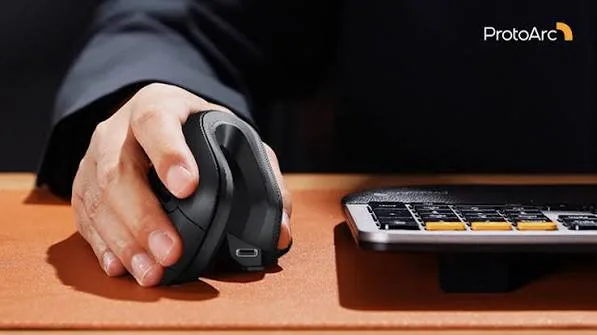
A vertical mouse is shaped like a small fin or joystick standing on its side. You hold it as if you were shaking hands with it. Your thumb rests on the side, your fingers curl over the buttons on the top or front, and your palm faces inward instead of down. The idea is to reduce the twisting of the forearm and keep the wrist in a more neutral line.
Benefits many people report:
- A more relaxed forearm and wrist.
- Less pressure on the underside of the wrist.
- A natural position that is easy to hold for long sessions.
Drawbacks to be aware of:
- It feels strange for the first few days.
- Fine control, such as precise selection in design work, takes practice.
- It is bulkier to carry than a compact mouse.
- It usually costs more than a basic mouse.
- It is not a cure for any medical condition.
The Logitech Lift
The Logitech Lift is a vertical ergonomic mouse designed so your hand rests in a handshake-like position instead of being flat on the desk. It is built for people who spend many hours on a computer, and it is aimed at small to medium hands.
Design. The vertical angle is designed to reduce the twisting of the forearm. The shape keeps your thumb, fingers and palm supported.
Hand size and handedness. Per the maker it is made for small to medium hands, and it comes in right-handed and left-handed versions. Tell us which you need and your hand size, and we confirm the right version before you order. If you have large hands, ask us to compare it with other options.
Connection. It offers wireless connection options and quiet clicks per the maker. We confirm the exact connection types and whether a receiver is included for the unit you order.
Adjusting. Most people need a few days. Fine control can feel unfamiliar at first. Give it a fair trial of a week or two before deciding.
Who it suits. Office workers, accountants, designers and developers who use a mouse many hours a day, people who feel discomfort with a regular mouse, and anyone who wants a more natural grip.
Who may prefer a standard mouse. People who need extreme precision for detailed design work and want no adjustment, people who often switch between many computers, and those on a very tight budget.
Lift vs a regular mouse: an honest comparison
| Logitech Lift | Standard wireless mouse | |
|---|---|---|
| Hand position | Handshake-like, vertical | Palm flat, pronated |
| Comfort over long sessions | Often more natural | Fine for short sessions |
| Adjustment period | A few days | None |
| Precision at first | Slower | Immediate |
| Portability | Bulkier | Compact |
| Price | Higher | Lower |
| Best for | Heavy daily use | Everyday and travel |
Nothing here means a standard mouse is bad. A well-fitting full-size mouse such as the M190 with good posture and regular breaks works for many people. The Lift is for those who want to go further for comfort.
Other types of ergonomic mice
You may see other designs in your research. Here is how they differ.
Vertical mice. Like the Lift. The hand is rotated toward a handshake position.
Trackball mice. The ball is moved by the thumb or fingers while the mouse stays still, reducing arm movement. They take practice and are less common.
Sculpted ergonomic mice. Larger mice with a contoured shape and a wrist rest, aimed at fitting the natural curve of the hand.
Pen-style mice. Held like a pen. They are unusual and take adjusting.
Large, full-size standard mice. Not strictly ergonomic, but fuller shapes like the M190 support the palm better than small travel mice.
We stock the Logitech Lift as our vertical ergonomic option, and we are honest that many people are well served by a comfortable full-size mouse and good habits.
Who benefits most from an ergonomic mouse?
Accountants and finance staff. Spreadsheets mean thousands of clicks and drags.
Designers and editors. Long editing sessions with the mouse in hand.
Developers and IT staff. Constant window switching.
Call-centre and admin staff. Repetitive data entry across a shift.
Students writing dissertations. Long periods at the laptop.
Anyone who notices discomfort. Aching wrists or forearms after work are a signal to adjust your setup.
How to set up your desk for comfort
A good mouse can only do so much if the rest of your setup works against you. Use this checklist.
Chair height. Your feet should be flat on the floor, your knees at about a right angle.
Desk height. Your elbows should be at about a right angle, forearms level with the desk surface.
Mouse position. Keep the mouse close to your body, in line with your shoulder, so you are not reaching.
Keyboard position. Keep it close and flat. Avoid a large gap that makes your shoulder reach out.
Screen height. The top of the screen should be about eye level. Use a laptop stand and a separate keyboard if you work on a laptop for long periods. See the keyboard and mouse combo guide.
Wrist position. Keep your wrist straight and supported by your forearm, not bent upward or sideways.
Lighting. Good light reduces leaning forward.
Habits that matter as much as the mouse
- Move your whole arm, not just your wrist, when using the mouse.
- Use a light grip. You do not need to squeeze.
- Take micro-breaks. Every thirty to sixty minutes, stand, stretch and shake out your hands.
- Alternate tasks. Mix mouse-heavy work with keyboard shortcuts and other activities.
- Learn shortcuts. Copy, paste, switch window and save with keys reduces mouse use.
- Adjust pointer speed. A slightly faster pointer means less hand movement.
- Stretch gently. Slowly stretch your fingers, wrists and forearms. Never force a painful stretch.
- Stay hydrated and move. Circulation helps.
Simple stretches you can do at your desk
These are general comfort stretches, not medical advice. Stop if anything hurts.
Wrist circles. Rotate your wrists gently ten times each direction.
Prayer stretch. Press your palms together in front of your chest and lower them slowly until you feel a mild stretch in the forearms.
Finger spread. Spread your fingers wide, hold for a few seconds, then relax.
Forearm stretch. Extend one arm with the palm up, gently pull the fingers back with the other hand for a few seconds.
Shoulder rolls. Roll your shoulders backward ten times.
Look away. Every so often look at something far away to rest your eyes.
If you have ongoing pain, tingling, numbness or weakness, speak to a doctor or physiotherapist.
Adapting to a vertical mouse: a one-week plan
Switching to a vertical mouse is a skill change, and rushing it causes frustration. Try this.
Day 1 and 2: Light tasks. Use the Lift only for browsing, email and documents. Keep your old mouse nearby. Expect the pointer to feel imprecise.
Day 3 and 4: Add spreadsheets and routine work. Slow down on purpose. Use your whole forearm to move the mouse rather than your wrist.
Day 5: Add precise tasks. Try dragging, selecting text and clicking small buttons. Adjust the pointer speed in your system settings until it feels right.
Day 6 and 7: Full day. Use the Lift for all work. If discomfort appears in your thumb or hand, loosen your grip and check your seating position.
Most people feel at ease within a week or two. If you still dislike it after a fair trial, tell us, and we will talk honestly about alternatives. Keep in mind the return and exchange policy we confirm at purchase.
Adjusting pointer speed and buttons
Logitech provides software for many of its mice that lets you adjust pointer speed and assign actions to buttons. Check on the unit which software supports the Lift, and we confirm per unit. Even without software, your operating system's mouse settings let you change speed, scroll direction and primary button. A slightly faster pointer means less arm travel, which is easier on the shoulder. Assign a side button to something you use constantly, such as back in a browser or copy and paste, to cut repetitive movement.
Left-handed users
Many left-handed people use a right-hand mouse because that is all they were given, which can feel awkward. A true left-handed vertical mouse mirrors the shape for the left hand. Logitech makes the Lift in both handed versions, so tell us which you need. If you are unsure, ask us, and we confirm per unit what is in stock before you pay.
Is an ergonomic mouse good for gaming?
A vertical mouse is not designed for fast-paced gaming. Gamers prefer lightweight mice with specialised sensors and buttons. If you game seriously, read our best gaming mouse guide. If you play casual games occasionally, a vertical mouse works, but expect slower aiming at first.
Ergonomic mouse and keyboard together
Comfort works best as a system. A full-size keyboard with a comfortable layout, placed close to your body, helps keep your shoulders relaxed. Wireless keyboards such as the Logitech MX Keys S give a steady typing feel, and compact keyboards such as the Pebble Keys 2 K380s suit travel. See our keyboard and mouse combo guide and mechanical keyboard guide for options.
Laptops, desks and the hidden problem of laptop-only work
Working on a laptop is the biggest hidden ergonomic problem. The screen and keyboard are joined, so you either look down at the screen or lift your hands up to the keyboard. For longer sessions, raise the laptop on a stand or a stack of books so the screen is at eye level, and use a separate keyboard and mouse. A wireless mouse and an external keyboard transform a laptop into a comfortable workstation. A vertical mouse is one part of that picture. Our USB-C hub guide helps if you also want to plug in a monitor and receivers.
Ergonomic mouse for different workplaces
Home offices. Often the worst setups: dining chairs, low tables and laptops. A vertical mouse plus a proper chair height helps a lot.
Open-plan offices. Quiet clicks matter. The Lift has quiet clicks per the maker.
Banks, Saccos and accounting offices. Heavy spreadsheet and data entry use. Standardising on a comfortable mouse can reduce complaints.
Schools and training centres. Computer labs benefit from comfortable mice, but a vertical mouse may be unusual for beginners. Consider a mix.
Creative studios. Designers who need extreme precision should test a vertical mouse before committing.
Shared hot desks. A personal mouse that you carry makes sense. A vertical mouse is bulkier, so consider a bag.
Buying for staff: how to introduce ergonomic mice
If you manage a team, do not force everyone onto a vertical mouse. Offer a trial. Let staff test one for a week and give feedback. Pair it with a short talk on posture, desk height and breaks. Buy a small number first, learn who loves it, then order more. A mouse is only part of a healthy workplace, and you will get better results by combining equipment, training and sensible schedules. Message us on WhatsApp for quantity arrangements, and we confirm availability honestly.
Common mistakes when buying an ergonomic mouse
- Expecting a cure. An ergonomic mouse may help comfort. It does not treat a medical condition.
- Giving up too early. Adjustment takes days.
- Wrong hand size. The Lift is for small to medium hands, so check.
- Wrong handedness. Buy the left or right version that fits you.
- Ignoring posture. A new mouse with a bad chair gains little.
- Buying a cheap unbranded vertical mouse. Many are poorly shaped and unreliable.
- Forgetting breaks. No mouse replaces movement.
- Using it only occasionally. To adapt, use it consistently.
Example scenarios
These are illustrative, not customer records.
Scenario 1: An accountant at month-end. He spends long days in spreadsheets and feels forearm tension. He tries the Logitech Lift, adjusts for a week, and fixes his chair and desk height at the same time. He finds the day feels less tiring, though he keeps taking breaks.
Scenario 2: A designer who needs precision. She tests the Lift but finds fine editing slower. She keeps a standard mouse for detail work and uses the Lift for emails and admin. Mixing is a valid choice.
Scenario 3: A remote worker with a laptop. He raises his laptop on a stand, adds an external keyboard and a vertical mouse, and notices his shoulders feel less tight.
Scenario 4: A left-handed office assistant. She was using a right-hand mouse awkwardly. We confirm a left-handed Lift is available, and she switches.
Scenario 5: A manager buying for a team. He buys two Lifts for a trial, collects feedback, and orders more for those who like them.
Questions to ask any seller before you pay
- Is the mouse brand new and sealed?
- Is it the right-handed or left-handed version?
- Which connection options does it support, and is a receiver included?
- Does it work with my laptop and operating system?
- What is the exchange policy if I cannot adapt?
- Will I get a receipt?
- Where is your shop if something goes wrong?
Is an ergonomic mouse worth the extra cost?
If you use a computer for many hours every day, the cost of a comfortable mouse spread over years of use is small. Compare it with the cost of lost productivity from discomfort. If you use a computer lightly, a standard mouse is enough. The best approach is to match your equipment to your hours. Heavy users gain the most.
Care and cleaning
Wipe the Lift with a slightly damp, soft cloth, avoiding liquid in the sensor and button openings. Clean the underside so dust does not disturb the sensor. Keep it away from heat and direct sun. Replace or recharge batteries according to the unit, and we confirm per unit what powers it. Store it in a dry place, and keep it on a mat for steady tracking.
Why wrist comfort is about more than the mouse
Discomfort at a desk usually has several causes that add up: a chair that is too low, a screen that makes you lean forward, long unbroken stretches of work, stress, and a mouse that forces a twisted position. Fixing one cause helps, and fixing several helps more. Think of the mouse as one lever among many. If you change only the mouse and keep a poor chair, you may feel little difference. If you fix the chair, desk height and breaks and also use a vertical mouse, the combined effect is often noticeable.
Pointer movement: wrist, forearm or shoulder?
Where you move from matters. Small movements from the fingers and wrist are fine for tiny adjustments, but large pointer moves should come from the forearm, pivoting at the elbow. For very large moves across a big screen, the shoulder joins in. A vertical mouse encourages forearm movement because the wrist stays straighter. Raising your pointer speed in settings reduces how far the arm has to travel. If you use two screens, consider placing the one you use most directly in front of you so you rarely stretch to the far side.
How a mouse mat and surface help
A mouse mat gives a steady, predictable surface so you do not need to press or push. A slightly textured mat suits most optical sensors. A wrist rest can support your wrist when pausing, but should not be used while moving, because resting the wrist on a pad while moving the pointer can add pressure. Keep the desk clear of clutter so the mouse can travel freely. Avoid glass surfaces, which can confuse optical sensors.
Ergonomic guidance: what experts generally suggest
Occupational health guidance is consistent on a few points. Keep wrists neutral, avoid long uninterrupted static postures, take regular short breaks, vary tasks, and adjust equipment to the person rather than the other way round. None of this is exotic, and most of it costs nothing. The mouse is a useful part of the picture, but a physiotherapist or occupational health professional can give personal advice that no guide can. If your employer offers a workstation assessment, take it up.
Signs you should seek advice
Mild tiredness after a long day is common. Pain that lasts, tingling in the fingers, numbness, weakness when gripping, night-time aching or discomfort that does not ease with rest deserves professional attention. Do not try to fix it only with a gadget. See a doctor or physiotherapist, and tell them about your workstation. A mouse can support good habits, but it is not a replacement for care.
Travelling with a vertical mouse
The Lift is bulkier than a compact travel mouse, so think about how you will carry it. A small padded pouch or the laptop bag's accessory pocket works well. Switch it off before packing to save the battery, and keep the receiver, if one is included, plugged in or stored safely. If you travel constantly and need a minimal setup, a compact Bluetooth mouse like the Logitech M196 or the M240 Silent may be more practical for the road, with the Lift staying at your main desk.
Comparing the Lift with the rest of our mouse range
If you are weighing the Lift against other mice we stock, think about what matters most. The M190 gives full-size comfort without changing how you hold the mouse, so it suits people who want an easy upgrade from a small mouse. The M185 and M171 are compact and affordable, ideal for travel and light use. The M196 and M240 Silent use Bluetooth, which suits USB-C laptops, and the M240 is quiet. The Lift is for people who want to change their hand position for comfort and are prepared for a short adaptation period. If you are unsure, message us on WhatsApp with a photo of your desk and a description of your work, and we will suggest honestly.
Mouse, keyboard and monitor: the comfort triangle
Think of your workstation as a triangle of mouse, keyboard and monitor. The mouse and keyboard should sit at elbow height, close to your body. The monitor should be an arm's length away, with the top of the screen at about eye level. When one corner is wrong, your body compensates. A low monitor makes you hunch, a distant keyboard makes you reach, and a poorly placed mouse twists your arm. Adjust all three together and check again after a week.
Budget thinking
An ergonomic mouse costs more than a basic one, but it is still a small purchase compared with a laptop or monitor. If your budget is tight, prioritise: first fix your chair and desk height, which cost little or nothing, then add a comfortable mouse. Buy genuine, because a poorly made vertical mouse can be less comfortable than a flat one. Message us for today's price and we will tell you honestly if a cheaper option will serve you.
How to spot a fake ergonomic mouse
Counterfeit mice copy popular designs, and vertical mice are copied often because the shape is easy to imitate. A fake may feel poorly shaped, lag, click loudly or fail quickly, and a badly shaped vertical mouse can be less comfortable than a flat one. Use these ten checks together.
- Check the model name and print. Genuine Logitech Lift packaging and the underside show the correct model name, handedness and details. Spelling errors and blurry printing are warning signs.
- Inspect the packaging. Genuine boxes are sturdy with sharp printing. Flimsy boxes are suspicious.
- Check the logo and finish. The Logitech logo should be crisp and even. Peeling or crooked logos suggest a fake.
- Check handedness. The box should clearly state right-handed or left-handed. Make sure it matches what you ordered.
- Inspect the build. The Lift has a solid, well-finished body with a smooth, comfortable surface. Rough seams are a red flag.
- Test the clicks. The Lift is described as having quiet clicks per the maker. A fake that clicks loudly or rattles is suspicious.
- Test the connection. A genuine mouse pairs or connects quickly and holds steady. A fake lags or drops.
- Check the wireless parts. Genuine receivers, if included, are neat. Loose or rough ones are warning signs.
- Check the weight. Genuine mice feel balanced. Very light or hollow ones are suspicious.
- Check the seller. An unrealistically low price, no shop address and no receipt are red flags.
If you are unsure, bring the mouse to New Alnoor Exhibition, Second Floor, Shop C7, Accra Road, and we will help you check it.
Why buy your ergonomic mouse from City Gadgets Kenya
- Genuine products, checked before they reach you.
- A real shop at New Alnoor Exhibition, Second Floor, Shop C7, Accra Road, Nairobi CBD.
- Same-day delivery in Nairobi and next-day delivery outside Nairobi.
- M-Pesa payment and clear receipts.
- Honest advice, including telling you when a standard mouse and better posture are enough.
- Keyboards, hubs and laptop accessories in our accessories category.
- Support and repairs for your laptop through our repair service.
- Trade-ins through our sell page.
- WhatsApp help on +254745575931.
Quick checklist
- I use a computer many hours a day and want a more natural grip.
- I checked my hand size and chose the right or left version.
- I will give myself a week or two to adapt.
- I checked my chair, desk and screen height.
- I plan regular breaks and stretches.
- I checked the model name, packaging and handedness.
- I have a receipt and know where to get support.
Frequently asked questions
What is the best ergonomic mouse in Kenya? The Logitech Lift is our vertical ergonomic option, designed for small to medium hands.
Will an ergonomic mouse cure wrist pain? No claim like that is made. It may be more comfortable for many people, but it is not a treatment. See a health professional for persistent pain.
How long does it take to get used to a vertical mouse? Usually a few days to a couple of weeks.
Is there a left-handed Lift? Yes, Logitech makes both versions. Tell us which you need.
Is it wireless? It offers wireless connection options per the maker. We confirm the exact types per unit.
Is it good for large hands? The Lift is designed for small to medium hands. Ask us for advice if you have large hands.
Can I use it for gaming? Casual gaming yes, but serious gamers prefer a gaming mouse.
Is it quiet? Quiet clicks per the maker.
How do I know it is genuine? Use the ten checks above.
Where can I buy an ergonomic mouse in Nairobi? At City Gadgets Kenya, Shop C7, Second Floor, New Alnoor Exhibition, Accra Road.
Ready to choose?
Message us on WhatsApp with your hand size, your work and your budget, and we will recommend the right mouse.
Related reading: Best wireless mouse · Best keyboard and mouse combo · Home office setup guide · Best USB-C hub