
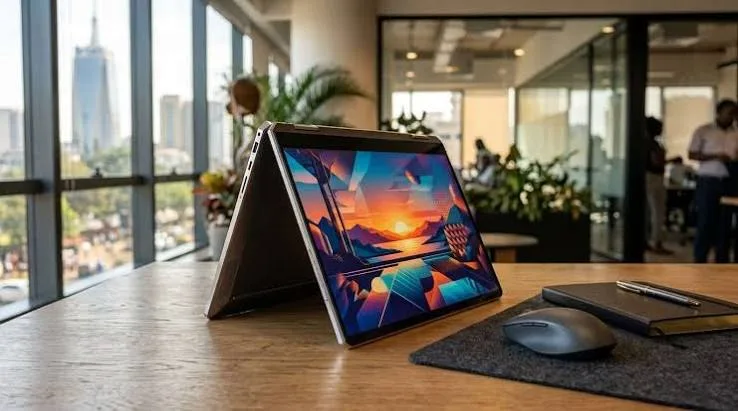
Best Convertible/2-in-1 Laptops in Kenya 2026: A Complete Guide
Walk through any electronics section in Nairobi and you'll notice a growing share of laptops advertised as "X360," "Yoga," "2-in-1," or "convertible" — terms that sound similar but actually describe genuinely different mechanisms and use cases. This guide explains exactly what these terms mean, who genuinely benefits from convertible functionality, and which specific configurations at City Gadgets Kenya are worth considering if you decide this form factor suits you.
What "Convertible" and "2-in-1" Actually Mean
It's worth clarifying this terminology precisely, since it's used inconsistently across sellers and can genuinely confuse buyers comparing options. Broadly, there are two distinct mechanisms sold under similar marketing language:
Hinge-based convertibles (X360, Yoga) use a genuine 360-degree hinge that allows the screen to fold all the way back against the keyboard, transforming the device through laptop mode, tent mode (screen facing forward, keyboard hidden underneath), stand mode, and full tablet mode — all without the keyboard ever physically separating from the screen. HP calls this design "X360" (as in the EliteBook X360 and Spectre X360), while Lenovo calls its version "Yoga" (as in the ThinkPad Yoga and X1 Yoga).
Detachable 2-in-1s use a genuinely different mechanism — the keyboard physically separates entirely from the screen, turning the device into a true standalone tablet with the keyboard as a removable accessory. The Microsoft Surface Pro is the best-known example of this design.
The distinction matters practically: hinge-based convertibles always have the keyboard attached (even if folded uselessly underneath in tablet mode, adding some weight and thickness), while detachable designs offer a genuinely lighter, more tablet-like experience when the keyboard is removed, at the cost of needing to keep track of a separate component.
Who Genuinely Benefits From Convertible Functionality
This is worth being honest about, since convertible functionality adds cost and, in some designs, a small amount of weight compared to an equivalent fixed-form laptop — it's worth the trade-off only if you'll genuinely use the flexibility.
Students who take handwritten notes digitally benefit genuinely from tablet mode combined with a stylus, allowing natural note-taking during lectures that syncs digitally rather than requiring separate physical notebooks.
Professionals who present regularly find tent mode genuinely useful for showing content to someone across a table without physically turning the whole laptop around, or for compact video calls where laptop mode feels unnecessarily bulky.
Anyone who wants tablet functionality without buying a separate tablet gets genuine value from a convertible, since it consolidates two devices into one purchase — useful for reading, casual browsing, or media consumption in tablet mode, then switching back to full laptop mode for serious work.
Sales and field professionals who demo products or services benefit from tablet mode for handing a device to a client to interact with directly, something a standard fixed-form laptop makes awkward.
Conversely, if your work is purely typing-focused — writing, coding, spreadsheet work — a fixed-form laptop genuinely serves you just as well, often at a lower price for equivalent internal specifications, since you're not paying for hinge and touchscreen hardware you won't use.
X360 vs Yoga vs Detachable: A Practical Comparison
| Design Type | Examples in Our Catalog | Keyboard Behaviour | Best For |
|---|---|---|---|
| X360 (HP) | EliteBook X360, Spectre X360 | Always attached, folds fully back | Presentations, note-taking, media consumption |
| Yoga (Lenovo) | ThinkPad Yoga, X1 Yoga, Yoga 12 | Always attached, folds fully back | Same as X360 — functionally equivalent mechanism |
| Detachable (Microsoft) | Surface Pro | Fully separates as accessory | True tablet use, minimal-weight portability |
| Dell 2-in-1 | Latitude 5300 2-in-1, 7390 2-in-1, XPS 13 9310 2-in-1 | Always attached, folds fully back | Business-focused convertible use |
Understanding the Genuine Trade-offs
Weight and thickness. Convertible laptops, particularly hinge-based designs, are generally slightly heavier and thicker than an equivalent fixed-form laptop, since they need to accommodate the hinge mechanism and touchscreen hardware. This is a genuine, if modest, trade-off worth considering if ultimate portability is your top priority.
Battery life. Touchscreens draw slightly more power than non-touch displays, meaning convertible laptops sometimes offer marginally shorter battery life than an equivalent non-touch configuration — worth factoring in if you prioritise all-day battery life above all else.
Price. Convertible functionality genuinely adds cost compared to an equivalent non-touch, fixed-form configuration with the same internal specifications — this is worth paying only if you'll genuinely use the touch and hinge functionality regularly, not simply because it sounds like a nice-to-have feature.
Hinge durability over time. A genuine, if uncommon, consideration for older refurbished convertible units — the hinge mechanism experiences more physical stress than a standard laptop's hinge, given the full 360-degree rotation. It's worth specifically checking hinge tightness and smoothness when buying a refurbished convertible, more so than for a standard laptop.
Budget Tier Breakdown for Convertible Laptops
Under KES 30,000: Entry-Level Convertible Functionality
At this budget, older-generation convertibles with modest specifications (Celeron or entry Core i5, 4-8GB RAM) are realistic — genuinely fine for light note-taking, browsing, and casual tablet-mode use, though not for demanding software.
Recommended: HP EliteBook 735 G6 touch configurations, or Lenovo ThinkPad Yoga 11e/N23S for education-focused, durability-first convertible use.
KES 30,000–50,000: Comfortable Everyday Convertible Use
This range genuinely opens up Core i5/i7 configurations with 8GB RAM, comfortable for regular note-taking, presentations, and general productivity in a convertible form factor.
Recommended: HP EliteBook X360 configurations, Lenovo ThinkPad Yoga X380/X390, or Dell Latitude 5300/7390 2-in-1 models.
KES 50,000–80,000: Premium Convertible Configurations
At this tier, genuine flagship convertible construction (Lenovo's X1 Yoga, Dell's XPS 13 2-in-1) becomes realistic, alongside stronger processors and more generous RAM.
Recommended: Lenovo ThinkPad X1 Yoga, Dell XPS 13 9310 2-in-1, or HP Spectre X360.
Above KES 80,000: Maximum Convertible Capability
Genuinely worth considering if you want the newest processor generation alongside premium convertible construction — top-tier X1 Yoga or XPS 13 2-in-1 configurations sit at this level.
Detachable Tablets: The Microsoft Surface Pro Approach
For buyers specifically wanting the lightest possible tablet experience when detached, the Microsoft Surface Pro line offers a genuinely different value proposition than hinge-based convertibles. Because the keyboard fully separates, the tablet portion alone is noticeably lighter than any hinge-based convertible's tablet mode — genuinely worth the trade-off if you frequently use tablet mode away from a desk (reading, sketching, casual browsing) and only need the keyboard for occasional typing sessions. The practical downside worth being honest about: the keyboard (Type Cover) is often sold separately, and it's easy to misplace or leave behind, unlike a hinge-based convertible where the keyboard is always physically present even in tablet mode.
Stylus and Pen Support: What to Check Before Buying
Many convertible laptops support pen or stylus input, but not universally, and it's worth confirming specifically rather than assuming any touchscreen convertible includes this capability. If digital note-taking or sketching is your primary reason for wanting a convertible, confirm:
- Whether the specific model supports active pen input (which offers pressure sensitivity and palm rejection) versus basic capacitive touch alone (which works for finger taps and swipes but not precise pen writing).
- Whether a compatible pen is included, since many refurbished units are sold without the original stylus, which may need to be sourced separately.
- Whether the software you intend to use for note-taking (OneNote, GoodNotes-equivalent Windows apps) is compatible with the specific pen technology the laptop uses.
Case Studies: Matching Real Kenyan Convertible Use Cases to Real Configurations
The university student who takes handwritten lecture notes. Preferring to write notes by hand but wanting them digitally searchable and backed up, this profile genuinely benefits from a pen-enabled convertible. A Lenovo ThinkPad Yoga X380/X390 with active pen support offers a natural note-taking experience that syncs to cloud storage automatically through apps like OneNote.
The sales representative who demos products to clients. Regularly handing a device across a table for a client to interact with directly, this profile benefits from either a hinge-based convertible's tent/tablet mode or a genuine detachable design. A Microsoft Surface Pro offers the lightest, most natural hand-off experience for this specific use case.
The trainer or lecturer presenting to groups. Needing to display content in tent mode while facing an audience, then switching back to laptop mode to type notes or adjust materials, this profile benefits from the always-attached keyboard of a hinge-based convertible rather than a detachable design where managing a separate keyboard adds friction during a live presentation. A HP EliteBook X360 handles this smoothly.
The small business owner who wants one device instead of a laptop and tablet. Consolidating browsing, light reading, and occasional business admin into tablet mode, while retaining full laptop functionality for invoicing and email, this profile gets genuine value from a mid-tier convertible rather than purchasing two separate devices. A Dell Latitude 5300 2-in-1 offers this consolidated value at an accessible business price point.
The digital artist or illustrator working on a budget. Wanting a genuine sketching surface without the cost of a dedicated graphics tablet, this profile benefits from active pen support on a convertible, understanding that serious professional illustration work still typically favours a dedicated drawing tablet for the finest control. A HP EliteBook X360 or Lenovo ThinkPad Yoga with pen support offers a genuinely capable starting point for casual to intermediate digital sketching.
Understanding Tent Mode and Stand Mode: Genuinely Useful, Often Overlooked
Beyond the widely-discussed laptop and tablet modes, hinge-based convertibles offer two additional configurations worth understanding, since they're genuinely useful but rarely explained clearly to first-time buyers. Tent mode — where the laptop forms an inverted V-shape, screen facing outward — is genuinely useful for compact video calls in tight spaces (like an airplane tray table), for following a recipe in a kitchen without the keyboard taking up counter space, or for sharing content with someone sitting across a small table without physically handing over the device. Stand mode — where the keyboard folds flat underneath and the screen stands upright, similar to tent mode but with the keyboard visible — genuinely suits media consumption or presentations where you want the screen upright but don't need to type. Both configurations are entirely dependent on the genuine 360-degree hinge covered earlier in this guide, and are one of the more concretely useful, if underappreciated, benefits of choosing a convertible over a detachable or fixed-form laptop.
Convertible Laptops for Education-Focused and Budget-Conscious Buyers
It's worth specifically mentioning Lenovo's education-focused convertible lines — the ThinkPad Yoga 11e and Yoga N23S — since they represent a genuinely distinct category from the premium convertibles discussed elsewhere in this guide. These models prioritise durability and accessible pricing over raw performance, built for the reality of school and college environments where devices are handled by younger or less careful users, dropped occasionally, and need to survive years of daily use without the babying a premium ultrabook might receive. If your convertible need is genuinely budget-conscious — outfitting a student, a training program, or a shared-use environment — these education-focused lines offer real durability at a fraction of premium convertible pricing, without needing to compromise on the core 360-degree functionality that defines the category.
Common Mistakes Buyers Make When Choosing a Convertible
Buying convertible functionality without a genuine use case for it. As discussed above, if you won't actually use tablet mode, tent mode, or touch input regularly, you're paying a premium for functionality that adds no real value to your workflow.
Assuming all "touchscreen" laptops are also convertible. As covered in more detail in our dedicated touchscreen laptop guide, plenty of laptops offer touch input on a fixed-form (non-folding) chassis — a genuinely different, sometimes more affordable option if you want touch input without full convertible flexibility.
Not checking hinge condition specifically on a refurbished convertible unit. Given the additional mechanical stress a 360-degree hinge experiences, this is worth a specific, direct question to your seller before purchase.
Overlooking battery life trade-offs. As mentioned above, convertibles with touchscreens can offer marginally shorter battery life than non-touch equivalents — worth factoring into your decision if all-day battery life is a top priority.
How to Test a Convertible's Hinge and Touchscreen Before Buying
Given the additional mechanical complexity convertibles carry compared to standard laptops, a few practical checks genuinely help before committing to a purchase:
- Fold the laptop through every mode — laptop, tent, stand, and full tablet — checking for any grinding, looseness, or resistance at any point in the rotation.
- Test touch responsiveness across the entire screen, not just the centre, since some ageing touchscreens develop dead zones near the edges that aren't immediately obvious with casual tapping.
- If pen support is claimed, test with the actual pen rather than assuming compatibility, since some convertibles support only specific, sometimes proprietary, pen models.
- Check for screen wobble in tablet mode, since a hinge that's developed play over years of use may allow the screen to wobble more than it should when held as a tablet.
- Confirm the touchscreen digitizer hasn't been damaged, by drawing a full diagonal line corner to corner and checking it registers as a single, continuous stroke rather than breaking up.
Red Flags Specific to Buying a Refurbished Convertible
Beyond general refurbished laptop red flags, a few matter specifically for convertible purchases:
No mention of hinge condition in the listing. Given the additional mechanical stress a 360-degree hinge experiences, a seller who doesn't proactively address hinge condition — and who can't answer direct questions about it — deserves more scrutiny than for a standard fixed-form laptop purchase.
Vague claims about "touchscreen" without confirming pen support, if that's specifically what you need. As covered above, basic touch and active pen input are genuinely different capabilities — always confirm which your intended use case requires.
No mention of whether the original stylus/pen is included, for models that support one — many refurbished units are sold without the original pen, which can be a genuine additional cost to source separately if you specifically need pen input.
Frequently Asked Questions
What's the genuine difference between "X360" and "Yoga" naming? These are simply different manufacturers' brand names (HP and Lenovo respectively) for functionally similar 360-degree hinge convertible mechanisms — there's no meaningful technical difference between the two approaches.
Is a detachable tablet (Surface Pro) genuinely better than a hinge-based convertible? Neither is universally better — detachables offer a lighter true-tablet experience but require managing a separate keyboard accessory, while hinge-based convertibles keep everything attached at the cost of slightly more weight in tablet mode.
Do all convertible laptops support pen/stylus input? No — confirm this specifically for any model you're considering, since basic touch (finger input) and active pen support are genuinely different capabilities not present on every convertible model.
Is convertible functionality worth the extra cost if I mostly just want a normal laptop? Generally no — if you don't have a genuine, regular use case for tablet mode, tent mode, or touch input, a standard fixed-form laptop offers the same core computing experience at a typically lower price for equivalent specifications.
Do convertible laptops have shorter battery life than standard laptops? Often marginally, due to the additional power draw of touchscreen hardware, though the difference is usually modest rather than dramatic — worth checking specific battery life figures if this is a major priority.
Is it harder to find refurbished convertible laptops in Kenya compared to standard laptops? They're less common than standard business laptops but genuinely available across HP, Lenovo, and Dell's convertible lines — City Gadgets Kenya stocks configurations across all three brands.
Should I worry about the hinge wearing out on a refurbished convertible? It's a genuine, worthwhile question to ask your seller directly — a well-maintained convertible from a reputable corporate fleet typically has a hinge that remains smooth and stable, but it's worth confirming hinge condition specifically given the additional mechanical use it experiences compared to a standard laptop hinge.
Does the warranty on a refurbished convertible cover the hinge and touchscreen specifically? Confirm this directly with your seller — a genuine, comprehensive warranty from a reputable seller like City Gadgets Kenya covers functional faults across the unit, including hinge mechanism and touchscreen function, rather than excluding these more mechanically complex components.
Can I add a stylus later if my convertible didn't come with one? Often yes, provided you source a pen genuinely compatible with your specific model's digitizer technology — confirm the exact pen technology (many use either Wacom AES or Microsoft Pen Protocol standards) before purchasing a replacement or third-party stylus.
Is a convertible laptop a good choice for a first-time laptop buyer who isn't sure what they need? Generally, it's safer to start with a standard fixed-form laptop unless you have a genuine, specific reason for wanting convertible functionality — the added cost is only worthwhile once you know you'll actually use the flexibility it provides.
Shop Convertible Laptops at City Gadgets Kenya
Every laptop at City Gadgets Kenya — including hinge mechanism and touchscreen function on every convertible — is fully tested and backed by a genuine 6-month warranty. Browse the full laptops category or message us directly on WhatsApp to find a convertible configuration that genuinely matches how you'll use it.








