
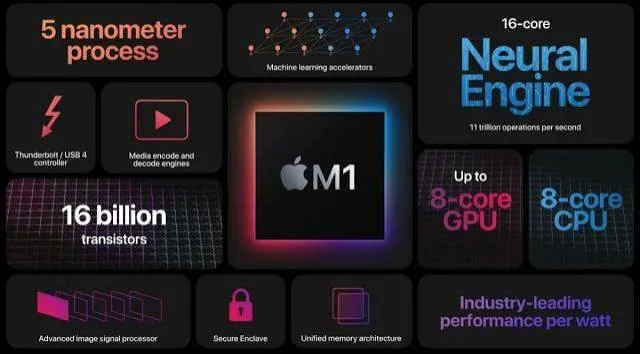
When Apple announced in 2020 that it would abandon Intel processors entirely in favour of its own custom-designed chips, starting with the original M1, the tech industry's reaction was a genuine mix of excitement and skepticism — Apple had made bold architectural claims before that didn't always fully materialise. What actually happened next genuinely surprised even seasoned industry observers: Apple silicon delivered real, measurable performance and efficiency gains that fundamentally reshaped how MacBooks compare to Windows laptops, a distinction directly relevant to anyone weighing a MacBook purchase through our dedicated MacBook vs Windows comparison guide and the MacBook configurations available at City Gadgets Kenya.
Understanding What "Apple Silicon" Actually Means
Before explaining why it mattered, it's worth clarifying precisely what changed. For over a decade before 2020, MacBooks used the same fundamental processor architecture as Windows laptops — Intel's x86 chips, the same underlying technology found in ThinkPads, EliteBooks, and Latitudes covered throughout our buying guide catalog. Apple's shift to its own silicon meant designing its own custom processors from the ground up, based on ARM architecture — the same fundamental architecture family used in smartphones, including Apple's own iPhone chips, rather than the x86 architecture that had defined both Mac and Windows computing for decades.
Why This Architectural Shift Was Genuinely Significant
This wasn't simply a brand preference or a cost-saving measure for Apple — it represented a genuinely different engineering philosophy with real, measurable consequences.
ARM architecture is fundamentally more power-efficient by design than x86 for many common computing tasks, a core reason it dominates the smartphone and tablet market, where battery life is paramount. Apple's decision to bring this same architectural foundation to its laptop line represented a genuine bet that the same efficiency advantages could translate to a full laptop computing experience, not just mobile devices.
Apple's vertical integration allowed genuinely deep hardware-software optimisation. Because Apple designs both the chip and the operating system (macOS) that runs on it, Apple's engineers could optimise the two together in ways that neither Intel (designing chips for many different operating systems and manufacturers) nor Microsoft (designing Windows for enormous hardware diversity across countless manufacturers) could achieve to the same degree — a genuine structural advantage specific to Apple's unique position in the industry.
The Real, Measured Results: What Genuinely Changed
It's worth being concrete about the actual, measured outcomes rather than repeating Apple's own marketing claims uncritically, since the genuine results were independently verified by numerous technology reviewers and benchmarking organisations following the M1's release.
Battery life improved dramatically and genuinely. MacBook Air models running the M1 chip demonstrated real-world battery life improvements often exceeding 30-50% over the immediately preceding Intel-based models with similar usage patterns — not a marginal, arguable improvement, but a clearly, independently measurable one that directly changed the practical experience of using these machines throughout a working day.
Performance-per-watt reached genuinely new territory. Rather than simply matching Intel's performance at lower power draw, M1-based Macs in many benchmarks matched or exceeded the performance of considerably more power-hungry Intel configurations, a genuinely unusual outcome in an industry where performance and power efficiency typically trade off against each other rather than both improving simultaneously.
Fanless designs became viable for genuinely capable performance. The original M1 MacBook Air has no fan at all, relying entirely on passive cooling, yet delivers performance that would have required active cooling in the Intel-based generation immediately preceding it — a genuine engineering achievement directly enabled by the chip's fundamental efficiency advantage.
Thermal management improved, reducing fan noise and heat even in the fan-equipped MacBook Pro models, since the chip simply generates less waste heat for equivalent performance compared to the Intel processors it replaced.
Why This Matters Specifically for the MacBook vs Windows Decision
Connecting this technical explanation back to the practical buying decision covered in our dedicated MacBook vs Windows comparison guide: Apple silicon represents the single clearest, most measurable advantage MacBooks hold over equivalent-generation Windows laptops specifically in battery life and efficiency — not a subjective preference or ecosystem loyalty question, but a genuine, independently verified hardware performance difference.
The important caveat for Kenyan refurbished buyers specifically: as detailed in our MacBook vs Windows guide, this advantage applies specifically to Apple silicon (M1 and later) MacBooks, not to the older, Intel-based MacBooks that remain common in the refurbished market and were sold before 2020. An Intel-based MacBook doesn't carry this same efficiency advantage — it performs more comparably to an equivalent-generation Windows laptop, meaning the case for choosing an older, Intel-based MacBook over a similarly-priced, similarly-specified Windows business laptop rests more on macOS preference and ecosystem factors than on a genuine hardware efficiency gap.
How Apple Achieved This: A Simplified Technical Explanation
Without descending into excessive technical detail better suited to a specialist audience, it's worth explaining the core engineering approach in accessible terms. Apple's chips use a "unified memory architecture," where RAM is integrated directly onto the same chip package as the processor and graphics components, rather than existing as a separate component connected via a traditional bus, as in most Intel and AMD-based laptops. This integration reduces the physical distance data needs to travel between components, genuinely improving both speed and power efficiency. Additionally, Apple's chips include dedicated, specialised processing units for specific common tasks — video encoding/decoding, machine learning computations, and image processing — handled by purpose-built hardware rather than general-purpose processor cores, a genuinely more efficient approach for these specific, common workloads than relying on general processing power alone, similar in concept to how a specialised tool often outperforms a general-purpose one for a specific job.
The Broader Industry Impact: How Competitors Responded
It's worth noting that Apple silicon's genuine success has had ripple effects across the broader laptop industry, indirectly relevant to the Intel and AMD processors covered throughout our other technical blog pieces. Intel's more recent hybrid core architecture, introduced with 12th generation processors and discussed in our dedicated Intel generations piece, incorporating separate "performance" and "efficiency" cores within the same chip, reflects a similar underlying engineering philosophy to approaches ARM-based chips like Apple silicon had already demonstrated — competitive pressure genuinely pushing the entire industry toward more sophisticated power efficiency engineering, a genuine benefit to consumers across all platforms, not just Mac buyers specifically.
The M-Series Naming Evolution: M1 Through Later Generations
It's worth briefly explaining how Apple's chip naming has evolved since the original M1, since Kenya's refurbished market increasingly includes MacBooks spanning multiple Apple silicon generations, not just the original M1. Following the M1's success, Apple introduced M1 Pro and M1 Max variants — more powerful versions of the same underlying architecture, aimed at the MacBook Pro line's more demanding professional users, offering additional processor and graphics cores for the video editing, 3D rendering, and other demanding creative workloads discussed throughout our video editing buying guide. Subsequent generations (M2, M3, and beyond) have continued this same fundamental architectural approach, with each generation bringing incremental improvements to the same core efficiency and performance principles the original M1 established — meaning the genuine architectural story explained throughout this piece applies broadly across the entire Apple silicon family, even as specific performance figures continue to improve with each new generation.
A Concrete Comparison: M1 MacBook Air vs Its Intel Predecessor
To make the improvement genuinely concrete rather than abstract, it's worth directly comparing the M1 MacBook Air against the Intel-based MacBook Air it replaced, since this comparison was extensively documented by independent reviewers at the time and remains a genuinely illustrative example. The Intel-based MacBook Air immediately preceding the M1 transition typically delivered around 10-12 hours of real-world battery life under moderate use, required active cooling with an audible fan under sustained load, and offered modest performance gains over previous generations, constrained by Intel's own well-documented manufacturing and architecture challenges during this specific period. The M1 MacBook Air, in the same chassis design and at a similar price point, delivered real-world battery life frequently exceeding 15-18 hours under similar usage patterns, required no fan at all even under sustained load, and delivered meaningfully faster performance across most common benchmarks — a genuine, dramatic generational leap that reviewers and everyday users alike could directly feel, not merely read about in a specifications comparison.
Why Apple's Vertical Integration Advantage Is Genuinely Difficult for Competitors to Replicate
It's worth explaining why this specific advantage — the tight hardware-software integration discussed above — is genuinely difficult for the broader Windows laptop ecosystem to match, even as competitors respond to the competitive pressure Apple silicon created. Microsoft designs Windows to run across an enormous diversity of hardware from many different manufacturers, using processors from both Intel and AMD, in countless different chassis designs and configurations — a genuine strength in terms of consumer choice and market flexibility, but one that inherently limits how deeply Microsoft can optimise Windows for any single specific chip architecture the way Apple can for its own custom-designed silicon running exclusively on its own hardware. This structural difference explains why the efficiency gap discussed throughout this piece, while narrowing somewhat as Intel and AMD have responded with their own efficiency-focused architectures (discussed in our Intel generations piece), hasn't been fully closed — it reflects a genuinely different, harder-to-replicate structural advantage rather than simply a temporary technology lead competitors can straightforwardly match.
What This Means for Refurbished Apple Silicon MacBooks in Kenya
As detailed in our MacBook vs Windows comparison guide, genuine Apple silicon MacBooks command a meaningful price premium in Kenya's refurbished market compared to both older Intel-based MacBooks and equivalent-specification Windows laptops — a premium directly justified by the real, measured efficiency and performance advantages explained throughout this piece, not simply brand markup without substance behind it. For Kenyan buyers specifically prioritising battery life above nearly every other factor — remote workers dealing with power access challenges discussed in our remote work buying guide, or frequent travellers valuing the lightweight and efficient combination discussed in our ultraportable buying guide — this premium is often genuinely worth paying, provided the buyer's software needs are compatible with macOS, as detailed throughout our platform comparison guide.
Frequently Asked Questions
Is every refurbished MacBook in Kenya's market equipped with Apple silicon? No — Kenya's refurbished market includes both older Intel-based MacBooks and newer Apple silicon models; always confirm which architecture a specific unit uses, since the efficiency advantages discussed throughout this piece apply specifically to Apple silicon models.
Does Apple silicon run all the same software as Intel-based Macs? The vast majority of macOS software runs natively or through Apple's translation technology (Rosetta 2) on Apple silicon, though some older or specialised software may have compatibility limitations worth checking for your specific needs.
Is Apple silicon genuinely faster than Intel and AMD processors, or just more power-efficient? Both, in many benchmarks — the genuine achievement was improving performance and efficiency simultaneously, rather than the usual trade-off between the two, as detailed throughout this piece.
Can Apple silicon MacBooks run Windows software? This is more limited than on Intel-based Macs, since traditional virtualisation tools designed for x86 Windows don't work the same way on ARM-based Apple silicon — worth researching specific compatibility if running Windows software is a genuine requirement, as discussed in our MacBook vs Windows comparison guide.
Why do Apple silicon MacBooks cost more than Intel-based MacBooks of similar age in Kenya's refurbished market? The genuine, measurable performance and efficiency advantages explained throughout this piece justify this premium for many buyers, reflecting real hardware capability differences rather than arbitrary pricing.
Is it worth buying an older Intel-based MacBook to save money if I want a Mac? Depends on your priorities — if macOS itself, rather than Apple silicon's specific efficiency advantages, is your primary reason for wanting a Mac, an Intel-based MacBook remains a genuinely functional, more accessible option, as detailed in our MacBook vs Windows comparison guide.
Are M1 Pro and M1 Max genuinely different chips, or just marketing names for the same M1? Genuinely different, more powerful chips within the same architectural family — they include additional processor and graphics cores beyond the standard M1, aimed specifically at the more demanding professional workloads discussed in our video editing buying guide.
Will Apple silicon MacBooks continue to receive software updates as long as Intel-based Macs did? Apple has generally provided multi-year software support windows for its Mac hardware across both Intel and Apple silicon generations — worth checking Apple's current official support timelines for the specific generation you're considering when planning a long-term purchase.
Does the unified memory architecture discussed in this piece mean Apple silicon MacBooks can't have their RAM upgraded later? Correct — as this architecture integrates RAM directly onto the chip package itself, Apple silicon MacBook RAM capacity is fixed at the time of purchase and cannot be upgraded afterward, an important consideration covered in our dedicated 16GB RAM buying guide's discussion of upgradeable versus soldered memory.
Is the battery life advantage of Apple silicon genuinely relevant for typical everyday Kenyan users, or mainly for specialised professional workloads? Genuinely relevant for everyday use specifically — the battery life improvements discussed throughout this piece show up clearly even in ordinary browsing, document editing, and video calling, not only in specialised professional benchmarks, making this a broadly, practically felt advantage for typical daily use.
Explore Apple Silicon and Intel-Based MacBooks at City Gadgets Kenya
Every MacBook at City Gadgets Kenya, whether Apple silicon or Intel-based, is fully tested and backed by a genuine 6-month warranty. Browse our laptops category or message us on WhatsApp to find the right MacBook generation for your needs and budget.








