
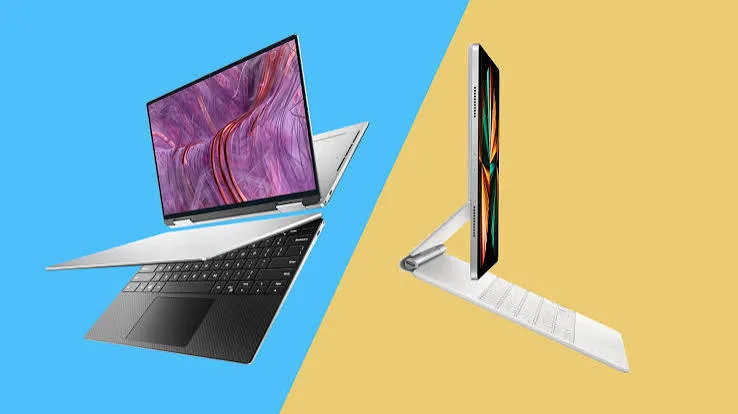
Our dedicated convertible laptop buying guide and our mechanics-focused explainer both covered how 2-in-1 laptops work. This piece takes a more direct, editorial approach — cutting straight to the actual decision most Kenyan buyers are trying to make, with less mechanism explanation and more honest verdict, drawing on everything discussed throughout our catalog at City Gadgets Kenya.
The Question Behind the Question
Most buyers asking "2-in-1 or traditional laptop" aren't genuinely asking about hinge mechanisms — they're asking a more fundamental question: will I actually use the flip-to-tablet functionality, or will it sit unused while I pay a premium for it? This is worth answering honestly rather than deflecting into a feature comparison, because the honest answer for most buyers is genuinely knowable in advance if you're willing to examine your actual habits rather than your aspirational ones.
The Honest Self-Assessment Test
Before spending a single shilling more on convertible functionality, ask yourself these direct questions, and answer honestly rather than optimistically:
Have you ever, in the past year, wished your current laptop could fold into a tablet? Not "might it be nice" — an actual, remembered moment where you specifically wanted this. If you're struggling to recall one, that's genuinely informative.
Do you currently own, or have you recently used, a tablet or e-reader? If you already own a tablet and rarely use it, a convertible laptop's tablet mode is statistically unlikely to see meaningfully more use than that existing device already receives.
Is your work genuinely presentation-heavy, requiring you to hand a device to someone else or display content in tent mode regularly? As discussed throughout our convertible buying guide, this is one of the more genuinely common, recurring use cases that justifies the premium — if this describes your actual weekly routine, convertible functionality earns its keep.
The Case Against Convertibles, Stated Plainly
It's worth stating the contrarian case directly, since most content on this topic leans toward selling the convertible feature rather than genuinely questioning it. For a genuinely large share of buyers — anyone whose computing is dominated by typing, spreadsheet work, coding, or document editing — the touchscreen and hinge mechanism add cost without adding corresponding daily value. Worse, as discussed in our convertible buying guide's honest trade-offs section, this functionality typically comes with modest downsides: slightly reduced battery life, marginally more weight than an equivalent non-convertible configuration, and — specifically relevant to refurbished buying — a hinge mechanism that experienced more mechanical stress during its original service life than a standard laptop hinge, deserving extra scrutiny during the verification process outlined in our buying checklist guide.
The Case For Convertibles, Stated Equally Plainly
The case for convertibles is genuinely strong for specific, identifiable use patterns, not a vague "flexibility is nice" argument. Students specifically doing handwritten digital note-taking, as detailed in our touchscreen-focused piece on Kenyan students and creatives, get genuine, daily, felt value. Sales and training professionals who regularly demo content or present in tent mode, as discussed in our convertible buying guide's case studies, use this functionality as a genuine, recurring part of their actual job, not a novelty. Creative professionals doing casual sketching or wanting a natural client hand-off experience, as discussed in our graphic design and touchscreen pieces, extract real workflow value.
The Verdict: A Direct, Actionable Recommendation
Rather than the usual "it depends on your needs" non-answer, here's a genuinely direct recommendation: if you can't immediately name a specific, recurring task that requires tablet mode or touch input, buy the traditional laptop and save the premium. The most common mistake, as discussed throughout our convertible buying guide, isn't choosing traditional over convertible — it's the reverse: buyers purchasing convertible functionality based on abstract appeal ("it seems more versatile") rather than genuine, specific need, then finding the tablet mode genuinely unused within weeks of ownership.
Conversely, if you did identify a specific, recurring use case during the self-assessment above — genuine handwritten note-taking, genuine regular presentation needs, genuine client-facing device hand-offs — the convertible premium is a well-justified, evidence-based purchase, not a speculative one.
A Middle Path Worth Considering: Touch Without Full Convertible
It's worth reminding readers of the distinction covered in our dedicated touchscreen buying guide: you don't need to choose between "full convertible" and "no touch at all." A fixed-form touchscreen laptop, without the 360-degree hinge, offers touch-based convenience — scrolling, tapping, basic annotation — at a typically lower price premium than full convertible functionality, worth considering specifically if your genuine need is closer to "occasional touch convenience" than "regular tablet mode use."
Why This Decision Is Worth More Deliberate Thought Than Most Laptop Features
It's worth explaining why this particular specification deserves more careful, honest self-assessment than most other laptop decisions covered throughout our buying guides. Choices like processor generation or RAM capacity have a genuinely objective, universally applicable answer — more RAM helps virtually everyone doing the multitasking discussed in our dedicated RAM buying guide, regardless of personal preference. Convertible functionality is genuinely different: its value is entirely contingent on your specific behaviour patterns, not a universal improvement everyone benefits from equally. This is precisely why a feature-listing comparison, of the kind common across generic laptop buying content, serves this particular decision poorly — the right approach is the self-assessment framework this piece provides, not a simple pros-and-cons feature checklist that treats the decision as if it had a universally correct answer.
Frequently Asked Questions
Is there a genuinely wrong answer between 2-in-1 and traditional laptop? The genuinely wrong choice, as emphasised throughout this piece, is buying convertible functionality speculatively without a specific, identified use case — not choosing either category itself, both of which are entirely valid for the right buyer.
Should students specifically lean toward convertibles by default? Not automatically — as discussed in our touchscreen-focused student piece, this depends on whether your specific study habits involve genuine annotation and handwritten note-taking, not simply being a student in general.
Is it worth buying a convertible "just in case" I develop a use for the tablet mode later? Generally not a sound approach, as emphasised throughout this piece — the honest self-assessment test above is a more reliable predictor of genuine future use than speculative "just in case" reasoning.
Does buying a traditional laptop mean I'm settling for less capability? No — as detailed throughout this piece, a traditional laptop simply omits functionality most buyers don't genuinely use, redirecting that budget toward specifications (RAM, processor, storage) that benefit virtually everyone.
Can I test whether I'd genuinely use convertible functionality before committing to purchase? Borrowing a friend's convertible laptop for a few days, or testing one in person at a shop, genuinely helps ground the self-assessment discussed throughout this piece in real experience rather than pure speculation.
Is the convertible premium genuinely worth it for buyers who do identify a specific use case? Yes, as detailed throughout our convertible buying guide — for buyers with a genuine, recurring need, this represents well-justified spending rather than a speculative feature purchase.
Choose Confidently, Either Way, at City Gadgets Kenya
Whether you choose traditional or convertible, every laptop at City Gadgets Kenya is fully tested and backed by a genuine 6-month warranty. Browse our laptops category or message us on WhatsApp and describe your actual daily habits — we'll give you an honest recommendation, not just a sales pitch.








